The PostgreSQL UPDATE statement is used to modify existing data in a table by changing the values of one or more columns.
- The WHERE clause specifies which rows should be updated.
- Without the WHERE clause, all rows in the table are updated.
- Multiple columns can be updated in a single statement.
Syntax
UPDATE table_name
SET column1 = value1,
    column2 = value2,
    ...
WHERE condition;
Where:
- table_name: The name of the table to be updated.
- SET: Specifies the column(s) and their new values.
- WHERE: Filters the rows to be updated.
Working with the UPDATE Statement
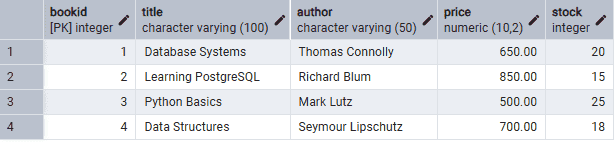
Firstly, create a Books table and insert some records into it.
Example 1: Update a Single Column
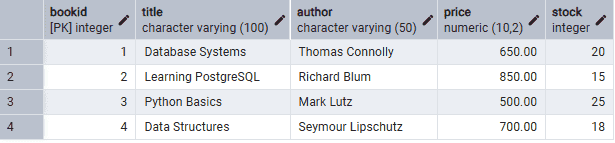
The following query updates the price of the book with BookID = 2.
Query:
UPDATE BooksSET Price = 900WHERE BookID = 2;SELECT * FROM Books;
Output:
Example 2: Update Multiple Columns
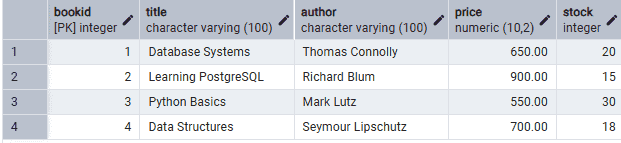
The following query updates both the price and stock of the book with BookID = 3.
Query:
UPDATE BooksSET Price = 550,Stock = 30WHERE BookID = 3;SELECT * FROM Books;
Output:
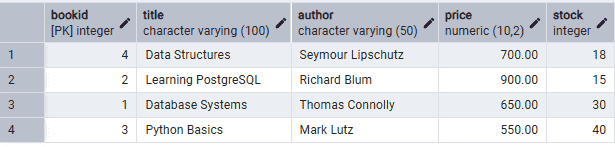
Example 3: Update Multiple Rows
The following query increases the stock of all books priced below 700 by 10.
Query:
UPDATE BooksSET Stock = Stock + 10WHERE Price < 700;SELECT * FROM Books;
Output:
Example 4: Omitting the WHERE Clause
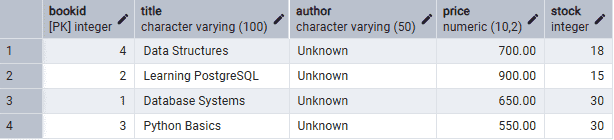
The following query updates the author name for all books.
Query:
UPDATE BooksSET Author = 'Unknown';SELECT * FROM Books;
Output: