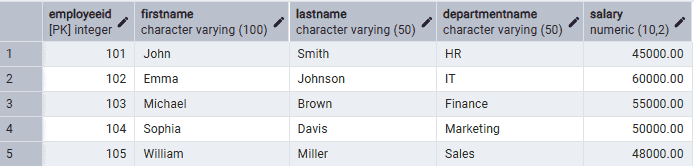
The ALTER TABLE statement in PostgreSQL is used to modify the structure of an existing table without deleting the existing data.
- Add, modify or drop columns in a table
- Renames tables or columns.
- Adds or removes constraints.
Syntax
ALTER TABLE table_name;Where:
- table_name: The name of the existing table to be modified.
- action: The operation to perform, such as ADD COLUMN, DROP COLUMN, ALTER COLUMN, RENAME COLUMN, RENAME TO or adding/removing constraints.
Examples
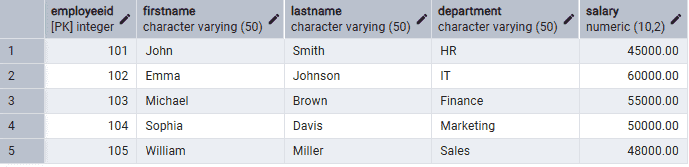
Before using the ALTER TABLE commands, create the following Employee table.
Example 1: Add a New Column
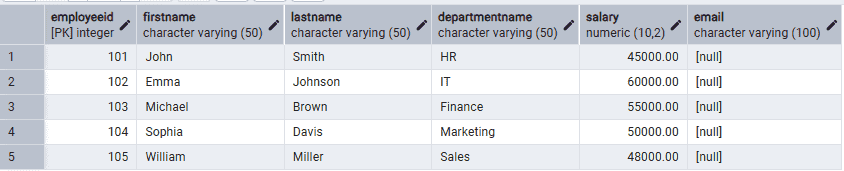
Firstly, add an Email column to the existing Employee table.
Query:
ALTER TABLE EmployeeADD COLUMN Email VARCHAR(100);
Output:
Example 2: Rename a Column
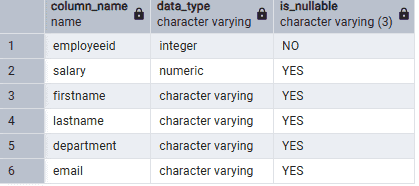
The following query renames the Department column to DepartmentName.
Query:
ALTER TABLE EmployeeRENAME COLUMN Department TO DepartmentName;
Output:
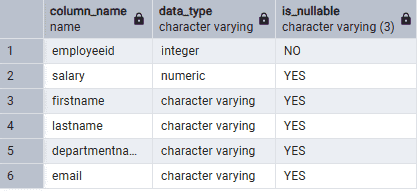
Example 3: Change the Data Type of a Column
The following query increases the maximum length of the FirstName column.
Query:
ALTER TABLE EmployeeALTER COLUMN FirstName TYPE VARCHAR(100);
Output:
Example 4: Rename the Table
The following query renames the Employee table to Employees.
Query:
ALTER TABLE EmployeeRENAME TO Employees;
Example 5: Add a CHECK Constraint
The following query adds a constraint to ensure that the salary is always greater than or equal to 30000.
Query:
ALTER TABLE EmployeeADD CONSTRAINT chk_salaryCHECK (Salary >= 30000);
Example 6: Drop a Column
The following query removes the Email column from the Employee table.
Query:
ALTER TABLE EmployeeDROP COLUMN Email;
Output: