

The NOT NULL constraint in PostgreSQL ensures that a column always contains a value and cannot store NULL.
- Enforce mandatory fields in a table.
- Improve data consistency and integrity.
Syntax
Create a NOT NULL constraint using the CREATE TABLE statement is:
CREATE TABLE table_name (
    column_name data_type NOT NULL
);
Add a NOT NULL constraint:
ALTER TABLE table_name
ALTER COLUMN column_name
SET NOT NULL;
Working
Example 1: Create a Table with a NOT NULL Constraint
Query:
CREATE TABLE Employees (
    EmployeeID INT PRIMARY KEY,
    EmployeeName VARCHAR(50) NOT NULL,
    Department VARCHAR(50),
    Salary NUMERIC
);

INSERT INTO Employees VALUES
(101, 'James Carter', 'Sales', 55000),
(102, 'Emily Johnson', 'Finance', 62000);
Output:

Example 2: Insert a NULL Value into a NOT NULL Column
Query:
INSERT INTO Employees
VALUES
(103, NULL, 'Marketing', 48000);
Output:

Example 3: Remove the NOT NULL Constraint from an Existing Column
Firstly, the EmployeeName column is defined with the NOT NULL constraint.
Query:
ALTER TABLE Employees
ALTER COLUMN EmployeeName
DROP NOT NULL;
Output:

Example 4: Insert a NULL Value After Removing the NOT NULL Constraint
Query:
INSERT INTO Employees
VALUES
(103, NULL, 'Marketing', 48000);
Output:
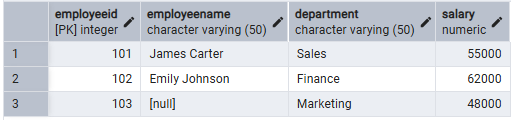
- The INSERT statement succeeds because the NOT NULL constraint has been removed from the EmployeeName column.
- PostgreSQL allows NULL values in the EmployeeName column after the constraint is dropped.
