PostgreSQL CASE expression is used to apply conditional logic in SQL queries. It works similarly to the IF...ELSE statement in programming languages, allowing you to return different values based on specified conditions.
- Return different values based on one or more conditions.
- Use conditional logic in SELECT, WHERE, ORDER BY, GROUP BY and HAVING clauses.
Syntax
General CASE Expression:
CASE
    WHEN condition1 THEN result1
    WHEN condition2 THEN result2
    ...
    ELSE result
END
Simple CASE Expression:
CASE expression
    WHEN value1 THEN result1
    WHEN value2 THEN result2
    ...
    ELSE result
END
Working with the CASE Expression
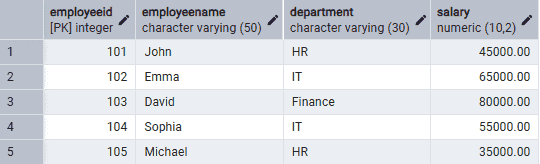
Firstly, create an Employee table and insert some records into it.
Example 1: Using the General CASE Expression
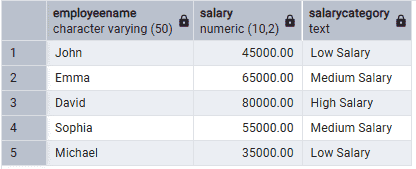
The following query classifies employees based on their salary.
Query:
SELECT EmployeeName,
       Salary,
       CASE
           WHEN Salary < 50000 THEN 'Low Salary'
           WHEN Salary BETWEEN 50000 AND 70000 THEN 'Medium Salary'
           ELSE 'High Salary'
       END AS SalaryCategory
FROM Employee;
Output:
Example 2: Using CASE with an Aggregate Function
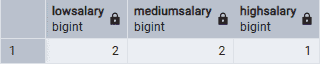
The following query counts employees in each salary category.
Query:
SELECT
SUM(CASE WHEN Salary < 50000 THEN 1 ELSE 0 END) AS LowSalary,
SUM(CASE WHEN Salary BETWEEN 50000 AND 70000 THEN 1 ELSE 0 END) AS MediumSalary,
SUM(CASE WHEN Salary > 70000 THEN 1 ELSE 0 END) AS HighSalary
FROM Employee;
Output:
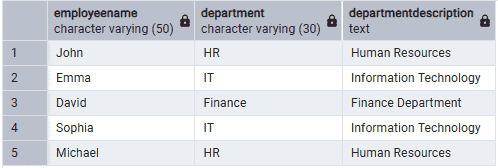
Example 3: Using the Simple CASE Expression
The following query displays a description for each department.
Query:
SELECT EmployeeName,
       Department,
       CASE Department
            WHEN 'HR' THEN 'Human Resources'
            WHEN 'IT' THEN 'Information Technology'
            WHEN 'Finance' THEN 'Finance Department'
            ELSE 'Other Department'
       END AS DepartmentDescription
FROM Employee;
Output:
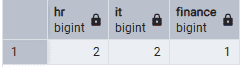
Example 4: Using Simple CASE with an Aggregate Function
The following query counts employees in each department.
Query:
SELECT
SUM(CASE Department WHEN 'HR' THEN 1 ELSE 0 END) AS HR,
SUM(CASE Department WHEN 'IT' THEN 1 ELSE 0 END) AS IT,
SUM(CASE Department WHEN 'Finance' THEN 1 ELSE 0 END) AS Finance
FROM Employee;
Output: