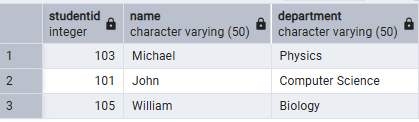
The EXCEPT operator in PostgreSQL returns the rows from the first query that do not appear in the second query. It is used to compare two result sets and identify records that exist only in the first result set.
- Returns only the rows that are unique to the first SELECT statement.
- Removes duplicate rows by default.
- Useful for comparing tables and finding unmatched records.
Syntax
SELECT column1, column2, ...FROM table1EXCEPTSELECT column1, column2, ...FROM table2;
Where:
- column1, column2, ...: Columns to retrieve (must match in both queries).
- table1: The first table or query.
- EXCEPT: Returns rows from the first query that are not present in the second query.
- table2: The second table or query whose matching rows are excluded.
Examples
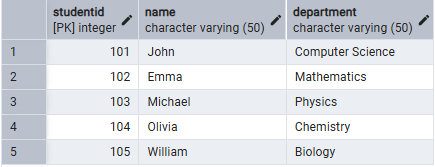
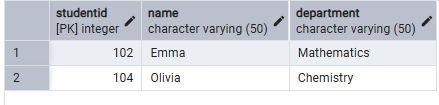
Let's consider two tables, Students and Assistant. We will perform all the examples based on these two tables.
Students Table
Assistant Table
Example 1: Use EXCEPT ALL Operator
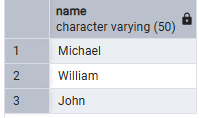
The following query returns the names from the Students table that are not present in the Assistant table while retaining duplicate rows.
Query:
SELECT NameFROM StudentsEXCEPT ALLSELECT NameFROM Assistant;
Output:
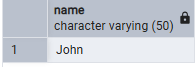
Example 2: Use EXCEPT with WHERE Clause
The following query returns the names of students from the Computer Science department that are not present in the Assistant table.
Query:
SELECT NameFROM StudentsWHERE Department = 'Computer Science'EXCEPTSELECT NameFROM Assistant;
Output:
Example 3: Use EXCEPT with ORDER BY
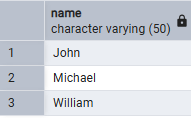
The following query returns the names of students that are not present in the Assistant table and sorts the result in ascending order.
Query:
SELECT NameFROM StudentsEXCEPTSELECT NameFROM AssistantORDER BY Name;
Output:
Example 4: Use EXCEPT with Multiple Columns
The following query returns the student records that are present in the Students table but not in the Assistant table.
Query:
SELECT StudentID, Name, Department
FROM Students

EXCEPT

SELECT StudentID, Name, Department
FROM Assistant;
Output: