

A FOREIGN KEY constraint in PostgreSQL is used to establish a relationship between two tables by ensuring that values in the child table match existing values in the parent table. It helps maintain referential integrity by preventing invalid references between related tables.
- Prevent orphan records and invalid data relationships.
- Use actions such as CASCADE, SET NULL and RESTRICT when updating or deleting related records.
Syntax
Add foreign key using the CREATE TABLE statement:
CREATE TABLE table_name (
    column1 data_type,
    column2 data_type,
    ...
    CONSTRAINT constraint_name
    FOREIGN KEY (column_name)
    REFERENCES parent_table(parent_column)
);
Add a foreign key using the ALTER TABLE statement:
ALTER TABLE table_name
ADD CONSTRAINT constraint_name
FOREIGN KEY (column_name)
REFERENCES parent_table(parent_column);
Examples
Firstly, create the Students and Enrollments tables and insert some records.
Student Table

Enrollment Table
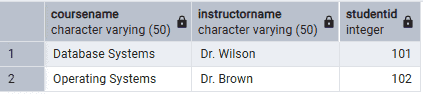
Example 1: Insert a Value into the Child Table
If the referenced value does not exist in the parent table, PostgreSQL prevents the insert operation.
Query:
INSERT INTO Enrollments (CourseName, InstructorName, StudentID)
VALUES ('Computer Networks', 'Dr. Miller', 105);
Output:

- StudentID = 105 does not exist in the Students table.
- The insert operation fails because it violates the foreign key constraint.
Example 2: Delete a Referenced Record
When a record in the parent table is referenced by a child table, PostgreSQL prevents the delete operation unless a suitable action (CASCADE, SET NULL, etc.) is specified.
Query:
DELETE FROM Students
WHERE StudentID = 101;
Output :

- StudentID = 101 is referenced in the Enrollments table.
- PostgreSQL prevents the delete operation to maintain referential integrity.
Example 3: Add a FOREIGN KEY to an Existing Table
Firstly, create an Exams table without a foreign key.
Query:
CREATE TABLE Exams (
    ExamID INT PRIMARY KEY,
    StudentID INT,
    Marks INT
);
Add the foreign key using the ALTER TABLE statement.
Query:
ALTER TABLE Exams
ADD CONSTRAINT fk_exam_student
FOREIGN KEY (StudentID)
REFERENCES Students(StudentID);
Output:
- The ALTER TABLE statement adds a foreign key to the existing table.
- PostgreSQL ensures that every StudentID in the Exams table exists in the Students table.
Example 4: Insert an Invalid Foreign Key After ALTER TABLE
Query:
INSERT INTO Exams
VALUES (201, 110, 90);
Output:

- StudentID = 110 does not exist in the Students table.
- PostgreSQL rejects the insert because it violates the foreign key constraint.
