

The CHECK constraint in PostgreSQL is used to enforce a condition on the values stored in a column or a group of columns. It ensures that only values satisfying the specified condition can be inserted or updated in the table.T he CHECK constraint allows users to:
- Prevent invalid data from being inserted or updated.
- Maintain data integrity in the database.
- Apply validation rules at the column or table level.
Syntax
Create a CHECK constraint using the CREATE TABLE statement:
CREATE TABLE table_name (column_name data_type CHECK (condition));
Add a CHECK constraint using the ALTER TABLE statement:
ALTER TABLE table_nameADD CONSTRAINT constraint_nameCHECK (condition);
Examples
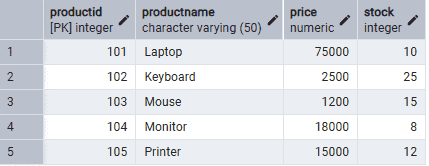
Firstly, create a Products table and insert some records.
CREATE TABLE Products (
    ProductID INT ,
    ProductName VARCHAR(50),
    Price NUMERIC CHECK (Price > 0),
    Stock INT CHECK (Stock >= 0)
);

INSERT INTO Products VALUES
(101, 'Laptop', 75000, 10),
(102, 'Keyboard', 2500, 25),
(103, 'Mouse', 1200, 15),
(104, 'Monitor', 18000, 8),
(105, 'Printer', 15000, 12);
Output:
Example 1: Insert Valid Data
The following query inserts a valid record into the Products table.
Query:
INSERT INTO ProductsVALUES (103, 'Mouse', 1200, 15);
Output:
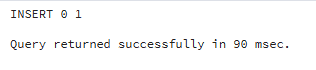
- The Price is greater than 0.
- The Stock value is not negative.
- The record satisfies all CHECK constraints and is inserted successfully.
Example 2: Insert Invalid Data
The following query attempts to insert a negative price.
Query:
INSERT INTO ProductsVALUES (104, 'Monitor', -25000, 5);
Output:

- The Price value is negative.
- The record violates the CHECK (Price > 0) constraint.
- PostgreSQL rejects the insert operation.
Example 3: Add a CHECK Constraint to an Existing Table
Firstly, create an Orders table.
CREATE TABLE Orders (
    OrderID INT PRIMARY KEY,
    CustomerName VARCHAR(50),
    Quantity INT
);
Add a CHECK constraint to ensure the quantity is greater than zero.
Query:
ALTER TABLE OrdersADD CONSTRAINT chk_quantityCHECK (Quantity > 0);
Output:

- The ALTER TABLE statement adds the CHECK constraint.
- Future records must satisfy Quantity > 0.
