The NOT LIKE operator in PostgreSQL is used to filter rows whose values do not match a specified pattern. It is commonly used with wildcard characters such as % (zero or more characters) and _ (a single character) to exclude matching records.
- Commonly used with the WHERE clause.
- Can be combined with clauses such as ORDER BY and LIMIT.
Syntax
SELECT column1, column2, ...FROM table_nameWHERE column_name NOT LIKE pattern;
Where:
- column1, column2, ...: The columns to retrieve.
- table_name: The name of the table.
- column_name: The column to compare.
- pattern: The pattern used for matching.
Examples
Firstly, create a Student table and insert some records into it.
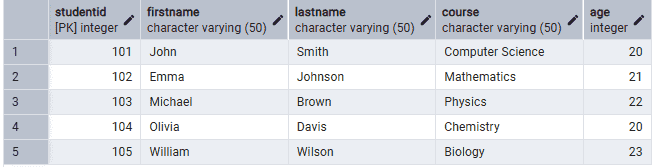
Example 1: Exclude Names Starting with 'J'
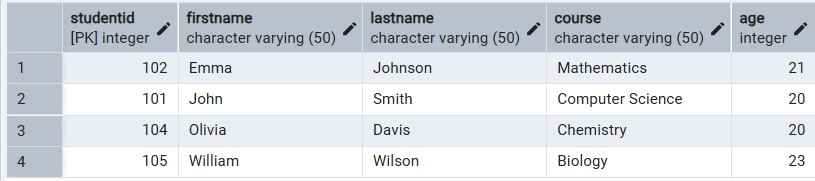
The following query retrieves students whose first names do not start with the letter J.
Query:
SELECT *FROM StudentWHERE FirstName NOT LIKE 'J%';
Output:
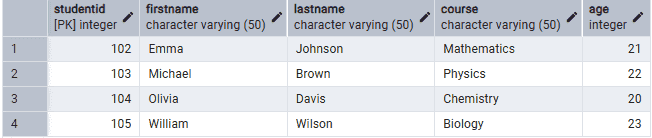
Example 2: Exclude Names Ending with 'a'
The following query retrieves students whose first names do not end with the letter a.
Query:
SELECT *FROM StudentWHERE FirstName NOT LIKE '%a';
Output:

Example 3: Exclude Names Containing 'li'
The following query retrieves students whose first names do not contain the substring li.
Query:
SELECT *FROM StudentWHERE FirstName NOT LIKE '%li%';
Output:

Example 4: Exclude Courses Starting with 'C'
The following query retrieves students whose course names do not start with the letter C.
Query:
SELECT *FROM StudentWHERE Course NOT LIKE 'C%';
Output:

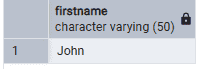
Example 5: Find Students Whose First Name Starts with 'J' and Third Character is 'h'
The following query retrieves the names of students whose first name starts with 'J', has 'h' as the third character, and is followed by any number of characters.
Query:
SELECT FirstName
FROM Student
WHERE FirstName LIKE 'J_h%';
Output:
Example 6: Use NOT LIKE with ORDER BY
The following query retrieves students whose first names do not start with M and sorts the results alphabetically.
Query:
SELECT *FROM StudentWHERE FirstName NOT LIKE 'M%'ORDER BY FirstName;
Output: