

The PostgreSQL FOR loop is a control structure in PL/pgSQL that executes a block of statements repeatedly for a specified range of values or for each row returned by a query. It is commonly used to process records, iterate through numeric ranges, and automate repetitive tasks.
- Process rows returned by a SQL query.
- Simplify data processing using loop constructs.
Syntax
Numeric FOR Loop
FOR variable IN [REVERSE] start_value..end_value LOOP
    statements;
END LOOP;
FOR Loop with Query
FOR record_variable IN
    query
LOOP
    statements;
END LOOP;
Where:
- variable: The loop counter variable.
- start_value: The starting value of the loop.
- end_value: The ending value of the loop.
- REVERSE: Executes the loop in reverse order.
- record_variable: A record variable that stores each row returned by the query.
- query: The SQL query whose result is processed row by row.
- statements: The statements executed during each iteration.
Working
Firstly, create a Courses table and insert some records.
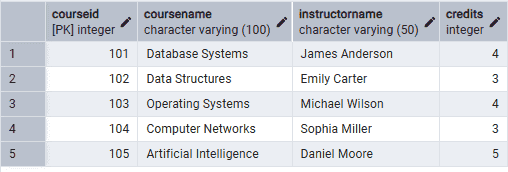
Example 1: Basic FOR Loop
The following block prints numbers from 1 to 5.
Query:
DO $$
BEGIN
    FOR counter IN 1..5 LOOP
        RAISE NOTICE 'Counter: %', counter;
    END LOOP;
END $$;
Output:
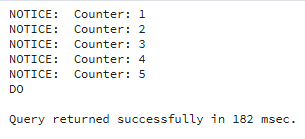
- During each iteration, the current value of counter is displayed.
- The loop terminates automatically after reaching the last value.
Example 2: FOR Loop with REVERSE
The following block prints numbers from 5 to 1 in reverse order.
Query:
DO $$
BEGIN
    FOR counter IN REVERSE 1..5 LOOP
        RAISE NOTICE 'Counter: %', counter;
    END LOOP;
END $$;
Output:
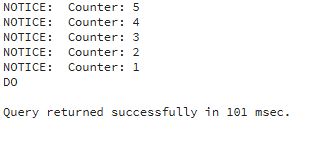
- The REVERSE keyword iterates through the range in descending order.
- The loop starts from the ending value and continues until the starting value is reached.
Example 3: FOR Loop with SELECT Query
The following block displays the course name and instructor name for each course.
Query:
DO $$
DECLARE
    course RECORD;
BEGIN
    FOR course IN
        SELECT CourseName, InstructorName
        FROM Courses
    LOOP
        RAISE NOTICE 'Course: %, Instructor: %',
                     course.CourseName,
                     course.InstructorName;
    END LOOP;
END $$;
Output:
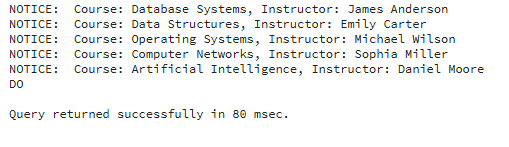
- The FOR loop executes the SELECT query.
- Each row is stored in the course record variable.
- The course name and instructor name are displayed for every row returned by the query.
