

PostgreSQL exercises provide a practical way to improve your skills in working with PostgreSQL databases. They help learners understand SQL concepts, practice database operations and gain hands-on experience with real-world scenarios.
- Cover topics ranging from basic SQL queries to advanced PostgreSQL features.
- Improve query-writing and database problem-solving skills.
- Provide practical experience in managing and querying PostgreSQL databases.
Authors Table
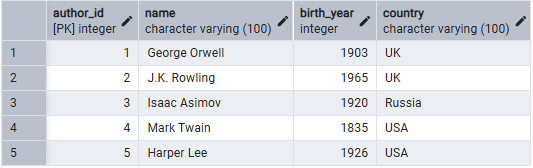
The Authors table stores information about authors, including their name, birth year and country.
CREATE TABLE Authors (
    author_id SERIAL PRIMARY KEY,
name VARCHAR(100) NOT NULL,
     birth_year INT,
     country VARCHAR(100) );

 -- Insert values into the Authors table
INSERT INTO Authors (name, birth_year, country)
VALUES ('George Orwell', 1903, 'UK'),
 ('J.K. Rowling', 1965, 'UK'),
('Isaac Asimov', 1920, 'Russia'),
('Mark Twain', 1835, 'USA'),
('Harper Lee', 1926, 'USA');
Output:
Books Table
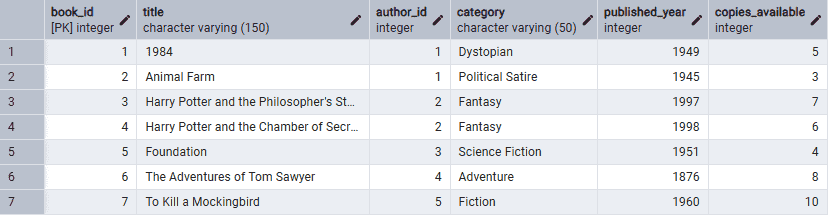
The Books table contains book details such as title, author, category, publication year and available copies.
CREATE TABLE Books (
    book_id SERIAL PRIMARY KEY,
    title VARCHAR(150) NOT NULL,
    author_id INT REFERENCES Authors(author_id),
    category VARCHAR(50),
    published_year INT,
    copies_available INT
);

-- Insert values into the Books table
INSERT INTO Books (title, author_id, category, published_year, copies_available)
VALUES
('1984', 1, 'Dystopian', 1949, 5),
('Animal Farm', 1, 'Political Satire', 1945, 3),
('Harry Potter and the Philosopher''s Stone', 2, 'Fantasy', 1997, 7),
('Harry Potter and the Chamber of Secrets', 2, 'Fantasy', 1998, 6),
('Foundation', 3, 'Science Fiction', 1951, 4),
('The Adventures of Tom Sawyer', 4, 'Adventure', 1876, 8),
('To Kill a Mockingbird', 5, 'Fiction', 1960, 10);
Output:
Members Table
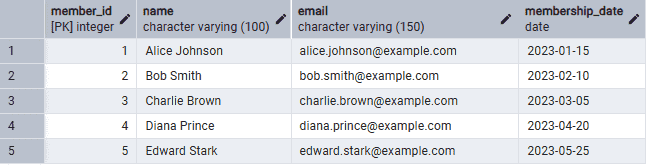
The Members table stores information about library members, including their name, email and membership date.
CREATE TABLE Members (
     member_id SERIAL PRIMARY KEY,
     name VARCHAR(100) NOT NULL,
     email VARCHAR(150) UNIQUE NOT NULL,
     membership_date DATE );

  -- Insert values into the Members table
INSERT INTO Members (name, email, membership_date)
 VALUES ('Alice Johnson', 'alice.johnson@example.com', '2023-01-15'),
 ('Bob Smith', 'bob.smith@example.com', '2023-02-10'),
 ('Charlie Brown', 'charlie.brown@example.com', '2023-03-05'),
('Diana Prince', 'diana.prince@example.com', '2023-04-20'),
 ('Edward Stark', 'edward.stark@example.com', '2023-05-25');
Output:
Borrowings Table
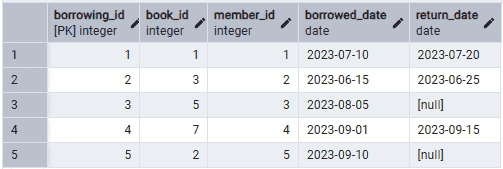
The Borrowings table records book borrowing transactions, including the borrowed book, member, borrow date and return date.
CREATE TABLE Borrowings (
    borrowing_id SERIAL PRIMARY KEY,
    book_id INT REFERENCES Books(book_id),
    member_id INT REFERENCES Members(member_id),
    borrowed_date DATE,
    return_date DATE
);

-- Insert values into the Borrowings table
INSERT INTO Borrowings (book_id, member_id, borrowed_date, return_date)
VALUES
(1, 1, '2023-07-10', '2023-07-20'),
(3, 2, '2023-06-15', '2023-06-25'),
(5, 3, '2023-08-05', NULL),
(7, 4, '2023-09-01', '2023-09-15'),
(2, 5, '2023-09-10', NULL);
Output:
PostgreSQL Questions for Beginners
This section includes practical PostgreSQL queries covering basic operations such as SELECT, INSERT, UPDATE and DELETE. These exercises help build a strong foundation in PostgreSQL and improve SQL query-writing skills.
Q1. Select all books from the database.
Query:
SELECT * FROM Books;Output:
Explanation:
This query retrieves all the rows and columns from the Bookstable. It displays details like book ID, title, author ID, category, year of publication and available copies.
Q2. Find the title and category of all books published in 2020.
Query:
SELECT title, category FROM Books WHERE published_year = 2020;Output:
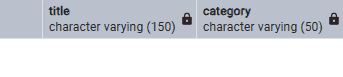
- No books were published in 2020, so the query returns 0 rows.
Q3. List all authors from the USA.
Query:
SELECT name FROM Authors WHERE country = 'USA';Output:
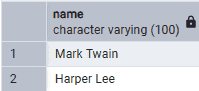
- The query retrieves the names of authors from the USA, returning Mark Twain and Harper Lee.
Q4. Insert a new book into the Books table.
Query:
INSERT INTO Books (book_id, title, author_id, category, published_year, copies_available)
VALUES (101, 'The Pragmatic Programmer', 1, 'Programming', 1999, 5);
Output:
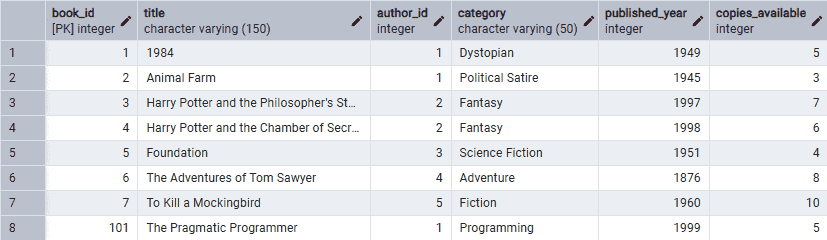
- The query adds The Pragmatic Programmer (1999) by author_id 1 with 5 available copies to the Books table.
Q5. Find all members who joined in the year 2023.
Query:
SELECT * FROM Members WHERE EXTRACT(YEAR FROM membership_date) = 2023;Output:
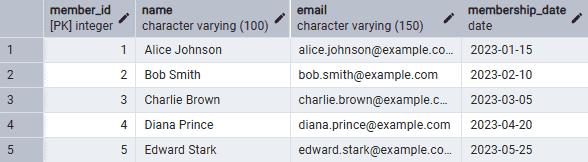
- The query retrieves all members who joined in 2023 using the EXTRACT() function.
Q6. Update the number of copies available for a specific book.
Query:
UPDATE Books SET copies_available = 4 WHERE book_id = 101;Output:
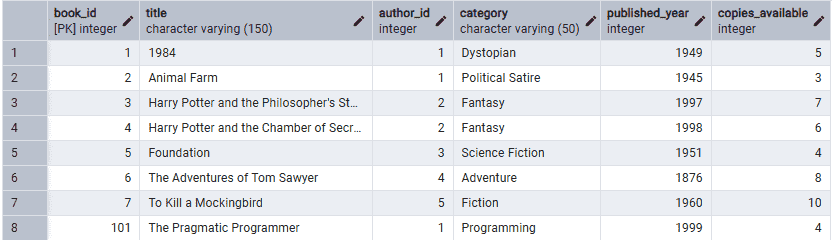
- The query updates the available copies of a specific book in the Books table.
Q7. Delete a book from the Books table.
Query:
DELETE FROM Books WHERE book_id = 101;Output:
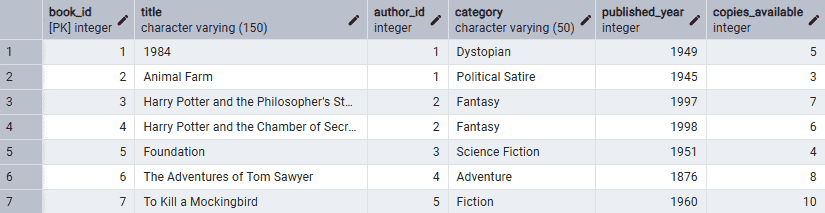
- The query deletes a book from the
Bookstable.
Q8. Find all books in the ‘Fiction’ category.
Query:
SELECT * FROM Books WHERE category = 'Fiction';Output:

- The query retrieves all Fiction books, returning To Kill a Mockingbird.
Q9. Display the name and email of all members.
SELECT name, email FROM Members;Output:
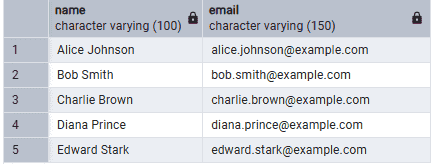
- The query retrieves the names and email addresses of all members from the Members table.
Q10. Count how many books are available in the 'History' category.
Query:
SELECT COUNT(*) FROM Books WHERE category = 'History';Output:
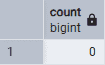
- The query returns 0 because there are no books in the 'History' category.
Q11. Find the title of the book borrowed by the member with ID 3.
Query:
SELECT title FROM Books
INNER JOIN Borrowings ON Books.book_id = Borrowings.book_id
WHERE member_id = 3;
Output:
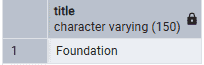
The query returns the book borrowed by member_id 3, which is Foundation.
Q12. Display the name and borrowed_date of all members who borrowed a book in January 2023.
Query:
SELECT name, borrowed_date FROM Members
INNER JOIN Borrowings ON Members.member_id = Borrowings.member_id
WHERE EXTRACT(MONTH FROM borrowed_date) = 1 AND EXTRACT(YEAR FROM borrowed_date) = 2023;
Output:
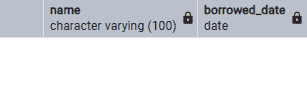
- The query returns 0 rows, indicating no books were borrowed in January 2023.
Q13. List all books authored by 'George Orwell'.
Query:
SELECT title FROM Books
INNER JOIN Authors ON Books.author_id = Authors.author_id
WHERE Authors.name = 'George Orwell';
Output:
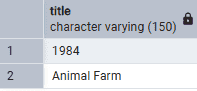
- The query returns George Orwell's books: 1984 and Animal Farm.
Q14. Find all authors who were born before 1950.
Query:
SELECT name FROM Authors WHERE birth_year < 1950;Output:
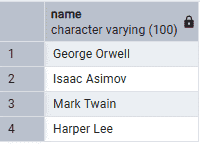
- The query returns authors born before 1950: George Orwell, Isaac Asimov, Mark Twain and Harper Lee.
Q15. Insert a new author into the Authors table.
Query:
INSERT INTO Authors (author_id, name, birth_year, country)
VALUES (5, 'Isaac Asimov', 1920, 'Russia');
Output:
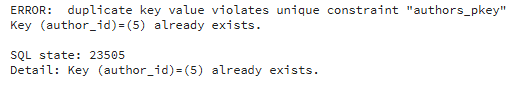
- The error occurs because author_id = 5 already exists, violating the primary key constraint.
Q16. Display the total number of members.
Query:
SELECT COUNT(*) FROM Members;Output:
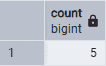
- The query returns the total number of members, which is 5.
Q17. Show all borrowings that have not been returned yet.
Query:
SELECT * FROM Borrowings WHERE return_date IS NULL;Output:

- The query returns books with return_date = NULL, indicating they have not been returned yet.
Q18. List all unique categories of books in the library.
Query:
SELECT DISTINCT category FROM Books;Output:
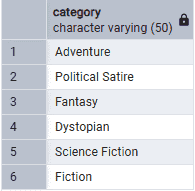
- The query returns 6 unique book categories without duplicates.
Q19. Find the number of books available for each category
Query:
SELECT category, COUNT(*) AS total_books
FROM Books
GROUP BY category;
Output:
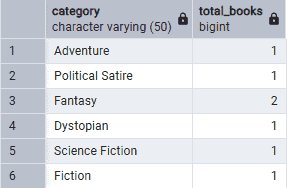
- This query shows the total available books in each category.
Q20. Display the name of the member who borrowed the book titled '1984'
Query:
SELECT Members.name
FROM Members
INNER JOIN Borrowings ON Members.member_id = Borrowings.member_id
INNER JOIN Books ON Borrowings.book_id = Books.book_id
WHERE Books.title = '1984';
Output:
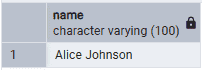
- The query returns the member who borrowed 1984, which is Bob.
Intermediate-level PostgreSQL
This section covers intermediate-level PostgreSQL questions on joins, subqueries, aggregation and data manipulation to strengthen SQL skills through practical exercises.
Q1. Find the total number of books borrowed by each member.
Query:
SELECT member_id, COUNT(book_id) AS total_borrowed
FROM Borrowings
GROUP BY member_id;
Output:
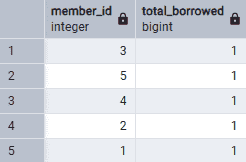
- The query counts the number of books borrowed by each member using COUNT(book_id).
Q2. Display the title and author of the most borrowed book.
Query:
SELECT title, name FROM Books
INNER JOIN Authors ON Books.author_id = Authors.author_id
INNER JOIN Borrowings ON Books.book_id = Borrowings.book_id
GROUP BY title, name
ORDER BY COUNT(Borrowings.book_id) DESC LIMIT 1;
Output:

- This query displays the title and author of the most borrowed book.
Q3. Show the author who has the most books in the library.
Query:
SELECT name, COUNT(book_id) AS total_books
FROM Authors
INNER JOIN Books ON Authors.author_id = Books.author_id
GROUP BY name
ORDER BY total_books DESC LIMIT 1;
Output
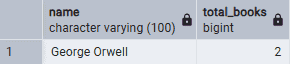
- The query returns the author with the most books, which is George Orwell (2 books).
Q4. Find all members who have borrowed more than 3 books.
Query:
SELECT member_id, COUNT(book_id) AS total_borrowed
FROM Borrowings
GROUP BY member_id
HAVING COUNT(book_id) > 3;
Output
- No books have been borrowed or the Borrowings table contains no borrowing records.
Q5. List all books that have been borrowed but not returned.
Query:
SELECT title FROM Books
INNER JOIN Borrowings ON Books.book_id = Borrowings.book_id
WHERE Borrowings.return_date IS NULL;
Output:
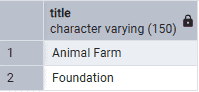
- The query returns books that have been borrowed but not yet returned (return_date = NULL).
Q6. Find the average number of copies available per category.
Query:
SELECT category, AVG(copies_available)
FROM Books
GROUP BY category;
Output:
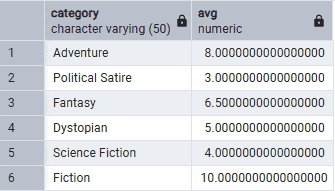
- The query calculates the average available copies for each book category using AVG(copies_available).
Q7. Update the return date of a book borrowed by a member.
Query:
UPDATE Borrowings
SET return_date = '2023-09-10'
WHERE borrowing_id = 5;
Output:
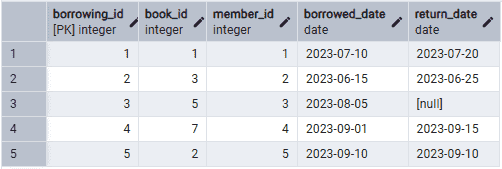
- The query updates the return_date of borrowing_id = 5 to 2023-09-10.
Q8. Find the titles of books written by authors born in the 20th century.
Query:
SELECT title FROM Books
INNER JOIN Authors ON Books.author_id = Authors.author_id
WHERE Authors.birth_year BETWEEN 1901 AND 2000;
Output:
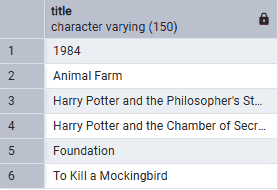
- The query retrieves books written by authors born between 1901 and 2000.
Q9. Display the total number of borrowings made in 2023.
Query:
SELECT COUNT(*)
FROM Borrowings
WHERE EXTRACT(YEAR FROM borrowed_date) = 2023;
Output:
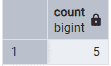
- The query counts the total borrowings made in 2023.
Q10. Display the top 5 most recently published books.
Query:
SELECT title, published_year
FROM Books
ORDER BY published_year DESC
LIMIT 5;
Output:
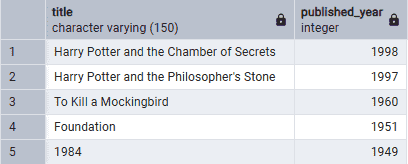
- The query returns the 5 most recently published books, with Harry Potter and the Chamber of Secrets (1998) as the latest.
Q11. Find the youngest author in the library.
Query:
SELECT name FROM Authors
ORDER BY birth_year DESC
LIMIT 1;
Output:
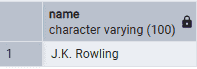
- The query returns the youngest author by sorting authors by birth year in descending order. Based on the data, J.K. Rowling is the youngest author.
Q12. Find the title of books that have more than 10 copies available.
Query:
SELECT title FROM Books
WHERE copies_available > 10;
Output:
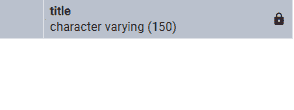
- This query checks for books with more than 10 available copies. Since it returns 0 rows, no such books exist in the database.
Q13. Create a view that shows all books along with the author's name.
Query:
CREATE VIEW BookAuthors AS
SELECT Books.title, Authors.name AS author_name
FROM Books
INNER JOIN Authors ON Books.author_id = Authors.author_id;
Output:
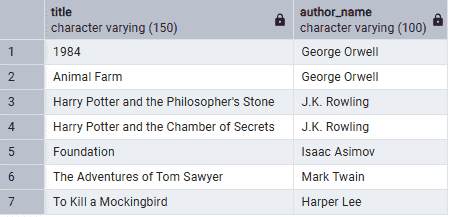
- This command creates a view named BookAuthors, displaying book titles along with their corresponding author names.
Q14. Find the top 3 categories with the most books.
Query:
SELECT category, COUNT(*) AS book_count
FROM Books
GROUP BY category
ORDER BY book_count DESC
LIMIT 3;
Output:
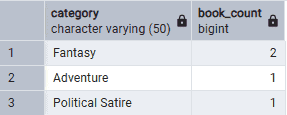
- This query displays the top three book categories by book count. Fantasy has the highest count (2), followed by Adventure and Political Satire (1 each).
Q15. Display the names of all members who borrowed books written by 'J.K. Rowling'.
Query:
SELECT Members.name FROM Members
INNER JOIN Borrowings ON Members.member_id = Borrowings.member_id
INNER JOIN Books ON Borrowings.book_id = Books.book_id
INNER JOIN Authors ON Books.author_id = Authors.author_id
WHERE Authors.name = 'J.K. Rowling';
Output:
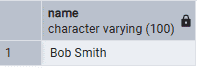
- This query retrieves members who borrowed books by J.K. Rowling. The result shows that Bob Smith has borrowed one of her books.
Advanced PostgreSQL Questions
This section features advanced PostgreSQL questions covering complex queries, borrowing analysis and database triggers
Q1. Find the member who has borrowed the most unique books.
Query:
SELECT member_id, COUNT(DISTINCT book_id) AS unique_books
FROM Borrowings
GROUP BY member_id
ORDER BY unique_books DESC
LIMIT 1;
Output:
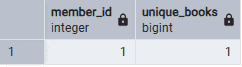
- This query counts the unique books borrowed by each member and sorts the results in descending order.
Q2. Display the name of the member who borrowed a book for the longest time.
Query:
SELECT name, (return_date - borrowed_date) AS days_borrowed
FROM Members
INNER JOIN Borrowings ON Members.member_id = Borrowings.member_id
ORDER BY days_borrowed DESC
LIMIT 1;
Output:
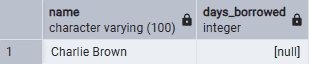
- This query displays the member who borrowed a book for the longest time.
Q3. Calculate the total available copies of books per author.
Query:
SELECT Authors.name, SUM(Books.copies_available) AS total_copies
FROM Authors
INNER JOIN Books ON Authors.author_id = Books.author_id
INNER JOIN Borrowings ON Books.book_id = Borrowings.book_id
GROUP BY Authors.name;
Output:
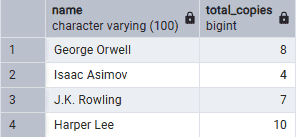
- This query displays each author's name and the total available copies of their borrowed books.
Q4. Find the author with the fewest books in the library.
Query:
SELECT Authors.name, COUNT(Books.book_id) AS book_count
FROM Authors
INNER JOIN Books ON Authors.author_id = Books.author_id
GROUP BY Authors.name
ORDER BY book_count ASC
LIMIT 1;
Output:
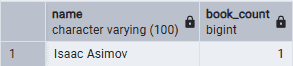
- The query finds the author with the fewest books by joining the Authors and Books tables, grouping by author and counting their books. Isaac Asimov has the fewest books, with only 1 book.
Q5. Write a query to find the members who never borrowed a book.
Query:
SELECT name FROM Members
WHERE member_id NOT IN (SELECT member_id FROM Borrowings);
Output:
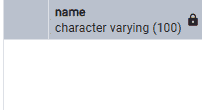
- The query returns no rows, indicating that every member in the database has borrowed at least one book. Therefore, there are no members without a borrowing record.
Q6. Display the average number of days books were borrowed before being returned in 2022.
Query:
SELECT AVG(return_date - borrowed_date) AS avg_days_borrowed FROM Borrowings
WHERE EXTRACT(YEAR FROM borrowed_date) = 2022;
Output:
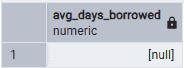
- The query calculates the average borrowing duration for books returned in 2022. Since no matching borrowing records are available for that year, the result is NULL.
Q7. Find the total number of books borrowed per month in 2023.
Query:
SELECT EXTRACT(MONTH FROM borrowed_date) AS month, COUNT(book_id) AS books_borrowed
FROM Borrowings WHERE EXTRACT(YEAR FROM borrowed_date) = 2023
GROUP BY month ORDER BY month;
Output:
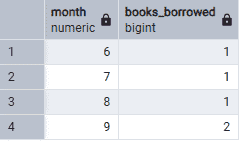
- This query counts the number of books borrowed each month in the year 2023
Q8. List all members who borrowed more than 2 books in January 2023 but haven't borrowed any since.
Query:
SELECT member_id, COUNT(book_id) AS total_borrowed
FROM Borrowings
WHERE EXTRACT(MONTH FROM borrowed_date) = 1
  AND EXTRACT(YEAR FROM borrowed_date) = 2023
GROUP BY member_id
HAVING COUNT(book_id) > 2
  AND member_id NOT IN
    (SELECT member_id
     FROM Borrowings
     WHERE EXTRACT(MONTH FROM borrowed_date) > 1
       AND EXTRACT(YEAR FROM borrowed_date) = 2023);
Output:
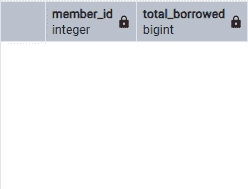
- The query returns members who borrowed more than 2 books in January 2023 and made no borrowings afterward. Since no such members exist, the output is 0 rows.
Q9. Write a query to find the total number of authors who have at least one book borrowed in 2023.
Query:
SELECT COUNT(DISTINCT Authors.author_id) AS total_authors FROM Authors
INNER JOIN Books ON Authors.author_id = Books.author_id
INNER JOIN Borrowings ON Books.book_id = Borrowings.book_id
WHERE EXTRACT(YEAR FROM borrowed_date) = 2023;
Output:
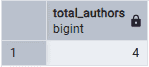
- This query counts the unique authors whose books were borrowed in 2023. The result shows 4 distinct authors.
Q10 .Create a trigger that updates the copies_available field in the Books table whenever a book is borrowed or returned.
Query:
CREATE OR REPLACE FUNCTION update_copies_available() RETURNS TRIGGER AS $$
BEGIN
   IF (TG_OP = 'INSERT') THEN
      UPDATE Books SET copies_available = copies_available - 1 WHERE book_id = NEW.book_id;
   ELSIF (TG_OP = 'UPDATE') AND NEW.return_date IS NOT NULL THEN
      UPDATE Books SET copies_available = copies_available + 1 WHERE book_id = NEW.book_id;
   END IF;
   RETURN NEW;
END;
$$ LANGUAGE plpgsql;

CREATE TRIGGER update_copies_available_trigger
AFTER INSERT OR UPDATE ON Borrowings
FOR EACH ROW EXECUTE FUNCTION update_copies_available();
Output:
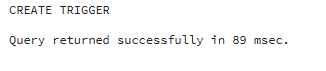
- The function and trigger were created successfully, enabling automatic updates to copies_available in the Books table.
