Hob is a free, open-source desktop AI assistant that works on your documents using LLMs running on your device.
Give it a spreadsheet, PDF, screenshot, or project folder, and it can analyze the material, run Python code, create charts, and generate new files.
The AI assistant was created as a local alternative to Claude and ChatGPT. It combines a familiar chatbot UI with tools for actual file work.
A request can generate a completed document or a chart, and a successful task can become a reusable agent skill for future conversations.
Key Features
- Selects and downloads a local open-weight model based on your hardware.
- Works with attached documents and project folders that have their own instructions.
- Uses sandboxed Python to calculate data, edit spreadsheets, and create files.
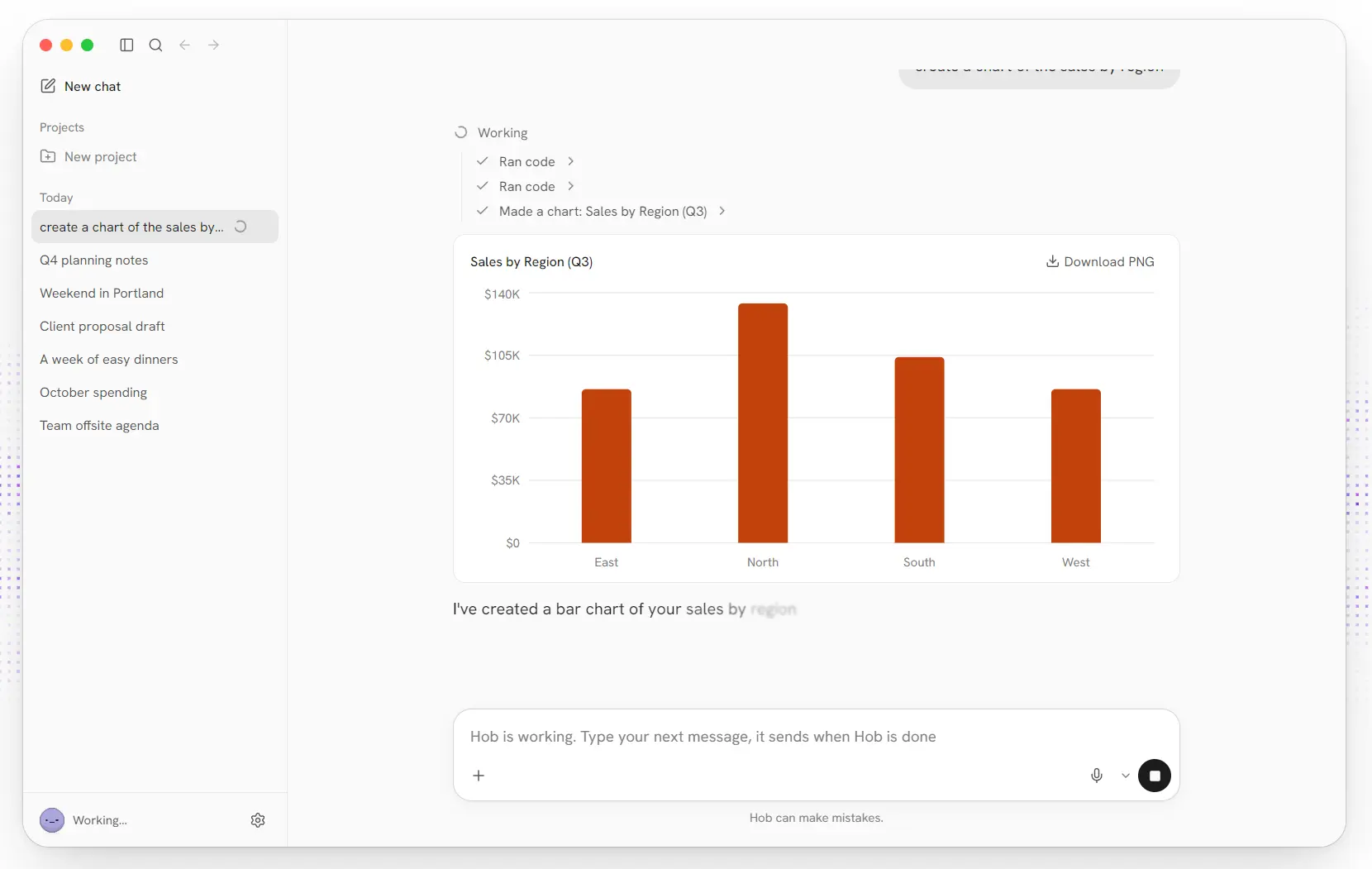
- Creates interactive charts in chat and exports them as PNG images.
- Reads PDFs, including scanned documents, and fills PDF forms on Mac.
- Interprets photos, receipts, charts, and screenshots with a local vision model.
- Searches the web when Web access is enabled and transcribes speech locally.
- Requests approval for changes to your folders and offers task Undo.
- Saves repeatable procedures as editable Agent Skills.
- Extends its tools with Python plugins and local or remote MCP connectors.
How Hob Works With Your Files
You can attach files directly to a chat or work in a project that groups files and folders under its own instructions. Tell Hob what you need from those files. Its language model can call built-in tools to analyze information, generate documents, or modify files in the chat’s working folder.
For example, attach a sales spreadsheet and request: “Calculate revenue by region and make a bar chart of the totals.” Hob can use Python with pandas, NumPy, and openpyxl to read the data and perform the calculations. The chart appears in the conversation as an interactive result, and you can export it as a PNG. Generated files appear as file cards and are saved in the chat’s working folder.
Hob can also read PDFs, including scanned pages, for questions and document work. On Mac, its PDF tools can also enter supplied details into an existing PDF form.
For images, paste a receipt, screenshot, graph, or error message into the conversation. Hob downloads an additional Qwen3-VL vision model to interpret visual content, alongside the main language model.
Local Models and Hardware
Hob uses llama.cpp to run open-weight language models on your computer. On the first launch, it checks the available hardware and downloads a suitable model from a curated selection. You can switch models later.
| Hardware example | Model in Hob’s current selection |
|---|---|
| Mac with 8 GB memory | Gemma 4 E4B Compact |
| Mac with 16 GB memory | Gemma 4 E4B |
| Mac with 24 GB or more | Gemma 4 26B |
| High-memory workstation | gpt-oss 120B |
Skills, Python Plugins, and MCP Connectors
Hob’s built-in Python, web, and PDF capabilities use its plugin system. You can extend that system with repeatable task instructions, Python scripts, and connections to other applications. A plugin is a folder containing a hob-plugin.json manifest and any files its tools need.
Save a Task as an Agent Skill
An Agent Skill contains instructions in a SKILL.md file, using the open Agent Skills format. Hob loads a skill when a request matches its description, or you can invoke it by its slash command.
After a task you expect to repeat, ask Hob to save this as a skill. It can collect the instructions and Python scripts from the completed task and show you the files before saving. The saved skill becomes available in later chats and can be edited or deleted under Settings -> Skills.
Add Custom Python Tools or MCP Connections
Custom Python tools accept structured arguments and return text or generated files. They run in a Python sandbox with access to the chat folder, the plugin folder, and folders you grant.
MCP connectors let Hob call tools exposed by another program or service. Under Settings -> Connectors -> Add connector, you can enter a local server command, a remote server URL, or an existing MCP configuration.
Local MCP servers start when needed and stop when Hob quits. Remote connectors can use Streamable HTTP or SSE and can authenticate through OAuth or an API key.
How to Get Started
- Download Hob. Visit the official Hob website or get the current desktop installer from GitHub releases.
- Download a local model. Open Hob and let it inspect your hardware and prepare the suggested model.
- Try a real file task. Attach a spreadsheet and ask: “Group sales by region, calculate total revenue, and create a bar chart.” The result should include the calculated data and a chart in the conversation.
- Work with a project folder. Group related files in a project and add instructions for how Hob should handle them.
- Reuse or extend the task. Save a successful procedure as an Agent Skill, or add an MCP connector for a service your work requires.
Privacy, Offline Use, and Pricing
Hob is free software released under the MIT license. Local use needs no Hob account, subscription, or per-message payment. The models run on your hardware, and chats and files are stored on your computer.
Once the necessary model files are downloaded, document processing, chat, and local Python tasks can run offline. The Web access setting controls online search and network requests from Python tools. Web search uses a metasearch component running on your computer, but retrieving pages and search results requires an internet connection.
Pros
- Free, MIT-licensed desktop app with local model execution.
- Automatic model selection and setup.
- File analysis, Python calculations, charts, PDFs, vision, and local dictation.
- Reusable skills, extensible Python plugins, and MCP connectors.
- Local chat storage, file-change approvals, and task Undo.
Cons
- Model size and processing speed depend on available RAM, GPU memory, and other hardware resources.
- Filling PDF forms is currently limited to Mac.
FAQs
Can I use Hob in languages other than English?
Yes. Hob offers 32 UI languages, with a default based on your device’s language and a setting to change it. You can write prompts in another language, and Hob responds in the language you use.
Where does Hob save generated files?
Files created by Hob’s tools appear as file cards in the chat and are stored in the chat’s working folder. The default location for user files is Documents/Hob, unless you change it. The generated files stay in that folder when you use Hob’s removal option.
How do I uninstall Hob and remove its models?
Use Settings -> Files & storage -> Remove Hob to remove the app, models, chats, and settings. If you installed Windows models on another drive, delete the remaining Hob model folder on that drive if necessary.
Alternatives & Related Resources
- LM Studio: Run Local LLMs on Windows, Mac, and Linux
- Nativ: Run Local AI Models on Mac (MLX & Agents)
- Moltis: Personal AI Agent for Secure Local Automation (OpenClaw Alternative)