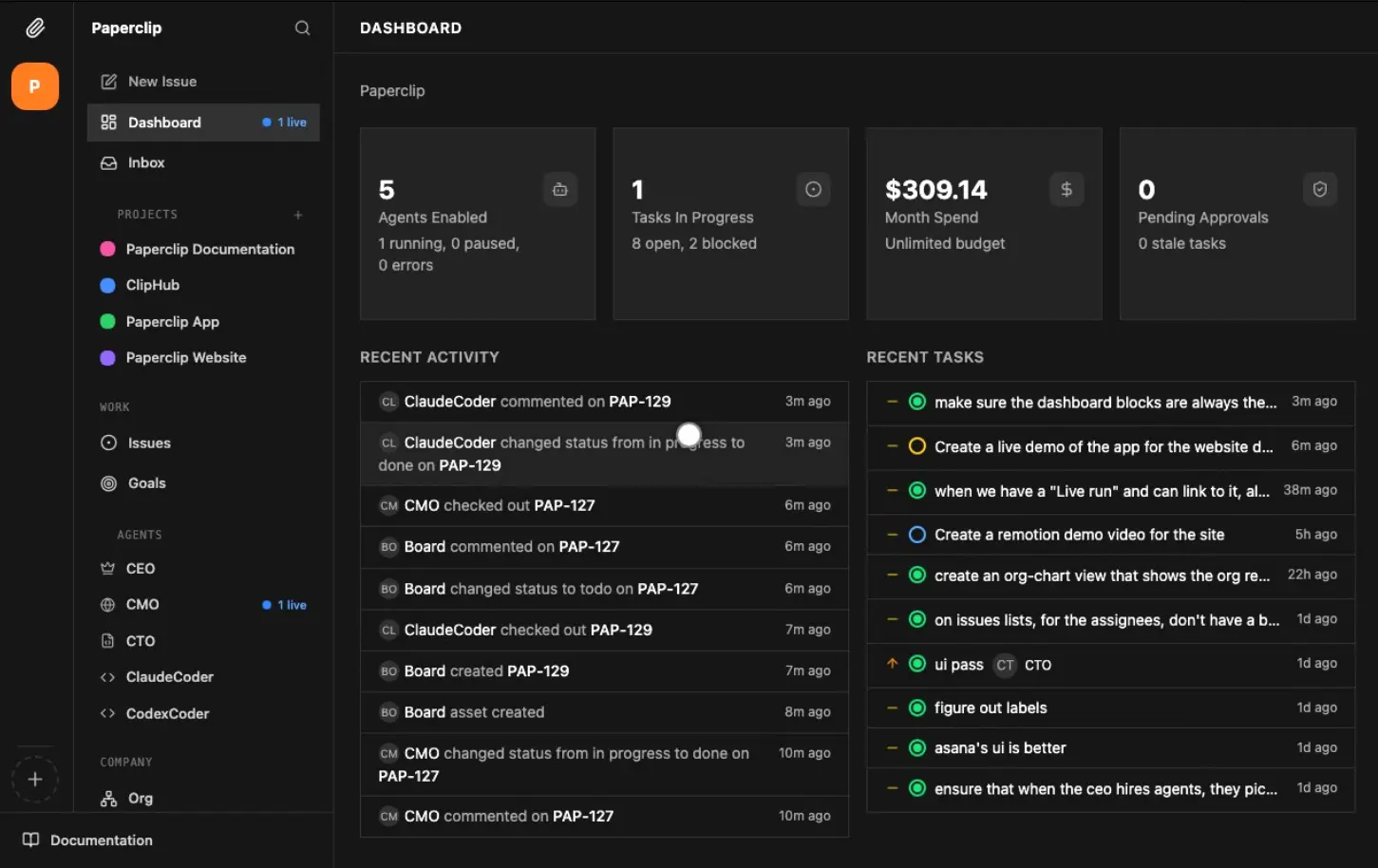
Paperclip is a free, open-source AI agent orchestration app for managing teams of AI agents from a single dashboard. You can organize Claude Code, Codex, OpenClaw, and other agents into a company, assign work, and track progress and spending.
Projects and issues keep agent work connected to company goals. Roles, reporting lines, and budgets establish responsibilities, while task discussions, approvals, and work products record what happens. Different agents can use different models and execution environments across the company.
Features
- Manage agents through organization charts, reporting lines, roles, and permissions.
- Organize projects and tasks around company goals, with conversations and decisions attached to each task.
- Coordinate agent runs through assignments, follow-up comments, manual requests, and timer heartbeats.
- Track company, project, and agent spending with budget warnings and automatic pauses.
- Review plans, hiring requests, sensitive operations, and task outcomes through approval policies.
- Use shared company skills, a Skills Store, version history, and agent instruction files.
- Connect coding agents, external services, model accounts, and custom HTTP or process adapters.
- Inspect run logs, document comments, attachments, files, and agent-produced artifacts.
- Manage multiple organizations from one deployment, with organization-scoped access.
- Choose local or remote execution environments, including configured sandbox providers.
How Paperclip Works
Each Paperclip organization has its own agents, projects, tasks, and budget. Give the organization a goal, create a project for the work, and assign a task to an agent. The agent receives task instructions and the relevant project context when a run begins.
Agents work in bursts called heartbeats. A task assignment, a follow-up comment on assigned work, a manual request, or an enabled timer can start a run. Scheduled routines create recurring tasks for jobs such as daily reports and repository checks.
You can review task conversations, documents, attachments, persistent agent files, and execution logs from the dashboard. Managers can delegate work, request revisions, pause an agent, or adjust its budget. Mentioning another agent in a task comment does not wake that agent. Assign the task or request a review when the agent needs to act.
With experimental Agent Chat enabled, you can have an ongoing conversation with an agent, discuss an idea, and ask for a plan. The agent can hand work off to tracked tasks and report back in the conversation when those tasks finish.
Agents, Skills, and Connections
Compatible AI Agents
Paperclip can orchestrate Claude Code, Codex, OpenClaw, Cursor, Gemini CLI, OpenCode, Pi, Hermes, Grok Build, and Kimi Code through their respective adapters. Process and HTTP adapters connect custom agents. Claude Code, Codex, Gemini, and OpenCode are configured through their own runtime credentials and model choices. For deployments using custom model gateways, supported local adapters can use provider overrides.
Paperclip Runner is an experimental execution option with task tools and session recovery. Its feature setting is enabled by default on self-hosted instances. Existing agents keep their configured adapters until you explicitly switch them to Runner.
Shared Skills and Connected Apps
Install reusable agent skills from the Skills Store or create company skills for recurring tasks. Skills can carry instructions for development, review, research, and other work. The Skill Studio lets you edit and test skills from the dashboard. Company skills can be versioned, restored, and synchronized from GitHub repositories.
Use Connections to link GitHub, Slack, AI accounts, and other external services. The app catalog shows available integrations, and permissions determine which people and agents can use each connection. Agents receive the connection-specific instructions for the accounts and actions they are authorized to use.
An experimental Assistant Connection (MCP) lets an external assistant work under a signed-in person’s identity. After the administrator enables the feature and configures a public HTTPS URL, an authorized Claude Code, Codex, OpenCode, or other MCP client can inspect tasks, post comments, and delegate work under that person’s permissions.
Plugins, MCP Server, and Execution Environments
Install extensions through the Plugin Manager to connect external services or extend Paperclip with custom host services, managed agents, projects, routines, skills, and UI components. Plugins declare the capabilities they need. If an update requests additional capabilities, you can review them before re-enabling the plugin.
Paperclip also has a standalone MCP server, published as @paperclipai/mcp-server. It exposes Paperclip API operations to MCP-compatible clients using a configured API URL and bearer token. This package uses the Paperclip REST API and is distinct from the experimental Assistant Connection, which signs in an external assistant as a person.
Agents can run through local adapters or configured remote environments. Sandbox provider plugins include cloud services and self-hosted Kubernetes. The deployment and permissions determine what files, credentials, and network resources each agent can access.
Use Cases
- Development and code review: Assign implementation, pull-request review, and release-preparation tasks to different agents within one project.
- Recurring operational work: Schedule daily reports, content maintenance, issue triage, or QA checks through routines and review the resulting task history.
- Agency or multi-project management: Run independent organizations or teams on one deployment, with their own agents, project records, and permissions.
- Supervised research and content work: Delegate research, drafting, editing, and approval stages while keeping documents and review decisions attached to each task.
OpenClaw vs. Paperclip
OpenClaw runs AI assistants through chat channels, tools, sessions, and automation. It can also delegate to specialized agents and subagents. Paperclip manages work across a team of agents, with an organization-wide task system, reporting lines, budgets, and review controls. An OpenClaw agent can work as part of a Paperclip organization.
| OpenClaw | Paperclip | |
|---|---|---|
| Primary job | AI assistant and agent runtime | Agent team management |
| Typical entry point | Chat, Gateway, and agent sessions | Organization dashboard and tasks |
| Coordination | Agents and subagents | Roles, managers, assignments |
| Work tracking | Conversations, sessions, jobs | Projects, task threads, approvals |
| Oversight | Gateway and agent permissions | Budgets, reviews, audit history |
| Relationship | Can run as a Paperclip agent | Can coordinate OpenClaw agents |
Installation
Paperclip requires Node.js 24.11.0 or newer. A repository-based development installation also requires pnpm 9.15 or newer. Local onboarding uses embedded PostgreSQL, and the dashboard opens at http://localhost:3100.
For a first-time setup, run onboarding from a regular user account:
node --version
npx paperclipai@latest onboard --yes
The default installation listens on local loopback. For authenticated access from a trusted LAN or tailnet, choose the corresponding bind preset during onboarding:
npx paperclipai@latest onboard --yes --bind lan
# Or: npx paperclipai@latest onboard --yes --bind tailnet
If your npm configuration points to a private registry and the package cannot be found, use the public registry explicitly:
npx --registry https://registry.npmjs.org paperclipai@latest onboard --yesInstall from GitHub
To work on Paperclip from the source repository:
git clone https://github.com/paperclipai/paperclip.git
cd paperclip
pnpm install
pnpm dev
Updating an Existing Installation
Before upgrading an existing instance, back up the database and stop the server and worker processes, including processes on other hosts. Do not run different Paperclip versions against the same instance directory. Review custom tool permissions if an agent loses access after an upgrade.
paperclipai update --check
paperclipai update
Setting Up a Company
- Create an organization. Enter the company name and configure its goal and projects.
- Hire and configure agents. Assign roles, reporting lines, adapter credentials, permission scopes, and budgets.
- Connect tools and skills. Authorize the apps each agent needs and install the reusable company skills for its work.
- Create and assign tasks. Set project context, choose an agent, and review the resulting task conversation, files, and run history.
- Configure reviews and recurring work. Set approval rules, schedule routines where appropriate, and monitor costs from the dashboard.
Pros
- Organization-wide task and agent tracking.
- Company and agent budget controls.
- Shared skills, approvals, and task history.
- Choice of agent runtimes and deployment environments.
- MIT-licensed self-hosted code.
Cons
- More configuration than using one coding agent directly.
- Model calls, hosting, and remote execution can cost money.
- Sandbox, permission, and provider settings require careful review.
Related Resources
- OpenClaw: Self-Hosted Personal AI Assistant for Chat & Automation
- Hermes Agent: Free Self-Improving AI Agent with Memory & Bot Mode
- 10 Best Agent Skills for Claude Code & AI Workflows
- 7 Best OpenClaw Alternatives for Safe & Local AI Agents
- Paperclip Official Documentation
FAQs
Is Paperclip free, and do I need a Paperclip account?
The self-hosted version is free, MIT-licensed, and does not require a Paperclip account. Model APIs, remote execution, third-party services, and hosting can involve separate charges.
Can I use different AI models and agent runtimes in one organization?
Yes. Each agent can use its configured adapter, model account, and permissions. Claude Code, Codex, OpenClaw, and other supported runtimes can participate in the same organization.
Does enabling Paperclip Runner switch all existing agents over?
No. Existing agents keep their configured execution adapters. You must explicitly change an agent to the experimental runner when you want to use it.
Can I manage multiple companies from one Paperclip instance?
Yes. You can create multiple companies in one instance. Each company has its own agents, goals, projects, budgets, and company-scoped records.
Which database does Paperclip use?
Paperclip uses PostgreSQL. Its local quickstart creates an embedded PostgreSQL instance. Production installations can use an external database with managed backups.
Can I move a Paperclip organization to a different instance?
Paperclip supports organization export and import. Export the organization data and import it on the destination instance. External credentials and runtime dependencies should be configured on that destination as needed.
Can an outside coding assistant connect to Paperclip through MCP?
Yes. The standalone MCP server authenticates with a Paperclip API token. Experimental Assistant Connections use a signed-in person’s permissions and require an explicit administrator setting plus a public HTTPS URL.
Last Updated: Oct 12, 2026