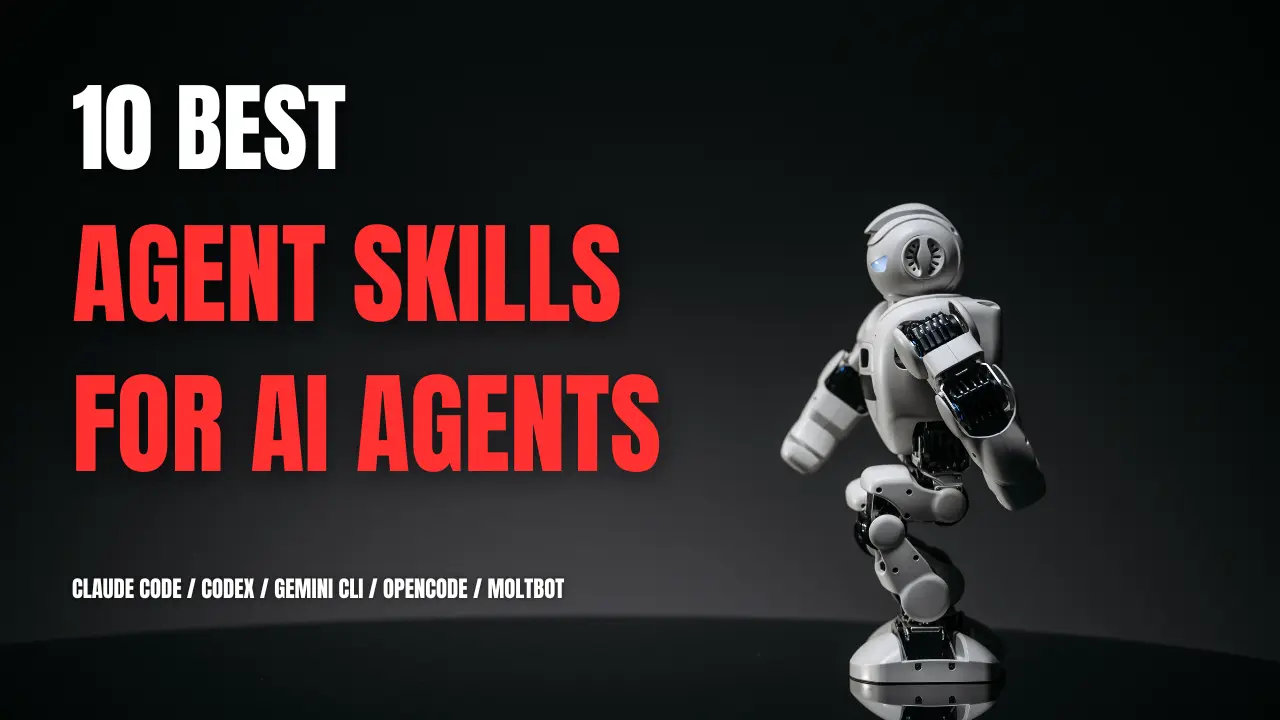
Agent Skills package reusable instructions, scripts, and reference files that AI coding agents like Claude Code can load for specific tasks.
They help with repeated work such as planning, code review, UI design, research, marketing, and writing, where a reusable skill reduces the need to rewrite prompts.
GitHub now has thousands of public agent skills and skill collections, and many are useful only for a very specific task.
This article focuses on 10 projects that are worth knowing first, with current install commands and a clear look at where each one is most useful.
Quick Comparison: 10 Best Agent Skills
| Skill | Best For | Source |
|---|---|---|
| Superpowers | End-to-end coding process | obra |
| UI UX Pro Max | UI/UX design systems | Next Level Builder |
| Vercel Agent Skills | React, Next.js, Vercel | Vercel |
| Planning with Files | Long-running tasks | OthmanAdi |
| Matt Pocock Skills | Specs, TDD, debugging, review | Matt Pocock |
| Obsidian Skills | Obsidian vault work | Kepano |
| Scientific Agent Skills | Scientific research | K-Dense AI |
| Marketing Skills | SEO, CRO, copy, analytics | Corey Haines |
| Skill Creator | Creating and evaluating skills | Anthropic |
| Humanizer | Editing AI-sounding text | blader |
What Are Agent Skills?
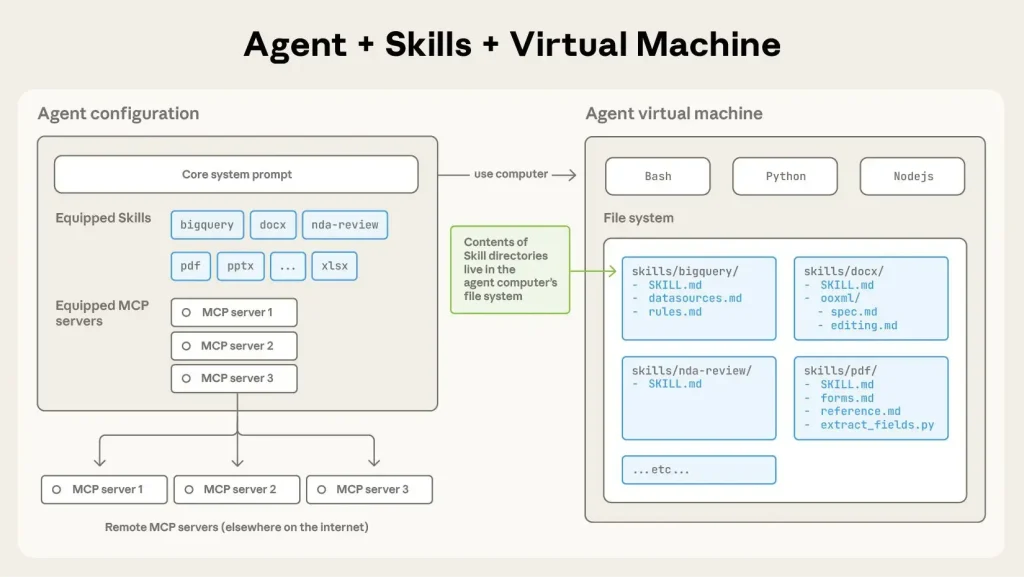
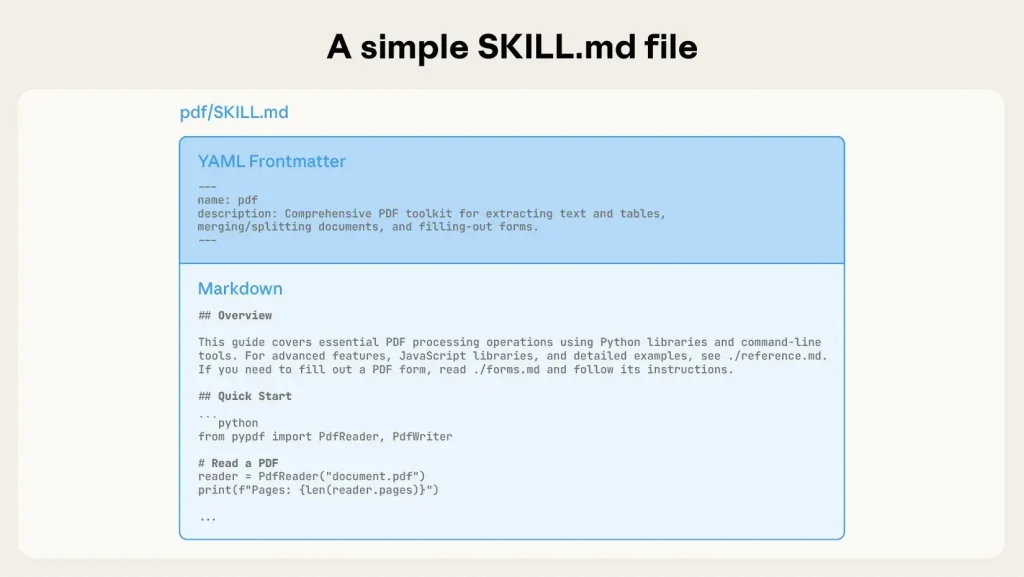
Agent Skills are folders that package reusable instructions for an AI agent. A skill directory uses a SKILL.md file with YAML frontmatter and Markdown instructions. The directory can also contain reference files, templates, assets, and executable scripts.
Anthropic introduced the format, and the Agent Skills specification defines the shared SKILL.md structure. Your AI coding agents inspect skill metadata to decide when a skill applies. The full SKILL.md instructions load after the skill is triggered, and extra files can be read only when the task needs them. This keeps large references outside the active prompt until they become relevant.
10 Best Agent Skills for Claude Code & Codex
1. Superpowers
Superpowers is an engineering framework for coding agents. It guides work through idea refinement, planning, isolated implementation, test-driven development, debugging, code review, and completion checks.
Best For: Developers who want one defined engineering process across planning, implementation, testing, and review.
Superpowers defines a process that spans planning, implementation, testing, debugging, review, and completion. It is a good match for repositories where the agent should follow repeatable engineering rules across an entire change.
- Refines requirements through structured brainstorming before implementation.
- Breaks approved work into executable development tasks.
- Uses red-green-refactor for test-driven implementation.
- Applies a staged process for diagnosing bugs.
- Runs code-review and completion checks before work is treated as finished.
Installation
/plugin install superpowers@claude-plugins-official2. UI UX Pro Max
UI UX Pro Max is a design skill for web and app projects. It handles design-system generation, typography and color guidance, component patterns, accessibility checks, and stack-specific recommendations for React, Vue, SwiftUI, Tailwind CSS, and other documented stacks.
Best For: Frontend developers who want design direction tied to implementation work.
Install the maintained CLI package as ui-ux-pro-max-cli. The installed command is uipro.
- Generates project-specific color, typography, spacing, and component guidance.
- Selects layout patterns for landing pages, dashboards, and product screens.
- Adapts design guidance to the selected framework or app stack.
- Applies domain-specific design rules for common product categories.
- Reviews common usability, accessibility, and consistency problems.
Installation
npm install -g ui-ux-pro-max-cli
uipro init --ai claude
3. Vercel Agent Skills
Vercel Agent Skills is Vercel’s official collection for web development and deployment. The repository has skills for React performance, composition patterns, React Native, view transitions, web design guidelines, Vercel deployment, CLI usage, and Vercel project optimization.
Best For: React, Next.js, React Native, and Vercel projects that need framework-specific engineering rules.
This collection has a narrower technical scope than general engineering packs. It is most relevant when the repository already uses React, Next.js, React Native, or Vercel services.
- Reviews React components against performance rules.
- Guides reusable component APIs and composition patterns.
- Applies React Native patterns to mobile projects.
- Checks UI code against web design and accessibility rules.
- Handles Vercel deployment, CLI, usage, cost, and reliability tasks.
Installation
npx skills add vercel-labs/agent-skills4. Planning with Files
Planning with Files stores task plans, findings, progress, and completion state in project files. The agent can recover that working state after context compaction, /clear, or a new session.
Best For: Long-running coding, research, and implementation tasks that can outlive one context window.
Planning with Files focuses on persistent task state. It records the live plan and evidence on disk across long sessions and works with Claude Code, Codex, Cursor, OpenCode, and many other Agent Skills hosts.
- Stores the active plan and phase status on disk.
- Records findings, errors, decisions, and progress outside chat history.
- Restores task context after compaction or a cleared session.
- Uses the open Agent Skills format across many coding agents.
Installation
npx skills add OthmanAdi/planning-with-files --skill planning-with-files -g5. Matt Pocock Skills
Matt Pocock Skills is a collection of focused engineering skills for coding agents. The engineering set contains TDD, code review, bug diagnosis, codebase design, specification work, implementation, architecture review, merge-conflict resolution, research, and task triage.
Best For: Developers who prefer task-specific engineering commands over one end-to-end development framework.
The collection is modular. Claude Code can install it as a managed plugin, and the Skills CLI can copy selected skills into other compatible coding agents.
- Questions requirements and records project terminology before implementation.
- Turns approved ideas into specifications and implementation tickets.
- Runs red-green-refactor development through the TDD skill.
- Investigates bugs through a structured diagnosis process.
- Reviews code quality, design, and project intent.
- Examines codebase architecture and identifies refactoring candidates.
Installation for Claude Code
/plugin install mattpocock-skills6. Obsidian Skills
Obsidian Skills teaches compatible agents how to work with Obsidian files and tooling. The collection has skills for Obsidian Markdown, Bases, JSON Canvas, the Obsidian CLI, Defuddle, and Knap.
Best For: People who use an Obsidian vault as a working knowledge base and want an agent to edit Obsidian files correctly.
Obsidian Skills has a clear product boundary. It is useful when the task involves Obsidian-specific syntax, Bases, Canvas data, or CLI operations that a generic Markdown skill would miss.
- Writes wiki links, callouts, properties, embeds, and other Obsidian Markdown syntax.
- Works with Obsidian Bases and structured note collections.
- Creates and edits JSON Canvas data.
- Uses Obsidian CLI commands for vault operations.
- Extracts clean Markdown from web pages through the Defuddle skill.
Installation for Claude Code
/plugin marketplace add kepano/obsidian-skills
/plugin install obsidian@obsidian-skills
7. Scientific Agent Skills
Scientific Agent Skills is the renamed successor to claude-scientific-skills. The repository contains 166 skill directories for scientific research, engineering, analysis, finance, and technical writing.
Best For: Researchers who need task-specific guidance for scientific Python libraries, research databases, literature work, and computational analysis.
Dependencies differ by skill. Database tasks can need network access or credentials, and package-focused skills can need Python dependencies. Install the specific skills required for the research task.
- Handles bioinformatics and genomics tasks such as RNA-seq and single-cell analysis.
- Works with chemistry, molecular analysis, screening, and cheminformatics packages.
- Uses research databases and paper-search services for literature work.
- Works with scientific Python packages for analysis and modeling.
- Creates research plots and publication-oriented figures.
- Documents reproducible research procedures and technical methods.
Installation
npx skills add K-Dense-AI/scientific-agent-skills8. Marketing Skills
Marketing Skills is a collection of 50 marketing skill directories for Claude Code, Codex, Cursor, Windsurf, and other Agent Skills hosts. The library spans SEO, CRO, copywriting, analytics, paid advertising, lifecycle email, customer research, positioning, pricing, launches, sales, and growth work.
Best For: Founders, technical marketers, and growth teams using coding agents for research, content, optimization, and measurement tasks.
The repository is large enough to install selectively. The Skills CLI can list the available skills and install only the marketing areas needed for a project.
- Audits SEO, schema, site architecture, content, and AI-search visibility.
- Writes and edits landing-page, email, and product copy.
- Reviews CRO, signup flows, onboarding, pricing, and experiments.
- Works with analytics, attribution, advertising, and campaign measurement.
- Handles launches, customer research, competitors, and sales enablement.
- Plans retention, referrals, community, and other growth programs.
Installation
npx skills add coreyhaines31/marketingskills9. Skill Creator
Skill Creator is Anthropic’s skill for creating new Agent Skills and improving existing ones. It defines the skill purpose, writes SKILL.md, creates test prompts, evaluates results, revises instructions, and improves the description used for skill triggering.
Best For: Developers and teams turning repeated processes into reusable Agent Skills.
Skill Creator is most useful after a repeated task has clear inputs, steps, and expected outputs. Its evaluation process checks whether the skill changes the result in the intended direction before the instructions are expanded or reused more widely.
- Creates skill metadata, instructions, references, scripts, and assets.
- Builds realistic test prompts for the task the skill should handle.
- Compares skill-assisted runs with a baseline.
- Revises the skill from test results and user review.
- Improves the description used to trigger the skill.
Installation
npx skills add anthropics/skills --skill skill-creator10. Humanizer
Humanizer is a writing skill that reviews text for recurring LLM writing habits. It rewrites the prose and preserves the underlying claims. The skill checks 25 writing patterns, including staged openings, repetitive sentence structures, inflated significance, decorative formatting, generic AI vocabulary, and chat residue.
Best For: Blog posts, documentation, emails, product copy, and other text that needs a focused editing pass.
Humanizer is a post-editing skill. Use it after the factual content is correct and the remaining problem is repetitive, generic, or artificial prose.
- Rewrites artificial phrasing and preserves factual claims.
- Uses a supplied writing sample for voice matching.
- Edits prose in files and leaves code, data, frontmatter, and link destinations unchanged.
- Runs a pattern review before producing the final rewrite.
Installation
npx skills add blader/humanizer --globalBefore Installing a Community Skill
- Read the
SKILL.mdfile and any scripts, hooks, shell commands, templates, or dependencies. - Check for network access, API keys, credentials, browser access, shell access, or file-write permissions.
- Test unfamiliar skills in a disposable repository, branch, container, or sandbox project.
- Confirm that the installation instructions match your coding agent and version.
Agent Skills vs Prompts
A prompt tells Claude what to do in the current request or conversation. An Agent Skill stores a reusable task method in a skill directory. Claude reads the skill metadata at startup and loads the full SKILL.md when a matching task appears. A skill can also contain scripts, reference files, templates, and assets.
| Agent Skill | Prompt | |
|---|---|---|
| Primary use | Repeatable task method | Current task instruction |
| Storage | SKILL.md directory with optional files | Conversation message or saved prompt text |
| Activation | Loads when the task matches its metadata or when invoked directly | Enters context when sent |
| Reusable resources | Scripts, references, templates, and assets | Instructions, examples, and context included with the prompt |
| Scope | Available wherever the skill is installed | Applies to the active request or conversation |
Agent Skills vs Claude Code Plugins
A Claude Code plugin is an installable package for a configured Claude Code setup. It can contain Agent Skills, subagents, hooks, and MCP servers. A standalone skill handles one reusable capability. A plugin can distribute several Claude Code extensions as one package through a marketplace or an organization.
| Agent Skill | Claude Code Plugin | |
|---|---|---|
| Role | Reusable task capability | Installable extension package |
| Contents | SKILL.md plus optional scripts, references, templates, and assets | Skills, subagents, hooks, and MCP servers |
| Loading | Claude loads the skill when a matching task appears | Claude Code installs and enables the bundled components |
| Distribution | Personal or project skill directory; skills can also ship inside plugins | Plugin marketplace, shared package, or organization distribution |
| Typical use | One recurring task or domain method | A configured workflow that needs several Claude Code extensions |
Agent Skills vs MCP
An Agent Skill stores task instructions and reusable resources. An MCP server exposes tools, data, or external services through the Model Context Protocol. A skill can define the procedure for using an MCP tool, and Claude can use both during one task. See the ScriptByAI MCP server directory for more MCP resources.
| Agent Skill | MCP Server | |
|---|---|---|
| Role | Reusable task instructions and resources | Callable tools, data, APIs, or services |
| Loading | Loads from a skill directory when the task matches | Connects through the MCP protocol |
| Task behavior | Defines a repeatable procedure Claude can follow | Exposes an external capability Claude can call |
| Typical use | Domain methods, project rules, and recurring work | Live operations, external data, and service access |
FAQs
Do these Agent Skills cost money to install?
The repositories in this list are publicly accessible, and the listed installation commands do not charge for the skill files. External APIs, services, subscriptions, and dependencies can have their own costs.
Can I create my own Agent Skills?
Yes. A basic skill uses a directory with a SKILL.md file. The file contains YAML frontmatter with a name and description, followed by the instructions. Scripts, references, and assets are optional. Anthropic’s Skill Creator can help draft and evaluate the skill.
Do installed Agent Skills use a lot of context?
Compatible agents use skill metadata for discovery and load the full instructions after a skill is triggered. Large reference files can stay outside the active prompt until the task needs them. Keep the active set focused on work you perform regularly to limit metadata overhead.
Related Resources
- 440+ Most Popular Agent Skills on GitHub for Coding Agents
- Agent Skills Specification: SKILL.md Format, Fields, and Directory Structure
- The Ultimate Claude Code Resource List: Agents, Skills, Plugins & More
- The Ultimate Codex Resource List: Skills, Plugins, MCP, SDKs & More
Last Updated Sep 24, 2026