Monish is a free iPhone app that displays updates from AI coding agents and automated jobs on your lock screen.
Your AI agent, like Claude Code, Codex, Cursor, or n8n, can send live progress updates, task results, and approval requests while it works on a computer or server.
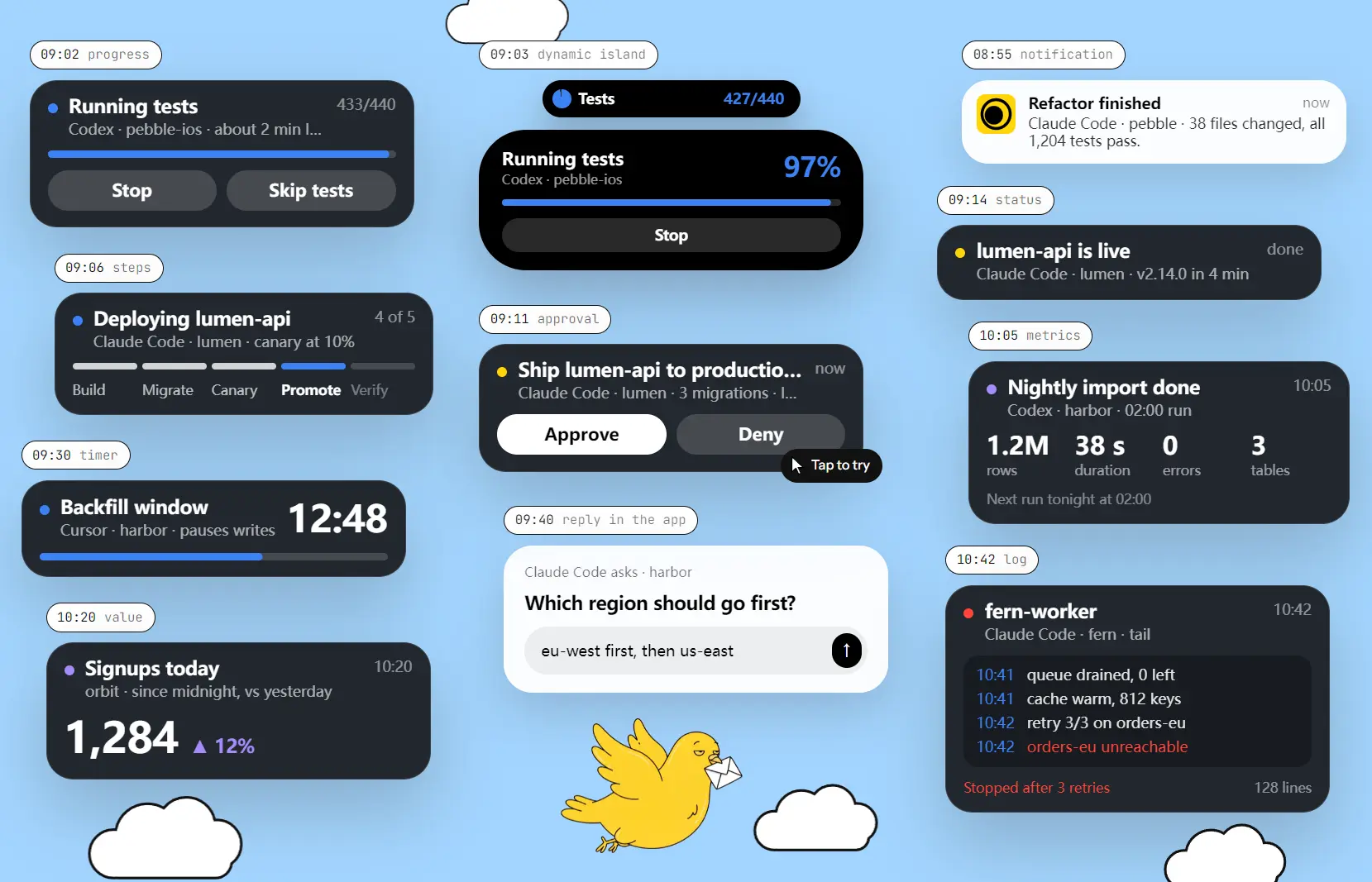
During a long test run, your iPhone shows a Live Activity that changes as the job progresses.
When an agent finishes or needs a decision, Monish sends a notification. Approval requests include Approve and Deny buttons, and you can enter longer answers in the app.
Key Features
- Show running tasks as updating Live Activities on the iPhone lock screen.
- Display compact progress updates in the Dynamic Island on iPhones with that feature.
- Receive a completion notification or a failure alert when a job ends.
- Answer agent approval requests with Approve, Deny, or a written reply.
- Display progress bars, step lists, countdowns, logs, and numerical metrics.
- Put up to two response buttons on a live card for actions such as stopping a job.
- Send notifications from Claude Code, Codex, Cursor, n8n, cron jobs, CI pipelines, and custom scripts.
How Monish Works
Monish creates a private key for your iPhone when you install the app. Copy its setup line into Claude Code, Codex, or Cursor. The agent reads the Monish skill instructions, uses the key to connect to the notification service, and sends a first test message. The agent can make future requests over HTTPS using curl, with no companion software required on your computer.
The sending agent selects the type of message and supplies its title, text, progress values, or buttons. Monish displays that information as a native iPhone notification or an updating Live Activity. The agent chooses when to send an update for a progress milestone, failed task, completed job, or question requiring a response.
An n8n automation, cron job, CI pipeline, or custom script can also send messages over HTTPS. For example, a nightly import script can send a result with processed-row and error counts. The script or agent performs the actual work. Monish handles the phone notifications and responses.
Live Progress, Results, and Agent Approvals
Watch long-running tasks on the lock screen
A Live Activity can show a test run progressing from 412 to 440 completed tests, a deployment moving through its stages, or a countdown for a scheduled job. Progress updates change the existing card, and iPhones with a Dynamic Island can display a compact version. The card can also show a short log or up to two buttons.
For an overnight build, the agent can update the test count during execution and send one final notification after the run ends. A Stop or Skip tests button can send a response back to the running process. The agent or script must interpret that response and perform the requested action.
Receive finished-job alerts and live numbers
Completed work can arrive as a notification with a short result, including a deployment status or the number of tests passed. Failed work can trigger an alert, and Monish can make failures audible during configured quiet hours. Regular updates can stay silent.
For monitoring jobs, a live card can show two to four figures, including revenue, signups, test totals, or import statistics. A scheduled script can send an updated report each morning through Monish.
Approve an action or answer a question
An agent can send a decision request before deploying code, sending an email, or spending money. Monish shows the question and its Approve and Deny actions in a notification. For a more detailed response, open the app and type an answer.
The running agent needs to request the decision, read the answer, and act on it. If the question expires before you respond, Monish returns a denial. The default expiration is one hour, and the sender can choose another deadline. This gives an agent a defined response to handle when you are away from your computer.
How to Get Started with Monish
1. Install Monish from the App Store on your iPhone running iOS 17.2 or later. Allow notifications and enable Live Activities if you want updating lock-screen progress.
2. Open Monish and copy the complete setup line. It contains your device key and a link to the setup instructions.
3. Paste the line into a new Claude Code, Codex, or Cursor conversation. The agent follows the instructions and sends its first ping. You should receive a notification on your iPhone.
4. Tell the agent which events to report, for example: “Show progress during long test runs and ask before deploying to production.” For n8n, cron, or other scripts, configure HTTPS requests using the Monish skill instructions and the key provided by the iPhone app.
Pricing, Requirements, and Limits
Monish is free, with no subscription, in-app purchases, advertisements, or Monish account. Each iPhone gets its own notification key.
The service accepts up to 300 messages per hour per key, subject to a further limit of 10 messages within 10 seconds.
Pros
- Free iPhone app with no account required.
- Native lock-screen progress and actionable approval requests.
- Works with major AI coding agents and HTTPS-capable scripts.
- One-line setup for agents that can follow the Monish skill instructions.
Cons
- Only available as an iPhone app.
- Running agents and scripts must send their own updates and handle replies.
- Notification content passes through Monish’s hosted service.
FAQs
Can several AI agents send notifications to one iPhone?
Yes. Configure each agent with the setup line from that phone. They send notifications using its device key, and the message limits apply to that key.
Can I receive Monish notifications on two iPhones?
Each iPhone has its own key and setup line. Configure the sending agents or scripts with both keys if you want messages on both devices.
What happens if I reset my Monish key?
The previous key stops working. Copy the new setup line into your connected agents or update the keys used by scripts. Requests using the old key can return a 401 unknown_key error.
Does Monish include Claude Code or Codex access?
No. Monish is the iPhone notification app. Claude Code, Codex, Cursor, and other agents run through their own products, accounts, or local installations. Any associated agent subscription or API charges are independent of Monish.
Alternatives & Related Resources
- The Ultimate Claude Code Resource List: Agents, Skills, Plugins & More
- The Ultimate Codex Resource List: Skills, Plugins, MCP, SDKs & More
- Wayland: Local-First AI Agent Command Center for Claude Code & Codex