

MySQL Window Functions perform calculations across a set of rows related to the current row without grouping or collapsing the result.
- Can divide rows into groups using PARTITION BY.
- Can arrange rows using ORDER BY.
- Supports functions such as SUM(), AVG(), ROW_NUMBER(), RANK() and DENSE_RANK().
Syntax
SELECT column_name1,
       window_function(column_name2)
       OVER (
           [PARTITION BY column_name3]
           [ORDER BY column_name4]
       ) AS new_column
FROM table_name;
Where:
- window_function: Function used for the calculation
- PARTITION BY: Divides the rows into groups.
- ORDER BY: Specifies the order of rows within each group.
- table_name: Name of the table from which data is retrieved.
Types of Window Functions
Window functions can mainly be divided into:
- Aggregate Window Functions
- Ranking Window Functions
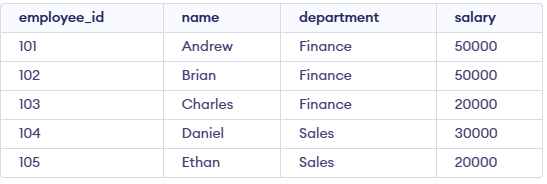
First, create an employees table:
Aggregate Window Functions
Aggregate window functions calculate values over a group of rows while retaining individual rows.
Common aggregate window functions include:
- SUM(): Calculates the sum of values.
- AVG(): Calculates the average value.
- COUNT(): Counts rows.
- MAX(): Returns the maximum value.
- MIN(): Returns the minimum value.
AVG() Function
The AVG() function can be used to calculate the average salary within each department.
SELECT name, department, salary,
       AVG(salary) OVER(PARTITION BY department) AS avg_salary
FROM employees;
Output:
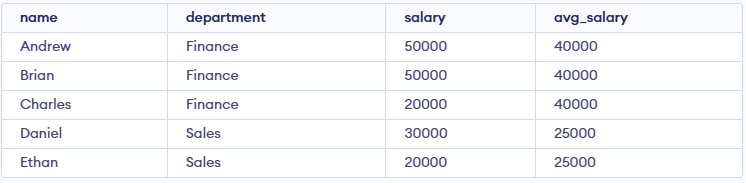
The average salary is calculated separately for each department while individual employee rows are retained.
Ranking Window Functions
Ranking window functions assign rankings to rows based on a specified order.
Common ranking functions include:
- RANK(): Assigns ranks and skips rank numbers when values are tied.
- DENSE_RANK(): Assigns ranks without skipping numbers.
- ROW_NUMBER(): Assigns a unique number to each row.
- PERCENT_RANK(): Shows the relative rank of a row as a value between 0 and 1.
RANK() Function
The RANK() function ranks employees by salary within each department.
SELECT name, department, salary,
       RANK() OVER(
           PARTITION BY department
           ORDER BY salary DESC
       ) AS emp_rank
FROM employees;
Output:
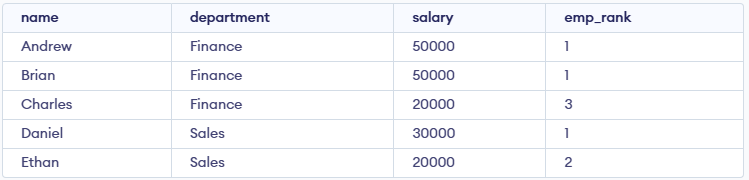
- In Finance andrew and Brian have the same salary, so both receive rank 1. The next rank is 3 because rank 2 is skipped.
DENSE_RANK() Function
The DENSE_RANK() function assigns the same rank to equal values without leaving gaps.
SELECT name, department, salary,
       DENSE_RANK() OVER(
           PARTITION BY department
           ORDER BY salary DESC
       ) AS emp_dense_rank
FROM employees;
Output:
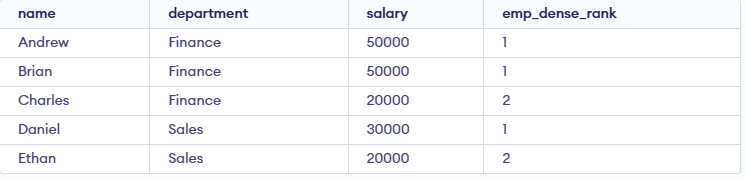
- Unlike RANK(), DENSE_RANK() does not skip rank 2 after the tied values.
ROW_NUMBER() Function
The ROW_NUMBER() function assigns a unique sequential number to each row.
SELECT name, department, salary,
       ROW_NUMBER() OVER(
           PARTITION BY department
           ORDER BY salary DESC
       ) AS emp_row_no
FROM employees;
Output:
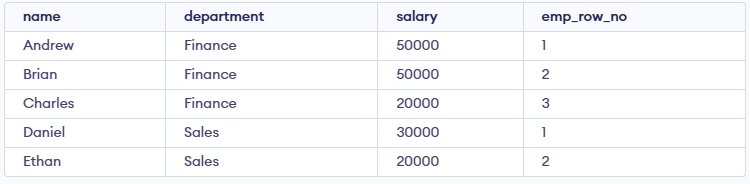
- Even when salaries are equal, each row receives a different number.
PERCENT_RANK() Function
The PERCENT_RANK() function shows the relative position of a row within its partition.
Formula:
PERCENT_RANK() = (RANK - 1) / (Total Rows in Partition - 1)Example:
SELECT name, department, salary,
       PERCENT_RANK() OVER(
           PARTITION BY department
           ORDER BY salary DESC
       ) AS emp_percent_rank
FROM employees;
Output:
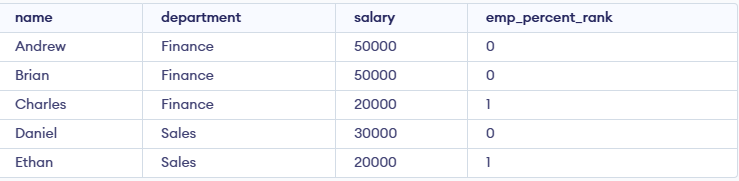
- The value represents the relative position of an employee within their department.
Fixing Window Function Issues
The following points help avoid common issues when using window functions:
- Partition carefully: Without PARTITION BY, the entire table is treated as one group.
- Check ORDER BY: It determines the order in which rows are processed.
- Optimize performance: Window functions may require additional processing on large datasets, so queries should be optimized when necessary.
