

The UNIQUE constraint in MySQL ensures that all values in a column or combination of columns are unique.
- Prevents duplicate values and Allows NULL values.
- Multiple UNIQUE constraints can be defined in a table.
- Can be applied to one or more columns.
Working
UNIQUE Constraint Using CREATE TABLE
A UNIQUE constraint can be defined while creating a table.
Syntax
CREATE TABLE table_name (column1 datatype,column2 datatype UNIQUE);
Example
Create a students table with a UNIQUE constraint on the email column:
CREATE TABLE students (id INT PRIMARY KEY,name VARCHAR(50),email VARCHAR(100) UNIQUE);
Here, the email column cannot contain duplicate values.
Insert records:
INSERT INTO students (id, name, email)VALUES(1, 'John', 'john@example.com'),(2, 'Emily', 'emily@example.com'),(3, 'Michael', 'michael@example.com');
To display the records:
SELECT * FROM students;Output:

Now, if we try to insert a duplicate email:
INSERT INTO students (id, name, email)VALUES (4, 'Sophia', 'john@example.com');
Output:

- MySQL returns a duplicate entry error because john@example.com already exists.
UNIQUE Constraint Using ALTER TABLE
A UNIQUE constraint can also be added to an existing table.
Syntax
ALTER TABLE table_nameADD UNIQUE (column_name);
Example
ALTER TABLE students
ADD UNIQUE (name);
This ensures that every value in the name column is unique.
UNIQUE Constraint on Multiple Columns
A UNIQUE constraint can be applied to multiple columns. In this case, the combination of values must be unique.
Example
CREATE TABLE employee (employee_id INT,department_id INT,employee_name VARCHAR(50),UNIQUE (employee_id, department_id));
Insert records:
INSERT INTO employee(employee_id, department_id, employee_name)VALUES(101, 1, 'John'),(101, 2, 'Emily'),(102, 1, 'Michael');
Output:
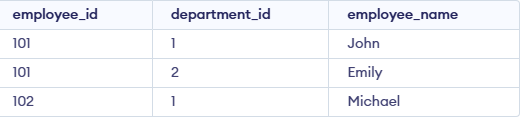
Note: Here, employee_id = 101 can appear multiple times as long as the department_id is different. However, the same combination of employee_id and department_id cannot be repeated.
Drop UNIQUE Constraint
To remove a UNIQUE constraint, use the following syntax:
Syntax:
ALTER TABLE table_nameDROP INDEX index_name;
Example:
If the email column has a UNIQUE constraint, remove it using:
ALTER TABLE studentsDROP INDEX email;
