

MySQL provides the INNER JOIN clause to combine rows from two or more tables based on a related column. It returns only those records where there is a match in both tables.
- Combines rows from multiple tables based on a matching condition.
- Returns only matching records from both tables.
- Excludes rows that do not have matching values.
- One of the most commonly used types of joins.
Syntax
SELECT <table1.column1>,<table1.column2>,....,<table2.column1>,.....
FROM table1 INNER JOIN table2
ON table1.condition_column = table2.condition_column
WHERE [condition];
GROUP BY <group-by-column-name>
HAVING [condition];
- SELECT: Specifies the columns to be retrieved from the result set.
- INNER JOIN: Combines rows from two tables based on a matching condition.
- ON: Defines the condition that relates the two tables (e.g., table1.column = table2.column).
- WHERE: Filters rows after the join operation.
- GROUP BY: Groups the result set based on specified columns.
- HAVING: Filters grouped data based on aggregate conditions.
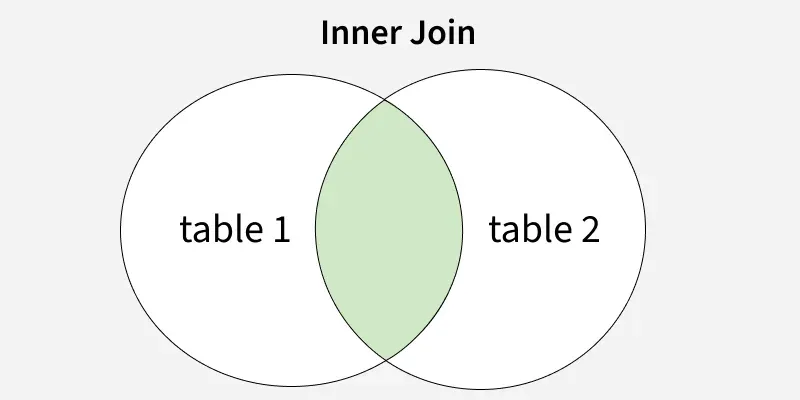
Examples of MySQL INNER JOIN
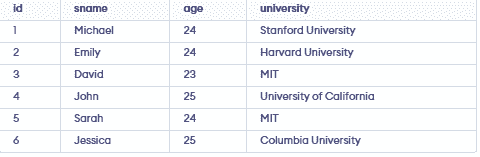
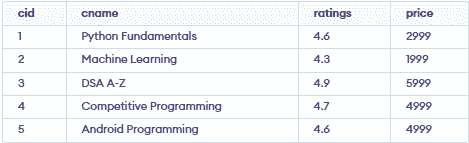
Let us consider the following schemas for the examples in the following article.
StudentDetails Table:
CourseDetails Table:
EnrolledIn Table:

Example 1: MySQL INNER JOIN using Multiple Tables
We can use inner join to join more than two tables using the join condition.
Query:
Find the list of students of students enrolled in the "Python Fundamentals" course and output their details like student id, name and age.
SELECT S.sid, S.sname, S.age
FROM StudentDetails S
INNER JOIN EnrolledIn E ON S.sid = E.sid
INNER JOIN CourseDetails C ON C.cid = E.cid
WHERE C.cname = "Python Fundamentals";
Output:

Explanation:
- Join StudentDetails, EnrolledIn, and CourseDetails using sid and cid.
- Use WHERE cname = "Python Fundamentals" to filter results.
Example 2: MySQL INNER JOIN with Group By & HAVING Clause
We can use GROUP BY and HAVING clauses along with MySQL Inner Join to write complex queries.
Query:
Find the list of courses where more than one student is enrolled and output the course name and count of students enrolled in that course.
SELECT C.cname, count(*)
FROM StudentDetails S
INNER JOIN EnrolledIn E ON S.sid = E.sid
INNER JOIN CourseDetails C ON C.cid = E.cid
GROUP BY C.cname
HAVING count(*) > 1;
Output:

Explanation:
- The output lists courses ("Python Fundamentals" and "DSA A-Z") with more than one student enrolled.
- It is obtained by joining the students, student_course, and courses tables.
- The query groups the records by cname and uses COUNT(*) to count the number of enrolled students in each course.
Example 3: MySQL INNER JOIN with WHERE keyword
We can use WHERE keyword to further filter out the tuples that satisfy the particular condition specified in the WHERE clause.
Query:
Find the list of students from "MIT" university who have enrolled in at least one course and output their details like student id, name, and age.
SELECT distinct(S.sid), S.sname, S.age
FROM StudentDetails S
INNER JOIN EnrolledIn E ON S.sid = E.sid
WHERE S.university = "MIT";
Output:

Explanation:
- The query uses an INNER JOIN between the students and student_course tables using students.id = student_course.sid.
- The WHERE clause filters students from the "MIT" university.
- Michael and David belongs to "MIT" and is enrolled in a course.
Example 4: MySQL INNER JOIN using Operators
MySQL INNER JOIN can be used with different SQL operators such as arithmetic (+, -, *, /, %), comparison (=, !=, >, <), and logical operators (AND, OR, BETWEEN, EXISTS, etc.).
Query:
Find the list of courses where at least one student is enrolled and the price of the course is greater than 4000 and output their course name, price, and ratings.
SELECT distinct(C.cname), C.price, C.ratings
FROM CourseDetails C
INNER JOIN EnrolledIn E ON C.cid = E.cid
WHERE C.price > 4000;
Output:

Explanation:
- The output displays courses with a price greater than 4000.
- It shows the course name (cname), price, and ratings of the enrolled courses.
- Duplicate course records are removed using the DISTINCT keyword.
