

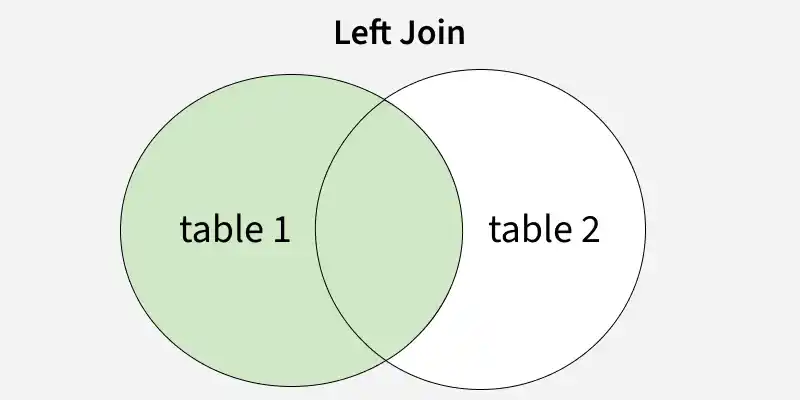
MySQL provides the LEFT JOIN to return all rows from the left table and the matching rows from the right table. If no match is found, NULL values are returned for columns from the right table.
- Returns all records from the left table.
- Returns matching records from the right table.
- Fills unmatched right-table columns with NULL values.
- Useful for retrieving complete data from the left table.
- Helps identify unmatched records between tables.
Syntax
SELECT column1, column2, ...
FROM table1
LEFT JOIN table2
ON table1.column_name = table2.column_name;
- columns: specific columns we want to retrieve.
- table1 and table2: tables being joined.
- column_name: columns used for matching values.
LEFT JOIN Examples
Firstly, let us create three tables named books, authors, and book_authors to understand the working of LEFT JOIN in detail.
Query to create authors Table:
CREATE TABLE authors (
    author_id INT PRIMARY KEY,
    author_name VARCHAR(255)
);
Query to create books Table:
CREATE TABLE books (
    book_id INT PRIMARY KEY,
    title VARCHAR(255),
    publication_year INT
);
Query to create book_authors Table:
CREATE TABLE book_authors (
    book_id INT,
    author_id INT,
    FOREIGN KEY (book_id) REFERENCES books(book_id),
    FOREIGN KEY (author_id) REFERENCES authors(author_id)
);
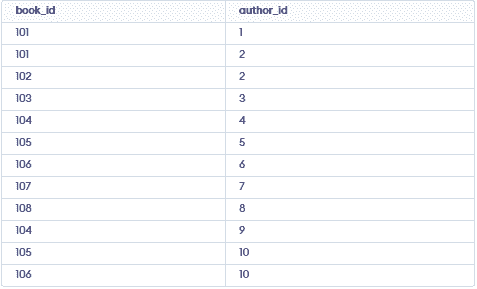
Here, book_id and author_id which are the PRIMARY KEY of books and authors table acts as a FOREIGN KEY for book_authors table.
After inserting some data into tables, tables look like:
Table: books
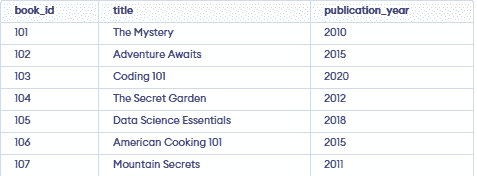
Table: authors
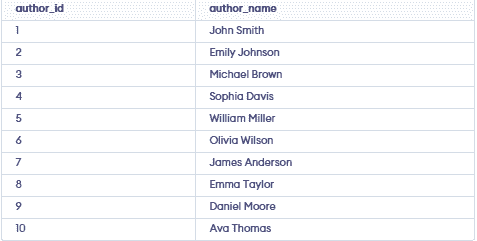
Table: book authors
Example 1: MySQL LEFT JOIN with USING Clause
We can use the USING clause, to specify the column/field on which the JOIN operation should be performed.
Query:
SELECT *
FROM books
LEFT JOIN book_authors USING (book_id);
Output:
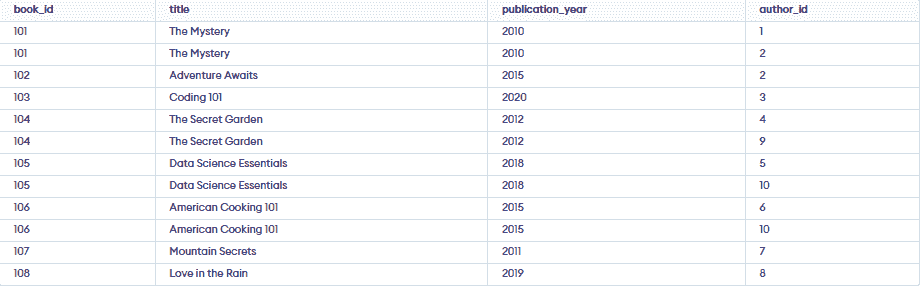
Explanation:
- Retrieves all records from the books table and matching records from the book_authors table using LEFT JOIN.
- Uses the USING clause to join both tables based on a common column with matching values.
Example 2: MySQL LEFT JOIN with GROUP BY Clause
We can use the GROUP BY clause with the LEFT JOIN keyword to view organized results based on specific columns.
Query:
SELECT authors.author_name, COUNT(books.book_id) as book_count
FROM authors
LEFT JOIN book_authors ON authors.author_id = book_authors.author_id
LEFT JOIN books ON book_authors.book_id = books.book_id
GROUP BY authors.author_name;
Output:
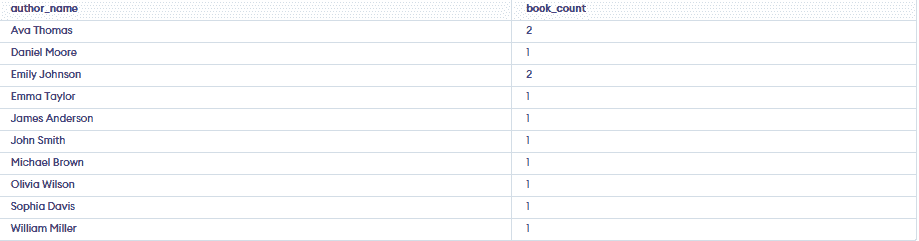
Explanation:
- Uses LEFT JOIN to merge data from the authors, book_authors, and books tables.
- Uses GROUP BY with the COUNT() function to find the total number of books written by each author.
Example 3: LEFT JOIN with WHERE Clause
We can use the WHERE clause with LEFT JOIN to view the records that fulfill a specific request. this allows the filtering of data from tables.
SELECT authors.author_name, books.title
FROM authors
LEFT JOIN book_authors ON authors.author_id = book_authors.author_id
LEFT JOIN books ON book_authors.book_id = books.book_id
WHERE books.publication_year < 2015;
Output:
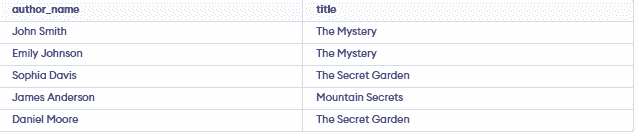
Explanation:
- The WHERE clause filters records based on a specified condition.
- This query uses LEFT JOIN to display authors and their books, but only for books published before 2015.
Example 4: MySQL LEFT JOIN to Get Unmatched Records
Query:
SELECT authors.author_name
FROM authors
LEFT JOIN book_authors ON authors.author_id = book_authors.author_id
WHERE book_authors.author_id IS NULL;
Output:

Explanation:
- Uses LEFT JOIN with a WHERE clause to find unmatched records between two tables.
- Helps identify authors with no books; if no rows are returned, it means every author has published at least one book.
