

MySQL provides the FOREIGN KEY constraint to establish a relationship between columns by referencing a PRIMARY KEY or UNIQUE key.
- Maintains referential integrity.
- Prevents invalid or unmatched values.
- Can reference a key in another table or the same table.
- Creates a relationship between related records.
Types of FOREIGN KEY in MySQL
A FOREIGN KEY can be created using:
- CREATE TABLE Statement
- ALTER TABLE Statement
Working
Using CREATE TABLE Statement
Syntax:
CREATE TABLE table_name (column1 datatype PRIMARY KEY,column2 datatype,FOREIGN KEY (column2)REFERENCES table_name(column1));
Example
Here, manager_id references employee_id within the same table.
CREATE TABLE employees (employee_id INT PRIMARY KEY,employee_name VARCHAR(50),manager_id INT,FOREIGN KEY (manager_id)REFERENCES employees(employee_id));
Insert records:
INSERT INTO employees (employee_id, employee_name, manager_id)
VALUES
(101, 'John', NULL),
(102, 'Emily', 101),
(103, 'Michael', 101),
(104, 'Sophia', 102),
(105, 'David', 102);
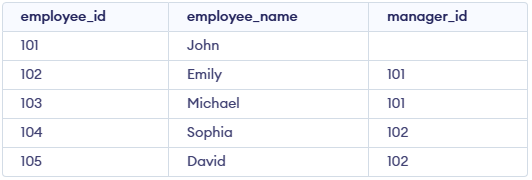
Here, John has no manager, while Emily and Michael have John as their manager.
To display the records:
SELECT * FROM employees;Output:
FOREIGN KEY with SET NULL
ON DELETE SET NULL sets the foreign key value to NULL when the referenced record is deleted.
First, remove the existing FOREIGN KEY:
ALTER TABLE employees
DROP FOREIGN KEY employees_ibfk_1;
Next, add the FOREIGN KEY with ON DELETE SET NULL:
ALTER TABLE employeesADD CONSTRAINT fk_managerFOREIGN KEY (manager_id)REFERENCES employees(employee_id)ON DELETE SET NULL;
Now, delete the referenced employee:
DELETE FROM employeesWHERE employee_id = 101;
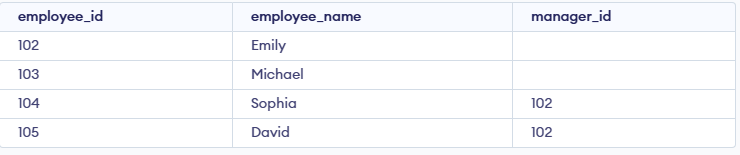
The manager_id of employees reporting to employee_id = 101 becomes NULL.
To verify the result:
SELECT * FROM employees;Output:
Verify FOREIGN KEY
To view the table structure:
DESCRIBE employees;Output:

To view the FOREIGN KEY information:
SELECTCONSTRAINT_NAME,COLUMN_NAME,REFERENCED_TABLE_NAME,REFERENCED_COLUMN_NAMEFROM INFORMATION_SCHEMA.KEY_COLUMN_USAGEWHERE TABLE_NAME = 'employees';
Output:

Drop FOREIGN KEY
Syntax:
ALTER TABLE table_nameDROP FOREIGN KEY foreign_key_name;
Example:
ALTER TABLE employeesDROP FOREIGN KEY fk_manager;
This removes the FOREIGN KEY constraint from the employees table.
