

A subquery in MySQL is a query written inside another query. The result of the inner query is used by the outer query to retrieve or modify data.
- Helps filter data using the result of another query.
- Can be used with SELECT, UPDATE and DELETE.
- Commonly used with WHERE, FROM and HAVING.
- Can work with aggregate functions such as AVG(), MAX() and COUNT().
Syntax
SELECT column_name
FROM table_name
WHERE column_name operator (
    SELECT column_name
    FROM table_name
    WHERE condition
);
Example Tables
Consider the following products table:
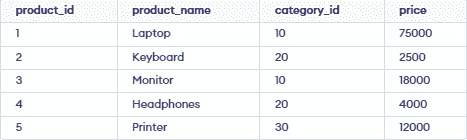
And the categories table:

Single-Row Subquery
A single-row subquery returns a single value.
Example
Find the product with the highest price:
SELECT product_name, price
FROM products
WHERE price = (
    SELECT MAX(price)
    FROM products
);
Output:

- The subquery finds the highest product price and the outer query returns the product having that price.
Multi-Row Subquery
A multi-row subquery returns multiple values. Operators such as IN can be used with it.
Example
Find products belonging to the Electronics category:
SELECT product_name, price
FROM products
WHERE category_id IN (
    SELECT category_id
    FROM categories
    WHERE category_name = 'Electronics'
);
Output:

- The subquery finds the category ID for Electronics and the outer query returns products from that category.
Correlated Subquery
A correlated subquery depends on the outer query and uses a value from it.
Example
Find products whose price is greater than the average price of their category:
SELECT p.product_name, p.price
FROM products p
WHERE p.price > (
    SELECT AVG(p2.price)
    FROM products p2
    WHERE p2.category_id = p.category_id
);
Output:
The subquery calculates the average price for each product's category.
Subquery in FROM Clause
A subquery can be used in the FROM clause as a temporary table.
SELECT product_name, price
FROM (
    SELECT product_name, price
    FROM products
    WHERE price > 10000
) AS expensive_products;
Output:

Subquery with UPDATE
A subquery can also be used with UPDATE.
For example, increase the price of products belonging to the Accessories category:
UPDATE products
SET price = price + 500
WHERE category_id IN (
    SELECT category_id
    FROM categories
    WHERE category_name = 'Accessories'
);
Subquery with DELETE
A subquery can be used with DELETE to remove records based on another query.
DELETE FROM products
WHERE category_id IN (
    SELECT category_id
    FROM categories
    WHERE category_name = 'Office'
);
