

The RENAME TABLE statement is used to rename an existing view in MySQL. It changes the view's name while keeping its underlying query unchanged.
- Does not modify data in the base tables.
- Can rename multiple views in a single statement.
- The new view name must not already exist.
Syntax
RENAME TABLE original_view_name
TO new_view_name;
Example
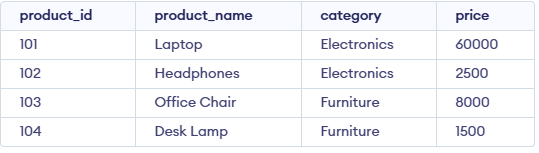
First, create a products table:
Creating a View
Create a view based on the products table:
CREATE VIEW PRODUCT_VIEW AS
SELECT * FROM products;
Output:
Renaming the View
Now, rename PRODUCT_VIEW to VIEW_PRODUCTS:
RENAME TABLE PRODUCT_VIEW TO VIEW_PRODUCTS;Verification
Use the following SELECT statement to verify the renamed view:
SELECT * FROM VIEW_PRODUCTS;Output:
- The VIEW_PRODUCTS view displays the same data, but with the new view name.
