

MySQL provides the JOIN clause to combine rows from two or more tables based on a related column. It is useful for retrieving related data from multiple tables in a single query.
- Combines data from multiple tables using a common column.
- Retrieves related information from different tables.
- Helps maintain relationships between tables.
- Supports a normalized database design by linking separate tables.
Types of MySQL JOIN
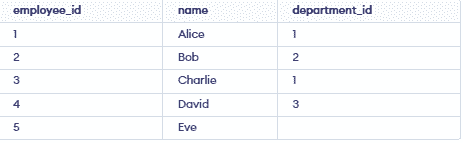
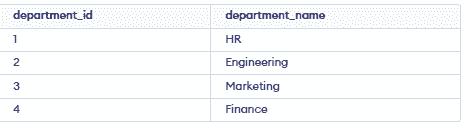
We will use employees and departments tables with department_id to demonstrate different MySQL JOINs.
Employees Tables:
Departments Table:
INNER JOIN
It Returns records that have matching values in both tables.
SELECT employees.name, departments.department_name
FROM employees
INNER JOIN departments
ON employees.department_id = departments.department_id;
Output:

LEFT JOIN
It returns all records from the Left table and matched records from the Right table. If there is no match, then NULL values are returned for Right table columns.
SELECT employees.name, departments.department_name
FROM employees
LEFT JOIN departments
ON employees.department_id = departments.department_id;
Output:

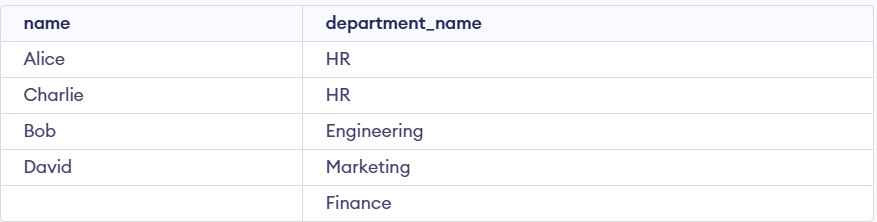
RIGHT JOIN
It returns all rows from the right table and matching rows from the left table, with NULL for unmatched rows.
SELECT employees.name, departments.department_name
FROM employees
RIGHT JOIN departments
ON employees.department_id = departments.department_id;
Output:
FULL JOIN
It Returns all records when there is a match in either the left or the right table. In case of no match, NULL values are returned for columns that have no match in either table.
SELECT employees.name, departments.department_name
FROM employees
LEFT JOIN departments
ON employees.department_id = departments.department_id

UNION

SELECT employees.name, departments.department_name
FROM employees
RIGHT JOIN departments
ON employees.department_id = departments.department_id;
Output:

CROSS JOIN
It Returns the Cartesian product of two tables. Matches every row of one table with every row of another table.
SELECT employees.name, departments.department_name
FROM employees
CROSS JOIN departments;
Output:

- The CROSS JOIN returns the Cartesian product of the employees and departments tables, pairing every employee with every department.
SELF JOIN
A self join is a join where a table is joined with itself. It is useful for comparing rows within the same table, such as finding employees and their managers.
Step 1: Altering the Table to Add the manager_id Column
ALTER TABLE employees ADD COLUMN manager_id INT;Step 2: Updating the Table with Manager Information
UPDATE employees SET manager_id = 3 WHERE employee_id = 1;
UPDATE employees SET manager_id = 3 WHERE employee_id = 2;
UPDATE employees SET manager_id = 4 WHERE employee_id = 3;
Output:

Step 3: Performing the Self Join
SELECT a.name AS employee, b.name AS manager
FROM employees a, employees b
WHERE a.manager_id = b.employee_id;
Output:

- Adds manager_id to the employees table to establish manager relationships.
- The self-join matches manager_id with employee_id to show employees and their managers
