
HTML
Living Standard — Last Updated 1 September 2026
Living Standard — Last Updated 1 September 2026
Support in one engine only.
Support in all current engines.
すべてのはhiddenコンテンツ属性設定を持ってもよい。属性は、次のキーワードと状態を持つである:
| キーワード | 状態 | 概要 |
|---|---|---|
hidden | 非表示 | レンダリングされない。 |
until-found | Hidden Until Found | レンダリングされないが、 およびで内部のコンテンツにアクセスできる。 |
属性の欠損値のデフォルトはNot Hidden状態であり、無効な値のデフォルトおよび空の値のデフォルトは、両方とも状態である。
要素が状態の属性を持つ場合、それは、その要素がまだないこと、もしくはもはやページの現在の状態には直接関係がない、または、ユーザーが直接アクセスするのとは対照的に、ページの他の部分で再利用するコンテンツを宣言するために使用されていることを示す。ユーザーエージェントは、状態にある要素をレンダリングすべきでない。
The requirement for user agents not to render elements that are in the state can be implemented indirectly through the style layer. For example, a web browser could implement these requirements using the rules suggested in the Rendering section.
要素がにある属性を持つ場合、その要素は状態のように非表示になっているが、要素内のコンテンツはおよびにアクセスできることを示す。これらの機能が要素のサブツリーにあるターゲットにスクロールしようとすると、ユーザーエージェントは属性を削除して内容を表示してから、ターゲットノードでを実行してスクロールする。
Web browsers will use 'content-visibility: hidden' instead of 'display: none' when the attribute is in the state, as specified in the Rendering section.
この属性は通常CSSを使用して実装されているため、CSSを使用して上書きすることもできる。たとえば、'display: block'をすべての要素に適用する規則は、状態の影響を相殺するだろう。したがって著者は、期待通りに属性がスタイル付けされていることを確認し、そのスタイルシートを書くときに注意する必要がある。さらに、状態をサポートしないレガシーユーザーエージェントは、'content-visibility: hidden'ではなく'display: none'になるため、著者はスタイルシートが要素の'display'または'content-visibility'プロパティを変更しないようにすることを勧める。
状態に属性をもつ要素は、'display: none'ではなく'content-visibility: hidden'を使用するため、状態には、状態Dとは異なる2つの注意点が存在する:
ページ内検索で表示するには、要素がの影響を受ける必要がある。 これは、状態の要素が'none'、'contents'、または'inline'の'display'値を持つ場合、その要素はページ内検索によって表示されないことを意味する。
状態の場合、要素は依然としてがある。これはつまり、ボーダー、マージン、およびパディングは要素の周囲にレンダリングされたままになる。
次の骨格の例において、属性は、ユーザーがログインするまでウェブゲームのメイン画面を非表示にするために使用される:
< h1 > The Example Game</ h1 >
< section id = "login" >
< h2 > Login</ h2 >
< form >
...
<!-- calls login() once the user's credentials have been checked -->
</ form >
< script >
function login() {
// switch screens
document. getElementById( 'login' ). hidden = true ;
document. getElementById( 'game' ). hidden = false ;
}
</ script >
</ section >
< section id = "game" hidden >
...
</ section > 属性は、別のプレゼンテーションに合法的に示すことができたコンテンツを隠すために使用されてはならない。たとえば、タブ付きインターフェイスは単にオーバーフロープレゼンテーションの一種であるため、タブ付きダイアログでパネルを隠すためにを使用することは誤りである。―それはスクロールバーをもつ1つの大きなページ内のすべてのフォームコントロールを示すのと同様である。ちょうど1つのプレゼンテーションからコンテンツを非表示にするためにこの属性を使用することも同様に誤りである。―何かがとマークされる場合、それは、たとえばスクリーンリーダーなどを含む、すべてのプレゼンテーションから隠されている。
自身がでない要素は、である要素へされてはならない。自身がでないおよび要素のfor属性も同様に、である要素を参照してはならない。どちらの場合も、このような参照はユーザーの混乱を引き起こすだろう。
しかし、要素およびスクリプトは、他のコンテキストでである要素を参照してもよい。
たとえば、属性でマークされたセクションにリンクする属性を使用するのは誤りだろう。コンテンツが適切または関連しない場合、それにリンクする理由はない。
しかし、自身がである説明を参照するために、ARIA 属性を使用することは構わない。説明を非表示にすることはそれらが単独で有用でないことを意味する一方で、それらは、それらが説明する要素から参照される特定のコンテキストにおいて有用である方法で記述することもできる。
同様に、属性を持つ要素は、オフスクリーンバッファーとしてスクリプト化されたグラフィックスエンジンによって使用されるかもしれず、フォームコントロールは、属性を使用する隠し要素を参照するかもしれない。
属性によって非表示にされたセクション内の要素は依然としてアクティブである。たとえば、そのようなセクションでのスクリプトやフォームコントロールは、依然として実行および送信する。それらのプレゼンテーションのみがユーザーに変更される。
Support in all current engines.
The hidden getter steps are:
If the attribute is in the state, then return "".
If the attribute is set, then return true.
falseを返す。
The setter steps are:
If the given value is a string that is an match for "", then set the attribute to "".
Otherwise, if the given value is false, then remove the attribute.
Otherwise, if the given value is the empty string, then remove the attribute.
Otherwise, if the given value is null, then remove the attribute.
Otherwise, if the given value is 0, then remove the attribute.
Otherwise, if the given value is NaN, then remove the attribute.
Otherwise, set the attribute to the empty string.
An ancestor reveal pair is a consisting of a node and a string.
The ancestor revealing algorithm given a node target is:
Let ancestorsToReveal be « ».
Let ancestor be target.
While ancestor has a parent node within the :
If ancestor has a attribute in the state, then (ancestor, "until-found") to ancestorsToReveal.
If ancestor is slotted into the second slot of a element which does not have an attribute, then (ancestor's parent node, "details") to ancestorsToReveal.
Set ancestor to the parent node of ancestor within the .
For each (ancestorToReveal, revealType) of ancestorsToReveal:
If ancestorToReveal is not , then return.
If revealType is "until-found":
If ancestorToReveal's attribute is not in the state, then return.
named at ancestorToReveal with the attribute initialized to true.
If ancestorToReveal is not , then return.
If ancestorToReveal's attribute is not in the state, then return.
Remove the attribute from ancestorToReveal.
Otherwise:
: revealType is "details".
If ancestorToReveal has an attribute, then return.
Set ancestorToReveal's attribute to the empty string.
作成時の初期値を含む、トラバース可能なナビゲート可能のシステム可視状態は、ユーザー エージェントによって決定される。たとえば、ブラウザーウィンドウが最小化されているか、ブラウザータブが現在バックグラウンドにあるか、またはタスクスイッチャーなどのシステム要素がページを覆い隠しているかどうかを表す。
When a user agent determines that the system visibility state for traversable navigable traversable has changed to newState, it must run the following steps:
Let navigables be the inclusive descendant navigables of traversable's active document.
For each navigable of navigables in what order?:
Let document be navigable's active document.
Queue a global task on the user interaction task source given document's relevant global object to update the visibility state of document with newState.
Documentは可視状態を持ち、これは"hidden"または"visible"のいずれかで、最初は"hidden"に設定される。
Support in all current engines.
Support in all current engines.
To update the visibility state of Document document to visibilityState:
If document's visibility state equals visibilityState, then return.
Set document's visibility state to visibilityState.
Queue a new VisibilityStateEntry whose visibility state is visibilityState and whose timestamp is the current high resolution time given document's relevant global object.
Run the screen orientation change steps with document. [SCREENORIENTATION]
Run the view transition page visibility change steps with document.
Run any page visibility change steps which may be defined in other specifications, with visibility state and document.
It would be better if specification authors sent a pull request to add calls from here into their specifications directly, instead of using the page visibility change steps hook, to ensure well-defined cross-specification call order. As of the time of this writing the following specifications are known to have page visibility change steps, which will be run in an unspecified order: Device Posture API and Web NFC. [DEVICEPOSTURE] [WEBNFC]
Fire an event named visibilitychange at document, with its bubbles attribute initialized to true.
To set the initial visibility state of Document document to visibilityState:
Set document's visibility state to visibilityState.
Queue a new VisibilityStateEntry whose visibility state is document's visibility state and whose timestamp is 0.
VisibilityStateEntryインターフェイスSupport in one engine only.
VisibilityStateEntryインターフェイスは、文書がアクティブになった瞬間から、文書の可視性の変更を公開する。
function wasHiddenBeforeFirstContentfulPaint() {
const fcpEntry = performance. getEntriesByName( "first-contentful-paint" )[ 0 ];
const visibilityStateEntries = performance. getEntriesByType( "visibility-state" );
return visibilityStateEntries. some( e =>
e. startTime < fcpEntry. startTime &&
e. name === "hidden" );
} ページを非表示にすると、レンダリングおよびその他のユーザエージェント操作のスロットリングが発生する可能性があるため、そのようなスロットリングが発生したことを示すものとして、可視の変更を使用するのが一般的である。ただし、長時間の非アクティブ状態など、他の要因によっても、さまざまなブラウザーでスロットリングが発生する可能性がある。
[Exposed =(Window )]
interface VisibilityStateEntry : PerformanceEntry {
readonly attribute DOMString name ; // shadows inherited name
readonly attribute DOMString entryType ; // shadows inherited entryType
readonly attribute DOMHighResTimeStamp startTime ; // shadows inherited startTime
readonly attribute unsigned long duration ; // shadows inherited duration
};VisibilityStateEntryは、関連付けられたDOMHighResTimeStamp タイムスタンプを持つ。
VisibilityStateEntryは、関連付けられた"visible"または"hidden"可視状態を持つ。
entryTypeゲッターステップは、"visibility-state"を返す。
durationゲッターステップは0を返す。
同じ名前の属性の説明については、inertも参照のこと。
ノード(特に要素およびテキストノード)は不活性である可能性がある。ノードが不活性である場合:
ヒットテストは、あたかも'pointer-events' CSSプロパティが'none'に設定されているかのように動作しなければならない。
テキスト選択機能は、あたかも'user-select' CSSプロパティが'none'に設定されているかのように動作しなければならない。
編集可能である場合、ノードはあたかも編集不可能であるかのように動作する。
ユーザーエージェントは、ページ内検索の目的でノードを無視すべきである。
通例、不活性ノードにフォーカスを当てることはできず、ユーザーエージェントは非活性ノードをアクセシビリティAPIまたは支援技術に公開しない。コマンドである不活性ノードは、上記の方法ではユーザーには使用不能となる。
いずれにせよ、ユーザーエージェントは、ページ内検索およびテキスト選択の制限をユーザーが上書き可能にしてもよい。
デフォルトでは、ノードは不活性ではない。
subjectがdocumentの最上位レイヤーの一番上のdialog要素である場合、Document documentはモーダルダイアログボックスによってブロックされるsubjectである。documentがそのようにブロックされる一方で、documentに接続されているすべてのノードは、subject要素とそのフラットツリーの子孫を除き、不活性とマークされなければならない。
subjectは、inert属性を介してさらに不活性になることができるが、subject自体に指定されている場合に限る(つまり、subjectは祖先の不活性を回避する)。subjectのフラットツリーの子孫は、同じように不活性になることがある。
dialog要素のshowModal()メソッドは、dialog要素をノード文書の最上位レイヤーに追加することによって、このメカニズムをトリガーさせる。
inert属性Support in all current engines.
inert属性は、その存在によって、(モーダルダイアログなど)他の方法では不活性化を免れない要素およびそのすべてのフラットツリーの子孫がユーザーエージェントによって不活性にされることを示す真偽属性である。
不活性サブツリーは、不活性状態ではないページの外観を理解または使用するために重要なコンテンツまたはコントロールを含むべきでない。不活性サブツリー内のコンテンツは、すべてのユーザーによって認識できる、またはインタラクティブではない。著者は、要素が表す内容が何らかの形で視覚的に隠されていない限り、要素を不活性と指定すべきでない。ほとんどの場合、著者は個々のフォームコントロールにinert属性を指定すべきでない。このような場合は、disabled属性の方がおそらく適切である。
次の例は、"loading"メッセージによって視覚的に隠されている、部分的に読み込まれたコンテンツを不活性としてマークする方法を示す。
< section aria-labelledby = s1 >
< h3 id = s1 > Population by City</ h3 >
< div class = container >
< div class = loading >< p > Loading...</ p ></ div >
< div inert >
< form >
< fieldset >
< legend > Date range</ legend >
< div >
< label for = start > Start</ label >
< input type = date id = start >
</ div >
< div >
< label for = end > End</ label >
< input type = date id = end >
</ div >
< div >
< button > Apply</ button >
</ div >
</ fieldset >
</ form >
< table >
< caption > From 20-- to 20--</ caption >
< thead >
< tr >
< th > City</ th >
< th > State</ th >
< th > 20-- Population</ th >
< th > 20-- Population</ th >
< th > Percentage change</ th >
</ tr >
</ thead >
< tbody >
<!-- ... -->
</ tbody >
</ table >
</ div >
</ div >
</ section > 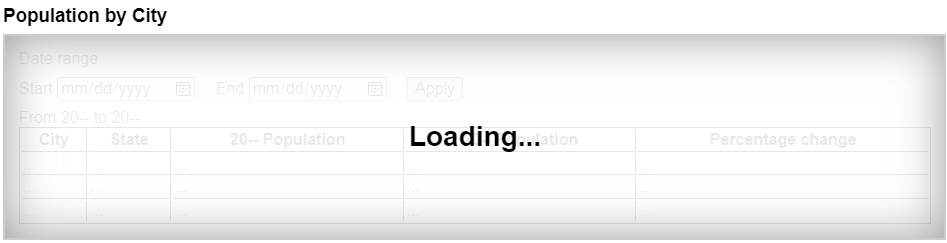
"loading"のオーバーレイは、不活性のコンテンツを覆い隠し、不活性のコンテンツが現在アクセス可能でないことを視覚的に明らかにする。見出しおよび"loading"のテキストは、inert属性をもつ要素の子孫ではないことに注意する。これは、このテキストがすべてのユーザーをアクセス可能にするが、不活性のコンテンツは誰も操作できなくなる。
デフォルトでは、要素またはそのサブツリーが不活性であることを示す永続的な視覚的表示は存在しない。そのようなコンテンツに適切な視覚的なスタイルは、多くの場合、コンテキストに依存する。例えば、不活性な画面外のナビゲーションパネルは、その画面外の位置がコンテンツを視覚的にさえぎるので、デフォルトスタイルを必要としない。同様に、モーダルdialog要素のbackdropは、ウェブページの不活性なコンテンツを具体的にスタイル設定するのではなく、視覚的にさえぎる手段として機能する。
しかし、他の多くの状況では、ユーザーの混乱を避けるために、著者は文書のどの部分がアクティブで、どの部分が不活性であるかを明確にマークすることが強く勧める。特に、すべてのユーザーがページのすべての部分を一度に表示できるわけではないことを覚えておく価値がある。 たとえば、スクリーンリーダーのユーザー、小型のデバイスや拡大鏡を使用しているユーザー、特に小さなウィンドウを使用しているユーザーでさえ、ページのアクティブな部分を見ることができず、不活性なセクションが明らかに不活性でない場合はフラストレーションを感じる可能性がある。
ユーザーに迷惑となる可能性がある特定のAPI(ポップアップを開く、振動する電話など)の悪用を防ぐために、ユーザーエージェントは、ユーザーがウェブページをアクティブに操作している、または少なくとも1回はページを操作した場合にのみ、これらのAPIを許可する。この"アクティブな相互作用"の状態は、この節で定義されたメカニズムを通じて維持される。
For the purpose of tracking user activation, each Window W has two relevant values:
A last activation timestamp, which is either a DOMHighResTimeStamp, positive infinity (indicating that W has never been activated), or negative infinity (indicating that the activation has been consumed). Initially positive infinity.
A last history-action activation timestamp, which is either a DOMHighResTimeStamp or positive infinity, initially positive infinity.
A user agent also defines a transient activation duration, which is a constant number indicating how long a user activation is available for certain user activation-gated APIs (e.g., for opening popups).
The transient activation duration is expected be at most a few seconds, so that the user can possibly perceive the link between an interaction with the page and the page calling the activation-gated API.
We then have the following boolean user activation states for W:
When the current high resolution time given W is greater than or equal to the last activation timestamp in W, W is said to have sticky activation.
This is W's historical activation state, indicating whether the user has ever interacted in W. It starts false, then changes to true (and never changes back to false) when W gets the very first activation notification.
When the current high resolution time given W is greater than or equal to the last activation timestamp in W, and less than the last activation timestamp in W plus the transient activation duration, then W is said to have transient activation.
This is W's current activation state, indicating whether the user has interacted in W recently. This starts with a false value, and remains true for a limited time after every activation notification W gets.
The transient activation state is considered expired if it becomes false because the transient activation duration time has elapsed since the last user activation. Note that it can become false even before the expiry time through an activation consumption.
When the last history-action activation timestamp of W is not equal to the last activation timestamp of W, then W is said to have history-action activation.
This is a special variant of user activation, used to allow access to certain session history APIs which, if used too frequently, would make it harder for the user to traverse back using browser UI. It starts with a false value, and becomes true whenever the user interacts with W, but is reset to false through history-action activation consumption. This ensures such APIs cannot be used multiple times in a row without an intervening user activation. But unlike transient activation, there is no time limit within which such APIs must be used.
The last activation timestamp and last history-action activation timestamp are retained even after the Document changes its fully active status (e.g., after navigating away from a Document, or navigating to a cached Document). This means sticky activation state spans multiple navigations as long as the same Document gets reused. For the transient activation state, the original expiry time remains unchanged (i.e., the state still expires within the transient activation duration limit from the original activation triggering input event). It is important to consider this when deciding whether to base certain things off sticky activation or transient activation.
When a user interaction causes firing of an activation triggering input event in a Document document, the user agent must perform the following activation notification steps before dispatching the event:
Assert: document is fully active.
Let windows be « document's relevant global object ».
Extend windows with the active window of each of document's ancestor navigables.
Extend windows with the active window of each of document's descendant navigables, filtered to include only those navigables whose active document's origin is same origin with document's origin.
For each window in windows:
Set window's last activation timestamp to the current high resolution time.
Notify the close watcher manager about user activation given window.
An activation triggering input event is any event whose isTrusted attribute is true and whose type is one of:
"keydown", provided the key is neither the Esc key nor a shortcut key reserved by the user agent;
"mousedown";
"pointerdown", provided the event's pointerType is "mouse";
"pointerup", provided the event's pointerType is not "mouse"; or
"touchend".
Activation consuming APIs defined in this and other specifications can consume user activation by performing the following steps, given a Window W:
If W's navigable is null, then return.
Let top be W's navigable's top-level traversable.
Let navigables be the inclusive descendant navigables of top's active document.
Let windows be the list of Window objects constructed by taking the active window of each item in navigables.
For each window in windows, if window's last activation timestamp is not positive infinity, then set window's last activation timestamp to negative infinity.
History-action activation-consuming APIs can consume history-action user activation by performing the following steps, given a Window W:
If W's navigable is null, then return.
Let top be W's navigable's top-level traversable.
Let navigables be the inclusive descendant navigables of top's active document.
Let windows be the list of Window objects constructed by taking the active window of each item in navigables.
For each window in windows, set window's last history-action activation timestamp to window's last activation timestamp.
Note the asymmetry in the sets of browsing contexts in the page that are affected by an activation notification vs an activation consumption: an activation consumption changes (to false) the transient activation states for all browsing contexts in the page, but an activation notification changes (to true) the states for a subset of those browsing contexts. The exhaustive nature of consumption here is deliberate: it prevents malicious sites from making multiple calls to an activation consuming API from a single user activation (possibly by exploiting a deep hierarchy of iframes).
ユーザーのアクティブ化に依存するAPIは、さまざまなレベルに分類される:
このAPIは、定着したアクティブ化状態がtrueである必要があるため、最初のユーザーによるアクティブ化までブロックされる。
このAPIは、一時的なアクティブ化状態がtrueであることを必要とするが、それを消費しないため、一時的な状態が期限切れになるまで、ユーザーによるアクティブ化ごとに複数の呼び出しが許可される。
このAPIは、一時的なアクティブ化状態がtrueであることを必要とし、ユーザーによるアクティブ化ごとの複数の呼び出しを防ぐために、各呼び出しでユーザーによるアクティブ化を消費する。
このAPIは、履歴アクションのアクティブ化状態がtrueであることを要求し、ユーザーアクティブ化ごとに複数のコールが発生するのを防ぐために、各コールで履歴アクションのアクティブ化を消費する。
UserActivationインターフェイス各Windowは、関連付けられたUserActivationを持ち、これはUserActivationオブジェクトである。Windowオブジェクトの作成時に、関連するUserActivationをWindowオブジェクトの関連領域で作成された新しいUserActivationオブジェクトに設定しなければならない。
[Exposed =Window ]
interface UserActivation {
readonly attribute boolean hasBeenActive ;
readonly attribute boolean isActive ;
};
partial interface Navigator {
[SameObject ] readonly attribute UserActivation userActivation ;
};navigator.userActivation.hasBeenActiveウィンドウがスティッキーアクティベーションを持つかどうかを返す。
navigator.userActivation.isActiveウィンドウが一時的にアクティベーションを持つかどうかを返す。
The userActivation getter steps are to return this's relevant global object's associated UserActivation.
The hasBeenActive getter steps are to return true if this's relevant global object has sticky activation, and false otherwise.
The isActive getter steps are to return true if this's relevant global object has transient activation, and false otherwise.
For the purposes of user-agent automation and application testing, this specification defines the following extension command for the Web Driver specification. It is optional for a user agent to support the following extension command. [WEBDRIVER]
| HTTP Method | URI Template |
|---|---|
`POST` | /session/{session id}/window/consume-user-activation |
The remote end steps are:
Let window be the current browsing context's active window.
Let consume be true if window has transient activation; otherwise false.
If consume is true, then consume user activation of window.
Return success with data consume.
HTMLの特定の要素は、ユーザーがアクティブにすることができることを意味する、アクティブ化動作を持つ。これは、常にclickイベントによって発生する。
The user agent should allow the user to manually trigger elements that have an activation behavior, for instance using keyboard or voice input, or through mouse clicks. When the user triggers an element with a defined activation behavior in a manner other than clicking it, the default action of the interaction event must be to fire a click event at the element.
element.click()Support in all current engines.
あたかも要素をクリックされたかのように動作する。
Each element has an associated click in progress flag, which is initially unset.
The click() method must run the following steps:
If this element is a form control that is disabled, then return.
If this element's click in progress flag is set, then return.
Set this element's click in progress flag.
Fire a synthetic pointer event named click at this element, with the not trusted flag set.
Unset this element's click in progress flag.
ToggleEventインターフェイスSupport in all current engines.
Support in all current engines.
[Exposed =Window ]
interface ToggleEvent : Event {
constructor (DOMString type , optional ToggleEventInit eventInitDict = {});
readonly attribute DOMString oldState ;
readonly attribute DOMString newState ;
readonly attribute Element ? source ;
};
dictionary ToggleEventInit : EventInit {
DOMString oldState = "";
DOMString newState = "";
Element ? source = null ;
};event.oldStateクローズからオープンに遷移する場合は"closed"に設定し、オープンからクローズに遷移する場合は"open"に設定する。
event.newStateクローズからオープンに遷移する場合は"open"に設定し、オープンからクローズに遷移する場合は"closed"に設定する。
event.source切り替えを開始したエレメントに設定する。これは、popovertargetおよびcommandfor属性で設定できる。ソース要素がない場合、nullに設定される。
Support in all current engines.
Support in all current engines.
oldStateおよびnewState属性は、初期化された値を返さなければならない。
sourceゲッターステップは、thisのcurrentTargetに対する 再ターゲットsourceの結果を返します。
DOM standard issue #1328は、Event上で意味のある方法で、関連するイベントデータをより適切に標準化する方法を追跡している。現在、値に初期化されたイベント属性はゲッターを持つことができないため、これを適切に指定するには内部スロット(または追加フィールドのマップ)が必要である。
toggle task trackerは、次のような構造体である:
ToggleEvent.oldState属性のタスクのイベントの値を表す文字列。CommandEventインターフェイス[Exposed =Window ]
interface CommandEvent : Event {
constructor (DOMString type , optional CommandEventInit eventInitDict = {});
readonly attribute Element ? source ;
readonly attribute DOMString command ;
};
dictionary CommandEventInit : EventInit {
Element ? source = null ;
DOMString command = "";
};event.command要素が実行できるアクションを返す。
event.sourceこのイベントを発生させるために相互作用したElementを返す。
command属性は、初期化された値を返さなければならない。
sourceゲッターステップは、thisのcurrentTargetに対する 再ターゲットsourceの結果を返します。
DOM standard issue #1328は、Event上で意味のある方法で、関連するイベントデータをより適切に標準化する方法を追跡している。現在、値に初期化されたイベント属性はゲッターを持つことができないため、これを適切に指定するには内部スロット(または追加フィールドのマップ)が必要である。
この節は非規範的である。
HTMLユーザーインターフェイスは典型的に、フォームコントロール、スクロール可能領域、リンク、ダイアログボックス、ブラウザータブなど、複数の対話的なウィジットから成る。これらウィジェットは、他(たとえば、リンク、フォームコントロール)を含むもの(たとえば、ブラウザータブ、ダイアログボックス)をもつ、階層構造を形成する。
キーボードを使用するインターフェイスと情報交換する場合、アクティブなウィジェットから、フォーカスされると呼ばれる、対話的なウィジェットの階層構造を通して、キー入力はシステムから流れる。
グラフィカル環境で動作するブラウザータブにおいて動作するHTMLアプリケーションを考えてみる。このアプリケーションが、いくつかのテキストコントロールおよびリンクをもつページを持ち、それ自身がテキストコントロールとボタンを持った、モーダルダイアログを表示していると想定する。
このシナリオにおいて、その子の間でHTMLアプリケーションを含むブラウザータブを持つだろう、フォーカス可能なウィジェットの階層構造は、ブラウザーウィンドウを含むかもしれない。タブ自身は、ダイアログと同様に、その子として、様々なリンクおよびテキストコントロールを持つだろう。ダイアログ自身は、その子として、テキストコントロールおよびボタンを持つだろう。
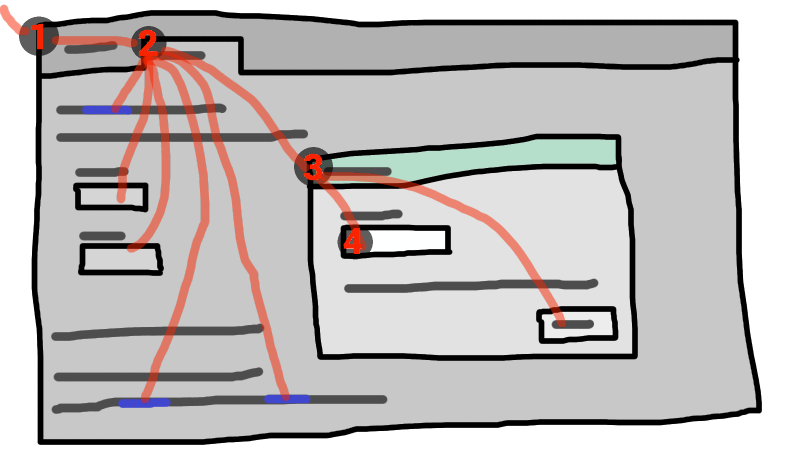
この例でフォーカスをもつウィジェットがダイアログボックスでテキストコントロールであった場合、キー入力は、グラフィカルシステムから①ウェブブラウザー、②タブ、③ダイアログ、そして最後に④テキストコントロールへ流される。
キーボードイベントは、常にこのフォーカスされた要素で対象にされる。
トップレベルトラバーサブルは、オペレーティングシステムからチャネルされたキーボード入力(おそらくアクティブな文書の子孫ナビゲート可能の1つがターゲット)を受け取ることができる場合、システムフォーカスを持つ。
トップレベル横断可能は、そのシステム可視状態が"visible"である場合、 ユーザーアテンションを持ち、そしてシステムフォーカスを持つか、またはそれに直接関連するユーザーエージェントウィジェットが、オペレーティングシステムから送られたキーボード入力を受け取ることができるかのいずれかである。
ブラウザーウィンドウがフォーカスを失うと、ユーザーアテンションは失われるが、一方でシステムのフォーカスもまた、ロケーションバーなど、ブラウザーウィンドウ内の他のシステムウィジェットを失われる可能性がある。
Document dは、dが完全にアクティブであり、かつdのノートナビゲート可能のトップレベル横断可能に ユーザーアテンションがある場合、ユーザーアテンションをもつトップレベル横断可能の完全にアクティブの子孫である。
用語フォーカス可能領域は、そのようなキーボード入力の対象になる可能性があるインターフェイスの領域を指すために使用される。フォーカス可能領域は、要素、要素の一部、またはユーザーエージェントによって処理される他の領域となることができる。
各フォーカス可能領域は、DOMでフォーカス可能領域の位置を表すNodeオブジェクトである、DOMアンカーを持つ。(フォーカス可能領域がNode自身である場合、それはそれ自身のDOM anchorである。)フォーカス可能領域を表すために他のDOMオブジェクトが存在しない場合、DOMアンカーは、フォーカス可能領域に適するようないくつかのAPIで使用される。
次のテーブルは、どのオブジェクトがフォーカス可能領域となることができるかを説明する。左の列におけるセルは、フォーカス可能領域となることができるオブジェクトを説明する。右の列におけるセルは、この要素に対するDOMアンカーを説明する。(両方の列をまたぐセルは、非規範的な例である。)
| フォーカス可能領域 | DOMアンカー |
|---|---|
| 例 | |
次のすべての基準を満たす要素:
| 要素自身。 |
| |
レンダリングされているおよび不活性でないimg要素に関連するイメージマップにおけるarea要素の形状。 | img要素 |
次の例において、それぞれ画像の、 | |
| 要素のサブウィジェットを提供されるユーザーエージェントは、レンダリングされているかつ実際に無効または不活性でない。 | フォーカス可能領域がサブウィジェットとなる要素。 |
| |
| レンダリングされているかつ不活性でない要素のスクロール可能な領域。 | スクロール可能な領域のスクロールが作成されたボックスに対する要素 |
CSS 'overflow'プロパティの'scroll'値が典型的にスクロール可能領域を作成する。 | |
非nullのブラウジングコンテキストがあり、不活性ではないDocumentのビューポート。 | ビューポートが作成されたDocument。 |
| |
| 特にアクセシビリティを支援するために、またはプラットフォームの規則によりよく一致させるために、ユーザーエージェントによってフォーカス可能な領域であると判断される他の要素または要素の一部。 | 要素。 |
ユーザーエージェントは、すべてのリストアイテムの箇条書きをシーケンシャルにフォーカス可能にして、その結果ユーザーがリストをより簡単にナビゲートできるようにすることができる。 同様に、ユーザーエージェントは、 | |
ナビゲート可能なコンテナー(iframeなど)は、フォーカス可能な領域であるが、ナビゲート可能なコンテナーに送られるキーイベントは、コンテンツナビゲート可能のアクティブな文書にすぐに送られる。 同様に、シーケンシャルフォーカスナビゲーションにおいて、ナビゲート可能なコンテナーは基本的に、コンテンツナビゲート可能のアクティブ文書のプレースホルダーとしてのみ機能する。
各Documentの1つのフォーカス可能な領域は、文書のフォーカスされた領域として指定される。どのコントロールがそのように呼ばれるかは時間とともに変化し、この仕様におけるアルゴリズムに基づく。
たとえ文書が完全にアクティブでなくかつユーザーに表示されないとしても、文書のフォーカスされた領域を保持できる。文書の完全にアクティブな状態が変化しても、文書のフォーカスされた領域は同じままとなる。
The currently focused area of a top-level traversable traversable is the focusable area-or-null returned by this algorithm:
If traversable does not have system focus, then return null.
Let candidate be traversable's active document.
While candidate's focused area is a navigable container with a non-null content navigable: set candidate to the active document of that navigable container's content navigable.
If candidate's focused area is non-null, set candidate to candidate's focused area.
candidateを返す。
The current focus chain of a top-level traversable traversable is the focus chain of the currently focused area of traversable, if traversable is non-null, or an empty list otherwise.
An element that is the DOM anchor of a focusable area is said to gain focus when that focusable area becomes the currently focused area of a top-level traversable. When an element is the DOM anchor of a focusable area of the currently focused area of a top-level traversable, it is focused.
The focus chain of a focusable area subject is the ordered list constructed as follows:
Let output be an empty list.
Let currentObject be subject.
While true:
Append currentObject to output.
If currentObject is an area element's shape, then append that area element to output.
Otherwise, if currentObject's DOM anchor is an element that is not currentObject itself, then append currentObject's DOM anchor to output.
If currentObject is a focusable area, then set currentObject to currentObject's DOM anchor's node document.
Otherwise, if currentObject is a Document whose node navigable's parent is non-null, then set currentObject to currentObject's node navigable's parent.
Otherwise, break.
Return output.
The chain starts with subject and (if subject is or can be the currently focused area of a top-level traversable) continues up the focus hierarchy up to the Document of the top-level traversable.
All elements that are focusable areas are said to be focusable.
There are two special types of focusability for focusable areas:
A focusable area is said to be sequentially focusable if it is included in its Document's sequential focus navigation order and the user agent determines that it is sequentially focusable.
A focusable area is said to be click focusable if the user agent determines that it is click focusable. User agents should consider focusable areas with non-null tabindex values to be click focusable.
Elements which are not focusable are not focusable areas, and thus not sequentially focusable and not click focusable.
Being focusable is a statement about whether an element can be focused programmatically, e.g. via the focus() method or autofocus attribute. In contrast, sequentially focusable and click focusable govern how the user agent responds to user interaction: respectively, to sequential focus navigation and as activation behavior.
The user agent might determine that an element is not sequentially focusable even if it is focusable and is included in its Document's sequential focus navigation order, according to user preferences. For example, macOS users can set the user agent to skip non-form control elements, or can skip links when doing sequential focus navigation with just the Tab key (as opposed to using both the Option and Tab keys).
Similarly, the user agent might determine that an element is not click focusable even if it is focusable. For example, in some user agents, clicking on a non-editable form control does not focus it, i.e. the user agent has determined that such controls are not click focusable.
Thus, an element can be focusable, but neither sequentially focusable nor click focusable. For example, in some user agents, a non-editable form-control with a negative-integer tabindex value would not be focusable via user interaction, only via programmatic APIs.
When a user activates a click focusable focusable area, the user agent must run the focusing steps on the focusable area with focus trigger set to "click".
Note that focusing is not an activation behavior, i.e. calling the click() method on an element or dispatching a synthetic click event on it won't cause the element to get focused.
A node is a focus navigation scope owner if it is a Document, a shadow host, a slot, or an element which is the popover trigger of an element in the popover showing state.
Each focus navigation scope owner has a focus navigation scope, which is a list of elements. Its contents are determined as follows:
Every element element has an associated focus navigation owner, which is either null or a focus navigation scope owner. It is determined by the following algorithm:
If element's parent is null, then return null.
If element's parent is a shadow host, then return element's assigned slot.
If element's parent is a shadow root, then return the parent's host.
If element's parent is the document element, then return the parent's node document.
If element is in the popover showing state and has a popover trigger set, then return element's popover trigger.
Return element's parent's associated focus navigation owner.
Then, the contents of a given focus navigation scope owner owner's focus navigation scope are all elements whose associated focus navigation owner is owner.
The order of elements within a focus navigation scope does not impact any of the algorithms in this specification. Ordering only becomes important for the tabindex-ordered focus navigation scope and flattened tabindex-ordered focus navigation scope concepts defined below.
A tabindex-ordered focus navigation scope is a list of focusable areas and focus navigation scope owners. Every focus navigation scope owner owner has tabindex-ordered focus navigation scope, whose contents are determined as follows:
It contains all elements in owner's focus navigation scope that are themselves focus navigation scope owners, except the elements whose tabindex value is a negative integer.
It contains all of the focusable areas whose DOM anchor is an element in owner's focus navigation scope, except the focusable areas whose tabindex value is a negative integer.
The order within a tabindex-ordered focus navigation scope is determined by each element's tabindex value, as described in the section below.
The rules there do not give a precise ordering, as they are composed mostly of "should" statements and relative orderings.
A flattened tabindex-ordered focus navigation scope is a list of focusable areas. Every focus navigation scope owner owner owns a distinct flattened tabindex-ordered focus navigation scope, whose contents are determined by the following algorithm:
Let result be a clone of owner's tabindex-ordered focus navigation scope.
For each item of result:
If item is not a focus navigation scope owner, then continue.
If item is not a focusable area, then replace item with all of the items in item's flattened tabindex-ordered focus navigation scope.
Otherwise, insert the contents of item's flattened tabindex-ordered focus navigation scope after item.
tabindex属性Support in all current engines.
tabindexコンテンツ属性は、著者が、DOMアンカーとして要素を持つ要素および領域をフォーカス可能領域にする、シーケンシャルフォーカス可能にすることを許可または防止する、ならびにシーケンシャルフォーカスナビゲーションの相対的な順序を決定することを可能にする。
名前"tab index"は、フォーカス可能な要素を通してナビゲートするためのTabキーの一般的な使用方法に由来する。"tabbing"(タブ移動)という用語は、シーケンシャルフォーカス可能なフォーカス可能領域を前に進めることを指す。
tabindex属性が指定される場合、妥当な整数である値を持たなければならない。正の数値は、要素のフォーカス可能領域の相対的な位置をシーケンシャルフォーカスナビゲーション順序で指定し、負の数値はコントロールがシーケンシャルフォーカス可能でないことを示す。
0または-1以外の値を使用している場合、開発者は、これが正しく行うために複雑になるよう、自身のtabindex属性に対して用心すべきである。
次は、可能なtabindex属性値の動作の非規範的な概要を提供する。下記の処理モデルは、より正確な規則を与える。
tabindex属性値がより大きい要素は後から来る。tabindex属性は、要素をフォーカス不可にするために使用できないことに注意する。ページ著者ができる唯一の方法は、要素を無効にする、または要素を不活性にすることである。
The tabindex value of an element is the value of its tabindex attribute, parsed using the rules for parsing integers. If parsing fails or the attribute is not specified, then the tabindex value is null.
The tabindex value of a focusable area is the tabindex value of its DOM anchor.
The tabindex value of an element must be interpreted as follows:
The user agent should follow platform conventions to determine if the element should be considered as a focusable area and if so, whether the element and any focusable areas that have the element as their DOM anchor are sequentially focusable, and if so, what their relative position in their tabindex-ordered focus navigation scope is to be. If the element is a focus navigation scope owner, it must be included in its tabindex-ordered focus navigation scope even if it is not a focusable area.
The relative ordering within a tabindex-ordered focus navigation scope for elements and focusable areas that belong to the same focus navigation scope and whose tabindex value is null should be in shadow-including tree order.
Modulo platform conventions, it is suggested that the following elements should be considered as focusable areas and be sequentially focusable:
a elements that have an href attributebutton elementsinput elements whose type attribute are not in the stateselect要素textarea要素summary elements that are the first summary element child of a details elementdraggable attribute set, if that would enable the user agent to allow the user to begin drag operations for those elements without the use of a pointing deviceThe user agent must consider the element as a focusable area, but should omit the element from any tabindex-ordered focus navigation scope.
One valid reason to ignore the requirement that sequential focus navigation not allow the author to lead to the element would be if the user's only mechanism for moving the focus is sequential focus navigation. For instance, a keyboard-only user would be unable to click on a text control with a negative tabindex, so that user's user agent would be well justified in allowing the user to tab to the control regardless.
The user agent must allow the element to be considered as a focusable area and should allow the element and any focusable areas that have the element as their DOM anchor to be sequentially focusable.
The relative ordering within a tabindex-ordered focus navigation scope for elements and focusable areas that belong to the same focus navigation scope and whose tabindex value is zero should be in shadow-including tree order.
The user agent must allow the element to be considered as a focusable area and should allow the element and any focusable areas that have the element as their DOM anchor to be sequentially focusable, and should place the element — referenced as candidate below — and the aforementioned focusable areas in the tabindex-ordered focus navigation scope where the element is a part of so that, relative to other elements and focusable areas that belong to the same focus navigation scope, they are:
tabindex attribute has been omitted or whose value, when parsed, returns an error,tabindex attribute has a value less than or equal to zero,tabindex attribute has a value greater than zero but less than the value of the tabindex attribute on candidate,tabindex attribute has a value equal to the value of the tabindex attribute on candidate but that is located earlier than candidate in shadow-including tree order,tabindex attribute has a value equal to the value of the tabindex attribute on candidate but that is located later than candidate in shadow-including tree order, andtabindex attribute has a value greater than the value of the tabindex attribute on candidate.Support in all current engines.
The tabIndex getter steps are:
If attribute is not null:
Let parsedValue be the result of integer parsing attribute's value.
If parsedValue is not an error and is within the long range, then return parsedValue.
Return 0 if this is an a, area, button, frame, iframe, input, object, select, textarea, or SVG a element, or MathML a element, or is a summary element that is a summary for its parent details; otherwise −1.
The varying default value based on element type is a historical artifact.
To get the focusable area for a focus target that is either an element that is not a focusable area, or is a navigable, given an optional string focus trigger (default "other"), run the first matching set of steps from the following list:
area element with one or more shapes that are focusable areasReturn the shape corresponding to the first img element in tree order that uses the image map to which the area element belongs.
Return the element's first scrollable region, according to a pre-order, depth-first traversal of the flat tree. [CSSSCOPING]
DocumentReturn the navigable's active document.
Return the navigable container's content navigable's active document.
Let focusedElement be the currently focused area of a top-level traversable's DOM anchor.
If focus target is a shadow-including inclusive ancestor of focusedElement, then return focusedElement.
Return the focus delegate for focus target given focus trigger.
For sequential focusability, the handling of shadow hosts and delegates focus is done when constructing the sequential focus navigation order. That is, the focusing steps will never be called on such shadow hosts as part of sequential focus navigation.
Return null.
The focus delegate for a focusTarget, given an optional string focusTrigger (default "other"), is given by the following steps:
If focusTarget is a shadow host and its shadow root's delegates focus is false, then return null.
Let whereToLook be focusTarget.
If whereToLook is a shadow host, then set whereToLook to whereToLook's shadow root.
Let autofocusDelegate be the autofocus delegate for whereToLook given focusTrigger.
If autofocusDelegate is not null, then return autofocusDelegate.
For each descendant of whereToLook's descendants, in tree order:
Let focusableArea be null.
If focusTarget is a dialog element and descendant is sequentially focusable, then set focusableArea to descendant.
Otherwise, if focusTarget is not a dialog and descendant is a focusable area, set focusableArea to descendant.
Otherwise, set focusableArea to the result of getting the focusable area for descendant given focusTrigger.
This step can end up recursing, i.e., the get the focusable area steps might return the focus delegate of descendant.
If focusableArea is not null, then return focusableArea.
It's important that we are not looking at the shadow-including descendants here, but instead only at the descendants. Shadow hosts are instead handled by the recursive case mentioned above.
Return null.
The above algorithm essentially returns the first suitable focusable area where the path between its DOM anchor and focusTarget delegates focus at any shadow tree boundaries.
The autofocus delegate for a focus target given a focus trigger is given by the following steps:
For each descendant descendant of focus target, in tree order:
If descendant does not have an autofocus content attribute, then continue.
Let focusable area be descendant, if descendant is a focusable area; otherwise let focusable area be the result of getting the focusable area for descendant given focus trigger.
If focusable area is null, then continue.
If focusable area is not click focusable and focus trigger is "click", then continue.
Return focusable area.
Return null.
The focusing steps for an object new focus target that is either a focusable area, or an element that is not a focusable area, or a navigable, are as follows. They can optionally be run with a fallback target and a string focus trigger.
If new focus target is not a focusable area, then set new focus target to the result of getting the focusable area for new focus target, given focus trigger if it was passed.
If new focus target is null:
If no fallback target was specified, then return.
Otherwise, set new focus target to the fallback target.
If new focus target is a navigable container with non-null content navigable, then set new focus target to the content navigable's active document.
If new focus target is a focusable area and its DOM anchor is inert, then return.
If new focus target is the currently focused area of a top-level traversable, then return.
Let old chain be the current focus chain of the top-level traversable in which new focus target finds itself.
Let new chain be the focus chain of new focus target.
Run the focus update steps with old chain, new chain, and new focus target respectively.
User agents must immediately run the focusing steps for a focusable area or navigable candidate whenever the user attempts to move the focus to candidate.
The unfocusing steps for an object old focus target that is either a focusable area or an element that is not a focusable area are as follows:
If old focus target is a shadow host whose shadow root's delegates focus is true, and old focus target's shadow root is a shadow-including inclusive ancestor of the currently focused area of a top-level traversable's DOM anchor, then set old focus target to that currently focused area of a top-level traversable.
If old focus target is inert, then return.
If old focus target is an area element and one of its shapes is the currently focused area of a top-level traversable, or, if old focus target is an element with one or more scrollable regions, and one of them is the currently focused area of a top-level traversable, then let old focus target be that currently focused area of a top-level traversable.
Let old chain be the current focus chain of the top-level traversable in which old focus target finds itself.
If old focus target is not one of the entries in old chain, then return.
If old focus target is not a focusable area, then return.
Let topDocument be old chain's last entry.
If topDocument's node navigable has system focus, then run the focusing steps for topDocument's viewport.
Otherwise, apply any relevant platform-specific conventions for removing system focus from topDocument's node navigable, and run the focus update steps given old chain, an empty list, and null.
The unfocusing steps do not always result in the focus changing, even when applied to the currently focused area of a top-level traversable. For example, if the currently focused area of a top-level traversable is a viewport, then it will usually keep its focus regardless until another focusable area is explicitly focused with the focusing steps.
The focus update steps, given an old chain, a new chain, and a new focus target respectively, are as follows:
If the last entry in old chain and the last entry in new chain are the same, pop the last entry from old chain and the last entry from new chain and redo this step.
For each entry entry in old chain, in order, run these substeps:
If entry is an input element, and the change event applies to the element, and the element does not have a defined activation behavior, and the user has changed the element's value or its list of selected files while the control was focused without committing that change (such that it is different to what it was when the control was first focused):
Set entry's user validity to true.
Fire an event named change at the element, with the bubbles attribute initialized to true.
If entry is an element, let blur event target be entry.
If entry is a Document object, let blur event target be that Document object's relevant global object.
Otherwise, let blur event target be null.
If entry is the last entry in old chain, and entry is an Element, and the last entry in new chain is also an Element, then let related blur target be the last entry in new chain. Otherwise, let related blur target be null.
If blur event target is not null, fire a focus event named blur at blur event target, with related blur target as the related target.
In some cases, e.g., if entry is an area element's shape, a scrollable region, or a viewport, no event is fired.
Apply any relevant platform-specific conventions for focusing new focus target. (For example, some platforms select the contents of a text control when that control is focused.)
For each entry entry in new chain, in reverse order, run these substeps:
If entry is a focusable area, and the focused area of the document is not entry:
Set document's relevant global object's navigation API's focus changed during ongoing navigation to true.
Designate entry as the focused area of the document.
If entry is an element, let focus event target be entry.
If entry is a Document object, let focus event target be that Document object's relevant global object.
Otherwise, let focus event target be null.
If entry is the last entry in new chain, and entry is an Element, and the last entry in old chain is also an Element, then let related focus target be the last entry in old chain. Otherwise, let related focus target be null.
If focus event target is not null, fire a focus event named focus at focus event target, with related focus target as the related target.
In some cases, e.g. if entry is an area element's shape, a scrollable region, or a viewport, no event is fired.
To fire a focus event named e at an element t with a given related target r, fire an event named e at t, using FocusEvent, with the relatedTarget attribute initialized to r, the view attribute initialized to t's node document's relevant global object, and the composed flag set.
When a key event is to be routed in a top-level traversable, the user agent must run the following steps:
Let target area be the currently focused area of the top-level traversable.
Assert: target area is not null, since key events are only routed to top-level traversables that have system focus. Therefore, target area is a focusable area.
Let target node be target area's DOM anchor.
If target node is a Document that has a body element, then let target node be the body element of that Document.
Otherwise, if target node is a Document object that has a non-null document element, then let target node be that document element.
If target node is not inert:
Let canHandle be the result of dispatching the key event at target node.
If canHandle is true, then let target area handle the key event. This might include firing a click event at target node.
The has focus steps, given a Document object target, are as follows:
If target's node navigable's top-level traversable does not have system focus, then return false.
Let candidate be target's node navigable's top-level traversable's active document.
While true:
If candidate is target, then return true.
If the focused area of candidate is a navigable container with a non-null content navigable, then set candidate to the active document of that navigable container's content navigable.
Otherwise, return false.
Each Document has a sequential focus navigation order, which orders some or all of the focusable areas in the Document relative to each other. Its contents and ordering are given by the flattened tabindex-ordered focus navigation scope of the Document.
Per the rules defining the flattened tabindex-ordered focus navigation scope, the ordering is not necessarily related to the tree order of the Document.
If a focusable area is omitted from the sequential focus navigation order of its Document, then it is unreachable via sequential focus navigation.
There can also be a sequential focus navigation starting point. It is initially unset. The user agent may set it when the user indicates that it should be moved.
For example, the user agent could set it to the position of the user's click if the user clicks on the document contents.
User agents are required to set the sequential focus navigation starting point to the target element when navigating to a fragment.
A sequential focus direction is one of two possible values: "forward", or "backward". They are used in the below algorithms to describe the direction in which sequential focus travels at the user's request.
A selection mechanism is one of two possible values: "DOM", or "sequential". They are used to describe how the sequential navigation search algorithm finds the focusable area it returns.
When the user requests that focus move from the currently focused area of a top-level traversable to the next or previous focusable area (e.g., as the default action of pressing the tab key), or when the user requests that focus sequentially move to a top-level traversable in the first place (e.g., from the browser's location bar), the user agent must use the following algorithm:
Let starting point be the currently focused area of a top-level traversable, if the user requested to move focus sequentially from there, or else the top-level traversable itself, if the user instead requested to move focus from outside the top-level traversable.
If there is a sequential focus navigation starting point defined and it is inside starting point, then let starting point be the sequential focus navigation starting point instead.
Let direction be "forward" if the user requested the next control, and "backward" if the user requested the previous control.
Typically, pressing tab requests the next control, and pressing shift + tab requests the previous control.
Loop: Let selection mechanism be "sequential" if starting point is a navigable or if starting point is in its Document's sequential focus navigation order.
Otherwise, starting point is not in its Document's sequential focus navigation order; let selection mechanism be "DOM".
Let candidate be the result of running the sequential navigation search algorithm with starting point, direction, and selection mechanism.
If candidate is not null, then run the focusing steps for candidate and return.
Otherwise, unset the sequential focus navigation starting point.
If starting point is a top-level traversable, or a focusable area in the top-level traversable, the user agent should transfer focus to its own controls appropriately (if any), honouring direction, and then return.
For example, if direction is backward, then the last sequentially focusable control before the browser's rendering area would be the control to focus.
If the user agent has no sequentially focusable controls — a kiosk-mode browser, for instance — then the user agent may instead restart these steps with the starting point being the top-level traversable itself.
Otherwise, starting point is a focusable area in a child navigable. Set starting point to that child navigable's parent and return to the step labeled loop.
The sequential navigation search algorithm, given a focusable area starting point, sequential focus direction direction, and selection mechanism selection mechanism, consists of the following steps. They return a focusable area-or-null.
Pick the appropriate cell from the following table, and follow the instructions in that cell.
The appropriate cell is the one that is from the column whose header describes direction and from the first row whose header describes starting point and selection mechanism.
direction is "forward" | direction is "backward" | |
|---|---|---|
| starting point is a navigable | Let candidate be the first suitable sequentially focusable area in starting point's active document, if any; or else null. | Let candidate be the last suitable sequentially focusable area in starting point's active document, if any; or else null. |
selection mechanism is "DOM" | Let candidate be the suitable sequentially focusable area, that appears nearest after starting point in starting point's In this case, starting point does not necessarily belong to its | Let candidate be the suitable sequentially focusable area, that appears nearest before starting point in starting point's Document, in shadow-including tree order, if any; or else null. |
selection mechanism is "sequential" | Let candidate be the first suitable sequentially focusable area after starting point, in starting point's Document's sequential focus navigation order, if any; or else null. | Let candidate be the last suitable sequentially focusable area before starting point, in starting point's Document's sequential focus navigation order, if any; or else null. |
A suitable sequentially focusable area is a focusable area whose DOM anchor is not inert and is sequentially focusable.
If candidate is a navigable container with a non-null content navigable:
Let recursive candidate be the result of running the sequential navigation search algorithm with candidate's content navigable, direction, and "sequential".
If recursive candidate is null, then return the result of running the sequential navigation search algorithm with candidate, direction, and selection mechanism.
Otherwise, set candidate to recursive candidate.
candidateを返す。
dictionary FocusOptions {
boolean preventScroll = false ;
boolean focusVisible ;
};documentOrShadowRoot.activeElementSupport in all current engines.
Support in all current engines.
キーイベントがルーティングされるdocumentOrShadowRoot内の最も深い要素を返す。大まかにいって、これは文書におけるフォーカスされた要素である。
このAPIために、子ナビゲート可能がフォーカスされるとき、そのコンテナーは親のアクティブな文書内でフォーカスされる。 たとえば、ユーザーがiframeでフォーカスをテキストコントロールに移動する場合、iframeはiframeのnode documentにおいてactiveElement APIによって返される要素である。
同様に、フォーカスされた要素がdocumentOrShadowRootとは異なるノードツリーにあるとき、documentOrShadowRootがフォーカスされた要素のシャドウを含む包含祖先である場合、返される要素はdocumentOrShadowRootと同じノードツリーにあるホストになり、そうでない場合はnullになる。
document.hasFocus()Support in all current engines.
キーイベントがdocumentを経由またはルーティングされている場合はtrueを返し、そうでなければfalseを返す。大まかにいって、これはフォーカスされているdocument、またはdocument内にネストされた文書に対応する。
window.focus()Support in all current engines.
windowのナビゲート可能なフォーカスを移動する。
element.focus()Support in all current engines.
element.focus({ preventScroll, focusVisible })フォーカスをelementに移動する。
elementがナビゲート可能なテキストコンテナーである場合、代わりにナビゲート可能なコンテンツにフォーカスを移動する。
デフォルトでは、このメソッドもelementをビューにスクロールする。preventScrollオプションを指定してtrueに設定すると、この動作が防止される。
デフォルトでは、ユーザーエージェント実装で定義されたヒューリスティックを使用して、フォーカスリングを介してフォーカスを示すかどうかを決定する。focusVisibleオプションを指定してtrueに設定すると、フォーカスリングが常に表示される。
element.blur()Support in all current engines.
フォーカスをビューポートに移動する。このメソッドの使用は奨められない。ビューポートにフォーカスしたい場合、Documentの文書要素上のfocus()メソッドを呼び出す。
見苦しいフォーカスリングを発見する場合、フォーカスリングを非表示にするためにこの方法を使用してはならない。代わりに、'outline'プロパティを上書きするために:focus-visible疑似クラスを使用し、要素がフォーカスされるものを表示する別の方法を提供する。代替フォーカススタイルが利用可能にならないか、ページが主にキーボードを使用してページをナビゲートする人に対して著しく使用可能にならないか、ページをナビゲートするのに役立つフォーカスアウトラインを使う人の視覚を減少させないかどうかに注意する。
たとえば、textarea要素からアウトラインを隠し、代わりにフォーカスを示すために黄色の背景を使用するために、次を使うことができる:
textarea:focus-visible { outline : none; background : yellow; color : black; } The DocumentOrShadowRoot activeElement getter steps are:
Let candidate be this's node document's focused area's DOM anchor.
Set candidate to the result of retargeting candidate against this.
If candidate is not a Document object, then return candidate.
If candidate has a body element, then return that body element.
If candidate's document element is non-null, then return that document element.
Return null.
The Document hasFocus() method steps are to return the result of running the has focus steps given this.
The Window focus() method steps are:
If current is null, then return.
If the allow focus steps given current's active document return false, then return.
Run the focusing steps with current.
If current is a top-level traversable, user agents are encouraged to trigger some sort of notification to indicate to the user that the page is attempting to gain focus.
Support in all current engines.
The Window blur() method steps are to do nothing.
Historically, the focus() and blur() methods actually affected the system-level focus of the system widget (e.g., tab or window) that contained the navigable, but hostile sites widely abuse this behavior to the user's detriment.
The HTMLOrSVGOrMathMLElement focus(options) method steps are:
If the allow focus steps given this's node document return false, then return.
Run the focusing steps for this.
If options["focusVisible"] is true, or does not exist but in an implementation-defined way the user agent determines it would be best to do so, then indicate focus.
If options["preventScroll"] is false, then scroll a target into view given this, "auto", "center", and "center".
The HTMLOrSVGOrMathMLElement blur() method steps are:
The user agent should run the unfocusing steps given this.
User agents may instead selectively or uniformly do nothing, for usability reasons.
For example, if the blur() method is unwisely being used to remove the focus ring for aesthetics reasons, the page would become unusable by keyboard users. Ignoring calls to this method would thus allow keyboard users to interact with the page.
The allow focus steps, given a Document object target, are:
If target is allowed to use the "focus-without-user-activation" feature, then return true.
If target's relevant global object has transient activation, then return true.
falseを返す。
autofocus属性autofocusコンテンツ属性は、著者にページがロードされるとすぐに要素にフォーカスされることを示すのを可能にし、ユーザーは重要な要素に手動でフォーカスすることなく入力を開始できる。
popover属性が設定されているdialog要素またはHTML要素内部の要素にautofocus属性が指定される場合、ダイアログまたはポップオーバーが表示されたときにフォーカスされる。
To find the nearest ancestor autofocus scoping root element given an Element element:
If element is a dialog element, then return element.
If element's popover attribute is not in the No Popover state, then return element.
Let ancestor be element.
While ancestor has a parent element:
Set ancestor to ancestor's parent element.
If ancestor is a dialog element, then return ancestor.
If ancestor's popover attribute is not in the No Popover state, then return ancestor.
Return ancestor.
両方がautofocus属性を指定される同じ直近の祖先オートフォーカス範囲のルート要素をもつ2つの要素が存在してはならない。
Each Document has an autofocus candidates list, initially empty.
Each Document has an autofocus processed flag boolean, initially false.
When an element with the autofocus attribute specified is inserted into a document, run the following steps:
If the user has indicated (for example, by starting to type in a form control) that they do not wish focus to be changed, then optionally return.
Let target be the element's node document.
If target is not fully active, then return.
If target's active sandboxing flag set has the sandboxed automatic features browsing context flag, then return.
If the allow focus steps given target return false, then return.
Let topDocument be target's node navigable's top-level traversable's active document.
If topDocument's autofocus processed flag is false, then remove the element from topDocument's autofocus candidates, and append the element to topDocument's autofocus candidates.
We do not check if an element is a focusable area before storing it in the autofocus candidates list, because even if it is not a focusable area when it is inserted, it could become one by the time flush autofocus candidates sees it.
To flush autofocus candidates for a document topDocument, run these steps:
If topDocument's autofocus processed flag is true, then return.
Let candidates be topDocument's autofocus candidates.
If candidates is empty, then return.
If topDocument's focused area is not topDocument itself, or topDocument has non-null target element:
Empty candidates.
Set topDocument's autofocus processed flag to true.
Return.
While candidates is not empty:
Let element be candidates[0].
Let doc be element's node document.
If doc is not fully active, then remove element from candidates, and continue.
If doc's node navigable's top-level traversable is not the same as topDocument's node navigable, then remove element from candidates, and continue.
If doc's script-blocking style sheet set is not empty, then return.
In this case, element is the currently-best candidate, but doc is not ready for autofocusing. We'll try again next time flush autofocus candidates is called.
Remove element from candidates.
Let inclusiveAncestorDocuments be a list consisting of the active document of doc's inclusive ancestor navigables.
If any Document in inclusiveAncestorDocuments has non-null target element, then continue.
Let target be element.
If target is not a focusable area, then set target to the result of getting the focusable area for target.
Autofocus candidates can contain elements which are not focusable areas. In addition to the special cases handled in the get the focusable area algorithm, this can happen because a non-focusable area element with an autofocus attribute was inserted into a document and it never became focusable, or because the element was focusable but its status changed while it was stored in autofocus candidates.
If target is not null:
Empty candidates.
Set topDocument's autofocus processed flag to true.
Run the focusing steps for target.
This handles the automatic focusing during document load. The show() and showModal() methods of dialog elements also processes the autofocus attribute.
Focusing the element does not imply that the user agent has to focus the browser window if it has lost focus.
次の断片において、文書が読み込まれるとき、テキストコントロールにフォーカスされる。
< input maxlength = "256" name = "q" value = "" autofocus >
< input type = "submit" value = "Search" > autofocus属性は、フォームコントロールだけでなく、すべての要素に適用される。 これにより、次のような例が可能になる:
< div contenteditable autofocus > Edit < strong > me!</ strong >< div > この節は非規範的である。
アクティブにされるまたはフォーカスさせることができる各要素はaccesskey属性を使用して、それをアクティブにするための単一のキーの組み合わせを割り当てることができる。
正確なショートカットは、ユーザーエージェントによって決定され、ユーザーのキーボードに関する情報に基づき、どのキーボードショートカットが既にプラットフォーム上に存在し、他にどのようなショートカットがページ上で指定され、ガイドとしてaccesskey属性に提供された情報を使用する。
関連するキーボードショートカットが多種多様な入力デバイスで利用可能であることを確実にするために、著者はaccesskey属性で多数の選択肢を提供できる。
各選択肢は、文字または数字のような、単一の文字で構成される。
ユーザーエージェントは、キーボードショートカットの一覧をユーザーに提供できるが、著者は行うことも推奨される。accessKeyLabel IDL属性は、ユーザーエージェントによって割り当てられた実際のキーの組み合わせを表す文字列を返す。
この例において、著者はショートカットキーを使用して呼び出すことができるボタンを提供してきた。フルキーボードをサポートするために、著者は可能なキーとして"C"を提供している。テンキーのみを搭載したデバイスをサポートするために、著者は別の可能なキーとして"1"を提供している。
< input type = button value = Collect onclick = "collect()"
accesskey = "C 1" id = c > To tell the user what the shortcut key is, the author has here opted to explicitly add the key combination to the button's label:
function addShortcutKeyLabel( button) {
if ( button. accessKeyLabel != '' )
button. value += ' (' + button. accessKeyLabel + ')' ;
}
addShortcutKeyLabel( document. getElementById( 'c' )); 異なるプラットフォーム上のブラウザーは、たとえ同じキーの組み合わせであっても、そのプラットフォーム上で普及している規則に基づいて異なるラベルを表示する。たとえば、キーの組み合わせが、Controlキー、Shiftキー、および文字Cである場合、Macのブラウザーが"^⇧C"を表示するかもしれない一方で、Windowsのブラウザーは"Ctrl+Shift+C"を表示するかもしれない。一方でEmacsのブラウザーは単に"C-C"を表示するかもしれない。同様に、キーの組み合わせがAltキーとEscキーである場合、Windowsは"Alt+Esc"を使用するかもしれず、Macは"⌥⎋"を使用するかもしれず、Emacsのブラウザーは、"M-ESC"または"ESC ESC"を使用するかもしれない。
したがって、一般に、accessKeyLabel IDL属性から返された値を解析しようとするのは賢明ではない。
accesskey属性Support in all current engines.
すべてのHTML要素は、accesskeyコンテンツ属性の設定を持ってもよい。accesskey属性値は、要素をアクティブにするまたはフォーカスするキーボードショートカットを作成するためのガイドとして、ユーザーエージェントによって使用される。
指定される場合、値は、順序付きの一意な空白区切りトークンの集合でなければならない。これらのトークンはいずれも別のトークンと同一でなく、それぞれが正確に1コードポイント長さでなければならない。
次の例において、サイトを熟知するキーボードユーザーがより迅速に関連するページに移動できるよう、さまざまなリンクがアクセスキーとともに与えられる:
< nav >
< p >
< a title = "Consortium Activities" accesskey = "A" href = "/Consortium/activities" > Activities</ a > |
< a title = "Technical Reports and Recommendations" accesskey = "T" href = "/TR/" > Technical Reports</ a > |
< a title = "Alphabetical Site Index" accesskey = "S" href = "/Consortium/siteindex" > Site Index</ a > |
< a title = "About This Site" accesskey = "B" href = "/Consortium/" > About Consortium</ a > |
< a title = "Contact Consortium" accesskey = "C" href = "/Consortium/contact" > Contact</ a >
</ p >
</ nav > 次の例において、検索フィールドは2つの可能なアクセスキー、"s"と"0"(この順番で)が与えられる。テンキー付きの小さなデバイス上のユーザーエージェントは単なる簡素なキー0を選ぶかもしれないが、フルキーボードを搭載したデバイスでのユーザーエージェントは、ショートカットキーとしてCtrl + Alt + Sを選ぶかもしれない:
< form action = "/search" >
< label > Search: < input type = "search" name = "q" accesskey = "s 0" ></ label >
< input type = "submit" >
</ form > 次の例において、ボタンは説明可能なアクセスキーを持つ。このスクリプトは次に、ユーザーエージェントが選択したキーの組み合わせを通知するためにボタンのラベルの更新を試みる。
< input type = submit accesskey = "N @ 1" value = "Compose" >
...
< script >
function labelButton( button) {
if ( button. accessKeyLabel)
button. value += ' (' + button. accessKeyLabel + ')' ;
}
var inputs = document. getElementsByTagName( 'input' );
for ( var i = 0 ; i < inputs. length; i += 1 ) {
if ( inputs[ i]. type == "submit" )
labelButton( inputs[ i]);
}
</ script > あるユーザーエージェントにおいて、ボタンのラベルは"Compose(⌘N)"になるかもしれない。別のものにおいて、これは"Compose(Alt+⇧+1)"になるかもしれない。ユーザーエージェントがキーを割り当てない場合、単に"Compose"になる。正確な文字列は割り当てられるアクセスキーが何であるか、およびどのようにユーザーエージェントがそのキーの組み合わせを表すかに依存する。
An element's assigned access key is a key combination derived from the element's accesskey content attribute. Initially, an element must not have an assigned access key.
Whenever an element's accesskey attribute is set, changed, or removed, the user agent must update the element's assigned access key by running the following steps:
If the element has no accesskey attribute, then skip to the fallback step below.
Otherwise, split the attribute's value on ASCII whitespace, and let keys be the resulting tokens.
For each value in keys in turn, in the order the tokens appeared in the attribute's value, run the following substeps:
If the value is not a string exactly one code point in length, then skip the remainder of these steps for this value.
If the value does not correspond to a key on the system's keyboard, then skip the remainder of these steps for this value.
 If the user agent can find a mix of zero or more modifier keys that, combined with the key that corresponds to the value given in the attribute, can be used as the access key, then the user agent may assign that combination of keys as the element's assigned access key and return.
Fallback: Optionally, the user agent may assign a key combination of its choosing as the element's assigned access key and then return.
If this step is reached, the element has no assigned access key.
Once a user agent has selected and assigned an access key for an element, the user agent should not change the element's assigned access key unless the accesskey content attribute is changed or the element is moved to another Document.
When the user presses the key combination corresponding to the assigned access key for an element, if the element defines a command, the command's facet is false (visible), the command's Disabled State facet is also false (enabled), the element is in a document that has a non-null browsing context, and neither the element nor any of its ancestors has a attribute specified, then the user agent must trigger the Action of the command.
User agents might expose elements that have an accesskey attribute in other ways as well, e.g. in a menu displayed in response to a specific key combination.
The accessKeyLabel IDL attribute must return a string that represents the element's assigned access key, if any. If the element does not have one, then the IDL attribute must return the empty string.
contenteditableコンテンツ属性Support in all current engines.
interface mixin ElementContentEditable {
[CEReactions ] attribute DOMString contentEditable ;
[CEReactions ] attribute DOMString enterKeyHint ;
readonly attribute boolean isContentEditable ;
[CEReactions ] attribute DOMString inputMode ;
};Global_attributes/contenteditable
Support in all current engines.
enctypeコンテンツ属性は、次のキーワードおよび状態をもつ列挙属性である:
| キーワード | 状態 | 概要 |
|---|---|---|
true | True | 要素は編集可能である。 |
false | False | 要素は編集可能でない。 |
plaintext-only | Plaintext-Only | 要素の生のテキストコンテンツのみが編集可能である。リッチフォーマットは無効になる。 |
この属性の欠損値のデフォルトおよび無効値のデフォルトは両方ともinherit状態である。継承状態は、親要素の状態に基づいて要素が編集可能である(または編集可能でない)ことを示す。属性の空の値のデフォルトはTrue状態である。
たとえば、ユーザーがHTMLを使用する記事を書くことが期待される、新しい記事を公開するためにformおよびtextareaを持つページを考えてみる:
< form method = POST >
< fieldset >
< legend > New article</ legend >
< textarea name = article > < p>Hello world.< /p></ textarea >
</ fieldset >
< p >< button > Publish</ button ></ p >
</ form > スクリプトを有効にする場合、textarea要素は、contenteditable属性を使用して、代わりにリッチテキストコントロールに置き換えることができる:
< form method = POST >
< fieldset >
< legend > New article</ legend >
< textarea id = textarea name = article > < p>Hello world.< /p></ textarea >
< div id = div style = "white-space: pre-wrap" hidden >< p > Hello world.</ p ></ div >
< script >
let textarea = document. getElementById( "textarea" );
let div = document. getElementById( "div" );
textarea. hidden = true ;
div. hidden = false ;
div. contentEditable = "true" ;
div. oninput = ( e) => {
textarea. value = div. innerHTML;
};
</ script >
</ fieldset >
< p >< button > Publish</ button ></ p >
</ form > たとえば挿入リンクを挿入する機能は、document.execCommand()APIを使用する、またはSelectionAPIおよび他のDOM APIを使用して実装することができる。[EXECCOMMAND] [SELECTION] [DOM]
contenteditable属性はまた、大きな効果を使用することができる:
<!doctype html>
< html lang = en >
< title > Live CSS editing!</ title >
< style style = white-space:pre contenteditable >
html { margin : .2 em ; font-size : 2 em ; color : lime ; background : purple }
head , title , style { display : block }
body { display : none }
</ style > element.contentEditable [ = value ]contenteditable属性の状態に基づいて、"true"、"plaintext-only"、"false"、または"inherit"を返す。
その状態を変更する設定が可能である。
新しい値がこれらの文字列のいずれかでない場合、"SyntaxError" DOMExceptionを投げる。
element.isContentEditableSupport in all current engines.
要素が編集可能な場合にtrueを返す。そうでなければfalseを返す。
The contentEditable IDL attribute, on getting, must return the string "true" if the content attribute is set to the True state, "plaintext-only" if the content attribute is set to the Plaintext-Only state, "false" if the content attribute is set to the False state, and "inherit" otherwise. On setting, if the new value is an ASCII case-insensitive match for the string "inherit", then the content attribute must be removed, if the new value is an ASCII case-insensitive match for the string "true", then the content attribute must be set to the string "true", if the new value is an ASCII case-insensitive match for the string "plaintext-only", then the content attribute must be set to the string "plaintext-only", if the new value is an ASCII case-insensitive match for the string "false", then the content attribute must be set to the string "false", and otherwise the attribute setter must throw a "SyntaxError" DOMException.
The isContentEditable IDL attribute, on getting, must return true if the element is either an editing host or editable, and false otherwise.
designModeのゲッターおよびセッターdocument.designMode [ = value ]Support in all current engines.
文書が編集可能である場合に"on"を返し、ない場合に"off"を返す。
文書の現在の状態を変更する設定が可能である。これは、文書をフォーカスし、その文書で文書の選択をリセットする。
Document objects have an associated design mode enabled, which is a boolean. 最初はfalseである。
The designMode getter steps are to return "on" if this's design mode enabled is true; otherwise "off".
The designMode setter steps are:
Let value be the given value, converted to ASCII lowercase.
If value is "on" and this's design mode enabled is false:
Set this's design mode enabled to true.
Reset this's active range's start and end boundary points to be at the start of this.
Run the focusing steps for this's document element, if non-null.
If value is "off", then set this's design mode enabled to false.
著者は、もともと値'pre-wrap'へこれら編集のメカニズムを介して作成された編集ホストおよびマークアップ上の'white-space'プロパティを設定することを奨める。デフォルトのHTML空白処理は、あまりWYSIWYG編集に向かず、そして'white-space'がデフォルト値のままである場合、いくつかのコーナーの場合において、行の折り返しは正しく動作しない。
デフォルト'normal'値が代わりに使用される場合に発生する問題の例として、単語の間に2つのスペース(ここでは"␣"によって表される)とともに、"yellow␣␣ball"と入力したユーザーの場合を考える。'white-space'のデフォルト値('normal')のための場所での編集規則ともに、結果のマークアップは、"yellow ball"または"yellow ball"のいずれかで構成される。すなわち、2つの単語間の非開票スペースに加えて、通常スペースが存在する。'white-space'に対する'normal'値は共に相殺するために隣接する通常スペースを必要とするため、これは必要である。
前者の場合において、たとえ行の末尾で"yellow"単独で一致するとしても、"yellow⍽"は次の行("⍽"は非改行スペースを表すためにここで使用されている)に折り返す。後者の場合において、行の先頭に包まれる場合、"⍽ball"は非改行スペース由来の可視インデントを持つだろう。
しかし、'white-space'が'pre-wrap'に設定される場合、編集規則は、代わりに単に単語間に2つの通常のスペースを置き、2つの単語が行末で分割されるべきであり、スペースはレンダリングから削除されてきれいになる。
An editing host is either an HTML element with its contenteditable attribute in the true state or plaintext-only state, or a child HTML element of a Document whose design mode enabled is true.
The definition of the terms active range, editing host of, and editable, the user interface requirements of elements that are editing hosts or editable, the execCommand(), queryCommandEnabled(), queryCommandIndeterm(), queryCommandState(), queryCommandSupported(), and queryCommandValue() methods, text selections, and the delete the selection algorithm are defined in execCommand. [EXECCOMMAND]
User agents can support the checking of spelling and grammar of editable text, either in form controls (such as the value of textarea elements), or in elements in an editing host (e.g. using contenteditable).
For each element, user agents must establish a default behavior, either through defaults or through preferences expressed by the user. There are three possible default behaviors for each element:
spellcheck attribute.spellcheck attribute.Support in all current engines.
spellcheck属性は、次のキーワードと状態を持つ列挙属性である:
| キーワード | 状態 | 概要 |
|---|---|---|
true | True | スペルおよび文法がチェックされる。 |
false | False | スペルおよび文法がチェックされない。 |
この属性の欠損値のデフォルトと無効値のデフォルトは、両方ともDefault状態である。デフォルト状態は、下記で定義されるように、おそらく親要素自身のspellcheck状態に基づいて、デフォルトの動作に応じて動作する要素であることを示す。属性の空の値のデフォルトはTrue状態である。
element.spellcheck [ = value ]要素がスペルや文法チェックを持つ場合はtrueを返す。そうでなければfalseを返す。
デフォルトを上書きしてspellcheckコンテンツ属性を設定するための、設定が可能である。
The spellcheck IDL attribute, on getting, must return true if the element's spellcheck content attribute is in the True state, or if the element's spellcheck content attribute is in the Default state and the element's default behavior is true-by-default, or if the element's spellcheck content attribute is in the Default state and the element's default behavior is inherit-by-default and the element's parent element's spellcheck IDL attribute would return true; otherwise, if none of those conditions applies, then the attribute must instead return false.
The spellcheck IDL attribute is not affected by user preferences that override the spellcheck content attribute, and therefore might not reflect the actual spellchecking state.
On setting, if the new value is true, then the element's spellcheck content attribute must be set to "true", otherwise it must be set to "false".
User agents should only consider the following pieces of text as checkable for the purposes of this feature:
input elements whose type attributes are in the Text, Search, URL, or Email states and that are mutable (i.e. that do not have the readonly attribute specified and that are not disabled).textarea elements that do not have a readonly attribute and that are not disabled.Text nodes that are children of editing hosts or editable elements.For text that is part of a Text node, the element with which the text is associated is the element that is the immediate parent of the first character of the word, sentence, or other piece of text. For text in attributes, it is the attribute's element. For the values of input and textarea elements, it is the element itself.
To determine if a word, sentence, or other piece of text in an applicable element (as defined above) is to have spelling- and grammar-checking enabled, the UA must use the following algorithm:
spellcheck content attribute, then: if that attribute is in the True state, then checking is enabled; otherwise, if that attribute is in the False state, then checking is disabled.spellcheck content attribute that is not in the Default state, then: if the nearest such ancestor's spellcheck content attribute is in the True state, then checking is enabled; otherwise, checking is disabled.If the checking is enabled for a word/sentence/text, the user agent should indicate spelling and grammar errors in that text. User agents should take into account the other semantics given in the document when suggesting spelling and grammar corrections. User agents may use the language of the element to determine what spelling and grammar rules to use, or may use the user's preferred language settings. UAs should use input element attributes such as pattern to ensure that the resulting value is valid, where possible.
If checking is disabled, the user agent should not indicate spelling or grammar errors for that text.
The element with ID "a" in the following example would be the one used to determine if the word "Hello" is checked for spelling errors. In this example, it would not be.
< div contenteditable = "true" >
< span spellcheck = "false" id = "a" > Hell</ span >< em > o!</ em >
</ div > The element with ID "b" in the following example would have checking enabled (the leading space character in the attribute's value on the input element causes the attribute to be ignored, so the ancestor's value is used instead, regardless of the default).
< p spellcheck = "true" >
< label > Name: < input spellcheck = " false" id = "b" ></ label >
</ p > この仕様は、スペルや文法チェッカーに対するユーザーインターフェイスを定義しない。ユーザーエージェントはオンデマンドチェックを提供するかもしれず、チェックが有効である間に連続的なチェックを実行するかもしれず、または他のインターフェイスを使用するかもしれない。
ユーザーエージェントは、ユーザーがフォームコントロール(textarea要素など)または編集ホスト内の要素のいずれかの編集可能領域に入力するときに、書き込みの提案を提供する。
writingsuggestionsコンテンツ属性は、次のキーワードおよび状態をもつ列挙属性である:
| キーワード | 状態 | 概要 |
|---|---|---|
true | True | この要素については、書き込みの提案を行うべきである。 |
false | False | この要素については、書き込みの提案を行うべきでない。 |
この属性の欠損値のデフォルトは、Default状態である。デフォルト状態は、下記で定義されるように、おそらく親要素自身のwritingsuggestions状態に基づいて、デフォルトの動作に応じて動作する要素であることを示す。
element.writingSuggestions [ = value ]ユーザーエージェントが要素のスコープの下で書き込みの提案を行う場合は "true"を返し、そうでなければ "false"を返す。
デフォルトを上書きしてwritingsuggestionsコンテンツ属性を設定するための、設定が可能である。
The computed writing suggestions value of a given element is determined by running the following steps:
If element's writingsuggestions content attribute is in the False state, return "false".
If element's writingsuggestions content attribute is in the Default state, element has a parent element, and the computed writing suggestions value of element's parent element is "false", then return "false".
Return "true".
The writingSuggestions getter steps are:
Return this's computed writing suggestions value.
The writingSuggestions IDL attribute is not affected by user preferences that override the writingsuggestions content attribute, and therefore might not reflect the actual writing suggestions state.
User agents should only offer suggestions within an element's scope if the result of running the following algorithm given element returns true:
If the user has disabled writing suggestions, then return false.
If none of the following conditions are true:
element is an input element whose type attribute is in either the Text, Search, Telephone, URL, or Email state and element is mutable;
element is an editing host or is editable,
then return false.
If element has an inclusive ancestor with a writingsuggestions content attribute that's not in the Default and the nearest such ancestor's writingsuggestions content attribute is in the False state, then return false.
Otherwise, return true.
This specification does not define the user interface for writing suggestions. A user agent could offer on-demand suggestions, continuous suggestions as the user types, inline suggestions, autofill-like suggestions in a popup, or could use other interfaces.
モバイルデバイス上の仮想キーボードや音声入力など、テキストを入力するいくつかの方法では、文の最初の文字を自動的に大文字にすることでユーザーを支援することがある(この規則で言語でテキストを構成する場合)。自動大文字化を実装する仮想キーボードは、自動大文字にすべき文字を入力しようとするとき、大文字の文字を表示するように自動的に切り替えるかもしれない(ただし、ユーザーはその文字を小文字に切り替え可能である)。例えば音声入力など、他の入力の種類は、ユーザーが最初に介入するオプションを与えないような方法で自動大文字化を行ってもよい。autocapitalize属性は、著者がそのような振る舞いを制御するのを可能にする。
典型的に実装されるように、autocapitalize属性は、物理キーボードで入力するときの動作に影響しない。(この理由のために、場合によっては自動大文字化の動作を上書きしたり、最初の入力の後にテキストを編集することをユーザーの能力と同様に、属性をいかなる種類の入力検証にも当てにしてはならない。
ホストされている編集可能領域の自動大文字化動作を制御するために編集ホスト上で、その要素にテキストを入力するための動作を制御するためにinputもしくはtextarea要素の上で、またはform要素に関連付けられたすべての自動大文字化および自動修正継承要素のデフォルトの動作を制御するためにform要素上でautocapitalize属性を使用することができる。
autocapitalize属性は、type属性がURL、Email、またはPassword状態のいずれかにあるinput要素に対して、自動大文字化を有効にすることはない。(This behavior is included in the used autocapitalization hint algorithm below.)
自動大文字化処理モデルは、次のように定義される5つの自動大文字化ヒントの中から選択することに基づく:
ユーザーエージェントおよび入力メソッドは、自動大文字化を有効にするかどうかを独自に決定すべきである。
自動大文字化は適用されるべきではない(すべての文字は小文字をデフォルトにすべきである)。
各文の最初の文字は大文字をデフォルトにすべきである。他のすべての文字は小文字をデフォルトにすべきである。
各単語の最初の文字は大文字をデフォルトにすべきである。他のすべての文字は小文字をデフォルトにすべきである。
全ての文字は大文字をデフォルトにすべきである。
Global_attributes/autocapitalize
Support in all current engines.
autocapitalize属性は、状態が可能な自動大文字ヒントである列挙属性である。属性の状態で指定された自動大文字化ヒントは、ユーザーエージェントの動作を通知する、使用済みの自動大文字化ヒントを形成するための他の考慮事項と組み合わされる。この属性のキーワードと状態マッピングは次のとおり:
| キーワード | 状態 |
|---|---|
off | None |
none | |
on | Sentences |
sentences | |
words | Words |
characters | Characters |
element.autocapitalize [ = value ]要素の現在の自動大文字化状態を返す。設定されていない場合は空文字列を返す。form要素から状態を継承するinput要素とtextarea要素の場合、これはform要素の自動大文字化状態を返すが、編集可能領域の要素の場合、これは(この要素が実際に編集ホストでない限り)編集ホストの自動大文字化状態を返さないことに注意すること。
autocapitalizeコンテンツ属性を設定する(そしてそれによって要素の自動大文字化動作を変化させる)ことで、設定が可能である。
To compute the own autocapitalization hint of an element element, run the following steps:
If the autocapitalize content attribute is present on element, and its value is not the empty string, return the state of the attribute.
If element is an autocapitalize-and-autocorrect inheriting element and has a non-null form owner, return the own autocapitalization hint of element's form owner.
Return Default.
The autocapitalize getter steps are to:
User agents that support customizable autocapitalization behavior for a text input method and wish to allow web developers to control this functionality should, during text input into an element, compute the used autocapitalization hint for the element. This will be an autocapitalization hint that describes the recommended autocapitalization behavior for text input into the element.
User agents or input methods may choose to ignore or override the used autocapitalization hint in certain circumstances.
The used autocapitalization hint for an element element is computed using the following algorithm:
If element is an input element whose type attribute is in one of the URL, Email, or Password states, then return Default.
If element is an input element or a textarea element, then return element's own autocapitalization hint.
If element is an editing host or an editable element, then return the own autocapitalization hint of the editing host of element.
Assert: this step is never reached, since text input only occurs in elements that meet one of the above criteria.
一部のテキスト入力方法は、入力中にスペルミスのある単語を自動的に修正することでユーザーを支援する。このプロセスは自動修正とも呼ばれる。ユーザーエージェントは、編集可能なテキストの自動修正を、フォームコントロール(textarea要素の値など)、または編集ホスト内の要素(contenteditableを使用するなど)でサポートできる。自動修正は、テキストが自動修正されようとしている、または自動修正されたことを示すユーザーインターフェイスを伴ってもよく、一般に、スペルミスのある単語の後に句読文字、スペース、または新しい段落を挿入するときに実行される。autocorrect属性は、著者にそのような動作を制御を可能にする。
ホストされている編集可能領域の自動大文字化動作を制御するために編集ホスト上で、その要素にテキストを入力するための動作を制御するためにinputもしくはtextarea要素の上で、またはform要素に関連付けられたすべての自動大文字化および自動修正継承要素のデフォルトの動作を制御するためにform要素上でautocapitalize属性を使用することができる。
type属性がURL、EmailまたはPasswordのいずれかの状態にあるinput要素ではautocorrect属性によって自動修正が有効になることはない。(This behavior is included in the used autocorrection state algorithm below.)
autocorrect属性は、次のキーワードと状態を持つ列挙属性である:
| キーワード | 状態 | 概要 |
|---|---|---|
on | On | ユーザーエージェントは、ユーザーの入力中にスペルミスを自動的に修正することができる。左への入力中にスペルが自動的に修正されるかどうかは、ユーザーエージェントが決定するものであり、要素とユーザーの好みによって決まってもよい。 |
off | Off | ユーザーエージェントは、ユーザーの入力中にスペルを自動的に修正することはできない。 |
autocorrectゲッターステップは次のとおり:要素の使用された自動修正状態がOnの場合はtrueを返し、要素の使用された自動修正状態がOffの場合はfalseを返す。セッターステップ手順は次のとおり:指定した値がtrueの場合、要素のautocorrect属性を"on"に設定しなければならない。そうでなければ、"off"に設定しなければならない。
To compute the used autocorrection state of an element element, run these steps:
If element is an input element whose type attribute is in one of the URL, Email, or Password states, then return Off.
If the autocorrect content attribute is present on element, then return the state of the attribute.
If element is an autocapitalize-and-autocorrect inheriting element and has a non-null form owner, then return the state of element's form owner's autocorrect attribute.
Return On.
autocorrect要素の自動修正動作を返す。form要素から状態を継承する自動大文字化および自動修正の継承要素の場合、これはform要素の自動修正動作を返すが、編集可能領域内の要素の場合、編集ホストの自動修正動作は返さない(この要素が実際に編集ホストでない場合)。
autocorrect = valueautocorrectコンテンツ属性を更新する(そしてこれにより、要素の自動修正動作が変更される)。
input要素は、autocorrectコンテンツ属性を持たないため、"off"という属性を持つform要素から継承されるため、自動修正ができない。しかし、textarea要素は、値が"on"のautocorrectコンテンツ属性があるため、自動修正が可能である。
< form autocorrect = "off" >
< input type = "search" >
< textarea autocorrect = "on" ></ textarea >
</ form > inputmode属性ユーザーエージェントは、フォームコントロール(textarea要素の値など)で、または編集ホスト(contenteditableなど)における要素でinputmode属性をサポートすることができる。
Support in all current engines.
inputmodeコンテンツ属性は、ユーザーがコンテンツを入力する際に最も参考になる入力メカニズムの種類を指定する列挙属性である。
| キーワード | 説明 |
|---|---|
none | ユーザーエージェントは仮想キーボードを表示すべきではない。このキーワードは、独自のキーボードコントロールをレンダリングするコンテンツに役立つ。 |
text | ユーザーエージェントは、ユーザーのロケールでテキスト入力が可能な仮想キーボードを表示すべきである。 |
tel | ユーザーエージェントは、電話番号入力が可能な仮想キーボードを表示すべきであある。これは、数字0〜9、"#"文字、および"*"文字のキーを含むべきである。一部のロケールで、これはまた、アルファベットのニーモニックラベル(たとえば、米国で、"2"キーはまた、歴史的に文字A、B、およびCで標識されている)を含むことができる。 |
url | ユーザーエージェントは、"/"と"."文字、"www"や".com"のようなドメイン名の中で見つかった文字列を簡単に入力するための、URLの入力を補助するためのキーとともに、ユーザーのロケールでテキスト入力が可能な仮想キーボードを表示すべきである。 |
email | ユーザーエージェントは、"@"文字および"."文字のような、電子メールアドレスの入力を補助するためのキーとともに、ユーザーのロケールでテキスト入力が可能な仮想キーボードを表示すべきである。 |
numeric | ユーザーエージェントは、数字入力が可能な仮想キーボードを表示すべきであある。このキーワードは、PIN入力に便利である。 |
decimal | ユーザーエージェントは、小数入力が可能な仮想キーボードを表示すべきであある。ロケールの数値キーおよびフォーマットセパレーターを表示すべきである。 |
search | ユーザーエージェントは、検索に最適化された仮想キーボードを表示すべきである。 |
Support in all current engines.
The inputMode IDL attribute must reflect the inputmode content attribute, limited to only known values.
When inputmode is unspecified (or is in a state not supported by the user agent), the user agent should determine the default virtual keyboard to be shown. Contextual information such as the input type or pattern attributes should be used to determine which type of virtual keyboard should be presented to the user.
enterkeyhint属性ユーザーエージェントは、フォームコントロール(textarea要素の値など)で、または編集ホスト(contenteditableなど)における要素でenterkeyhint属性をサポートすることができる。
Global_attributes/enterkeyhint
Support in all current engines.
enterkeyhintコンテンツ属性は、仮想キーボードのEnterキーに表示するアクションラベル(またはアイコン)を指定する列挙属性である。これにより、ユーザーにとってより役立つようにするために、著者はEnterキーの表示をカスタマイズを可能にする。
| キーワード | 説明 |
|---|---|
enter | ユーザーエージェントは、典型的には新しい行を挿入する、操作'enter'の合図を提示すべきである。 |
done | ユーザーエージェントは、典型的には入力するものがもう何もなく、そして input method editor (IME)は閉じられることを意味する、操作'done'の合図を提示すべきである。 |
go | ユーザーエージェントは、典型的にはユーザーがタイプしたテキストのターゲットにユーザーを連れて行くことを意味する、操作'go'の合図を提示すべきである。 |
next | ユーザーエージェントは、典型的にはテキストを受け付ける次のフィールドにユーザーを連れて行く、操作'next'の合図を提示すべきである。 |
previous | ユーザーエージェントは、典型的にはテキストを受け入れる前のフィールドにユーザーを連れて行く、操作'previous'の合図を提示すべきである。 |
search | ユーザーエージェントは、典型的にはユーザーがタイプしたテキストの検索の結果にユーザーを連れて行く、操作「検索」の合図を提示すべきである。 |
send | ユーザーエージェントは、典型的にはテキストをそのテキストのターゲットに配信する、操作'send'の合図を提示すべきである。 |
Support in all current engines.
The enterKeyHint IDL attribute must reflect the enterkeyhint content attribute, limited to only known values.
When enterkeyhint is unspecified (or is in a state not supported by the user agent), the user agent should determine the default action label (or icon) to present. Contextual information such as the inputmode, type, or pattern attributes should be used to determine which action label (or icon) to present on the virtual keyboard.
このセクションは、ページ内検索を定義する。これは、ユーザーが特定の情報に対してページのコンテンツを検索できるようにする一般的なユーザーエージェントのメカニズムである。
ページ内検索機能へのアクセスは、ページ内検索インターフェイスを介して提供される。これはユーザーエージェントが提供するユーザーインターフェイスであり、ユーザーが入力と検索のパラメーターを指定できるようする。このインターフェイスは、ショートカットまたはメニュー選択の結果として表示される。
ページ内検索インターフェイスのテキスト入力と設定の組み合わせは、ユーザーのクエリーを表す。これは通常、ユーザーが検索したいテキストと、オプションの設定(例えば、検索を単語に限定する機能など)が含まれる。
ユーザーエージェントは、与えられたクエリーのページコンテンツを処理し、0個以上のマッチを識別する。これはユーザークエリーを満たすコンテンツ範囲である。
マッチの1つがアクティブなマッチとしてユーザーに識別される。 それはハイライトされ、スクロールして表示される。ユーザーは、ページ内検索インターフェイスを使用してアクティブなマッチを前進させることにより、マッチをナビゲートできる。
Issue #3539は、ページ内検索が現在指定されていないwindow.find() APIの基礎となる方法の標準化を追跡する。
ページ内検索が一致するものの検索を開始するとき、 属性が設定されていないページ内のすべての要素は、ページ内検索が検索できるようにするために、属性を変更せずに、2番目のスロットのにアクセスできるようにすべきである。同様に、状態の属性をもつすべてのHTML要素は、ページ内検索で検索できるようにするために、属性を変更せずににアクセスできるようにすべきである。ページ内検索が一致の検索を終了した後、要素と、状態の属性をもつ要素は、コンテンツが再びスキップされるようにすべきである。このプロセス全体は同期的に行われなければならない(したがって、ユーザーや著者のコードを監視することはできない)。[CSSCONTAIN]
When find-in-page chooses a new , perform the following steps:
Let node be the first node in the .
on the given node's to run the on node.
このようにページ内検索が要素を自動展開すると、イベントが発火する。ページ内検索が起動する別のイベントと同様に、このイベントは、ユーザーがページ内検索のダイアログに入力している内容を検出するためにページによって使用される。ページが、現在の検索語と、ユーザーが入力できるすべての次の文字をギャップで区切った小さなスクロール可能領域を作成し、ブラウザがどの文字にスクロールするかを観察した場合、その文字を検索語に追加し、スクロール可能領域を更新して、検索語を段階的に構築できる。考えられる次のマッチをそれぞれ閉じた要素でラップすることで、ページはイベントではなくイベントをリッスンすることができる。この攻撃は、ユーザーがページ内検索ダイアログに入力したすべての文字に作用しないことによって、両方のイベントに対して対処することができる。
ページ内検索プロセスは、文書のコンテキストで呼び出され、その文書の選択に影響を与えることがある。 具体的には、アクティブなマッチを定義する範囲が、現在の選択を決定することがある。しかし、この選択の更新は、ページ内検索プロセスのさまざまな時点で発生することがある(たとえば、ページ内検索インターフェイスの終了時、またはアクティブなマッチの範囲の変更時)。
実装で定義された(そしておそらくデバイス固有の)方法で、ユーザーはユーザーエージェントに閉じ要求を送ることができる。これは、ユーザーが、ポップオーバー、メニュー、ダイアログ、ピッカー、表示モードなど、現在画面に表示されているものを閉じたいことを示す。
閉じ要求の例を次に示す:
デスクトッププラットフォームのEscキー。
Androidなどの特定のモバイルプラットフォームでの戻るボタンまたはジェスチャー。
iOS VoiceOverの2本指スクラブ"z"ジェスチャーなど、支援技術の取り消しジェスチャー。
DualShockゲームパッドの丸ボタンなど、ゲームコントローラーの標準的な"戻る"ボタン
Whenever the user agent receives a potential close request targeted at a Document document, it must queue a global task on the user interaction task source given document's relevant global object to perform the following close request steps:
If document's fullscreen element is not null:
Fully exit fullscreen given document's node navigable's top-level traversable's active document.
Return.
This does not fire any relevant event, such as keydown; it only causes fullscreenchange to be eventually fired.
Optionally, skip to the step labeled alternative processing.
For example, if the user agent detects user frustration at repeated close request interception by the current web page, it might take this path.
Fire any relevant events, per UI Events or other relevant specifications. [UIEVENTS]
An example of a relevant event in the UI Events model would be the keydown event that UI Events suggests firing when the user presses the Esc key on their keyboard. On most platforms with keyboards, this is treated as a close request, and so would trigger these close request steps.
An example of relevant events that are outside of the model given in UI Events would be assistive technology synthesizing an Esc keydown event when the user sends a close request by using a dismiss gesture.
Let event be null if no such events are fired, or the Event object representing one of the fired events otherwise. If multiple events are fired, which one is chosen is implementation-defined.
If event is not null, and its canceled flag is set, then return.
If document is not fully active, then return.
This step is necessary because, if event is not null, then an event listener might have caused document to no longer be fully active.
Let closedSomething be the result of processing close watchers on document's relevant global object.
If closedSomething is true, then return.
Alternative processing: Otherwise, there was nothing watching for a close request. The user agent may instead interpret this interaction as some other action, instead of interpreting it as a close request.
Escキーを押すことが閉じ要求として解釈されるプラットフォームでは、ユーザーエージェントは、キーが押されているdownを、キーが離されているのではなく、閉じ要求としなければならない。したがって、上記のアルゴリズムでは、発生する"関連イベント"は単一のkeydownイベントでなければならない。
Escが閉じ要求であるプラットフォームでは、ユーザーエージェントはまず、適切に初期化されたkeydownイベントを発火する。ウェブ開発者がpreventDefault()を呼び出してイベントをキャンセルした場合、それ以降は何も起こらない。しかし、イベントがキャンセルされずに発生した場合、ユーザーエージェントはクローズウォッチャーの処理に進む。
戻るボタンが潜在的閉じ要求であるプラットフォームでは、イベントは関係しないため、戻るボタンが押されると、ユーザーエージェントは直接クローズウォッチャー の処理に進む。アクティブなクローズウォッチャーが存在する場合、それがトリガーされる。存在しない場合、ユーザーエージェントは、別の方法で、例えば、-1のデルタによる履歴のトラバース要求として、戻るボタンの押下を解釈することができる。
Each Window has a close watcher manager, which is a struct with the following items:
Groups, a list of lists of close watchers, initially empty.
Allowed number of groups, a number, initially 1.
Next user interaction allows a new group, a boolean, initially true.
Most of the complexity of the close watcher manager comes from anti-abuse protections designed to prevent developers from disabling users' history traversal abilities, for platforms where a close request's fallback action is the main mechanism of history traversal. In particular:
The grouping of close watchers is designed so that if multiple close watchers are created without history-action activation, they are grouped together, so that a user-triggered close request will close all of the close watchers in a group. This ensures that web developers can't intercept an unlimited number of close requests by creating close watchers; instead they can create a number equal to at most 1 + the number of times the user activates the page.
The next user interaction allows a new group boolean encourages web developers to create close watchers in a way that is tied to individual user activations. Without it, each user activation would increase the allowed number of groups, even if the web developer isn't "using" those user activations to create close watchers. In short:
Allowed: user interaction; create a close watcher in its own group; user interaction; create a close watcher in a second independent group.
Disallowed: user interaction; user interaction; create a close watcher in its own group; create a close watcher in a second independent group.
Allowed: user interaction; user interaction; create a close watcher in its own group; create a close watcher grouped with the previous one.
This protection is not important for upholding our desired invariant of creating at most (1 + the number of times the user activates the page) groups. A determined abuser will just create one close watcher per user interaction, "banking" them for future abuse. But this system causes more predictable behavior for the normal case, and encourages non-abusive developers to create close watchers directly in response to user interactions.
To notify the close watcher manager about user activation given a Window window:
Let manager be window's close watcher manager.
If manager's next user interaction allows a new group is true, then increment manager's allowed number of groups.
Set manager's next user interaction allows a new group to false.
A close watcher is a struct with the following items:
A window, a Window.
A cancel action, an algorithm accepting a boolean argument and returning a boolean. The argument indicates whether or not the cancel action algorithm can prevent the close request from proceeding via the algorithm's return value. If the boolean argument is true, then the algorithm can return either true to indicate that the caller will proceed to the close action, or false to indicate that the caller will bail out. If the argument is false, then the return value is always false. This algorithm can never throw an exception.
A close action, an algorithm accepting no arguments and returning nothing. This algorithm can never throw an exception.
An is running cancel action boolean.
A get enabled state, an algorithm accepting no arguments and returning a boolean. This algorithm can never throw an exception.
A close watcher closeWatcher is active if closeWatcher's window's close watcher manager contains any list which contains closeWatcher.
To establish a close watcher given a Window window, a list of steps cancelAction, a list of steps closeAction, and an algorithm that returns a boolean getEnabledState:
Assert: window's associated Document is fully active.
Let closeWatcher be a new close watcher, with
Let manager be window's close watcher manager.
If manager's groups's size is less than manager's allowed number of groups, then append « closeWatcher » to manager's groups.
Otherwise:
Set manager's next user interaction allows a new group to true.
Return closeWatcher.
To request to close a close watcher closeWatcher with boolean requireHistoryActionActivation:
If closeWatcher is not active, then return true.
If the result of running closeWatcher's get enabled state is false, then return true.
If closeWatcher's is running cancel action is true, then return true.
Let window be closeWatcher's window.
If window's associated Document is not fully active, then return true.
Let canPreventClose be true if requireHistoryActionActivation is false, or if window's close watcher manager's groups's size is less than window's close watcher manager's allowed number of groups, and window has history-action activation; otherwise false.
Set closeWatcher's is running cancel action to true.
Let shouldContinue be the result of running closeWatcher's cancel action given canPreventClose.
Set closeWatcher's is running cancel action to false.
If shouldContinue is false:
Assert: canPreventClose is true.
Consume history-action user activation given window.
falseを返す。
Note that since these substeps consume history-action user activation, requesting to close a close watcher twice without any intervening user activation will result in canPreventClose being false the second time.
Close closeWatcher.
Return true.
To close a close watcher closeWatcher:
If closeWatcher is not active, then return.
If the result of running closeWatcher's get enabled state is false, then return.
If closeWatcher's window's associated Document is not fully active, then return.
Destroy closeWatcher.
Run closeWatcher's close action.
To destroy a close watcher closeWatcher:
To process close watchers given a Window window:
Let processedACloseWatcher be false.
If window's close watcher manager's groups is not empty:
Let group be the last item in window's close watcher manager's groups.
For each closeWatcher of group, in reverse order:
If the result of running closeWatcher's get enabled state is true, set processedACloseWatcher to true.
Let shouldProceed be the result of requesting to close closeWatcher with true.
If shouldProceed is false, then break.
If window's close watcher manager's allowed number of groups is greater than 1, decrement it by 1.
Return processedACloseWatcher.
CloseWatcherインターフェイス[Exposed =Window ]
interface CloseWatcher : EventTarget {
constructor (optional CloseWatcherOptions options = {});
undefined requestClose ();
undefined close ();
undefined destroy ();
attribute EventHandler oncancel ;
attribute EventHandler onclose ;
};
dictionary CloseWatcherOptions {
AbortSignal signal ;
};watcher = new CloseWatcher()watcher = new CloseWatcher({ signal })新しいCloseWatcherインスタンスを作成する。
signalオプションが与えられる場合、与えられたAbortSignalをアボートすることで、watcherを破棄できる(あたかもwatcher.destroy()のように)。
いずれかのclose watcherがすでにアクティブであり、かつWindow>がhistory-action activationを持たない場合、結果として生じるCloseWatcherは、close requestに応答して、すでにアクティブなclose watcherとともに閉じられる。(このすでにアクティブなclose watcherは、必ずしもCloseWatcherオブジェクトである必要はない。モーダルdialog要素、またはpopover属性をもつ要素によって生成されたポップオーバーである可能性がある。)
watcher.requestClose()最初にcancelイベントを発火させ、かつそのイベントがpreventDefault()でキャンセルされない場合、あたかもwatcher.destroy()が呼び出されたかのように閉じたウォッチャを非アクティブ化する前にcloseイベントを発火させる。これにより、あたかもclose requestがwatcherをターゲットとして送信されたかのように動作する。
これは、キャンセルおよびクローズロジックをcancelおよびcloseイベントハンドラーに統合するために使用できるヘルパーユーティリティであり、非close requestのすべてのクローズアフォーダンスでこのメソッドを呼び出すことができる。
watcher.close()即座にcloseイベントを発火させ、 あたかもwatcher.destroy()が呼び出されたかのようにクローズウォッチャーを停止させる。
これは、cancelイベントハンドラー内のロジックをスキップして、 closeイベントハンドラーへの終了ロジックをトリガーするために使用できるヘルパーユーティリティである。
watcher.destroy()watcherを停止させ、closeイベントを受け取らないようにし、新しい独立したCloseWatcherインスタンスを構築できるようにする。
これは、関連するUI要素が閉じられる以外の方法で分解された場合に呼び出されることを目的とする。
Each CloseWatcher instance has an internal close watcher, which is a close watcher.
The new CloseWatcher(options) constructor steps are:
If this's relevant global object's associated Document is not fully active, then throw an "InvalidStateError" DOMException.
Let closeWatcher be the result of establishing a close watcher given this's relevant global object, with:
cancelAction given canPreventClose being to return the result of firing an event named cancel at this, with the cancelable attribute initialized to canPreventClose.
closeAction being to fire an event named close at this.
getEnabledState being to return true.
Set this's internal close watcher to closeWatcher.
The requestClose() method steps are to request to close this's internal close watcher with false.
The close() method steps are to close this's internal close watcher.
The destroy() method steps are to destroy this's internal close watcher.
下記は、CloseWatcherインターフェイスを実装するすべてのオブジェクトによって、イベントハンドラーIDL属性として、サポートされるイベントハンドラー(および対応するイベントハンドラーイベント型)である:
| イベントハンドラー | イベントハンドラーイベント型 |
|---|---|
oncancel | cancel |
onclose | close |
ユーザーが指定した閉じる要求と閉じるボタンが押されたときに自動的に閉じるカスタムピッカーコントロールを実装する場合、次のコードは、CloseWatcher APIを使用して閉じる要求を処理する方法を示す:
const watcher = new CloseWatcher();
const picker = setUpAndShowPickerDOMElement();
let chosenValue = null ;
watcher. onclose = () => {
chosenValue = picker. querySelector( 'input' ). value;
picker. remove();
};
picker. querySelector( '.close-button' ). onclick = () => watcher. requestClose(); 選択された値を収集するためのロジックが、CloseWatcherオブジェクトのcloseイベントハンドラーに集中されていることに注意する。閉じるボタンのclickイベントハンドラーは、requestClose()を呼び出すことによって、そのロジックに委任される。
CloseWatcherオブジェクトのcancelイベントを使用すると、closeイベントの発火およびCloseWatcherの破棄を防ぐことができる。一般的な使用例を次に示す:
watcher. oncancel = async ( e) => {
if ( hasUnsavedData && e. cancelable) {
e. preventDefault();
const userReallyWantsToClose = await askForConfirmation( "Are you sure you want to close?" );
if ( userReallyWantsToClose) {
hasUnsavedData = false ;
watcher. close();
}
}
}; 不正使用防止のため、このイベントは、ページにhistory-action activationがある場合にのみ cancelableになる。これは、指定された閉じる要求の後に失われる。これにより、ユーザーによるアクティブ化が介在しない状態でユーザーが閉じる要求を2回続けて送信した場合、要求は確実に成功する。2回目の要求は、cancelイベントハンドラーによるpreventDefault()の呼び出し試行を無視し、CloseWatcherの終了に進む。
上記の2つの例を組み合わせると、requestClose()と close()の違いがわかる。閉じるボタンのclickイベントハンドラーでrequestClose()を使用したので、そのボタンをクリックするとCloseWatcherのcancelイベントがトリガーされ、保存されていないデータがある場合はユーザーに確認を求める可能性がある。close()を使用した場合、このチェックはスキップされる。これが適切な場合もあるが、通常はrequestClose()の方が、ユーザーがトリガーする閉じる要求に適している。
cancelイベントに対するuser activation制限に加えて、 CloseWatcher構成物のためのより巧妙な形式のユーザーアクティベーションゲーティングがある。ユーザーがアクティブ化せずに複数CloseWatcherを作成した場合、新しく作成されたものは、最後に作成されたもの close watcherと一緒にグループ化されるため、1つの閉じ要求で両方が閉じられる:
window. onload = () => {
// This will work as normal: it is the first close watcher created without user activation.
( new CloseWatcher()). onclose = () => { /* ... */ };
};
button1. onclick = () => {
// This will work as normal: the button click counts as user activation.
( new CloseWatcher()). onclose = () => { /* ... */ };
};
button2. onclick = () => {
// These will be grouped together, and both will close in response to a single close request.
( new CloseWatcher()). onclose = () => { /* ... */ };
( new CloseWatcher()). onclose = () => { /* ... */ };
}; つまり、 destroy()、close()またはrequestClose()を適切に呼び出すことが重要である。そうすることが、グループ化されていない「フリー」のクローズウォッチャースロットを取り戻す唯一の方法である。ユーザーのアクティブ化なしに作成されたこのようなクローズウォッチャーは、セッションの非アクティブタイムアウトダイアログや、ユーザーのアクティブ化に応答して生成されないサーバートリガーイベントの緊急通知などの場合に役立つ。