
HTML
Living Standard — Last Updated 1 September 2026
Living Standard — Last Updated 1 September 2026
スクリプトは著者が文書に双方向性を追加することを許可する。
著者は、宣言型のメカニズムがしばしばより保守しやすく、かつ多くのユーザーがスクリプトを無効としているため、可能であれば、スクリプトに宣言型の代替を使用するよう推奨される。
たとえば、より詳細な情報を表示するセクションを表示または非表示にするスクリプトを使用する代わりに、details要素を使用できる。
著者はまた、スクリプトのサポートがない状態でそれらのアプリケーションが行儀よくデグレードするよう推奨される。
たとえば、著者がテーブルヘッダーにおいてリンクに動的なテーブルの再ソートを提供する場合、リンクはまたサーバーからソートされたテーブルを要求することによって、スクリプトなしで機能させることができるかもしれない。
script要素Support in all current engines.
Support in all current engines.
src属性が存在しない場合、type属性の値に依存するが、スクリプトの内容制限に一致しなければならない。src属性が存在する場合、要素は空またはスクリプト文書を含むだけでなくスクリプトの内容制限に一致するかのいずれかでなければならない。type — スクリプトの種類src — リソースのアドレスnomodule — モジュールスクリプトをサポートするユーザーエージェントにおける実行を防ぐasync — フェッチの間ブロックなしで、可能な場合にスクリプトを実行するdefer — スクリプトの実行を延期するblocking — 要素が潜在的にレンダリングブロッキングであるかどうか crossorigin — 要素が生成元をまたいだ要求を処理する方法referrerpolicy — 要素によって開始されたフェッチのためのリファラーポリシーintegrity — Subresource Integrityチェックで使用される整合性メタデータ[SRI]fetchpriority — 要素によって開始されるフェッチの優先度を設定する[Exposed =Window ]
interface HTMLScriptElement : HTMLElement {
[HTMLConstructor ] constructor ();
[CEReactions , Reflect ] attribute DOMString type ;
[CEReactions , ReflectURL ] attribute USVString src ;
[CEReactions , Reflect ] attribute boolean noModule ;
[CEReactions ] attribute boolean async ;
[CEReactions , Reflect ] attribute boolean defer ;
[SameObject , PutForwards =value , Reflect ] readonly attribute DOMTokenList blocking ;
[CEReactions ] attribute DOMString ? crossOrigin ;
[CEReactions ] attribute DOMString referrerPolicy ;
[CEReactions , Reflect ] attribute DOMString integrity ;
[CEReactions ] attribute DOMString fetchPriority ;
[CEReactions ] attribute DOMString text ;
static boolean supports (DOMString type );
// also has obsolete members
};script要素は、著者が文書に動的スクリプト、ユーザーエージェントへの命令、およびデータブロックを含めることを可能にする。この要素は、ユーザーにコンテンツを表すものでない。
Support in all current engines.
script要素には、2つのコア属性がある。type属性は、表されるスクリプトの型のカスタマイズを可能にする:
属性を省略する、空文字列に設定する、またはJavaScript MIMEタイプエッセンスマッチに設定することは、そのスクリプトがクラシックスクリプトであり、JavaScript Scriptトップレベル制作物によって解釈されることを意味する。著者はtype属性を重複して設定するのではなく、省略すべきである。
"module"にASCII大文字・小文字不区別で一致する属性を設定することは、スクリプトがJavaScript Moduleトップレベル制作物によって解釈されるようなJavaScriptモジュールスクリプトであることを意味する。
"importmap"とASCII大文字・小文字不区別で一致する属性を設定することは、スクリプトがモジュール指定子解決の動作を制御するために使用されるJSONを含むインポートマップであることを意味する。
この属性を"speculationrules"とASCII大文字・小文字不区別でマッチするように設定するということは、スクリプトがspeculation rule setを定義し、その中にspeculative loads記述するために使用されるJSONが含まれることを意味する。
属性を他の値に設定することは、スクリプトがデータブロックであることを意味し、ユーザーエージェントによって処理されるのではなく、著者スクリプトまたは他のツールによって処理される。著者は、データブロックを示すためにJavaScript MIMEタイプエッセンシャルマッチでない妥当なMIMEタイプ文字列を使用しなければならない。
データブロックが妥当なMIMEタイプ文字列を使用して表記されなければならない要件は、潜在的な将来の衝突を回避するための場所である。"module"または"importmap"のようなMIMEタイプではないtype属性の値は、ユーザーエージェントで特別な動作をするスクリプトのタイプを示すために標準で使用される。現在に妥当なMIMEタイプ文字列を使用することで、将来のユーザーエージェントでさえも、データブロックが異なるスクリプトタイプとして再解釈されないことを保証する。
2つ目のコア属性はsrc属性です。これは、クラシックスクリプトおよびJavaScriptモジュールスクリプトに対してのみ指定しなければならず、要素の子テキストコンテンツをスクリプトコンテンツとして使用する代わりに、指定されたURLからスクリプトがフェッチされることを示す。srcが指定される場合、潜在的にスペースで囲まれる妥当な空でないURLでなければならない。
指定されたscript要素に指定できるその他の属性は、次の表によって決まる:
nomodule | async | defer | blocking | crossorigin | referrerpolicy | integrity | fetchpriority | |
|---|---|---|---|---|---|---|---|---|
| External classic scripts | Yes | Yes | Yes | Yes | Yes | Yes | Yes | Yes |
| Inline classic scripts | Yes | · | · | · | Yes* | Yes* | · | ·† |
| External module scripts | · | Yes | · | Yes | Yes | Yes | Yes | Yes |
| Inline module scripts | · | Yes | · | · | Yes* | Yes* | · | ·† |
| Import maps | · | · | · | · | · | · | · | · |
| Speculation rules | · | · | · | · | · | · | · | · |
| Data blocks | · | · | · | · | · | · | · | · |
* インラインスクリプトには初期フェッチがないが、インラインスクリプトのcrossoriginおよびreferrerpolicy属性は、動的import()を含むモジュールインポートで使用されるcredentials modeおよびreferrerpolicyに影響する。
† crossoriginおよびreferrerpolicyとは異なり、fetchpriorityはモジュールのインポートに影響しない。See some discussion in issue #10276.
インラインscript要素、または外部スクリプトリソースのコンテンツは、それぞれクラシックスクリプトおよびJavaScriptモジュールスクリプトに対するJavaScript仕様のScriptまたはModule生成物の要件に適合しなければならない。[JAVASCRIPT]
インポートマップのインラインscript要素のコンテンツは、インポートマップのオーサリング要件に適合しなければならない。
投機ルールセットのインラインscript要素のコンテンツは、投機ルールセットのオーサリング要件に適合しなければならない。
データブロックを含めるために使用される場合、データは、インラインに埋め込まれなければならず、データの形式は、type属性を使用して指定しなければならず、かつscript要素のコンテンツは、使用される形式のために定義される要件に適合しなければならない。
nomodule属性は、モジュールスクリプトをサポートするユーザーエージェントでスクリプトが実行されないようにする真偽属性である。これは、下記に示すように、モダンなユーザーエージェントのモジュールスクリプトと古いユーザーエージェントのクラシックスクリプトの選択的な実行を可能にする。
Support in all current engines.
Support in all current engines.
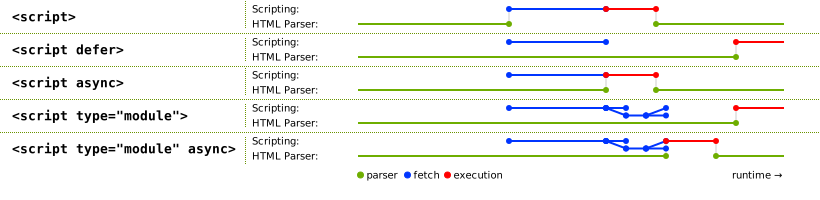
asyncおよびdefer属性は、どのようにスクリプトが評価されるべきかを示す真偽属性である。スクリプトのタイプに応じて、これらの属性を使用して選択できる複数の可能なモードが存在する。
外部のクラシックスクリプトでは、async属性が存在する場合、クラシックスクリプトは解析用に並行してフェッチされ、使用可能になるとすぐに評価される(解析が完了する前に行われる可能性がある)。asyncが存在しないがdefer属性が存在する場合、クラシックスクリプトは、並行してフェッチされ、ページが解析終了したときに評価される。いずれの属性も存在しない場合、スクリプトは、両方が完了するまで解析を阻止して、すぐにフェッチされ評価される。
モジュールスクリプトについて、async属性が存在する場合、モジュールスクリプトとそのすべての依存関係は、構文解析と並行してフェッチされ、モジュールスクリプトは利用可能になるとすぐに(潜在的に構文解析が完了する前に)評価される。そうでなければ、モジュールスクリプトとその依存関係は、構文解析と並行してフェッチされ、ページが解析終了したときに評価される。(defer属性は、モジュールスクリプトに影響しない。)
これは、次の模式図にすべて要約される:
これら属性の正確な処理の詳細は、主に歴史的な理由から、いくぶん自明でない、多くのHTMLの側面を含む。したがって、実装要求は必然的に仕様のあらゆる場所に散在している。The algorithms below describe the core of this processing, but these algorithms reference and are referenced by the parsing rules for script start and end tags in HTML, in foreign content, and in XML, the rules for the document.write() method, the handling of scripting, etc.
document.write()メソッドを使用して挿入するとき、通常はscript要素が実行される(一般に、スクリプトの実行またはHTMLの解析をブロックする)。innerHTML属性とouterHTML属性を使用して挿入する場合、それらは一切実行されない。
たとえasync属性が指定されても、デフォルトとなるブロッキング動作の代わりにdeferの動作をフォールバックするために、deferのみをサポートする(かつasyncをサポートしない)レガシーウェブブラウザーをもたらすため、defer属性は指定されてもよい。
blocking属性はブロッキング属性である。
crossorigin属性はCORS設定属性である。外部クラシックスクリプトの場合、スクリプトが他の生成元から取得されたとき、エラー情報を表示するかどうかを制御する。外部モジュールスクリプトの場合、異なる生成元であれば、モジュールソースの初期フェッチに使用される資格モードを制御する。クラシックとモジュールスクリプトとの両方で、異なる生成元のモジュールのインポートに使用される資格情報モードを制御する。
クラシックスクリプトとは異なり、モジュールスクリプトは、生成元をまたいだフェッチのためにCORSプロトコルを使用する必要がある。
referrerpolicy属性は、リファラーポリシー属性である。これは、外部スクリプトの初期フェッチと、インポートされたモジュールスクリプトのフェッチに使用されるリファラーポリシーを設定する。[REFERRERPOLICY]
インポートされたスクリプトをフェッチするときに使用されているが他のサブリソースを取得していないときに使用されているscriptのリファラーポリシーの例:
< script referrerpolicy = "origin" >
fetch( '/api/data' ); // not fetched with <script>'s referrer policy
import ( './utils.mjs' ); // is fetched with <script>'s referrer policy ("origin" in this case)
</ script > integrity属性は、外部スクリプトの初期フェッチに使用される完全性メタデータを設定する。その値はintegrity属性の要件にマッチしなければならない。[SRI]
fetchpriorityは、フェッチ優先度属性である。外部スクリプトの初期フェッチに使用される優先順位を設定する。
Changing any of these attributes dynamically has no direct effect; these attributes are only used at specific times described in the processing model.
The crossOrigin IDL attribute must reflect the crossorigin content attribute, limited to only known values.
HTMLScriptElement/referrerPolicy
Support in all current engines.
The referrerPolicy IDL attribute must reflect the referrerpolicy content attribute, limited to only known values.
The fetchPriority IDL attribute must reflect the fetchpriority content attribute, limited to only known values.
The async getter steps are:
If this's force async is true, then return true.
If this's async content attribute is present, then return true.
falseを返す。
The async setter steps are:
script.text [ = value ]要素の子テキストコンテンツを返す。
script.text = value要素の子をvalueで指定されたテキストに置き換える。
HTMLScriptElement.supports(type)指定されたtypeがユーザーエージェントによってサポートされるスクリプトタイプである場合、trueを返す。この仕様で可能なスクリプトタイプは"classic"、"module"および"importmap"であるが、将来的に他のタイプが追加される可能性がある。
The text getter steps are to return this's child text content.
The text setter steps are to string replace all with the given value within this.
HTMLScriptElement/supports_static
Support in all current engines.
The static supports(type) method steps are:
type引数は、これらの値と正確に一致する必要がある。ASCII大文字・小文字不区別一致は実行しない。これは、typeコンテンツ属性値の処理方法、およびDOMTokenListのsupports()メソッドの動作とは異なるが、Worker()コンストラクターで使用されるWorkerType列挙体と一致する。
次の例において、2つのscript要素が使用される。1つは外部のクラシックスクリプトを埋め込み、もう1つはデータブロックのようないくつかのデータを含む。
< script src = "game-engine.js" ></ script >
< script type = "text/x-game-map" >
........ U......... e
o............ A.... e
..... A..... AAA.... e
. A.. AAA... AAAAA... e
</ script > この場合のデータは、ビデオゲームのマップを生成するスクリプトによって使用されるかもしれない。しかし、データはそのように使用する必要はない。おそらく実際にマップデータは、ページのマークアップの他の部分に埋め込まれており、ここでデータブロックは、ゲームマップで特定の機能を探しているユーザーを支援するサイトの検索エンジンによって単に使用される。
次のサンプルは、script要素が外部モジュールスクリプトを含めるために使用される方法を示す。また、フォームの出力を初期化する場合に、文書が解析されている間にscript要素がスクリプトを呼び出すために使用されうる方法を示す。
< script >
function calculate( form) {
var price = 52000 ;
if ( form. elements. brakes. checked)
price += 1000 ;
if ( form. elements. radio. checked)
price += 2500 ;
if ( form. elements. turbo. checked)
price += 5000 ;
if ( form. elements. sticker. checked)
price += 250 ;
form. elements. result. value = price;
}
</ script >
< form name = "pricecalc" onsubmit = "return false" onchange = "calculate(this)" >
< fieldset >
< legend > Work out the price of your car</ legend >
< p > Base cost: £52000.</ p >
< p > Select additional options:</ p >
< ul >
< li >< label >< input type = checkbox name = brakes > Ceramic brakes (£1000)</ label ></ li >
< li >< label >< input type = checkbox name = radio > Satellite radio (£2500)</ label ></ li >
< li >< label >< input type = checkbox name = turbo > Turbo charger (£5000)</ label ></ li >
< li >< label >< input type = checkbox name = sticker > "XZ" sticker (£250)</ label ></ li >
</ ul >
< p > Total: £< output name = result ></ output ></ p >
</ fieldset >
< script >
calculate( document. forms. pricecalc);
</ script >
</ form > 次のサンプルは、script要素が外部JavaScriptモジュールスクリプトを含めるために使用される方法を示す。
< script type = "module" src = "app.mjs" ></ script > このモジュール、およびそのすべての依存関係(ソースファイル内のJavaScript import文を通して表現される)は、フェッチされる。一度、全体の結果としてモジュールグラフがインポートされ、かつ文書が解析を完了したら、app.mjsのコンテンツは評価される。
さらに、同じWindow内の他のscript要素からのコードがapp.mjsからモジュールをインポートする場合(たとえばimport "./app.mjs";経由で)、より早いscript要素によって作成された同じJavaScriptモジュールスクリプトがインポートされる。
次の例は、モダンなユーザーエージェント用のJavaScriptモジュールスクリプトと古いユーザーエージェント用のクラシックスクリプトを含める方法を示している:
< script type = "module" src = "app.mjs" ></ script >
< script nomodule defer src = "classic-app-bundle.js" ></ script > JavaScriptモジュールスクリプトをサポートするモダンなユーザーエージェントでは、nomodule属性を持つscript要素は無視され、"module"のtypeをもつscript要素がフェッチされ、評価される(モジュールスクリプトとして)。逆に、古いユーザーエージェントは、"module"のtypeをもつscript要素を、そのスクリプトタイプを未知のものとして無視するが、nomodule属性を実装しないため、他のscript要素を(クラシックスクリプトとして)フェッチして評価することは問題ない。
次のサンプルは、script要素が(たとえばニュースサイト上で)より面白い読書体験を生み出すために、文書のテキストで多数の置換を行うインラインJavaScriptモジュールスクリプトを書くために使用することができる方法を示す:[XKCD1288]
< script type = "module" >
import { walkAllTextNodeDescendants } from "./dom-utils.mjs" ;
const substitutions = new Map([
[ "witnesses" , "these dudes I know" ]
[ "allegedly" , "kinda probably" ]
[ "new study" , "Tumblr post" ]
[ "rebuild" , "avenge" ]
[ "space" , "spaaace" ]
[ "Google glass" , "Virtual Boy" ]
[ "smartphone" , "Pokédex" ]
[ "electric" , "atomic" ]
[ "Senator" , "Elf-Lord" ]
[ "car" , "cat" ]
[ "election" , "eating contest" ]
[ "Congressional leaders" , "river spirits" ]
[ "homeland security" , "Homestar Runner" ]
[ "could not be reached for comment" , "is guilty and everyone knows it" ]
]);
function substitute( textNode) {
for ( const [ before, after] of substitutions. entries()) {
textNode. data = textNode. data. replace( new RegExp( `\\b ${ before} \\b` , "ig" ), after);
}
}
walkAllTextNodeDescendants( document. body, substitute);
</ script > JavaScriptモジュールスクリプトを使用して得られたいくつかの注目すべき機能は、他のJavaScriptモジュール、デフォルトでstrictモード、およびトップレベル宣言がグローバルオブジェクトに新しいプロパティを導入しない方法から関数をインポートする機能を含む。両方の文書の解析が完了し、およびその依存関係(dom-utils.mjs)がフェッチされかつ評価されるまで、このscript要素が文書に表示されるかを問わず、評価されないことにも注意する。
次の例は、JSONモジュールスクリプトをJavaScriptモジュールスクリプト内からインポートする方法を示す:
< script type = "module" >
import peopleInSpace from "http://api.open-notify.org/astros.json" with { type: "json" };
const list = document. querySelector( "#people-in-space" );
for ( const { craft, name } of peopleInSpace. people) {
const li = document. createElement( "li" );
li. textContent = ` ${ name} / ${ craft} ` ;
list. append( li);
}
</ script > モジュールスクリプトのMIMEタイプチェックは厳密である。JSONモジュールスクリプトのフェッチを成功させるために、HTTPレスポンスがJSON MIMEタイプ(Content-Type: text/jsonなど)を持たなければならない。一方、ステートメントのwith { type: "json" }の部分が省略される場合、JavaScriptモジュールスクリプトをインポートすることが目的であるとみなされ、HTTPレスポンスがJavaScript MIMEタイプでないMIMEタイプを持つ場合にフェッチが失敗する。
A script element has several associated pieces of state.
A script element has a parser document, which is either null or a Document, initially null. It is set by the HTML parser and the XML parser on script elements they insert, and affects the processing of those elements. script elements with non-null parser documents are known as parser-inserted.
A script element has a preparation-time document, which is either null or a Document, initially null. It is used to prevent scripts that move between documents during preparation from executing.
A script element has a force async boolean, initially true. It is set to false by the HTML parser and the XML parser on script elements they insert, and when the element gets an async content attribute added.
A script element has a from an external file boolean, initially false. It is determined when the script is prepared, based on the src attribute of the element at that time.
A script element has a ready to be parser-executed boolean, initially false. This is used only used for elements that are also parser-inserted, to let the parser know when to execute the script.
A script element has an already started boolean, initially false.
A script element has a delaying the load event boolean, initially false.
A script element has a type, which is either null, "classic", "module", "importmap", or "speculationrules", initially null. It is determined when the element is prepared, based on the type attribute of the element at that time.
A script element has a result, which is either "uninitialized", null (representing an error), a script, an import map parse result, or a speculation rules parse result. It is initially "uninitialized".
A script element has steps to run when the result is ready, which are a series of steps or null, initially null. To mark as ready a script element el given a result:
Set el's result to result.
If el's steps to run when the result is ready are not null, then run them.
Set el's steps to run when the result is ready to null.
Set el's delaying the load event to false.
A script element el is implicitly potentially render-blocking if el's type is "classic", el is parser-inserted, and el does not have an async or defer attribute.
The cloning steps for script elements given node, copy, and subtree are to set copy's already started to node's already started.
When an async attribute is added to a script element el, the user agent must set el's force async to false.
Whenever a script element el's delaying the load event is true, the user agent must delay the load event of el's preparation-time document.
The script HTML element post-connection steps, given insertedNode, are:
If insertedNode is parser-inserted, then return.
Prepare the script element given insertedNode.
The HTML element post-connection steps only run when the inserted element is still connected, which protects against cases where an earlier-inserted script removes a later-inserted script. For instance:
< script >
const script1 = document. createElement( 'script' );
script1. innerText = `
document.querySelector('#script2').remove();
` ;
const script2 = document. createElement( 'script' );
script2. id = 'script2' ;
script2. textContent = `console.log('script#2 running')` ;
document. body. append( script1, script2);
</ script > Nothing is printed to the console in this example. By the time the HTML element post-connection steps run for the first script that was atomically inserted by append(), it can observe that the second script is already connected to the DOM, and it removes it from the DOM. Because the second script is no longer connected, its HTML element post-connection steps do not run, and it does not get prepared.
The script HTML element removing steps given removedNode are:
If removedNode's result is a speculation rules parse result:
Unregister speculation rules given removedNode's relevant global object and removedNode's result.
Set removedNode's already started to false.
Set removedNode's result to null.
The script children changed steps given changedNode are:
Run the script HTML element post-connection steps, given changedNode.
This has an interesting implication on the execution order of a script element and any newly-inserted child script elements. 次の断片を考えてみる:
< script id = outer-script ></ script >
< script >
const outerScript = document. querySelector( '#outer-script' );
const start = new Text( 'console.log(1);' );
const innerScript = document. createElement( 'script' );
innerScript. textContent = `console.log('inner script executing')` ;
const end = new Text( 'console.log(2);' );
outerScript. append( start, innerScript, end);
// Logs:
// 1
// 2
// inner script executing
</ script > By the time the second script block executes, the outer-script has already been prepared, but because it is empty, it did not execute and therefore is not marked as already started. The atomic insertion of the Text nodes and nested script element have the following effects:
All three child nodes get atomically inserted as children of outer-script; all of their insertion steps run, which have no observable consequences in this case.
The outer-script's children changed steps run, which prepares that script; because its body is now non-empty, this executes the contents of the two Text nodes, in order.
The script HTML element post-connection steps finally run for innerScript, causing its body to execute.
The following attribute change steps, given element, localName, oldValue, value, and namespace, are used for all script elements:
If namespace is not null, then return.
If localName is src, value is not null, and element is connected, then run the script HTML element post-connection steps, given element.
To prepare the script element given a script element el:
If el's already started is true, then return.
Let parser document be el's parser document.
Set el's parser document to null.
This is done so that if parser-inserted script elements fail to run when the parser tries to run them, e.g. because they are empty or specify an unsupported scripting language, another script can later mutate them and cause them to run again.
If parser document is non-null and el does not have an async attribute, then set el's force async to true.
This is done so that if a parser-inserted script element fails to run when the parser tries to run it, but it is later executed after a script dynamically updates it, it will execute in an async fashion even if the async attribute isn't set.
Let source text be el's child text content.
If el has no src attribute, and source text is the empty string, then return.
If el is not connected, then return.
If any of the following are true:
el has a type attribute whose value is the empty string;
el has no type attribute but it has a language attribute and that attribute's value is the empty string; or
then let the script block's type string for this script element be "text/javascript".
Otherwise, if el has a type attribute, then let the script block's type string be the value of that attribute with leading and trailing ASCII whitespace stripped.
Otherwise, el has a non-empty language attribute; let the script block's type string be the concatenation of "text/" and the value of el's language attribute.
The language attribute is never conforming, and is always ignored if there is a type attribute present.
If the script block's type string is a JavaScript MIME type essence match, then set el's type to "classic".
Otherwise, if the script block's type string is an ASCII case-insensitive match for the string "module", then set el's type to "module".
Otherwise, if the script block's type string is an ASCII case-insensitive match for the string "importmap", then set el's type to "importmap".
Otherwise, if the script block's type string is an ASCII case-insensitive match for the string "speculationrules", then set el's type to "speculationrules".
Otherwise, return. (No script is executed, and el's type is left as null.)
If parser document is non-null, then set el's parser document back to parser document and set el's force async to false.
Set el's already started to true.
Set el's preparation-time document to its node document.
If parser document is non-null, and parser document is not equal to el's preparation-time document, then return.
If scripting is disabled for el, then return.
The definition of scripting is disabled means that, amongst others, the following scripts will not execute: scripts in XMLHttpRequest's responseXML documents, scripts in DOMParser-created documents, scripts in documents created by XSLTProcessor's transformToDocument feature, and scripts that are first inserted by a script into a Document that was created using the createDocument() API. [XHR] [DOMPARSING] [XSLTP] [DOM]
If el has a nomodule content attribute and its type is "classic", then return.
This means specifying nomodule on a module script has no effect; the algorithm continues onward.
Let cspType be "script speculationrules" if el's type is "speculationrules"; otherwise, "script".
If el does not have a src content attribute, and the Should element's inline behavior be blocked by Content Security Policy? algorithm returns "Blocked" when given el, cspType, and source text, then return. [CSP]
If el has an event attribute and a for attribute, and el's type is "classic":
Let for be the value of el's for attribute.
Let event be the value of el's event attribute.
Strip leading and trailing ASCII whitespace from event and for.
If for is not an ASCII case-insensitive match for the string "window", then return.
If event is not an ASCII case-insensitive match for either the string "onload" or the string "onload()", then return.
If el has a charset attribute, then let encoding be the result of getting an encoding from the value of the charset attribute.
If el does not have a charset attribute, or if getting an encoding failed, then let encoding be el's node document's the encoding.
If el's type is "module", this encoding will be ignored.
Let classic script CORS setting be the current state of el's crossorigin content attribute.
Let module script credentials mode be the CORS settings attribute credentials mode for el's crossorigin content attribute.
Let cryptographic nonce be el's [[CryptographicNonce]] internal slot's value.
If el has an integrity attribute, then let integrity metadata be that attribute's value.
Otherwise, let integrity metadata be the empty string.
Let referrer policy be the current state of el's referrerpolicy content attribute.
Let fetch priority be the current state of el's fetchpriority content attribute.
Let parser metadata be "parser-inserted" if el is parser-inserted, and "not-parser-inserted" otherwise.
Let options be a script fetch options whose cryptographic nonce is cryptographic nonce, integrity metadata is integrity metadata, parser metadata is parser metadata, credentials mode is module script credentials mode, referrer policy is referrer policy, and fetch priority is fetch priority.
Let settings object be el's node document's relevant settings object.
If el has a src content attribute:
If el's type is "importmap" or "speculationrules", then queue an element task on the DOM manipulation task source given el to fire an event named error at el, and return.
External import maps and speculation rules are not currently supported. See WICG/import-maps issue #235 and WICG/nav-speculation issue #348 for discussions on adding support.
Let src be the value of el's src attribute.
If src is the empty string, then queue an element task on the DOM manipulation task source given el to fire an event named error at el, and return.
Set el's from an external file to true.
Let url be the result of encoding-parsing a URL given src, relative to el's node document.
If url is failure, then queue an element task on the DOM manipulation task source given el to fire an event named error at el, and return.
If el is potentially render-blocking, then block rendering on el.
Set el's delaying the load event to true.
If el is currently render-blocking, then set options's render-blocking to true.
Let onComplete given result be the following steps:
Mark as ready el given result.
Switch on el's type:
classic"Fetch a classic script given url, settings object, options, classic script CORS setting, encoding, and onComplete.
module"If el does not have an integrity attribute, then set options's integrity metadata to the result of resolving a module integrity metadata with url and settings object.
Fetch an external module script graph given url, settings object, options, and onComplete.
For performance reasons, user agents may start fetching the classic script or module graph (as defined above) as soon as the src attribute is set, instead, in the hope that el will become connected (and that the crossorigin attribute won't change value in the meantime). Either way, once el becomes connected, the load must have started as described in this step. If the UA performs such prefetching, but el never becomes connected, or the src attribute is dynamically changed, or the crossorigin attribute is dynamically changed, then the user agent will not execute the script so obtained, and the fetching process will have been effectively wasted.
If el does not have a src content attribute:
Let base URL be el's node document's document base URL.
Switch on el's type:
classic"Let script be the result of creating a classic script using source text, settings object, base URL, and options.
Mark as ready el given script.
module"Set el's delaying the load event to true.
If el is potentially render-blocking:
Block rendering on el.
Set options's render-blocking to true.
Fetch an inline module script graph, given source text, base URL, settings object, options, and with the following steps given result:
Queue an element task on the networking task source given el to perform the following steps:
Mark as ready el given result.
Queueing a task here means that, even if the inline module script has no dependencies or synchronously results in a parse error, we won't proceed to execute the script element synchronously.
importmap"Let result be the result of creating an import map parse result given source text and base URL.
Mark as ready el given result.
speculationrules"Let result be the result of creating a speculation rules parse result given source text and el's node document.
Mark as ready el given result.
If el's type is "classic" and el has a src attribute, or el's type is "module":
If el has an async attribute or el's force async is true:
Let scripts be el's preparation-time document's set of scripts that will execute as soon as possible.
Append el to scripts.
Set el's steps to run when the result is ready to the following:
Remove el from scripts.
Otherwise, if el is not parser-inserted:
Let scripts be el's preparation-time document's list of scripts that will execute in order as soon as possible.
Append el to scripts.
Set el's steps to run when the result is ready to the following:
If scripts[0] is not el, then abort these steps.
While scripts is not empty, and scripts[0]'s result is not "uninitialized":
Execute the script element scripts[0].
Remove scripts[0].
Otherwise, if el has a defer attribute or el's type is "module":
Append el to its parser document's list of scripts that will execute when the document has finished parsing.
Set el's steps to run when the result is ready to the following: set el's ready to be parser-executed to true. (The parser will handle executing the script.)
Otherwise:
Set el's parser document's pending parsing-blocking script to el.
Block rendering on el.
Set el's steps to run when the result is ready to the following: set el's ready to be parser-executed to true. (The parser will handle executing the script.)
Otherwise:
If all of the following are true:
classic";then:
Set el's parser document's pending parsing-blocking script to el.
Set el's ready to be parser-executed to true. (The parser will handle executing the script.)
Otherwise, immediately execute the script element el, even if other scripts are already executing.
Each Document has a pending parsing-blocking script, which is a script element or null, initially null.
Each Document has a set of scripts that will execute as soon as possible, which is a set of script elements, initially empty.
Each Document has a list of scripts that will execute in order as soon as possible, which is a list of script elements, initially empty.
Each Document has a list of scripts that will execute when the document has finished parsing, which is a list of script elements, initially empty.
If a script element that blocks a parser gets moved to another Document before it would normally have stopped blocking that parser, it nonetheless continues blocking that parser until the condition that causes it to be blocking the parser no longer applies (e.g., if the script is a pending parsing-blocking script because the original Document has a style sheet that is blocking scripts when it was parsed, but then the script is moved to another Document before the blocking style sheet(s) loaded, the script still blocks the parser until the style sheets are all loaded, at which time the script executes and the parser is unblocked).
To execute the script element given a script element el:
Let document be el's node document.
If el's preparation-time document is not equal to document, then return.
Unblock rendering on el.
If el's result is null, then fire an event named error at el, and return.
If el's from an external file is true, or el's type is "module", then increment document's ignore-destructive-writes counter.
Switch on el's type:
classic"Let oldCurrentScript be the value to which document's currentScript object was most recently set.
If el's root is not a shadow root, then set document's currentScript attribute to el. Otherwise, set it to null.
This does not use the in a document tree check, as el could have been removed from the document prior to execution, and in that scenario currentScript still needs to point to it.
Run the classic script given by el's result.
Set document's currentScript attribute to oldCurrentScript.
module"Assert: document's currentScript attribute is null.
Run the module script given by el's result.
importmap"Register an import map given el's relevant global object and el's result.
speculationrules"Register speculation rules given el's relevant global object and el's result.
Decrement the ignore-destructive-writes counter of document, if it was incremented in the earlier step.
If el's from an external file is true, then fire an event named load at el.
User agents are not required to support JavaScript. This standard needs to be updated if a language other than JavaScript comes along and gets similar wide adoption by web browsers. Until such a time, implementing other languages is in conflict with this standard, given the processing model defined for the script element.
サーバーは、Updates to ECMAScript Media Typesに従って、JavaScriptリソースにtext/javascriptを使用すべきである。サーバーは、JavaScriptリソースに他のJavaScript MIMEタイプを使用すべきではなく、非JavaScript MIMEタイプを使用してはならない。[RFC9239]
For external JavaScript resources, MIME type parameters in `Content-Type` headers are generally ignored. (In some cases the `charset` parameter has an effect.) However, for the script element's type attribute they are significant; it uses the JavaScript MIME type essence match concept.
For example, scripts with their type attribute set to "text/javascript; charset=utf-8" will not be evaluated, even though that is a valid JavaScript MIME type when parsed.
Furthermore, again for external JavaScript resources, special considerations apply around `Content-Type` header processing as detailed in the prepare the script element algorithm and Fetch. [FETCH]
script要素のコンテンツの制約この節で説明されるかなり奇妙な制約を回避する最も簡単で安全な方法は、これらのシーケンスがスクリプト内でリテラル(たとえば文字列、正規表現、またはコメントなど)に出現するとき、ASCII大文字・小文字不区別の一致で"<!--"を"<\!--"に、"<script"を"<\script"に、および"</script"を"<\/script"に常にエスケープし、式の中でそのような構造体を使用するコードを記述しないようにすることである。この節の制限がトリガーになりやすい落とし穴を回避する:すなわち、歴史的な理由のために、HTMLにおけるscriptブロックの解析は、これらのシーケンスを考えた場合に直観的でない働きをする奇妙で風変わりな慣習である。
script要素の子孫テキストコンテンツは、Unicodeの文字セットである次のABNFのscript生成物と一致しなければならない。[ABNF]
script = outer * ( comment-open inner comment-close outer )
outer = < any string that doesn 't contain a substring that matches not-in-outer >
not-in-outer = comment-open
inner = < any string that doesn 't contain a substring that matches not-in-inner >
not-in-inner = comment-close / script-open
comment-open = "<!--"
comment-close = "-->"
script-open = "<" s c r i p t tag-end
s = %x0053 ; U+0053 LATIN CAPITAL LETTER S
s =/ %x0073 ; U+0073 LATIN SMALL LETTER S
c = %x0043 ; U+0043 LATIN CAPITAL LETTER C
c =/ %x0063 ; U+0063 LATIN SMALL LETTER C
r = %x0052 ; U+0052 LATIN CAPITAL LETTER R
r =/ %x0072 ; U+0072 LATIN SMALL LETTER R
i = %x0049 ; U+0049 LATIN CAPITAL LETTER I
i =/ %x0069 ; U+0069 LATIN SMALL LETTER I
p = %x0050 ; U+0050 LATIN CAPITAL LETTER P
p =/ %x0070 ; U+0070 LATIN SMALL LETTER P
t = %x0054 ; U+0054 LATIN CAPITAL LETTER T
t =/ %x0074 ; U+0074 LATIN SMALL LETTER T
tag-end = %x0009 ; U+0009 CHARACTER TABULATION (tab)
tag-end =/ %x000A ; U+000A LINE FEED (LF)
tag-end =/ %x000C ; U+000C FORM FEED (FF)
tag-end =/ %x0020 ; U+0020 SPACE
tag-end =/ %x002F ; U+002F SOLIDUS (/)
tag-end =/ %x003E ; U+003E GREATER-THAN SIGN (>) script要素がスクリプト文書を含む場合、下記の節で記述されるように、要素のコンテンツのさらなる制約がある。
次のスクリプトは、この問題を示している。このように、文字列が含まれているスクリプトがあるとする:
const example = 'Consider this string: <!-- <script>' ;
console. log( example); これがscriptブロックで直接この文字列を入れていた場合、上記の制限に違反しない。
< script >
const example = 'Consider this string: <!-- <script>' ;
console. log( example);
</ script > しかし、より大きな問題かつ、スクリプトがそれらの制限に違反しない理由は、実際にスクリプトが奇妙に解析されるだろうということである。上記のスクリプトブロックは終了していない。それは、実際には依然としてscriptブロックの一部であるこのスニペットにおいて"</script>"終了タグのように見えるものである。(スクリプトが終了していないため)スクリプトは実行しない。スクリプトが何らかの形で実行した場合、次のようにマークアップが見えた場合、(ここで強調される)スクリプトが妥当なJavaScriptでないので、スクリプトは失敗するだろう:
< script >
const example = 'Consider this string: <!-- <script>' ;
console. log( example);
</ script >
<!-- despite appearances, this is actually part of the script still! -->
< script >
... // this is the same script block still...
</ script > ここで起こっていることはレガシーな理由のために、HTMLにおけるscript要素で"<!--"および"<script"文字列は、パーサーがブロックを閉じる検討するためにバランスをとる必要がある。
この節の最初に述べたように、問題の文字列をエスケープすることによって、問題は完全に回避されている:
< script >
// Note: `\x3C` is an escape sequence for `<`.
const example = 'Consider this string: \x3C!-- \x3Cscript>' ;
console. log( example);
</ script >
<!-- this is just a comment between script blocks -->
< script >
... // this is a new script block
</ script > 次の例のように、これらのシーケンスは自然にスクリプト式で出現可能である:
if ( x<!-- y) { ... }
if ( player< script ) { ... } このような場合、文字はエスケープすることはできないが、シーケンスが発生しないように式は次のように書き換えることができる:
if ( x < !-- y) { ... }
if ( !-- y > x) { ... }
if ( ! ( -- y) > x) { ... }
if ( player < script) { ... }
if ( script > player) { ... } これを行うとはまた、同様に様々な落とし穴を回避する:関連する歴史的な理由のために、クラシックスクリプトで文字列"<!--"は、"//"のように、実際には行コメントの開始として扱われる。
script要素のsrc属性が指定される場合、もしあれば、script要素のコンテンツは、要素のコンテンツから分割されるようなtext IDL属性値でなければならず、文字セットがUnicodeである下記のABNFでdocumentation生成物と一致しなければならない。[ABNF]
documentation = * ( * ( space / tab / comment ) [ line-comment ] newline )
comment = slash star * ( not-star / star not-slash ) 1* star slash
line-comment = slash slash * not-newline
; characters
tab = %x0009 ; U+0009 CHARACTER TABULATION (tab)
newline = %x000A ; U+000A LINE FEED (LF)
space = %x0020 ; U+0020 SPACE
star = %x002A ; U+002A ASTERISK (*)
slash = %x002F ; U+002F SOLIDUS (/)
not-newline = %x0000-0009 / %x000B-10FFFF
; a scalar value other than U+000A LINE FEED (LF)
not-star = %x0000-0029 / %x002B-10FFFF
; a scalar value other than U+002A ASTERISK (*)
not-slash = %x0000-002E / %x0030-10FFFF
; a scalar value other than U+002F SOLIDUS (/) これは、JavaScriptのコメントで要素のコンテンツを設置するものと一致する。
この要求は、script要素のコンテンツの構文上に先の制約に加えて存在する。
以下は、依然として外部スクリプトファイルを参照する間に文書内で、著者がライセンス情報やAPI情報のような文書を含むことを許可する。src属性を提供する一方で、偶然にも著者が有効なスクリプトのように見えるものが含まないように、構文は制約される。
< script src = "cool-effects.js" >
// create new instances using:
// var e = new Effect();
// start the effect using .play, stop using .stop:
// e.play();
// e.stop();
</ script > script elements and XSLTAvoid using client-side XSLT in browsers. The browser implementations of XSLT are highly susceptible to memory safety vulnerabilities, and the web platform has evolved toward JavaScript as the safe replacement. For these reasons, this feature is in the process of being removed from the web platform. (これは何年もかかる長いプロセスである。)
この節は非規範的である。
This specification does not define how XSLT interacts with the script element. However, in the absence of another specification actually defining this, here are some guidelines for implementers, based on existing implementations:
When an XSLT transformation program is triggered by an <?xml-stylesheet?> processing instruction and the browser implements a direct-to-DOM transformation, script elements created by the XSLT processor need to have its parser document set correctly, and run in document order (modulo scripts marked defer or async), immediately, as the transformation is occurring.
The XSLTProcessor transformToDocument() method adds elements to a Document object with a null browsing context, and, accordingly, any script elements they create need to have their already started set to true in the prepare the script element algorithm and never get executed (scripting is disabled). Such script elements still need to have their parser document set, though, such that their async IDL attribute will return false in the absence of an async content attribute.
The XSLTProcessor transformToFragment() method needs to create a fragment that is equivalent to one built manually by creating the elements using document.createElementNS(). For instance, it needs to create script elements with null parser document and with their already started set to false, so that they will execute when the fragment is inserted into a document.
The main distinction between the first two cases and the last case is that the first two operate on Documents and the last operates on a fragment.
noscript要素Support in all current engines.
noscript要素が存在しない場合、HTML文書のhead要素内。noscript要素が存在しない場合、HTML文書でフレージングコンテンツが期待される場所。noscript要素がない場合、select要素またはoptgroup要素の子孫として。head要素内で:任意の順で、0個以上のlink要素、0個以上のstyle要素、0個以上のmeta要素。head要素外で:透過的。ただし、noscript要素の子孫を持ってはならない。HTMLElementを使用する。noscript要素は、スクリプトが有効である場合は何も表さず、スクリプトが無効である場合は要素の子を表す。これは、文書が解析される方法に影響を与えることによって、スクリプトをサポートするユーザーエージェントとサポートしないユーザーエージェントに異なるマークアップを提示するために使用される。
HTML文書で使用する場合、許可されるコンテンツモデルは次のとおり:
head要素内のnoscript要素に対してhead要素内のnoscript要素に対してnoscript要素は、テキストのみを含まなければならない。ただし、context要素としてnoscript要素をもつHTML断片解析アルゴリズムを呼び出し、かつinputとしてテキストコンテンツを呼び出すと、noscript要素の子であった場合に適合するだろう、link、style、meta要素のみからなるノードのリストをもたらさなければならず、かつ解析エラーでない場合を除く。
head要素外のnoscript要素に対してnoscript要素のコンテンツモデルは透過的であり、同時にnoscript要素がnoscript要素を持ってはならない(noscript要素を入れ子にできない)追加制限がある。
head要素外のnoscript要素に対してnoscript要素はテキストのみを含まなければならない。ただしテキストは、次のアルゴリズムがnoscript要素およびscript要素をもたない適合文書をもたらすものでなければならず、アルゴリズムでステップは例外を投げるまたはHTMLパーサーに解析エラーを起こさないようにしなければならない:
歴史的な理由により、パーサーが呼び出されたときにスクリプトモードが無効かどうかに基づくHTMLパーサーによってnoscript要素が異なる方法で処理されるので、これらのすべてのこじつけが必要とされる。
noscript要素はHTML構文でのみ有効だが、XML構文では効果がない。スクリプトが有効である場合、この要素が動作する方法は、基本的にパーサーを"オフ"にすることであり、要素の内容は、実際の要素としてではなく純粋にテキストとして扱われているのである。XMLは、これを実行するためのメカニズムを定義しない。
The noscript element has no other requirements. In particular, children of the noscript element are not exempt from form submission, scripting, and so forth, even when scripting is enabled for the element.
次の例において、noscript要素は、スクリプトのフォールバックを提供するために使用される。
< form action = "calcSquare.php" >
< p >
< label for = x > Number</ label > :
< input id = "x" name = "x" type = "number" >
</ p >
< script >
var x = document. getElementById( 'x' );
var output = document. createElement( 'p' );
output. textContent = 'Type a number; it will be squared right then!' ;
x. form. appendChild( output);
x. form. onsubmit = function () { return false ; }
x. oninput = function () {
var v = x. valueAsNumber;
output. textContent = v + ' squared is ' + v * v;
};
</ script >
< noscript >
< input type = submit value = "Calculate Square" >
</ noscript >
</ form > スクリプトが無効である場合、ボタンは、サーバー側で計算を行うために表示される。スクリプトが有効である場合、代わりに値がその場で計算される。
noscript要素は鈍器である。時には、スクリプトを有効にするかもしれないが、何らかの理由でページのスクリプトが失敗するかもしれない。このような理由から、次の例のように、noscript要素の使用を避ける代わりに、その場でスクリプトのないページからスクリプト化されたページにページを変更するスクリプトを設計することが一般により良い:
< form action = "calcSquare.php" >
< p >
< label for = x > Number</ label > :
< input id = "x" name = "x" type = "number" >
</ p >
< input id = "submit" type = submit value = "Calculate Square" >
< script >
var x = document. getElementById( 'x' );
var output = document. createElement( 'p' );
output. textContent = 'Type a number; it will be squared right then!' ;
x. form. appendChild( output);
x. form. onsubmit = function () { return false ; }
x. oninput = function () {
var v = x. valueAsNumber;
output. textContent = v + ' squared is ' + v * v;
};
var submit = document. getElementById( 'submit' );
submit. parentNode. removeChild( submit);
</ script >
</ form > template要素Support in all current engines.
Support in all current engines.
span属性を持たないcolgroup要素の子として。for — 既存のコンテンツを更新するshadowrootmode — 宣言的なシャドウルートのストリーミングを有効にするshadowrootdelegatesfocus — 宣言的なシャドウルートに代理フォーカスを設定するshadowrootserializable — 宣言的なシャドウルートにシリアライズ可能を設定するshadowrootslotassignment — 宣言的なシャドウルートにスロット割り当てを設定するshadowrootclonable — 宣言的なシャドウルートにクローン可能を設定するshadowrootcustomelementregistry — 宣言的なシャドウルートを有効にして、カスタム要素レジストリを使用することを示す[Exposed =Window ]
interface HTMLTemplateElement : HTMLElement {
[HTMLConstructor ] constructor ();
readonly attribute DocumentFragment content ;
[CEReactions , Reflect="for"] attribute DOMString htmlFor ;
[CEReactions ] attribute DOMString shadowRootMode ;
[CEReactions , Reflect ] attribute boolean shadowRootDelegatesFocus ;
[CEReactions , Reflect ] attribute boolean shadowRootSerializable ;
[CEReactions ] attribute DOMString shadowRootSlotAssignment ;
[CEReactions , Reflect ] attribute boolean shadowRootClonable ;
[CEReactions , Reflect ] attribute DOMString shadowRootCustomElementRegistry ;
};template要素は、複製され、スクリプトによって文書に挿入できるHTMLの断片を宣言するために使用される。
forコンテンツ属性は、コンテンツを挿入する位置(<?marker>)、または置き換える範囲の開始位置(<?start>)を示すProcessingInstructionを識別する。この属性が指定されている場合、この属性の値は、template要素と同じツリー内にある<?marker>または<?start> ProcessingInstructionのname属性の値と同じでなければならない。
shadowrootmodeコンテンツ属性は、次のキーワードおよび状態をもつ列挙属性である:
| キーワード | 状態 | 概要 |
|---|---|---|
open | Open | template要素は、開いた宣言的なシャドウルートを表す。 |
closed | Closed | template要素は、閉じた宣言的なシャドウルートを表す。 |
shadowrootmode属性の無効値のデフォルトおよび欠損値のデフォルトは、両方ともnone状態である。
shadowrootdelegatesfocusコンテンツ属性は、真偽属性である。
shadowrootserializableコンテンツ属性は、真偽属性である。
shadowrootslotassignmentコンテンツ属性は、次のキーワードおよび状態をもつ列挙属性である:
| キーワード | 状態 | 概要 |
|---|---|---|
named | Named | 宣言型シャドウルートは、名前付きスロット割り当てを使用する。 |
manual | Manual | 宣言的なシャドウルートは、手動のスロット割り当てを使用する。 |
shadowrootslotassignment属性の不正値のデフォルトと欠損値のデフォルトの両方は、Named状態である。
shadowrootclonableコンテンツ属性は、真偽属性である。
shadowrootcustomelementregistryコンテンツ属性は、真偽属性である。
template要素のテンプレートコンテンツは、要素自体の子ではない。
DOM操作の結果として、template要素がTextノードと要素ノードを含むことも可能である。しかし、この要素のコンテンツモデルはnothingとして定義されるため、すべてのものはtemplate要素のコンテンツモデルに違反する。
たとえば、次の文書を考えてみる:
<!doctype html>
< html lang = "en" >
< head >
< title > Homework</ title >
< body >
< template id = "template" >< p > Smile!</ p ></ template >
< script >
let num = 3 ;
const fragment = document. getElementById( 'template' ). content. cloneNode( true );
while ( num-- > 1 ) {
fragment. firstChild. before( fragment. firstChild. cloneNode( true ));
fragment. firstChild. textContent += fragment. lastChild. textContent;
}
document. body. appendChild( fragment);
</ script >
</ html > templateにおけるp要素は、DOM内のtemplateの子ではない。template要素のcontent IDL属性によって返されるDocumentFragmentの子である。
スクリプトがtemplate要素のappendChild()を呼び出すと、(他の要素の場合と同様に)template要素に子要素が追加される。しかし、そのようにすることは、template要素のコンテンツモデルに違反することになる。
template.contentSupport in all current engines.
Each template element has an associated DocumentFragment object that is its template contents. The template contents have no conformance requirements. When a template element is created, the user agent must run the following steps to establish the template contents:
Let document be the template element's node document's appropriate template contents owner document.
Create a DocumentFragment object whose node document is document and host is the template element.
Set the template element's template contents to the newly created DocumentFragment object.
A Document document's appropriate template contents owner document is the Document returned by the following algorithm:
If document is not a Document created by this algorithm:
If document does not yet have an associated inert template document:
Let newDocument be the result of creating a document that implements Document, given document's relevant realm; its browsing context is null. This is "a Document created by this algorithm" for the purposes of the step above.
If document is an HTML document, then mark newDocument as an HTML document also.
Set document's associated inert template document to newDocument.
Set document to document's associated inert template document.
Each Document not created by this algorithm thus gets a single Document to act as its proxy for owning the template contents of all its template elements, so that they aren't in a browsing context and thus remain inert (e.g. scripts do not run). Meanwhile, template elements inside Document objects that are created by this algorithm just reuse the same Document owner for their contents.
Return document.
Each template element has an associated Element-or-DocumentFragment-or-null insertion target, which is initially null.
Each template element has an associated ProcessingInstruction-or-null insertion start marker and insertion end marker, which are initially null.
The adopting steps (with node and oldDocument as parameters) for template elements are the following:
Let document be node's node document's appropriate template contents owner document.
node's node document is the Document object that node was just adopted into.
Adopt node's template contents (a DocumentFragment object) into document.
The content getter steps are:
Assert: this's template contents is not a ShadowRoot node.
Return this's template contents.
The shadowRootMode IDL attribute must reflect the shadowrootmode content attribute, limited to only known values.
The shadowRootSlotAssignment IDL attribute must reflect the shadowrootslotassignment content attribute, limited to only known values.
The shadowRootCustomElementRegistry IDL attribute intentionally does not have a boolean type so it can be extended.
The cloning steps for template elements given node, copy, and subtree are:
If subtree is false, then return.
For each child of node's template contents's children, in tree order: clone a node given child with document set to copy's template contents's node document, subtree set to true, and parent set to copy's template contents.
To prepare content patching given an Element or DocumentFragment scope and a template element template:
Let markerName be template's for attribute's value.
If markerName is the empty string, then return false.
Let (start, end) be the result of find markers given scope and markerName.
If start is null, then return false.
Set template's insertion target to start's parent.
Set template's insertion start marker to start.
Set template's insertion end marker to end.
If start is end, then return true.
Let removedNodes be an empty list.
Let currentNode be start's next sibling.
While currentNode is not null:
If currentNode is end, then break.
Append currentNode to removedNodes.
Set currentNode to currentNode's next sibling.
For each node of removedNodes:
Return true.
To find markers given a node scope and a string name:
For each descendant of scope's descendants, in tree order:
If descendant is not a ProcessingInstruction node, then continue.
If the result of getting a processing instruction attribute given descendant and "name" is not name, then continue.
If descendant's target is "marker", then return (descendant, descendant).
If descendant's target is "start":
Let start be descendant.
Let nestingLevel be 0.
Let sibling be start's next sibling.
While sibling is not null:
If sibling is a ProcessingInstruction node:
Set sibling to sibling's next sibling.
Return (start, null).
No matching <?end> was found, which is interpreted as a range from start to the end of its parent.
Return (null, null).
この例において、スクリプトは、手動でマークアップから構造を生成する代わりに要素構造を提供するためにtemplateを使用して、データ構造からデータをもつテーブル4列に投入する。
<!DOCTYPE html>
< html lang = 'en' >
< title > Cat data</ title >
< script >
// Data is hard-coded here, but could come from the server
var data = [
{ name: 'Pillar' , color: 'Ticked Tabby' , sex: 'Female (neutered)' , legs: 3 },
{ name: 'Hedral' , color: 'Tuxedo' , sex: 'Male (neutered)' , legs: 4 },
];
</ script >
< table >
< thead >
< tr >
< th > Name < th > Color < th > Sex < th > Legs
< tbody >
< template id = "row" >
< tr >< td >< td >< td >< td >
</ template >
</ table >
< script >
var template = document. querySelector( '#row' );
for ( var i = 0 ; i < data. length; i += 1 ) {
var cat = data[ i];
var clone = template. content. cloneNode( true );
var cells = clone. querySelectorAll( 'td' );
cells[ 0 ]. textContent = cat. name;
cells[ 1 ]. textContent = cat. color;
cells[ 2 ]. textContent = cat. sex;
cells[ 3 ]. textContent = cat. legs;
template. parentNode. appendChild( clone);
}
</ script > この例は、templateのコンテンツにcloneNode()を使用する。それは、同じことをするdocument.importNode()を等価的に使用することもできる。ノード文書が更新されるときに、この2つのAPIの唯一の違いがある。ノードがappendChild()で付加される場合にcloneNode()とともに更新され、ノードがクローン化されるときに、document.importNode()とともに更新される。
この例では、ページのメインコンテンツが配信された後、for属性をもつtemplate要素を使用してselect要素に国のリストを取り込む。
<!DOCTYPE html>
< html lang = "en" >
< head >
< title > Out-of-order countries</ title >
< style >
# countries : empty {
opacity : 0 ;
}
</ style >
</ head >
< body >
< select id = countries > <?marker name="country-options"?> </ select >
...
< template for = "country-options" >< option > Antigua</ option > ...</ template >
</ body >
</ html > <?marker?>処理命令は、後のtemplate要素のoption要素に置き換えられる。select要素は、値が設定されるまで透過的である。
この例では、for属性をもつtemplate要素が使用されており、文書を順不同でストリーミングするために、まず高速な静的コンテンツを送り、そしてサーバー上で非同期的に利用可能になった時点で計算された推奨情報を送信している。
<!DOCTYPE html>
< html lang = "en" >
< head >
< title > Async recommendation engine</ title >
< style >
aside {
/* position the aside where it can grow without causing layout shift or obscuring other content */
}
aside : has ( . placeholder ) {
/* style the placeholder content */
}
</ style >
</ head >
< body >
< h1 > How to train your cat</ h1 >
< p > Set realistic goals and don't expect your cat to make a perfect cup of tea
on the first try.</ p >
< aside >
< p > Recommended reading:</ p >
<?start name="recommended">
< ul class = "placeholder" >
< li > ...</ li >
< li > ...</ li >
< li > ...</ li >
</ ul >
<?end>
</ aside >
< p > ...</ p >
< p > Now sit back and enjoy your tea with your cat.</ p >
<!-- The server has a potentially long delay at this point. -->
< template for = "recommended" >
< ul >
< li > Cat or butler, which is right for you?</ li >
< li > Rewarding good cat behavior</ li >
< li > Kettles considered harmful</ li >
</ ul >
</ template >
</ body >
</ html > <?start name="recommended">と<?end>との間のコンテンツは、 templateのコンテンツに置き換えられる。新しいコンテンツはclass="placeholder"を使用しないため、プレースホルダーのスタイルは適用されなくなる。
template elements with XSLT and XPathAvoid using client-side XSLT in browsers. The browser implementations of XSLT are highly susceptible to memory safety vulnerabilities, and the web platform has evolved toward JavaScript as the safe replacement. For these reasons, this feature is in the process of being removed from the web platform. (これは何年もかかる長いプロセスである。)
この節は非規範的である。
This specification does not define how XSLT and XPath interact with the template element. However, in the absence of another specification actually defining this, here are some guidelines for implementers, which are intended to be consistent with other processing described in this specification:
An XSLT processor based on an XML parser that acts as described in this specification needs to act as if template elements contain as descendants their template contents for the purposes of the transform.
An XSLT processor that outputs a DOM needs to ensure that nodes that would go into a template element are instead placed into the element's template contents.
XPath evaluation using the XPath DOM API when applied to a Document parsed using the HTML parser or the XML parser described in this specification needs to ignore template contents.
slot要素Support in all current engines.
Support in all current engines.
name — シャドウツリースロットの名前[Exposed =Window ]
interface HTMLSlotElement : HTMLElement {
[HTMLConstructor ] constructor ();
[CEReactions , Reflect ] attribute DOMString name ;
sequence <Node > assignedNodes (optional AssignedNodesOptions options = {});
sequence <Element > assignedElements (optional AssignedNodesOptions options = {});
undefined assign ((Element or Text )... nodes );
};
dictionary AssignedNodesOptions {
boolean flatten = false ;
};slot要素は、スロットを定義する。典型的にシャドウツリーに使用される。もしあれば、slot要素はその割り当てられるノードを表し、そうでなければそのコンテンツを表す。
nameコンテンツ属性は、任意の文字列値を含んでもよい。これはスロットの名前を表す。
slot属性は、別の要素にスロットを割り当てるために使用される:name属性をもつslot要素は、その要素がそのname属性の値と一致する値を持つslot属性を持ち、かつslot要素がその対応するslot属性値を持つルートのホストを持つシャドウツリーの子である場合、任意の要素が割り当てられる名前付きスロットを作成する。
slot.nameSupport in all current engines.
slot.assignedNodes()Support in all current engines.
slot.assignedNodes({ flatten: true })slot要素が存在しなくなるまで、再帰的に、slot要素に遭遇するのと同じものを返す。slot.assignedElements()HTMLSlotElement/assignedElements
Support in all current engines.
slot.assignedElements({ flatten: true })assignedNodes({ flatten: true })と同じものを返す。slot.assign(...nodes)slotの手動で割り当てられたノードを、指定されたnodesに設定する。
slot要素は、manually assigned nodesを持ち、これは、 assign()によって設定されたslottablesの順序付きセットである。このセットは、最初は空である。
manually assigned nodesセットは、スクリプトから直接アクセスできないため、slottablesへの弱い参照を使用して実装することができる。
The assignedNodes(options) method steps are:
If options["flatten"] is false, then return this's assigned nodes.
Return the result of finding flattened slottables with this.
The assignedElements(options) method steps are:
If options["flatten"] is false, then return this's assigned nodes, filtered to contain only Element nodes.
Return the result of finding flattened slottables with this, filtered to contain only Element nodes.
Support in all current engines.
The assign(...nodes) method steps are:
For each node of this's manually assigned nodes, set node's manual slot assignment to null.
Let nodesSet be a new ordered set.
For each node of nodes:
If node's manual slot assignment refers to a slot, then remove node from that slot's manually assigned nodes.
Set node's manual slot assignment to this.
Append node to nodesSet.
Set this's manually assigned nodes to nodesSet.
Run assign slottables for a tree for this's root.