

The User Interface (UI) is the front-end layer of a software system that enables interaction between the user and the application. It acts as a bridge between the system’s functionality and the end user.
- Provides an easy, intuitive, and user-friendly experience.
- Includes input controls, buttons, menus, forms, and screens.
- Focuses on usability, accessibility, and visual design.
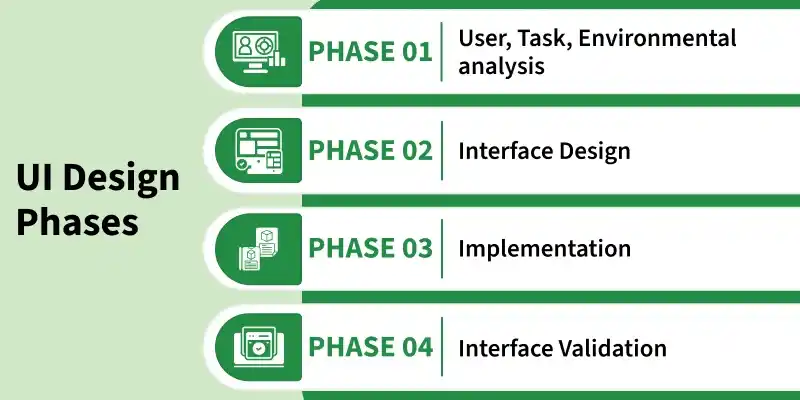
User Interface Design Process
The analysis and design process of a user interface is iterative and can be represented by a spiral model. This process of user interface consists of four framework activities.
- User, Task, Environmental Analysis, and Modeling: The profile of users who will interact with the system, i.e., understanding, skill and knowledge, type of user, etc., based on the user's profile users are made into categories. From each category requirements are gathered. Based on the requirement's developer understand how to develop the interface.
- Interface Design: The goal of this phase is to define the set of interface objects and actions. Indicate how these control mechanisms affect the system. Specify the action sequence of tasks and subtasks. Indicate the state of the system when the user performs a particular task.
- Implementation: The implementation activity begins with the creation of a prototype (model) that enables usage scenarios to be evaluated. As iterative design process continues a User Interface toolkit that allows the creation of windows, menus, device interaction, error messages, and commands.
- Interface Validation: This phase focuses on testing the interface. The interface should be in such a way that it should be able to perform tasks correctly, and it should be able to handle a variety of tasks. It should achieve all the user's requirements.
Types of User Interface
- Command Line Interface: The Command Line Interface provides a command prompt, where the user types the command and feeds it to the system. The user needs to remember the syntax of the command and its use.
- Graphical User Interface: Graphical User Interface provides a simple interactive interface to interact with the system. GUI can be a combination of both hardware and software. Using GUI, the user interprets the software.
User Interface Design Golden Rules
The following are the golden rules stated by Theo Mandel that must be followed during the design of the interface.
- Define interaction modes carefully so users are not forced into unnecessary or unwanted actions. Users should be able to enter and exit modes easily.
- Provide flexible interaction methods. Support different input mechanisms such as keyboard, mouse, and touch.
- Allow interactions to be interruptible. Users should be able to pause or switch tasks without losing their progress.
- Support customization. Advanced users should be able to adjust or personalize the interface to match their preferences.
- Hide technical details from users. The interface should focus on tasks, not internal system complexity
Reduce User's Memory Load
- Reduce demand on short-term memory: When users are involved in some complex tasks the demand on short-term memory is significant. So the interface should be designed in such a way to reduce the remembering of previously done actions, given inputs and results.
- Establish meaningful defaults: Always an initial set of defaults should be provided to the average user, if a user needs to add some new features then he should be able to add the required features.
- Define shortcuts that are intuitive: Mnemonics should be used by the user. Mnemonics means the keyboard shortcuts to do some action on the screen.
- Real-World Metaphor in UI Design: Anything you represent on a screen if it is a metaphor for a real-world entity then users would easily understand.
- Disclose information in a progressive fashion: The interface should be organized hierarchically i.e., on the main screen the information about the task, an object or some behavior should be presented first at a high level of abstraction.
Key Principles for Designing User Interfaces
- Bring the interface to all the individuals, including people with disabilities using the proper contrast, readable text, keyboard navigation and assistive support.
