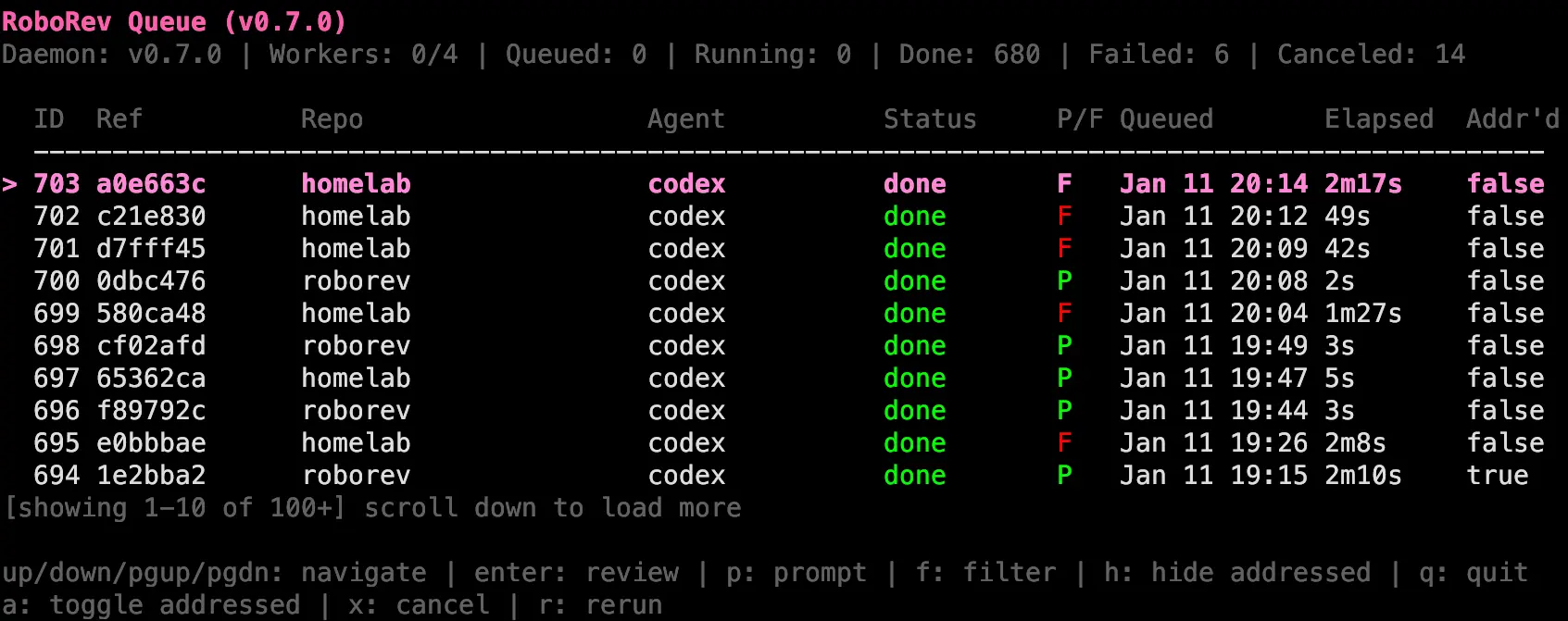
Roborev is an open-source AI code review tool built around Git commits. After you initialize a repository, a post-commit hook queues each new commit for background review through a supported coding agent.
Review findings stay in a local queue that you can open in the terminal or browser. From there, you can inspect the feedback, send selected issues back to an agent with roborev fix, or run roborev refine across a branch before opening a pull request.
You need at least one supported coding-agent CLI installed on your machine. Roborev uses that agent for model access, and the agent’s authentication, billing, and provider-side data handling apply to each review.
How Roborev Works
- Run
roborev initin a Git repository to install the post-commit hook and initialize Roborev. - New commits enter the background review queue and are analyzed by a configured coding agent.
- Open findings stay in the review ledger until you inspect, close, comment on, or fix them.
- Use
roborev fixfor selected findings orroborev refinefor an iterative branch repair loop.
Features
- Reviews every Git commit automatically through a post-commit hook.
- Auto-detects supported coding-agent CLIs installed on your machine.
- Returns open findings to supported agent sessions through Agent Hook.
- Shows review history in terminal and browser workspaces.
- Sends selected findings to an agent with
roborev fix. - Repeats fix and re-review cycles with
roborev refine. - Analyzes duplication, complexity, security, dead code, architecture, API design, and refactoring concerns.
- Verifies and consolidates open findings with
roborev compact. - Reviews branches, commit ranges, and uncommitted working-tree changes.
- Stores review history in SQLite with optional PostgreSQL sync.
Supported Coding Agents
Roborev can auto-detect installed agents and use the first available option. Set --agent for one command, agent in .roborev.toml for a repository, or default_agent in the global configuration.
| Agent | CLI Command |
|---|---|
| Codex | codex |
| Claude Code | claude |
| Gemini | agy or gemini |
| GitHub Copilot | copilot |
| Cursor | agent |
| OpenCode | opencode |
| Factory Droid | droid |
| Kilo | kilo |
| Kiro | kiro-cli |
| Pi | pi |
| Grok Build | grok |
Roborev also accepts named agents that implement the Agent Client Protocol. Agent Hook integrations are available for Claude Code, Codex, GitHub Copilot CLI, Cursor, Factory Droid, Gemini CLI, Hermes, Qwen, and Grok Build.
Use Cases
- Review agent-generated commits throughout an active coding session.
- Check every commit on a feature branch before opening a pull request.
- Review staged, unstaged, and untracked working-tree changes before committing.
- Run focused security, architecture, duplication, complexity, or API-design analysis.
- Post AI review results to GitHub pull requests or GitLab merge requests.
- Send open findings back to a coding agent for repair and re-review.
How to Install Roborev
At least one supported coding-agent CLI must be available on the system.
macOS and Linux
curl -fsSL https://roborev.io/install.sh | bashHomebrew
brew install kenn-io/tap/roborevWindows PowerShell
powershell -ExecutionPolicy ByPass -c "irm https://roborev.io/install.ps1 | iex"The Windows installer supports x64 and ARM64 and adds the Roborev binary directory to PATH.
Go
go install go.kenn.io/roborev/cmd/roborev@latest
export PATH="$PATH:$(go env GOPATH)/bin"
Quick Start
Initialize Roborev inside the repository you want to review:
cd your-repo
roborev init
Make commits as usual, then open the review queue in the terminal or browser:
roborev tui
roborev ui
Use a manual review for a full branch or the working tree:
roborev review --branch
roborev review --dirty
Send open findings to a configured coding agent:
roborev fixRun an iterative fix and re-review loop across the branch:
roborev refine
roborev refine --max-iterations 5
Agent Hook Setup
Agent Hook watches supported coding-agent sessions for turns, commits, and open failed reviews. When a configured threshold is reached, it can return the relevant Roborev findings to the active agent session.
roborev agent-hook installThe default command installs hooks for detected profiles. You can target one profile or install every supported Agent Hook integration:
roborev agent-hook install --agent codex
roborev agent-hook install --agent all
Code Analysis and Auto-Fix
The analyze command creates focused review jobs for specific code-quality concerns. Built-in types cover test fixtures, duplication, refactoring, complexity, API design, dead code, architecture, and security.
roborev analyze duplication ./...
roborev analyze complexity --per-file src/*.go
roborev analyze architecture internal/
roborev analyze security ./...
roborev analyze --list
Verify and Consolidate Findings with Compact
roborev compact checks open completed reviews against the latest code and consolidates related findings into a new review. It is useful after a long branch has accumulated findings that overlap or no longer match the code.
roborev compact --dry-run
roborev compact --wait
GitHub Actions and GitLab CI
Roborev can run one-shot CI reviews for GitHub pull requests and GitLab merge requests. The CI command can detect the surrounding CI context and post review output back to the code-review thread.
roborev ci review
roborev ci review --comment
For GitHub Actions, Roborev can generate a workflow file for the repository:
roborev init gh-actionCommand Cheat Sheet
| Command | What It Does |
|---|---|
roborev init | Initializes Roborev and installs the post-commit hook. |
roborev review | Reviews HEAD. |
roborev review <sha> | Reviews a specific commit. |
roborev review --branch | Reviews commits on the active branch since its base. |
roborev review --dirty | Reviews working-tree changes. |
roborev tui | Opens the terminal review workspace. |
roborev ui | Opens the browser review workspace. |
roborev list --open | Lists open reviews. |
roborev show <job_id> | Displays a review by job ID. |
roborev fix | Runs an agent against open findings. |
roborev refine | Runs an iterative fix and re-review loop. |
roborev compact | Verifies and consolidates open findings. |
roborev analyze <type> | Runs a focused code analysis. |
roborev agent-hook install | Installs Agent Hook integrations. |
roborev summary | Shows aggregate review statistics. |
roborev cost | Shows approximate stored agent cost data. |
roborev insights | Analyzes recurring review patterns. |
roborev daemon status | Shows daemon, browser UI, and queue status. |
roborev update | Updates an installed release. |
Repository Configuration
Create .roborev.toml in a repository to set the default agent and project-specific review rules:
agent = "claude-code"
review_guidelines = """
Check error handling on external API calls.
Flag unsafe handling of secrets or credentials.
Prefer tests that validate observable behavior.
"""
Global settings live in ~/.roborev/config.toml. Repository settings can override the corresponding global values.
Pros
- Automatic post-commit reviews
- Multiple coding agents support
- Local review history
- Terminal and browser UIs
- Automated fix and refine loops
- MIT-licensed open source
Cons
- Requires a coding agent CLI
- Model access can add cost
- Agentic fixes can modify or execute code
Alternatives & Related Resources
- Clawpatch is an open-source AI code review CLI built around semantic feature slices and targeted patching.
- Best CLI AI Coding Agents compares terminal coding agents for code generation, editing, automation, and development tasks.
- OpenAI Codex Commands Cheat Sheet collects Codex commands and controls for terminal coding sessions.
- Roborev Documentation contains the installation, command, Agent Hook, CI, configuration, and troubleshooting reference.
FAQs
Does Roborev send code to an external AI service?
The coding agent you select determines where model inference runs and which repository context reaches a model provider. Roborev keeps its review history locally in SQLite unless you configure PostgreSQL sync.
Can Roborev fix code automatically?
Yes. roborev fix sends open findings to a coding agent for repair. roborev refine can repeat the fix and re-review cycle across failed reviews on a branch.
Can Roborev run in GitHub Actions or GitLab CI?
Yes. roborev ci review supports one-shot reviews for GitHub pull requests and GitLab merge requests, including an option to post the result back to the review thread.
Is Roborev safe for reviewing untrusted repositories?
Use a container, VM, or comparable sandbox for untrusted repositories. Repository content can contain prompt-injection instructions that influence a coding agent, and agentic repair commands can edit files or execute commands.
Last Updated: Aug 23, 2026