

Spring Security interview questions are commonly asked to evaluate your understanding of authentication, authorization, security configurations, JWT, OAuth2, and securing Spring Boot applications. This collection covers the most important Spring Security concepts to help you prepare for Java and Spring Boot interviews.
- Covers the most frequently asked Spring Security interview questions with clear and concise explanations.
- Suitable for both freshers and experienced professionals preparing for Java, Spring Boot, and backend developer interviews.
1. What is Spring Security?
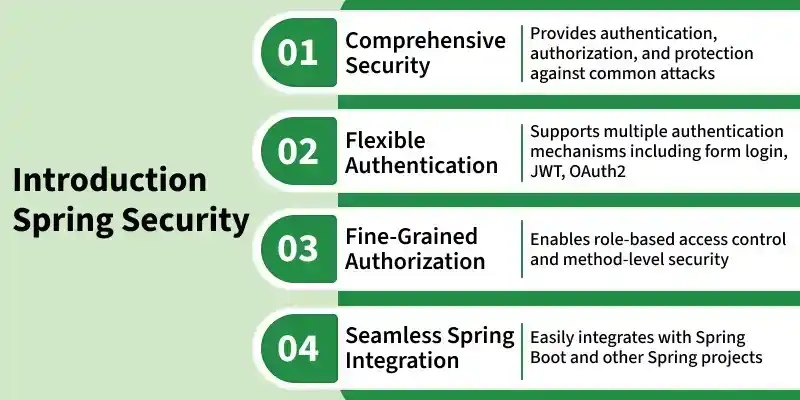
Spring Security is a powerful security framework for Java and Spring-based applications. It provides comprehensive security features such as authentication, authorization, and protection against common web security threats. It integrates seamlessly with Spring Boot and Spring MVC to help developers build secure web applications and RESTful APIs.
- Protects against common attacks such as CSRF, session fixation, and clickjacking.
- Supports multiple authentication methods, including Form Login, HTTP Basic, OAuth 2.0, JWT, and LDAP.
2. What are the key features of Spring Security?
Spring Security provides a comprehensive set of features to secure Java and Spring-based applications. Some of the core features of Spring Security are depicted below:
- Authentication: verifying user identity.
- Authorization: deciding whether a user is allowed to perform an action.
- Principal: the representation of the currently logged-in user.
- GrantedAuthority: a representation of a user’s rights or permissions.
- Protection against common web threats such as CSRF and session fixation.
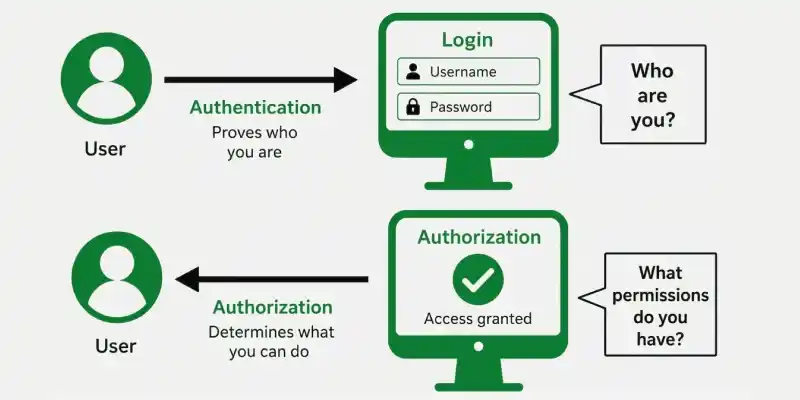
3. Difference between Authentication and Authorization in Spring Security.
| Feature | Authentication | Authorization |
|---|---|---|
| Definition | Verifies the identity of a user. | Determines what an authenticated user is allowed to access. |
| Purpose | Confirms who the user is. | Controls access to resources and operations. |
| Working | Validates credentials such as username and password. | Checks user roles and permissions. |
| Performed | Before authorization. | After successful authentication. |
| Result | Creates an authenticated user session or token. | Grants or denies access to resources. |
| Example | Logging into an application. | Allowing only ADMIN users to access /admin. |
4. How to configure Authentication in Spring Security?
Authentication is the process of verifying the identity of a user before granting access to an application. In Spring Security 6, authentication is typically configured using a UserDetailsService, a PasswordEncoder, and a SecurityFilterChain.
Steps to Configure Authentication:
- Create a UserDetailsService to load user details.
- Configure a PasswordEncoder to securely encode passwords.
- Define a SecurityFilterChain bean to secure application endpoints.
- Authenticate users using in-memory, JDBC, LDAP, or a custom user service.
@EnableWebSecurity
public class SecurityConfig extends WebSecurityConfigurerAdapter {
    @Override
    protected void configure(AuthenticationManagerBuilder auth) throws Exception {
        auth.inMemoryAuthentication()
            .withUser("user").password("{noop}password").roles("USER");
    }
}
5. How to configure Authorization in Spring Security?
Authorization determines what resources an authenticated user is allowed to access. In Spring Security 6, authorization rules are configured using the SecurityFilterChain and requestMatchers() methods.
Steps to Configure Authorization:
- Configure a SecurityFilterChain bean.
- Use requestMatchers() to specify URL patterns.
- Assign roles or authorities using methods like hasRole() or hasAuthority().
- Define a default access rule using anyRequest().
@Override
protected void configure(HttpSecurity http) throws Exception
{
    http.authorizeRequests()
        .antMatchers("/author/admin")
        .hasRole("ADMIN")
        .antMatchers("/author/user")
        .hasRole("USER")
        .antMatchers("/")
        .permitAll()
        .and()
        .formLogin();
}
6. What is the Latest Version of Spring Security and What's New in It?
The latest major release is Spring Security 6, which introduces several improvements and removes deprecated APIs.
Key Changes in Spring Security 6:
- Removed WebSecurityConfigurerAdapter.
- Introduced SecurityFilterChain for security configuration.
- Replaced authorizeRequests() with authorizeHttpRequests().
- Replaced antMatchers() with requestMatchers().
7. Explain basic authentication in Spring Security.
Basic Authentication is an HTTP authentication mechanism where the client sends a username and password with every request using the Authorization header. Spring Security validates these credentials before granting access to protected resources.
Steps to implement Basic Authentication:
- Add dependency spring-boot-starter-security.
- Extend WebSecurityConfigurerAdapter.
- Override configure(HttpSecurity) method.
8. How to Enable and Disable CSRF in Spring Security?
CSRF (Cross-Site Request Forgery) protection is enabled by default. To disable it, modify the configuration class as shown below:
@Configuration
public class SecurityConfig extends WebSecurityConfigurerAdapter {
    @Value("${security.enable-csrf}")
    private boolean csrfEnabled;

    @Override
    protected void configure(HttpSecurity http) throws Exception {
        if (!csrfEnabled) {
            http.csrf().disable();
        }
    }
}
9. What is a Filter Chain in Spring Security?
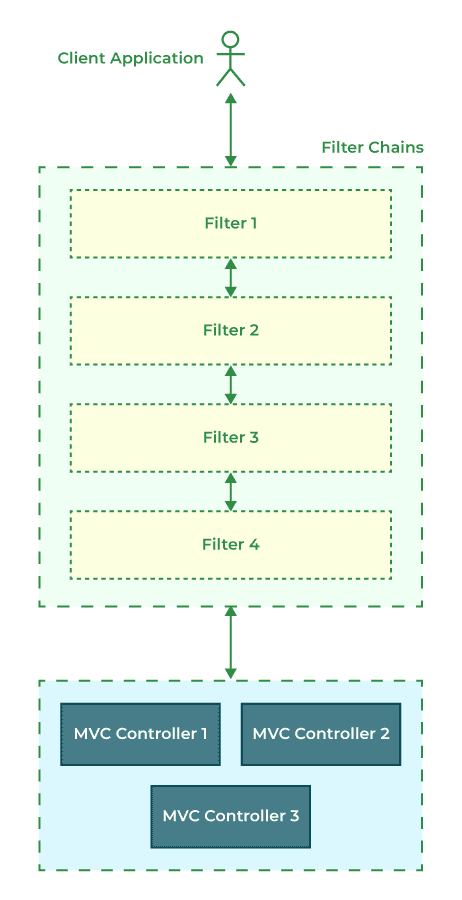
A Security Filter Chain is a sequence of security filters that intercept every incoming HTTP request before it reaches the application. Each filter performs a specific security task such as authentication, authorization, CSRF validation, session management, or exception handling.
Request flow:
- Client sends request.
- Filters intercept the request in sequence.
- Security checks are applied before request reaches the controller.
10. When to Use requestMatchers() in Spring Security?
requestMatchers() is used to define authorization rules for specific URL patterns in a Spring Security application. It allows developers to specify which users or roles can access particular endpoints.
It supports wildcard patterns for matching URLs:
- ? -> Matches exactly one character.
- * -> Matches zero or more characters within a single path segment.
- ** -> Matches zero or more directories or path segments.
Common methods: hasRole(), hasAnyRole(), hasAuthority(), authenticated(), anonymous()
11. How to implement Spring Security in a simple Spring Boot application?
Spring Security can be easily integrated into a Spring Boot application by adding the spring-boot-starter-security dependency. Once the dependency is added, Spring Boot automatically secures all endpoints with default authentication and generates a default username and password during application startup. Developers can then customize authentication, authorization, login pages, and security rules according to application requirements.
Steps:
- Add the Spring Security dependency.
- Run the application.
- Configure authentication if required.
- Customize authorization rules using SecurityFilterChain.
Add the dependency:
<dependency>
    <groupId>org.springframework.boot</groupId>
    <artifactId>spring-boot-starter-security</artifactId>
</dependency>
12. How to configure Spring Security in Spring MVC application?
Spring Security is configured in a Spring MVC application by defining security-related beans and authorization rules.
Steps:
- Add the Spring Security dependency in pom.xml.
- Create a security configuration class.
- Define a SecurityFilterChain bean.
- Configure authentication and authorization rules.
- Optionally create a custom login page.
- Run the application to secure the required endpoints.
13. How to Deny Access to All URLs in Spring Security?
The denyAll() method is used to block access to all application URLs regardless of the user's authentication status. It is useful when:
- Temporarily disabling an application
- Blocking access during maintenance
- Restricting access for testing purposes
@Override
protected void configure(HttpSecurity http) throws Exception
{
    http.authorizeHttpRequests()
        .anyRequest()
        .denyAll()
        .and()
        .httpBasic();
}
14. How to Get the Current Logged in User Details in Spring Security?
Spring Security provides several ways to obtain information about the currently authenticated user. These objects provide details such as:
- Username
- Roles and Authorities
- Authentication status
@GetMapping("/")
public String userDetails(Principal principal, Authentication auth, Model model) {
    String userName = principal.getName();
    Collection<? extends GrantedAuthority> roles = auth.getAuthorities();
    model.addAttribute("username", userName);
    model.addAttribute("roles", roles);
    return "home";
}
15. What is PasswordEncoder in Spring Security?
PasswordEncoder is an interface used to securely hash passwords before storing them in a database and to verify passwords during authentication.
@Configuration
public class SecurityConfig {
    @Bean
    public PasswordEncoder passwordEncoder() {
        return new BCryptPasswordEncoder();
    }
}
Common Encoders:
- BCryptPasswordEncoder
- Pbkdf2PasswordEncoder
- Argon2PasswordEncoder
- NoOpPasswordEncoder (for testing)
16. What is @EnableWebSecurity Annotation?
@EnableWebSecurity enables Spring Security's web security support and allows developers to customize authentication and authorization. It is typically used together with the @Configuration annotation to register security-related beans such as SecurityFilterChain, PasswordEncoder, and UserDetailsService.
@Configuration
@EnableWebSecurity
public class SecurityConfig extends WebSecurityConfigurerAdapter {
    @Override
    protected void configure(HttpSecurity http) throws Exception {
        http.authorizeRequests()
            .antMatchers("/hello").permitAll()
            .anyRequest().authenticated()
            .and().formLogin();
    }
}
Spring Security Interview Questions for Intermediate
17. What is JWT in Spring Security?
JWT (JSON Web Token) is a secure way to transfer information between two parties as a JSON object. It is mainly used for authorization and information exchange.
A JWT consists of three parts separated by dots (.):
- Header: Contains algorithm and token type.
- Payload: Contains user data or claims.
- Signature: Verifies token integrity.
Example JWT:
NiIsInR5cCI6IkpXVCJ9. eyJzdWIiOiIibmFtZSI6IkpvaG4gRG9lIiwiaWF0IjoxNTE2MjM5MDIyfQ . SflKxwRJSMeKKF2QT4fwpMeJf36
Structure:
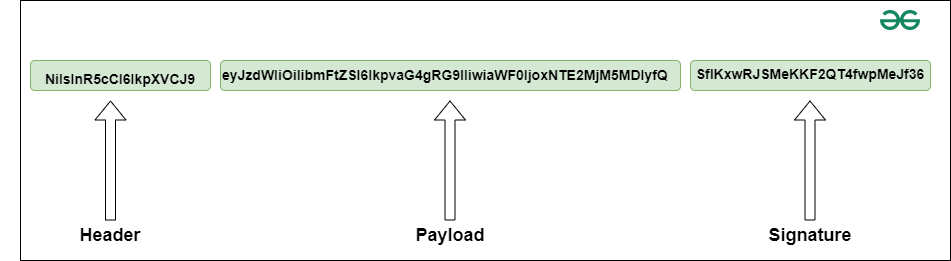
- NiIsInR5cCI6IkpXVCJ9: This is the header part and contains the algorithm and what type of token it is.
- eyJzdWIiOiIibmFtZSI6IkpvaG4gRG9lIiwiaWF0IjoxNTE2MjM5MDIyfQ: This is the data part (payload).
- SflKxwRJSMeKKF2QT4fwpMeJf36: This is the signature part. It is used to verify that the data or message does not change during the information transformation.
Use Case in Spring Security:
- JWT replaces session-based authentication.
- Each request carries the JWT in the Authorization header for validation.
18. What is OAuth and OAuth2 in Spring Security?
OAuth is an open standard protocol used for authorization, allowing third-party applications to access protected resources without exposing user credentials. OAuth2 is the latest and most widely adopted version of OAuth.
- Provides authorization, not authentication.
- Operates by issuing access tokens after user consent.
OAuth2 Components:
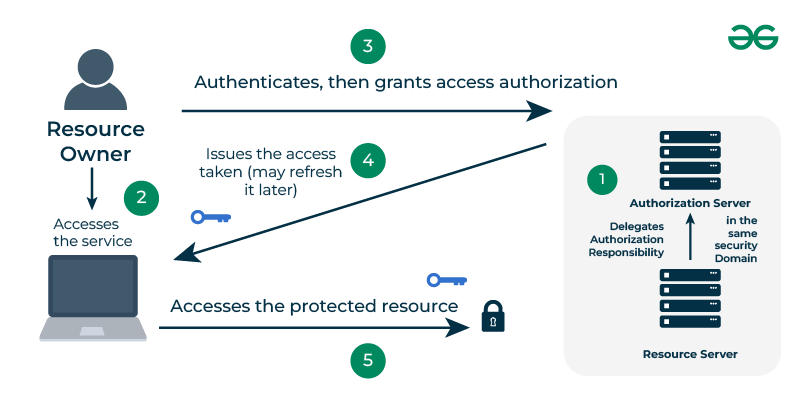
- Resource Owner: The user.
- Client Application: The app requesting access.
- Authorization Server: Issues access tokens.
- Resource Server: Hosts protected resources.
19. What is Keycloak and How to Integrate It with Spring Security?
Keycloak is an open-source Identity and Access Management (IAM) solution that provides authentication, authorization, Single Sign-On (SSO), user federation, and identity management.
It integrates with Spring Security using OAuth2 and OpenID Connect (OIDC), allowing applications to delegate authentication to Keycloak instead of implementing their own authentication system.
Steps to Integrate with Spring Security:
1. Add the dependency:
<dependency>
    <groupId>org.keycloak</groupId>
    <artifactId>keycloak-spring-security-adapter</artifactId>
    <version>21.1.2</version>
</dependency>
2. Configure Security Class:
@KeycloakConfiguration
public class SecurityConfig extends KeycloakWebSecurityConfigurerAdapter {

    @Autowired
    public void configureGlobal(AuthenticationManagerBuilder auth) throws Exception {
        auth.authenticationProvider(keycloakAuthenticationProvider());
    }

    @Bean
    @Override
    protected SessionAuthenticationStrategy sessionAuthenticationStrategy() {
        return new RegisterSessionAuthenticationStrategy(new SessionRegistryImpl());
    }

    @Override
    protected void configure(HttpSecurity http) throws Exception {
        super.configure(http);
        http.authorizeRequests()
            .antMatchers("/customers").hasRole("USER")
            .antMatchers("/admin").hasRole("ADMIN")
            .anyRequest().permitAll();
    }
}
Advantages:
- Centralized user management.
- Built-in OAuth2 and OpenID Connect support.
- Easy integration with Spring Boot apps.
20. What is the role of an AuthenticationProvider in Spring Security?
Spring Security supports multiple AuthenticationProvider implementations, allowing authentication through databases, LDAP servers, JWT, OAuth2, or custom authentication mechanisms.
- AuthenticationProvider performs the actual authentication logic.
- It validates credentials and returns an Authentication object upon success.
- Used internally by the AuthenticationManager.
@Override
public void configure(AuthenticationManagerBuilder auth) throws Exception {
    auth.inMemoryAuthentication()
        .withUser("admin")
        .password("{noop}password")
        .roles("USER");
}
21. How to Secure an Endpoint in Spring Security?
Endpoints can be secured by defining authorization rules using requestMatchers() inside a SecurityFilterChain or by using method-level security annotations such as @PreAuthorize and @PostAuthorize.
Step 1: Create a configuration class extending WebSecurityConfigurerAdapter.
Step 2: Override configure(HttpSecurity) and configure(AuthenticationManagerBuilder).
Step 3: Use annotations to secure endpoints.
@Configuration
@EnableWebSecurity
public class SecurityConfig extends WebSecurityConfigurerAdapter {

    @Override
    protected void configure(HttpSecurity http) throws Exception {
        http.authorizeRequests()
            .antMatchers("/secured").hasRole("USER")
            .and().formLogin();
    }
}
Enable Method Security:
@EnableGlobalMethodSecurity(securedEnabled = true)
public class MethodSecurityConfig {}
22. Explain UserDetailsService and UserDetails in Spring Security.
UserDetailsService is an interface responsible for loading user information during authentication. UserDetails is an interface that represents the authenticated user's information, including username, password, roles, and account status.
- UserDetails stores user credentials, authorities, and account status.
- Spring Security uses these interfaces during authentication and authorization.
Example:
@Service
public class MyUserDetailsService implements UserDetailsService {
    @Override
    public UserDetails loadUserByUsername(String username) {
        return new User("admin", "{noop}password", List.of(new SimpleGrantedAuthority("ROLE_ADMIN")));
    }
}
23. What is method-level security in Spring Security?
Method-level security provides fine-grained access control by securing individual methods instead of entire URLs. It allows developers to control method execution based on user roles, authorities, or custom security expressions.
- Achieved using annotations like @PreAuthorize and @PostAuthorize.Provides fine-
- Ensures that only authorized users can invoke certain methods.
Example Using @PreAuthorize:
@PreAuthorize("hasRole('ADMIN')")
public void deleteEmployee(Long id) {
    // Only ADMIN can delete
}
Example Using @PostAuthorize:
@PostAuthorize("returnObject.owner == authentication.name")
public Employee getEmployeeDetails(Long id) {
    // Accessible after execution check
}
To Enable Method Security:
@EnableGlobalMethodSecurity(prePostEnabled = true)
public class SecurityConfig {}
24. Difference between hasRole() and hasAuthority().
| Feature | hasRole() | hasAuthority() |
|---|---|---|
| Purpose | Used for checking roles | Used for checking authorities |
| Prefix Requirement | Automatically adds ROLE_ prefix | Requires full authority name |
| Syntax Example | .hasRole("ADMIN") | .hasAuthority("ROLE_ADMIN") |
| Use Case | When roles are prefixed automatically | When full authority name is used manually |
Interview Questions for Experienced
25. How does Spring Security handle Session Management?
Spring Security developers to configure session creation policies, maximum concurrent sessions, session invalidation, and timeout behavior.
- Prevents session fixation and concurrent login issues.
- Configured through HttpSecurity.sessionManagement().
Example:
@Override
protected void configure(HttpSecurity http) throws Exception {
    http.sessionManagement()
        .sessionCreationPolicy(SessionCreationPolicy.ALWAYS)
        .maximumSessions(1)
        .maxSessionsPreventsLogin(true);
}
SessionCreationPolicy options:
- ALWAYS: Creates session if needed.
- NEVER: Uses existing session only.
- STATELESS: No session (used in JWT).
- IF_REQUIRED: Default policy.
26. What is CSRF and how can it be handled in Spring Security?
Cross-Site Request Forgery (CSRF) is a web security attack in which a malicious website tricks an authenticated user into performing unwanted actions on another trusted website. Spring Security enables CSRF protection by default for browser-based applications by generating and validating CSRF tokens.
- CSRF (Cross-Site Request Forgery) is an attack that tricks a user into performing unwanted actions.
- Spring Security enables CSRF protection by default.
Token-based protection:
@Override
protected void configure(HttpSecurity http) throws Exception {
    http.csrf().csrfTokenRepository(CookieCsrfTokenRepository.withHttpOnlyFalse());
}
To disable (for stateless APIs):
http.csrf().disable();
Note: Never disable CSRF for browser-based applications.
27. How can you implement Two-Factor Authentication (2FA) in Spring Security?
Two-Factor Authentication (2FA) enhances application security by requiring users to verify their identity using two authentication factors, such as a password and a one-time password (OTP).
Steps:
- Authenticate username + password.
- Generate a verification code (e.g., TOTP).
- Validate OTP in a separate endpoint before granting access.
Example (simplified flow):
@PostMapping("/verify-otp")
public ResponseEntity<String> verifyOtp(@RequestParam String code) {
    if(otpService.validateCode(code))
        return ResponseEntity.ok("2FA success");
    return ResponseEntity.status(HttpStatus.UNAUTHORIZED).body("Invalid OTP");
}
Libraries used: GoogleAuthenticator or Twilio for OTP delivery.
28. Explain Hashing in Spring Security.
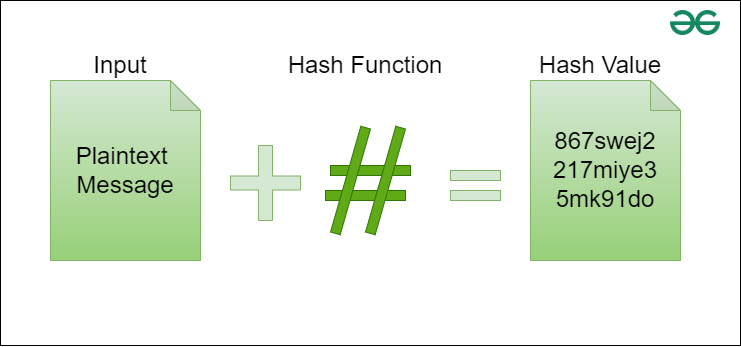
Hashing is the process of converting a plain-text password into an unreadable, fixed-length string using a one-way cryptographic function to ensure password security.
- Prevents storing plain-text passwords in the database.
- One-way process, cannot retrieve the original password.
- Protects credentials even if the database is compromised.
- Implemented in Spring Security using PasswordEncoder.
Common algorithms:
- Less Secure: MD5, SHA-1, SHA-256
- Recommended: BCrypt, PBKDF2, Argon2
Example:
@Bean
public PasswordEncoder passwordEncoder() {
    return new BCryptPasswordEncoder();
}
29. What are Security Expressions in Spring Security (SpEL)?
Spring Expression Language (SpEL) enables dynamic authorization by evaluating expressions at runtime. Common annotations: @PreAuthorize, @PostAuthorize, @PreFilter, @PostFilter.
Examples:
@PreAuthorize("hasAuthority('ROLE_ADMIN')")
public void deleteEmployee(Long id) {}

@PostAuthorize("returnObject.owner == authentication.name")
public Employee getEmployee(Long id) { ... }
Custom Expressions: Create a custom PermissionEvaluator for business rules.
30. How can you implement Role-Based Access Control (RBAC)?
Role-Based Access Control (RBAC) restricts access to application resources based on user roles. Each user is assigned one or more roles, and access permissions are granted according to those roles. Common roles include:
- ADMIN
- USER
- MANAGER
Example:
@Override
protected void configure(HttpSecurity http) throws Exception {
    http.authorizeRequests()
        .antMatchers("/admin/**").hasRole("ADMIN")
        .antMatchers("/user/**").hasRole("USER")
        .anyRequest().authenticated();
}
Database tables: users, roles, user_roles for mapping.
31. Explain potential web application vulnerabilities and how Spring Security mitigates them?
Spring Security protects against common web application vulnerabilities like:
- SQL injection
- Cross Site Scripting (XSS)
- Cross Site Request Forgery (XSRF)
Spring Security mitigates them through filters and Content Security Policy.
32. How to implement Spring Security with in-memory user storage.
In-memory authentication stores user credentials directly in the application's memory instead of a database. It is commonly used for:
- Learning Spring Security
- Development
- Testing
Step 1: Add Starter dependency in XML file.
spring-boot-starter-security
Step 2: In Spring Security configuration, enable in-memory authentication.
auth.inMemoryAthentication()
33. How does Spring Security integrate with OAuth2 Resource Server?
Spring Security can act as an OAuth2 Resource Server by validating JWT access tokens issued by an Authorization Server. When a client sends a JWT in the Authorization header, Spring Security verifies the token's signature, issuer, and claims before allowing access to protected resources.
Configuration:
@Bean
SecurityFilterChain securityFilterChain(HttpSecurity http) throws Exception {
    http.authorizeHttpRequests()
        .anyRequest().authenticated()
        .and()
        .oauth2ResourceServer(OAuth2ResourceServerConfigurer::jwt);
    return http.build();
}
application.yml:
spring:
security:
oauth2:
resourceserver:
jwt:
issuer-uri: https://auth-server.com
34. How to customize Authentication Entry Point and Access Denied Handler?
Custom implementations allow developers to return meaningful error responses, custom JSON messages, or redirect users to specific pages.
- AuthenticationEntryPoint handles requests from unauthenticated users attempting to access protected resources.
- AccessDeniedHandler handles requests from authenticated users who do not have sufficient permissions.
Example:
@Component
public class CustomAuthEntryPoint implements AuthenticationEntryPoint {
    @Override
    public void commence(HttpServletRequest request, HttpServletResponse response,
                         AuthenticationException authException) throws IOException {
        response.sendError(HttpServletResponse.SC_UNAUTHORIZED, "Unauthorized Access");
    }
}
Configuration:
http.exceptionHandling()
    .authenticationEntryPoint(customAuthEntryPoint)
    .accessDeniedHandler(customAccessDeniedHandler);
35. Explain Salting and its usage.
Salting is the process of adding a unique random value (salt) to a password before hashing it. This ensures that identical passwords generate different hash values, making rainbow table and precomputed hash attacks ineffective.
- By increasing its uniqueness and complexity, it improves Hashing.
- Modern password encoders such as BCrypt, PBKDF2, and Argon2 automatically generate and manage salts, providing stronger password security.
Note: Salting is automatically applied since Spring Security version 3.1.
36. How to disable Spring Security for specific endpoints?
Specific endpoints, such as public pages, static resources, health checks, or API documentation, can be excluded from authentication by configuring authorization rules.
- Useful for public resources or actuator endpoints.
Example:
@Override
protected void configure(HttpSecurity http) throws Exception {
    http.authorizeRequests()
        .antMatchers("/public/**", "/actuator/**").permitAll()
        .anyRequest().authenticated();
}
Alternative: Exclude endpoints using WebSecurity
@Override
public void configure(WebSecurity web) {
    web.ignoring().antMatchers("/css/**", "/js/**");
}
37. What is the SecurityContext in Spring Security?
The SecurityContext is a core component of Spring Security that stores the security information of the currently authenticated user. It contains the Authentication object, which holds details such as the user's principal, credentials, authorities (roles), and authentication status.
- Stores information about the currently authenticated user.
- Contains the Authentication object.
- Accessible using SecurityContextHolder.
38. What is SecurityContextHolder in Spring Security?
SecurityContextHolder is a utility class that provides access to the current SecurityContext. It allows developers to retrieve information about the authenticated user from anywhere within the application.
- Provides access to the current SecurityContext.
- Stores security information using ThreadLocal by default.
- Commonly used to retrieve the current user's details.
39. What is the Difference Between Authentication and AuthenticationManager?
Authentication and AuthenticationManager serve different purposes in Spring Security.
| Feature | Authentication | AuthenticationManager |
|---|---|---|
| Purpose | Represents user authentication information | Processes authentication requests |
| Contains | Principal, credentials, authorities | Delegates authentication to AuthenticationProvider |
| Type | Interface | Interface |
| Used During | Before and after authentication | During authentication process |
40. What is the Difference Between hasRole() and hasAnyRole() in Spring Security?
Both hasRole() and hasAnyRole() are used to authorize users based on their roles, but they differ in the number of roles they can evaluate.
| Feature | hasRole() | hasAnyRole() |
|---|---|---|
| Number of Roles | One | Multiple |
| Access Granted | Single matching role | Any one matching role |
| Example | hasRole("ADMIN") | hasAnyRole("ADMIN","MANAGER") |
| Use Case | Single-role authorization | Multiple-role authorization |
