

You want to host websites without paying a per-server licence fee, so you go looking for a free hosting control panel and immediately hit a wall of round-up posts that all list the same eight names. Half of those names have not shipped a release in years, and several of the “open source” ones are not open source at all. This guide sorts that out with dates and licences you can check yourself.
Every panel below was checked against its own repository, licence file and release history in July 2026: current version, last release date, and which operating systems the project itself claims to support today. Where a project has stalled or shipped a critical vulnerability, that is stated plainly rather than buried, including for the panel that comes out on top. For paid options, see our companion piece on commercial control panels and cPanel alternatives.
Every licence, version and release date below came from the project’s own repository and docs in July 2026, not from an older list. The HestiaCP installer gotcha further down I hit myself on a fresh Ubuntu 24.04 box.
Three different tools all called “control panel”
Most of the confusion in this category comes from lumping three unrelated products together. Decide which one you actually need before comparing features, because a tool from the wrong group will never do the job no matter how good it is.
- Web hosting panels. Multi-tenant hosting: virtual hosts, mailboxes, DNS zones, FTP accounts, per-site PHP versions, resellers, quotas. This is the cPanel replacement, and it is what the rest of this article ranks.
- App deployment platforms. Docker and git-push tools: Coolify, Dokploy, CapRover. They deploy your applications beautifully and provision no mailboxes or DNS zones for customers.
- Server admin dashboards. Cockpit and friends. They manage the machine, which means systemd units, storage, network and updates, but they never create a website for a customer.
If you are hosting sites for clients who need email at their own domain, only group one works. That distinction eliminates most of the trendy names people recommend in forum threads.
Free does not mean open source
This is where most comparisons quietly mislead. Several popular panels are free to download and run but ship under a proprietary licence, a custom licence with restrictions, or no published source at all. That matters if you plan to modify the panel, build a product on it, or simply want the guarantee that the project can be forked if the vendor changes direction.
| Panel | Licence as published | Genuinely open source? |
|---|---|---|
| HestiaCP | GPL-3.0 | Yes |
| Webmin / Virtualmin GPL | BSD-3-Clause / GPL-3.0 | Yes, with a paid Pro edition alongside |
| ISPConfig | BSD | Yes |
| Froxlor | LGPL-2.1 | Yes |
| CyberPanel | GPL-3.0 | Yes. The optional LiteSpeed Enterprise path is commercial |
| 1Panel | GPL-3.0 core | Yes, with features held back for Pro |
| BlueOnyx | Sun-modified BSD | Yes, though the exact variant is not on the OSI list |
| myVesta | GPL-3.0 | Yes |
| CloudPanel | Proprietary terms, no licence file in repo | No. Modification and resale prohibited |
| aaPanel | Custom terms, no OSI licence detected | No |
| Control Web Panel (CWP) | Freeware, no published source | No |
| KeyHelp | Freeware, closed source, paid Pro tier | No |
| Easypanel | Proprietary, free tier capped at 3 projects | No |
| OpenPanel | EULA for the UI, CC BY-NC-ND for the CLI | No |
CloudPanel is the one that surprises people most, because it is widely listed as MIT. Its own licence terms say the licensee “is not permitted to modify the Software” beyond the options exposed in the interface, and may not resell or transfer it. The repository carries no licence file at all. It is good software and free to use; it is not open source, and the article you read that said otherwise was wrong.
The best free and open source hosting control panels
These are the panels that do full multi-tenant hosting, carry a real open source licence, and shipped a release recently enough to trust with a customer’s website.
| Panel | Web server | Mail + DNS | Supported OS (per upstream) | Latest release |
|---|---|---|---|---|
| HestiaCP | nginx, optionally in front of Apache | Exim, Dovecot, BIND | Debian 11/12, Ubuntu 22.04/24.04 LTS | 1.9.7, July 2026 |
| Virtualmin GPL | Apache, nginx via plugin | Postfix, Dovecot, BIND | RHEL/Alma/Rocky 8-10, Debian 12/13, Ubuntu 22.04/24.04 | 8.1.0, March 2026 |
| ISPConfig | Apache or nginx | Postfix, Dovecot, BIND or PowerDNS | Debian 11-13, Ubuntu 22.04-24.04, Alma/Rocky 8-10 | 3.3.1p1, March 2026 |
| Froxlor | Apache, nginx or lighttpd | Postfix, Dovecot, BIND or PowerDNS | Debian 11-13, Ubuntu 22.04/24.04 (LTS only) | 2.3.10, June 2026 |
| CyberPanel | OpenLiteSpeed or LiteSpeed Enterprise | Postfix, Dovecot, PowerDNS | Ubuntu 20.04-24.04, AlmaLinux 8/9, CloudLinux | 2.4.x line, shipped from git |
| 1Panel | OpenResty | No integrated mail or authoritative DNS | Most mainstream distros, no OS gate in the installer | v2.2.4, July 2026 |
| BlueOnyx | Apache, optional nginx SSL proxy | Postfix or Sendmail, BIND | RHEL 10, AlmaLinux 10, Rocky Linux 10 | 5212R line, 2026 |
| myVesta | nginx and Apache | Exim, Dovecot, BIND | Debian only | 0.9.9-0-17, July 2026 |
1. HestiaCP, the default recommendation
HestiaCP is where most people should start. It is the healthy fork of the abandoned VestaCP, it is GPL-3.0 with no paid tier holding features back, and it ships the complete hosting stack: nginx (optionally proxying to Apache), Exim and Dovecot for mail, BIND for DNS, multiple PHP versions per domain, and a clean multi-user interface with resellers and quotas. Of the panels here it gives you the most working hosting platform for the least setup effort.
It also deserves the caveat this article promised to apply evenly. Version 1.9.7, released in July 2026, fixed nine coordinated advisories, four of them critical, including unauthenticated remote code execution through the web terminal and a root-level flaw reachable via nested eval() calls. The mitigating facts are real: the web terminal is disabled by default, the issues came through coordinated disclosure, and the fixes shipped together. Treat it as a reason to stay patched rather than a reason to avoid the panel, and do not leave the panel port open to the world.
Be honest about the release rhythm too, because “actively maintained” gets used loosely in this category. Hestia ships in bursts rather than on a metronome: there was a ten-month gap between 1.9.4 in July 2025 and 1.9.5 in May 2026, then several releases in quick succession. That is normal for a volunteer project and still far better than the dead panels further down, but if you want the steadiest security-release cadence here, Froxlor has actually been shipping more often.
The real constraint is OS choice. Hestia supports Debian 11 and 12 plus Ubuntu 22.04 and 24.04 LTS, and the project states flatly that it does not support non-LTS releases. There is no RHEL path at all, and no Debian 13 support yet, which is the sharper 2026 limitation. If you are standardised on AlmaLinux or Rocky, or already on Debian 13, look at Virtualmin, ISPConfig or Froxlor instead.
One installer gotcha is worth knowing before you script anything, and it cost me a while to work out. Passing --interactive no does not make the installer fully non-interactive: if you omit --username, it still calls read to prompt for the administrator name, and with no terminal attached it loops forever printing “Please use a valid username (ex. user).” Always pass an explicit username. Note also that if the name you choose already exists as a user or a group, the installer stops with a different message about the name already existing, so pick something unused:
wget https://raw.githubusercontent.com/hestiacp/hestiacp/release/install/hst-install.sh
bash hst-install.sh --interactive no --username hestiaadmin --multiphp yes --email [email protected] --hostname panel.example.com --password 'ChangeThisPassword'
The --multiphp yes flag matters because multiple PHP versions are off by default, and it is one of the reasons to run Hestia in the first place. The panel then answers on port 8083 over HTTPS with a self-signed certificate until you point a real hostname at it. Full walkthrough here: install HestiaCP on Ubuntu and Debian.
2. Virtualmin GPL, the widest OS support
Virtualmin is the answer when Hestia’s narrow OS list does not fit, and its interface reflects its systems-tool heritage rather than a modern hosting dashboard.

Its supported-OS matrix is the broadest of any free panel here: RHEL, AlmaLinux and Rocky Linux 8, 9 and 10 on both x86_64 and aarch64, plus Debian 12 and 13 and the Ubuntu LTS pair. Ubuntu 26.04 sits one grade lower as a developer preview, so hold off there for production.
Being built on Webmin cuts both ways. You inherit a genuinely complete systems-management interface, so the same login that creates a virtual host also edits firewall rules, manages users, and reads logs. You also inherit an interface that looks like a systems tool, which is a real consideration if end customers will log in.
Virtualmin GPL is the free edition of a commercial product, so some conveniences live in Pro. The GPL edition is still a complete hosting panel with mail, DNS, backups and reseller accounts. Webmin itself is BSD-licensed and extremely active, with 2.653 released in July 2026. Start with Webmin and Virtualmin on Debian, or the RHEL-family install.
3. ISPConfig, for hosting split across servers
ISPConfig looks conventional until you notice what it does with more than one machine.

It is the only free panel here that distributes hosting roles across machines from its own interface: web on one server, mail on another, DNS on a third, with mirrored clusters behind that, all provisioned as ordinary sites and mailboxes. Several tools further down manage multiple servers, but they deploy containers rather than hand a customer a mailbox. If your hosting is outgrowing one box, this is the panel that grows with it.
The licence is BSD, and unusually for this category there is no feature-gated paid edition; the commercial offerings are the manual, support, a migration toolkit and a billing module. Version 3.3.1 arrived in January 2026 with Debian 13 and Dovecot 2.4 support, the RHEL 10 family, PHP 8.5 compatibility and pgAdmin, followed by the 3.3.1p1 patch release in March. Version 3.3.1 also fixed three privilege-escalation issues, which is a good reminder to stay current.
What you give up is hand-holding. ISPConfig assumes you build the LAMP or LEMP stack first and then install the panel over it, so budget an afternoon rather than ten minutes. The payoff is that you know exactly what is on your server. We cover it for Debian and Ubuntu.
4. Froxlor, the steady security cadence
Froxlor is a small, focused, German-built panel aimed at people reselling hosting rather than running one personal server.
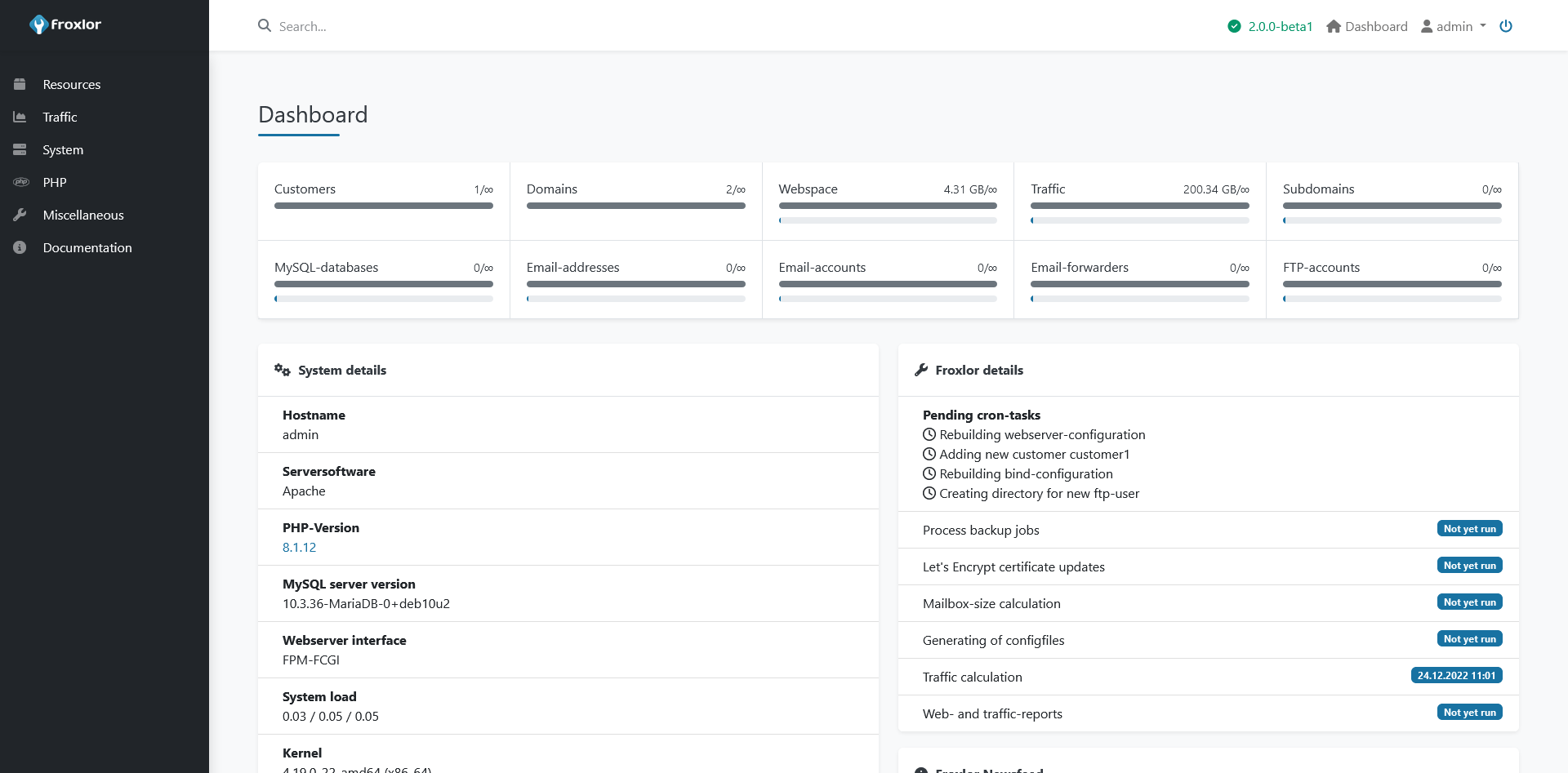
Its strengths are the unglamorous ISP features: per-customer and per-reseller resource limits, separate HTTP, FTP and mail traffic accounting with graphs, per-domain PHP configurations, and per-domain choice of which IPv4 and IPv6 addresses and ports to bind. It is also the most flexible about web servers, supporting Apache, nginx and lighttpd.
The quiet surprise is its release record. Froxlor shipped eight releases through the first half of 2026, seven of the eight titled as security releases, which is roughly monthly and the steadiest security-patch rhythm of any traditional hosting panel here. Its apt repository covers Debian 11, 12 and 13 plus the Ubuntu LTS releases, so unlike HestiaCP it already supports Debian 13. The team is small and the interface is plain, which is the trade-off. Setup guide: install Froxlor on Ubuntu and Debian.
5. CyberPanel, fastest WordPress but read the security note
CyberPanel exists because of OpenLiteSpeed, and its dashboard is built around that web server rather than Apache or nginx.
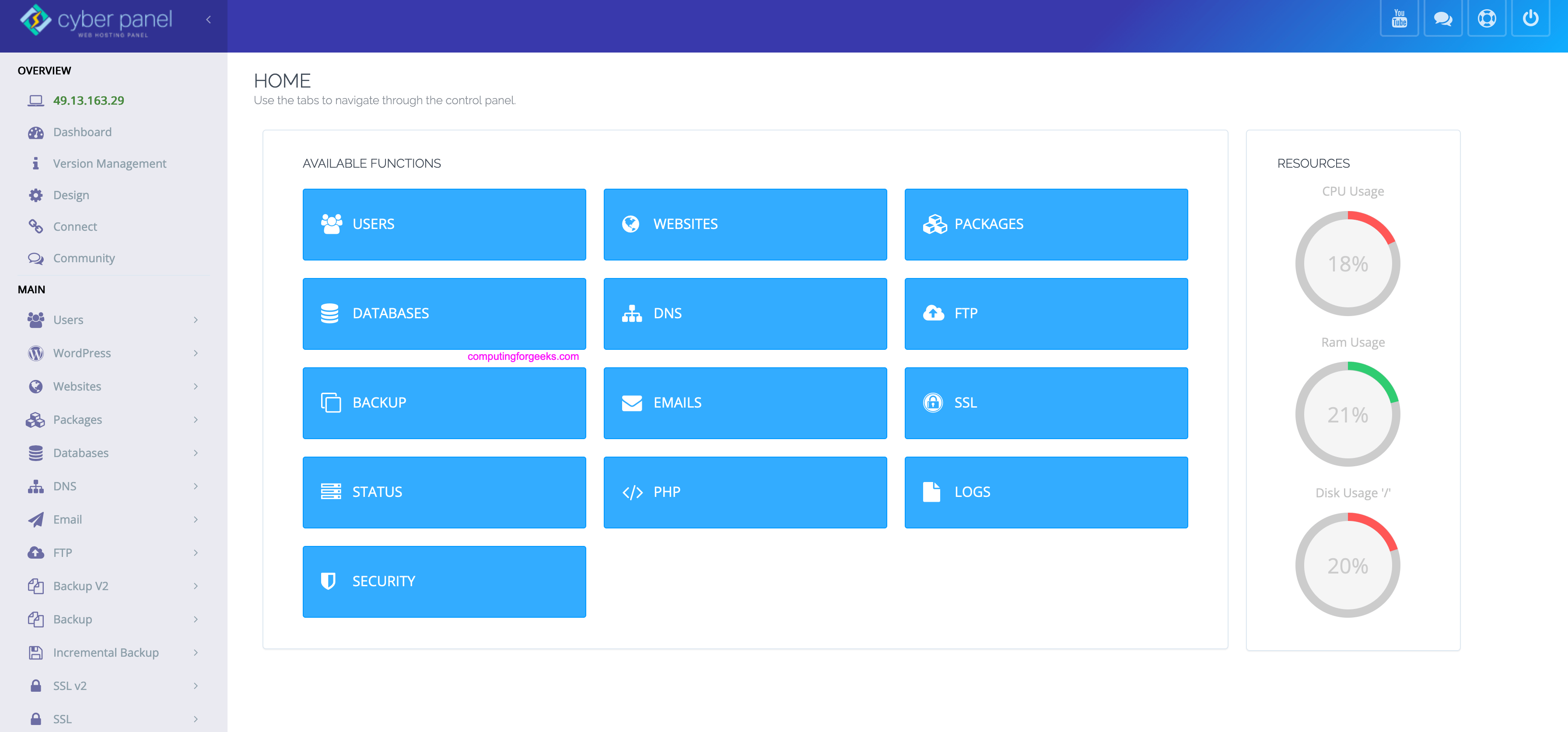
Pairing OpenLiteSpeed with LSCache gives WordPress a genuine performance advantage over a stock Apache or nginx setup, with one-click installs for WordPress, Joomla and Drupal on top. OpenLiteSpeed itself is GPLv3 with no tier limits; the paid LiteSpeed Enterprise path is optional. If raw page-serving speed on PHP sites is the priority, it is the most compelling free option.
Now the part other round-ups skip. In October 2024, CVE-2024-51378 was disclosed: a pre-authentication command injection scoring 9.8 on the NVD scale, reachable through getresetstatus in the DNS and FTP views, affecting every version before 2.3.8. It was mass-exploited within days by ransomware operators against thousands of exposed panels and is listed in CISA’s Known Exploited Vulnerabilities catalogue. It was not an isolated incident either.
That does not make CyberPanel unusable, and the project is actively developed. It does mean you should never expose the panel port to the whole internet, you should firewall it to your own address or a VPN, and you must patch the moment a release lands. Two more quirks trip people up: the GitHub releases page stops at v1.9.1 from 2019 because the current 2.4.x line ships from git branches, and despite what many listings claim, the installer supports AlmaLinux 8 and 9 but not AlmaLinux 10 or Rocky Linux. Our walkthrough: install CyberPanel with Let’s Encrypt.
6. 1Panel, the container-first newcomer
1Panel has more GitHub stars than every other hosting panel in this article combined, and the interface is the most modern of the lot.

It manages websites through OpenResty, runs PHP and Node runtimes, handles MySQL, PostgreSQL and Redis, and leans heavily on a Docker app store for everything else, which the container list above shows plainly. The v2.x line added AI tooling, including Ollama deployment and an MCP server, which no competitor here offers.
Read the gap in that description carefully, though: there is no mail or DNS service wired into its website objects. You can deploy a containerised mail server from the app store, but you then administer it yourself, and there is no cPanel-style per-domain mailbox or DNS-zone provisioning. 1Panel is a superb VPS panel for running your own applications and a poor cPanel replacement for hosting clients who expect mailboxes at their domain. It is also open core, with the WAF, monitoring and white-labelling reserved for the paid Pro edition, and being a Chinese-vendor product it attracts recurring telemetry questions in community threads that you should form your own view on. See managing a Linux server with 1Panel.
7. BlueOnyx, the RHEL 10 specialist
BlueOnyx is easy to write off as a relic, and that would be a mistake.
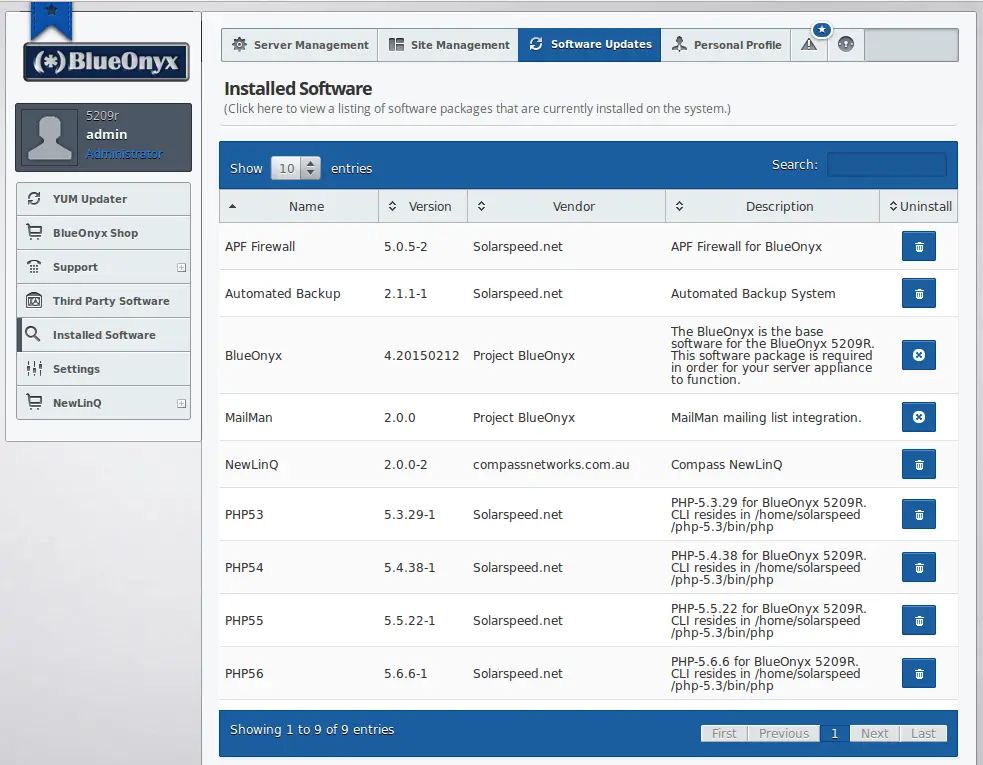
The project is still shipping: the current 5212R line targets RHEL 10 with AlmaLinux 10 and Rocky Linux 10, and 2026 brought both security fixes and a new FOSSBilling integration, per the project’s own news feed. That makes it one of the few panels here that supports the RHEL 10 generation at all, alongside Virtualmin and ISPConfig, and the only one of those three built around jailed accounts. 1Panel will install there too, but without mail or DNS. BlueOnyx is released under a Sun-modified BSD licence rather than the GPL, which is permissive and forkable but not one of the licences OSI actually lists, an unusual detail worth knowing if licence compatibility matters to you.
It carries a distinctive feature set from its Cobalt RaQ heritage: optional chrooted jails with SFTP or SSH access controls, dual-stack IPv4 and IPv6, installation from official ISO images, Mailman mailing lists, multi-tenant virtual sites with no per-site fees, and brute-force login protection through pam_abl. The interface shows its age and the community is small, so treat it as a specialist choice for RHEL-family shops rather than a general recommendation. Guide: install BlueOnyx on Rocky Linux and AlmaLinux.
8. myVesta, if you are stuck on VestaCP
Anyone still running VestaCP needs a migration target, and myVesta is the gentlest one. It is a security-focused, Debian-only fork maintained independently of the original project, GPL-3.0, and releasing regularly with 0.9.9-0-17 in July 2026. Its installer refuses anything that is not Debian, deliberately. Because the layout and command set stay close to Vesta’s, moving across is far less disruptive than a rebuild on a different panel.
It is a much smaller project than HestiaCP by every measure, so pick it for migration continuity. If you are starting fresh, start with Hestia.
If you deploy apps rather than host clients
This second group has taken over the conversation, and for good reason: if your job is shipping your own applications rather than selling shared hosting, a git-push platform beats a vhost manager. Coolify’s project view is representative of how these tools think.
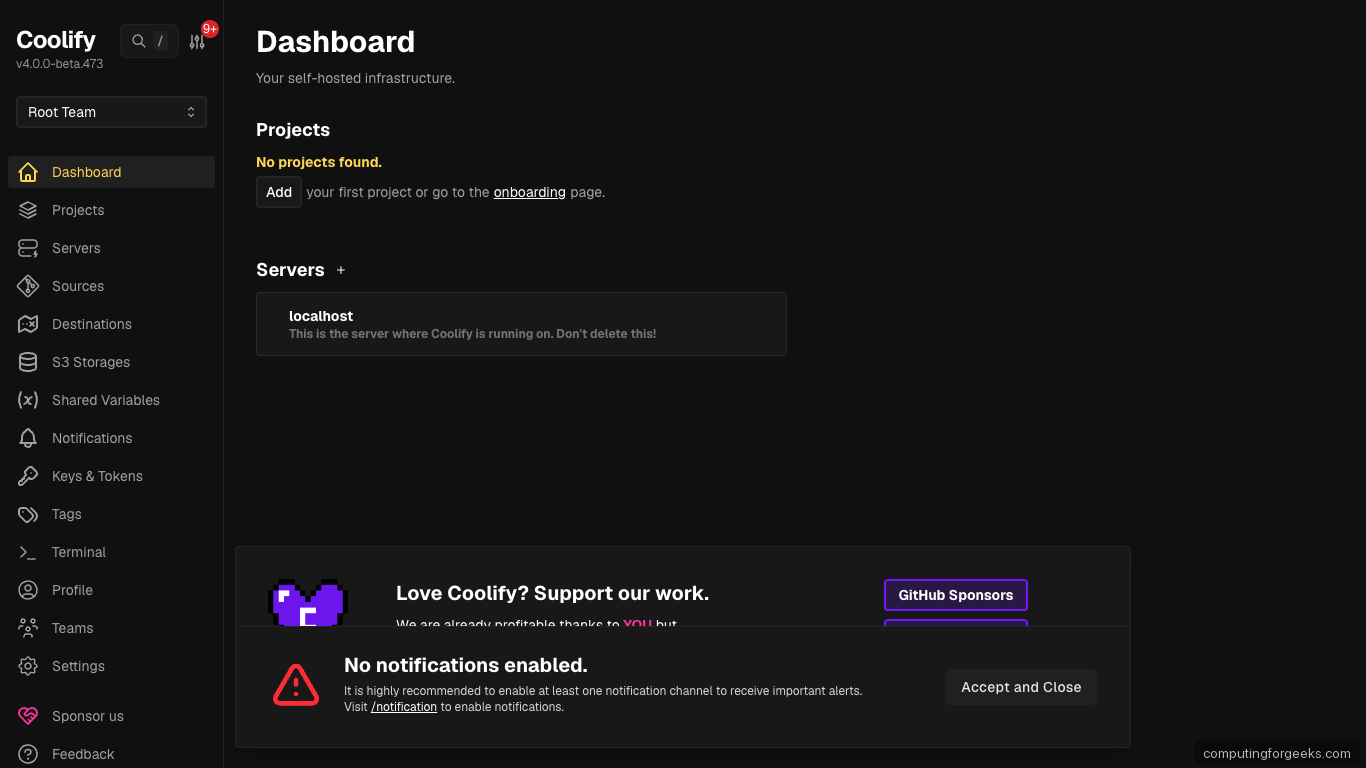
None of these run a mail server or authoritative DNS for customer domains, so they are complements to the list above, not replacements.
| Tool | Licence | Stars | Best at |
|---|---|---|---|
| Coolify | Apache-2.0 | ~59,800 | The all-rounder: Docker and Compose apps, git deploys, 280+ service templates, multi-server over SSH |
| Dokploy | Apache-2.0 outside a proprietary directory | ~36,200 | Docker Swarm clustering, database backups to S3 |
| Dokku | MIT | ~32,100 | The original git-push platform, CLI-driven, very light |
| CapRover | Apache-2.0 with a restrictive appendix | ~15,100 | Long-running and tiny, though innovation has slowed |
| Komodo | GPL-3.0 | ~11,700 | Managing Docker builds and deployments across many hosts |
Coolify is the safe default here and genuinely replaces a small Heroku or Vercel bill, with the caveat that the panel itself is heavy for a 1 GB VPS. Dokploy is the one to watch if you want real multi-node clustering, since its Swarm support is something Coolify lacks. CapRover is worth a licence check before commercial use: its Apache-2.0 file carries an appendix that overrides the general terms and restricts redistribution of paid features. We have guides for Coolify on Ubuntu, CapRover, and Komodo. For pure machine administration with no hosting layer at all, Cockpit is the Red Hat-backed answer.
Free, popular, and not open source
These four are worth knowing precisely because they get recommended as open source when they are not. Using them is fine, as long as the decision is informed.
CloudPanel is fast, nginx-only, free for unlimited sites, and excellent for PHP and Laravel work, with ARM64 support and tidy cloud images. Its licence forbids modification and resale, and there is no mail or DNS server. See installing CloudPanel on Ubuntu.
aaPanel is the international edition of China’s BT.cn panel, very actively developed, and unusual in letting you pick nginx, Apache or OpenLiteSpeed per site. Its licence resolves to custom terms rather than anything OSI-approved, parts install as fetched binaries, and a 2025 third-party disclosure found its multi-factor implementation used the same TOTP secret for every user, making the second factor bypassable. Try it via aaPanel on Debian.
Control Web Panel, formerly CentOS Web Panel, is RHEL-family only, publishes no source, and sells a CWPpro tier. Its security record is the reason to be careful: CVE-2025-48703 allowed unauthenticated remote code execution through the file manager, tempered slightly by needing a valid non-root username, and CVE-2022-44877 scored 9.8 and was mass-exploited in early 2023. Both are in CISA’s exploited-vulnerabilities catalogue.
KeyHelp is the better-behaved member of this group: closed source but free for unlimited domains, polished, current with Debian 13 support, and backed by a German host. There is a paid Pro tier at around 9 euros a month, free for Keyweb’s own customers.
Panels to skip in 2026
Every one of these still appears in “best free control panel” lists, including, until this update, ours. Check the dates.
- Sentora. Last release May 2024, last commit February 2025. Its installer hard-codes support for Ubuntu 24.04 and Debian 12 and refuses to run on anything newer, so Debian 13 and Ubuntu 26.04 are off the table entirely. It is also a fork of the ZPanel codebase, which accumulated a dozen CVEs including remote command execution, though Sentora itself has no CVEs of its own on record.
- VestaCP. No tagged release since November 2021, and none at all under the new ownership that took over the repository. The repository is still actively committed to, with 17 commits in July 2026 alone, yet nothing has been released, and a couple of security fixes sit on the master branch unreleased. Anyone installing from a release is running nearly five-year-old code. A version 2.0 Rust rewrite was announced and has not shipped. Migrate to HestiaCP or myVesta.
- Ajenti V. Ajenti 2.x is alive, MIT-licensed and has nearly 8,000 stars, but it is a server admin dashboard. The hosting addon that managed vhosts, mail and PHP belonged to the 1.x line and has not been touched since 2022. The stars mislead people into thinking Ajenti is a hosting panel; in 2026 it is not.
- CasaOS. Not a hosting panel to begin with, and now stalled: no release since December 2024, no repository activity since August 2025, with the vendor’s attention moved to a product that introduced a paid tier. Its 36,000 stars reflect past popularity, not present health. For a home-server app store, Runtipi is the maintained choice.
Which one should you run
Match the panel to the job and the decision gets simple:
- Shared hosting with email, on Debian 11/12 or Ubuntu LTS: HestiaCP.
- Shared hosting on Debian 13: Froxlor or ISPConfig, since Hestia has not got there yet.
- Shared hosting on RHEL, AlmaLinux or Rocky: Virtualmin GPL, or ISPConfig if you prefer building the stack yourself. BlueOnyx if you specifically want RHEL 10 with a jailed-account model.
- Hosting split across several servers: ISPConfig. Nothing else free here provisions web, mail and DNS roles on separate machines from one panel.
- Reselling hosting with per-customer accounting: Froxlor.
- WordPress performance above all: CyberPanel, firewalled to your own address and patched aggressively.
- Your own apps, no client mailboxes: Coolify, or 1Panel if you want a website panel and a Docker app store in one interface.
Test a panel properly before a customer touches it
Control panels are unusually hard to leave. They own your vhost configs, your mail store, your DNS zones and your database users, so a panel you regret is a migration project rather than an uninstall. Spend an hour on a throwaway VM first and put the candidate through the things that actually hurt later.
- Install it on the exact OS version you will run in production. Support matrices in this category are narrow and precise, and several panels refuse to run at all on an unsupported release rather than degrading gracefully. A panel that is happy on Ubuntu 24.04 may reject 26.04 outright.
- Check egress before you blame the panel. These installers pull from several third-party repositories, so a blocked port or an unreachable mirror produces a half-finished install and a confusing error. I lost time to exactly that, and the panel was not at fault.
- Create a real site with real mail. Add a domain, issue a Let’s Encrypt certificate, create a mailbox, then send a message to an external provider and check it does not land in spam. Mail is where free panels differ most, and it is the feature customers notice.
- Restore a backup, do not just take one. Every panel can write a backup. Prove you can restore a single site onto a second clean VM, because that is the operation you will be doing under pressure.
- Read the last six months of releases. Look for security fixes and how quickly they followed disclosure. This single check would have removed most of the dead panels above from consideration years ago.
- Try the upgrade. Install a slightly older version, then upgrade it. Panels that manage system services can and do break configuration on a major bump, and finding that out on a test VM costs nothing.
Run that checklist and the shortlist usually collapses to one obvious answer for your situation, which is a much better basis for a decision than anyone’s ranked list, including this one.






you are missing the best panels around:
aapanel
zeslecp
fastpanel
Thanks we will add them to the list.
We are enthusiastic about a potential new addition that has shown great potential in https://warren.io/
try https://openpanel.co/