React Suspense for Data Fetching is an expected new feature in the upcoming React version. Although technically Suspense for Data Fetching can be used in the current version of React, new Concurrent Mode enables a new Data Fetching pattern called Render-as-You-Fetch. The new Hook, useTransition, in Concurrent Mode eases displaying with pending state.

This article describes what React Suspense in Concurrent Mode means in terms of developer experience. We will see how traditional Data Fetching in Legacy Mode can be done in Concurrent Mode. We will show pseudo-code in specific cases to compare the difference between the traditional pattern and new pattern. We will also introduce libraries that allow the new pattern.
One of the most typical Data Fetching Hooks can be implemented like this:
const useFetch = (url) => {
  const [loading, setLoading] = useState(false);
  const [result, setResult] = useState();
  useEffect(() => {
    const fetchData = async () => {
      setLoading(true);
      const response = await fetch(url);
      const result = await response.json();
      setResult(result);
      setLoading(false);
    };
    fetchData();
  }, [url]);
  return { loading, result };
};
This useEffect based useFetch is very handy and is often used, as of today. It’s used like this in a component:
const Component = ({ url }) => {
  const { loading, result } = useFetch(url);
  if (loading) return <Loading />;
  return <Result result={result} />
};
However, one of the typical problems is the loading flag. Because this loading flag coexists with the Hook, this often leads many loading indicators in the UI. We could technically create a unified loading component and lift up the loading state in the parent component. That would be possible if you have control for all asynchronous Hooks. But, if you are using a library that does not support your unified pattern, you are out of luck. We need an official pattern that the entire community can live with.
React Suspense will solve this problem. Instead of each Hook handling loading state, Suspense takes care of a unified loading state. With Suspense, the code will look like this:
const Component = () => {
  const { result } = useFetchWithSuspense(somethingPrepared);
  return <Result result={result} />
};

const App = () => (
  <Suspense fallback={<Loading />}>
    <Component />
  </Suspense>
);
With this pattern, we no longer need to consider the loading state in each component. If we have a good useFetchWithSuspense Hook, having a unified loading indicator is trivial with less code.
As the useFetch, that is based on useEffect (shown in the previous section), it calls a fetch function in useEffect. useEffect runs the function only after finishing all components rendering. This may not be a UI issue if an app is small enough.
Let’s suppose we have a “Next” button to trigger fetching new data:
const Component = ({ url, initialIndex }) => {
  const [index, setIndex] = useState(initialIndex);
  const { loading, result } = useFetch(`${url}?index=${index}`);
  const onClick = () => {
    setIndex(index + 1);
  };
  if (loading) return <Loading />;
  return (
    <div>
      <button onClick={onClick}>Next</button>
      <Result result={result} />
      <VeryHugeComponent />
    </div>
  );
};
Now, the issue is if VeryHugeComponent takes time to render. It will only start fetching more data after it finishes all renders. To overcome this problem, we can take the Fetch-Then-Render approach:
const fetchData = async () => {
  const response = await fetch(url);
  const result = await response.json();
  return result;
};

const initialResult = await fetchData(...); // top-level await is not ideal

const Component = ({ url, initialIndex, initialResult }) => {
  const [index, setIndex] = useState(initialIndex);
  const [loading, setLoading] = useState(false);
  const [result, setResult] = useState(initialResult);
  const onClick = async () => {
    setLoading(true);
    setResult(await fetchData(`${url}?index=${index}`));
    setIndex(index + 1);
    setLoading(false);
  };
  if (loading) return <Loading />;
  return (
    <div>
      <button onClick={onClick}>Next</button>
      <Result result={result} />
      <VeryHugeComponent />
    </div>
  );
};
With this example above, data fetching starts in the callback before rendering. It doesn’t wait for VeryHugeComponent to render.
Notice how the initialResult is created, this may not be a good pattern because it runs async initialization at the top level. It might be better to prepare initialResult before rendering for consistency, or we could use Fetch-on-Render pattern for the initial render:
Using React Suspense, the code shown above will become something like this:
const Component = ({ url, initialIndex, initialResult }) => {
  const [index, setIndex] = useState(initialIndex);
  const [result, setResult] = useState(initialResult);
  const onClick = async () => {
    setResult(fetchDataWithSuspense(`${url}?index=${index}`));
    setIndex(index + 1);
  };
  return (
    <div>
      <button onClick={onClick}>Next</button>
      <Result result={result} />
      <VeryHugeComponent index={index} />
    </div>
  );
};
In addition to the fact that we no longer take care of the loading state, this has a benefit in Concurrent Mode. Suppose VeryHugeComponent has an index prop, it can render while the Data Fetching is in progress.
The following rough diagram shows the four different patterns with Data Fetching. Render-as-You-Fetch patterns start Data Fetching before the render, while allowing React to render as much as possible until the Data Fetching finishes.
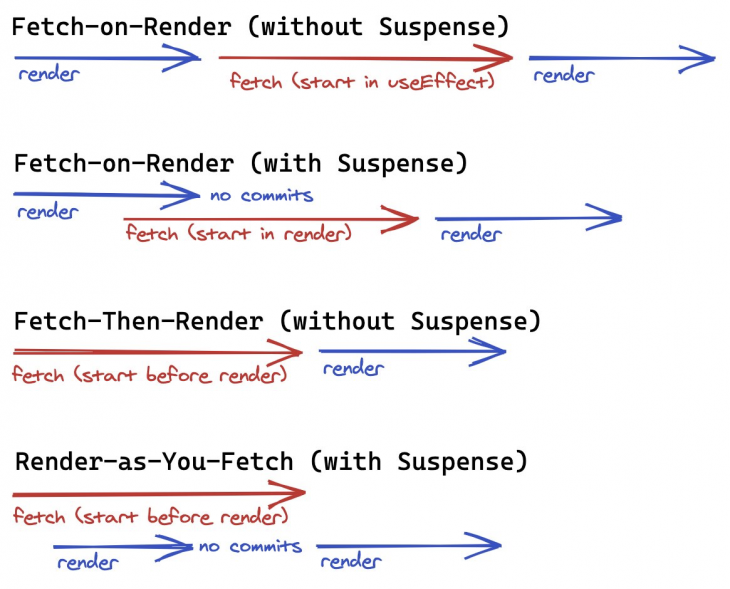
Often in a traditional Web API, you would need to fetch data several times for a page to show up. For example, let’s consider an app that shows a blog post and the “like count” of the post. Using useEffect-based useFetch, the code with the Fetch-on-Render pattern will look like this:
const BlogPosts = () => {
  const { loading, result } = useFetch(...);
  if (loading) return <Loading />;
  return (
    <ul>
      {result.map(postId => (
        <BlogPost key={postId} id={id} />
      ))}
    </ul>
  );
};

const BlogPost = ({ postId }) => {
  const { loading, result } = useFetch(`...${postId}`);
  if (loading) return <Loading />;
  return (
    <li>
      <h1>{result.title}</h1>
      <p>{result.content}</p>
      <BlogLikeCount postId={postId} />
    </li>
  );
};

const BlogLikeCount = ({ postId }) => {
  const { loading, result } = useFetch(`...${postId}`);
  if (loading) return <Loading />;
  return <span>{result.count}</span>;
};
This is somewhat of a hypothetical example, but the point is that tying a visual component and Data Fetching can lead to waterfalls. In this case, we can fetch “like count” earlier. We could actually do it — fetch “like count” in BlogPost, which is the Fetch-Then-Render pattern.
With the Render-as-You-Fetch pattern, you would need to change the mental mode. A component only cares about rendering, not about data fetching. With this mental model, the same example would look like this:
const BlogPosts = ({ posts }) => {
  return (
    <ul>
      {posts.map(post => (
        <BlogPost key={post.id} post={post} />
      ))}
    </ul>
  );
};

const BlogPost = ({ post }) => {
  return (
    <li>
      <h1>{post.title}</h1>
      <p>{post.content}</p>
      <BlogLikeCount like={post.like} />
    </li>
  );
};

const BlogLikeCount = ({ like }) => {
  return <span>{like.count}</span>;
};
There’s nothing surprising in this code. It just handles async data as if it’s sync data. However, this is usually not possible in the normal JavaScript. It is possible with React Suspense. Implementing a library to allow this pattern is not trivial. You want to control parallel and sequential loading patterns. Especially, allowing incremental loading would become a bit tricky. (For someone interested, please see how react-suspense-fetch solves it.)
It can be said that useEffect is overused for data fetching. Functions are generally composable and having a big useEffect callback is nonsense. If you try to split into smaller functions, you need to wrap a function with useCallback. The code will look like this:
const Component = ({ id1, id2 }) => {
  const [loading, setLoading] = useState(false);
  const [result, setResult] = useState(initialResult);
  const fetchItem1 = useCallback(async () => {
    const item1 = await fetchItem(id1);
    return item1;
  }, [id1]);
  const fetchItem2 = useCallback(async () => {
    const item2 = await fetchItem(id2);
    return item2;
  }, [id2]);
  const fetchContent = useCallback(async () => {
    const [item1, item2] = await Promise.all([fetchItem1(), fetchItem2()]);
    return { item1, item2 };
  }, [fetchItem1, fetchItem2]);
  useEffect(() => {
    const fetchData = async () => {
      setLoading(true);
      setResult(await fetchContent());
      setLoading(false);
    };
    fetchData();
  }, [fetchContent]);
  if (loading) return <Loading />;
  return <Result result={result} />
};
This is, again, a hypothetical example. Without the exhaustive-deps rule in the eslint-plugin-react-hooks package, we can’t safely write this kind of code because developers often make mistakes. useEffect wouldn’t be very suited for data fetching or async functions in general. The Render-as-You-Fetch pattern is to allow data fetching without useEffect, which releases this annoying deps issue from us. The result would be as simple as this.
const Component = ({ item1, item2 }) => {
  return <Result result={{ item1, item2 }} />
};
I have been developing several React libraries for data fetching. Most notably, these libraries encourage the Render-as-You-Fetch pattern as much as possible. With these libraries, the discussions we had in the previous sections are actually actionable.
This is a very primitive library to create a suspense-enabled data from an async function. The data can almost be treated as sync data in React. It is implemented with proxies. As the cache is in the object itself, it can safely be garbage collected, if it’s no longer referenced. The example code in the previous sections are created with this in mind.
Because react-suspense-fetch is too primitive, we need a more use case oriented library. This is a library to combine react-suspense-fetch and react-router. It allows us to fetch data based on route change.
This is another primitive library. Unlike react-suspense-fetch, it provides Hooks API. It doesn’t depend on an implicit cache, but uses an explicit store.
These libraries above are designed not to depend on global cache. Here are various libraries with global cache:
We are still at the beginning of the new era. Concurrent Mode is not yet released, and libraries are far from mature. It is still uncertain what the best practice of Data Fetching in React will be. Nevertheless, this new technology seems promising. React Suspense for Data Fetching is often featured for better user experience, but this article explains more from the developer experience perspective. Technically the same user experience can be accomplished with the current technology without React Suspense. Overall, it can be said that creating a better user experience requires a better developer experience.
Install LogRocket via npm or script tag. LogRocket.init() must be called client-side, not
server-side
$ npm i --save logrocket

// Code:

import LogRocket from 'logrocket';
LogRocket.init('app/id');
// Add to your HTML:

<script src="https://cdn.lr-ingest.com/LogRocket.min.js"></script>
<script>window.LogRocket && window.LogRocket.init('app/id');</script>

Can AI refactor legacy CSS without breaking your layout? We benchmarked 5 top AI assistants across cascade order, specificity ties, and stacking traps.

Learn how to offload long-running Gemini AI requests to Trigger.dev background jobs in Next.js using Server Actions and real-time React hooks.

Learn how to use Google’s LiteRT.js to build a browser-based OCR receipt scanner with WebGPU acceleration and on-device LLM structuring via LiteRT-LM.
Learn how to use the TypeScript Compiler API and AST traversal to extract imports and build a file dependency graph CLI.
Would you be interested in joining LogRocket's developer community?
Join LogRocket’s Content Advisory Board. You’ll help inform the type of content we create and get access to exclusive meetups, social accreditation, and swag.
Sign up now


 Learn more →