HTML5日本語訳
HTMLとXHTMLのための語彙と関連API
HTMLとXHTMLのための語彙と関連API
この節は非規範的である。
フォームは、テキストフィールド、ボタン、チェックボックス、レンジコントロール、またはカラーピッカーなど、フォームコントロールを持つウェブページのコンポーネントである。さらなる処理(たとえば、検索または計算結果を返す)に対してサーバーに送信できるデータを提供して、ユーザーはそのようなフォームで情報を交換できる。スクリプトがユーザーエクスペリエンスを補強するか、またはサーバーにデータを送信する以外の意義に対してフォームを使用できるようなAPIが利用可能であるが、多くの場合クライアント側のスクリプトは必要ない。
フォームの記述は、ユーザーインターフェースを記述する、サーバー側の処理を実装する、そのサーバーと通信するためのユーザーインターフェースを構成するという、任意の順序で実行される複数のステップから成る。
この節は非規範的である。
この簡単な手引きの目的に対して、ピザを注文するフォームを作成する。
すべてのフォームは、内部にコントロールを配置されたform要素で始まる。ほとんどのコントロールは、デフォルトで1行のテキストフィールドを提供するinput要素によって表される。コントロールをラベル付けするために、label要素が使用される。ラベルテキストおよびコントロール自身は、label要素の中に入る。フォームの各部分は段落とみなされ、通常はp要素を使用して他の部分から分離される。これを一緒に置くと、これは顧客の名前を尋ねることができる方法の一つである:
<form>
 <p><label>Customer name: <input></label></p>
</form>
ユーザーにピザのサイズを選択させるために、ラジオボタンのセットを使用できる。ラジオボタンはまた、今回は値のradioとともにtype属性をもつ、input要素を使用する。グループとしてラジオボタンを動作させるために、それらはname属性を使用して、共通の名前を与えられる。この場合、ラジオボタンのように、一緒にコントロールのバッチをグループ化するために、fieldset要素を使用できる。コントロールのグループのようなタイトルは、fieldset内の最初の要素で与えられる。これは、legend要素である必要がある。
<form>
 <p><label>Customer name: <input></label></p>
 <fieldset>
  <legend> Pizza Size </legend>
  <p><label> <input type=radio name=size> Small </label></p>
  <p><label> <input type=radio name=size> Medium </label></p>
  <p><label> <input type=radio name=size> Large </label></p>
 </fieldset>
</form>
前のステップからの変更点が強調表示される。
トッピングを選ぶために、チェックボックスを使用できる。これらは、値checkboxをもつtype属性とともにinput要素を使用する。
<form>
 <p><label>Customer name: <input></label></p>
 <fieldset>
  <legend> Pizza Size </legend>
  <p><label> <input type=radio name=size> Small </label></p>
  <p><label> <input type=radio name=size> Medium </label></p>
  <p><label> <input type=radio name=size> Large </label></p>
 </fieldset>
 <fieldset>
  <legend> Pizza Toppings </legend>
  <p><label> <input type=checkbox> Bacon </label></p>
  <p><label> <input type=checkbox> Extra Cheese </label></p>
  <p><label> <input type=checkbox> Onion </label></p>
  <p><label> <input type=checkbox> Mushroom </label></p>
 </fieldset>
</form>
このフォームで注文するピザ屋は、いつも間違いをするので、顧客に連絡する方法を必要とする。この目的のために、電話番号(telに設定されたtype属性をもつinput要素)、および電子メールアドレス(emailに設定されたtype属性をもつinput要素)に対してフォームコントロールを特別に使用できる:
<form>
 <p><label>Customer name: <input></label></p>
 <p><label>Telephone: <input type=tel></label></p>
 <p><label>E-mail address: <input type=email></label></p>
 <fieldset>
  <legend> Pizza Size </legend>
  <p><label> <input type=radio name=size> Small </label></p>
  <p><label> <input type=radio name=size> Medium </label></p>
  <p><label> <input type=radio name=size> Large </label></p>
 </fieldset>
 <fieldset>
  <legend> Pizza Toppings </legend>
  <p><label> <input type=checkbox> Bacon </label></p>
  <p><label> <input type=checkbox> Extra Cheese </label></p>
  <p><label> <input type=checkbox> Onion </label></p>
  <p><label> <input type=checkbox> Mushroom </label></p>
 </fieldset>
</form>
配達時間を尋ねるためにtimeに設定されたtype属性にinput要素を使用できる。フォームコントロールの多くは、値が指定できるものを正確に制御するための属性を持つ。この場合、特に関心のある3つの属性は、min、max、およびstepである。これらは、最小時間、最大時間、及び許可された値の間隔(秒単位で)を設定する。このピザは、午前11時と午後9時の間で配送され、15分刻み以上を約束するものでなく、次のようにマークアップできる:
<form>
 <p><label>Customer name: <input></label></p>
 <p><label>Telephone: <input type=tel></label></p>
 <p><label>E-mail address: <input type=email></label></p>
 <fieldset>
  <legend> Pizza Size </legend>
  <p><label> <input type=radio name=size> Small </label></p>
  <p><label> <input type=radio name=size> Medium </label></p>
  <p><label> <input type=radio name=size> Large </label></p>
 </fieldset>
 <fieldset>
  <legend> Pizza Toppings </legend>
  <p><label> <input type=checkbox> Bacon </label></p>
  <p><label> <input type=checkbox> Extra Cheese </label></p>
  <p><label> <input type=checkbox> Onion </label></p>
  <p><label> <input type=checkbox> Mushroom </label></p>
 </fieldset>
 <p><label>Preferred delivery time: <input type=time min="11:00" max="21:00" step="900"></label></p>
</form>
textarea要素は、自由形式のテキストフィールドを提供するために使用できる。この文脈において、配送指示を与えるために顧客に対してスペースを提供するために要素を使用しようとしている:
<form>
 <p><label>Customer name: <input></label></p>
 <p><label>Telephone: <input type=tel></label></p>
 <p><label>E-mail address: <input type=email></label></p>
 <fieldset>
  <legend> Pizza Size </legend>
  <p><label> <input type=radio name=size> Small </label></p>
  <p><label> <input type=radio name=size> Medium </label></p>
  <p><label> <input type=radio name=size> Large </label></p>
 </fieldset>
 <fieldset>
  <legend> Pizza Toppings </legend>
  <p><label> <input type=checkbox> Bacon </label></p>
  <p><label> <input type=checkbox> Extra Cheese </label></p>
  <p><label> <input type=checkbox> Onion </label></p>
  <p><label> <input type=checkbox> Mushroom </label></p>
 </fieldset>
 <p><label>Preferred delivery time: <input type=time min="11:00" max="21:00" step="900"></label></p>
 <p><label>Delivery instructions: <textarea></textarea></label></p>
</form>
最後に、フォームを投稿可能にするために、button要素を使用する:
<form>
 <p><label>Customer name: <input></label></p>
 <p><label>Telephone: <input type=tel></label></p>
 <p><label>E-mail address: <input type=email></label></p>
 <fieldset>
  <legend> Pizza Size </legend>
  <p><label> <input type=radio name=size> Small </label></p>
  <p><label> <input type=radio name=size> Medium </label></p>
  <p><label> <input type=radio name=size> Large </label></p>
 </fieldset>
 <fieldset>
  <legend> Pizza Toppings </legend>
  <p><label> <input type=checkbox> Bacon </label></p>
  <p><label> <input type=checkbox> Extra Cheese </label></p>
  <p><label> <input type=checkbox> Onion </label></p>
  <p><label> <input type=checkbox> Mushroom </label></p>
 </fieldset>
 <p><label>Preferred delivery time: <input type=time min="11:00" max="21:00" step="900"></label></p>
 <p><label>Delivery instructions: <textarea></textarea></label></p>
 <p><button>Submit order</button></p>
</form>
この節は非規範的である。
サーバー側の処理機構の記述に対する正確な詳細は、この仕様書の範囲外である。この手引きの目的のために、HTTP POSTボディ内で以下のパラメータが送信されたと期待し、https://pizza.example.com/order.cgiでスクリプトがapplication/x-www-form-urlencoded形式を使用して投稿を受け付ける設定がされていると仮定する:
custnamecusttelcustemailsizesmall、medium、またはlargeのいずれかの、ピザのサイズtoppingbacon、cheese、onion、およびmushroomをもつ、各選択されたトッピングに対して一度に指定される。deliverycommentsこの節は非規範的である。
フォームの送信は、最も一般的なHTTP GETまたはPOSTリクエストとして、種々の方法でサーバーに公開される。使用される正確な方法を指定するために、method属性はform要素で指定される。ただし、これはフォームデータがどのようにエンコードされるかを指定しない。指定するためには、enctype属性を使用する。また、action属性を使用して、送信されたデータを処理するサービスのURLを指定する必要がある。
提出したい各フォームコントロールについて、提出でのデータを参照するために使用される名前を付ける必要がある。すでに、ラジオボタンのグループの名前を指定している。同じ属性(name)も提出名を指定する。ラジオボタンはvalue属性を使用して、それぞれに異なる値を与えることにより提出で互いに区別できる。
複数のコントロールは、同じ名前を持つことができる。たとえば、すべてのチェックボックスに同じ名前を与え、サーバーは、どの値がその名前で提出されたかを見ることによって、どのチェックボックスがチェックされたかを区別する―ラジオボタンのように、これらはまた、value属性を持つ一意な値を与えられる。
前節の設定を考えれば、次のようになる:
<form method="post"
      enctype="application/x-www-form-urlencoded"
      action="https://pizza.example.com/order.cgi">
 <p><label>Customer name: <input name="custname"></label></p>
 <p><label>Telephone: <input type=tel name="custtel"></label></p>
 <p><label>E-mail address: <input type=email name="custemail"></label></p>
 <fieldset>
  <legend> Pizza Size </legend>
  <p><label> <input type=radio name=size value="small"> Small </label></p>
  <p><label> <input type=radio name=size value="medium"> Medium </label></p>
  <p><label> <input type=radio name=size value="large"> Large </label></p>
 </fieldset>
 <fieldset>
  <legend> Pizza Toppings </legend>
  <p><label> <input type=checkbox name="topping" value="bacon"> Bacon </label></p>
  <p><label> <input type=checkbox name="topping" value="cheese"> Extra Cheese </label></p>
  <p><label> <input type=checkbox name="topping" value="onion"> Onion </label></p>
  <p><label> <input type=checkbox name="topping" value="mushroom"> Mushroom </label></p>
 </fieldset>
 <p><label>Preferred delivery time: <input type=time min="11:00" max="21:00" step="900" name="delivery"></label></p>
 <p><label>Delivery instructions: <textarea name="comments"></textarea></label></p>
 <p><button>Submit order</button></p>
</form>
属性が引用符で囲まれた値を持ったり囲まれなかったりするが、特に意味はない。構文のセクションで説明されるように、HTML構文は属性を指定するための等価で妥当な様々な方法を可能にする。
たとえば、顧客が自分の名前として"Denise Lawrence"、電話番号として"555-321-8642"と入力し、電子メールアドレスを指定せず、中型ピザを求め、追加でチーズとキノコのトッピングを選択し、午後7時の配達時間を入力し、配送指示のテキストフィールドを空白のままにした場合、ユーザーエージェントは、オンラインウェブサービスに以下を送信するだろう:
custname=Denise+Lawrence&custtel=555-321-8624&custemail=&size=medium&topping=cheese&topping=mushroom&delivery=19%3A00&comments=
この節は非規範的である。
フォームは、フォームが送信される前に、どのようにユーザーエージェントがユーザーの入力をチェックするかのような注釈を付けることができる。(悪意あるユーザーが簡単にフォームの検証を迂回することができるので)サーバは依然として入力が妥当であることを確認する必要があるが、ユーザーは、ユーザーの入力の独占的なチェッカーであるサーバーを持つことによって発生した待ち時間を回避できる。
最も簡単な注釈は、値が指定されるまでフォームが送信されないことを示すためにinput要素で指定できる、required属性である。顧客の名前と配達時間のフィールドにこの属性を追加することによって、ユーザーがフィールドに入力せずにフォームを送信する際に、ユーザーエージェントはユーザーに通知できる:
<form method="post"
      enctype="application/x-www-form-urlencoded"
      action="https://pizza.example.com/order.cgi">
 <p><label>Customer name: <input name="custname" required></label></p>
 <p><label>Telephone: <input type=tel name="custtel"></label></p>
 <p><label>E-mail address: <input type=email name="custemail"></label></p>
 <fieldset>
  <legend> Pizza Size </legend>
  <p><label> <input type=radio name=size required value="small"> Small </label></p>
  <p><label> <input type=radio name=size required value="medium"> Medium </label></p>
  <p><label> <input type=radio name=size required value="large"> Large </label></p>
 </fieldset>
 <fieldset>
  <legend> Pizza Toppings </legend>
  <p><label> <input type=checkbox name="topping" value="bacon"> Bacon </label></p>
  <p><label> <input type=checkbox name="topping" value="cheese"> Extra Cheese </label></p>
  <p><label> <input type=checkbox name="topping" value="onion"> Onion </label></p>
  <p><label> <input type=checkbox name="topping" value="mushroom"> Mushroom </label></p>
 </fieldset>
 <p><label>Preferred delivery time: <input type=time min="11:00" max="21:00" step="900" name="delivery" required></label></p>
 <p><label>Delivery instructions: <textarea name="comments"></textarea></label></p>
 <p><button>Submit order</button></p>
</form>
maxlength属性を使用して、入力の長さを制限することも可能である。textarea要素にこれを追加することによって、ユーザーに1000文字の制限ができ、焦点を合わせて留まる代わりに忙しい配送ドライバーに対してユーザーが巨大なエッセイを書かないようにする。
<form method="post"
      enctype="application/x-www-form-urlencoded"
      action="https://pizza.example.com/order.cgi">
 <p><label>Customer name: <input name="custname" required></label></p>
 <p><label>Telephone: <input type=tel name="custtel"></label></p>
 <p><label>E-mail address: <input type=email name="custemail"></label></p>
 <fieldset>
  <legend> Pizza Size </legend>
  <p><label> <input type=radio name=size required value="small"> Small </label></p>
  <p><label> <input type=radio name=size required value="medium"> Medium </label></p>
  <p><label> <input type=radio name=size required value="large"> Large </label></p>
 </fieldset>
 <fieldset>
  <legend> Pizza Toppings </legend>
  <p><label> <input type=checkbox name="topping" value="bacon"> Bacon </label></p>
  <p><label> <input type=checkbox name="topping" value="cheese"> Extra Cheese </label></p>
  <p><label> <input type=checkbox name="topping" value="onion"> Onion </label></p>
  <p><label> <input type=checkbox name="topping" value="mushroom"> Mushroom </label></p>
 </fieldset>
 <p><label>Preferred delivery time: <input type=time min="11:00" max="21:00" step="900" name="delivery" required></label></p>
 <p><label>Delivery instructions: <textarea name="comments" maxlength=1000></textarea></label></p>
 <p><button>Submit order</button></p>
</form>
フォームが送信される際、invalidなイベントは、無効な各フォームコントロールで発火し、その後form要素自身で。典型的にブラウザ自体は一度に一つの問題を報告するので、これはフォームに関する問題の要約を表示するために有用でありうる。
この節は非規範的である。
このピザ配達の例において、時刻は、24時間形式で2桁の時間と2桁の分、形式"HH:MM"で指定される。(この例において必要ないが、秒もまた指定できる。)
しかし、ユーザーに提示される際、一部のロケールにおいて、時刻はしばしば異なった表現がなされる。たとえば、アメリカでは"2pm"のように、am/pm表示付きの12時間制を使用するのが一般的である。フランスでは"14h00"のように、"h"の文字を用いて時間と分を分離するのが一般的である。
コンポーネントの順序が常に一貫しないような複雑な関係を付加されるとともに、日付に同様の問題が存在する―たとえば、キプロスで2003年2月1日は一般に"1/2/03"と書かれ、一方で日本において同じ日付は一般に"2003年02月01日"のように書かれるだろう―数字と平行して、たとえば、どのような句読点が小数点記号や桁区切り記号として使用されるという点でロケールが異なる。
したがって、ブラウザでユーザーに提示され、ブラウザでユーザーからの入力として受け入れられる時刻、日付、および数値形式から、常に形式がこの仕様で定義される(およびコンピュータ可読の日付と時刻の形式に対して十分に確立されたISO 8601規格に基づく)場合、HTMLとフォームの送信で使用される時刻、日付、および数値形式を区別することが重要である。
形式は"ワイヤ上で"使用される。すなわち、HTMLマークアップとフォームの送信で、これはコンピュータ可読およびユーザーのロケールに関わらず、一貫性があることを意図する。たとえば、日付は常に"2003-02-01"のように、形式"YYYY-MM-DD"で記述される。ユーザーは、これまでにこの形式を参照することが期待されていない。
時刻、日付、またはワイヤ形式でページによって与えられた数字は、ユーザーに表示される前に、(ユーザー設定に基づくか、ページ自身のロケールに基づいて)ユーザーの好みの表現に変換される。同様に、ユーザーは、好みの形式を使用して、時刻、日付、または数値の入力する後に、ユーザーエージェントは、DOMに入れるまたは送信する前に、ワイヤ形式に戻って変換する。
依然としてユーザーのニーズをサポートする一方で、これは、ページ内やサーバー上のスクリプトに、多数の異なるフォーマットをサポートする必要なしに、一貫性のある方法で、時刻、日付、および数値を処理できる。
See also the implementation notes regarding localization of form controls.
多くの歴史的な理由のために、この節における要素は、フローコンテンツ、フレージングコンテンツ、およびインタラクティブコンテンツのように通常のものに加えて、複数の(しかし微妙に異なる)カテゴリが重複して分類される。
要素の数は、フォーム所有者を持つことができることを意味する、フォーム関連要素である。
フォーム関連要素は、複数のサブカテゴリに分類される:
form.elementsとfieldset.elements APIに記載される要素を表す。
form要素が送信された際に設定したフォームのデータを作成するために用いることのできる要素を示す。
一部の送信可能要素は、その属性ボタンに応じて存在できる。要素がボタンである場合、以下の文が定義される。一部のボタンは、特に送信ボタンである。
フォーム関連のすべてでなく、一部の要素がラベル付け可能要素として分類される。これは、label要素に関連付けることができる要素である。
form要素form要素の子孫を除く。accept-charset - フォーム送信に使用する文字エンコーディングaction - フォーム送信に使用するURLautocomplete - フォーム内のコントロールのオールフィル機能に対するデフォルト設定 enctype - フォーム送信に使用する文字エンコーディングを設定するフォームデータmethod - フォーム送信に使用するHTTPメソッドname - document.forms APIで使用するためのフォーム名novalidate - フォーム送信のためのフォームコントロール検証を回避するtarget - フォーム送信に対するブラウジングコンテキストaria-*属性。[OverrideBuiltins]
interface HTMLFormElement : HTMLElement {
attribute DOMString acceptCharset;
attribute DOMString action;
attribute DOMString autocomplete;
attribute DOMString enctype;
attribute DOMString encoding;
attribute DOMString method;
attribute DOMString name;
attribute boolean noValidate;
attribute DOMString target;
readonly attribute HTMLFormControlsCollection elements;
readonly attribute long length;
getter Element (unsigned long index);
getter (RadioNodeList or Element) (DOMString name);
void submit();
void reset();
boolean checkValidity();
};
form要素は、処理のためにサーバーに送信できる編集可能な値を表すことができる一部で、フォーム関連要素のコレクションを表す。
accept-charset属性は送信に対して使用される文字エンコーディングを提供する。指定した場合、値はASCII大文字・小文字不区別な一意なスペース区切りトークンの順序付けられたセットでなければならず、各トークンはASCII互換文字エンコーディングのラベルとASCII大文字・小文字不区別で一致しなければならない。[ENCODING]
name属性はformsコレクション内のformの名前を表す。値は空文字列であってはならず、いかなる場合も、値はformsコレクションのform要素の中で一意でなければならない。
autocomplete属性は列挙属性である。この属性は2つの状態を持つ。onキーワードはon状態に対応し、offキーワードはoff状態に対応する。属性は省略されてもよい。欠損値のデフォルトはon状態である。off状態はデフォルトで、フォーム内のフォームコントロールがオートフィルフィールド名を"off"に設定されることを示し、on状態はデフォルトで、フォーム内のフォームコントロールがオートフィルフィールド名を"on"に設定されることを示す。
action、enctype、method、novalidate、およびtarget属性はフォーム送信に対する属性である。
elementsフォーム(歴史的な理由でイメージボタンを除く)でのフォームコントロールのHTMLCollectionを返す。
lengthフォーム(歴史的な理由でイメージボタンを除く)におけるフォームコントロールの数を返す。
フォーム(歴史的な理由でイメージボタンを除く)でindex番目の要素を返す。
指定したIDまたはname(歴史的な理由でイメージボタンを除く)をもつフォームでフォームコントロール(または複数存在する場合、フォームコントロールのRadioNodeList)を返す。または、いずれも存在しない場合、与えられたIDとともにimg要素を返す。
一度要素が特定の名前を使用して参照されると、たとえ要素の実際のIDまたはnameを変更しても要素がDocumentに残る限り、その名前は、この方法でその要素を参照する方法として利用され続けるだろう。
複数のマッチするアイテムが存在する場合、それらの要素すべてを含むRadioNodeListオブジェクトが返される。
submit()フォームを送信する。
reset()フォームをリセットする。
checkValidity()フォームのコントロールがすべて有効である場合はtrueを返す。そうでなければfalseを返す。
The autocomplete IDL attribute must
reflect the content attribute of the same name, limited to only known
values.
The name IDL attribute must reflect
the content attribute of the same name.
The acceptCharset IDL attribute must
reflect the accept-charset content
attribute.
The elements IDL attribute must return an
HTMLFormControlsCollection rooted at the Document node while the
form element is in a Document and rooted at the
form element itself when it is not, whose filter matches listed elements whose form owner is the
form element, with the exception of input elements whose type attribute is in the Image
Button state, which must, for historical reasons, be excluded from this particular
collection.
The length IDL attribute must return the number
of nodes represented by the elements collection.
The supported property indices at any instant are the indices supported by the
object returned by the elements attribute at that
instant.
When a form element is indexed for indexed property
retrieval, the user agent must return the value returned by the item method on the elements collection, when invoked with the given index as its
argument.
Each form element has a mapping of names to elements called the past names
map. It is used to persist names of controls even when they change names.
The supported property names consist of the names obtained from the following algorithm, in the order obtained from this algorithm:
Let sourced names be an initially empty ordered list of tuples consisting of a string, an element, a source, where the source is either id, name, or past, and, if the source is past, an age.
For each listed element candidate
whose form owner is the form element, with the exception of any
input elements whose type attribute is in the
Image Button state, run these substeps:
If candidate has an id attribute, add
an entry to sourced names with that id
attribute's value as the string, candidate as the element, and id as
the source.
If candidate has a name attribute,
add an entry to sourced names with that name attribute's value as the string, candidate
as the element, and name as the source.
For each img element candidate whose form owner
is the form element, run these substeps:
If candidate has an id attribute, add
an entry to sourced names with that id
attribute's value as the string, candidate as the element, and id as
the source.
If candidate has a name attribute,
add an entry to sourced names with that name attribute's value as the string, candidate
as the element, and name as the source.
For each entry past entry in the past names map add an entry to sourced names with the past entry's name as the string, past entry's element as the element, past as the source, and the length of time past entry has been in the past names map as the age.
Sort sourced names by tree order of the element entry of each tuple, sorting entries with the same element by putting entries whose source is id first, then entries whose source is name, and finally entries whose source is past, and sorting entries with the same element and source by their age, oldest first.
Remove any entries in sourced names that have the empty string as their name.
Remove any entries in sourced names that have the same name as an earlier entry in the map.
Return the list of names from sourced names, maintaining their relative order.
The properties exposed in this way must not be enumerable.
When a form element is indexed for named property
retrieval, the user agent must run the following steps:
Let candidates be a live RadioNodeList
object containing all the listed elements whose form
owner is the form element that have either an id
attribute or a name attribute equal to name, with the exception of input elements whose type attribute is in the Image
Button state, in tree order.
If candidates is empty, let candidates be a
live RadioNodeList object containing all the img elements
that are descendants of the form element and that have either an id attribute or a name attribute equal
to name, in tree order.
If candidates is empty, name is the name of one of
the entries in the form element's past names map: return the object
associated with name in that map.
If candidates contains more than one node, return candidates and abort these steps.
Otherwise, candidates contains exactly one node. Add a mapping from
name to the node in candidates in the form
element's past names map, replacing the previous entry with the same name, if
any.
Return the node in candidates.
If an element listed in a form element's past names map changes
form owner, then its entries must be removed from that map.
The submit() method, when invoked, must submit the form element from the form
element itself, with the submitted from submit() method flag set.
The reset() method, when invoked, must run the
following steps:
If the form element is marked as locked for reset, then abort these
steps.
Mark the form element as locked for reset.
Unmark the form element as locked for reset.
If the checkValidity() method is
invoked, the user agent must statically validate the constraints of the
form element, and return true if the constraint validation return a positive
result, and false if it returned a negative result.
この例は、2つの検索フォームを示す:
<form action="http://www.google.com/search" method="get">
 <label>Google: <input type="search" name="q"></label> <input type="submit" value="Search...">
</form>
<form action="http://www.bing.com/search" method="get">
 <label>Bing: <input type="search" name="q"></label> <input type="submit" value="Search...">
</form>
label要素label要素でないを除く。form - form要素とコントロールを関連付けるfor - フォームコントロールとラベルを関連付けるinterface HTMLLabelElement : HTMLElement {
readonly attribute HTMLFormElement? form;
attribute DOMString htmlFor;
readonly attribute HTMLElement? control;
};
labelは、ユーザーインターフェースでのキャプションを表す。The caption can be associated with a specific form control, known as the label element's labeled control, either using the for attribute, or by putting the form control inside the label element itself.
Except where otherwise specified by the following rules, a label element has no
labeled control.
for属性は、キャプションが関連付けされることになっているフォームコントロールを示すために指定されてもよい。この属性が指定される場合、属性値は、label要素と同じDocumentでラベル付け可能要素のIDでなければならない。If the attribute is specified and there is an element in the Document whose ID is equal to the value of the for attribute, and the first such element is a labelable element, then that element is the label element's labeled control.
If the for attribute is not specified, but the
label element has a labelable element descendant,
then the first such descendant in tree order is the label element's
labeled control.
The label element's exact default presentation and behavior, in particular what
its activation behavior might be, if anything, should match the platform's label
behavior. The activation behavior of a label element for events targeted
at interactive content descendants of a label element, and any
descendants of those interactive content descendants, must be to do nothing.
For example, on platforms where clicking a checkbox label checks the checkbox, clicking the
label in the following snippet could trigger the user agent to run synthetic
click activation steps on the input element, as if the element itself had
been triggered by the user:
<label><input type=checkbox name=lost> Lost</label>
On other platforms, the behavior might be just to focus the control, or do nothing.
form属性は、フォームの所有者とlabel要素を明示的に関連付けるために使用される。
次の例は、ラベルを伴う3つのフォームコントロールであり、そのうちの2つが使用するユーザーに対して適切なフォーマットを示す小さなテキストを持つことを示す。
<p><label>Full name: <input name=fn> <small>Format: First Last</small></label></p>
<p><label>Age: <input name=age type=number min=0></label></p>
<p><label>Post code: <input name=pc> <small>Format: AB12 3CD</small></label></p>
controlこの要素に関連付けられるフォームコントロールを返す。
The htmlFor IDL attribute must
reflect the for content attribute.
The control IDL attribute must return the
label element's labeled control, if any, or null if there isn't one.
The form IDL attribute is part of the element's forms
API.
Labelable elements have a NodeList object
associated with them that represents the list of label elements, in tree
order, whose labeled control is the element in question. The labels IDL attribute of labelable elements, on getting, must return that
NodeList object.
input要素type属性がHidden状態でない場合:インタラクティブコンテンツ。type属性がHidden状態でない場合:記載、ラベル付け可能、送信可能、およびリセット可能、再関連付け可能 フォーム関連要素。type属性がHidden状態である場合:記載、ラベル付け可能、リセット可能、再関連付け可能 フォーム関連要素。type属性がHidden状態でない場合:パルパブルコンテンツ。accept - ファイルアップロードコントロールで予期されるファイルタイプに対するヒントalt - 画像が利用不可の際使用する置換テキストautocomplete - フォームオートフィル機能に対するヒントautofocus - ページが読み込まれた際にフォームコントロールに自動的にフォーカスするchecked - コマンドまたはコントロールがチェックされているかどうかdirname - フォーム送信で、要素の方向を送信するために使用するフォームフィールドの名前disabled - フォームコントロールが無効であるかどうかform - form要素とコントロールを関連付けるformaction - フォーム送信に使用するURLformenctype - フォーム送信に使用する文字エンコーディングを設定するフォームデータformmethod - フォーム送信に使用するHTTPメソッドformnovalidate - フォーム送信のためのフォームコントロール検証を回避するformtarget - フォーム送信に対するブラウジングコンテキストheight - 縦の次元inputmode - 入力モダリティーを選択するためのヒントlist - オートコンプリートオプションのリストmax - 最大値maxlength - 値の最大長さmin - 最小値minlength - 値の最小長さmultiple - 複数の値を許可するかどうかname - フォーム送信およびform.elements APIで使用するフォームコントロール名 pattern - フォームコントロールの値でマッチするパターンplaceholder - フォームコントロール内に配置されるユーザー可視ラベルreadonly - ユーザーによって編集される値を許可するかどうかrequired - コントロールがフォーム送信に要求されるかどうかsize - コントロールのサイズsrc - リソースのアドレスstep - フォームコントロールの値でマッチする粒度type - フォームコントロールの種類value - フォームコントロールの値width - 横の次元pattern属性と組み合わせて使用する場合、title属性はこの要素で特別な意味を持つ。type 属性の状態に依存する。aria-*属性。interface HTMLInputElement : HTMLElement {
attribute DOMString accept;
attribute DOMString alt;
attribute DOMString autocomplete;
attribute boolean autofocus;
attribute boolean defaultChecked;
attribute boolean checked;
attribute DOMString dirName;
attribute boolean disabled;
readonly attribute HTMLFormElement? form;
readonly attribute FileList? files;
attribute DOMString formAction;
attribute DOMString formEnctype;
attribute DOMString formMethod;
attribute boolean formNoValidate;
attribute DOMString formTarget;
attribute unsigned long height;
attribute boolean indeterminate;
readonly attribute HTMLElement? list;
attribute DOMString max;
attribute long maxLength;
attribute DOMString min;
attribute long minLength;
attribute boolean multiple;
attribute DOMString name;
attribute DOMString pattern;
attribute DOMString placeholder;
attribute boolean readOnly;
attribute boolean required;
attribute unsigned long size;
attribute DOMString src;
attribute DOMString step;
attribute DOMString type;
attribute DOMString defaultValue;
[TreatNullAs=EmptyString] attribute DOMString value;
attribute Date? valueAsDate;
attribute unrestricted double valueAsNumber;
attribute unsigned long width;
void stepUp(optional long n = 1);
void stepDown(optional long n = 1);
readonly attribute boolean willValidate;
readonly attribute ValidityState validity;
readonly attribute DOMString validationMessage;
boolean checkValidity();
void setCustomValidity(DOMString error);
readonly attribute NodeList labels;
void select();
attribute unsigned long selectionStart;
attribute unsigned long selectionEnd;
attribute DOMString selectionDirection;
void setRangeText(DOMString replacement);
void setRangeText(DOMString replacement, unsigned long start, unsigned long end, optional SelectionMode selectionMode = "preserve");
void setSelectionRange(unsigned long start, unsigned long end, optional DOMString direction);
};
input要素は、通常、ユーザーがデータを編集できるようにするためのフォームコントロールと、型指定されたデータフィールドを表す。
type属性は、要素のデータ型(および関連するコントロール)を制御する。この属性は列挙属性である。次の表は、キーワードと属性の状態を示す。1列目のキーワードは、キーワードと同じ行で2列目のセル内の状態に対応づける。
| キーワード | 状態 | データ型 | コントロール型 |
|---|---|---|---|
hidden
| 非表示 | 任意の文字列 | 該当なし |
text
| テキスト | 改行なしのテキスト | テキストフィールド |
search
| Search | 改行なしのテキスト | 検索フィールド |
tel
| 電話番号 | 改行なしのテキスト | テキストフィールド |
url
| URL | 絶対URL | テキストフィールド |
email
| 電子メール | 電子メールアドレス(のリスト) | テキストフィールド |
password
| Password | 改行なしのテキスト(センシティブな情報) | データエントリを覆い隠したテキストフィールド |
date
| 日付 | タイムゾーンを伴わない日付(年、月、日) | 日付のコントロール |
time
| Time | タイムゾーンを伴わない時刻(時間、分、秒、秒の小数) | 時刻のコントロール |
number
| Number | 数値 | テキストフィールドまたはダイヤルのコントロール |
range
| Range | 正確な値が重要ではない追加のセマンティックを持つ数値 | スライダコントロールまたは類似のもの |
color
| Color | 8ビットの赤、緑、青色コンポーネントをもつRGB色 | 色 |
checkbox
| Checkbox | 定義済みリストからの0個以上の値のセット | チェックボックス |
radio
| Radio Button | 列挙値 | ラジオボタン |
file
| File Upload | MIMEタイプをもつ0個以上のファイルと任意でファイル名 | ラベルとボタン |
submit
| Submit Button | 選択された最後の値でなければならず、フォームの送信を開始する追加のセマンティックを持つ列挙値 | ボタン |
image
| Image Button | 選択された最後の値でなければならず、フォームの送信を開始する追加のセマンティックを持つ、特定の画像のサイズを基準とする座標 | クリック可能な画像、またはボタンのいずれか |
reset
| Reset Button | 該当なし | ボタン |
button
| Button | 該当なし | ボタン |
欠損値のデフォルトは、Text状態である。
accept、alt、autocomplete、checked、dirname、formaction、formenctype、formmethod、formnovalidate、formtarget、height、list、max、maxlength、min、minlength、multiple、pattern、placeholder、readonly、required、size、src、step、widthコンテンツ属性、checked、files、valueAsDate、valueAsNumber、およびlistIDL属性、select()メソッド、selectionStart、selectionEnd、およびselectionDirectionIDL属性、setRangeText() and setSelectionRange()メソッド、stepUp() and stepDown()メソッド、inputおよびchangeイベントが、そのtype属性の状態に依存するinput要素に適用する。各タイプを定義するサブセクションはまた、各タイプにこれらの機能を適用するものと適用しないものを、規範的"簿記"セクションで明瞭に定義する。これらの機能の動作は、それら様々なセクションで定義されるため、それらが適用するかどうかに依存する。(コンテンツ属性、API、eventsを参照)。
The following table is non-normative and summarizes which of those content attributes, IDL attributes, methods, and events apply to each state:
| 非表示 | Text, Search | URL, Telephone | 電子メール | Password | Date, Time | Number | Range | Color | Checkbox, Radio Button | File Upload | Submit Button | Image Button | Reset Button, Button | |
|---|---|---|---|---|---|---|---|---|---|---|---|---|---|---|
| コンテンツ属性 | ||||||||||||||
accept
| · | · | · | · | · | · | · | · | · | · | Yes | · | · | · |
alt
| · | · | · | · | · | · | · | · | · | · | · | · | Yes | · |
autocomplete
| · | Yes | Yes | Yes | Yes | Yes | Yes | Yes | Yes | · | · | · | · | · |
checked
| · | · | · | · | · | · | · | · | · | Yes | · | · | · | · |
dirname
| · | Yes | · | · | · | · | · | · | · | · | · | · | · | · |
formaction
| · | · | · | · | · | · | · | · | · | · | · | Yes | Yes | · |
formenctype
| · | · | · | · | · | · | · | · | · | · | · | Yes | Yes | · |
formmethod
| · | · | · | · | · | · | · | · | · | · | · | Yes | Yes | · |
formnovalidate
| · | · | · | · | · | · | · | · | · | · | · | Yes | Yes | · |
formtarget
| · | · | · | · | · | · | · | · | · | · | · | Yes | Yes | · |
height
| · | · | · | · | · | · | · | · | · | · | · | · | Yes | · |
inputmode
| · | Yes | · | · | Yes | · | · | · | · | · | · | · | · | · |
list
| · | Yes | Yes | Yes | · | Yes | Yes | Yes | Yes | · | · | · | · | · |
max
| · | · | · | · | · | Yes | Yes | Yes | · | · | · | · | · | · |
maxlength
| · | Yes | Yes | Yes | Yes | · | · | · | · | · | · | · | · | · |
min
| · | · | · | · | · | Yes | Yes | Yes | · | · | · | · | · | · |
minlength
| · | Yes | Yes | Yes | Yes | · | · | · | · | · | · | · | · | · |
multiple
| · | · | · | Yes | · | · | · | · | · | · | Yes | · | · | · |
pattern
| · | Yes | Yes | Yes | Yes | · | · | · | · | · | · | · | · | · |
placeholder
| · | Yes | Yes | Yes | Yes | · | Yes | · | · | · | · | · | · | · |
readonly
| · | Yes | Yes | Yes | Yes | Yes | Yes | · | · | · | · | · | · | · |
required
| · | Yes | Yes | Yes | Yes | Yes | Yes | · | · | Yes | Yes | · | · | · |
size
| · | Yes | Yes | Yes | Yes | · | · | · | · | · | · | · | · | · |
src
| · | · | · | · | · | · | · | · | · | · | · | · | Yes | · |
step
| · | · | · | · | · | Yes | Yes | Yes | · | · | · | · | · | · |
width
| · | · | · | · | · | · | · | · | · | · | · | · | Yes | · |
| IDL属性とメソッド | ||||||||||||||
checked
| · | · | · | · | · | · | · | · | · | Yes | · | · | · | · |
files
| · | · | · | · | · | · | · | · | · | · | Yes | · | · | · |
value
| default | value | value | value | value | value | value | value | value | default/on | filename | default | default | default |
valueAsDate
| · | · | · | · | · | Yes | · | · | · | · | · | · | · | · |
valueAsNumber
| · | · | · | · | · | Yes | Yes | Yes | · | · | · | · | · | · |
list
| · | Yes | Yes | Yes | · | Yes | Yes | Yes | Yes | · | · | · | · | · |
select()
| · | Yes | Yes | · | Yes | · | · | · | · | · | · | · | · | · |
selectionStart
| · | Yes | Yes | · | Yes | · | · | · | · | · | · | · | · | · |
selectionEnd
| · | Yes | Yes | · | Yes | · | · | · | · | · | · | · | · | · |
selectionDirection
| · | Yes | Yes | · | Yes | · | · | · | · | · | · | · | · | · |
setRangeText()
| · | Yes | Yes | · | Yes | · | · | · | · | · | · | · | · | · |
setSelectionRange()
| · | Yes | Yes | · | Yes | · | · | · | · | · | · | · | · | · |
stepDown()
| · | · | · | · | · | Yes | Yes | Yes | · | · | · | · | · | · |
stepUp()
| · | · | · | · | · | Yes | Yes | Yes | · | · | · | · | · | · |
| イベント | ||||||||||||||
input event
| · | Yes | Yes | Yes | Yes | Yes | Yes | Yes | Yes | Yes | Yes | · | · | · |
change event
| · | Yes | Yes | Yes | Yes | Yes | Yes | Yes | Yes | Yes | Yes | · | · | · |
Some states of the type attribute define a value
sanitization algorithm.
Each input element has a value, which is
exposed by the value IDL attribute. Some states define an
algorithm to convert a string to a number, an
algorithm to convert a number to a string, an
algorithm to convert a string to a Date
object, and an algorithm to convert a
Date object to a string, which are used by max, min, step, valueAsDate, valueAsNumber, stepDown(), and stepUp().
Each input element has a boolean dirty
value flag. The dirty value flag must be
initially set to false when the element is created, and must be set to true whenever the user
interacts with the control in a way that changes the value.
(It is also set to true when the value is programmatically changed, as described in the definition
of the value IDL attribute.)
valueコンテンツ属性はinput要素のデフォルトの値を示す。When the value content attribute is added, set, or removed, if the control's dirty value flag is false, the user agent must set the value of the element to the value of the value content attribute, if there is one, or the empty string otherwise, and then run the current value sanitization algorithm, if one is defined.
Each input element has a checkedness,
which is exposed by the checked IDL attribute.
Each input element has a boolean dirty checkedness flag. When it is true, the
element is said to have a dirty checkedness.
The dirty checkedness flag must be initially
set to false when the element is created, and must be set to true whenever the user interacts with
the control in a way that changes the checkedness.
checkedコンテンツ属性は、input要素のデフォルトのcheckednessを与える真偽属性である。When the checked content attribute is added, if the control does not have dirty checkedness, the user agent must set the checkedness of the element to true; when the checked content attribute is removed, if the control does not have dirty checkedness, the user agent must set the checkedness of the element to false.
The reset algorithm for input
elements is to set the dirty value flag and
dirty checkedness flag back to false, set
the value of the element to the value of the value content attribute, if there is one, or the empty string
otherwise, set the checkedness of the element to true if
the element has a checked content attribute and false if
it does not, empty the list of selected
files, and then invoke the value sanitization algorithm, if the type attribute's current state defines one.
Each input element can be mutable. Except where
otherwise specified, an input element is always mutable. Similarly, except where otherwise specified, the user
agent should not allow the user to modify the element's value or checkedness.
When an input element is disabled, it is not mutable.
The readonly attribute can also in some
cases (e.g. for the Date state, but not the Checkbox state) stop an input element from
being mutable.
The cloning steps for input elements
must propagate the value, dirty value flag, checkedness, and dirty checkedness flag from the node being cloned
to the copy.
When an input element is first created, the element's rendering and behavior must
be set to the rendering and behavior defined for the type
attribute's state, and the value sanitization algorithm, if one is defined for the
type attribute's state, must be invoked.
When an input element's type attribute
changes state, the user agent must run the following steps:
If the previous state of the element's type attribute
put the value IDL attribute in the value mode, and the element's value is not the empty string, and the new state of the element's
type attribute puts the value IDL attribute in either the default mode or the default/on mode, then set the element's value content attribute to the element's value.
Otherwise, if the previous state of the element's type attribute put the value
IDL attribute in any mode other than the value mode, and the
new state of the element's type attribute puts the value IDL attribute in the value mode, then set the value of the element to the value of the value content attribute, if there is one, or the empty string
otherwise, and then set the control's dirty value
flag to false.
Update the element's rendering and behavior to the new state's.
Invoke the value sanitization algorithm, if one is defined for the type attribute's new state.
name属性は要素の名前を表す。dirname属性は、要素の方向がどのように送信されるかを制御する。disabled属性は、コントロールが非インタラクティブにするためおよびその値を送信するのを防ぐために使用される。form属性は、フォームの所有者とinput要素を明示的に関連付けるために使用される。autofocus属性はフォーカスを制御する。autocomplete属性は、どのようにユーザーエージェントがオートフィルの振る舞いを提供するかを制御する。
The indeterminate IDL attribute must
initially be set to false. On getting, it must return the last value it was set to. On setting, it
must be set to the new value. It has no effect except for changing the appearance of checkbox controls.
The accept, alt, max,
min, multiple, pattern, placeholder, required, size, src,
and step IDL attributes must reflect
the respective content attributes of the same name. The dirName IDL attribute must reflect the
dirname content attribute. The readOnly IDL attribute must reflect the
readonly content attribute. The defaultChecked IDL attribute must
reflect the checked content attribute. The
defaultValue IDL attribute must
reflect the value content attribute.
The type IDL attribute must reflect
the respective content attribute of the same name, limited to only known values.
The maxLength IDL attribute must reflect
the maxlength content attribute, limited to only
non-negative numbers. The minLength IDL attribute must reflect
the minlength content attribute, limited to only
non-negative numbers.
The IDL attributes width and height must return the rendered width and height of
the image, in CSS pixels, if an image is being rendered, and is being rendered to a
visual medium; or else the intrinsic width and height of the image, in CSS pixels, if an image is
available but not being rendered to a visual medium; or else 0,
if no image is available. When the input element's
type attribute is not in the Image Button state, then no image is available. [CSS]
On setting, they must act as if they reflected the respective content attributes of the same name.
The willValidate, validity, and validationMessage IDL attributes, and the checkValidity(), and setCustomValidity() methods, are part of the constraint validation API. labelsIDL属性は、 要素のlabelのリストを提供する。The select(), selectionStart, selectionEnd, selectionDirection, setRangeText(), and setSelectionRange() methods and IDL attributes expose the element's text selection. The autofocus, disabled, form, and name IDL attributes are part of the element's forms API.
type 属性の状態type=hidden)input要素は、検査されることを意図せず、またユーザーによって操作されない値を表す。
Constraint validation: If an input element's type attribute is in the Hidden state, it is barred from constraint
validation.
name属性が存在し、かつ文字列"_charset_"に大文字・小文字区別で一致する値を持つ場合、その要素のvalue属性を省略しなければならない。
valueIDL属性は、この要素に適用され、モードのデフォルトとなる。
以下のコンテンツ属性を指定してはならず、要素に適用しない:accept、alt、autocomplete、checked、dirname、formaction、formenctype、formmethod、formnovalidate、formtarget、height、list、max、maxlength、min、minlength、multiple、pattern、placeholder、readonly、required、size、src、step、width。
以下のIDL属性とメソッドは、要素に適用しない:checked、files、list、selectionStart、selectionEnd、selectionDirection、valueAsDate、valueAsNumber IDL属性、select()、setRangeText()、setSelectionRange()、stepDown()、stepUp()メソッド。
type=text)状態とSearch状態(type=search)textbox(デフォルト - 設定しない)またはcombobox。aria-*属性。When an input element's type attribute is in
the Text state or the Search state, the rules in this section apply.
input要素は、要素の値に対する1行のプレーンテキスト編集コントロールを表す。
SearchText状態および状態との違いは、主に文体である:検索フィールドが通常のテキストフィールドとは区別されるプラットフォームにおいて、Search状態は、通常のテキストフィールドのように表示されるよりも、プラットフォームの検索フィールドを持つ一貫した外観になるかもしれない。
If the element is mutable, its value should be editable by the user. User agents must not allow users to insert "LF" (U+000A) or "CR" (U+000D) characters into the element's value.
If the element is mutable, the user agent should allow the user to change the writing direction of the element, setting it either to a left-to-right writing direction or a right-to-left writing direction. If the user does so, the user agent must then run the following steps:
Set the element's dir attribute to "ltr" if the user selected a left-to-right writing direction, and
"rtl" if the user selected a right-to-left writing
direction.
Queue a task to fire a simple event that bubbles named input at the input element.
指定される場合、value属性は、"LF"(U+000A)または"CR"(U+000D)文字を含まない値を持たなければならない。
The value sanitization algorithm is as follows: Strip line breaks from the value.
以下の共通input要素コンテンツ属性、IDL属性、およびメソッドは要素に適用する:autocomplete、dirname、inputmode、list、maxlength、minlength、pattern、placeholder、readonly、required、sizeコンテンツ属性、list、selectionStart、selectionEnd、selectionDirection、valueIDL属性、select()、setRangeText()、setSelectionRange()メソッド。
以下のコンテンツ属性を指定してはならず、要素に適用しない:accept、alt、checked、formaction、formenctype、formmethod、formnovalidate、formtarget、height、max、min、multiple、src、step、width。
以下のIDL属性とメソッドは、要素に適用しない:checked、files、valueAsDate、valueAsNumberIDL属性、stepDown()、stepUp()メソッド。
type=tel)textbox(デフォルト - 設定しない)またはcombobox。aria-*属性。input要素は、その要素の値で与えられた電話番号の編集に対するコントロールを表す。
If the element is mutable, its value should be editable by the user. User agents may change the spacing and, with care, the punctuation of values that the user enters. User agents must not allow users to insert "LF" (U+000A) or "CR" (U+000D) characters into the element's value.
指定される場合、value属性は、"LF"(U+000A)または"CR"(U+000D)文字を含まない値を持たなければならない。
The value sanitization algorithm is as follows: Strip line breaks from the value.
URLやE-mail型とは異なり、Telephone型は特定の構文を強制しない。これは意図的なものである。妥当である電話番号は多種多様にわたって存在するので、実際に、電話番号フィールドは自由形式のフィールドになる傾向がある。特定の形式を適用する必要のあるシステムは、クライアント側の検証機構に接続するためにpattern属性またはsetCustomValidity()メソッドを使用するよう推奨される。
以下の共通input要素コンテンツ属性、IDL属性、およびメソッドは要素に適用する:autocomplete、list、maxlength、minlength、pattern、placeholder、readonly、required、sizeコンテンツ属性、list、selectionStart、selectionEnd、selectionDirection、valueIDL属性、select()、setRangeText()、setSelectionRange()メソッド。
以下のコンテンツ属性を指定してはならず、要素に適用しない:accept、alt、checked、dirname、formaction、formenctype、formmethod、formnovalidate、formtarget、height、max、min、multiple、src、step、width。
以下のIDL属性とメソッドは、要素に適用しない:checked、files、valueAsDate、valueAsNumberIDL属性、stepDown()、stepUp()メソッド。
type=url)textbox(デフォルト - 設定しない)またはcombobox。aria-*属性。input要素は、要素の値で指定された単一の絶対URLを編集するためのコントロールを表す。
If the element is mutable, the user agent should allow the user to change the URL represented by its value. User agents may allow the user to set the value to a string that is not a valid absolute URL, but may also or instead automatically escape characters entered by the user so that the value is always a valid absolute URL (even if that isn't the actual value seen and edited by the user in the interface). User agents should allow the user to set the value to the empty string. User agents must not allow users to insert "LF" (U+000A) or "CR" (U+000D) characters into the value.
指定されかつ空でない場合、value属性は、絶対URLである潜在的にスペースで囲まれた妥当なURLである値を持たなければならない。
The value sanitization algorithm is as follows: Strip line breaks from the value, then strip leading and trailing whitespace from the value.
Constraint validation: While the value of the element is neither the empty string nor a valid absolute URL, the element is suffering from a type mismatch.
以下の共通input要素コンテンツ属性、IDL属性、およびメソッドは要素に適用する:autocomplete、list、maxlength、minlength、pattern、placeholder、readonly、required、sizeコンテンツ属性、list、selectionStart、selectionEnd、selectionDirection、valueIDL属性、select()、setRangeText()、setSelectionRange()メソッド。
以下のコンテンツ属性を指定してはならず、要素に適用しない:accept、alt、checked、dirname、formaction、formenctype、formmethod、formnovalidate、formtarget、height、max、min、multiple、src、step、width。
以下のIDL属性とメソッドは、要素に適用しない:checked、files、valueAsDate、valueAsNumberIDL属性、stepDown()、stepUp()メソッド。
文書が以下のマークアップを含んでいた場合:
<input type="url" name="location" list="urls">
<datalist id="urls">
 <option label="MIME: Format of Internet Message Bodies" value="http://tools.ietf.org/html/rfc2045">
 <option label="HTML 4.01 Specification" value="http://www.w3.org/TR/html4/">
 <option label="Form Controls" value="http://www.w3.org/TR/xforms/slice8.html#ui-commonelems-hint">
 <option label="Scalable Vector Graphics (SVG) 1.1 Specification" value="http://www.w3.org/TR/SVG/">
 <option label="Feature Sets - SVG 1.1 - 20030114" value="http://www.w3.org/TR/SVG/feature.html">
 <option label="The Single UNIX Specification, Version 3" value="http://www.unix-systems.org/version3/">
</datalist>
そしてユーザーが"www.w3"と入力し、ユーザーエージェントが最近ユーザーがhttp://www.w3.org/Consortium/#membershipおよびhttp://www.w3.org/TR/XForms/を訪れたことを認められる場合、レンダリングはこのように見えるだろう:

このサンプルにおいて最初の4つのURLは、(おそらく、ユーザーがこれらのURLを参照する頻度による)ユーザーエージェント定義の方法でソートされた、ユーザーが入力したテキストと一致する著者が指定したリスト内の4つのURLで構成される。ユーザーエージェントはユーザーがスキームの部分を省略して、ドメイン名上のインテリジェントマッチングを実行できるようにするために、値がURLであるという情報をどのように使っているかに注意する。
最後の2つのURL(また、利用可能であるより多くの値のスクロールバーの効能を考えると、おそらく多くのURL)は、ユーザーエージェントのセッション履歴データからふさわしいものである。このデータは、ページのDOMで利用できない。この特殊な例において、ユーザーエージェントはその値を提供するためのタイトルを持たない。
type=email)textbox(デフォルト - 設定しない)またはcombobox。aria-*属性。E-mail状態がどのように動作するかは、multiple属性が指定されるかどうかに依存する。
multiple属性が要素に指定されていない場合input要素は、その要素の値valueで指定された電子メールアドレスを編集するためのコントロールを表す。
If the element is mutable, the user agent should allow the user to change the e-mail address represented by its value. User agents may allow the user to set the value to a string that is not a valid e-mail address. The user agent should act in a manner consistent with expecting the user to provide a single e-mail address. User agents should allow the user to set the value to the empty string. User agents must not allow users to insert "LF" (U+000A) or "CR" (U+000D) characters into the value. User agents may transform the value for display and editing; in particular, user agents should convert punycode in the value to IDN in the display and vice versa.
Constraint validation: While the user interface is representing input that the user agent cannot convert to punycode, the control is suffering from bad input.
指定されてかつ空でない場合、value属性は、単一の妥当な電子メールアドレスである値を持たなければならない。
The value sanitization algorithm is as follows: Strip line breaks from the value, then strip leading and trailing whitespace from the value.
When the multiple attribute is removed, the user
agent must run the value sanitization algorithm.
Constraint validation: While the value of the element is neither the empty string nor a single valid e-mail address, the element is suffering from a type mismatch.
multiple属性が要素に指定されている場合The element's values are the result of splitting on commas the element's value.
input要素は、要素の値で与えられた電子メールアドレスを追加、削除、および編集するに対するコントロールを表す。
If the element is mutable, the user agent should allow the user to add, remove, and edit the e-mail addresses represented by its values. User agents may allow the user to set any individual value in the list of values to a string that is not a valid e-mail address, but must not allow users to set any individual value to a string containing "," (U+002C), "LF" (U+000A), or "CR" (U+000D) characters. User agents should allow the user to remove all the addresses in the element's values. User agents may transform the values for display and editing; in particular, user agents should convert punycode in the value to IDN in the display and vice versa.
Constraint validation: While the user interface describes a situation where an individual value contains a "," (U+002C) or is representing input that the user agent cannot convert to punycode, the control is suffering from bad input.
Whenever the user changes the element's values, the user agent must run the following steps:
Let latest values be a copy of the element's values.
Strip leading and trailing whitespace from each value in latest values.
Let the element's value be the result of concatenating all the values in latest values, separating each value from the next by a single "," (U+002C) character, maintaining the list's order.
value属性が指定される場合、妥当な電子メールアドレスのリストである値を持たなければならない。
The value sanitization algorithm is as follows:
Split on commas the element's value, strip leading and trailing whitespace from each resulting token, if any, and let the element's values be the (possibly empty) resulting list of (possibly empty) tokens, maintaining the original order.
Let the element's value be the result of concatenating the element's values, separating each value from the next by a single "," (U+002C) character, maintaining the list's order.
When the multiple attribute is set, the user agent
must run the value sanitization algorithm.
Constraint validation: While the value of the element is not a valid e-mail address list, the element is suffering from a type mismatch.
妥当な電子メールアドレスは、Unicode文字セットと以下のABNFのemail生成物にマッチする文字列である。このABNFは、RFC 1123で説明される拡張を実装する。[ABNF] [RFC5322] [RFC1034] [RFC1123]
email         = 1*( atext / "." ) "@" label *( "." label )
label         = let-dig [ [ ldh-str ] let-dig ]  ; RFC 1034 3.5節によって63文字の長さに制限される
atext         = < RFC 5322 3.2.3節で定義されるとおり >
let-dig       = < RFC 1034 3.5節で定義されるとおり >
ldh-str       = < RFC 1034 3.5節で定義されるとおり >
この要求事項は、この条件で実際に使用するには、あまりにも厳格である("@"文字の前)と同時に、あまりにも曖昧("@"文字の後)であり、かつあまりにも緩慢な(コメント、空白文字、ほとんどのユーザーにはなじみのない方法である引用符を許容する)電子メールアドレスの構文を定義する、RFC5322の故意の違反である。
以下のJavaScriptとPerl互換の正規表現は、上記の定義を実装したものである。
/^[a-zA-Z0-9.!#$%&'*+/=?^_`{|}~-]+@[a-zA-Z0-9](?:[a-zA-Z0-9-]{0,61}[a-zA-Z0-9])?(?:\.[a-zA-Z0-9](?:[a-zA-Z0-9-]{0,61}[a-zA-Z0-9])?)*$/
ここで、各トークンは、妥当な電子メールアドレスそのものである。妥当な電子メールアドレスのリストは、コンマ区切りのトークンのセットである。To obtain the list of tokens from a valid e-mail address list, and implementation must split the string on commas.
以下の共通input要素コンテンツ属性、IDL属性、およびメソッドは要素に適用する:autocomplete、list、maxlength、minlength、multiple、pattern、placeholder、readonly、required、sizeコンテンツ属性、list、valueIDL属性。
以下のコンテンツ属性を指定してはならず、要素に適用しない:accept、alt、checked、dirname、formaction、formenctype、formmethod、formnovalidate、formtarget、height、max、min、src、step、width。
以下のIDL属性とメソッドは、要素に適用しない:checked、files、selectionStart、selectionEnd、selectionDirection、valueAsDate、valueAsNumberIDL属性、select()、setRangeText()、setSelectionRange()、stepDown()、stepUp()メソッド。
type=password)textbox (デフォルト - 設定しない)。aria-*属性。input要素は、要素の値に対する1行のプレーンテキスト編集コントロールを表す。ユーザー以外が値を見ることができないようにユーザーエージェントは値を見えなくすべきである。
If the element is mutable, its value should be editable by the user. User agents must not allow users to insert "LF" (U+000A) or "CR" (U+000D) characters into the value.
指定される場合、value属性は、"LF"(U+000A)または"CR"(U+000D)文字を含まない値を持たなければならない。
The value sanitization algorithm is as follows: Strip line breaks from the value.
以下の共通input要素コンテンツ属性、IDL属性、およびメソッドは要素に適用する:autocomplete、maxlength、minlength、pattern、placeholder、readonly、required、sizeコンテンツ属性、selectionStart、selectionEnd、selectionDirection、valueIDL属性、select()、setRangeText()、setSelectionRange()メソッド。
以下のコンテンツ属性を指定してはならず、要素に適用しない:accept、alt、checked、dirname、formaction、formenctype、formmethod、formnovalidate、formtarget、height、list、max、min、multiple、src、step、width。
以下のIDL属性とメソッドは、要素に適用しない:checked、files、list、valueAsDate、valueAsNumberIDL属性、stepDown()、stepUp()メソッド。
type=date)input要素は、特定の日付を表す、要素の値を設定する文字列に対するコントロールを表す。
If the element is mutable, the user agent should allow the user to change the date represented by its value, as obtained by parsing a date from it. User agents must not allow the user to set the value to a non-empty string that is not a valid date string. If the user agent provides a user interface for selecting a date, then the value must be set to a valid date string representing the user's selection. User agents should allow the user to set the value to the empty string.
Constraint validation: While the user interface describes input that the user agent cannot convert to a valid date string, the control is suffering from bad input.
See the introduction section for a discussion of the difference between the input format and submission format for date, time, and number form controls, and the implementation notes regarding localization of form controls.
指定されてかつ空でない場合、value属性は、妥当な日付文字列である値を持たなければならない。
The value sanitization algorithm is as follows: If the value of the element is not a valid date string, then set it to the empty string instead.
min属性が指定された場合、妥当な日付文字列となる値を持たなければならない。max属性が指定された場合、妥当な日付文字列となる値を持たなければならない。
step属性は日単位で表される。The step scale factor is 86,400,000 (which converts the days to milliseconds, as used in the other algorithms). The default step is 1 day.
When the element is suffering from a step mismatch, the user agent may round the element's value to the nearest date for which the element would not suffer from a step mismatch.
The algorithm to convert a string to a
number, given a string input, is as follows: If parsing a date from input results in an
error, then return an error; otherwise, return the number of milliseconds elapsed from midnight
UTC on the morning of 1970-01-01 (the time represented by the value "1970-01-01T00:00:00.0Z") to midnight UTC on the morning of the parsed date, ignoring leap seconds.
The algorithm to convert a number to a
string, given a number input, is as follows: Return a
valid date string that represents the date that, in
UTC, is current input milliseconds after midnight UTC on the morning of
1970-01-01 (the time represented by the value "1970-01-01T00:00:00.0Z").
The algorithm to convert a string to a
Date object, given a string input, is as follows:
If parsing a date from input results
in an error, then return an error; otherwise, return a new
Date object representing midnight UTC on the morning of the parsed date.
The algorithm to convert a
Date object to a string, given a Date object input, is as follows: Return a valid date string that
represents the date current at the time represented by input in the UTC time zone.
以下の共通input要素コンテンツ属性、IDL属性、およびメソッドは要素に適用する:autocomplete、list、max、min、readonly、required、およびstepコンテンツ属性、list、value、valueAsDate、およびvalueAsNumberIDL属性、stepDown()およびstepUp()メソッド。
以下のコンテンツ属性を指定してはならず、要素に適用しない:accept、alt、checked、dirname、formaction、formenctype、formmethod、formnovalidate、formtarget、height、maxlength、minlength、multiple、pattern、placeholder、size、src、width。
以下のIDL属性とメソッドは、要素に適用しない:checked、selectionStart、selectionEnd、selectionDirectionIDL属性、select()、setRangeText()、setSelectionRange()メソッド。
type=time)input要素は、特定の時刻を表す、要素の値を設定する文字列に対するコントロールを表す。
If the element is mutable, the user agent should allow the user to change the time represented by its value, as obtained by parsing a time from it. User agents must not allow the user to set the value to a non-empty string that is not a valid time string. If the user agent provides a user interface for selecting a time, then the value must be set to a valid time string representing the user's selection. User agents should allow the user to set the value to the empty string.
Constraint validation: While the user interface describes input that the user agent cannot convert to a valid time string, the control is suffering from bad input.
See the introduction section for a discussion of the difference between the input format and submission format for date, time, and number form controls, and the implementation notes regarding localization of form controls.
指定されてかつ空でない場合、value属性は、妥当な時刻文字列である値を持たなければならない。
The value sanitization algorithm is as follows: If the value of the element is not a valid time string, then set it to the empty string instead.
The form control has a periodic domain.
min属性が指定された場合、妥当な時刻文字列となる値を持たなければならない。max属性が指定された場合、妥当な時刻文字列となる値を持たなければならない。
step属性は秒単位で表される。The step scale factor is 1000 (which converts the seconds to milliseconds, as used in the other algorithms). The default step is 60 seconds.
When the element is suffering from a step mismatch, the user agent may round the element's value to the nearest time for which the element would not suffer from a step mismatch.
The algorithm to convert a string to a number, given a string input, is as follows: If parsing a time from input results in an error, then return an error; otherwise, return the number of milliseconds elapsed from midnight to the parsed time on a day with no time changes.
The algorithm to convert a number to a string, given a number input, is as follows: Return a valid time string that represents the time that is input milliseconds after midnight on a day with no time changes.
The algorithm to convert a string to a
Date object, given a string input, is as follows:
If parsing a time from input results
in an error, then return an error; otherwise, return a new
Date object representing the parsed time in
UTC on 1970-01-01.
The algorithm to convert a
Date object to a string, given a Date object input, is as follows: Return a valid time string that
represents the UTC time component that is represented by input.
以下の共通input要素コンテンツ属性、IDL属性、およびメソッドは要素に適用する:autocomplete、list、max、min、readonly、required、およびstepコンテンツ属性、list、value、valueAsDate、およびvalueAsNumberIDL属性、stepDown()およびstepUp()メソッド。
以下のコンテンツ属性を指定してはならず、要素に適用しない:accept、alt、checked、dirname、formaction、formenctype、formmethod、formnovalidate、formtarget、height、maxlength、minlength、multiple、pattern、placeholder、size、src、width。
以下のIDL属性とメソッドは、要素に適用しない:checked、files、selectionStart、selectionEnd、selectionDirectionIDL属性、select()、setRangeText()、setSelectionRange()メソッド。
type=number)spinbutton (デフォルト - 設定しない)。aria-*属性。input要素は、数値を表す文字列に要素の値を設定する文字列に対するコントロールを表す。
If the element is mutable, the user agent should allow the user to change the number represented by its value, as obtained from applying the rules for parsing floating-point number values to it. User agents must not allow the user to set the value to a non-empty string that is not a valid floating-point number. If the user agent provides a user interface for selecting a number, then the value must be set to the best representation of the number representing the user's selection as a floating-point number. User agents should allow the user to set the value to the empty string.
Constraint validation: While the user interface describes input that the user agent cannot convert to a valid floating-point number, the control is suffering from bad input.
この仕様は、ユーザーエージェントがどのようなユーザーインターフェースを使用するかを定義しない。ユーザーエージェントのベンダーは、最良のものをユーザーのニーズに提供するよう考慮することが推奨される。たとえば、ペルシャ語やアラビア語商圏においてユーザーエージェントは、ペルシャ語とアラビア語の数字入力(上記のように送信するために必要な形式に変換)をサポートするだろう。同様に、ローマ人に設計されたユーザーエージェントは、小数よりもむしろローマ数字の値を表示することがある。または(より現実的に)フランス市場向けに設計されたユーザーエージェントは1000と小数の前のコンマとの間にアポストロフィで値を表示することがあり、内部的に上記の送信形式に変換して、その方法で値を入力できる。
指定されてかつ空でない場合、value属性は、妥当な浮動小数点数である値を持たなければならない。
The value sanitization algorithm is as follows: If the value of the element is not a valid floating-point number, then set it to the empty string instead.
min属性が指定された場合、妥当な浮動小数点数となる値を持たなければならない。max属性が指定された場合、妥当な浮動小数点数となる値を持たなければならない。
The step scale factor is 1. The default step is 1 (allowing only integers to be selected by the user, unless the step base has a non-integer value).
When the element is suffering from a step mismatch, the user agent may round the element's value to the nearest number for which the element would not suffer from a step mismatch. If there are two such numbers, user agents are encouraged to pick the one nearest positive infinity.
The algorithm to convert a string to a number, given a string input, is as follows: If applying the rules for parsing floating-point number values to input results in an error, then return an error; otherwise, return the resulting number.
The algorithm to convert a number to a string, given a number input, is as follows: Return a valid floating-point number that represents input.
以下の共通input要素コンテンツ属性、IDL属性、およびメソッドは要素に適用する:autocomplete、list、max、min、placeholder、readonly、requiredおよびstepコンテンツ属性、list、valueおよびvalueAsNumberIDL属性、stepDown()およびstepUp()メソッド。
以下のコンテンツ属性を指定してはならず、要素に適用しない:accept、alt、checked、dirname、formaction、formenctype、formmethod、formnovalidate、formtarget、height、maxlength、minlength、multiple、pattern、size、src、width。
以下のIDL属性とメソッドは、要素に適用しない:checked、files、selectionStart、selectionEnd、selectionDirection、valueAsDateIDL属性、select()、setRangeText()、setSelectionRange()メソッド。
これは数値入力制御を使用する例である:
<label>How much do you want to charge? $<input type=number min=0 step=0.01 name=price></label>
上述したように、ユーザーエージェントは、送信するために必要なフォーマットに変換し、ユーザーのローカルフォーマットの数値入力をサポートするかもしれない。これは、グループ化区切り文字("872,000,000,000"のように)の処理と、様々な桁区切り記号(たとえば"3,99"と"3.99")またはその土地の数字(たとえばアラビア語、ヒンディー語、ペルシャ語、タイ語のものなど)の使用を含むかもしれない。
type=number状態は、数字のみで構成されるように出現するが、厳密に番号を伝えない入力に適さない。たとえば、クレジットカード番号や米国の郵便番号には不適切だろう。type=number決定する簡単な方法は、(たとえば"up"と"down"の矢印をもつ)スピンボックスインターフェースを持つ入力制御が筋が通るかどうかを検討することである。最後の桁で1つ間違ったクレジットカード番号の取得は小さなミスではなく、すべての桁を間違って取得することと同じである。よって、ユーザーが"up"と"down"ボタンを使用してクレジットカード番号を選択することは筋が通らないだろう。スピンボックスインターフェースが適切でない場合、type=textはおそらく正しい選択である(おそらくpattern属性を持つ)。
type=range)slider (デフォルト - 設定しない)。aria-*属性。input要素は、数値を表す文字列に要素の値を設定するためのコントロールを表すが、正確な値が重要ではないという通知とともに、Number状態を提供するよりも単純なインターフェースをユーザーエージェントに提供させる。
この状態において、範囲およびステップ制約は、ユーザー入力の間でさえも強制され、そして値を空文字列に設定する方法は存在しない。
If the element is mutable, the user agent should allow the user to change the number represented by its value, as obtained from applying the rules for parsing floating-point number values to it. User agents must not allow the user to set the value to a string that is not a valid floating-point number. If the user agent provides a user interface for selecting a number, then the value must be set to a best representation of the number representing the user's selection as a floating-point number. User agents must not allow the user to set the value to the empty string.
Constraint validation: While the user interface describes input that the user agent cannot convert to a valid floating-point number, the control is suffering from bad input.
value属性が指定された場合、妥当な浮動小数点数となる値を持たなければならない。
The value sanitization algorithm is as follows: If the value of the element is not a valid floating-point number, then set it to a valid floating-point number that represents the default value.
min属性が指定された場合、妥当な浮動小数点数となる値を持たなければならない。デフォルトの最小は0である。max属性が指定された場合、妥当な浮動小数点数となる値を持たなければならない。デフォルトの最大は100である。
デフォルト値は、最小値に最小値と最大値の差の半分を加えたものである。ただし、最大値が最小値よりも小さい場合を除き、この場合デフォルト値が最小値となる。
When the element is suffering from an underflow, the user agent must set the element's value to a valid floating-point number that represents the minimum.
When the element is suffering from an overflow, if the maximum is not less than the minimum, the user agent must set the element's value to a valid floating-point number that represents the maximum.
The step scale factor is
1. The default step is 1 (allowing only
integers, unless the min attribute has a non-integer
value).
When the element is suffering from a step mismatch, the user agent must round the element's value to the nearest number for which the element would not suffer from a step mismatch, and which is greater than or equal to the minimum, and, if the maximum is not less than the minimum, which is less than or equal to the maximum, if there is a number that matches these constraints. If two numbers match these constraints, then user agents must use the one nearest to positive infinity.
For example, the markup
<input type="range" min=0 max=100 step=20 value=50>
results in a range control whose initial value is 60.
The algorithm to convert a string to a number, given a string input, is as follows: If applying the rules for parsing floating-point number values to input results in an error, then return an error; otherwise, return the resulting number.
The algorithm to convert a number to a string, given a number input, is as follows: Return a valid floating-point number that represents input.
以下の共通input要素コンテンツ属性、IDL属性、およびメソッドは要素に適用する:autocomplete、list、max、minおよびstepコンテンツ属性、list、valueおよびvalueAsNumberIDL属性、stepDown()およびstepUp()メソッド。
以下のコンテンツ属性を指定してはならず、要素に適用しない:accept、alt、checked、dirname、formaction、formenctype、formmethod、formnovalidate、formtarget、height、maxlength、minlength、multiple、pattern、placeholder、readonly、required、size、src、width。
以下のIDL属性とメソッドは、要素に適用しない:checked、files、selectionStart、selectionEnd、selectionDirection、valueAsDateIDL属性、select()、setRangeText()、setSelectionRange()メソッド。
ここでlist属性をもつオートコンプリートリストを使用する範囲コントロールの例を示す。たとえば事前設定された光量、または速度コントロールとして使用される範囲コントロールで典型的な速度制限など、特に重要であるコントロールの完全な範囲に沿った値が存在する場合、これは役に立つかもしれない。次のマークアップ断片で:
<input type="range" min="-100" max="100" value="0" step="10" name="power" list="powers">
<datalist id="powers">
 <option value="0">
 <option value="-30">
 <option value="30">
 <option value="++50">
</datalist>
以下のスタイルシートが適用されるとして:
input { height: 75px; width: 49px; background: #D5CCBB; color: black; }
このようにレンダリングされるかもしれない:

ユーザーエージェントがスタイルシートが指定した高さと幅のプロパティーの比からコントロールの向きを決定する様子に注意する。同様に色はスタイルシートから派生したものである。しかし、目盛りはマークアップに由来である。具体的には、step属性は目盛りの配置に影響を与えず、ユーザーエージェントは著者が指定した終了値を使用するかを決定してから、極端に長い目盛りを追加する。
無効な値+50は、完全に無視される様子にも注意する。
ほかにも、以下のマークアップ断片を考えてみる:
<input name=x type=range min=100 max=700 step=9.09090909 value=509.090909>
ユーザーエージェントは、様々な方法で表示できる。たとえば:

あるいは:

ユーザーエージェントは、スタイルシートで指定された寸法に基づいて表示するかを選ぶことができる。これは、幅の違いにもかかわらず、目盛りのために同じ解像度を維持することができるだろう。
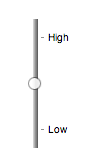
最後に、2つのラベルの値を持つ範囲コントロールの例を次に示す:
<input type="range" name="a" list="a-values">
<datalist id="a-values">
 <option value="10" label="Low">
 <option value="90" label="High">
</datalist>
コントロールが垂直に描画するスタイルとともに、次のようになる:
type=color)input要素は、単純色を表す文字列に要素の値を設定するための、色のコントロールを表す。
In this state, there is always a color picked, and there is no way to set the value to the empty string.
If the element is mutable, the user agent should allow the user to change the color represented by its value, as obtained from applying the rules for parsing simple color values to it. User agents must not allow the user to set the value to a string that is not a valid lowercase simple color. If the user agent provides a user interface for selecting a color, then the value must be set to the result of using the rules for serializing simple color values to the user's selection. User agents must not allow the user to set the value to the empty string.
Constraint validation: While the user interface describes input that the user agent cannot convert to a valid lowercase simple color, the control is suffering from bad input.
指定されてかつ空でない場合、value属性は、妥当な単純色である値を持たなければならない。
The value sanitization algorithm is as follows: If the value of the element is a valid simple color, then
set it to the value of the element converted to ASCII
lowercase; otherwise, set it to the string "#000000".
以下の共通input要素のコンテンツ属性およびIDL属性は要素に適用する:autocompleteおよびlistコンテンツ属性、listおよびvalueIDL属性。
以下のコンテンツ属性を指定してはならず、要素に適用しない:accept、alt、checked、dirname、formaction、formenctype、formmethod、formnovalidate、formtarget、height、max、maxlength、min、minlength、multiple、pattern、placeholder、readonly、required、size、src、step、width。
以下のIDL属性とメソッドは、要素に適用しない:checked、files、selectionStart、selectionEnd、selectionDirection、valueAsDate、valueAsNumberIDL属性、select()、setRangeText()、setSelectionRange()、stepDown()、stepUp()メソッド。
type=checkbox)checkbox(デフォルト - 設定しない)またはmenuitemcheckbox。aria-*属性。input要素は、その要素のcheckedness状態を表す2状態コントロールを表す。要素のcheckedness状態がtrueの場合、コントロールは正の選択を表し、falseの場合、負の選択を表す。要素のindeterminate DOM属性がtrueに設定される場合、あたかもコントロールが第3の状態である、不確定であったかのように、コントロールの選択を隠すべきである。
たとえ要素のindeterminateIDL属性がtrueに設定されても、コントロールはtrueの3状態ではない。indeterminateIDL属性は、第3の状態の外観を与える。
If the element is mutable, then: The pre-click
activation steps consist of setting the element's checkedness to its opposite value (i.e. true if it is false,
false if it is true), and of setting the element's indeterminate IDL attribute to false. The canceled
activation steps consist of setting the checkedness
and the element's indeterminate IDL attribute back to
the values they had before the pre-click activation steps were run. The
activation behavior is to fire a simple event that bubbles named input at the element and then fire a simple event that bubbles named change at the element.
If the element is not mutable, it has no activation behavior.
Constraint validation: If the element is required and its checkedness is false, then the element is suffering from being missing.
indeterminate [ = value ]設定する場合、checkboxコントロールの表示は、現在の値が表示されないように上書きする。
以下の共通input要素コンテンツ属性、IDL属性、およびメソッドは要素に適用する:checkedおよびrequiredコンテンツ属性、checkedおよびvalueIDL属性。
valueIDL属性はモードdefault/onとなる。
以下のコンテンツ属性を指定してはならず、要素に適用しない:accept、alt、autocomplete、dirname、formaction、formenctype、formmethod、formnovalidate、formtarget、height、list、max、maxlength、min、minlength、multiple、pattern、placeholder、readonly、size、src、step、width。
以下のIDL属性とメソッドは、要素に適用しない:files、list、selectionStart、selectionEnd、selectionDirection、valueAsDate、valueAsNumberIDL属性、select()、setRangeText()、setSelectionRange()、stepDown()、stepUp()メソッド。
type=radio)radio(デフォルト - 設定しない)またはmenuitemradio。aria-*属性。When an input element's type attribute is in
the Radio Button state, the rules in this section
apply.
input要素は、他のinput要素と組み合わせて使用した場合、1つのみのコントロールがそのcheckedness状態をtrueに設定させることができるラジオボタングループを形成するコントロールを表す。要素のcheckedness状態がtrueである場合、コントロールは、グループ内の選択されたコントロールを表し、falseである場合、選択されてないグループ内のコントロールを示す。
input要素aを含むラジオボタングループはまた、次のすべての条件を満たす他のinput要素bを含む:
input要素bのtype属性は、Radio Button状態となる。name属性を持ち、それらのname属性が空でなく、かつaのname属性値がbのname属性値と互換性大文字・小文字不区別で一致する。文書は、ラジオボタングループがその要素のみを含むinput要素を含めてはならない。
When any of the following phenomena occur, if the element's checkedness state is true after the occurrence, the checkedness state of all the other elements in the same radio button group must be set to false:
name attribute is set, changed, or
removed.If the element is mutable, then: The pre-click
activation steps consist of setting the element's checkedness to true. The canceled activation steps
consist of setting the element's checkedness to false. The
activation behavior is to fire a simple event that bubbles named input at the element and then fire a simple event that bubbles named change at the element.
If the element is not mutable, it has no activation behavior.
Constraint validation: If an element in the radio button group is required, and all of the input elements in the
radio button group have a checkedness that is
false, then the element is suffering from being missing.
ボタンが文書に挿入された際に、ラジオボタングループ内のラジオボタンがいずれもチェックされない場合、(ユーザーまたはスクリプトのいずれかによって)ボタンの1つがチェックされるようになるまで、インターフェースで初期にチェックされないだろう。
以下の共通input要素コンテンツ属性、IDL属性、およびメソッドは要素に適用する:checkedおよびrequiredコンテンツ属性、checkedおよびvalueIDL属性。
valueIDL属性はモードdefault/onとなる。
以下のコンテンツ属性を指定してはならず、要素に適用しない:accept、alt、autocomplete、dirname、formaction、formenctype、formmethod、formnovalidate、formtarget、height、list、max、maxlength、min、minlength、multiple、pattern、placeholder、readonly、size、src、step、width。
以下のIDL属性とメソッドは、要素に適用しない:files、list、selectionStart、selectionEnd、selectionDirection、valueAsDate、valueAsNumberIDL属性、select()、setRangeText()、setSelectionRange()、stepDown()、stepUp()メソッド。
type=file)When an input element's type attribute is in
the File Upload state, the rules in this section
apply.
input要素は、各ファイルがファイル名、ファイルタイプ、ファイル本体(ファイルの内容)で構成される、選択されたファイルのリストを表す。
File names must not contain path components, even in the case that a user has selected an entire directory hierarchy or multiple files with the same name from different directories.
Unless the multiple attribute is set, there must be
no more than one file in the list of selected
files.
If the element is mutable, then the element's activation behavior is to run the following steps:
If the algorithm is not allowed to show a popup, then abort these steps without doing anything else.
Return, but continue running these steps asynchronously.
Optionally, wait until any prior execution of this algorithm has terminated.
Display a prompt to the user requesting that the user specify some files. If the multiple attribute is not set, there must be no more than one
file selected; otherwise, any number may be selected. Files can be from the filesystem or created
on the fly, e.g. a picture taken from a camera connected to the user's device.
Wait for the user to have made their selection.
Queue a task to first update the element's selected files so that it represents the user's
selection, then fire a simple event that bubbles named input at the input element, and finally fire a
simple event that bubbles named change at the
input element.
If the element is mutable, the user agent should allow the
user to change the files on the list in other ways also, e.g. adding or removing files by
drag-and-drop. When the user does so, the user agent must queue a task to first
update the element's selected files so that
it represents the user's new selection, then fire a simple event that bubbles named
input at the input element, and finally fire
a simple event that bubbles named change at the
input element.
If the element is not mutable, it has no activation behavior and the user agent must not allow the user to change the element's selection.
Constraint validation: If the element is required and the list of selected files is empty, then the element is suffering from being missing.
accept属性は、どのファイルタイプが受け入れられるかのヒントとともにユーザーエージェントを提供するために指定されてもよい。
指定された場合、この属性は、次のいずれかとASCII大文字・小文字不区別で一致しなければならない、それぞれがカンマ区切りのトークンのセットで構成しなければならない。
audio/*video/*image/*トークンは、他のトークンのいずれかとASCII大文字・小文字不区別で一致してはならない(つまり重複は許可されない)。To obtain the list of tokens from the attribute, the user agent must split the attribute value on commas.
ユーザーエージェントは、一般的なファイルピッカーよりも適切なユーザーインターフェースを表示するためにこの属性の値を使用してもよい。たとえば、値image/*を与えられると、ユーザーエージェントはユーザーにローカルカメラのオプションや、写真コレクションから写真の選択を提供できる。値audio/*を与えられると、ユーザーエージェントは、ユーザーにヘッドセットのマイクを使用してクリップを記録するオプションを提供できる。
User agents should prevent the user from selecting files that are not accepted by one (or more) of these tokens.
著者は、特定の形式でデータを検索する際、任意のMIMEタイプと対応する拡張子の両方を指定することが推奨される。
たとえば、Microsoft Word文書をOpen Document形式のファイルに変換するアプリケーションを考えてみる。Microsoft Word文書は多種多様なMIMEタイプと拡張子で記載されるので、次のように、サイトは複数列挙できる:
<input type="file" accept=".doc,.docx,.xml,application/msword,application/vnd.openxmlformats-officedocument.wordprocessingml.document">
ファイルの種類を記述するためにファイル拡張子のみを使用するプラットフォーム上で、もしあれば、他の拡張子を判別するために、MIMEタイプがシステムの型登録テーブル(システムで使用される拡張子にMIMEタイプを対応付ける)とともに使用できると同時に、ここに記載される拡張子は、許可された文書をフィルタするために使用できる。同様に、システムがファイル名または拡張子を持たないが、内部的にMIMEタイプをもつ文書を識別するシステムで、システムで使用されるMIMEタイプに既知の拡張子を対応づける拡張子登録テーブルをシステムが持つ場合、拡張子を使用できると同時に、MIMEタイプは許可されたファイルを選択するために使用できる。
拡張子は曖昧になる傾向があり(たとえば、".dat"拡張子を使用する莫大な数のフォーマットが存在しており、Microsoft Wordの文書でない場合でも、ユーザーは通常、非常に簡単に".doc"という拡張子を持つファイル名に変更できる)、そしてMIMEタイプは信頼性が低くなる傾向がある(たとえば、多くのフォーマットは正式に登録された型を持たず、実際に多くのフォーマットが多数の異なるMIMEタイプを用いて識別される)。ユーザーが敵対的でなく、ユーザーエージェントが完全にaccept属性の要件に従った場合であっても、それが期待されるフォーマットでないかもしれないので、著者は通常、クライアントから受信したデータが慎重に扱われるべきであることに注意する。
歴史的な理由により、value IDL属性は、ファイル名に文字列"C:\fakepath\"を接頭辞として付ける。一部のレガシーユーザーエージェントは、実際に(セキュリティー上の脆弱性があった)完全なパスを含む。この結果として、後方互換性のある方法でvalue IDL属性からファイル名を取得することは自明ではない。次の関数は適切に互換性のある方法でファイル名を抽出する:
function extractFilename(path) {
  if (path.substr(0, 12) == "C:\\fakepath\\")
    return path.substr(12); // modern browser
  var x;
  x = path.lastIndexOf('/');
  if (x >= 0) // Unix-based path
    return path.substr(x+1);
  x = path.lastIndexOf('\\');
  if (x >= 0) // Windows-based path
    return path.substr(x+1);
  return path; // just the file name
}
これは次のように使用できる:
<p><input type=file name=image onchange="updateFilename(this.value)"></p>
<p>The name of the file you picked is: <span id="filename">(none)</span></p>
<script>
 function updateFilename(path) {
   var name = extractFilename(path);
   document.getElementById('filename').textContent = name;
 }
</script>
以下の共通input要素コンテンツ属性、IDL属性、およびメソッドは要素に適用する:accept、multiple、requiredコンテンツ属性、files、valueIDL属性。
以下のコンテンツ属性を指定してはならず、要素に適用しない:accept、alt、autocomplete、dirname、formaction、formenctype、formmethod、formnovalidate、formtarget、height、list、max、maxlength、min、minlength、pattern、placeholder、readonly、size、src、step、width。
要素のvalue属性は省略しなければならない。
以下のIDL属性とメソッドは、要素に適用しない:checked、list、selectionStart、selectionEnd、selectionDirection、valueAsDate、valueAsNumberIDL属性、select()、setRangeText()、setSelectionRange()、stepDown()、stepUp()メソッド。
type=submit)button (デフォルト - 設定しない)。aria-*属性。When an input element's type attribute is in
the Submit Button state, the rules in this section
apply.
input要素は、アクティブになった際、フォームを送信するボタンを表す。If the element has a value attribute, the button's label must be the value of that attribute; otherwise, it must be an implementation-defined string that means "Submit" or some such. The element is a button, specifically a submit button.

If the element is mutable, then the element's
activation behavior is as follows: if the element has a form owner,
and the element's Document is fully active,
submit the form owner from the
input element; otherwise, do nothing.
If the element is not mutable, it has no activation behavior.
formaction、formenctype、formmethod、formnovalidate、formtarget属性は、フォーム送信用の属性である。
formnovalidate属性は、制約検証をトリガーしない送信ボタンを作成するために使用できる。
以下の共通input要素コンテンツ属性、IDL属性、およびメソッドは要素に適用する:formaction、formenctype、formmethod、formnovalidate、およびformtargetコンテンツ属性、value IDL属性。
以下のコンテンツ属性を指定してはならず、要素に適用しない:accept、alt、autocomplete、checked、dirname、height、list、max、maxlength、min、minlength、multiple、pattern、placeholder、readonly、required、size、src、step、width。
以下のIDL属性とメソッドは、要素に適用しない:checked、files、list、selectionStart、selectionEnd、selectionDirection、valueAsDate、valueAsNumber IDL属性、select()、setRangeText()、setSelectionRange()、stepDown()、stepUp()メソッド。
type=image)button (デフォルト - 設定しない)、link、menuitem、menuitemcheckbox、menuitemradioまたはradio。aria-*属性。When an input element's type attribute is in
the Image Button state, the rules in this section
apply.
input要素は、ユーザーが座標を選択してフォームを送信する画像、または代わりに、ユーザーがフォームを送信できるボタンを表す。要素は、具体的に送信ボタンとなるボタンである。
座標に対する2つのエントリーを送信することによってフォームの送信時にサーバーに送信され、制御の名前から得られるが、".x"と".y"はそれぞれの座標のxとy成分をもつ名前に付加される。
画像はsrc属性によって指定される。src属性は存在しなければならず、画像リソースは潜在的にページ化もスクリプト化もされていない、任意でアニメーションである、非対話型を参照する潜在的にスペースで囲まれた妥当な空でないURLを含めなければならない。
When any of the following events occur, unless the user agent cannot support images, or its
support for images has been disabled, or the user agent only fetches elements on demand, or the
src attribute's value is the empty string, the user agent must
resolve the value of the src attribute, relative to the element, and if that is successful,
must fetch the resulting absolute URL:
input element's type attribute is first
set to the Image Button state (possibly when the
element is first created), and the src attribute is
present.input element's type attribute is
changed back to the Image Button state, and the src attribute is present, and its value has changed since the last
time the type attribute was in the Image Button state.input element's type attribute is in
the Image Button state, and the src attribute is set or changed.Fetching the image must delay the load event of the element's document until the task that is queued by the networking task source once the resource has been fetched (defined below) has been run.
If the image was successfully obtained, with no network errors, and the image's type is a supported image type, and the image is a valid image of that type, then the image is said to be available. If this is true before the image is completely downloaded, each task that is queued by the networking task source while the image is being fetched must update the presentation of the image appropriately.
The user agent should apply the image sniffing rules to determine the type of the image, with the image's associated Content-Type headers giving the official type. If these rules are not applied, then the type of the image must be the type given by the image's associated Content-Type headers.
User agents must not support non-image resources with the input element. User
agents must not run executable code embedded in the image resource. User agents must only display
the first page of a multipage resource. User agents must not allow the resource to act in an
interactive fashion, but should honor any animation in the resource.
The task that is queued by
the networking task source once the resource has been fetched, must, if the download was successful and the image is available, queue a task to fire a simple
event named load at the input element; and
otherwise, if the fetching process fails without a response from the remote server, or completes
but the image is not a valid or supported image, queue a task to fire a simple
event named error on the input element.
alt属性は、画像を使用できないユーザーおよびユーザーエージェントのためにボタンのテキストラベルを提供する。alt属性は存在しなければならず、画像が利用できなかった場合に等価なボタンに対して適切だろうラベルを与える空でない文字列を含まなければならない。
If the src attribute is set, and the image is available and the user agent is configured to display that image,
then: The element represents a control for selecting a coordinate from the image specified by the
src attribute; if the element is mutable, the user agent should allow the user to select this coordinate, and the element's activation
behavior is as follows: if the element has a form owner, and the element's
Document is fully active, take the user's selected coordinate, and submit the input element's form owner
from the input element. If the user activates the control without explicitly
selecting a coordinate, then the coordinate (0,0) must be assumed.
Otherwise, the element represents a submit button whose label is given by the
value of the alt attribute; if the element is mutable, then the element's activation behavior is as
follows: if the element has a form owner, and the element's Document is
fully active, set the selected
coordinate to (0,0), and submit the
input element's form owner from the input element.
In either case, if the element is mutable but has no
form owner or the element's Document is not fully active,
then its activation behavior must be to do nothing. If the element is not mutable, it has no activation behavior.
The selected coordinate must consist of an x-component and a y-component. The coordinates represent the position relative to the edge of the image, with the coordinate space having the positive x direction to the right, and the positive y direction downwards.
The x-component must be a valid integer representing a number x in the range −(borderleft+paddingleft) ≤ x ≤ width+borderright+paddingright, where width is the rendered width of the image, borderleft is the width of the border on the left of the image, paddingleft is the width of the padding on the left of the image, borderright is the width of the border on the right of the image, and paddingright is the width of the padding on the right of the image, with all dimensions given in CSS pixels.
The y-component must be a valid integer representing a number y in the range −(bordertop+paddingtop) ≤ y ≤ height+borderbottom+paddingbottom, where height is the rendered height of the image, bordertop is the width of the border above the image, paddingtop is the width of the padding above the image, borderbottom is the width of the border below the image, and paddingbottom is the width of the padding below the image, with all dimensions given in CSS pixels.
Where a border or padding is missing, its width is zero CSS pixels.
formaction、formenctype、formmethod、formnovalidate、formtarget属性は、フォーム送信用の属性である。
width [ = value ]height [ = value ]これらの属性は、実際のレンダリングされた画像の大きさ、または寸法が未知である場合に0を返す。
対応するコンテンツ属性を変更するために、設定が可能である。
以下の共通input要素コンテンツ属性、IDL属性、およびメソッドは要素に適用する:alt、formaction、formenctype、formmethod、formnovalidate、formtarget、height、srcおよびwidthコンテンツ属性、value IDL属性。
以下のコンテンツ属性を指定してはならず、要素に適用しない:accept、autocomplete、checked、dirname、list、max、maxlength、min、minlength、multiple、pattern、placeholder、readonly、required、size、step。
要素のvalue属性は省略しなければならない。
以下のIDL属性とメソッドは、要素に適用しない:checked、files、list、selectionStart、selectionEnd、selectionDirection、valueAsDate、valueAsNumber IDL属性、select()、setRangeText()、setSelectionRange()、stepDown()、stepUp()メソッド。
この状態の挙動に関して多くの側面は、img要素の挙動に似ている。読者は、同じ要件の多くがより詳細に記載される節を読むことを推奨する。
次のフォームを取ると:
<form action="process.cgi">
 <input type=image src=map.png name=where alt="Show location list">
</form>
ユーザーが座標(127,40)で画像をクリックした場合、フォームを送信するために使用されるURLは"process.cgi?where.x=127&where.y=40"となる。
(この例において、マップが表示されないユーザー、および"Show location list"というラベルの付いたボタンが表示されたユーザーを仮定し、ボタンをクリックすることはマップの代わりから選択する場所のリストの表示をサーバーにさせる。)
type=reset)button (デフォルト - 設定しない)。aria-*属性。When an input element's type attribute is in
the Reset Button state, the rules in this section
apply.
アクティブの際、input要素は、フォームをリセットするボタンを表す。If the element has a value attribute, the button's label must be the value of that attribute; otherwise, it must be an implementation-defined string that means "Reset" or some such. The element is a button.
If the element is mutable, then the element's
activation behavior, if the element has a form owner and the element's
Document is fully active, is to reset the form owner; otherwise, it is to do
nothing.
If the element is not mutable, it has no activation behavior.
Constraint validation: The element is barred from constraint validation.
valueIDL属性は、この要素に適用され、モードのデフォルトとなる。
以下のコンテンツ属性を指定してはならず、要素に適用しない:accept、alt、autocomplete、checked、dirname、formaction、formenctype、formmethod、formnovalidate、formtarget、height、list、max、maxlength、min、minlength、multiple、pattern、placeholder、readonly、required、size、src、step、width。
以下のIDL属性とメソッドは、要素に適用しない:checked、files、list、selectionStart、selectionEnd、selectionDirection、valueAsDate、valueAsNumber IDL属性、select()、setRangeText()、setSelectionRange()、stepDown()、stepUp()メソッド。
type=button)button (デフォルト - 設定しない)、link、menuitem、menuitemcheckbox、menuitemradioまたはradio。aria-*属性。input要素は、デフォルトの動作をもたないボタンを表す。要素が空文字列であるかもしれないが、ボタンのラベルは、value属性で指定されなければならない。If the element has a value attribute, the button's label must be the value of that attribute; otherwise, it must be the empty string. The element is a button.
If the element is mutable, the element's activation behavior is to do nothing.
If the element is not mutable, it has no activation behavior.
Constraint validation: The element is barred from constraint validation.
valueIDL属性は、この要素に適用され、モードのデフォルトとなる。
以下のコンテンツ属性を指定してはならず、要素に適用しない:accept、alt、autocomplete、checked、dirname、formaction、formenctype、formmethod、formnovalidate、formtarget、height、list、max、maxlength、min、minlength、multiple、pattern、placeholder、readonly、required、size、src、step、width。
以下のIDL属性とメソッドは、要素に適用しない:checked、files、list、selectionStart、selectionEnd、selectionDirection、valueAsDate、valueAsNumber IDL属性、select()、setRangeText()、setSelectionRange()、stepDown()、stepUp()メソッド。
この節は非規範的である。
The formats shown to the user in date, time, and number controls is independent of the format used for form submission.
Browsers are encouraged to use user interfaces that present dates, times, and numbers according
to the conventions of either the locale implied by the input element's
language or the user's preferred locale. Using the page's locale will ensure
consistency with page-provided data.
For example, it would be confusing to users if an American English page claimed that a Cirque De Soleil show was going to be showing on 02/03, but their browser, configured to use the British English locale, only showed the date 03/02 in the ticket purchase date picker. Using the page's locale would at least ensure that the date was presented in the same format everywhere. (There's still a risk that the user would end up arriving a month late, of course, but there's only so much that can be done about such cultural differences...)
input要素属性These attributes only apply to an input
element if its type attribute is in a state whose definition
declares that the attribute applies. When an attribute
doesn't apply to an input element, user agents must
ignore the attribute, regardless of the requirements and definitions below.
minおよびmax属性The maxlength attribute, when it applies, is a form control maxlength attribute controlled by the input element's dirty value flag.
The minlength attribute, when it applies, is a form control minlength attribute controlled by the input element's dirty value flag.
input要素が最大許容値の長さを持つ場合、その要素のvalue属性値に属するコード単位長さは、要素の最大許容値の長さ以下でなければならない。
次の抜粋は、簡潔であるようなこの媒体を通した任意の会話を強制してインテリジェントな談話に反対するような、メッセージングクライアントのテキスト入力が任意に固定文字数に制限できる方法を示す。
<label>What are you doing? <input name=status maxlength=140></label>
ここでは、パスワードが最小の長さを与えられる:
<p><label>Username: <input name=u required></label>
<p><label>Password: <input name=p required minlength=12></label>
size属性視覚的なレンダリングにおいて、size属性は、ユーザーエージェントが要素の値を編集している間にユーザーが参照できるようにする、文字数を与える。
size属性が指定される場合、ゼロより大きい妥当な負でない整数である値を持たなければならない。
If the attribute is present, then its value must be parsed using the rules for parsing non-negative integers, and if the result is a number greater than zero, then the user agent should ensure that at least that many characters are visible.
The size IDL attribute is limited to only
non-negative numbers greater than zero and has a default value of 20.
readonly属性readonly属性は、ユーザーがフォームコントロールを編集できるかどうかを制御する真偽属性である。When specified, the element is not mutable.
Constraint validation: If the readonly attribute is specified on an input
element, the element is barred from constraint validation.
disabledとreadonlyとの違いは、無効なコントロールに非対話型であるのに対し、読み取り専用コントロールは、依然としてフォーカス可能であるので、ユーザーはまだテキストを選択し対話できる。(このような理由から、テキストのみのコントロールは読み取り専用にできる。たとえば、チェックボックスやボタンの意味をなさないだろう。)
次の例において、既存の製品識別子は変更できないが、(識別子がまだ入力されていない場所で)新製品を表す行との一貫性を保つために、それらは依然としてフォームの一部として表示される。
<form action="products.cgi" method="post" enctype="multipart/form-data">
 <table>
  <tr> <th> Product ID <th> Product name <th> Price <th> Action
  <tr>
   <td> <input readonly="readonly" name="1.pid" value="H412">
   <td> <input required="required" name="1.pname" value="Floor lamp Ulke">
   <td> $<input required="required" type="number" min="0" step="0.01" name="1.pprice" value="49.99">
   <td> <button formnovalidate="formnovalidate" name="action" value="delete:1">Delete</button>
  <tr>
   <td> <input readonly="readonly" name="2.pid" value="FG28">
   <td> <input required="required" name="2.pname" value="Table lamp Ulke">
   <td> $<input required="required" type="number" min="0" step="0.01" name="2.pprice" value="24.99">
   <td> <button formnovalidate="formnovalidate" name="action" value="delete:2">Delete</button>
  <tr>
   <td> <input required="required" name="3.pid" value="" pattern="[A-Z0-9]+">
   <td> <input required="required" name="3.pname" value="">
   <td> $<input required="required" type="number" min="0" step="0.01" name="3.pprice" value="">
   <td> <button formnovalidate="formnovalidate" name="action" value="delete:3">Delete</button>
 </table>
 <p> <button formnovalidate="formnovalidate" name="action" value="add">Add</button> </p>
 <p> <button name="action" value="update">Save</button> </p>
</form>
required属性required属性は真偽属性である。指定される場合、要素はrequiredとなる。
Constraint validation: If the element is required, and its value
IDL attribute applies and is in the mode value, and the element is mutable, and the element's value is the empty string, then the element is suffering
from being missing.
以下のフォームは、電子メールアドレスに対しておよびパスワードに対しての2つの必須フィールドを持つ。フォームはまた、ユーザーがパスワードフィールドおよび3つ目のフィールドで同じパスワードを打ち込む場合に、妥当であるとみなされる3つ目のフィールドを持つ。
<h1>Create new account</h1>
<form action="/newaccount" method=post
      oninput="up2.setCustomValidity(up2.value != up.value ? 'Passwords do not match.' : '')">
 <p>
  <label for="username">E-mail address:</label>
  <input id="username" type=email required name=un>
 <p>
  <label for="password1">Password:</label>
  <input id="password1" type=password required name=up>
 <p>
  <label for="password2">Confirm password:</label>
  <input id="password2" type=password name=up2>
 <p>
  <input type=submit value="Create account">
</form>
ラジオボタンに対して、グループ内のラジオボタンのいずれかが選択されている場合、required属性は満たされる。したがって次の例において、必須としてマークされる1つのみでなく、ラジオボタンのいずれかがチェックされうる。
<fieldset>
 <legend>Did the movie pass the Bechdel test?</legend>
 <p><label><input type="radio" name="bechdel" value="no-characters"> No, there are not even two female characters in the movie. </label>
 <p><label><input type="radio" name="bechdel" value="no-names"> No, the female characters never talk to each other. </label>
 <p><label><input type="radio" name="bechdel" value="no-topic"> No, when female characters talk to each other it's always about a male character. </label>
 <p><label><input type="radio" name="bechdel" value="yes" required> Yes. </label>
 <p><label><input type="radio" name="bechdel" value="unknown"> I don't know. </label>
</fieldset>
ラジオボタングループが必須とされるかどうかにかかわらず、混乱を避けるために、著者は、グループ内のすべてのラジオボタンで属性を指定することが推奨される。実際一般に、これはユーザーが戻ることができない状態であるため、著者は、最初の場所で任意の最初にチェックするコントロールを持たないラジオボタングループを回避することが推奨されており、したがって一般に貧弱なユーザーインターフェースと見なされる。
multiple属性multiple属性は、ユーザーに複数の値を指定することを許可するかどうかを示す真偽属性である。
以下の抜粋は、電子メールクライアントの"Cc"のフィールドが複数の電子メールアドレスを受け入れることができる方法を示す。
<label>Cc: <input type=email multiple name=cc></label>
ユーザーの連絡先データベースで多くの友人の間で、ユーザーが、2人の友人"Arthur Dent"(アドレス"art@example.net")と"Adam Josh"(アドレス"adamjosh@example.net")持っていた場合、ユーザーが"a"を入力した後に、ユーザーエージェントは、ユーザーにこれら2つの電子メールアドレスを推奨するかもしれない。

このページはまた、サイトからユーザーの連絡先データベースにリンクできる:
<label>Cc: <input type=email multiple name=cc list=contacts></label>
...
<datalist id="contacts">
 <option value="hedral@damowmow.com">
 <option value="pillar@example.com">
 <option value="astrophy@cute.example">
 <option value="astronomy@science.example.org">
</datalist>
ユーザーがこのテキストフィールドに"bob@example.net"を入力した後、"a"で始まる2番目の電子メールアドレスを入力し始めていたと仮定する。ユーザーエージェントは、前述した2人の友人だけでなく、datalist要素で指定された"astrophy"と"astronomy"の値の両方を表示するかもしれない。

次の抜粋は、電子メールクライアントの"Attachments"フィールドが、アップロード用に複数ファイルを受け入れることができる様子を示す。
<label>Attachments: <input type=file multiple name=att></label>
pattern属性pattern属性は、コントロールの値すなわち、multiple属性が適用されて設定される場合、コントロールの複数の値がチェックされる対象となる正規表現を指定する。
指定された場合、属性値は、JavaScriptパターン生成規則にマッチしなければならない。[ECMA262]
If an input element has a pattern
attribute specified, and the attribute's value, when compiled as a JavaScript regular expression
with the global, ignoreCase, and multiline flags disabled (see ECMA262 Edition 5, sections 15.10.7.2
through 15.10.7.4), compiles successfully, then the resulting regular expression is the element's
compiled pattern regular expression. If the element has no such attribute, or if the
value doesn't compile successfully, then the element has no compiled pattern regular
expression. [ECMA262]
Constraint validation: If the element's value is not the empty string, and either the element's multiple attribute is not specified or it does not apply to the input element given its type attribute's current state, and the element has a
compiled pattern regular expression but that regular expression does not match the
entirety of the element's value, then the element is
suffering from a pattern mismatch.
Constraint validation: If the element's value is not the empty string, and the element's multiple attribute is specified and applies to the input element, and the element has
a compiled pattern regular expression but that regular expression does not match the
entirety of each of the element's values, then the
element is suffering from a pattern mismatch.
The compiled pattern regular expression, when matched against a string, must have its start anchored to the start of the string and its end anchored to the end of the string.
This implies that the regular expression language used for this attribute is the
same as that used in JavaScript, except that the pattern
attribute is matched against the entire value, not just any subset (somewhat as if it implied a
^(?: at the start of the pattern and a )$ at the
end).
input要素が指定されたpattern属性を持つ場合、著者は、コントロールの近くにパターンの説明を提供すべきである。著者は、パターンの説明を与えるためのtitle属性を含んでもよい。存在する場合、パターンが一致しないことをユーザーに通知する、またはツールチップでまたはコントロールがフォーカスを取得する際に支援技術によって読み出されるなど、他の任意の適切な時点で、ユーザーエージェントは、この属性のコンテンツを使用してもよい。
title属性に依存することは、多くのユーザーエージェントがこの仕様で要求されるようなアクセス可能な方法で属性を公開しないため、現在推奨されない(たとえば、ツールチップを出現させるマウスなどのポインティングデバイスが必要になり、これは近代的な携帯端末やタブレットをもつ人のような、キーボードのみのユーザーとタッチのみのユーザーを締め出す)。
たとえば、次の断片はinputの下にあるテキストでパターンの説明を含み、パターン記述もまたtitle属性に含まれてる:
<label> Part number:
        <input pattern="[0-9][A-Z]{3}" name="part"
        data-x="A part number is a digit followed by three uppercase letters."/>
        </label>
        <p>A part number is a digit followed by three uppercase letters.</p>
テキスト内のパターン記述の存在は、デバイスにかかわらず任意のユーザーに利用可能なアドバイスを行う。
title属性でのパターン記述の存在は、入力がフォーカスを受ける際にスクリーンリーダーのような支援技術によって披露されている説明となる。
ユーザーが誤った情報でフォームを送信しようとする場合、title属性のテキストの存在もまた、ユーザーエージェントに以下のような警告を表示させるかもしれない:
A part number is a digit followed by three uppercase letters.
    You cannot submit this form when the field is incorrect.
この例において、パターン記述はtitle属性のテキストでなく、inputの下のテキストである。aria-describedby属性は、明示的にコントロールと説明テキストを関連付けるために使用され、inputがフォーカスを受け取る際にスクリーンリーダーなどの支援技術によって説明は披露される。
<label> Part number:
        <input pattern="[0-9][A-Z]{3}" name="part" aria-describedby="description">
        </label>
        <p id="description">A part number is a digit followed by three uppercase letters.</p>
コントロールがpattern属性を持つ場合、titleか使用された場合、パターンを記述しなければならない。追加情報はまた、コントロールで埋める際にユーザーを支援する限り、含まれるかもしれない。そうでなければ、支援技術は弱められるだろう。
たとえば、title属性がコントロールのキャプションを含んだ場合、支援技術は、The text you have entered does not match the required pattern. Birthday、で終わるかもしれず、これは有益ではない。
ユーザーエージェントはエラー以外の状況で(たとえば、コントロールの上にマウスを移動ツールチップとして)titleを依然として表示してもよく、あたかもエラーが必然的に発生しているかのように、著者はtitleを言葉で表すことのないよう注意すべきである。
minおよびmax属性フォームコントロールは、ユーザーが提供できる値の許容範囲を制限することに対して明示的な制約を適用できる。通常、このような範囲は線形および連続だろう。しかし、フォームコントロールの最大限広い範囲が有限である場合、フォームコントロールは定期的なドメインを持つことができ、かつ著者は境界にまたがり、その中で明示的に範囲を指定できる。
具体的に、type=time制御の広い範囲が深夜の真夜中(24時間)であり、かつ著者は両方の連続線形範囲(たとえば午後9時から午後11時までなど)や不連続な範囲にわたる深夜(たとえば午後11時から午前1時までなど)を設定できる。
minおよびmax属性は、要素に対して許可された範囲を示す。
Their syntax is defined by the section that defines the type attribute's current state.
If the element has a min attribute, and the result of
applying the algorithm to convert a string to a
number to the value of the min attribute is a number,
then that number is the element's minimum; otherwise, if the
type attribute's current state defines a default minimum, then that is the minimum; otherwise, the element has no minimum.
The min attribute also defines the step base.
If the element has a max attribute, and the result of
applying the algorithm to convert a string to a
number to the value of the max attribute is a number,
then that number is the element's maximum; otherwise, if the
type attribute's current state defines a default maximum, then that is the maximum; otherwise, the element has no maximum.
要素が定期的なドメインを持たない場合、max属性の値(最大値)は、min属性の値(最小値)未満であってはならない。
If an element that does not have a periodic domain has a maximum that is less than its minimum, then so long as the element has a value, it will either be suffering from an underflow or suffering from an overflow.
An element has a reversed range if it has a periodic domain and its maximum is less than its minimum.
要素が定義された最小値または定義された最大値を持つ場合、要素は、範囲の制限がある。
Constraint validation: When the element has a minimum and does not have a reversed range, and the result of applying the algorithm to convert a string to a number to the string given by the element's value is a number, and the number obtained from that algorithm is less than the minimum, the element is suffering from an underflow.
Constraint validation: When the element has a maximum and does not have a reversed range, and the result of applying the algorithm to convert a string to a number to the string given by the element's value is a number, and the number obtained from that algorithm is more than the maximum, the element is suffering from an overflow.
Constraint validation: When an element has a reversed range, and the result of applying the algorithm to convert a string to a number to the string given by the element's value is a number, and the number obtained from that algorithm is more than the maximum and less than the minimum, the element is simultaneously suffering from an underflow and suffering from an overflow.
次の日付コントロールは1980年代以前の日付への入力を制限する:
<input name=bday type=date max="1979-12-31">
次の数のコントロールは、ゼロより大きい整数への入力を制限する:
<input name=quantity required="" type="number" min="1" value="1">
真夜中にデフォルト設定、21時と6時の間に発生した分への時間管理限界入力:
<input name="sleepStart" type=time min="21:00" max="06:00" step="60" value="00:00">
step属性step属性は、許可される値を制限することによって、値の期待される(そして必須の)粒度を示す。The section that defines the type attribute's current state also defines the default step, the step scale factor, and in some cases the default step base, which are used in processing the attribute as described below.
step属性が指定される場合、ゼロより大きい数値に解析する、妥当な浮動小数点数である値を持たなければならない、または文字列"any"とASCII大文字・小文字不区別で一致する値のいずれかを持たなければならない。
The attribute provides the allowed value step for the element, as follows:
any", then there is no allowed
value step.The step base is the value returned by the following algorithm:
If the element has a min content attribute, and the
result of applying the algorithm to convert a
string to a number to the value of the min content
attribute is not an error, then return that result and abort these steps.
If the element has a value content attribute, and
the result of applying the algorithm to convert a
string to a number to the value of the value content
attribute is not an error, then return that result and abort these steps.
If a default step base is defined for
this element given its type attribute's state, then return
it and abort these steps.
Return zero.
Constraint validation: When the element has an allowed value step, and the result of applying the algorithm to convert a string to a number to the string given by the element's value is a number, and that number subtracted from the step base is not an integral multiple of the allowed value step, the element is suffering from a step mismatch.
次の範囲の制御は、範囲0..1の値のみを受け取り、その範囲内の256のステップを可能にする:
<input name=opacity type=range min=0 max=1 step=0.00392156863>
次のコントロールは、任意の精度(たとえば1000分の1秒精度以上)で、ある日において任意の時間を選択できる:
<input name=favtime type=time step=any>
通常、時間のコントロールは1分の精度に制限される。
list属性list属性は、ユーザーに提案済みオプションの一覧を示す要素を識別するために使用される。
存在する場合、その値は同じ文書でdatalist要素のIDでなければならない。
The suggestions source element is the first element in
the document in tree order to have an ID equal to the
value of the list attribute, if that element is a
datalist element. If there is no list attribute,
or if there is no element with that ID, or if the first element
with that ID is not a datalist element, then there is
no suggestions source element.
If there is a suggestions source element, then, when
the user agent is allowing the user to edit the input element's value, the user agent should offer the suggestions represented by
the suggestions source element to the user in a manner
suitable for the type of control used. The user agent may use the suggestion's label to identify the suggestion if appropriate.
How user selections of suggestions are handled depends on whether the element is a control accepting a single value only, or whether it accepts multiple values:
multiple attribute
specified or if the multiple attribute does not
applyWhen the user selects a suggestion, the input element's value must be set to the selected suggestion's value, as if the user had written that value himself.
multiple
attribute specified, and the multiple attribute does
applyWhen the user selects a suggestion, the user agent must either add a new entry to the
input element's values, whose value
is the selected suggestion's value, or change an
existing entry in the input element's values to have the value given by the selected
suggestion's value, as if the user had himself added
an entry with that value, or edited an existing entry to be that value. Which behavior is to be
applied depends on the user interface in a user-agent-defined manner.
If the list attribute does not
apply, there is no suggestions source element.
このURLフィールドは、いくつかの提案を提供する。
<label>Homepage: <input name=hp type=url list=hpurls></label>
<datalist id=hpurls>
 <option value="http://www.google.com/" label="Google">
 <option value="http://www.reddit.com/" label="Reddit">
</datalist>
ユーザーの履歴から他のURLも表示されることがあるが、これはユーザーエージェントに任される。
この例は、レガシーユーザーエージェントで依然として劣化しつつ有用である、自動補完リスト機能を使用するフォームを設計する方法を示す。
自動補完リストは単なる支援であり、コンテンツにとって重要でない場合、単に子option要素とともにdatalist要素を使用すれば十分である。レガシーユーザーエージェントで値をレンダリングされてるのを防止するために、これらは、インラインの代わりにvalue属性の内部に配置する必要がある。
<p>
 <label>
  Enter a breed:
  <input type="text" name="breed" list="breeds">
  <datalist id="breeds">
   <option value="Abyssinian">
   <option value="Alpaca">
   <!-- ... -->
  </datalist>
 </label>
</p>
ただし、値がレガシーユーザーエージェントで示される必要がある場合、フォールバックコンテンツは、次のようにdatalist要素内に配置できる:
<p>
 <label>
  Enter a breed:
  <input type="text" name="breed" list="breeds">
 </label>
 <datalist id="breeds">
  <label>
   or select one from the list:
   <select name="breed">
    <option value=""> (none selected)
    <option>Abyssinian
    <option>Alpaca
    <!-- ... -->
   </select>
  </label>
 </datalist>
</p>
フォールバックコンテンツは、datalistをサポートしないユーザーエージェントでのみ表示される。一方で、それらがdatalist要素の子ではないにもかかわらず、オプションはすべてのユーザーエージェントで検出される。
datalistで使用されるoption要素がselectedである場合、要素は(selectに影響を与えるため)レガシーユーザーエージェントによってデフォルトで選択されるが、要素がdatalistをサポートするユーザーエージェントでinput要素に何の影響もないことに注意する。
placeholder属性コントロールが値を持たない場合、placeholder属性は、データ入力を伴うユーザーの支援を意図する短いヒント(単語や短いフレーズ)を表す。ヒントは、サンプル値または期待された形式の簡単な説明かもしれない。属性が指定される場合、"LF"(U+000A)または"CR"(U+000D)文字を一切含まない値を持たなければならない。
placeholder属性は、labelの代替として使用すべきでない。ヒントや他の助言テキストについては、コントロールの次にテキストを置く。
labelの代替としてのplaceholder属性の使用は、高齢ユーザーおよび認知、モビリティー、微細な運動技能や視覚に障害を持つユーザーを含む幅広いユーザーのコントロールのアクセシビリティーおよびユーザービリティーを減らすことがある。コントロールのlabelによって与えられるヒントは毎回表示される一方で、placeholder属性に与えられた短いヒントは、ユーザーが値を入力する前にのみ表示される。さらに、placeholderテキストは予め埋められた値と間違われるかもしれず、一般に実装されるプレースホルダーテキストのデフォルト色が不十分なコントラストを提供し、そして別の可視labelの欠如は、コントロールのフォーカスを設定するために利用可能なヒット領域のサイズを小さくする。
User agents should present this hint to the user, after having stripped line breaks from it, when the element's value is the empty string and the control is not focused (i.e., by displaying it inside a blank unfocused control).
ここでplaceholder属性を使用するメール設定のユーザーインターフェースの例は次のとおり:
<fieldset>
 <legend>Mail Account</legend>
 <p><label>Name: <input type="text" name="fullname" placeholder="John Ratzenberger"></label></p>
 <p><label>Address: <input type="email" name="address" placeholder="john@example.net"></label></p>
 <p><label>Password: <input type="password" name="password"></label></p>
 <p><label>Description: <input type="text" name="desc" placeholder="My Email Account"></label></p>
</fieldset>
コントロールのコンテンツが1つの方向性を持つが、プレースホルダーは異なる方向性を持つ必要がある状況において、Unicodeの双方向アルゴリズムの書式文字は属性値で使用できる:
<input name=t1 type=tel placeholder="‫ رقم الهاتف 1 ‮"> <input name=t2 type=tel placeholder="‫ رقم الهاتف 2 ‮">
もう少しわかりやすくするために、インラインのアラビア語の代わりに数値文字参照を使用する同じ例を示す:
<input name=t1 type=tel placeholder="‫رقم الهاتف 1‮"> <input name=t2 type=tel placeholder="‫رقم الهاتف 2‮">
input要素APIvalue [ = value ]フォームコントロールの現在の値を返す。
値を変更する設定が可能である。
コントロールがファイルアップロードコントロールである際に、空文字列以外の任意の値に設定される場合、InvalidStateError例外を投げる。
checked [ = value ]フォームコントロールの現在checkednessを返す。
checkednessを変更する設定が可能である。
files フォームコントロールの選択されたファイルを列挙するFileListオブジェクトを返す。
コントロールがファイル制御でない場合はnullを返す。
valueAsDate [ = value ]該当する場合、フォームのコントロールの値を表すDateオブジェクトを返す。そうでなければ、nullを返す。
値を変更する設定が可能である。
コントロールが日付または時間ベースでない場合、InvalidStateError例外を投げる。
valueAsNumber [ = value ]該当する場合、フォームのコントロールの値を表す数値を返す。そうでなければ、NaNを返す。
値を変更する設定が可能である。NaNにこれを設定すると、空文字列の基になる値を設定する。
コントロールが日付または時間ベースでも数値でもない場合、InvalidStateError例外を投げる。
stepUp( [ n ] )stepDown( [ n ] )step属性で指定された値によって、フォームコントロールの値をn倍に変更する。nのデフォルト値は1である。
コントロールが日付または時間ベースまたは数値のいずれでもない場合、またはstep属性値が"any"である場合、InvalidStateError例外を投げる。
listThe value IDL attribute allows scripts to
manipulate the value of an input element. The
attribute is in one of the following modes, which define its behavior:
On getting, it must return the current value of the
element. On setting, it must set the element's value to
the new value, set the element's dirty value
flag to true, invoke the value sanitization algorithm, if the element's
type attribute's current state defines one, and then, if
the element has a text entry cursor position, should move the text entry cursor position to the
end of the text field, unselecting any selected text and resetting the selection direction to
none.
On getting, if the element has a value attribute, it
must return that attribute's value; otherwise, it must return the empty string. On setting, it
must set the element's value attribute to the new
value.
On getting, if the element has a value attribute, it
must return that attribute's value; otherwise, it must return the string "on". On setting, it must set the element's value attribute to the new value.
On getting, it must return the string "C:\fakepath\" followed by the
name of the first file in the list of selected
files, if any, or the empty string if the list is empty. On setting, if the new value is
the empty string, it must empty the list of selected files; otherwise, it must throw an
InvalidStateError exception.
This "fakepath" requirement is a sad accident of history. See the example in the File Upload state section for more information.
The checked IDL attribute allows scripts to
manipulate the checkedness of an input
element. On getting, it must return the current checkedness of the element; and on setting, it must set the
element's checkedness to the new value and set the
element's dirty checkedness flag to
true.
The files IDL attribute allows scripts to
access the element's selected files. On
getting, if the IDL attribute applies, it must return a
FileList object that represents the current selected files. The same object must be returned
until the list of selected files changes. If
the IDL attribute does not apply, then it must instead return
null. [FILEAPI]
The valueAsDate IDL attribute represents
the value of the element, interpreted as a date.
On getting, if the valueAsDate attribute does not apply, as defined for the input element's type attribute's current state, then return null. Otherwise, run
the algorithm to convert a string to a
Date object defined for that state; if the algorithm returned a
Date object, then return it, otherwise, return null.
On setting, if the valueAsDate attribute does not apply, as defined for the input element's type attribute's current state, then throw an
InvalidStateError exception; otherwise, if the new value is null or a
Date object representing the NaN time value, then set the value of the element to the empty string; otherwise, run the algorithm to convert a Date object to a
string, as defined for that state, on the new value, and set the value of the element to the resulting string.
The valueAsNumber IDL attribute
represents the value of the element, interpreted as a
number.
On getting, if the valueAsNumber attribute does not apply, as defined for the input element's type attribute's current state, then return a Not-a-Number (NaN)
value. Otherwise, if the valueAsDate attribute
applies, run the algorithm to convert a string to a Date
object defined for that state; if the algorithm returned a Date object, then
return the time value of the object (the number of milliseconds from midnight UTC the
morning of 1970-01-01 to the time represented by the Date object), otherwise, return
a Not-a-Number (NaN) value. Otherwise, run the algorithm to convert a string to a number defined
for that state; if the algorithm returned a number, then return it, otherwise, return a
Not-a-Number (NaN) value.
On setting, if the new value is infinite, then throw a TypeError exception.
Otherwise, if the valueAsNumber attribute does not apply, as defined for the input element's type attribute's current state, then throw an
InvalidStateError exception. Otherwise, if the new value is a Not-a-Number (NaN)
value, then set the value of the element to the empty
string. Otherwise, if the valueAsDate
attribute applies, run the algorithm to convert a Date object to a
string defined for that state, passing it a Date object whose time
value is the new value, and set the value of the element
to the resulting string. Otherwise, run the algorithm to convert a number to a string, as
defined for that state, on the new value, and set the value
of the element to the resulting string.
The stepDown(n) and stepUp(n) methods, when invoked,
must run the following algorithm:
If the stepDown() and stepUp() methods do not apply, as defined for the
input element's type attribute's current state,
then throw an InvalidStateError exception, and abort these steps.
If the element has no allowed value step, then
throw an InvalidStateError exception, and abort these steps.
If the element has a minimum and a maximum and the minimum is greater than the maximum, then abort these steps.
If the element has a minimum and a maximum and there is no value greater than or equal to the element's minimum and less than or equal to the element's maximum that, when subtracted from the step base, is an integral multiple of the allowed value step, then abort these steps.
If applying the algorithm to convert a string to a number to the string given by the element's value does not result in an error, then let value be the result of that algorithm. Otherwise, let value be zero.
If value subtracted from the step
base is not an integral multiple of the allowed value
step, then set value to the nearest value that, when subtracted from
the step base, is an integral multiple of the allowed value step, and that is less than value if the method invoked was the stepDown() and more than value
otherwise.
Otherwise (value subtracted from the step base is an integral multiple of the allowed value step), run the following substeps:
Let n be the argument.
Let delta be the allowed value step multiplied by n.
If the method invoked was the stepDown() method,
negate delta.
Let value be the result of adding delta to value.
If the element has a minimum, and value is less than that minimum, then set value to the smallest value that, when subtracted from the step base, is an integral multiple of the allowed value step, and that is more than or equal to minimum.
If the element has a maximum, and value is greater than that maximum, then set value to the largest value that, when subtracted from the step base, is an integral multiple of the allowed value step, and that is less than or equal to maximum.
Let value as string be the result of running the algorithm to convert a number to a string, as
defined for the input element's type
attribute's current state, on value.
Set the value of the element to value as string.
The list IDL attribute must return the current
suggestions source element, if any, or null otherwise.
When the input and change
events apply (which is the case for all
input controls other than buttons and those with
the type attribute in the Hidden state), the events are fired to indicate that the
user has interacted with the control. The input
event fires whenever the user has modified the data of the control. The change event fires when the value is committed, if
that makes sense for the control, or else when the control loses focus. In all cases, the input event comes before the corresponding change event (if any).
When an input element has a defined activation behavior, the rules
for dispatching these events, if they apply, are given
in the section above that defines the type attribute's
state. (This is the case for all input controls with the type attribute in the Checkbox state, the Radio Button state, or the File Upload state.)
For input elements without a defined activation behavior, but to
which these events apply, and for which the user
interface involves both interactive manipulation and an explicit commit action, then when the user
changes the element's value, the user agent must
queue a task to fire a simple event that bubbles named input at the input element, and any time the user commits
the change, the user agent must queue a task to fire a simple event that
bubbles named change at the input element.
An example of a user interface involving both interactive manipulation and a
commit action would be a Range controls that use a
slider, when manipulated using a pointing device. While the user is dragging the control's knob,
input events would fire whenever the position changed, whereas
the change event would only fire when the user let go of the
knob, committing to a specific value.
For input elements without a defined activation behavior, but to
which these events apply, and for which the user
interface involves an explicit commit action but no intermediate manipulation, then any time the
user commits a change to the element's value, the user
agent must queue a task to first fire a simple event that bubbles named
input at the input element, and then fire a
simple event that bubbles named change at the
input element.
An example of a user interface with a commit action would be a Color control that consists of a single button that brings up a color wheel: if the value only changes when the dialog is closed, then that would be the explicit commit action. On the other hand, if the control can be focused and manipulating the control changes the color interactively, then there might be no commit action.
Another example of a user interface with a commit action would be a Date control that allows both text-based user input and user selection from a drop-down calendar: while text input might not have an explicit commit step, selecting a date from the drop down calendar and then dismissing the drop down would be a commit action.
For input elements without a defined activation behavior, but to
which these events apply, any time the user causes the
element's value to change without an explicit commit
action, the user agent must queue a task to fire a simple event that
bubbles named input at the input element. The
corresponding change event, if any, will be fired when the
control loses focus.
Examples of a user changing the element's value would include the user typing into a text field, pasting a new value into the field, or undoing an edit in that field. Some user interactions do not cause changes to the value, e.g. hitting the "delete" key in an empty text field, or replacing some text in the field with text from the clipboard that happens to be exactly the same text.
A Range control in the form of a slider that the user has focused and is interacting with using a keyboard would be another example of the user changing the element's value without a commit step.
In the case of tasks that just fire an input event, user agents may wait for a suitable break in the user's
interaction before queuing the tasks; for example, a user agent
could wait for the user to have not hit a key for 100ms, so as to only fire the event when the
user pauses, instead of continuously for each keystroke.
When the user agent is to change an input element's value on behalf of the user (e.g. as part of a form prefilling
feature), the user agent must queue a task to first update the value accordingly, then fire a simple event that
bubbles named input at the input element, then
fire a simple event that bubbles named change at
the input element.
These events are not fired in response to changes made to the values of form controls by scripts. (This is to make it easier to update the values of form controls in response to the user manipulating the controls, without having to then filter out the script's own changes to avoid an infinite loop.)
The task source for these tasks is the user interaction task source.
button要素autofocus - ページが読み込まれた際にフォームコントロールに自動的にフォーカスするdisabled - フォームコントロールが無効であるかどうかform - form要素とコントロールを関連付けるformaction - フォーム送信に使用するURLformenctype - フォーム送信に使用する文字エンコーディングを設定するフォームデータformmethod - フォーム送信に使用するHTTPメソッドformnovalidate - フォーム送信のためのフォームコントロール検証を回避するformtarget - フォーム送信に対するブラウジングコンテキストmenu - 要素の指定されたポップアップメニューを指定するname - フォーム送信およびform.elements APIで使用するフォームコントロール名 type - ボタンの種類value - フォーム送信に対して使用される値button (デフォルト - 設定しない)、link、menuitem、menuitemcheckbox、menuitemradioまたはradio。aria-*属性。interface HTMLButtonElement : HTMLElement {
attribute boolean autofocus;
attribute boolean disabled;
readonly attribute HTMLFormElement? form;
attribute DOMString formAction;
attribute DOMString formEnctype;
attribute DOMString formMethod;
attribute boolean formNoValidate;
attribute DOMString formTarget;
attribute DOMString name;
attribute DOMString type;
attribute DOMString value;
readonly attribute boolean willValidate;
readonly attribute ValidityState validity;
readonly attribute DOMString validationMessage;
boolean checkValidity();
void setCustomValidity(DOMString error);
readonly attribute NodeList labels;
};
button要素は要素のコンテンツによって分類されるボタンを表す。
要素はボタンである。
type属性は、アクティブ時のボタンの振る舞いを制御する。この属性は列挙属性である。次の表は、キーワードと属性の状態を示す。1列目のキーワードは、キーワードと同じ行で2列目のセル内の状態に対応づける。
| キーワード | 状態 | 概要 |
|---|---|---|
submit
| Submit Button | フォームを送信する。 |
reset
| Reset Button | フォームをリセットする。 |
button
| Button | 何もしない。 |
欠損値のデフォルトは、Submit Button状態である。
type属性がSubmit Button状態にある場合、要素は具体的にsubmit buttonである。
Constraint validation: If the type
attribute is in the Reset Button state, or the
Button state, the element is barred from constraint
validation.
When a button element is not disabled,
its activation behavior element is to run the steps defined in the following list for
the current state of the element's type attribute:
If the element has a form owner and the element's Document is
fully active, the element must submit the
form owner from the button element.
If the element has a form owner and the element's Document is
fully active, the element must reset the
form owner.
何もしない。
form属性は、フォームの所有者とbutton要素を明示的に関連付けるために使用される。name属性は要素の名前を表す。disabled属性は、コントロールが非インタラクティブにするためおよびその値を送信するのを防ぐために使用される。autofocus属性はフォーカスを制御する。formaction、formenctype、formmethod、formnovalidate、formtarget属性は、フォーム送信用の属性である。
formnovalidate属性は、制約検証をトリガーしない送信ボタンを作成するために使用できる。
要素のtype属性がSubmit Button状態でない場合、formaction、formenctype、formmethod、formnovalidate、formtargetは指定されてはならない。
value属性はフォーム送信の目的のために要素の値を与える。存在する場合、要素の値は要素のvalue属性の値であり、そうでなければ空文字列である。
ボタン自体がフォームの送信を開始するために使用された場合、ボタン(およびその値)はフォームの送信にのみ含まれる。
typeIDL属性は、既知の値に制限され、同じ名前のコンテンツ属性を反映しなければならない。
The willValidate, validity, and validationMessage IDL attributes, and the checkValidity(), and setCustomValidity() methods, are part of the constraint validation API. labelsIDL属性は、 要素のlabelのリストを提供する。autofocus、disabled、form、およびnameIDL属性は要素のフォームAPIの一部である。
次のボタンは、アクティブ時に、"Show hint"のラベルをもち、ダイアログボックスがポップアップ表示される:
<button type=button
        onclick="alert('This 15-20 minute piece was composed by George Gershwin.')">
 Show hint
</button>
select要素option、optgroup、およびスクリプトサポート要素。autofocus - ページが読み込まれた際にフォームコントロールに自動的にフォーカスするdisabled - フォームコントロールが無効であるかどうかform - form要素とコントロールを関連付けるmultiple - 複数の値を許可するかどうかname - フォーム送信およびform.elements APIで使用するフォームコントロール名 required - コントロールがフォーム送信に要求されるかどうかsize - コントロールのサイズlistbox(デフォルト - 設定しない)またはmenu。aria-*属性。interface HTMLSelectElement : HTMLElement {
attribute boolean autofocus;
attribute boolean disabled;
readonly attribute HTMLFormElement? form;
attribute boolean multiple;
attribute DOMString name;
attribute boolean required;
attribute unsigned long size;
readonly attribute DOMString type;
readonly attribute HTMLOptionsCollection options;
attribute unsigned long length;
getter Element? item(unsigned long index);
HTMLOptionElement? namedItem(DOMString name);
void add((HTMLOptionElement or HTMLOptGroupElement) element, optional (HTMLElement or long)? before = null);
void remove(); // ChildNode overload
void remove(long index);
setter creator void (unsigned long index, HTMLOptionElement? option);
readonly attribute HTMLCollection selectedOptions;
attribute long selectedIndex;
attribute DOMString value;
readonly attribute boolean willValidate;
readonly attribute ValidityState validity;
readonly attribute DOMString validationMessage;
boolean checkValidity();
void setCustomValidity(DOMString error);
readonly attribute NodeList labels;
};
select要素は、オプション一式の中で選択するためのコントロールを表す。
multiple属性は真偽属性である。属性が存在する場合、select要素は、オプションのリストから0個以上のオプションを選択するためのコントロールを表す。属性が存在しない場合、select要素は、オプションのリストから1つのオプションを選択するためのコントロールを表す。
size属性は、ユーザーに表示するためのオプションの数を与える。size属性が指定される場合、0より大きい妥当な負でない整数である値を持たなければならない。
The display size of a select element is the
result of applying the rules for parsing non-negative integers to the value of
element's size attribute, if it has one and parsing it is
successful. If applying those rules to the attribute's value is not successful, or if the size attribute is absent, then the element's display size is 4 if the element's multiple content attribute is present, and 1 otherwise.
select要素のオプションのリストは、ツリー順で、select要素のすべてのoption子要素、およびselect要素のすべてのoptgroup要素に属するすべてのoption子要素で構成される。
required属性は真偽属性である。指定される場合、ユーザーがフォームを送信する前に値を選択する必要がある。
select要素がrequired属性を指定され、multiple属性を指定されず、1である表示サイズを持つ場合、および(もしあれば)select要素のオプションのリストで最初のoptionの値が空文字列であり、そのoption要素の親ノードがselect要素(かつoptgroup要素でない)場合、そのoptionは、select要素のプレースホルダーのラベルオプションである。
select要素がrequired属性を指定され、multiple属性を指定されず、1である表示サイズを持つ場合、そのselect要素は、プレースホルダーのラベルオプションを持たなければならない。
Constraint validation: If the element has its required attribute specified, and either none of the
option elements in the select element's list of options have their selectedness set to true, or the only
option element in the select element's list of options with its selectedness set to true is the placeholder label
option, then the element is suffering from being missing.
If the multiple attribute is absent, and the element
is not disabled, then the user agent should allow the
user to pick an option element in its list
of options that is itself not disabled. Upon
this option element being picked (either
through a click, or through unfocusing the element after changing its value,
or through any other mechanism), and before the
relevant user interaction event is queued (e.g. before the
click event), the user agent must set the selectedness of the picked option element
to true, set its dirtiness to true, and then
send select update notifications.
If the multiple attribute is absent, whenever an
option element in the select element's list of options has its selectedness set to true, and whenever an
option element with its selectedness
set to true is added to the select element's list of options, the user agent must set the selectedness of all the other option
elements in its list of options to false.
If the multiple attribute is absent and the element's
display size is greater than 1, then the user agent
should also allow the user to request that the option whose selectedness is true, if any, be unselected. Upon this
request being conveyed to the user agent, and before the relevant user interaction event is queued (e.g. before the click
event), the user agent must set the selectedness
of that option element to false, set its dirtiness to true, and then send
select update notifications.
If nodes are inserted or nodes are removed causing the list of options to gain or lose one or more
option elements, or if an option element in the list of options asks for a
reset, then, if the select element's multiple attribute is absent, the select
element's display size is 1, and no option
elements in the select element's list of
options have their selectedness set to
true, the user agent must set the selectedness of
the first option element in the list of
options in tree order that is not disabled, if any, to true.
If the multiple attribute is present, and the element
is not disabled, then the user agent should allow the
user to toggle the selectedness of the option elements in its
list of options that are themselves not disabled. Upon such an element being toggled (either through a click,
or any other mechanism), and before the relevant user interaction event is queued (e.g. before a related click event), the selectedness of the option
element must be changed (from true to false or false to true), the dirtiness of the element must be set to true, and the
user agent must send select update notifications.
When the user agent is to send select update notifications, queue
a task to first fire a simple event that bubbles named input at the select element, and then fire a simple
event that bubbles named change at the
select element, using the user interaction task source as the task
source.
The reset algorithm for select
elements is to go through all the option elements in the element's list of options, set their selectedness to true if the option element
has a selected attribute, and false otherwise, set their dirtiness to false, and then
have the option elements ask for a reset.
form属性は、フォームの所有者とselect要素を明示的に関連付けるために使用される。name属性は要素の名前を表す。disabled属性は、コントロールが非インタラクティブにするためおよびその値を送信するのを防ぐために使用される。autofocus属性はフォーカスを制御する。
disabledでないselect要素はmutableである。
type要素がmultiple属性を持つ場合、"select-multiple"を返し、そうでなければ"select-one"を返す。
optionslength [ = value ]オプションのリストの要素数を返す。
item(index)namedItem(name)オプションのリストからのIDまたはname nameとともに最初のアイテムを返す。
IDをもつ要素が見つからない場合、nullを返す。
add(element [, before ])beforeによって与えられるノードの前の要素を挿入する。
before引数は数字でもよく、その場合elementはその数字をもつアイテムの前に挿入され、またはオプションのリストからの要素でもよい。その場合elementはその要素の前に挿入される。
beforeが省略された、null、または範囲外の数字の場合、elementはリストの最後に加えられるだろう。
要素に挿入された要素が親要素の場合、このメソッドはHierarchyRequestError例外を投げるだろう。
selectedOptions選択されたオプションのリストのHTMLOptionsCollectionを返す。
selectedIndex [ = value ]もしあるならば、最初に選ばれたアイテムのインデックスを、または選択したアイテムが存在しない場合−1を返す。
選択を変更する設定が可能である。
value [ = value ]もしあれば、最初に選択されたアイテムの値を返し、選択されたアイテムが存在しない場合、空文字列を返す。
選択を変更する設定が可能である。
The type IDL attribute, on getting, must return
the string "select-one" if the multiple attribute is absent, and the string "select-multiple" if the multiple
attribute is present.
The options IDL attribute must return an
HTMLOptionsCollection rooted at the select node, whose filter matches
the elements in the list of options.
The options collection is also mirrored on the
HTMLSelectElement object. The supported property indices at any instant
are the indices supported by the object returned by the options attribute at that instant.
The length IDL attribute must return the
number of nodes represented by the options collection. On setting, it must act like the attribute
of the same name on the options collection.
The item(index) method must
return the value returned by the method of the same
name on the options collection, when invoked with
the same argument.
The namedItem(name)
method must return the value returned by the
method of the same name on the options collection,
when invoked with the same argument.
When the user agent is to set the value of a new
indexed property for a given property index index to a new value value, it must instead set the value
of a new indexed property with the given property index index to the
new value value on the options
collection.
Similarly, the add() method must act like its
namesake method on that same options collection.
The remove() method must act like its
namesake method on that same options collection when it
has arguments, and like its namesake method on the ChildNode interface implemented by
the HTMLSelectElement ancestor interface Element when it has no
arguments.
The selectedOptions IDL attribute
must return an HTMLCollection rooted at the select node, whose filter
matches the elements in the list of options that
have their selectedness set to true.
The selectedIndex IDL attribute, on
getting, must return the index of the first
option element in the list of options
in tree order that has its selectedness set to true, if any. If there isn't one,
then it must return −1.
On setting, the selectedIndex attribute must set
the selectedness of all the option
elements in the list of options to false, and then
the option element in the list of
options whose index is the given new value, if
any, must have its selectedness set to true and its dirtiness set to true.
This can result in no element having a selectedness set to true even in the case of the
select element having no multiple attribute
and a display size of 1.
The value IDL attribute, on getting, must
return the value of the first option
element in the list of options in tree
order that has its selectedness set to
true, if any. If there isn't one, then it must return the empty string.
On setting, the value attribute must set the selectedness of all the option elements in
the list of options to false, and then the first
option element in the list of
options, in tree order, whose value
is equal to the given new value, if any, must have its selectedness set to true and its dirtiness set to true.
This can result in no element having a selectedness set to true even in the case of the
select element having no multiple attribute
and a display size of 1.
The multiple, required, and size IDL attributes must reflect the
respective content attributes of the same name. The size IDL
attribute has a default value of zero.
For historical reasons, the default value of the size IDL attribute does not return the actual size used, which, in
the absence of the size content attribute, is either 1 or 4
depending on the presence of the multiple attribute.
The willValidate, validity, and validationMessage IDL attributes, and the checkValidity(), and setCustomValidity() methods, are part of the constraint validation API. labelsIDL属性は、 要素のlabelのリストを提供する。autofocus、disabled、form、およびnameIDL属性は要素のフォームAPIの一部である。
オプションのセットからユーザーが1つのオプションを選択できるselect要素が使用される様子を次に示す。デフォルトのオプションはあらかじめ選択されている。
<p>
 <label for="unittype">Select unit type:</label>
 <select id="unittype" name="unittype">
  <option value="1"> Miner </option>
  <option value="2"> Puffer </option>
  <option value="3" selected> Snipey </option>
  <option value="4"> Max </option>
  <option value="5"> Firebot </option>
 </select>
</p>
デフォルトのオプションが存在しない場合、プレースホルダーが代わりに使用される:
<select name="unittype" required>
 <option value=""> Select unit type </option>
 <option value="1"> Miner </option>
 <option value="2"> Puffer </option>
 <option value="3"> Snipey </option>
 <option value="4"> Max </option>
 <option value="5"> Firebot </option>
</select>
ここでは、ユーザーがオプションのセットから任意の数を選択できる。デフォルトで、5つすべてのオプションが選択されている。
<p>
 <label for="allowedunits">Select unit types to enable on this map:</label>
 <select id="allowedunits" name="allowedunits" multiple>
  <option value="1" selected> Miner </option>
  <option value="2" selected> Puffer </option>
  <option value="3" selected> Snipey </option>
  <option value="4" selected> Max </option>
  <option value="5" selected> Firebot </option>
 </select>
</p>
ときには、ユーザーは1つ以上の項目を選択する必要がある。次の例はそのようなインターフェースを示す。
<p>Select the songs from that you would like on your Act II Mix Tape:</p>
<select multiple required name="act2">
 <option value="s1">It Sucks to Be Me (Reprise)
 <option value="s2">There is Life Outside Your Apartment
 <option value="s3">The More You Ruv Someone
 <option value="s4">Schadenfreude
 <option value="s5">I Wish I Could Go Back to College
 <option value="s6">The Money Song
 <option value="s7">School for Monsters
 <option value="s8">The Money Song (Reprise)
 <option value="s9">There's a Fine, Fine Line (Reprise)
 <option value="s10">What Do You Do With a B.A. in English? (Reprise)
 <option value="s11">For Now
</select>
datalist要素option要素子孫をもつ)フレージングコンテンツ。option要素。listbox (デフォルト - 設定しない)。aria-*属性。interface HTMLDataListElement : HTMLElement {
readonly attribute HTMLCollection options;
};
datalist要素は、他のコントロール用にあらかじめ定義されたオプションを表すoption要素のセットを表す。In the rendering, the datalist element represents nothing and it, along with its children, should be hidden.
datalist要素は2つの方法で使用される。最も単純な場合、datalist要素はoption要素の子のみを持つ。
<label>
 Sex:
 <input name=sex list=sexes>
 <datalist id=sexes>
  <option value="Female">
  <option value="Male">
 </datalist>
</label>
より手の込んだ場合、datalist要素はdatalistをサポートしないダウンレベルクライアントに対して表示されるコンテンツを与えられる。この場合、option要素はdatalist要素の内側のselect要素の内側で提供される。
<label>
 Sex:
 <input name=sex list=sexes>
</label>
<datalist id=sexes>
 <label>
  or select from the list:
  <select name=sex>
   <option value="">
   <option>Female
   <option>Male
  </select>
 </label>
</datalist>
datalist要素はinput要素でlist属性を使用するinput要素に接続される。
その値が空文字列でない文字列である、無効でない、datalist要素の子孫である各option要素は、提案を表す。各提案は、値とラベルを持つ。
optionsdatalistのoptions要素のHTMLCollectionを返す。
The options IDL attribute must return an
HTMLCollection rooted at the datalist node, whose filter matches
option elements.
Constraint validation: If an element has a datalist element
ancestor, it is barred from constraint validation.
optgroup要素select要素の子として。optionおよびスクリプトサポート要素。disabled - フォームコントロールが無効であるかどうかlabel - ユーザー可視ラベルoptgroup element's end tag may be omitted
if the optgroup element is
immediately followed by another optgroup element, or if there is no more content in
the parent element.interface HTMLOptGroupElement : HTMLElement {
attribute boolean disabled;
attribute DOMString label;
};
optgroup要素は、共通のラベルをもつoption要素のグループを表す。
option要素の要素のグループは、optgroup要素の子であるoption要素で構成する。
When showing option elements in select elements, user agents should
show the option elements of such groups as being related to each other and separate
from other option elements.
disabled属性は真偽属性であり、一緒にoption要素のグループを無効にするために使用できる。
label属性を指定しなければならない。その値は、ユーザーインターフェースの目的に対して、グループの名前を与える。User agents should use this attribute's value when labeling the group of option elements in a select element.
The disabled and label attributes must reflect the
respective content attributes of the same name.
次の断片は、selectドロップダウンウィジェットで3つのコースからレッスンのセットが提供される様子を示す:
<form action="courseselector.dll" method="get">
 <p>Which course would you like to watch today?
 <p><label>Course:
  <select name="c">
   <optgroup label="8.01 Physics I: Classical Mechanics">
    <option value="8.01.1">Lecture 01: Powers of Ten
    <option value="8.01.2">Lecture 02: 1D Kinematics
    <option value="8.01.3">Lecture 03: Vectors
   <optgroup label="8.02 Electricity and Magnestism">
    <option value="8.02.1">Lecture 01: What holds our world together?
    <option value="8.02.2">Lecture 02: Electric Field
    <option value="8.02.3">Lecture 03: Electric Flux
   <optgroup label="8.03 Physics III: Vibrations and Waves">
    <option value="8.03.1">Lecture 01: Periodic Phenomenon
    <option value="8.03.2">Lecture 02: Beats
    <option value="8.03.3">Lecture 03: Forced Oscillations with Damping
  </select>
 </label>
 <p><input type=submit value="▶ Play">
</form>
option要素select要素の子として。datalist要素の子として。optgroup要素の子として。label属性およびvalue属性を持つ場合:空。label属性を持つがvalue属性を持たない場合:テキスト。label属性を持たない場合:要素内の空白文字でないテキスト。disabled - フォームコントロールが無効であるかどうかlabel - ユーザー可視ラベルselected - デフォルトでオプションが選択されるかどうかvalue - フォーム送信に対して使用される値option要素が別のoption要素またはoptgroup要素の直前に存在する場合、または親要素に追加のコンテンツが存在しない場合、option要素の終了タグは省略してもよい。option(デフォルト - 設定しない)、menuitem、menuitemradioまたはseparator。aria-*属性。[NamedConstructor=Option(optional DOMString text = "", optional DOMString value, optional boolean defaultSelected = false, optional boolean selected = false)]
interface HTMLOptionElement : HTMLElement {
attribute boolean disabled;
readonly attribute HTMLFormElement? form;
attribute DOMString label;
attribute boolean defaultSelected;
attribute boolean selected;
attribute DOMString value;
attribute DOMString text;
readonly attribute long index;
};
option要素は、select要素でまたはdatalist要素で提案のリストの一部としてオプションを表す。
selectの定義で記載されるある特定の状況において、option要素は、select要素のプレースホルダーのラベルオプションとなることができる。プレースホルダーのラベルオプションは、実際のオプションを表さないが、selectコントロールのラベルを表す。
disabled属性は、真偽属性である。要素のdisabled属性が存在する場合、またはdisabled属性であるoptgroup要素の子が存在する場合、option要素は無効である。
An option element that is disabled must
prevent any click events that are queued on the user interaction task source from being dispatched on the
element.
label属性は、要素のラベルを提供する。属性が存在する場合、optionのラベルはlabelコンテンツ属性の値であり、存在しない場合、要素のtext IDL属性の値となる。
labelコンテンツ属性が指定される場合、空であってはならない。
value属性は、その要素の値を提供する。属性が存在する場合、optionの値はvalueコンテンツ属性の値であり、存在しない場合、要素のtext IDL属性の値となる。
selected属性は、真偽属性である。これは、要素のデフォルトselectednessを表す。
The dirtiness of an option element is
a boolean state, initially false. It controls whether adding or removing the selected content attribute has any effect.
The selectedness of an option
element is a boolean state, initially false. Except where otherwise specified, when the element is
created, its selectedness must be set to true if
the element has a selected attribute. Whenever an
option element's selected attribute is
added, if its dirtiness is false, its selectedness must be set to true.
Whenever an
option element's selected attribute is
removed, if its dirtiness is false, its selectedness must be set to false.
The Option() constructor, when called with three
or fewer arguments, overrides the initial state of the selectedness state to always be false even if the third
argument is true (implying that a selected attribute is
to be set). The fourth argument can be used to explicitly set the initial selectedness state when using the constructor.
multiple属性が指定されないselect要素は、そのselected属性設定を持つ複数の子孫option要素を持ってはならない。
An option element's index is the number of
option elements that are in the same list of
options but that come before it in tree order. If the option
element is not in a list of options, then the
option element's index is zero.
selected要素が選択される場合trueを返し、そうでなければfalseを返す。
要素の現在の状態を上書きする設定が可能である。
indexform存在するならば、要素のform要素を返し、またはそうでなければnullを返す。
textスペースが相殺されscript要素がスキップされる場合を除き、textContentと同じ。
Option( [ text [, value [, defaultSelected [, selected ] ] ] ] )新しいoption要素を返す。
text引数は要素のコンテンツを設定する。
value引数はvalue属性を設定する。
defaultSelected引数はselected属性を設定する。
selected引数は要素が選択されるかどうかを設定する。省略される場合、たとえdefaultSelected引数がtrueであっても、要素は選択されない。
The disabled IDL attribute must
reflect the content attribute of the same name. The defaultSelected IDL attribute must
reflect the selected content attribute.
The label IDL attribute, on getting, must
return the element's label. On setting, the element's
label content attribute must be set to the new value.
The value IDL attribute, on getting, must
return the element's value. On setting, the element's
value content attribute must be set to the new value.
The selected IDL attribute, on getting,
must return true if the element's selectedness is
true, and false otherwise. On setting, it must set the element's selectedness to the new value, set its dirtiness to true, and then cause the
element to ask for a reset.
The index IDL attribute must return the
element's index.
The text IDL attribute, on getting, must return
the result of stripping and collapsing
whitespace from the concatenation of data of all the
Text node descendants of the option element, in tree order,
excluding any that are descendants of descendants of the option element that are
themselves script elements in the HTML namespace or script elements in the SVG namespace.
On setting, the text attribute must act as if the
textContent IDL attribute on the element had been set to the new value.
The form IDL attribute's behavior depends on
whether the option element is in a select element or not. If the
option has a select element as its parent, or has an
optgroup element as its parent and that optgroup element has a
select element as its parent, then the form IDL
attribute must return the same value as the form IDL attribute
on that select element. Otherwise, it must return null.
A constructor is provided for creating HTMLOptionElement objects (in addition to
the factory methods from DOM such as createElement()): Option(text, value, defaultSelected, selected). When invoked as a
constructor, it must return a new HTMLOptionElement object (a new option
element). If the first argument is not the empty string, the new object must have as its only
child a Text node whose data is the value of that argument. Otherwise, it must have
no children. If the value argument is present, the new object must have a
value attribute set with the value of the argument as its
value. If the defaultSelected argument is true, the new object must have a
selected attribute set with no value. If the selected argument is true, the new object must have its selectedness set to true; otherwise the selectedness must be set to false, even if the defaultSelected argument is true. The element's document must be the active
document of the browsing context of the Window object on which
the interface object of the invoked constructor is found.
textarea要素autocomplete - フォームオートフィル機能に対するヒントautofocus - ページが読み込まれた際にフォームコントロールに自動的にフォーカスするcols - 行あたりの最大文字数dirname - フォーム送信で、要素の方向を送信するために使用するフォームフィールドの名前disabled - フォームコントロールが無効であるかどうかform - form要素とコントロールを関連付けるinputmode - 入力モダリティーを選択するためのヒントmaxlength - 値の最大長さminlength - 値の最小長さname - フォーム送信およびform.elements APIで使用するフォームコントロール名 placeholder - フォームコントロール内に配置されるユーザー可視ラベルreadonly - ユーザーによって編集される値を許可するかどうかrequired - コントロールがフォーム送信に要求されるかどうかrows - 表示する行数wrap - どのようにフォームコントロール値がフォーム送信に対して包まれるかtextbox (デフォルト - 設定しない)。aria-*属性。interface HTMLTextAreaElement : HTMLElement {
attribute DOMString autocomplete;
attribute boolean autofocus;
attribute unsigned long cols;
attribute DOMString dirName;
attribute boolean disabled;
readonly attribute HTMLFormElement? form;
attribute long maxLength;
attribute long minLength;
attribute DOMString name;
attribute DOMString placeholder;
attribute boolean readOnly;
attribute boolean required;
attribute unsigned long rows;
attribute DOMString wrap;
readonly attribute DOMString type;
attribute DOMString defaultValue;
[TreatNullAs=EmptyString] attribute DOMString value;
readonly attribute unsigned long textLength;
readonly attribute boolean willValidate;
readonly attribute ValidityState validity;
readonly attribute DOMString validationMessage;
boolean checkValidity();
void setCustomValidity(DOMString error);
readonly attribute NodeList labels;
void select();
attribute unsigned long selectionStart;
attribute unsigned long selectionEnd;
attribute DOMString selectionDirection;
void setRangeText(DOMString replacement);
void setRangeText(DOMString replacement, unsigned long start, unsigned long end, optional SelectionMode selectionMode = "preserve");
void setSelectionRange(unsigned long start, unsigned long end, optional DOMString direction);
};
The textarea element represents a multiline plain text edit control for the element's raw value. コントロールのコンテンツは、コントロールのデフォルトの値を表す。
The raw value of a textarea
control must be initially the empty string.
This element has rendering requirements involving the bidirectional algorithm.
readonly属性は、テキストがユーザーによって編集できるかどうかを制御するために使用される真偽属性である。
この例において、テキストフィールドは読み取り専用ファイルを表すので、読み取り専用としてマークされる:
Filename: <code>/etc/bash.bashrc</code> <textarea name="buffer" readonly> # System-wide .bashrc file for interactive bash(1) shells. # To enable the settings / commands in this file for login shells as well, # this file has to be sourced in /etc/profile. # If not running interactively, don't do anything [ -z "$PS1" ] && return ...</textarea>
Constraint validation: If the readonly attribute is specified on a textarea
element, the element is barred from constraint validation.
A textarea element is mutable if it is
neither disabled nor has a readonly attribute specified.
When a textarea is mutable, its raw value should be editable by the user: the user agent
should allow the user to edit, insert, and remove text, and to insert and remove line breaks in
the form of "LF" (U+000A) characters. Any time the user causes the element's raw value to change, the user agent must queue a
task to fire a simple event that bubbles named input at the textarea element. User agents may wait for a
suitable break in the user's interaction before queuing the task; for example, a user agent could
wait for the user to have not hit a key for 100ms, so as to only fire the event when the user
pauses, instead of continuously for each keystroke.
A textarea element has a dirty value
flag, which must be initially set to false, and must be set to true whenever the user
interacts with the control in a way that changes the raw
value.
When the textarea element's textContent IDL attribute changes value,
if the element's dirty value flag is false, then the
element's raw value must be set to the value of
the element's textContent IDL attribute.
The reset algorithm for textarea
elements is to set the element's value to the
value of the element's textContent IDL attribute.
If the element is mutable, the user agent should allow the user to change the writing direction of the element, setting it either to a left-to-right writing direction or a right-to-left writing direction. If the user does so, the user agent must then run the following steps:
Set the element's dir attribute to "ltr" if the user selected a left-to-right writing direction, and
"rtl" if the user selected a right-to-left writing
direction.
Queue a task to fire a simple event that bubbles named input at the textarea element.
cols属性は行あたりの予想最大文字数を指定する。cols属性が指定される場合、その値は0より大きい妥当な非負整数でなければならない。If applying the rules for parsing non-negative integers to the attribute's value results in a number greater than zero, then the element's character width is that value; otherwise, it is 20.
The user agent may use the textarea element's character width as a hint to the user as to how many
characters the server prefers per line (e.g. for visual user agents by making the width of the
control be that many characters). In visual renderings, the user agent should wrap the user's
input in the rendering so that each line is no wider than this number of characters.
rows属性は、表示する行数を指定する。rows属性が指定される場合、その値は0より大きい妥当な非負整数でなければならない。If applying the rules for parsing non-negative integers to the attribute's value results in a number greater than zero, then the element's character height is that value; otherwise, it is 2.
Visual user agents should set the height of the control to the number of lines given by character height.
wrap属性は、2つのキーワードと状態をもつ真偽属性である。softキーワードはSoft状態に対応し、hardキーワードはHard状態に対応する。欠損値のデフォルトは、Soft状態である。
Soft状態は、テキストが送信される際、(レンダリングにおいてテキストが依然として包まれることはできるが)textareaでテキストが包まれないことを示す。
Hard状態は、textareaでテキストがユーザーエージェントによって追加される改行を持つので、テキストが送信される際にテキストが包まれることを示す。
要素のwrap属性がHard状態にある場合、cols属性を指定しなければならない。
For historical reasons, the element's value is normalised in three different ways for three
different purposes. The raw value is the value as
it was originally set. It is not normalized. The API
value is the value used in the value IDL attribute.
It is normalized so that line breaks use "LF" (U+000A) characters. Finally, there is the
form submission value. It is normalized so that line breaks
use U+000D CARRIAGE RETURN "CRLF" (U+000A) character pairs, and in addition, if necessary
given the element's wrap attribute, additional line breaks
are inserted to wrap the text at the given width.
The element's API value is defined to be the element's raw value with the following transformation applied:
Replace every U+000D CARRIAGE RETURN "CRLF" (U+000A) character pair from the raw value with a single "LF" (U+000A) character.
Replace every remaining U+000D CARRIAGE RETURN character from the raw value with a single "LF" (U+000A) character.
The element's value is defined to be the element's raw value with the following transformation applied:
Replace every occurrence of a "CR" (U+000D) character not followed by a "LF" (U+000A) character, and every occurrence of a "LF" (U+000A) character not preceded by a "CR" (U+000D) character, by a two-character string consisting of a U+000D CARRIAGE RETURN "CRLF" (U+000A) character pair.
If the element's wrap attribute is in the Hard state, insert U+000D CARRIAGE RETURN "CRLF" (U+000A) character pairs into the string using a UA-defined algorithm so that each line
has no more than character width characters. For
the purposes of this requirement, lines are delimited by the start of the string, the end of the
string, and U+000D CARRIAGE RETURN "CRLF" (U+000A) character pairs.
maxlength属性は、textarea要素の汚い値フラグによって制御されるフォームコントロールmaxlength属性である。
textarea要素が最大許容値の長さを持つ場合、その要素の子は、要素のtextContentIDL属性値に属するコード単位の長さに等しいか、または要素の最大許容値の長さよりも小さくなるようにしなければならない。
minlength属性は、textarea要素の汚い値フラグによって制御されるフォームコントロールminlength属性である。
required属性は真偽属性である。指定される場合、ユーザーがフォームを送信する前に値を入力する必要がある。
Constraint validation: If the element has its required attribute specified, and the element is mutable, and the element's value is the empty string, then the element is suffering
from being missing.
コントロールが値を持たない場合、placeholder属性は、データ入力を伴うユーザーの支援を意図する短いヒント(単語や短いフレーズ)を表す。ヒントは、サンプル値または期待された形式の簡単な説明かもしれない。
placeholder属性は、labelの代替として使用すべきでない。ヒントや他の助言テキストについては、コントロールの次にテキストを置く。
labelの代替としてのplaceholder属性の使用は、高齢ユーザーおよび認知、モビリティー、微細な運動技能や視覚に障害を持つユーザーを含む幅広いユーザーのコントロールのアクセシビリティーおよびユーザービリティーを減らすことがある。コントロールのlabelによって与えられるヒントは毎回表示される一方で、placeholder属性に与えられた短いヒントは、ユーザーが値を入力する前にのみ表示される。さらに、placeholderテキストは予め埋められた値と間違われるかもしれず、一般に実装されるプレースホルダーテキストのデフォルト色が不十分なコントラストを提供し、そして別の可視labelの欠如は、コントロールのフォーカスを設定するために利用可能なヒット領域のサイズを小さくする。
User agents should present this hint to the user when the element's value is the empty string and the control is not focused (e.g. by displaying it inside a blank unfocused control). All U+000D CARRIAGE RETURN U+000A LINE FEED character pairs (CRLF) in the hint, as well as all other "CR" (U+000D) and "LF" (U+000A) characters in the hint, must be treated as line breaks when rendering the hint.
name属性は要素の名前を表す。dirname属性は、要素の方向がどのように送信されるかを制御する。disabled属性は、コントロールが非インタラクティブにするためおよびその値を送信するのを防ぐために使用される。form属性は、フォーム所有者とtextarea要素を明示的に関連付けるために使用される。autofocus属性はフォーカスを制御する。autocomplete属性は、どのようにユーザーエージェントがオートフィルの振る舞いを提供するかを制御する。
type文字列"textarea"を返す。
value要素の現在の値を返す。
値を変更する設定が可能である。
The cols, placeholder, required, rows, and wrap attributes must reflect the
respective content attributes of the same name. The cols
and rows attributes are limited to only non-negative
numbers greater than zero. The cols attribute's
default value is 20. The rows attribute's default value is
2. The dirName IDL attribute must
reflect the dirname content attribute. The maxLength IDL attribute must
reflect the maxlength content attribute,
limited to only non-negative numbers. The minLength IDL attribute must
reflect the minlength content attribute,
limited to only non-negative numbers. The readOnly IDL attribute must reflect
the readonly content attribute.
The type IDL attribute must return the value
"textarea".
The defaultValue IDL attribute must
act like the element's textContent IDL attribute.
The value attribute must, on getting, return
the element's API value; on setting, it must set
the element's raw value to the new value, set the
element's dirty value flag to true, and should then
move the text entry cursor position to the end of the text field, unselecting any selected text
and resetting the selection direction to none.
The textLength IDL attribute must
return the code-unit length of the element's API value.
The willValidate, validity, and validationMessage IDL attributes, and the checkValidity(), and setCustomValidity() methods, are part of the constraint validation API. labelsIDL属性は、 要素のlabelのリストを提供する。The select(), selectionStart, selectionEnd, selectionDirection, setRangeText(), and setSelectionRange() methods and IDL attributes expose the element's text selection. The autofocus, disabled, form, and name IDL attributes are part of the element's forms API.
ここで、フォームで無制限の自由形式のテキスト入力に対して使用されるtextareaの例は次のとおり:
<p>If you have any comments, please let us know: <textarea cols=80 name=comments></textarea></p>
コメントの最大長を指定するために、maxlength属性を使用できる:
<p>If you have any short comments, please let us know: <textarea cols=80 name=comments maxlength=200></textarea></p>
デフォルト値を与えるために、テキストを要素内に含むことができる:
<p>If you have any comments, please let us know: <textarea cols=80 name=comments>You rock!</textarea></p>
また、最小の長さを与えることもできる。ここで、文字はユーザーによって記入される必要がある。テンプレート(これは最小の長さよりも短くなっている)が設けられているが、フォームを送信するには不十分である。
<textarea required minlength="500">Dear Madam Speaker,

Regarding your letter dated ...

...

Yours Sincerely,

...</textarea>
プレースホルダーは明示的なテンプレートを提供することなく、ユーザーへの基本的な形を提案するために同様に与えることができる。
<textarea placeholder="Dear Francine,

They closed the parks this week, so we won't be able to
meet your there. Should we just have dinner?

Love,
Daddy"></textarea>
ブラウザが値とともに要素の方向を送信させる場合、dirnameに属性を指定できる:
<p>If you have any comments, please let us know (you may use either English or Hebrew for your comments):
<textarea cols=80 name=comments dirname=comments.dir></textarea></p>
keygen要素autofocus - ページが読み込まれた際にフォームコントロールに自動的にフォーカスするchallenge - 生成され署名される公開鍵とともにパッケージ化する文字列disabled - フォームコントロールが無効であるかどうかform - form要素とコントロールを関連付けるkeytype - 生成する暗号鍵の種類name - フォーム送信およびform.elements APIで使用するフォームコントロール名 interface HTMLKeygenElement : HTMLElement {
attribute boolean autofocus;
attribute DOMString challenge;
attribute boolean disabled;
readonly attribute HTMLFormElement? form;
attribute DOMString keytype;
attribute DOMString name;
readonly attribute DOMString type;
readonly attribute boolean willValidate;
readonly attribute ValidityState validity;
readonly attribute DOMString validationMessage;
boolean checkValidity();
void setCustomValidity(DOMString error);
readonly attribute NodeList labels;
};
keygen要素は、鍵ペアジェネレーターコントロールを表す。コントロールのフォームが送信されると、秘密鍵はローカルキーストアに保存され、公開鍵はパッケージ化されてサーバに送信される。
challenge属性を指定してもよい。その値は送信鍵と一緒にパッケージにされる。
keytype属性は、列挙属性である。次の表は、キーワードと属性の状態を示す。1列目のキーワードは、キーワードと同じ行で2列目のセル内の状態に対応づける。ユーザーエージェントは、これらの値をサポートする必要はないが、サポートするアルゴリズムに対応する値を単に認識しなければならない。
| キーワード | 状態 |
|---|---|
rsa
| RSA |
無効値のデフォルトは、unknown状態である。サポートされる場合、欠損値のデフォルトはRSA状態であり、そうでなければunknown状態である。
この仕様は、ユーザーエージェントがサポートすべき鍵の種類を指定しない―ユーザーエージェントが鍵の種類をまったくサポートしないことも可能である。
The user agent may expose a user interface for each keygen element to allow the
user to configure settings of the element's key pair generator, e.g. the key length.
The reset algorithm for keygen
elements is to set these various configuration settings back to their defaults.
The element's value is the string returned from the following algorithm:
Use the appropriate step from the following list:
keytype attribute is in the RSA stateGenerate an RSA key pair using the settings given by the user, if appropriate, using the
md5WithRSAEncryption RSA signature algorithm (the signature algorithm
with MD5 and the RSA encryption algorithm) referenced in section 2.2.1 ("RSA Signature
Algorithm") of RFC 3279, and defined in RFC 3447. [RFC3279] [RFC3447]
keytype attribute is in the unknown stateThe given key type is not supported. Return the empty string and abort this algorithm.
Let private key be the generated private key.
Let public key be the generated public key.
Let signature algorithm be the selected signature algorithm.
If the element has a challenge attribute, then let
challenge be that attribute's value. Otherwise, let challenge be the empty string.
Let algorithm be an ASN.1 AlgorithmIdentifier
structure as defined by RFC 5280, with the algorithm field giving the
ASN.1 OID used to identify signature algorithm, using the OIDs defined in
section 2.2 ("Signature Algorithms") of RFC 3279, and the parameters field
set up as required by RFC 3279 for AlgorithmIdentifier structures for that
algorithm. [X690] [RFC5280] [RFC3279]
Let spki be an ASN.1 SubjectPublicKeyInfo structure
as defined by RFC 5280, with the algorithm field set to the algorithm structure from the previous step, and the subjectPublicKey field set to the BIT STRING value resulting from ASN.1 DER
encoding the public key. [X690] [RFC5280]
Let publicKeyAndChallenge be an ASN.1 PublicKeyAndChallenge
structure as defined below, with the spki field set to the spki structure from the previous step, and the challenge
field set to the string challenge obtained earlier. [X690]
Let signature be the BIT STRING value resulting from ASN.1 DER encoding the signature generated by applying the signature algorithm to the byte string obtained by ASN.1 DER encoding the publicKeyAndChallenge structure, using private key as the signing key. [X690]
Let signedPublicKeyAndChallenge be an ASN.1
SignedPublicKeyAndChallenge structure as defined below, with the publicKeyAndChallenge field set to the publicKeyAndChallenge
structure, the signatureAlgorithm field set to the algorithm structure, and the signature field set to the BIT
STRING signature from the previous step. [X690]
Return the result of base64 encoding the result of ASN.1 DER encoding the signedPublicKeyAndChallenge structure. [RFC4648] [X690]
The data objects used by the above algorithm are defined as follows. These definitions use the same "ASN.1-like" syntax defined by RFC 5280. [RFC5280]
PublicKeyAndChallenge ::= SEQUENCE {
    spki SubjectPublicKeyInfo,
    challenge IA5STRING
}

SignedPublicKeyAndChallenge ::= SEQUENCE {
    publicKeyAndChallenge PublicKeyAndChallenge,
    signatureAlgorithm AlgorithmIdentifier,
    signature BIT STRING
}
Constraint validation: The keygen element is barred from
constraint validation.
form属性は、フォームの所有者とkeygen要素を明示的に関連付けるために使用される。name属性は要素の名前を表す。disabled属性は、コントロールが非インタラクティブにするためおよびその値を送信するのを防ぐために使用される。autofocus属性はフォーカスを制御する。
type文字列"keygen"を返す。
The challenge IDL attribute must
reflect the content attribute of the same name.
The keytype IDL attribute must
reflect the content attribute of the same name, limited to only known
values.
The type IDL attribute must return the value
"keygen".
The willValidate, validity, and validationMessage IDL attributes, and the checkValidity(), and setCustomValidity() methods, are part of the constraint validation API. labelsIDL属性は、 要素のlabelのリストを提供する。autofocus、disabled、form、およびnameIDL属性は要素のフォームAPIの一部である。
この仕様は、生成された秘密鍵を使用する方法を指定しない。SignedPublicKeyAndChallenge(SPKAC)構造を受信した後、サーバはクライアント証明書を生成し、ダウンロードに対してユーザーに戻って証明書を提供することが期待される。この証明書は、一度ダウンロードして、秘密鍵と一緒に鍵ストアに格納されてから、TLSおよび証明書による認証を使用するサービスへの認証に使用できる。
鍵ペアを生成するには、ユーザーの鍵ストアに秘密鍵を追加して、サーバーへ公開鍵を送信し、次のようなマークアップを使用できる:
<form action="processkey.cgi" method="post" enctype="multipart/form-data">
 <p><keygen name="key"></p>
 <p><input type=submit value="Submit key..."></p>
</form>
その後、サーバは"key"の値としてパッケージ化されたRSA公開鍵をもつフォームの送信を受信する。上記のように、クライアント証明書を生成するなど、これはさまざまな目的に使用できる。
output要素for - 出力が計算されたコントロールフォームを指定するform - form要素とコントロールを関連付けるname - フォーム送信およびform.elements APIで使用するフォームコントロール名 status(デフォルト - 設定しない)、 任意のrole値。aria-*属性。interface HTMLOutputElement : HTMLElement {
[PutForwards=value] readonly attribute DOMSettableTokenList htmlFor;
readonly attribute HTMLFormElement? form;
attribute DOMString name;
readonly attribute DOMString type;
attribute DOMString defaultValue;
attribute DOMString value;
readonly attribute boolean willValidate;
readonly attribute ValidityState validity;
readonly attribute DOMString validationMessage;
boolean checkValidity();
void setCustomValidity(DOMString error);
readonly attribute NodeList labels;
};
output要素は、計算の結果またはユーザーアクションを表す。
forコンテンツ属性は、計算に参加したまたは別の方法で計算に影響を与えた値を表す、計算と要素の結果の間で作られた明示的な関係を与える。for属性を指定する場合は、それぞれが同じDocumentで要素のIDの値を持たなければならない、大文字・小文字区別である一意なスペース区切りトークンの順不同のセットで構成される文字列を含まなければならない。
form属性は、フォームの所有者とoutput要素を明示的に関連付けるために使用される。name属性は要素の名前を表す。
The element has a value mode flag which is either value or default. Initially, the value mode flag must be set to default.
The element also has a default value. Initially, the default value must be the empty string.
When the value mode flag is in mode default, the contents of the element represent both the
value of the element and its default value. When
the value mode flag is in mode value, the contents of the element represent the value of
the element only, and the default value is only
accessible using the defaultValue IDL attribute.
Whenever the element's descendants are changed in any way, if the value mode flag is in mode default, the element's default value must be set to the value of the element's
textContent IDL attribute.
The reset algorithm for output
elements is to set the element's value mode flag to default and then to set the element's
textContent IDL attribute to the value of the element's default value (thus replacing the element's child
nodes).
value [ = value ]要素の現在の値を返す。
値を変更する設定が可能である。
defaultValue [ = value ]要素の現在のデフォルト値を返す。
デフォルト値を変更する設定が可能である。
type文字列"output"を返す。
The value IDL attribute must act like the
element's textContent IDL attribute, except that on setting, in addition, before the
child nodes are changed, the element's value mode flag
must be set to value.
The defaultValue IDL attribute, on
getting, must return the element's default value.
On setting, the attribute must set the element's default
value, and, if the element's value mode flag is in
the mode default, set the element's
textContent IDL attribute as well.
The type attribute must return the string
"output".
The htmlFor IDL attribute must
reflect the for content attribute.
The willValidate, validity, and validationMessage IDL attributes, and the checkValidity(), and setCustomValidity() methods, are part of the constraint validation API. labelsIDL属性は、 要素のlabelのリストを提供する。The form and name IDL attributes are part of the element's forms API.
シンプルな電卓は、計算結果の表示に対してoutputを使用できる:
<form onsubmit="return false" oninput="o.value = a.valueAsNumber + b.valueAsNumber">
 <input name=a type=number step=any> +
 <input name=b type=number step=any> =
 <output name=o for="a b"></output>
</form>
この例において、結果が入ってくるように、output要素は、リモートサーバからの結果を報告するために使用される:
<output id="result"></output>
<script>
 var primeSource = new WebSocket('ws://primes.example.net/');
 primeSource.onmessage = function (event) {
   document.getElementById('result').value = event.data;
 }
</script>
progress要素progress要素の子孫が存在してはならない。value - 要素の現在値max - 範囲の上限progressbar (デフォルト - 設定しない)。aria-*属性。interface HTMLProgressElement : HTMLElement {
attribute double value;
attribute double max;
readonly attribute double position;
readonly attribute NodeList labels;
};
progress要素は、タスクの完了の進捗を表す。進捗は、進捗が進行しているが(たとえば、タスクが応答するリモートホストを待っているためなど)タスクが完了する前にどの程度作業が残っているのかが明らかでないことを指す不確定であるか、進捗がこれまでに完了している作業率を与える0から最大の範囲における数値であるかのいずれかである。
要素によって表される現行のタスク完了を決定する2つの属性がある。value属性はどの程度タスクが完了しているかを指定し、max属性は、タスクが合計でどの程度のタスクが必要かを指定する。単位は任意であり、指定されない。
有限の進捗バーを作成するためには、現在の進行状況(max属性が指定されている場合は0.0〜1.0の数、または0からmax属性値までの数のいずれか)でvalue属性を追加する。無限の進捗バーを作成するためには、value属性を削除する。
著者はまた、進捗がレガシーユーザーエージェントのユーザーに使用可能になるよう、要素内のテキストとして現在の値と最大値をインラインで含むよう推奨される。
これは自動進行状況を表示するウェブアプリケーションの断片である:
<section>
 <h2>Task Progress</h2>
 <p>Progress: <progress id="p" max=100><span>0</span>%</progress></p>
 <script>
  var progressBar = document.getElementById('p');
  function updateProgress(newValue) {
    progressBar.value = newValue;
    progressBar.getElementsByTagName('span')[0].textContent = newValue;
  }
 </script>
</section>
(この例においてupdateProgress()メソッドは、タスクが進行するにつれて、実際の進捗バーを更新するためにページに他のコードによって呼び出される。)
valueおよびmax属性が存在する場合、妥当な浮動小数点数の値を持たなければならない。value属性が存在する場合、0個以上の値をもたなければならず、かつ存在する場合max属性の値以下を持たなければならない。そうでなければ1.0でなければならない。max属性が存在する場合、ゼロより大きい値を持たなければならない。
progress要素は、タスクの進行状況とは対照的に、適切なゲージである何かのために使用する間違った要素である。たとえば、progressを使用してディスク領域の使用状況を示すことは不適切であろう。代わりに、meter要素は、このようなユースケースで利用可能である。
User agent requirements: If the value
attribute is omitted, then the progress bar is an indeterminate progress bar. Otherwise, it is a
determinate progress bar.
If the progress bar is a determinate progress bar and the element has a max attribute, the user agent must parse the max attribute's value according to the rules for parsing
floating-point number values. If this does not result in an error, and if the parsed value
is greater than zero, then the maximum value of the
progress bar is that value. Otherwise, if the element has no max attribute, or if it has one but parsing it resulted in an
error, or if the parsed value was less than or equal to zero, then the maximum value of the progress bar is 1.0.
If the progress bar is a determinate progress bar, user agents must parse the value attribute's value according to the rules for
parsing floating-point number values. If this does not result in an error, and if the
parsed value is less than the maximum value and
greater than zero, then the current value of the
progress bar is that parsed value. Otherwise, if the parsed value was greater than or equal to the
maximum value, then the current value of the progress bar is the maximum value of the progress bar. Otherwise, if parsing
the value attribute's value resulted in an error, or a
number less than or equal to zero, then the current
value of the progress bar is zero.
UA requirements for showing the progress bar: When representing a
progress element to the user, the UA should indicate whether it is a determinate or
indeterminate progress bar, and in the former case, should indicate the relative position of the
current value relative to the maximum value.
position有限の進捗バー(既知の現在値と最大値を持つもの)について、最大値で現在値を除算した結果を返す。
無限の進捗バーは、-1を返す。
If the progress bar is an indeterminate progress bar, then the position IDL attribute must return −1.
Otherwise, it must return the result of dividing the current
value by the maximum value.
If the progress bar is an indeterminate progress bar, then the value IDL attribute, on getting, must return 0.
Otherwise, it must return the current value. On
setting, the given value must be converted to the best representation of the number as a
floating-point number and then the value content
attribute must be set to that string.
Setting the value IDL attribute to itself
when the corresponding content attribute is absent would change the progress bar from an
indeterminate progress bar to a determinate progress bar with no progress.
The max IDL attribute must
reflect the content attribute of the same name, limited to numbers greater than
zero. The default value for max is 1.0.
The labels IDL attribute provides a list of the element's
labels.
meter要素meter要素の子孫が存在してはならない。value - 要素の現在値min - 範囲の下限max - 範囲の上限low - 低域の上限high - 高域の下限optimum - ゲージにおける最適値interface HTMLMeterElement : HTMLElement {
attribute double value;
attribute double min;
attribute double max;
attribute double low;
attribute double high;
attribute double optimum;
readonly attribute NodeList labels;
};
meter要素は既知の範囲内でスカラー量、または小数の値を表す。たとえば、ディスク使用量、クエリ結果の関連性、または特定の候補を選択するための投票人口の割合などである。
これはまた、ゲージとして知られる。
meter要素は、(進捗バーのように)進行状況を示すために使用すべきでない。その役割に対して、HTMLは独立してprogress要素を提供する。
meter要素はまた、任意の範囲のスカラー値を表すものでない―たとえば、既知の最大値が存在しない限り、重量、高さを報告するためにこれを使用することは誤りであろう。
要素によって表されるゲージの意味を決定する6つの属性がある。
min属性は範囲の下限を指定し、max属性は上限を指定する。value属性は、"測定された"値として示すゲージを持つ値を指定する。
他の3つの属性は、"最適"部分であるゲージの一部を示すために、ゲージの範囲を"低"、"中"、"高"の部分に分割して使用できる。low属性は"低"部分であると考えられる範囲を指定し、high属性は"高"部分であると考えられる範囲を指定する。optimumは、"最適"である位置を与える。それが"高"値より高い場合、より高い値がより良いことを示し、それが"低"マークよりも低い場合、より低い値がより良いことを示す。自然に間にある場合、高くも低くもない値が良いことを示す。
Authoring requirements: The value attribute must be specified. The value, min, low, high, max, and optimum attributes,
when present, must have values that are valid
floating-point numbers.
加えて、属性値はさらに制約される:
valueをvalue属性の数とする。
min属性が指定される場合、minimumをその属性値とする。そうでなければ0とする。
max属性が指定される場合、maximumをその属性値とする。そうでなければ1.0とする。
次の不等式は、必要に応じて保持しなければならない:
low ≤ maximum(lowが指定される場合)high ≤ maximum(highが指定される場合)optimum ≤ maximum(optimumが指定される場合)low ≤ high (lowとhighの両方が指定される場合)最小または最大を指定しない場合、範囲は0~1であると仮定され、したがって値はその範囲内にする必要がある。
著者は、meter要素をサポートしないユーザーエージェントのユーザーのために、要素のコンテンツでゲージの状態のテキスト表現を含むよう推奨される。
次の例は、すべて3/4で満たされる3つのゲージを示す:
Storage space usage: <meter value=6 max=8>6 blocks used (out of 8 total)</meter>
Voter turnout: <meter value=0.75><img alt="75%" src="graph75.png"></meter>
Tickets sold: <meter min="0" max="100" value="75"></meter>
範囲を与えるものでない(そしてデフォルトの最大値は1であるため、両方のゲージが最大限に達している)ため、次の例は、要素の誤った用法である:
<p>The grapefruit pie had a radius of <meter value=12>12cm</meter>
and a height of <meter value=2>2cm</meter>.</p> <!-- BAD! -->
代わりに、meter要素を含まないか、他のパイに比べてコンテキスト内の寸法を与えるために定義された範囲でmeter要素を使用するかのいずれかだろう。
<p>The grapefruit pie had a radius of 12cm and a height of
2cm.</p>
<dl>
 <dt>Radius: <dd> <meter min=0 max=20 value=12>12cm</meter>
 <dt>Height: <dd> <meter min=0 max=10 value=2>2cm</meter>
</dl>
meter要素内の単位を指定する明示的な方法はないが、単位は自由形式のテキストでtitle属性において指定してもよい。
上記の例は、単位を言及するように拡張できる:
<dl>
 <dt>Radius: <dd> <meter min=0 max=20 value=12 title="centimeters">12cm</meter>
 <dt>Height: <dd> <meter min=0 max=10 value=2 title="centimeters">2cm</meter>
</dl>
User agent requirements: User agents must parse the min, max, value, low, high, and optimum
attributes using the rules for parsing floating-point number values.
User agents must then use all these numbers to obtain values for six points on the gauge, as follows. (The order in which these are evaluated is important, as some of the values refer to earlier ones.)
If the min attribute is specified and a value could be
parsed out of it, then the minimum value is that value. Otherwise, the minimum value is
zero.
If the max attribute is specified and a value could be
parsed out of it, then the candidate maximum value is that value. Otherwise, the candidate
maximum value is 1.0.
If the candidate maximum value is greater than or equal to the minimum value, then the maximum value is the candidate maximum value. Otherwise, the maximum value is the same as the minimum value.
If the value attribute is specified and a value could
be parsed out of it, then that value is the candidate actual value. Otherwise, the candidate
actual value is zero.
If the candidate actual value is less than the minimum value, then the actual value is the minimum value.
Otherwise, if the candidate actual value is greater than the maximum value, then the actual value is the maximum value.
Otherwise, the actual value is the candidate actual value.
If the low attribute is specified and a value could be
parsed out of it, then the candidate low boundary is that value. Otherwise, the candidate low
boundary is the same as the minimum value.
If the candidate low boundary is less than the minimum value, then the low boundary is the minimum value.
Otherwise, if the candidate low boundary is greater than the maximum value, then the low boundary is the maximum value.
Otherwise, the low boundary is the candidate low boundary.
If the high attribute is specified and a value could be
parsed out of it, then the candidate high boundary is that value. Otherwise, the candidate high
boundary is the same as the maximum value.
If the candidate high boundary is less than the low boundary, then the high boundary is the low boundary.
Otherwise, if the candidate high boundary is greater than the maximum value, then the high boundary is the maximum value.
Otherwise, the high boundary is the candidate high boundary.
If the optimum attribute is specified and a value
could be parsed out of it, then the candidate optimum point is that value. Otherwise, the
candidate optimum point is the midpoint between the minimum value and the maximum value.
If the candidate optimum point is less than the minimum value, then the optimum point is the minimum value.
Otherwise, if the candidate optimum point is greater than the maximum value, then the optimum point is the maximum value.
Otherwise, the optimum point is the candidate optimum point.
All of which will result in the following inequalities all being true:
UA requirements for regions of the gauge: If the optimum point is equal to the low boundary or the high boundary, or anywhere in between them, then the region between the low and high boundaries of the gauge must be treated as the optimum region, and the low and high parts, if any, must be treated as suboptimal. Otherwise, if the optimum point is less than the low boundary, then the region between the minimum value and the low boundary must be treated as the optimum region, the region from the low boundary up to the high boundary must be treated as a suboptimal region, and the remaining region must be treated as an even less good region. Finally, if the optimum point is higher than the high boundary, then the situation is reversed; the region between the high boundary and the maximum value must be treated as the optimum region, the region from the high boundary down to the low boundary must be treated as a suboptimal region, and the remaining region must be treated as an even less good region.
UA requirements for showing the gauge: When representing a meter
element to the user, the UA should indicate the relative position of the actual value to the
minimum and maximum values, and the relationship between the actual value and the three regions of
the gauge.
次のマークアップは:
<h3>Suggested groups</h3>
<ul>
 <li>
  <p><a href="/group/comp.infosystems.www.authoring.stylesheets/view">comp.infosystems.www.authoring.stylesheets</a> -
     <a href="/group/comp.infosystems.www.authoring.stylesheets/subscribe">join</a></p>
  <p>Group description: <strong>Layout/presentation on the WWW.</strong></p>
  <p><meter value="0.5">Moderate activity,</meter> Usenet, 618 subscribers</p>
 </li>
 <li>
  <p><a href="/group/netscape.public.mozilla.xpinstall/view">netscape.public.mozilla.xpinstall</a> -
     <a href="/group/netscape.public.mozilla.xpinstall/subscribe">join</a></p>
  <p>Group description: <strong>Mozilla XPInstall discussion.</strong></p>
  <p><meter value="0.25">Low activity,</meter> Usenet, 22 subscribers</p>
 </li>
 <li>
  <p><a href="/group/mozilla.dev.general/view">mozilla.dev.general</a> -
     <a href="/group/mozilla.dev.general/subscribe">join</a></p>
  <p><meter value="0.25">Low activity,</meter> Usenet, 66 subscribers</p>
 </li>
</ul>
このようにレンダリングされるだろう:
User agents may combine the value of the title attribute and the other attributes to provide context-sensitive
help or inline text detailing the actual values.
たとえば、次の断片で:
<meter min=0 max=60 value=23.2 title=seconds></meter>
1行目に"Value: 23.2 out of 60."、2行目に"seconds"というツールチップを伴うケージをユーザーエージェントに表示させるかもしれない。
The value IDL attribute, on getting, must
return the actual value. On setting, the given value
must be converted to the best representation of the number as a floating-point number
and then the value content attribute must be set to that
string.
The min IDL attribute, on getting, must return
the minimum value. On setting, the given value must be
converted to the best representation of the number as a floating-point number and
then the min content attribute must be set to that string.
The max IDL attribute, on getting, must return
the maximum value. On setting, the given value must be
converted to the best representation of the number as a floating-point number and
then the max content attribute must be set to that string.
The low IDL attribute, on getting, must return
the low boundary. On setting, the given value must be
converted to the best representation of the number as a floating-point number and
then the low content attribute must be set to that string.
The high IDL attribute, on getting, must return
the high boundary. On setting, the given value must be
converted to the best representation of the number as a floating-point number and
then the high content attribute must be set to that
string.
The optimum IDL attribute, on getting, must
return the optimum value. On setting, the given value
must be converted to the best representation of the number as a floating-point number
and then the optimum content attribute must be set to that
string.
The labels IDL attribute provides a list of the element's
labels.
次の例は、ゲージがローカライズされたまたは整形済みテキストにフォールバックする様子を示す。
<p>Disk usage: <meter min=0 value=170261928 max=233257824>170 261 928 bytes used
out of 233 257 824 bytes available</meter></p>
fieldset要素legend要素。disabled - フォームコントロールが無効であるかどうかform - form要素とコントロールを関連付けるname - フォーム送信およびform.elements APIで使用するフォームコントロール名 group(デフォルト - 設定しない)またはpresentation。aria-*属性。interface HTMLFieldSetElement : HTMLElement {
attribute boolean disabled;
readonly attribute HTMLFormElement? form;
attribute DOMString name;
readonly attribute DOMString type;
readonly attribute HTMLFormControlsCollection elements;
readonly attribute boolean willValidate;
readonly attribute ValidityState validity;
readonly attribute DOMString validationMessage;
boolean checkValidity();
void setCustomValidity(DOMString error);
};
fieldset要素は、任意で共通の名前の下にグループ化されたフォームコントロールのセットを表す。
グループの名前がもしあれば、fieldset要素の子である最初のlegend要素によって与えられる。子孫の残りの部分は、グループを形成する。
disabled属性は指定された場合、もしあれば、無効にするために、fieldset要素の所有する最初のlegend要素の子に属する子孫であるものを除き、fieldset要素の全フォームコントロールの子孫をもたらす。
form属性は、フォームの所有者とfieldset要素を明示的に関連付けるために使用される。name属性は要素の名前を表す。
type文字列"fieldset"を返す。
elements要素内のフォームコントロールのHTMLFormControlsCollectionを返す。
The disabled IDL attribute must
reflect the content attribute of the same name.
The type IDL attribute must return the string
"fieldset".
The elements IDL attribute must return an
HTMLFormControlsCollection rooted at the fieldset element, whose filter
matches listed elements.
The willValidate, validity, and validationMessage attributes, and the checkValidity(), and setCustomValidity() methods, are part of the
constraint validation API. The form and name IDL attributes are part of the element's forms API.
この例は、関連するコントロールのセットをグループ化するために使用されているfieldset要素を示す:
<fieldset>
 <legend>Display</legend>
 <div><label><input type=radio name=c value=0 checked> Black on White</label></div>
 <div><label><input type=radio name=c value=1> White on Black</label></div>
 <div><label><input type=checkbox name=g> Use grayscale</label></div>
 <div><label>Enhance contrast <input type=range name=e list=contrast min=0 max=100 value=0 step=1></label></div>
 <datalist id=contrast>
  <option label=Normal value=0>
  <option label=Maximum value=100>
 </datalist>
</fieldset>
上記および後述のコード例で使用されるdiv要素は、任意のセマンティックを伝えることを意図されておらず、グループ化されたフィールドセットコントロールの非インラインレンダリングを作成するためにのみ使用される。
次の断片は、fieldsetが有効であるかどうかを制御する、凡例内でチェックボックスを持つフィールドセットを示す。fieldset要素のコンテンツは、必須のテキストフィールドと任意の年/月コントロールで構成される。
<fieldset name="clubfields" disabled>
 <legend> <label>
  <input type=checkbox name=club onchange="form.clubfields.disabled = !checked">
  Use Club Card
 </label> </legend>
 <div><label>Name on card: <input name=clubname required></label></div>
 <div><label>Card number: <input name=clubnum required pattern="[-0-9]+"></label></div>
 <div><label>Expiry date: <input name=clubexp type=date></label></div>
</fieldset>
fieldset要素はまたネストできる。前のものの拡張例は次のとおり:
<fieldset name="clubfields" disabled>
 <legend> <label>
  <input type=checkbox name=club onchange="form.clubfields.disabled = !checked">
  Use Club Card
 </label> </legend>
 <div><label>Name on card: <input name=clubname required></label></div>
 <fieldset name="numfields">
  <legend> <label>
   <input type=radio checked name=clubtype onchange="form.numfields.disabled = !checked">
   My card has numbers on it
  </label> </legend>
  <div><label>Card number: <input name=clubnum required pattern="[-0-9]+"></label></div>
 </fieldset>
 <fieldset name="letfields" disabled>
  <legend> <label>
   <input type=radio name=clubtype onchange="form.letfields.disabled = !checked">
   My card has letters on it
  </label> </legend>
  <div><label>Card code: <input name=clublet required pattern="[A-Za-z]+"></label></>
 </fieldset>
</fieldset>
この例において、外側の"Use Club Card"チェックボックスがチェックされない場合、2つのネストされたfieldsetのlegendで2つのラジオボタンを含む、外側のfieldset内部のすべては無効になる。しかし、チェックボックスがチェックされる場合、ラジオボタンが両方とも有効に設定され、有効にするよう2つの内部fieldsetのどちらが選択できるようになる。
legend要素fieldset要素の最初の子として。aria-*属性。interface HTMLLegendElement : HTMLElement {
readonly attribute HTMLFormElement? form;
};
The legend element represents a caption for the rest of the contents
of the legend element's parent fieldset element, if
any.
form存在するならば、要素のform要素を返し、またはそうでなければnullを返す。
The form IDL attribute's behavior depends on
whether the legend element is in a fieldset element or not. If the
legend has a fieldset element as its parent, then the form IDL attribute must return the same value as the form IDL attribute on that fieldset element. Otherwise,
it must return null.
フォームコントロールは、値とcheckednessを持つ。(後者は、input要素によってのみ使用される。)これらは、ユーザーがコントロールと対話する方法を記述するために使用される。
input要素のmultiple属性に直面する制約バリデーションの動作を定義するために、input要素はまた、別々に定義された複数の値を持つことができる。
フォームコントロールはmutableとして指定することができる。
これは、ユーザーがフォームコントロールの値またはcheckednessを変更できるかどうか、またはコントロールを自動的に事前入力できるかどうかを(要素が指定されようとなかろうと依存する本仕様での定義及び要件によって)判定する。
フォーム関連要素は、要素のフォーム所有者と呼ばれるform要素との関係を持つことができる。フォーム関連要素がform要素に関連付けられない場合、そのフォーム所有者はnullであると言われる。
A form-associated element is, by default, associated with its nearest ancestor form element (as described
below), but, if it is reassociateable, may have a
form attribute specified to override this.
この機能は、著者がネストされたform要素に対するサポートの不足を回避することができる。
再関連付け可能フォーム関連要素が指定されたform属性を持つ場合、その属性の値は、その要素の所有者Documentでform要素のIDでなければならない。
The rules in this section are complicated by the fact that although conforming
documents will never contain nested form elements, it is quite possible (e.g. using a
script that performs DOM manipulation) to generate documents that have such nested elements. They
are also complicated by rules in the HTML parser that, for historical reasons, can result in a
form-associated element being associated with a form element that is not
its ancestor.
When a form-associated element is created, its form owner must be initialized to null (no owner).
When a form-associated element is to be associated with a form, its form owner must be set to that form.
When a form-associated element or one of its ancestors is inserted into a Document, then the user agent must
reset the form owner of that form-associated element. The HTML parser overrides this requirement when inserting form
controls.
When an element is removed from a
Document resulting in a form-associated element and its
form owner (if any) no longer being in the same home subtree, then the
user agent must reset the form owner of that form-associated
element.
When a reassociateable form-associated
element's form attribute is set, changed, or removed,
then the user agent must reset the form owner of that element.
When a reassociateable form-associated
element has a form attribute and the ID of any of the elements in the Document changes, then the
user agent must reset the form owner of that form-associated
element.
When a reassociateable form-associated
element has a form attribute and an element with an
ID is inserted
into or removed from the
Document, then the user agent must reset the form owner of that
form-associated element.
When the user agent is to reset the form owner of a form-associated element, it must run the following steps:
If the element's form owner is not null, and either the element is not reassociateable or its form
content attribute is not present, and the element's form owner is its nearest
form element ancestor after the change to the ancestor chain, then do nothing, and
abort these steps.
Let the element's form owner be null.
If the element is reassociateable, has a form content attribute, and is itself in a Document, then run these substeps:
If the first element in the Document to
have an ID that is case-sensitively equal to the element's form content attribute's value is a form element,
then associate the form-associated
element with that form element.
Abort the "reset the form owner" steps.
Otherwise, if the form-associated element in question has an ancestor
form element, then associate the
form-associated element with the nearest such ancestor form
element.
Otherwise, the element is left unassociated.
In the following non-conforming snippet:
...
 <form id="a">
  <div id="b"></div>
 </form>
 <script>
  document.getElementById('b').innerHTML =
     '<table><tr><td><form id="c"><input id="d"></table>' +
     '<input id="e">';
 </script>
...
The form owner of "d" would be the inner nested form "c", while the form owner of "e" would be the outer form "a".
This happens as follows: First, the "e" node gets associated with "c" in the HTML
parser. Then, the innerHTML algorithm moves the nodes
from the temporary document to the "b" element. At this point, the nodes see their ancestor chain
change, and thus all the "magic" associations done by the parser are reset to normal ancestor
associations.
This example is a non-conforming document, though, as it is a violation of the content models
to nest form elements.
form要素のフォーム所有者を返す。
存在しない場合nullを返す。
Reassociateable form-associated elements have a form
IDL attribute, which, on getting, must return the element's form owner, or null if
there isn't one.
name属性nameコンテンツ属性は、フォームの送信やform要素のelementsオブジェクトで使用されるような、フォームコントロールの名前を与える。属性が指定される場合、その値は空の文字列であってはならない。
nameに対して任意の空でない値が許可されるが、名前"_charset_"と"isindex"は特別である:
isindexapplication/x-www-form-urlencodedメカニズムを使用して送信されるフォームの最初のコントロールでTextコントロールの名前として使用される場合、この値は、名前なしで、このコントロールの値をのみを含む送信を引き起こす。
_charset_value属性のないHiddenコントロールの名前として使用される場合、この値は、送信文字エンコーディングから成る送信の間の値を自動的に与えられる。
dirname属性dirname属性は要素の方向の送信を有効にし、フォーム送信の間にこの値を含むフィールド名を与える。そのような属性が指定される場合、その値は空文字列であってはならない。
この例において、フォームはテキストフィールドと送信ボタンを含む:
<form action="addcomment.cgi" method=post>
 <p><label>Comment: <input type=text name="comment" dirname="comment.dir" required></label></p>
 <p><button name="mode" type=submit value="add">Post Comment</button></p>
</form>
ユーザーがフォームを送信する際、ユーザーエージェントは、"comment"、"comment.dir"、"mode"と呼ばれる3つのフィールドを含む。よって、ユーザーが"Hello"を打ち込んだ場合、送信ボディはこのようになるかもしれない:
comment=Hello&comment.dir=ltr&mode=add
ユーザーが手動で右から左へ記述方向に切り替え、"مرحبًا"を入力した場合、送信本体はこのようになるかもしれない:
comment=%D9%85%D8%B1%D8%AD%D8%A8%D8%A7&comment.dir=rtl&mode=add
maxlength属性dirty value flagによって制御される、フォームコントロールmaxlength属性は、ユーザーが入力できる文字数の制限を宣言する。
要素がフォームコントロールmaxlength属性を指定される場合、属性値は妥当な非負の整数でなければならない。属性が指定され、数をもたらすその値に非負整数を解析するための規則を適用する場合、その数は要素の最大許容値の長さである。属性を省略する、またはその値を解析しエラーとなる場合、最大許容値の長さは存在しない。
Constraint validation: If an element has a maximum allowed value length, its dirty value flag is true, its value was last changed by a user edit (as opposed to a change made by a script), and the code-unit length of the element's value is greater than the element's maximum allowed value length, then the element is suffering from being too long.
User agents may prevent the user from causing the element's value to be set to a value whose code-unit length is greater than the element's maximum allowed value length.
minlength属性dirty value flagによって制御されるフォームコントロールminlength属性は、ユーザーが入力できる文字数の下限を宣言する。
minlength属性はrequired属性を暗示しない。フォームコントロールが一切minlength属性を持たない場合、値は依然として省略できる。minlength属性は、ユーザーがすべて値を入力した後にのみ蹴る。空文字列が許可されない場合、required属性も設定する必要がある。
要素がフォームコントロールminlength属性を指定される場合、属性値は妥当な非負の整数でなければならない。属性が指定され、数をもたらすその値に非負整数を解析するための規則を適用する場合、その数は要素の最小許容値の長さである。属性を省略する、またはその値を解析しエラーとなる場合、最小許容値の長さは存在しない。
要素が最大許容値の長さと最小許容値の長さの両方を持つ場合、最小許容値の長さは最大許容値の長さ以下でなければならない。
Constraint validation: If an element has a minimum allowed value length, its value is not the empty string, and the code-unit length of the element's value is less than the element's minimum allowed value length, then the element is suffering from being too short.
この例において、4つのテキストフィールドが存在する。1つめは必須であり、少なくとも5文字である必要がある。他の3つは任意だが、ユーザーは1つを記入する場合、ユーザーは少なくとも10文字を入力する必要がある。
<form action="/events/menu.cgi" method="post">
 <p><label>Name of Event: <input required minlength=5 maxlength=50 name=event></label></p>
 <p><label>Describe what you would like for breakfast, if anything:
    <textarea name="breakfast" minlength="10"></textarea></label></p>
 <p><label>Describe what you would like for lunch, if anything:
    <textarea name="lunch" minlength="10"></textarea></label></p>
 <p><label>Describe what you would like for dinner, if anything:
    <textarea name="dinner" minlength="10"></textarea></label></p>
 <p><input type=submit value="Submit Request"></p>
</form>
disabled属性disabledコンテンツ属性は、真偽属性である。
フォームコントロールのdisabled属性が設定される場合、またはフォームコントロールがdisabled属性を設定されるfieldset要素の子孫であり、かつもしあればそのfieldset要素の所有する最初のlegend要素の子に属する子孫でない場合、フォームコントロールは無効である。
A form control that is disabled must prevent any click events that are queued on the
user interaction task source from being dispatched on the element.
Constraint validation: If an element is disabled, it is barred from constraint validation.
The disabled IDL attribute must
reflect the disabled content attribute.
フォーム送信のための属性は、form要素上と送信ボタン上(フォーム送信ボタンを表す要素、たとえば、type属性のinput要素がSubmit Button状態にある)の両方を指定できる。
form要素で指定されてもよいフォーム送信のための属性は、action、enctype、method、novalidate、targetである。
送信ボタンで指定されてもよい対応するフォーム送信のための属性は、formaction、formenctype、formmethod、formnovalidate、formtargetである。省略した場合、これらはform要素の対応する属性で指定された値をデフォルトとする。
指定される場合、actionおよびformactionコンテンツ属性は、潜在的にスペースで囲まれた妥当な空でないURLである値を持たなければならない。
要素が送信ボタンでありかつそのような属性を持つ場合、要素のactionはその要素のformaction属性値である。すなわちactionがそのような属性を持つ場合、そのフォーム所有者のaction属性値であり、そうでなければ空文字列である。
methodおよびformmethodコンテンツ属性以下のキーワードおよび状態をもつ列挙属性である:
getは、状態GETに対応し、HTTP GETメソッドを示す。postは、状態POSTに対応し、HTTP POSTメソッドを示す。これら属性に対する無効値のデフォルトは、GET状態である。method属性の対する欠損値のデフォルトもまたGET状態である。(formmethod属性に対する欠損値のデフォルトは存在しない。)
要素のメソッドはこれらの状態のいずれかである。要素が送信ボタンでありかつformmethod属性を持つ場合、要素のメソッドはその属性の状態である。そうでなければ、フォーム所有者のmethod属性状態である。
ここで検索クエリがURLに提出されるように、method属性は明示的にデフォルト値"get"を指定するために使用される:
<form method="get" action="/search.cgi">
 <p><label>Search terms: <input type=search name=q></label></p>
 <p><input type=submit></p>
</form>
一方で、ユーザーのメッセージがHTTPリクエストのボディに送信されるように、ここでmethod属性は、値"post"を指定するために使用される:
<form method="post" action="/post-message.cgi">
 <p><label>Message: <input type=text name=m></label></p>
 <p><input type=submit value="Submit message"></p>
</form>
enctypeおよびformenctypeコンテンツ属性以下のキーワードおよび状態をもつ列挙属性である:
application/x-www-form-urlencoded"キーワードおよび対応する状態。multipart/form-data"キーワードおよび対応する状態。text/plain"キーワードおよび対応する状態。これら属性に対する無効値のデフォルトは、application/x-www-form-urlencoded状態である。enctype属性に対する欠損値のデフォルトはまた、application/x-www-form-urlencoded状態である。(formenctype属性に対する欠損値のデフォルトは存在しない。)
要素のenctypeはこれらの状態のいずれかである。要素が送信ボタンでありかつformenctype属性を持つ場合、要素のenctypeはその属性の状態である。そうでなければ、フォーム所有者のenctype属性状態である。
指定される場合、targetおよびformtargetコンテンツ属性は、妥当なコンテンツ名またはキーワードである値を持たなければならない。
要素が送信ボタンでありそのような属性を持つ場合、要素のターゲットは要素のformtarget属性の値である。それがそのような属性を持つ場合、または、そのフォーム所有者のtarget属性の値である。またはDocumentがtarget属性をもつbase要素を含む場合、最初のそのようなbase要素のtarget属性の値である。そのような要素が存在しない場合、空文字列である。
novalidateおよびformnovalidate属性は真偽属性である。存在する場合、フォームが送信時に検証されないことを示す。
要素が送信ボタンでありかつ要素のformnovalidate属性が存在する場合、または要素のフォーム所有者のnovalidate属性が存在する場合、要素のno-validate stateはtrueである。そうでなければfalseである。
属性がフォームでデータを完全に入力していないにもかかわらず、ユーザーが自分の進捗状況を保存できるように、この属性は検証の制約を持つフォーム上のボタン"保存"を含めると便利である。次の例は、2つの必須フィールドを持つ単純なフォームを示す。3つのボタンがある。1つは、両方のフィールドに値が入力されている必要があるフォームを提出するためのもの、1つはユーザーが戻ってきて、後で埋めることができるようにフォームを保存するためのもの、1つは完全にフォームをキャンセルするためのものである。
<form action="editor.cgi" method="post">
 <p><label>Name: <input required name=fn></label></p>
 <p><label>Essay: <textarea required name=essay></textarea></label></p>
 <p><input type=submit name=submit value="Submit essay"></p>
 <p><input type=submit formnovalidate name=save value="Save essay"></p>
 <p><input type=submit formnovalidate name=cancel value="Cancel"></p>
</form>
The action IDL attribute must
reflect the content attribute of the same name, except that on getting, when the
content attribute is missing or its value is the empty string, the document's address
must be returned instead. The target IDL attribute
must reflect the content attribute of the same name. The method and enctype IDL attributes must reflect the
respective content attributes of the same name, limited to only known values. The
encoding IDL attribute must reflect
the enctype content attribute, limited to only known
values. The noValidate IDL attribute must
reflect the novalidate content attribute. The
formAction IDL attribute must
reflect the formaction content attribute,
except that on getting, when the content attribute is missing or its value is the empty string,
the document's address must be returned instead. The formEnctype IDL attribute must reflect
the formenctype content attribute, limited to only
known values. The formMethod IDL
attribute must reflect the formmethod content
attribute, limited to only known values. The formNoValidate IDL attribute must
reflect the formnovalidate content
attribute. The formTarget IDL attribute must
reflect the formtarget content attribute.
autofocus属性autofocusコンテンツ属性は、ページが読み込まれるとすぐに、コントロールをフォーカスすることを著者に許可し、ユーザーが手動でメインコントロールにフォーカスすることなしに入力をすぐに開始できるようにする。
要素の直近の祖先オートフォーカス範囲のルート要素は、要素のルート要素である。
両方がautofocus属性を指定される同じ直近の祖先オートフォーカス範囲のルート要素をもつ2つの要素が存在してはならない。
When an element with the autofocus attribute specified
is inserted into a document, user agents
should run the following steps:
Let target be the element's Document.
If target has no browsing context, abort these steps.
If target's browsing context has no top-level browsing context (e.g. it is a nested browsing context with no parent browsing context), abort these steps.
If target's active sandboxing flag set has the sandboxed automatic features browsing context flag, abort these steps.
If target's origin is not the same as the origin of the Document of the currently
focused element in target's top-level browsing context, abort
these steps.
If target's origin is not the same as the origin of the active document of target's top-level browsing context, abort these steps.
If the user agent has already reached the last step of this list of steps in response to
an element being inserted into a
Document whose top-level browsing context's active
document is the same as target's top-level browsing
context's active document, abort these steps.
If the user has indicated (for example, by starting to type in a form control) that he does not wish focus to be changed, then optionally abort these steps.
Queue a task that checks to see if the element is focusable, and if so, runs the focusing steps for that element. User agents may also change the scrolling position of the document, or perform some other action that brings the element to the user's attention. The task source for this task is the user interaction task source.
This handles the automatic focusing during document load.
Focusing the control does not imply that the user agent must focus the browser window if it has lost focus.
The autofocus IDL attribute must
reflect the content attribute of the same name.
次の断片において、文書が読み込まれるとき、テキストコントロールにフォーカスされる。
<input maxlength="256" name="q" value="" autofocus>
<input type="submit" value="Search">
autocomplete属性ユーザーエージェントは、たとえば以前のユーザー入力に基づくユーザーのアドレスを事前に入力するなど、ユーザーにフォームの記入を助けるための機能を持つこともある。autocompleteコンテンツ属性は、ユーザーエージェントへのヒントの手段に、または実際にそのような機能を提供するかどうかに使用できる。
属性が存在する場合は、文字列"off"にASCII大文字・小文字不区別で一致する値、または文字列"on"にASCII大文字・小文字不区別で一致する単一トークンである値を持たなければならない。
"off"キーワードは、コントロールの入力データが特にセンシティブ(たとえば、核兵器のアクティベーションコード)である、またはキーワードが再利用されることのない値(たとえば、銀行のログインのためのワンタイムキー)であり、したがってユーザーは、値を事前入力するためにユーザーエージェントを当てにできる代わりに、明示的にデータを毎回入力する必要がある、または文書は独自のオートコンプリートのメカニズムを提供し、ユーザーエージェントに自動補完値を提供したくないことのいずれかを示す。
"on"キーワードは、ユーザーエージェントが、オートコンプリート値をユーザーに提供することを許可するが、ユーザーが入力すると予想されるだろうデータの種類についてのさらなる情報を提供しないことを示す。ユーザーエージェントは、自動補完が提案する値を決定するためにヒューリスティックを使用する必要があるだろう。
autocomplete属性が省略される場合、要素のフォーム所有者のautocomplete属性に関する状態に対応するデフォルト値が("on"または"off"のいずれか)の代わりに使用される。フォーム所有者が存在しない場合、値"on"が使用される。
When an element's autofill field name is "off", the user agent should not remember the control's
value, and should not offer past values to the user.
In addition, when an element's autofill field name is "off", values are reset
when traversing the history.
Banks frequently do not want UAs to prefill login information:
<p><label>Account: <input type="text" name="ac" autocomplete="off"></label></p>
<p><label>PIN: <input type="password" name="pin" autocomplete="off"></label></p>
When an element's autofill field name is not "off", the user agent may store the control's value, and may offer previously stored values to the user.
When the autofill field name is "on",
the user agent should attempt to use heuristics to determine the most appropriate values to offer
the user, e.g. based on the element's name value, the position
of the element in the document's DOM, what other fields exist in the form, and so forth.
オートコンプリート機構は、あたかもユーザーが要素の値を修正したかのようにユーザーエージェントの振るまいによって実装されなければならず、要素がmutableである場所である時間に実行されなければならない。(たとえば、要素が文書に挿入される直後、またはユーザーエージェントが解析を停止する際)。ユーザーエージェントは、は、ユーザーが入力したかもしれない値を使用するコントロールのみを事前入力しなければならない。
A user agent prefilling a form control's value must not cause that control to suffer from a type mismatch, suffer from a pattern mismatch, suffer from being too long, suffer from being too short, suffer from an underflow, suffer from an overflow, or suffer from a step mismatch. Where possible given the control's constraints, user agents must use the format given as canonical in the aforementioned table. Where it's not possible for the canonical format to be used, user agents should use heuristics to attempt to convert values so that they can be used.
A user agent may allow the user to override an element's autofill field name, e.g.
to change it from "off" to "on" to allow values to be remembered and prefilled despite
the page author's objections, or to always "off",
never remembering values. However, user agents should not allow users to trivially override the
autofill field name from "off" to
"on" or other values, as there are significant
security implications for the user if all values are always remembered, regardless of the site's
preferences.
The autocomplete IDL attribute, on getting,
must return the element's IDL-exposed autofill value, and on setting, must
reflect the content attribute of the same name.
inputおよびtextarea要素はセレクションを扱うDOMインターフェースで以下のメンバーを定義する:
  void select();
           attribute unsigned long selectionStart;
           attribute unsigned long selectionEnd;
           attribute DOMString selectionDirection;
  void setRangeText(DOMString replacement);
  void setRangeText(DOMString replacement, unsigned long start, unsigned long end, optional SelectionMode selectionMode = "preserve");
  void setSelectionRange(unsigned long start, unsigned long end, optional DOMString direction = "preserve");
setRangeTextメソッドは以下の列挙型を使用する:
enum SelectionMode {
  "select",
  "start",
  "end",
  "preserve" // default
};
これらメソッドと属性は、inputおよびtextareaテキストフィールドのセレクションを公開し制御する。
select()テキストフィールドにおけるすべてを選択する。
selectionStart [ = value ]セレクションの開始オフセットを返す。
セレクションの開始を変更する設定が可能である。
selectionEnd [ = value ]セレクションの終了オフセットを返す。
セレクションの終了を変更する設定が可能である。
selectionDirection [ = value ]セレクションの現在の方向を返す。
セレクションの現在の方向を変更する設定が可能である。
可能な値は、"forward"、"backward"、"none"である。
setSelectionRange(start, end [, direction] )指定された方向に指定された部分列をカバーするために選択を変更する。方向が省略された場合、方向がプラットフォームのデフォルト(なしまたは前方)になるようにリセットされる。
setRangeText(replacement [, start, end [, selectionMode ] ] )新しいテキストとともにテキストの範囲を置換する。startおよびend引数が提供されない場合、範囲は選択されることが想定される。
最後の引数は、テキストを交換した後に選択が設定されるべきであるかを決定する。可能な値は次のとおり:
select"start"end"preserve"For input elements, calling these methods while they don't apply, and getting or setting these attributes while they don't apply, must throw an InvalidStateError exception. Otherwise, they
must act as described below.
For input elements, these methods and attributes must operate on the element's
value. For textarea elements, these methods and
attributes must operate on the element's raw
value.
Where possible, user interface features for changing the text selection in input
and textarea elements must be implemented in terms of the DOM API described in this
section, so that, e.g., all the same events fire.
The selections of input and textarea elements have a
direction, which is either forward, backward, or none. This direction
is set when the user manipulates the selection. The exact meaning of the selection direction
depends on the platform.
On Windows, the direction indicates the position of the caret relative to the selection: a forward selection has the caret at the end of the selection and a backward selection has the caret at the start of the selection. Windows has no none direction. On Mac, the direction indicates which end of the selection is affected when the user adjusts the size of the selection using the arrow keys with the Shift modifier: the forward direction means the end of the selection is modified, and the backwards direction means the start of the selection is modified. The none direction is the default on Mac, it indicates that no particular direction has yet been selected. The user sets the direction implicitly when first adjusting the selection, based on which directional arrow key was used.
The select() method must cause the
contents of the text field to be fully selected, with the selection direction being none, if the
platform support selections with the direction none, or otherwise forward. The user
agent must then queue a task to fire a simple event that bubbles named
select at the element, using the user interaction task
source as the task source.
The selectionStart attribute
must, on getting, return the offset (in logical order) to the character that immediately follows
the start of the selection. If there is no selection, then it must return the offset (in logical
order) to the character that immediately follows the text entry cursor.
On setting, it must act as if the setSelectionRange() method had been called,
with the new value as the first argument; the current value of the selectionEnd attribute as the second argument,
unless the current value of the selectionEnd
is less than the new value, in which case the second argument must also be the new value; and the
current value of the selectionDirection
as the third argument.
The selectionEnd attribute
must, on getting, return the offset (in logical order) to the character that immediately follows
the end of the selection. If there is no selection, then it must return the offset (in logical
order) to the character that immediately follows the text entry cursor.
On setting, it must act as if the setSelectionRange() method had been called,
with the current value of the selectionStart attribute as the first argument,
the new value as the second argument, and the current value of the selectionDirection as the third argument.
The selectionDirection
attribute must, on getting, return the string corresponding to the current selection direction: if
the direction is forward, "forward"; if the direction is
backward, "backward"; and otherwise, "none".
On setting, it must act as if the setSelectionRange() method had been called,
with the current value of the selectionStart attribute as the first argument,
the current value of the selectionEnd
attribute as the second argument, and the new value as the third argument.
The setSelectionRange(start, end, direction) method
must set the selection of the text field to the sequence of characters starting with the character
at the startth position (in logical order) and ending with the character at
the (end-1)th position. Arguments greater than the
length of the value of the text field must be treated as pointing at the end of the text field. If
end is less than or equal to start then the start of the
selection and the end of the selection must both be placed immediately before the character with
offset end. In UAs where there is no concept of an empty selection, this must
set the cursor to be just before the character with offset end. The direction
of the selection must be set to backward if direction is a
case-sensitive match for the string "backward", forward
if direction is a case-sensitive match for the string "forward" or if the platform does not support selections with the direction
none, and none otherwise (including if the argument is omitted). The user agent must
then queue a task to fire a simple event that bubbles named select at the element, using the user interaction task
source as the task source.
The setRangeText(replacement, start, end, selectMode) method must run the following steps:
If the method has only one argument, then let start and end have the values of the selectionStart attribute and the selectionEnd attribute respectively.
Otherwise, let start, end have the values of the second and third arguments respectively.
If start is greater than end, then throw an
IndexSizeError exception and abort these steps.
If start is greater than the length of the value of the text field, then set it to the length of the value of the text field.
If end is greater than the length of the value of the text field, then set it to the length of the value of the text field.
Let selection start be the current value of the selectionStart attribute.
Let selection end be the current value of the selectionEnd attribute.
If start is less than end, delete the sequence of characters starting with the character at the startth position (in logical order) and ending with the character at the (end-1)th position.
Insert the value of the first argument into the text of the value of the text field, immediately before the startth character.
Let new length be the length of the value of the first argument.
Let new end be the sum of start and new length.
Run the appropriate set of substeps from the following list:
select"Let selection start be start.
Let selection end be new end.
start"Let selection start and selection end be start.
end"Let selection start and selection end be new end.
preserve" (the default)Let old length be end minus start.
Let delta be new length minus old length.
If selection start is greater than end, then increment it by delta. (If delta is negative, i.e. the new text is shorter than the old text, then this will decrease the value of selection start.)
Otherwise: if selection start is greater than start, then set it to start. (This snaps the start of the selection to the start of the new text if it was in the middle of the text that it replaced.)
If selection end is greater than end, then increment it by delta in the same way.
Otherwise: if selection end is greater than start, then set it to new end. (This snaps the end of the selection to the end of the new text if it was in the middle of the text that it replaced.)
Set the selection of the text field to the sequence of characters starting with the character at the selection startth position (in logical order) and ending with the character at the (selection end-1)th position. In UAs where there is no concept of an empty selection, this must set the cursor to be just before the character with offset end. The direction of the selection must be set to forward if the platform does not support selections with the direction none, and none otherwise.
Queue a task to fire a simple event that bubbles named select at the element, using the user interaction task
source as the task source.
All elements to which this API applies have either a selection or a text entry cursor position at all times (even for elements that are not being rendered). User agents should follow platform conventions to determine their initial state.
U+200D ZERO WIDTH JOINERのような、不可視のレンダリングをともなう文字は、依然として文字としてカウントされる。したがって、たとえば選択は単に不可視の文字を含めることができ、テキスト挿入カーソルは片側またはそのような文字の別のものに配置できる。
現在選択されているテキストを取得するためには、次のJavaScriptで十分である:
var selectionText = control.value.substring(control.selectionStart, control.selectionEnd);
テキストの選択範囲を維持する一方で、テキストコントロールの開始時にテキストを追加するには、3つの属性が保持されなければならない:
var oldStart = control.selectionStart;
var oldEnd = control.selectionEnd;
var oldDirection = control.selectionDirection;
var prefix = "http://";
control.value = prefix + control.value;
control.setSelectionRange(oldStart + prefix.length, oldEnd + prefix.length, oldDirection);
A submittable element is a candidate for constraint
validation except when a condition has barred
the element from constraint validation. (For example, an element is barred from
constraint validation if it is an object element.)
An element can have a custom validity error message defined. Initially, an element
must have its custom validity error message set to the empty string. When its value
is not the empty string, the element is suffering from a custom error. It can be set
using the setCustomValidity() method. The user
agent should use the custom validity error message when alerting the user to the
problem with the control.
An element can be constrained in various ways. The following is the list of validity states that a form control can be in, making the control invalid for the purposes of constraint validation. (The definitions below are non-normative; other parts of this specification define more precisely when each state applies or does not.)
When a control has no value but has a required attribute (input required, select required, textarea required), or, in the case of an element in a radio
button group, any of the other elements in the group has a required attribute.
When a control that allows arbitrary user input has a value that is not in the correct syntax (E-mail, URL).
When a control has a value that doesn't satisfy the
pattern attribute.
When a control has a value that is too long for the
form control maxlength attribute
(input maxlength, textarea
maxlength).
When a control has a value that is too short for the
form control minlength attribute
(input minlength, textarea
minlength).
When a control has a value that is too low for the
min attribute.
When a control has a value that is too high for the
max attribute.
When a control has a value that doesn't fit the
rules given by the step attribute.
When a control has incomplete input and the user agent does not think the user ought to be able to submit the form in its current state.
When a control's custom validity error message (as set by the element's
setCustomValidity() method) is not the empty
string.
An element can still suffer from these states even when the element is disabled; thus these states can be represented in the DOM even if validating the form during submission wouldn't indicate a problem to the user.
An element satisfies its constraints if it is not suffering from any of the above validity states.
When the user agent is required to statically validate the constraints of
form element form, it must run the following steps, which return
either a positive result (all the controls in the form are valid) or a negative
result (there are invalid controls) along with a (possibly empty) list of elements that are
invalid and for which no script has claimed responsibility:
Let controls be a list of all the submittable elements whose form owner is form, in tree order.
Let invalid controls be an initially empty list of elements.
For each element field in controls, in tree order, run the following substeps:
If field is not a candidate for constraint validation, then move on to the next element.
Otherwise, if field satisfies its constraints, then move on to the next element.
Otherwise, add field to invalid controls.
If invalid controls is empty, then return a positive result and abort these steps.
Let unhandled invalid controls be an initially empty list of elements.
For each element field in invalid controls, if any, in tree order, run the following substeps:
Fire a simple event named invalid that
is cancelable at field.
If the event was not canceled, then add field to unhandled invalid controls.
Return a negative result with the list of elements in the unhandled invalid controls list.
If a user agent is to interactively validate the constraints of form
element form, then the user agent must run the following steps:
Statically validate the constraints of form, and let unhandled invalid controls be the list of elements returned if the result was negative.
If the result was positive, then return that result and abort these steps.
Report the problems with the constraints of at least one of the elements given in unhandled invalid controls to the user. User agents may focus one of those
elements in the process, by running the focusing steps for that element, and may
change the scrolling position of the document, or perform some other action that brings the
element to the user's attention. User agents may report more than one constraint violation. User
agents may coalesce related constraint violation reports if appropriate (e.g. if multiple radio
buttons in a group are marked as required, only one error
need be reported). If one of the controls is not being rendered (e.g. it has the
hidden attribute set) then user agents may report a script
error.
Return a negative result.
willValidateフォームが送信される際に要素が認証される場合trueを返し、そうでなければfalseを返す。
setCustomValidity(message)要素の検証に失敗するように、カスタムエラーを設定する。与えられたメッセージは、ユーザーに問題を報告する際にユーザーに表示されるメッセージである。
引数が空文字列である場合、カスタムエラーをクリアする。
validity . valueMissing要素が値を持たないが必須フィールドである場合trueを返し、そうでなければfalseを返す。
validity . typeMismatch要素の値が正しい構文でない場合trueを返し、そうでなければfalseを返す。
validity . patternMismatch要素の値が提供されたパターンとマッチしない場合trueを返し、そうでなければfalseを返す。
validity . tooLong要素の値が提供された最大長さより長い場合trueを返し、そうでなければfalseを返す。
validity . tooShort要素の値が空文字列ではなく、提供された最小長さより短い場合trueを返し、そうでなければfalseを返す。
validity . rangeUnderflow要素の値が提供された最小値より短い場合trueを返し、そうでなければfalseを返す。
validity . rangeOverflow要素の値が提供された最大値より長い場合trueを返し、そうでなければfalseを返す。
validity . stepMismatch要素の値がstep属性によって与えられる規則に合致しない場合trueを返し、そうでなければfalseを返す。
validity . badInputユーザーエージェントが値に変換できないユーザーインターフェースで入力をユーザーが提供される場合trueを返し、そうでなければfalseを返す。
validity . customError要素がカスタムエラーを持つ場合trueを返し、そうでなければfalseを返す。
validity . valid要素の値が妥当性問題を持たない場合trueを返し、そうでなければfalseを返す。
checkValidity()要素の値が妥当性問題を持たない場合trueを返し、そうでなければfalseを返す。後者の場合要素でinvalidイベントを発火する。
validationMessage要素が妥当性に対してチェックされた場合、ユーザーに表示されるエラーメッセージを返す。
The willValidate attribute must return
true if an element is a candidate for constraint validation, and false otherwise
(i.e. false if any conditions are barring it from
constraint validation).
The setCustomValidity(message), when invoked, must set the custom validity error
message to the value of the given message argument.
次の例において、スクリプトは値が編集されるたびにフォームコントロールの値をチェックし、かつ妥当な値でない場合はいつでも、適切なメッセージを設定するためにsetCustomValidity()メソッドを使用する。
<label>Feeling: <input name=f type="text" oninput="check(this)"></label>
<script>
 function check(input) {
   if (input.value == "good" ||
       input.value == "fine" ||
       input.value == "tired") {
     input.setCustomValidity('"' + input.value + '" is not a feeling.');
   } else {
     // input is fine -- reset the error message
     input.setCustomValidity('');
   }
 }
</script>
The validity attribute must return a
ValidityState object that represents the validity states of the element.
This object is live, and the same object must be returned each time the element's
validity attribute is retrieved.
interface ValidityState {
  readonly attribute boolean valueMissing;
  readonly attribute boolean typeMismatch;
  readonly attribute boolean patternMismatch;
  readonly attribute boolean tooLong;
  readonly attribute boolean tooShort;
  readonly attribute boolean rangeUnderflow;
  readonly attribute boolean rangeOverflow;
  readonly attribute boolean stepMismatch;
  readonly attribute boolean badInput;
  readonly attribute boolean customError;
  readonly attribute boolean valid;
};
A ValidityState object has the following attributes. On getting, they must return
true if the corresponding condition given in the following list is true, and false otherwise.
valueMissingThe control is suffering from being missing.
typeMismatchThe control is suffering from a type mismatch.
patternMismatchThe control is suffering from a pattern mismatch.
tooLongThe control is suffering from being too long.
tooShortThe control is suffering from being too short.
rangeUnderflowThe control is suffering from an underflow.
rangeOverflowThe control is suffering from an overflow.
stepMismatchThe control is suffering from a step mismatch.
badInputThe control is suffering from bad input.
customErrorThe control is suffering from a custom error.
validNone of the other conditions are true.
When the checkValidity() method is
invoked, if the element is a candidate for constraint validation and does not satisfy its constraints, the user agent must fire a simple
event named invalid that is cancelable (but in this case
has no default action) at the element and return false. Otherwise, it must only return true
without doing anything else.
The validationMessage attribute must
return the empty string if the element is not a candidate for constraint validation
or if it is one but it satisfies its constraints; otherwise,
it must return a suitably localized message that the user agent would show the user if this were
the only form control with a validity constraint problem. If the user agent would not actually
show a textual message in such a situation (e.g. it would show a graphical cue instead), then the
attribute must return a suitably localized message that expresses (one or more of) the validity
constraint(s) that the control does not satisfy. If the element is a candidate for
constraint validation and is suffering from a custom error, then the
custom validity error message should be present in the return value.
サーバは、クライアント側の検証に依存すべきではない。クライアント側の検証は、悪意あるユーザーによって意図的にバイパスされ、古いユーザーエージェントまたは、これらの機能を実装しない自動化ツールのユーザーによって意図せずに回避されうる。制約検証機能は、あらゆる種類のセキュリティーメカニズムを提供することでなく、ユーザーの利便性を向上させることのみを意図する。
この節は非規範的である。
フォームが送信される際、フォーム内のデータはenctypeで指定した構造体に変換され、指定したメソッドを使用するアクションで指定した宛先に送信される。
たとえば、次のような形式をとる:
<form action="/find.cgi" method=get>
 <input type=text name=t>
 <input type=search name=q>
 <input type=submit>
</form>
ユーザーが最初のフィールドで"cat"および2番目で"猫"と入力し、次に送信ボタンを押す場合、ユーザーエージェントは/find.cgi?t=cats&q=furを読み込む。
一方、このフォームを考えてみる:
<form action="/find.cgi" method=post enctype="multipart/form-data">
 <input type=text name=t>
 <input type=search name=q>
 <input type=submit>
</form>
同じユーザー入力を考えると、提出上の結果はかなり異なる:ユーザーエージェントは、次のテキストのようなエンティティボディとして、代わりに指定されたURLにHTTP POSTを行う。
------kYFrd4jNJEgCervE
Content-Disposition: form-data; name="t"

cats
------kYFrd4jNJEgCervE
Content-Disposition: form-data; name="q"

fur
------kYFrd4jNJEgCervE--
A form element's default button is the first submit button in tree order whose form
owner is that form element.
If the user agent supports letting the user submit a form implicitly (for example, on some platforms hitting the "enter" key while a text field is focused implicitly submits the form), then doing so for a form whose default button has a defined activation behavior must cause the user agent to run synthetic click activation steps on that default button.
Consequently, if the default button is disabled, the form is not submitted when such an implicit submission mechanism is used. (A button has no activation behavior when disabled.)
There are pages on the Web that are only usable if there is a way to implicitly submit forms, so user agents are strongly encouraged to support this.
If the form has
no submit button, then the implicit submission
mechanism must do nothing if the form has more than one field that blocks implicit
submission, and must submit the form
element from the form element itself otherwise.
For the purpose of the previous paragraph, an element is a field that blocks implicit
submission of a form element if it is an input element whose
form owner is that form element and whose type attribute is in one of the following states:
Text,
Search,
URL,
Telephone,
E-mail,
Password,
Date,
Time,
Number
When a form element form is submitted from an element submitter
(typically a button), optionally with a submitted from submit() method flag set, the user agent must run the
following steps:
Let form document be the form's
Document.
If form document has no associated browsing context or its active sandboxing flag set has its sandboxed forms browsing context flag set, then abort these steps without doing anything.
Let form browsing context be the browsing context of form document.
If the submitted from submit()
method flag is not set, and the submitter element's no-validate state is false, then interactively
validate the constraints of form and examine the result: if the result
is negative (the constraint validation concluded that there were invalid fields and probably
informed the user of this) then fire a simple event named invalid at the form element and then abort these
steps.
If the submitted from submit()
method flag is not set, then fire a simple event that bubbles and is
cancelable named submit, at form. If the
event's default action is prevented (i.e. if the event is canceled) then abort these steps.
Otherwise, continue (effectively the default action is to perform the submission).
Let form data set be the result of constructing the form data set for form in the context of submitter.
Let action be the submitter element's action.
If action is the empty string, let action be the document's address of the form document.
Resolve the URL action, relative to the submitter element. If this fails, abort these steps.
Let action be the resulting absolute URL.
Let action components be the resulting parsed URL.
Let scheme be the scheme of the resulting parsed URL.
Let enctype be the submitter element's enctype.
Let method be the submitter element's method.
Let target be the submitter element's target.
If the user indicated a specific browsing context to use when submitting the form, then let target browsing context be that browsing context. Otherwise, apply the rules for choosing a browsing context given a browsing context name using target as the name and form browsing context as the context in which the algorithm is executed, and let target browsing context be the resulting browsing context.
If target browsing context was created in the previous step, or,
alternatively, if the form document has not yet completely
loaded and the submitted from submit()
method flag is set, then let replace be true. Otherwise, let it be
false.
Otherwise, select the appropriate row in the table below based on the value of scheme as given by the first cell of each row. Then, select the appropriate cell on that row based on the value of method as given in the first cell of each column. Then, jump to the steps named in that cell and defined below the table.
| GET | POST | |
|---|---|---|
http
| Mutate action URL | Submit as entity body |
https
| Mutate action URL | Submit as entity body |
ftp
| Get action URL | Get action URL |
javascript
| Get action URL | Get action URL |
data
| Get action URL | Post to data: |
mailto
| Mail with headers | Mail as body |
If scheme is not one of those listed in this table, then the behavior is not defined by this specification. User agents should, in the absence of another specification defining this, act in a manner analogous to that defined in this specification for similar schemes.
Each form element has a planned navigation, which is either null or a
task; when the form is first created, its
planned navigation must be set to null. In the behaviours described below, when the
user agent is required to plan to navigate to a particular resource destination, it must run the following steps:
If the form has a non-null planned navigation, remove it from
its task queue.
Let the form's planned navigation be a new task that consists of running the following steps:
Let the form's planned navigation be null.
Navigate target browsing context to the particular resource destination. If replace is true, then target browsing context must be navigated with replacement enabled.
For the purposes of this task, target browsing context and replace are the variables that were set up when the overall form submission algorithm was run, with their values as they stood when this planned navigation was queued.
Queue the task that is the form's new
planned navigation.
The task source for this task is the DOM manipulation task source.
The behaviors are as follows:
Let query be the result of encoding the form data
set using the application/x-www-form-urlencoded encoding
algorithm, interpreted as a US-ASCII string.
Set parsed action's query component to query.
Let destination be a new URL formed by applying the URL serializer algorithm to parsed action.
Plan to navigate to destination.
Let entity body be the result of encoding the form data set using the appropriate form encoding algorithm.
Let MIME type be determined as follows:
application/x-www-form-urlencodedapplication/x-www-form-urlencoded".multipart/form-datamultipart/form-data;", a U+0020 SPACE character, the string "boundary=", and the multipart/form-data boundary
string generated by the multipart/form-data encoding
algorithm.text/plaintext/plain".Otherwise, plan to navigate to action using the HTTP method given by method and with entity body as the entity body, of type MIME type.
Plan to navigate to action.
The form data set is discarded.
Let data be the result of encoding the form data set using the appropriate form encoding algorithm.
If action contains the string "%%%%" (four U+0025
PERCENT SIGN characters), then percent encode all bytes in data that, if interpreted as US-ASCII, are not characters in the URL
default encode set, and then, treating the result as a US-ASCII string,
UTF-8 percent encode all the U+0025 PERCENT SIGN characters in the resulting
string and replace the first occurrence of "%%%%" in action with the resulting doubly-escaped string. [URL]
Otherwise, if action contains the string "%%"
(two U+0025 PERCENT SIGN characters in a row, but not four), then UTF-8 percent
encode all characters in data that, if interpreted as US-ASCII, are
not characters in the URL default encode set, and then, treating the result as a
US-ASCII string, replace the first occurrence of "%%" in action with the resulting escaped string. [URL]
Plan to navigate to the potentially modified action (which
will be a data: URL).
Let headers be the resulting encoding the form data
set using the application/x-www-form-urlencoded encoding
algorithm, interpreted as a US-ASCII string.
Replace occurrences of "+" (U+002B) characters in headers with
the string "%20".
Let destination consist of all the characters from the first character in action to the character immediately before the first "?" (U+003F) character, if any, or the end of the string if there are none.
Append a single "?" (U+003F) character to destination.
Append headers to destination.
Plan to navigate to destination.
Let body be the resulting of encoding the form data set using the appropriate form encoding algorithm and then percent encoding all the bytes in the resulting byte string that, when interpreted as US-ASCII, are not characters in the URL default encode set. [URL]
Let destination have the same value as action.
If destination does not contain a "?" (U+003F) character, append a single "?" (U+003F) character to destination. Otherwise, append a single U+0026 AMPERSAND character (&).
Append the string "body=" to destination.
Append body, interpreted as a US-ASCII string, to destination.
Plan to navigate to destination.
The appropriate form encoding algorithm is determined as follows:
application/x-www-form-urlencodedapplication/x-www-form-urlencoded encoding
algorithm.multipart/form-datamultipart/form-data encoding algorithm.text/plaintext/plain encoding algorithm.The algorithm to construct the form data set for a form form optionally in the context of a submitter submitter is as follows. If not specified otherwise, submitter is null.
Let controls be a list of all the submittable elements whose form owner is form, in tree order.
Let the form data set be a list of name-value-type tuples, initially empty.
Loop: For each element field in controls, in tree order, run the following substeps:
If any of the following conditions are met, then skip these substeps for this element:
datalist element ancestor.input element whose type attribute is in the Checkbox state and whose checkedness is false.input element whose type attribute is in the Radio Button state and whose checkedness is false.input element whose type attribute is in the Image Button state, and either the field element does not have a name attribute
specified, or its name attribute's value is the empty
string.object element that is not using
a plugin.Otherwise, process field as follows:
Let type be the value of the type IDL
attribute of field.
If the field element is an input element whose type attribute is in the Image Button state, then run these further nested
substeps:
If the field element has a name
attribute specified and its value is not the empty string, let name be
that value followed by a single "." (U+002E) character. Otherwise, let name be the empty string.
Let namex be the string consisting of the concatenation of name and a single U+0078 LATIN SMALL LETTER X character (x).
Let namey be the string consisting of the concatenation of name and a single U+0079 LATIN SMALL LETTER Y character (y).
The field element is submitter, and before this algorithm was invoked the user indicated a coordinate. Let x be the x-component of the coordinate selected by the user, and let y be the y-component of the coordinate selected by the user.
Append an entry to the form data set with the name namex, the value x, and the type type.
Append an entry to the form data set with the name namey and the value y, and the type type.
Skip the remaining substeps for this element: if there are any more elements in controls, return to the top of the loop step, otherwise, jump to the end step below.
Let name be the value of the field element's
name attribute.
If the field element is a select element, then for each
option element in the select element's list of options whose selectedness is true and that is not disabled, append an entry to the form data
set with the name as the name, the value of the option element as the value, and
type as the type.
Otherwise, if the field element is an input element whose
type attribute is in the Checkbox state or the Radio Button state, then run these further nested
substeps:
If the field element has a value attribute specified, then let value
be the value of that attribute; otherwise, let value be the string "on".
Append an entry to the form data set with name as the name, value as the value, and type as the type.
Otherwise, if the field element is an input element
whose type attribute is in the File Upload state, then for each file selected in the input element,
append an entry to the form data set with the name as
the name, the file (consisting of the name, the type, and the body) as the value, and type as the type. If there are no selected files, then append an entry to the
form data set with the name as the name, the empty
string as the value, and application/octet-stream as the type.
Otherwise, if the field element is an object element:
try to obtain a form submission value from the plugin, and if that is successful,
append an entry to the form data set with name as the
name, the returned form submission value as the value, and the string "object" as the type.
Otherwise, append an entry to the form data set with name as the name, the value of the field element as the value, and type as the type.
If the element has a dirname attribute, and that
attribute's value is not the empty string, then run these substeps:
Let dirname be the value of the element's dirname attribute.
Let dir be the string "ltr" if the
directionality of the element is 'ltr', and "rtl" otherwise (i.e. when the directionality of the element is
'rtl').
Append an entry to the form data set with dirname as the name, dir as the value, and the string
"direction" as the type.
An element can only have a dirname
attribute if it is a textarea element or an input element whose
type attribute is in either the Text state or the Search state.
End: For the name of each entry in the form data set, and for the
value of each entry in the form data set whose type is not "file" or "textarea", replace every occurrence of a "CR" (U+000D) character not followed by a "LF" (U+000A) character, and every
occurrence of a "LF" (U+000A) character not preceded by a "CR" (U+000D)
character, by a two-character string consisting of a U+000D CARRIAGE RETURN "CRLF" (U+000A) character pair.
In the case of the value of
textarea elements, this newline normalization is already performed during the
conversion of the control's raw value into the
control's value (which also performs any necessary line
wrapping). In the case of input elements type
attributes in the File Upload state, the value is not
normalized.
Return the form data set.
If the user agent is to pick an encoding for a form, optionally with an allow non-ASCII-compatible encodings flag set, it must run the following substeps:
Let input be the value of the form element's accept-charset attribute.
Let candidate encoding labels be the result of splitting input on spaces.
Let candidate encodings be an empty list of character encodings.
For each token in candidate encoding labels in turn (in the order in which they were found in input), get an encoding for the token and, if this does not result in failure, append the encoding to candidate encodings.
If the allow non-ASCII-compatible encodings flag is not set, remove any encodings that are not ASCII-compatible character encodings from candidate encodings.
If candidate encodings is empty, return UTF-8 and abort these steps.
Each character encoding in candidate encodings can represent a finite number of characters. (For example, UTF-8 can represent all 1.1 million or so Unicode code points, while Windows-1252 can only represent 256.)
For each encoding in candidate encodings, determine how many of the characters in the names and values of the entries in the form data set the encoding can represent (without ignoring duplicates). Let max be the highest such count. (For UTF-8, max would equal the number of characters in the names and values of the entries in the form data set.)
Return the first encoding in candidate encodings that can encode max characters in the names and values of the entries in the form data set.
このフォームデータセットのエンコーディングは、いろいろな意味で常軌を逸した奇怪な物であり、相互運用性に対する必要な一連の要件を導く実装事故や妥協の長年の結果だが、決して良い設計手法を示すものでない。具体的に、読者は、文字エンコーディングとバイト配列との間で繰り返し(そして場合によっては入れ子になる)変換を伴うねじれた細部に細心の注意を払うように警告される。
The application/x-www-form-urlencoded encoding algorithm is as
follows:
Let result be the empty string.
If the form element has an accept-charset attribute, let the selected character
encoding be the result of picking an encoding for the form.
Otherwise, if the form element has no accept-charset attribute, but the document's
character encoding is an ASCII-compatible character encoding, then that is
the selected character encoding.
Otherwise, let the selected character encoding be UTF-8.
Let charset be the name of the selected character encoding.
For each entry in the form data set, perform these substeps:
If the entry's name is "_charset_" and its
type is "hidden", replace its value with charset.
If the entry's type is "file", replace its value with the file's
name only.
For each character in the entry's name and value that cannot be expressed using the selected character encoding, replace the character by a string consisting of a U+0026 AMPERSAND character (&), a "#" (U+0023) character, one or more ASCII digits representing the Unicode code point of the character in base ten, and finally a ";" (U+003B) character.
Encode the entry's name and value using the encoder for the selected character encoding. The entry's name and value are now byte strings.
For each byte in the entry's name and value, apply the appropriate subsubsteps from the following list:
Leave the byte as is.
Let s be a string consisting of a U+0025 PERCENT SIGN character (%) followed by uppercase ASCII hex digits representing the hexadecimal value of the byte in question (zero-padded if necessary).
Encode the string s as US-ASCII, so that it is now a byte string.
Replace the byte in question in the name or value being processed by the bytes in s, preserving their relative order.
Interpret the entry's name and value as Unicode strings encoded in US-ASCII. (All of the bytes in the string will be in the range 0x00 to 0x7F; the high bit will be zero throughout.) The entry's name and value are now Unicode strings again.
If the entry's name is "isindex", its type is
"text", and this is the first entry in the form data
set, then append the value to result and skip the rest of the
substeps for this entry, moving on to the next entry, if any, or the next step in the overall
algorithm otherwise.
If this is not the first entry, append a single U+0026 AMPERSAND character (&) to result.
Append the entry's name to result.
Append a single "=" (U+003D) character to result.
Append the entry's value to result.
Encode result as US-ASCII and return the resulting byte stream.
application/x-www-form-urlencodedペイロードをデコードするために、次のアルゴリズムを使用すべきである。このアルゴリズムは、入力としてU+0000からU+007Fまでの範囲内の文字のみを使用するUnicode文字列で構成されるペイロード自身、payload、デフォルトの文字エンコーディングencoding、および必要に応じて、あたかもそれがisindexコントロールを含むフォームのために生成されていたかのように、ペイロードが処理されることを示すisindexフラグを使用する。このアルゴリズムの出力は、名前と値のペアのソートされたリストである。isindexフラグが設定され、最初のコントロールが本物のisindexコントロールだった場合、最初の名前と値のペアは、その名の通り、空の文字列を持つ。
使用すべきどのデフォルトの文字エンコーディングもケースバイケースで決定されるが、一般にデフォルトとして使用すべき最適な文字エンコーディングは、フ自身が見つけられたペイロードを作成するために使用されたフォームでページをエンコードするために使用されたものである。より良いデフォルトがない限り、UTF-8が推奨される。
isindexフラグはレガシーにのみ使用される。HTML文書に適合するフォームは、このフラグを設定してデコードする必要があるペイロードを生成しない。
stringsをU+0026 AMPERSAND文字(&)で厳密に文字列を分割するpayloadの結果とする。
isindexフラグが設定され、stringsで先頭文字列が"="(U+003D)文字を含まない場合、stringsの先頭文字列の開始に"="(U+003D)文字を挿入する。
pairsを名前と値のペアの空リストにする。
strings内の各文字列stringに対して、以下のサブステップを実行する。
stringが"="(U+003D)文字を含む場合、そのnameをstringの先頭からstringの部分文字列であるが、その最初の"="(U+003D)文字を除くことができ、もしあれば、そのvalueを最初の文字から部分文字列とし、その後stringの末尾に最初の"="(U+003D)文字とする。最初の"=" (U+003D)文字が最初の文字である場合、nameは空文字列になる。それが最後の文字である場合、valueは空文字列になる。
そうでなければ、stringは"="(U+003D)文字を含まない。nameにstringの値を持たせ、valueを空文字列にする。
nameおよびvalueのすべての"+"(U+002B)文字をU+0020 SPACE文字に置換する。
nameおよびvalueでのすべてのエスケープをエスケープによって表される文字に置換する。この置換は、ほとんどの場合再帰的でない。
エスケープは"%"(U+0025)文字の後に続く2つのアスキー16進数である。
エスケープで表現される文字は、コードポイントが16進数(0から255までの範囲内)として解釈される、"%"(U+0025)文字の後に2文字の値に等しいUnicode文字である。
よって、たとえば、文字列"A%2BC"は"A+C"になる。同様に、文字列"100%25AA%21"は文字列"100%AA!"になる。
nameおよびvalue文字列をISO-8859-1におけるバイト表現に変換する(すなわち、直接バイト値にコードポイントをマッピングし、バイト文字列をUnicode文字列に変換する)。
nameおよびvalueからなるペアにpairsを追加する。
pairsの名前と値のペアのいずれかが、ある場合は、US-ASCIIでエンコードされた文字列"_charset_"から成る名前コンポーネント、およびUS-ASCIIとしてデコードされる際に最初のペアの値コンポーネントを持ち、サポートされる文字エンコーディングの名前である場合、encodingをその文字エンコーディング(デフォルトで置換するアルゴリズムに渡す)とする。
エンコーディングencodingに従ってバイトを解釈することによって、Unicodeへpairsのそれぞれの名前と値の、名前と値のコンポーネントを変換する。
pairsを返す。
application/x-www-form-urlencodedMIMEタイプ上のパラメータは無視される。特に、このMIMEタイプはcharsetパラメータをサポートしない。
The multipart/form-data encoding algorithm is as follows:
Let result be the empty string.
If the algorithm was invoked with an explicit character encoding, let the selected character
encoding be that encoding. (This algorithm is used by other specifications, which provide an
explicit character encoding to avoid the dependency on the form element described
in the next paragraph.)
Otherwise, if the form element has an accept-charset attribute, let the selected character
encoding be the result of picking an encoding for the form.
Otherwise, if the form element has no accept-charset attribute, but the document's
character encoding is an ASCII-compatible character encoding, then that is
the selected character encoding.
Otherwise, let the selected character encoding be UTF-8.
Let charset be the name of the selected character encoding.
For each entry in the form data set, perform these substeps:
If the entry's name is "_charset_" and its
type is "hidden", replace its value with charset.
For each character in the entry's name and value that cannot be expressed using the selected character encoding, replace the character by a string consisting of a U+0026 AMPERSAND character (&), a "#" (U+0023) character, one or more ASCII digits representing the Unicode code point of the character in base ten, and finally a ";" (U+003B) character.
Encode the (now mutated) form data set using the rules described by RFC
2388, Returning Values from Forms: multipart/form-data, and
return the resulting byte stream. [RFC2388]
Each entry in the form data set is a field, the name of the entry is the field name and the value of the entry is the field value.
The order of parts must be the same as the order of fields in the form data set. Multiple entries with the same name must be treated as distinct fields.
In particular, this means that multiple files submitted as part of a single
<input type=file multiple> element will result in each file
having its own field; the "sets of files" feature ("multipart/mixed") of
RFC 2388 is not used.
The parts of the generated multipart/form-data resource that correspond
to non-file fields must not have a Content-Type header specified. Their names and
values must be encoded using the character encoding selected above (field names in particular do
not get converted to a 7-bit safe encoding as suggested in RFC 2388).
File names included in the generated multipart/form-data resource (as
part of file fields) must use the character encoding selected above, though the precise name may
be approximated if necessary (e.g. newlines could be removed from file names, quotes could be
changed to "%22", and characters not expressible in the selected character encoding could be
replaced by other characters). User agents must not use the RFC 2231 encoding suggested by RFC
2388.
The boundary used by the user agent in generating the return value of this algorithm is the
multipart/form-data boundary string. (This value is used to
generate the MIME type of the form submission payload generated by this algorithm.)
multipart/form-dataのペイロードを解釈する方法の詳細については、RFC2388を参照のこと。[RFC2388]
The text/plain encoding algorithm is as follows:
Let result be the empty string.
If the form element has an accept-charset attribute, let the selected character
encoding be the result of picking an encoding for the form, with the allow
non-ASCII-compatible encodings flag unset.
Otherwise, if the form element has no accept-charset attribute, then that is the selected
character encoding.
Let charset be the name of the selected character encoding.
If the entry's name is "_charset_" and its type
is "hidden", replace its value with charset.
If the entry's type is "file", replace its value with the file's
name only.
For each entry in the form data set, perform these substeps:
Append the entry's name to result.
Append a single "=" (U+003D) character to result.
Append the entry's value to result.
Append a "CR" (U+000D) "LF" (U+000A) character pair to result.
Encode result using the encoder for the selected character encoding and return the resulting byte stream.
text/plain形式を使用するペイロードは、人間可読であることを意図される。形式は不明瞭である(たとえば、値の末尾の改行と値でのリテラルの改行を区別する方法はない)ので、これらはコンピュータによって確実に解釈されない。
When a form element form is reset, the user agent must fire a simple event named
reset, that bubbles and is cancelable, at form, and then, if that event is not canceled, must invoke the reset algorithm of each resettable element whose form owner is form.
Each resettable element defines its own reset algorithm. Changes made to form controls as part of
these algorithms do not count as changes caused by the user (and thus, e.g., do not cause input events to fire).
