

Functional testing ensures that software behaves according to specified requirements and delivers correct outputs for given inputs. It focuses on validating application features from an end-user perspective without any functional defects.
- Verifies that each function of the application meets business requirements.
- Detects issues in features, workflows, and user interactions.
- Ensures reliable and consistent system behavior before release.
Functional Testing Interview Questions for Freshers
This section covers common Functional Testing interview questions, from basic concepts to real-world scenarios. Functional Testing ensures software works according to its requirements and helps evaluate your practical testing knowledge.
1. What is Functional Testing?
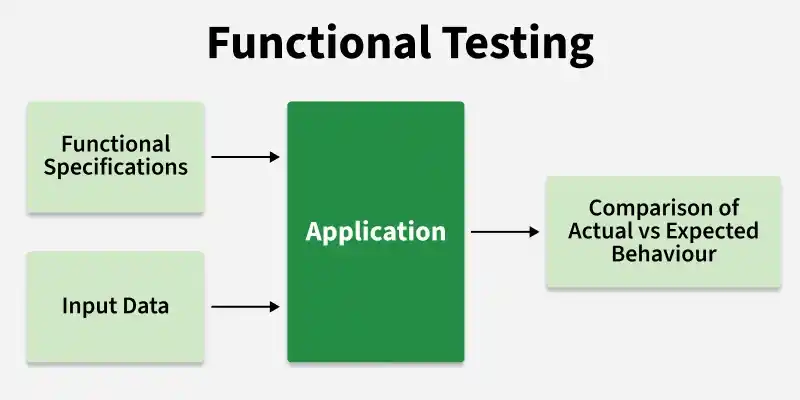
Functional Testing is a type of Black Box Testing that verifies whether each function of a software application works according to the specified functional and business requirements. It validates features such as the user interface, APIs, database interactions, and business logic to ensure the application behaves as expected.
- Validates the application's functionality against business requirements.
- Verifies inputs, business logic, and expected outputs.
- Focuses on what the application does, not how it is implemented.
2. Why is Functional Testing Important?
Functional Testing is important because it ensures that all features of a software application work correctly according to the specified business and functional requirements. It helps identify functional defects before the software is released, ensuring a reliable and user-friendly application.
- Ensures the application functions as expected and meets business requirements.
- Identifies functional defects early, reducing the risk of failures in production.
- Improves software quality, reliability, and user satisfaction.
3. What is the Purpose of Functional Testing?
The purpose of Functional Testing is to verify that every feature of a software application functions correctly according to the specified functional and business requirements. It ensures that the application delivers the expected results for different user actions and business scenarios.
- Verifies that all application features work as intended.
- Validates business logic, workflows, inputs, and expected outputs.
- Ensures the application meets functional and user requirements.
- Identifies functional defects before deployment.
- Confirms proper interaction between different application modules.
4. What Kind of Testing Covers Functional Testing?
Functional testing includes several types of testing such as:
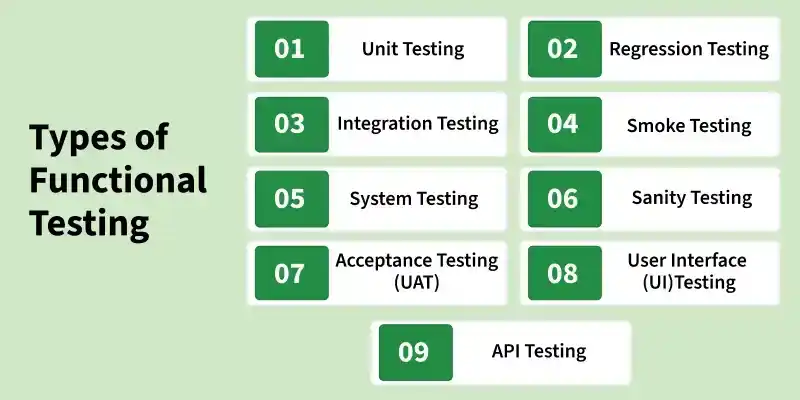
- Unit Testing: Testing individual components or units of code.
- Integration Testing: Testing the interaction between integrated units or components.
- System Testing: Testing the complete and integrated software system.
- Acceptance Testing: Validating the software against user requirements to determine if it is ready for release.
5. What Do You Test in Functional Testing?
In Functional Testing, testers verify that every feature and function of the application works correctly according to the specified functional and business requirements. The focus is on validating the application's behavior, business logic, and expected outcomes from the user's perspective.
- User interface (UI) elements and navigation.
- Input validation and form submissions.
- Business logic and application workflows.
- APIs and integration between application modules.
- Database operations and data integrity.
- Error handling and validation messages.
6. What Are the Important Steps That Are Covered in Functional Testing?
Functional Testing follows a structured process to verify that all application features work according to the specified functional requirements. Each step helps ensure complete test coverage and accurate validation of the application's functionality.
Key Steps
- Analyze functional requirements and identify test scenarios.
- Create test cases and prepare test data.
- Set up the test environment.
- Execute test cases and verify expected results.
- Log and report defects found during testing.
- Retest fixed defects and perform regression testing.
- Prepare the test summary report and verify exit criteria.
7. What Is the Use of a Traceability Matrix?
A Traceability Matrix or Requirement Traceability Matrix (RTM) is a document that maps software requirements with corresponding test cases. It ensures that all requirements are covered by testing and helps track the progress of test execution.
- Ensures complete test coverage by linking requirements with test cases.
- Helps identify missing requirements or untested functionalities.
- Tracks defects by mapping them to related requirements and test cases.
- Supports impact analysis when requirements change.
8. What Is the Difference Between Functional and Non-Functional Testing?
Functional Testing verifies what the application does by checking whether its features and functionalities work according to business requirements. Non-Functional Testing verifies how well the application performs by testing attributes like performance, security, usability, and reliability.
| Functional Testing | Non-Functional Testing |
|---|---|
| Validates application features and business functionality. | Validates performance and quality attributes of the application. |
| Focuses on inputs, outputs, and user interactions. | Focuses on speed, security, scalability, and reliability. |
| Ensures the system produces expected results. | Ensures the system provides a better user experience. |
| Example: Testing login, search, and payment functionality. | Example: Testing response time, load handling, and security. |
9. What Are the Different Test Levels?
Test Levels define different stages of software testing performed to validate the application at various levels, from individual components to the complete system. Each level focuses on specific objectives and helps identify defects at different stages of development.
Key Test Levels
- Unit Testing: Tests individual components or modules of an application to verify that each unit works correctly.
- Integration Testing: Verifies the interaction and data communication between multiple modules or systems.
- System Testing: Tests the complete integrated application to ensure it meets specified functional and business requirements.
- Acceptance Testing: Validates that the application meets user needs and business expectations before release.
10. What Is the Use of Acceptance Testing?
Acceptance testing is performed to verify whether a system meets business requirements and is ready for delivery. It ensures the software is acceptable to the end users before going live. It is usually the final phase of testing.
- Validates system against business requirements
- Ensures readiness for production release
- Confirms acceptability from end-user perspective
11. What Is Adhoc Testing?
Adhoc testing is an informal and unplanned testing approach where testers randomly test the application without following predefined test cases or documentation. It is performed to quickly identify unexpected defects and check the application's stability.
- Does not follow a structured test plan or test case document.
- Focuses on finding defects through random exploration and tester experience.
- Helps identify issues that may be missed during formal testing.
12. What is Meant by Equivalence Partitioning?
Equivalence Partitioning is a Black Box Testing technique that divides input data into different groups or partitions where the system is expected to behave similarly. Instead of testing every possible input value, testers select representative values from each partition to reduce test cases while maintaining effective coverage.
- Divides input data into valid and invalid equivalence classes.
- Reduces the number of test cases without affecting test coverage.
- Improves testing efficiency by selecting representative test values.
13. What is Boundary Value Analysis?
Boundary Value Analysis (BVA) is a Black Box Testing technique used to test the boundary values of input ranges, as defects are more likely to occur at the edges of valid input conditions. It verifies whether the application correctly handles minimum, maximum, and invalid boundary values.
- Helps identify errors in input validation and range handling.
- Reduces the number of test cases while maintaining effective coverage.
- Commonly used for fields with numerical, date, or character limits.
14. When to Do Smoke Testing?
Smoke testing is performed after receiving a new software build to verify whether the critical functionalities of the application are working correctly and whether the build is stable enough for further testing. It acts as a preliminary check before detailed testing begins.
- Performed on every new build or major deployment.
- Conducted before functional and regression testing.
- Verifies critical features like login, navigation, and core workflows.
15. Why Do We Need to Conduct End-to-End Testing?
End-to-end testing is performed to verify that the complete application workflow works correctly from start to finish by testing all integrated components. It ensures that the system behaves as expected in a real-world user environment.
- Validates complete business workflows across different modules.
- Ensures proper interaction between integrated systems and components.
- Identifies integration issues that may not be detected during individual module testing.
- Verifies data flow and communication between application layers.
16. What Do You Understand by Sanity Testing?
Sanity testing is a type of regression testing performed after minor code changes, bug fixes, or enhancements to verify that the specific functionality works correctly. It ensures that the recent changes have not introduced defects in the affected areas.
- Performed on a stable build after small modifications.
- Focuses on specific features or modules affected by changes.
- Verifies whether the application is ready for further detailed testing.
Example: After fixing a password reset issue, Sanity Testing verifies only the password reset functionality and related login flow.
17. What is the Difference Between Severity and Priority?
Severity and Priority are defect attributes used to evaluate the impact and urgency of fixing a defect. Severity defines how much the defect affects the application's functionality, while Priority defines how quickly the defect should be resolved.
| Severity | Priority |
|---|---|
| Indicates the impact of a defect on the system. | Indicates the urgency of fixing a defect. |
| Usually decided by the QA team. | Usually decided by the Product Owner, Manager, or Business team. |
| Focuses on technical impact. | Focuses on business importance. |
| Can be High, Medium, or Low. | Can be High, Medium, or Low. |
18. What is RTM?
RTM (Requirements Traceability Matrix) is a document that maps software requirements with their corresponding test cases to ensure complete test coverage. It helps verify that every requirement is tested and no functionality is missed during the testing process.
- Ensures all requirements are covered by test cases.
- Maintains traceability between requirements, test cases, and defects.
- Supports impact analysis when requirements change.
Example: A login requirement in RTM is mapped with test cases for valid login, invalid login, password validation, and account lock functionality.
19. What is Data-Driven Testing?
Data-driven testing is a testing approach where test data is separated from the test scripts, allowing the same test case to be executed multiple times with different sets of input values. It is commonly used in automation testing to improve test coverage and reduce script duplication.
- Separates test data from test logic for better maintainability.
- Helps validate application behavior with different inputs and scenarios.
- Reduces the effort required to create multiple similar test cases.
- Commonly implemented using Excel, CSV, databases, or external data sources.
20. What is Mutation Testing?
Mutation testing is a software testing technique used to evaluate the effectiveness of test cases by introducing small changes (mutations) into the application code and checking whether existing test cases can detect those changes. It helps measure the quality and coverage of the test suite.
- Creates modified versions of the code called mutants.
- Helps improve weak test cases and increase test coverage.
- A mutant is considered killed if tests detect the change and survived if tests fail to detect it.
21. Why Is It Impossible to Test a Program Thoroughly?
It is impossible to test a program thoroughly because software can behave differently for an extremely large number of inputs and conditions. Due to practical constraints, only selected test cases can be executed. System complexity and external dependencies further prevent complete coverage.
- Enormous range of inputs and execution paths
- Limited time, cost, and testing resources
- Dependency on external systems and environments
22. How Can You Test a Product if the Requirement Is Yet to Freeze?
When requirements are not finalized, testing can be approached by:
- Using Prototypes: Test early versions or mock-ups of the product.
- Exploratory Testing: Conducting informal, ad-hoc testing based on experience and intuition.
- Focusing on Core Functionality: Testing the most critical and stable parts of the application.
- Collaborating with Stakeholders: Regularly communicating with developers, product managers, and users to understand evolving requirements.
23. What Are Important Points You Need to Remember While Considering Writing Test Cases?
While writing test cases, testers should ensure that test cases are clear, complete, and easy to execute. A well-written test case should validate the expected behavior of the application and provide maximum test coverage.
- Understand the requirements and business rules before writing test cases.
- Write clear, simple, and specific test steps.
- Include positive, negative, and edge-case scenarios.
- Define proper test data and expected results.
- Ensure test cases are independent and reusable.
- Cover all functional requirements and user workflows.
24. How Many Test Cases Can You Execute in a Day?
The number of test cases executed in a day depends on various factors such as application complexity, test case length, testing type, environment stability, and tester experience. There is no fixed number of test cases that can be executed daily.
- Depends on the complexity and scope of the application.
- Simple test cases may allow execution of more cases, while complex cases require more time.
- Includes time for test data preparation, execution, defect reporting, and result analysis.
- Quality of testing is more important than the number of test cases executed.
Example: A tester may execute around 20–50 simple test cases in a day, while complex end-to-end scenarios may require more time per test case.
25. What Is Stress Testing?
Stress testing is a type of non-functional testing that evaluates how an application behaves under extreme workload conditions beyond its normal operating capacity. It helps identify the breaking point of the system and ensures that the application can recover properly after excessive load.
- Tests system stability and performance under extreme conditions.
- Identifies limitations, bottlenecks, and failure points.
- Verifies error handling and recovery mechanisms.
26. What Is Load Testing?
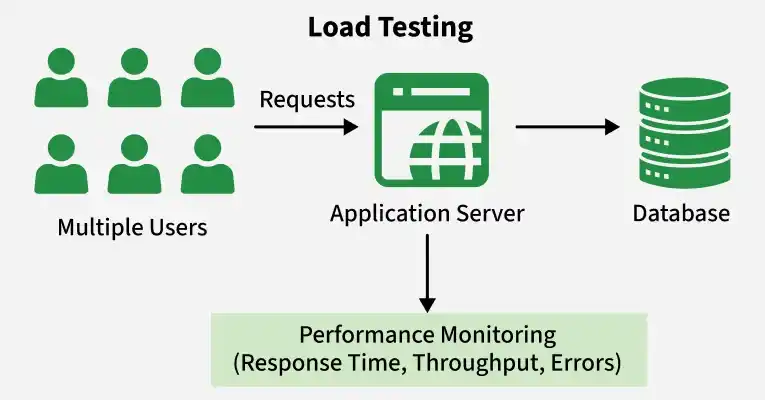
Load testing is a type of non-functional testing that evaluates the performance and behavior of an application under expected user load and workload conditions. It ensures that the system can handle the required number of users and transactions while maintaining acceptable performance.
- Verifies application performance under normal and expected load conditions.
- Measures response time, throughput, scalability, and resource utilization.
- Identifies performance bottlenecks before production release.
- Ensures system stability and reliability with multiple concurrent users.
27. What Is Configuration Management?
Configuration Management is a process of identifying, organizing, controlling, and tracking changes made to software components, documents, test environments, and other project assets throughout the software development lifecycle. It ensures consistency and proper management of different versions of software.
- Maintains and controls different versions of software artifacts.
- Tracks changes in code, documents, and test environments.
- Prevents unauthorized or inconsistent changes.
Example: Using tools like Git to manage source code versions and track changes made by different team members during development.
28. What Are the Important Factors to Be Considered in Risk-Based Testing?
Risk-Based Testing is a testing approach where testing efforts are prioritized based on the level of risk associated with different features or functionalities. It helps testers focus on high-risk areas to improve quality and reduce potential failures.
- Identify and analyze potential risks in the application.
- Prioritize testing based on risk impact and probability.
- Focus more on critical and business-sensitive functionalities.
- Consider the severity of failures and their impact on users.
- Allocate testing resources effectively based on risk priority.
- Continuously monitor and update risks throughout the testing process.
29. What Is Non-Functional Testing?
Non-Functional Testing is a type of software testing that evaluates the quality attributes of an application, such as performance, security, usability, reliability, and scalability. It focuses on how well the system performs rather than testing specific functionalities.
- Verifies application performance, security, usability, and reliability.
- Ensures the system meets non-functional requirements and user expectations.
- Tests factors like response time, scalability, stability, and resource usage.
30. What Are the Main Advantages of Automation Testing?
Automation testing offers several advantages:
- Efficiency: Executes tests faster and more accurately than manual testing.
- Repeatability: Allows repetitive execution of tests with consistent results.
- Coverage: Enables testing of a larger set of cases, increasing test coverage.
- Early Detection: Identifies defects early in the development cycle.
- Cost-Effective: Reduces long-term testing costs despite initial setup investments.
- Continuous Testing: Supports continuous integration and continuous delivery (CI/CD) pipelines, facilitating frequent testing and faster releases
31. What Is Covered, and What Are the Different Coverage Techniques?
Coverage is a metric used to measure how much of an application's functionality, requirements, or code has been tested. It helps identify missing test scenarios and ensures effective testing of the application.
Different Coverage Techniques:
- Requirement Coverage: Ensures all business requirements are covered by test cases.
- Functional Coverage: Verifies that all application features and functionalities are tested.
- Code Coverage: Measures how much of the source code is executed during testing.
- Statement Coverage: Checks whether each line of code is executed.
- Branch Coverage: Verifies that all decision paths are tested.
- Path Coverage: Ensures different execution paths in the application are tested.
32. What Is a Bug Report?
A bug report is a document that communicates detailed information about a defect or issue found in the software. It typically includes:
- Bug ID: A unique identifier for the bug.
- Title: A brief summary of the bug.
- Description: A detailed explanation of the bug, including steps to reproduce it.
- Severity: The impact of the bug on the system's functionality.
- Priority: The urgency of fixing the bug.
- Environment: Information about the system configuration where the bug was found.
- Attachments: Any screenshots, logs, or other files that help illustrate the bug.
33. What Is GUI Testing?
GUI testing involves testing the graphical user interface of an application to ensure it meets specifications and provides a positive user experience. This includes checking elements like buttons, menus, icons, and dialogs for:
- Functionality: Ensuring they work as intended.
- Usability: Ensuring they are user-friendly and intuitive.
- Consistency: Ensuring they adhere to design standards and guidelines.
- Layout: Ensuring proper alignment, spacing, and visual appeal.
34. What Are the Standard Rules of an API Test Design?
Standard rules of API Test Design define the key areas that should be considered while creating API test cases. They ensure that APIs are functional, secure, reliable, and perform as expected under different conditions.
- Validate HTTP methods such as GET, POST, PUT, PATCH, and DELETE.
- Verify request data, headers, authentication, and authorization.
- Validate response status codes, response body, schema, and data correctness.
- Cover positive, negative, and boundary test scenarios.
- Verify error handling and proper error messages.
35. What Are the Advantages of Manual Testing?
Advantages of manual testing include:
- Suitable for testing new features where requirements may change frequently.
- Allows testers to perform exploratory testing and discover unexpected defects.
- Requires less initial setup cost compared to automation testing.
- Provides human judgment to evaluate application behavior and appearance.
- Effective for small projects and one-time testing scenarios.
- Useful for testing complex scenarios that require human decision-making.
36. What Is the Test Harness?
A test harness is a collection of software and test data configured to test a program unit by running it under varying conditions and monitoring its behavior and outputs. It typically includes:
- Drivers: Components that call the functions being tested.
- Stubs: Simulated components that replace missing parts of the software.
- Test Scripts: Automated scripts that execute the tests.
- Reporting Tools: Tools that capture and report test results.
37. What Is Test Closure?
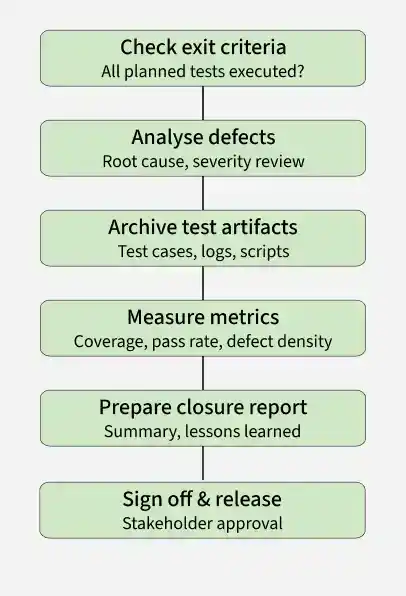
Test closure is the final phase of the Software Testing Life Cycle (STLC) where testing activities are formally completed after verifying that all planned testing objectives have been achieved. It involves analyzing test results, preparing reports, and documenting testing outcomes.
- Helps identify usability issues and user experience problems.
- Suitable for testing new features where requirements may change frequently.
- Allows testers to perform exploratory testing and discover unexpected defects.
38. What Is a Critical Bug in Functional Testing?
A critical bug in functional testing is a serious defect that affects the main functionality of an application. It can make the system crash, behave incorrectly, or become unusable, so it must be fixed immediately.
- Impacts core features of the application
- May cause system crash or data loss
- Requires immediate attention and fixing
39. What Is Baseline Testing?
Baseline testing is a testing approach used to evaluate the performance and behavior of an application against a predefined baseline or reference point. It establishes a standard measurement of system performance, functionality, or quality, which can be used for future comparisons after changes are introduced.
- Used to verify that new updates do not negatively impact existing functionality.
- Supports performance monitoring and regression analysis.
- Helps maintain consistency and quality throughout the software lifecycle.
40. What Is Defect Cascading?
Defect cascading occurs when one defect in a software application triggers or causes multiple other defects in different modules or functionalities. It usually happens when an initial defect is not identified and fixed early, causing incorrect data or behavior to spread throughout the system.
- A defect in one module can affect dependent modules and create additional defects.
- It often occurs due to incorrect assumptions, data corruption, or improper handling of dependencies.
- Defect cascading increases testing effort and makes debugging more difficult.
41. Name All the Basic Components of the Defect Report Format.
The basic components of a defect report typically include:
- Defect ID: A unique identifier for the defect.
- Title/Summary: A brief description of the defect.
- Description: Detailed information about the defect, including steps to reproduce it.
- Severity: The impact of the defect on the system’s functionality.
- Priority: The urgency of fixing the defect.
- Status: The current state of the defect (e.g., new, assigned, fixed, closed).
- Environment: Information about the software and hardware configuration where the defect was found.
- Assigned To: The person responsible for fixing the defect.
- Attachments: Any supporting documents, screenshots, or logs.
- Date Raised: The date when the defect was reported.
- Reporter: The person who identified and reported the defect.
42. What Is a Testbed?
A testbed is a controlled testing environment that contains all the required hardware, software, tools, configurations, and test data needed to execute software testing activities.
Components of a Testbed:
- Hardware configuration (servers, systems, devices)
- Software configuration (OS, applications, browsers)
- Database setup and test data
- Network configuration
- Testing tools and frameworks
43. What Is Defect Removal Efficiency?
Defect Removal Efficiency (DRE) is a software quality metric that measures how effectively defects are identified and fixed before the software is released to users. It indicates the efficiency of the testing and quality assurance process.
Formula: DRE = (Defects Found Before Release / (Defects Found Before Release + Defects Found After Release)) × 100
44. What Is the Difference Between Bug Release and Bug Leakage?
Bug Release and Bug Leakage are software testing terms related to defects reaching the production environment, but they differ in how and why the defects are released.
| Bug Release | Bug Leakage |
|---|---|
| A known defect is intentionally released to production with approval. | An unknown defect unintentionally reaches production because it was not detected during testing. |
| The defect is documented and accepted due to time, cost, or business constraints. | The defect escapes the testing process and is discovered by end users after release. |
| It is a planned and approved decision. | It is an unplanned testing failure. |
| Usually has low severity or minimal business impact. | Can have low, medium, or high impact depending on the defect. |
45. What Is Agile Testing, and Why Is It Important?
Agile testing is a software testing practice that follows the principles of Agile development, which emphasizes iterative and incremental delivery of software. Agile testing is important because it:
- Promotes continuous feedback and improvement.
- Allows for early detection and resolution of defects.
- Enhances collaboration between testers, developers, and stakeholders.
- Supports rapid changes and adaptability to evolving requirements.
46. What Will You Do as a Tester When Encountering a Bug?
When a tester encounters a bug, they should verify, document, report, and track the defect until it is resolved. This ensures the issue is fixed correctly without affecting other functionalities.
- Verify the Bug: Reproduce the issue to confirm it is a genuine defect.
- Analyze the Defect: Identify the affected module, severity, and priority.
- Collect Evidence: Capture screenshots, logs, videos, or error messages.
- Report the Bug: Log the defect in a defect tracking tool with complete details.
- Assign the Defect: Submit the defect to the appropriate developer or team.
- Track the Status: Monitor the defect through its lifecycle until it is fixed.
- Retest the Fix: Verify that the defect has been resolved successfully.
- Perform Regression Testing: Ensure the fix has not introduced new defects in related features.
- Close the Defect: Mark the defect as closed if the fix works as expected; otherwise, reopen it.
47. What Are the Different Types of Debugging Categories?
Debugging is the process of identifying, analyzing, and fixing defects or errors in software. Different debugging categories help developers locate and resolve issues efficiently.
Types of Debugging Categories:
- Brute Force Debugging: Uses print statements, logs, or memory dumps to identify the source of a defect.
- Backtracking: Starts from the point where the error occurs and traces the execution backward to find the root cause.
- Cause Elimination: Identifies possible causes of the defect and eliminates them one by one through testing and analysis.
- Program Slicing: Focuses only on the relevant section of code that affects the faulty output, making debugging faster.
- Fault Tree Analysis: Uses a logical tree structure to analyze all possible causes of a failure and identify the root cause.
48. What Is the Test Deliverable?
TA test deliverable is any document, report, or artifact created and submitted during the software testing lifecycle. These deliverables help plan, execute, monitor, and document testing activities, ensuring the software meets quality standards.
- Test Plan: Document outlining the testing strategy and objectives.
- Test Cases: Detailed test scenarios and steps to be executed.
- Test Scripts: Automated test scripts for execution.
- Test Data: Data sets used during testing.
- Test Summary Report: Overview of testing activities and results.
- Defect Reports: Records of identified defects.
- Traceability Matrix: Mapping of requirements to test cases.
- Test Logs: Records of test execution details and outcomes.
49. What Are the Common Risks That Lead to Project Failure?
Project risks are uncertainties that can negatively affect the project's schedule, budget, quality, or successful completion. Identifying and managing these risks early helps improve project success.
- Unclear or changing requirements
- Poor project planning and estimation
- Unrealistic deadlines
- Lack of skilled resources
- Poor communication among stakeholders
- Scope creep (uncontrolled requirement changes)
- Technical or integration issues
- Inadequate testing and quality assurance
- Budget constraints
- Poor risk management
Example: A project with unclear requirements and tight deadlines may experience delays, increased defects, and cost overruns, leading to project failure.
50. What Are the Significant Differences Between Test Matrix and Traceability Matrix?
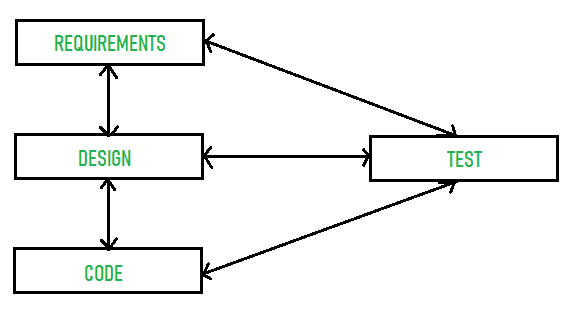
Test Matrix: A test matrix is used to track and measure test coverage, execution status, and test progress. It mainly focuses on test cases, their execution results, and overall testing status.
Traceability Matrix: A traceability matrix maps requirements to test cases to ensure that all requirements are covered by testing. It helps verify that no requirement is missed.
51. What Are Positive and Negative Testing?
Positive Testing verifies that the application works correctly when valid inputs are provided, while Negative Testing checks how the application handles invalid, unexpected, or incorrect inputs.
| Feature | Positive Testing | Negative Testing |
|---|---|---|
| Purpose | Verify system works with valid inputs | Verify system handles invalid inputs |
| Input Type | Valid data and correct actions | Invalid, incorrect, or unexpected data |
| Focus | Confirm expected behavior | Check error handling and stability |
| Goal | Ensure functionality works as intended | Ensure system does not crash and shows proper error messages |
| Example | Successful login with correct username/password | Login attempt with wrong password |
52. What Is the Big Bang Approach?
The Big Bang approach is an integration testing method where all components or modules are integrated simultaneously, and the entire system is tested as a whole. It is typically used when the individual modules have been tested independently, and the focus is on testing the interactions between modules.
53. What Is the Meaning of a Fault?
A fault is an error or defect in the software code, design, or requirements that can cause the application to produce incorrect results or behave unexpectedly during execution.
- A fault is the root cause of a software defect or failure.
- It may occur due to coding mistakes, design flaws, or incorrect requirements.
- A fault can lead to one or more failures when the software is executed.
Example: If a developer uses the wrong formula to calculate interest in a banking application, the incorrect code is a fault, which may result in incorrect interest calculations.
54. What Is Bug Leakage in Functional Testing?
Bug leakage in functional testing occurs when a defect is not detected during testing and is discovered by end users after the application is released to production.
- It happens when a defect escapes the testing process.
- Indicates gaps in test coverage or test execution.
- Can affect software quality, user experience, and customer satisfaction.
Example: A login feature works during testing but fails for certain valid users after deployment. Since the defect was missed during functional testing and found in production, it is considered bug leakage.
55. What Is TDD?
Test-Driven Development (TDD) is a software development approach in which developers write test cases before writing the actual code. The code is then developed to make the tests pass, followed by refactoring to improve code quality.
TDD Cycle (Red–Green–Refactor):
- Red: Write a test case that initially fails.
- Green: Write the minimum code required to pass the test.
- Refactor: Improve the code without changing its functionality.
56. What Is the Difference Between Latent and Masked Defects?
Latent Defect vs Masked Defect:
| Feature | Latent Defect | Masked Defect |
|---|---|---|
| Meaning | A hidden defect that exists in the system but is not yet discovered | A defect that is hidden by another defect and not visible until the first one is fixed |
| Detection | Found later, often during real usage or advanced testing | Discovered only after another defect is removed |
| Cause | Poor design, coding error, or missed requirement | One defect hiding the effect of another defect |
| Visibility | Not visible during normal testing initially | Temporarily hidden due to another defect |
| Example | A calculation error that appears only under rare conditions | A failure in output caused by another bug masking the real issue |
57. What Is Random/Monkey Testing?
Random or Monkey Testing is a software testing technique in which the tester or an automated tool provides random inputs and performs random actions without following predefined test cases to identify unexpected defects or application crashes.
- Tests the application's stability and robustness.
- Helps uncover unexpected crashes, hangs, or failures.
- Useful for identifying defects caused by unpredictable user behavior.
Example: A tester randomly taps buttons, enters random text, and navigates through different screens of a mobile application to check whether it crashes or behaves unexpectedly.
58. What Is Context-Driven Testing?
Context-Driven Testing is a software testing approach in which the testing strategy, techniques, and test cases are chosen based on the project's specific requirements, risks, and business goals. It recognizes that there is no single testing method that works for every project.
- Testing is adapted to the project's context and objectives.
- Focuses on risk, customer needs, and business priorities.
- Encourages critical thinking and exploratory testing.
- Improves test effectiveness by using the most suitable testing approach.
59. What Is the PDCA Cycle in Software Testing?
The PDCA (Plan-Do-Check-Act) cycle is a continuous improvement model used in software testing:
- Plan: Define objectives, plan tests, and prepare test cases.
- Do: Execute the test plan and perform testing.
- Check: Evaluate test results and identify defects.
- Act: Implement improvements based on test results and feedback.
Example: A QA team plans regression testing (Plan), executes the test cases (Do), reviews defect reports (Check), and updates the testing process to prevent similar issues in future releases (Act).
60. What Are the Entry Criteria in Software Testing?
Entry criteria are the conditions that must be met before testing can begin. These may include:
- Requirements documentation is complete and approved.
- Test environment is set up and ready.
- Test cases are developed and reviewed.
- Necessary resources (tools, data, personnel) are available.
61. What Is Exit Criteria in Software Testing?
Exit criteria are the conditions that must be met before testing can be considered complete. These may include:
- All planned test cases have been executed.
- All critical defects have been resolved.
- Test coverage meets predefined thresholds.
- Test summary reports are prepared and reviewed.
- Stakeholder approval is obtained.
62. Can System Testing Be Done at Any Stage?
System testing is typically done after integration testing and before acceptance testing. It focuses on testing the complete and integrated system to ensure it meets the specified requirements. While it is ideally performed at a specific stage, system testing can be done iteratively in agile development environments.
63. What Is Meant by Alpha, Beta, and Gamma Testing?
- Alpha Testing:Conducted internally by the development team or QA team in a controlled environment. It aims to identify bugs before releasing the product to external users.
- Beta Testing: Conducted by a select group of external users in a real-world environment. It helps gather feedback and identify defects not found during alpha testing.
- Gamma Testing: A final round of testing conducted just before the product release. It focuses on minor fixes and ensures the product is ready for production.
64. What Can Be Understood from End-To-End Testing?
End-to-end testing is a testing approach that verifies the complete workflow of an application from start to finish. It ensures that all integrated components, systems, and external services work together correctly in a real-world scenario.
- Validates interactions between integrated systems.
- Ensures data flows correctly across the application.
- Identifies issues that may not appear in unit or integration testing.
65. What Is Use Case Testing?
Use Case Testing is a black-box testing technique that verifies whether an application correctly performs tasks based on real-world user interactions (use cases). It ensures that business requirements and user workflows are implemented correctly.
- Based on functional requirements and use cases.
- Covers both successful and alternative scenarios.
- Ensures the application meets user and business needs.
Example: For an online banking application, a use case test verifies the complete fund transfer process, including login, beneficiary selection, amount entry, transaction confirmation, and successful transfer.
66. What Is A/B Testing?
A/B testing is a testing technique in which two versions (A and B) of a webpage, application, or feature are compared to determine which version performs better based on user behavior and predefined metrics.
- Measures performance using metrics such as conversion rate, click-through rate, or user engagement.
- Helps optimize user experience and business outcomes.
- Commonly used in websites, mobile apps, and digital marketing.
67. What Is the Defect Life Cycle?
The defect life cycle, also known as the bug life cycle, describes the stages a defect goes through from identification to resolution. Typical stages include:
- New: The defect is reported.
- Assigned: The defect is assigned to a developer for fixing.
- Open: The developer starts working on the defect.
- Fixed: The defect is resolved by the developer.
- Retest: The tester verifies the fix.
- Closed: The defect is confirmed as fixed and closed.
- Reopened: If the defect is not fixed, it is reopened for further investigation.
68. What Is Configuration Testing?
Configuration testing involves evaluating the software’s performance and functionality on different hardware, software, and network configurations. It ensures compatibility and identifies issues related to varying environments, such as different operating systems, browsers, devices, and network conditions.
69. What Determines the Level of Risk?
The level of risk is determined by the likelihood (probability) of a defect occurring and the impact (severity) it would have if it occurs.
- Impact (Severity): How serious the consequences will be if the defect occurs (e.g., business loss, system failure, or poor user experience).
- Likelihood (Probability): The chance that the defect or failure will occur.
- Risk Level = Impact × Likelihood
Example: A payment gateway failure has a high impact and a high probability of affecting users, so it is considered a high-risk area and is tested thoroughly.
70. What Do You Mean by Defect Triage?
Defect Triage is the process of reviewing, prioritizing, and assigning defects based on their severity, priority, business impact, and release schedule.
- Decides which defects should be fixed first.
- Assigns defects to the appropriate developers.
- Helps ensure timely and efficient defect resolution.
71. What Is a Stub?
A stub is a dummy or temporary program module used in top-down integration testing. It simulates the behavior of lower-level modules that are A stub is a temporary program or module used during integration testing to simulate the behavior of a lower-level component that has not yet been developed or is unavailable. It returns predefined responses to the calling module.
- Used mainly in Top-Down Integration Testing.
- Returns dummy or predefined data.
- Enables testing before all modules are complete.
Example: If the Payment Service is not yet developed, a stub can return a predefined response such as "Payment Successful" so the checkout module can be tested independently.
