

Data-Driven Testing (DDT) is an automation testing approach where the same test script is executed multiple times using different sets of input data stored in external files such as Excel, CSV, JSON, XML, or databases. It improves test coverage, reduces code duplication, and makes test maintenance easier.
- Separates test data from test scripts.
- Executes the same test with multiple input values.
- Supports external data sources like Excel, CSV, JSON, XML, and databases.
Example: An online banking application tests fund transfers using different account numbers and transfer amounts. A single automated test reads multiple data sets from an external file and executes the same test for each combination.
Types of Data-Driven Testing
- Excel-Driven Testing: Test data is stored in Excel spreadsheets, and the automation script reads the data to execute the same test with multiple input values.
- CSV-Driven Testing: Test data is maintained in CSV files, allowing the test script to run repeatedly with different datasets in a simple and lightweight format.
- XML-Driven Testing: Test data is stored in XML files, making it suitable for testing applications that require structured or hierarchical data.
- JSON-Driven Testing: Test data is stored in JSON files, which are commonly used for API testing and modern web applications due to their lightweight structure.
- Database-Driven Testing: Test data is retrieved directly from a database, enabling automated tests to validate applications using large and dynamic datasets.
Data-Driven Testing Architecture
The Data-Driven Testing architecture separates test data from the automation script. The driver script reads input data and expected results from an external data source, executes the test on the application, compares the actual and expected results, and generates a Pass/Fail report.
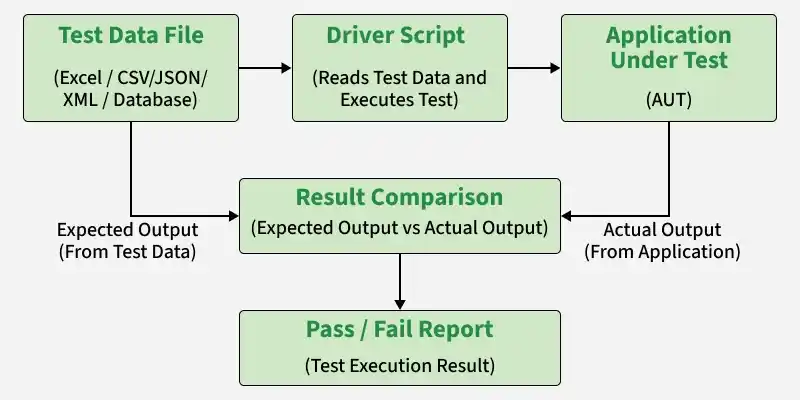
- Test Data File: Stores input values and expected results in external files such as Excel, CSV, JSON, XML, or a database.
- Driver Script: Reads the test data, executes the automation script, and controls the test execution.
- Application Under Test (AUT): The software application that processes the input data and generates the actual output.
- Result Comparison: Compares the expected output with the actual output to determine whether the test passes or fails.
- Pass/Fail Report: Displays the final execution status and test results.
Process of Data-Driven Testing
Data-Driven Testing works by separating test data from the test script. The automation framework reads test data from an external source, executes the same test with multiple datasets, compares the actual and expected results, and generates a test report.
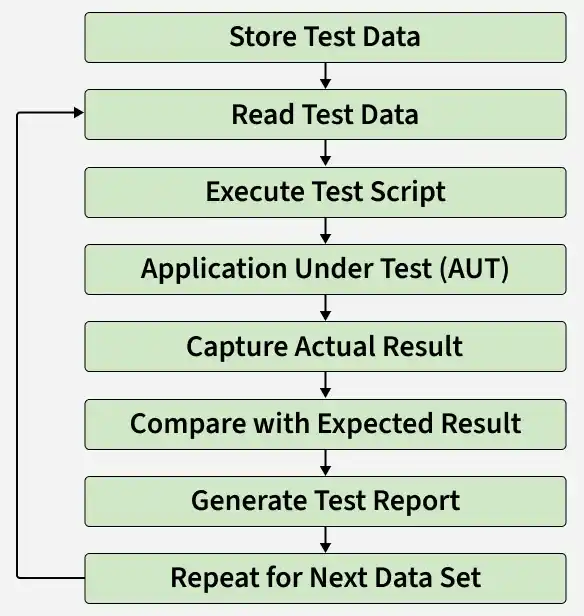
- Store Test Data: Store input values and expected results in an external source such as Excel, CSV, JSON, XML, or a database.
- Read Test Data: The automation framework reads one data set at a time and passes it to the test script.
- Execute Test Script: The reusable test script runs using the current set of input data.
- Application Under Test (AUT): The application processes the provided inputs and generates the actual output.
- Capture Actual Result: The framework records the output produced by the application during execution.
- Compare with Expected Result: The actual output is compared with the expected result to determine whether the test passes or fails.
- Generate Test Report: A report is created showing the execution status, results, and any detected failures.
- Repeat for Next Data Set: The same test script executes again using the next data set until all data has been tested.
Popular Tools Supporting Data-Driven Testing
- Selenium: Supports data-driven testing using Excel, CSV, JSON, XML, or databases with frameworks like TestNG and JUnit.
- Cypress: Uses fixtures (JSON), CSV files, or external data sources to execute tests with multiple data sets.
- Playwright: Enables data-driven testing by reading test data from JSON, CSV, Excel, or APIs.
- TestNG: Provides the @DataProvider annotation to run the same test with multiple input values.
- Cucumber: Uses Scenario Outline and Examples tables to execute the same test with different inputs.
- Katalon Studio: Offers built-in data files and data binding for executing tests with multiple data sets.
Advantages of Data-Driven Testing
- Reuses the same test script with multiple data sets.
- Increases test coverage by validating different input combinations.
- Reduces duplicate test scripts and maintenance effort.
- Separates test data from test logic for better organization.
- Saves time by automating repetitive test execution.
Limitations of Data-Driven Testing
- Initial framework setup can be time-consuming.
- Managing large or complex test data files can be difficult.
- Poor-quality or incorrect test data can lead to inaccurate results.
- Requires programming knowledge to build and maintain the framework.
- Debugging failures can be challenging when many data sets are executed.
- Not suitable for tests with highly dynamic or complex workflows.
