

Stop words are commonly used words in a language that carry little or no meaningful information for text analysis. These include words such as "the", "is", "in", "and", "a", which appear frequently but do not contribute significantly to the core meaning of a sentence in most NLP tasks.
- Stop words are high-frequency, low-meaning words in text data
- They are often removed during preprocessing in NLP pipelines
- Removal helps improve efficiency and model performance in many tasks
- Different libraries provide built-in stopword lists (NLTK, SpaCy, etc.)
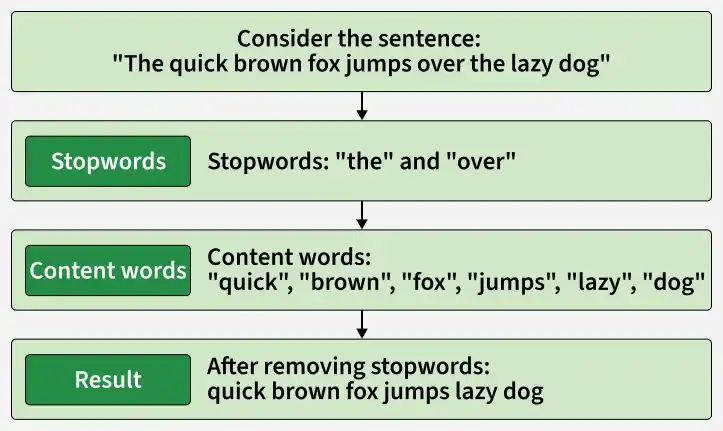
When to Remove Stopwords
Stop word removal is an important preprocessing step in NLP that helps in cleaning text data for better analysis.
- Text classification and sentiment analysis
- Search engines and information retrieval
- Topic modeling and clustering
- Keyword extraction
- Machine translation
- Text summarization
- Grammar or syntax-based tasks
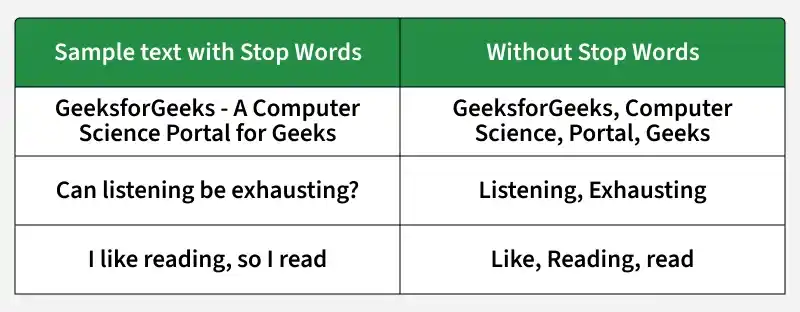
Categories of Stopwords
Understanding different types of stopwords helps in making informed decisions:
- Standard Stopwords: Common function words like articles ("a", "the"), conjunctions ("and", "but") and prepositions ("in", "on")
- Domain-Specific Stopwords: Context-dependent terms that appear frequently in specific fields like "patient" in medical texts
- Contextual Stopwords: Words with extremely high frequency in particular datasets
- Numerical Stopwords: Digits, punctuation marks and single characters
Implementation with NLTK
NLTK provides a simple and effective way to remove stop words using built-in English stopword lists.
Step 1: Import Libraries and Download Resources
- Imports the required NLTK modules for tokenization and stop word removal.
- Downloads the stopwords, punkt, and punkt_tab resources needed for tokenizing text and accessing the predefined English stopword list.
import nltk
from nltk.corpus import stopwords
from nltk.tokenize import word_tokenize

nltk.download('stopwords')
nltk.download('punkt')
nltk.download('punkt_tab')
Step 2: Define and Tokenize the Text
- Defines a sample sentence and converts it to lowercase for consistent processing.
- Uses
word_tokenize()to split the sentence into individual words (tokens).
text = "The quick brown fox jumps over the lazy dog"
tokens = word_tokenize(text.lower())
Step 3: Remove Stop Words
- Loads the English stopword list using
stopwords.words('english'). - Filters out the stop words from the tokenized text using list comprehension.
- Prints both the original tokens and the filtered tokens for comparison.
stop_words = set(stopwords.words('english'))
filtered_tokens = [word for word in tokens if word not in stop_words]
print("Original:", tokens)
print("Filtered:", filtered_tokens)
Output:
Original: ['this', 'is', 'a', 'sample', 'sentence', 'showing', 'stopword', 'removal', '.']
Filtered: ['sample', 'sentence', 'showing', 'stopword', 'removal', '.']
Custom Stop Words with NLTK
In real-world NLP tasks, standard stopword lists are often insufficient. Domain-specific words may also need to be removed.
Step 1: Create Custom Stopwords
- Imports the
Counterclass to count the frequency of words in the text. - Combines multiple text samples into a single list of tokens.
- Identifies frequently occurring words (frequency ≥ 3) and stores them as custom stop words.
from collections import Counter

text_data = [
    "data science is growing fast",
    "data analysis is important in science",
    "science and data are related"
]

all_tokens = " ".join(text_data).lower().split()

freq = Counter(all_tokens)
custom_stopwords = set([word for word, count in freq.items() if count >= 3])
Step 2: Merge with NLTK Stopwords
- Loads the default English stopword list provided by NLTK.
- Combines the default stopwords with the custom stopword list using the
union()method to create a single set of stop words.
stop_words = set(stopwords.words('english'))
final_stopwords = stop_words.union(custom_stopwords)
Step 3: Apply Filtering
- Removes all words that are present in the combined stopword list using list comprehension.
- Prints the filtered text containing only the meaningful words.
filtered_text = [word for word in all_tokens if word not in final_stopwords]
print(filtered_text)
Output:
['growing', 'fast', 'analysis', 'important', 'related']
You can download the complete code from here.
Applications
- Text Classification: Removes common words so models can focus on important features for categorizing documents.
- Search Engines: Improves search relevance by matching queries with meaningful keywords instead of frequent filler words.
- Topic Modeling: Helps identify the main topics in a collection of documents by reducing noise.
- Keyword Extraction: Makes it easier to extract the most informative words from text.
- Document Clustering: Groups similar documents more accurately by emphasizing content-bearing words.
Advantages
- Reduces the size of the text, making processing faster.
- Removes frequently occurring words that add little value to analysis.
- Improves feature quality for traditional machine learning models.
- Reduces memory usage when working with large text datasets.
- Easy to implement using built-in stopword lists available in NLP libraries.
Limitations
- Standard stopword lists are not suitable for every domain and may require customization.
- Can reduce performance in tasks that depend on sentence structure, such as machine translation or text summarization.
- Different languages require different stopword lists, making multilingual processing more challenging.
- Modern transformer-based models often learn word importance automatically, so explicit stopword removal may not always be beneficial.
