

A TreeMap in Java is a part of the java.util package that implements the Map interface. It stores key-value pairs in a sorted order using either a natural or custom comparator.
- TreeMap internally uses a Red-Black Tree for efficient sorting.
- Provides O(log n) time for insertion, deletion and lookup due to its self-balancing Red-Black Tree structure.
- TreeMap does not allow null keys, but allows null values.
import java.util.Map;
import java.util.TreeMap;

public class TreeMapCreation {
    public static void main(String args[]){

        // Create a TreeMap of Strings (keys) and Integers
        // (values)
        TreeMap<String, Integer> tm = new TreeMap<>();

        System.out.println("TreeMap elements: " + tm);
    }
}
Output
TreeMap elements: {}
Hierarchy of TreeMap
TreeMap extends AbstractMap and implements the NavigableMap, SortedMap, Map, Cloneable, and Serializable interfaces.
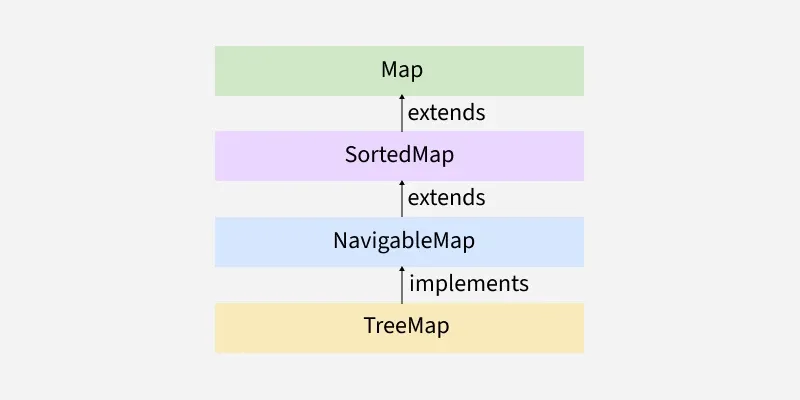
Constructors of TreeMap
In order to create a TreeMap, we need to create an object of the TreeMap class. The TreeMap class consists of various constructors that allow the possible creation of the TreeMap. The following are the constructors available in this class:
1. TreeMap()
This constructor is used to build an empty TreeMap that will be sorted by using the natural order of its keys.
Syntax:
TreeMap<K, V> map = new TreeMap<>();
import java.util.*;

public class Geeks {

    // To show TreeMap constructor
    static void Constructor(){

        // Creating an empty TreeMap
        TreeMap<Integer, String> tm = new TreeMap<>();

        // Mapping string values to int keys using put()
        // method
        tm.put(10, "Geeks");
        tm.put(15, "For");
        tm.put(20, "Geeks");

        // Printing the elements of TreeMap
        System.out.println("TreeMap: " + tm);
    }

    public static void main(String[] args){

        System.out.println(
            "TreeMap using TreeMap() constructor");

        // Calling constructor
        Constructor();
    }
}
Output
TreeMap using TreeMap() constructor
TreeMap: {10=Geeks, 15=For, 20=Geeks}
2. TreeMap(Comparator comp):
This constructor is used to build an empty TreeMap object in which the elements will need an external specification of the sorting order.
Syntax:
TreeMap<K, V> map = new TreeMap<>(Comparator<? super K> comparator);
import java.util.*;
class Student{

    int rollno;
    String name, address;

    public Student(int rollno, String name, String address){

        this.rollno = rollno;
        this.name = name;
        this.address = address;
    }

    public String toString(){

        return this.rollno + " " + this.name + " "
            + this.address;
    }
}

// Comparator class
class SortByRoll implements Comparator<Student>{

    public int compare(Student a, Student b){

        // Compare based on roll number
        return a.rollno - b.rollno;
    }
}

public class Geeks{
    public static void main(String[] args){

        // Create a TreeMap using a Comparator
        TreeMap<Student, Integer> tm
            = new TreeMap<>(new SortByRoll());

        tm.put(new Student(111, "Geek1", "New York"), 1);
        tm.put(new Student(131, "Geek2", "London"), 2);
        tm.put(new Student(121, "Geek3", "Paris"), 3);

        System.out.println("TreeMap sorted by roll number: "
                           + tm);
    }
}
Output
TreeMap sorted by roll number: {111 Geek1 New York=1, 121 Geek3 Paris=3, 131 Geek2 London=2}
3. TreeMap(Map M)
This constructor is used to initialize a TreeMap with the entries from the given map M which will be sorted by using the natural order of the keys.
Syntax:
TreeMap<K, V> map = new TreeMap<>(Map<? extends K, ? extends V> m);
import java.util.*;
import java.util.concurrent.*;

public class Geeks {

    // Method To illustrate constructor<Map>
    static void Constructor()
    {
        // Creating an empty HashMap
        TreeMap<Integer, String> m = new TreeMap<>();

        m.put(10, "Geeks");
        m.put(20, "For");
        m.put(30, "Geeks");

        // Creating the TreeMap using the Map
        TreeMap<Integer, String> tm
                = new TreeMap<Integer, String>(
                m);

        // Printing the elements of TreeMap
        System.out.println("TreeMap: " + tm);
    }

    public static void main(String[] args)
    {
        System.out.println(
                "TreeMap using TreeMap(Map) Constructor");
        Constructor();
    }
}
Output
TreeMap using TreeMap(Map) Constructor
TreeMap: {10=Geeks, 20=For, 30=Geeks}
Performing Various Operations on TreeMap
1. Adding Elements
We can use the put() method to insert elements to a TreeMap. However, the insertion order is not retained in the TreeMap. Internally, for every element, the keys are compared and sorted in ascending order.
import java.util.*;

class Geeks {

    public static void main(String args[]){

        // Initialization of TreeMap
        TreeMap<Integer, String> tm = new TreeMap<>();

        // Inserting the elements in TreeMap using put()
        // method
        tm.put(3, "Geeks");
        tm.put(2, "For");
        tm.put(1, "Geeks");

        System.out.println("TreeMap with raw type: " + tm);

        // Initialization of TreeMap with Generics
        TreeMap<Integer, String> tm1 = new TreeMap<>();

        // Inserting elements into tm1
        tm1.put(3, "Language");
        tm1.put(2, "Programming");
        tm1.put(1, "Java");

        System.out.println("TreeMap with generics: " + tm1);
    }
}
Output
TreeMap with raw type: {1=Geeks, 2=For, 3=Geeks}
TreeMap with generics: {1=Java, 2=Programming, 3=Language}
2. Changing Elements
To change the element in a TreeMap, simply use the put() method again with the same key and the new value.
import java.util.*;

class Geeks{

    public static void main(String args[]){

       TreeMap<Integer, String> tm = new TreeMap<>();

        // Inserting the elements in Map
        tm.put(3, "Geeks");
        tm.put(2, "Geeks");
        tm.put(1, "Geeks");

        System.out.println(tm);

        tm.put(2, "For");

        System.out.println(tm);
    }
}
Output
{1=Geeks, 2=Geeks, 3=Geeks}
{1=Geeks, 2=For, 3=Geeks}
3. Removing Element
We can use the remove() method to remove element from the TreeMap.
import java.util.*;

class Geeks{

    public static void main(String args[]){

        // Initialization of a TreeMap using Generics
        TreeMap<Integer, String> tm = new TreeMap<>();


        // Inserting the elements using put() method
        tm.put(3, "Java");
        tm.put(2, "C++");
        tm.put(1, "Python");
        tm.put(4, "JS");

        System.out.println(tm);

        // Removing the element corresponding to key
        tm.remove(4);

        System.out.println(tm);
    }
}
Output
{1=Python, 2=C++, 3=Java, 4=JS}
{1=Python, 2=C++, 3=Java}
4. Iterating Elements
There are multiple ways to iterate through the Map. The most famous way is to use a for-each loop and get the keys. The value of the key is found by using the getValue() method.
import java.util.*;

class Geeks {

    public static void main(String args[]){

        // Initialization of TreeMap
        TreeMap<Integer, String> tm = new TreeMap<>();

        // Inserting elements
        tm.put(3, "Geeks");
        tm.put(2, "For");
        tm.put(1, "Geeks");

        for (Map.Entry<Integer, String> e : tm.entrySet()) {
            int k = e.getKey();
            String v = e.getValue();

            System.out.println(k + " : " + v);
        }
    }
}
Output
1 : Geeks
2 : For
3 : Geeks
Methods of TreeMap
| Method | Action Performed |
|---|---|
| clear() | Removes all key-value mappings from the TreeMap. |
| clone() | Returns a shallow copy of the TreeMap. |
| containsKey(Object key) | Returns true if the map contains a mapping for the specified key. |
| containsValue(Object value) | Returns true if the map contains one or more mappings for the specified value. |
| entrySet() | Returns a Set view of the key-value mappings contained in the map. |
| firstKey() | Returns the lowest key currently present in the map. |
| lastKey() | Returns the highest key currently present in the map. |
| get(Object key) | Returns the value associated with the specified key. |
| put(K key, V value) | Inserts a key-value mapping into the map. If the key already exists, its value is replaced. |
| putAll(Map<? extends K, ? extends V> map) | Copies all mappings from the specified map into the TreeMap. |
| remove(Object key) | Removes the mapping associated with the specified key. |
| size() | Returns the number of key-value mappings in the map. |
| isEmpty() | Returns true if the map contains no mappings. |
| keySet() | Returns a Set view of the keys contained in the map. |
| values() | Returns a collection view of the values contained in the map. |
| headMap(K toKey) | Returns a view of the portion of the map whose keys are strictly less than toKey. |
| tailMap(K fromKey) | Returns a view of the portion of the map whose keys are greater than or equal to fromKey. |
| subMap(K fromKey, K toKey) | Returns a view of the portion of the map whose keys range from fromKey (inclusive) to toKey (exclusive). |
| lowerKey(K key) | Returns the greatest key strictly less than the specified key. |
| higherKey(K key) | Returns the least key strictly greater than the specified key. |
| floorKey(K key) | Returns the greatest key less than or equal to the specified key. |
| ceilingKey(K key) | Returns the least key greater than or equal to the specified key. |
| lowerEntry(K key) | Returns the entry associated with the greatest key strictly less than the specified key. |
| higherEntry(K key) | Returns the entry associated with the least key strictly greater than the specified key. |
| floorEntry(K key) | Returns the entry associated with the greatest key less than or equal to the specified key. |
| ceilingEntry(K key) | Returns the entry associated with the least key greater than or equal to the specified key. |
| firstEntry() | Returns the entry associated with the lowest key. |
| lastEntry() | Returns the entry associated with the highest key. |
| pollFirstEntry() | Removes and returns the entry associated with the lowest key. |
| pollLastEntry() | Removes and returns the entry associated with the highest key. |
| descendingMap() | Returns a reverse-order view of the mappings contained in the map. |
| descendingKeySet() | Returns a reverse-order NavigableSet view of the keys. |
| navigableKeySet() | Returns a NavigableSet view of the keys contained in the map. |
| comparator() | Returns the comparator used to order the keys, or null if natural ordering is used. |
