

Abstraction in Java is the process of hiding internal implementation details and showing only essential functionality to the user. It focuses on what an object does rather than how it does it.
- It hides the complex details and shows only essential features.
- Abstract classes may have methods without implementation and must be implemented by subclasses.
- By abstracting functionality, changes in the implementation do not affect the code that depends on the abstraction.
Ways to Achieve Abstraction
Java provides two ways to implement abstraction, which are listed below:
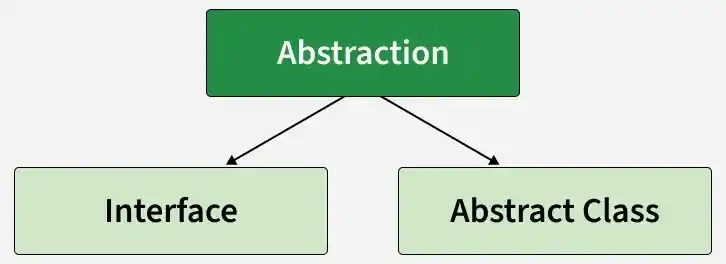
- Abstract Classes (Partial Abstraction)
- Interface (provides abstraction for behavior, may contain default or static methods)
Real-Life Example of Abstraction
The television remote control is the best example of abstraction. It simplifies the interaction with a TV by hiding all the complex technology. We don't need to understand how the TV internally works; we just need to press the button to change the channel or adjust the volume.
abstract class TV{

    abstract void turnOn();
    abstract void turnOff();
}

// Concrete class implementing the abstract methods
class TVRemote extends TV{

    @Override
    void turnOn(){

        System.out.println("TV is turned ON.");
    }

    @Override
    void turnOff(){

        System.out.println("TV is turned OFF.");
    }
}

// Main class to demonstrate abstraction
public class Geeks{

    public static void main(String[] args){

        TV remote = new TVRemote();
        remote.turnOn();
        remote.turnOff();
    }
}
Output
TV is turned ON.
TV is turned OFF.
Explanation:
- TV is abstract class defining turnOn() and turnOff() methods.
- TVRemote class implements the abstract methods with specific logic.
- Geeks class(Main class) uses TV remote = new TVRemote(); to interact without knowing the internal implementation.
Abstract class
An abstract class is a class declared using the abstract keyword that cannot be instantiated directly. It can contain both abstract methods (without a body) and concrete methods (with a body), allowing it to provide common functionality while leaving some behavior to subclasses.
- Can contain abstract and concrete methods.
- Can have constructors, instance variables, and static members.
Real World Example
The diagram shows an abstract class Shape that contains common properties and methods shared by different shapes. Circle and Rectangle extend Shape and provide their own specific properties, such as radius for Circle and length and width for Rectangle. The area() and toString() methods are abstract, so each concrete class must provide its own implementation.
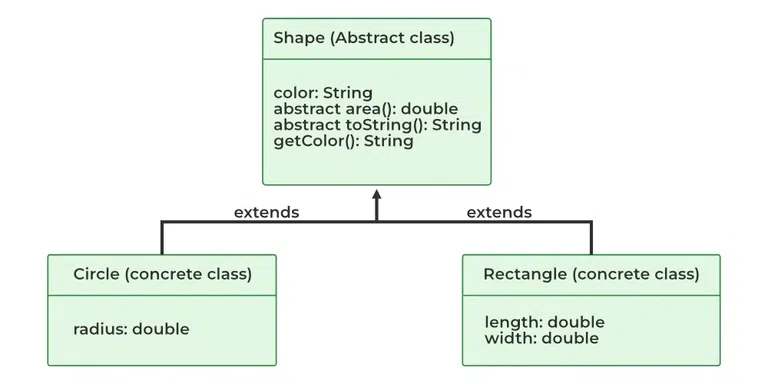
Example: This program demonstrates partial abstraction by defining an abstract class Shape that includes an abstract method area(), a concrete method getColor(), and a constructor.
abstract class Shape{
    String color;

    // these are abstract methods
    abstract double area();
    public abstract String toString();

    // abstract class can have the constructor
    public Shape(String color){

        System.out.println("Shape constructor called");
        this.color = color;
    }

    // this is a concrete method
    public String getColor(){

        return color;

    }
}
class Circle extends Shape{

    double radius;

    public Circle(String color, double radius){

        // calling Shape constructor
        super(color);
        System.out.println("Circle constructor called");
        this.radius = radius;
    }

    @Override double area(){

        return Math.PI * Math.pow(radius, 2);
    }

    @Override public String toString(){

        return "Circle color is " + super.getColor()
            + "and area is : " + area();
    }
}
class Rectangle extends Shape{

    double length;
    double width;

    public Rectangle(String color, double length,
                     double width)
    {
        // calling Shape constructor
        super(color);
        System.out.println("Rectangle constructor called");
        this.length = length;
        this.width = width;
    }

    @Override double area() { return length * width; }

    @Override public String toString()
    {
        return "Rectangle color is " + super.getColor()
            + "and area is : " + area();
    }
}
public class Test {
    public static void main(String[] args)
    {
        Shape s1 = new Circle("Red", 2.2);
        Shape s2 = new Rectangle("Yellow", 2, 4);

        System.out.println(s1.toString());
        System.out.println(s2.toString());
    }
}
Explanation: In the Shape example, Shape defines the common color property and abstract area() method. Circle and Rectangle extend Shape and provide their own implementations of area(). The Shape reference can refer to different shape objects, hiding their specific implementations.
Interface
An interface in Java defines a contract that specifies the behavior a class should provide. A class implements an interface and provides implementations for its abstract methods. Interfaces can also contain default and static methods with implementations.
- A class uses the implements keyword to implement an interface.
- A class can implement multiple interfaces, supporting multiple inheritance of type.
Example: To implement an interface we use the keyword “implements” with class.
// Define an interface named Shape
interface Shape{

    // Abstract method for calculating the area
    double calculateArea();
}

// Implement the interface
// in a class named Circle
class Circle implements Shape{

    private double r;

    // Constructor for Circle
    public Circle(double r){

      this.r = r;
    }

    // Implementing the abstract method
    // from the Shape interface
    public double calculateArea()
    {
        return Math.PI * r * r;
    }
}

// Implement the interface in a
// class named Rectangle
class Rectangle implements Shape{

    private double length;
    private double width;

    // Constructor for Rectangle
    public Rectangle(double length, double width){

        this.length = length;
        this.width = width;
    }

    // Implementing the abstract
    // method from the Shape interface
    public double calculateArea() {
      return length * width;
    }
}

public class Main {
    public static void main(String[] args) {

        // Reference type is the interface (Shape)
        Shape cir = new Circle(5.0);
        Shape rect = new Rectangle(4.0, 6.0);

        // Dynamic method dispatch — decides which method to call at runtime
        System.out.println("Area of Circle: " + cir.calculateArea());
        System.out.println("Area of Rectangle: " + rect.calculateArea());
    }
}
Output
Area of Circle: 78.53981633974483
Area of Rectangle: 24.0
Explanation: In the Shape interface example, Shape declares the calculateArea() method. Circle and Rectangle implement the interface and provide their own area calculations. The Shape references cir and rect allow the program to use both objects through the same interface type.
Advantages of Abstraction
- Abstraction makes complex systems easier to understand by hiding the implementation details.
- Abstraction keeps different part of the system separated.
- Abstraction maintains code more efficiently.
- Abstraction increases the security by only showing the necessary details to the user.
Limitations of Abstraction in Java
- Can make the code more complex if abstraction is used unnecessarily.
- Can make debugging harder because the implementation details are hidden.
- May require additional classes or interfaces, increasing the amount of code.
- Too many abstraction layers can make the program difficult to understand.
- Designing a good abstraction requires careful planning.
- May add little benefit in small or simple programs.
