

lambda expressions, introduced in Java 8, allow developers to write concise, functional-style code by representing anonymous functions. They enable passing code as parameters or assigning it to variables, resulting in cleaner and more readable programs.
- It implement a functional interface (An interface with only one abstract function)
- Enable passing code as data (method arguments).
- Lambda expressions can access only final or effectively final variables from the enclosing scope.
@FunctionalInterface
interface Calculator {
    int calculate(int a, int b);
}

public class GFG {
    public static void main(String[] args) {

        Calculator add = (a, b) -> a + b;
        Calculator multiply = (a, b) -> a * b;
        Calculator subtract = (a, b) -> a - b;

        System.out.println("Addition: " + add.calculate(10, 5));
        System.out.println("Multiplication: " + multiply.calculate(10, 5));
        System.out.println("Subtraction: " + subtract.calculate(10, 5));
    }
}
Output
Addition: 15
Multiplication: 50
Subtraction: 5
Explanation: The Calculator interface is a functional interface because it has one abstract method, calculate(). The add, multiply, and subtract variables store different lambda expressions that provide implementations of this method. When calculate() is called, the corresponding lambda expression is executed.
Syntax
(parameters) -> {
// multiple statements
}
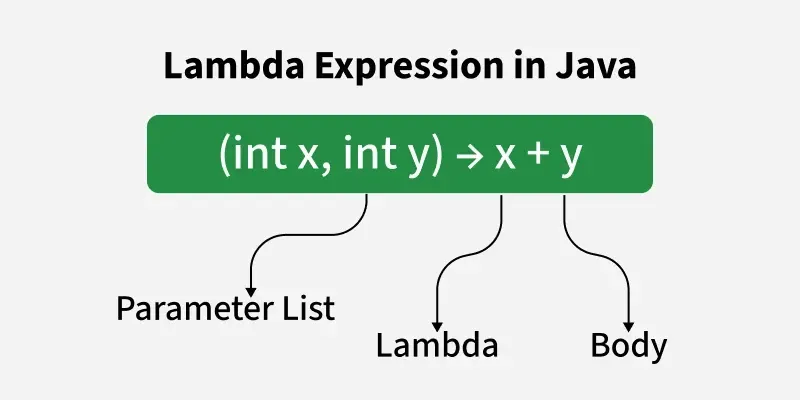
- Parameter List: Parameters for the lambda expression
- Arrow Token (->): Separates the parameter list and the body
- Body: Logic to be executed.
interface Add{

    int addition(int a, int b);
}

public class GFG{

    public static void main(String[] args){

        // Lambda expression to add two numbers
        Add add = (a, b) -> a + b;

        int result = add.addition(10, 20);
        System.out.println("Sum: " + result);
    }
}
Output
Sum: 30
Explanation: In Above example, the Add functional interface defines the addition() method that takes two integers and returns their sum. The lambda expression (a, b) -> a + b provides the implementation of this method without creating a separate class. The addition() method is then called with 10 and 20, producing 30.
Functional interface
A functional interface has exactly one abstract method. Lambda expressions provide its implementation. @FunctionalInterface annotation is optional but recommended to enforce this rule at compile time.
- A functional interface contains exactly one abstract method, but it can have multiple default and static methods.
- It is mainly used with lambda expressions and method references to enable functional programming in Java.
interface FuncInterface{

    void abstractFun(int x);
    default void normalFun(){
        System.out.println("Hello");
        }
}

public class GFG{

    public static void main(String[] args){

        FuncInterface fobj = (int x) -> System.out.println(2 * x);
        fobj.abstractFun(5);
    }
}
Output
10
Explanation: In above example, FuncInterface contains one abstract method, abstractFun(), and one default method, normalFun(). The lambda expression (int x) -> System.out.println(2 * x) provides the implementation of the abstract method. When abstractFun(5) is called, the value 5 is multiplied by 2, so the output is 10.
Types of Lambda Parameters
There are three Lambda Expression Parameters are mentioned below:
1. Lambda with Zero Parameters
Lambda with Zero Parameters is a lambda expression that does not take any input values. It is commonly used to implement methods that perform a task without requiring any arguments.
- Empty parentheses () are used to indicate that the lambda accepts no parameters.
- It is commonly used for tasks such as printing messages, triggering events, or executing background operations
Syntax:
() -> System.out.println("Zero parameter lambda");
@FunctionalInterface
interface ZeroParameter{

    void display();
}

public class Geeks{

    public static void main(String[] args){

        // Lambda expression with zero parameters
        ZeroParameter zeroParamLambda = ()
            -> System.out.println(
                "This is a zero-parameter lambda expression!");

        // Invoke the method
        zeroParamLambda.display();
    }
}
Output
This is a zero-parameter lambda expression!
Explanation: In above example, the ZeroParameter functional interface defines a display() method that takes no arguments. The lambda expression () -> System.out.println(...) implements this method. When display() is called, it prints the given message. Empty parentheses () indicate that the lambda does not accept any parameters.
2. Lambda with a Single Parameter
Lambda with a Single Parameter is a lambda expression that accepts one input value. It is used when the operation needs a single argument to produce a result or perform a task.
- It is not mandatory to use parentheses if the type of that variable can be inferred from the context.
- Parentheses are optional if the compiler can infer the parameter type from the functional interface.
Syntax:
(p) -> System.out.println("One parameter: " + p)
import java.util.ArrayList;

public class GFG{

    public static void main(String[] args){

        ArrayList<Integer> list = new ArrayList<>();
        list.add(1);
        list.add(2);
        list.add(3);

        System.out.println("All elements:");
        list.forEach(n -> System.out.println(n));

        System.out.println("Even elements:");
        list.forEach(n -> {
            if (n % 2 == 0)
                System.out.println(n);
        });
    }
}
Output
All elements:
1
2
3
Even elements:
2
Explanation: In above example, an ArrayList contains the numbers 1, 2, and 3. The lambda expression n -> System.out.println(n) is used with forEach() to print every element. Another lambda checks n % 2 == 0 and prints only the even numbers. Since the lambda has one parameter, parentheses around n are optional.
Note: The forEach() method internally uses the Consumer<T> functional interface, which takes one argument and performs an action.
3. Lambda Expression with Multiple Parameters
Lambda with Multiple Parameters is a lambda expression that accepts two or more input values. It is used when an operation requires multiple arguments to perform a calculation or execute a task.
- Parentheses () are mandatory when a lambda expression has multiple parameters.
- Parameter types can be specified explicitly or omitted if the compiler can infer them.
Syntax:
(p1, p2) -> System.out.println("Multiple parameters: " + p1 + ", " + p2);
@FunctionalInterface
interface Functional {
    int operation(int a, int b);
}

public class Test {

    public static void main(String[] args) {

        // Using lambda expressions to define the operations
        Functional add = (a, b) -> a + b;
        Functional multiply = (a, b) -> a * b;

        // Using the operations
        System.out.println(add.operation(6, 3));
        System.out.println(multiply.operation(4, 5));
    }
}
Output
9
20
Explanation: In above example, the Functional interface defines an operation() method that accepts two integers. Two lambda expressions provide different implementations of this method: (a, b) -> a + b performs addition, while (a, b) -> a * b performs multiplication. The corresponding method calls produce 9 and 20.
Examples in Collections / Streams
Lambda expressions are widely used with Java Collections and Streams for concise operations
import java.util.Arrays;
import java.util.List;

public class GFG{

    public static void main(String[] args){

        List<String> names = Arrays.asList(
            "Alice", "Bob", "Charlie", "Adam");

        System.out.println("All names:");
        names.forEach(name -> System.out.println(name));

        System.out.println("\nNames starting with 'A':");
        names.stream()
            .filter(n -> n.startsWith("A"))
            .map(n -> n.toUpperCase())
            .forEach(System.out::println);
    }
}
Output
All names:
Alice
Bob
Charlie
Adam

Names starting with 'A':
ALICE
ADAM
Explanation: In above example, a list containing four names is created. The forEach() method uses a lambda expression to print every name. A Stream is then used with filter() to select names beginning with "A", map() to convert them to uppercase, and forEach() to print the results. This demonstrates how lambda expressions can make collection and stream operations concise.
Common Built-in Functional Interfaces
| Interface | Method | Purpose |
|---|---|---|
| Predicate | boolean test(T t) | Tests a given condition and returns true or false. |
| Consumer | void accept(T t) | Performs an action on the given argument without returning a result. |
| Supplier | T get() | Supplies or generates a result without taking any input. |
| Comparator<T> | int compare(T o1, T o2) | Compares two objects to determine their order. |
| Comparable<T> | int compareTo(T o) | Defines the natural ordering for objects of a class. |
Validity Check: Example Lambda Expressions
| Expression | Validity | Reason |
|---|---|---|
| () -> {} | Valid | No parameters, empty body |
| () -> "geeksforgeeks" | Valid | Single expression returns value |
| () -> { return "geeksforgeeks"; } | Valid | Uses braces with return keyword |
| (Integer i) -> { return "geeksforgeeks" + i; } | Valid | Correct syntax with typed parameter |
| (String s) -> { return "geeksforgeeks"; } | Valid | Parameter unused but valid |
| () -> { return "Hello" } | Invalid | Missing semicolon after return statement |
| x -> { return x + 1; } | Invalid | Invalid if type inference not possible |
| (int x, y) -> x + y | Invalid | If one parameter has type, all must |
Advantages
- Reduces boilerplate code.
- Makes code more concise and readable.
- Makes it easier to pass behavior as an argument.
- Works well with Collections and the Stream API.
- Reduces the need for anonymous classes in many situations.
