

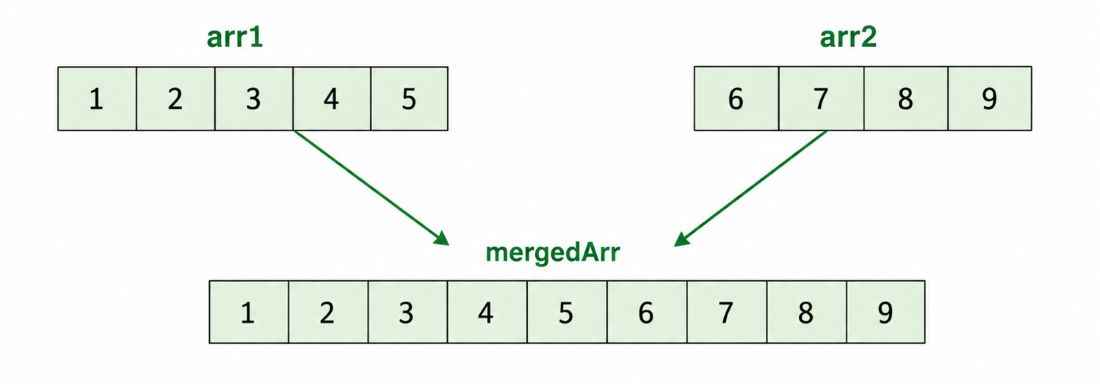
Merging two arrays means combining the elements of two arrays into a single array. The elements of the first array are placed first, followed by the elements of the second array.
Example
Input: arr1 = [1, 2, 3, 4, 5] , arr2 = [6, 7, 8, 9]
Output: [1, 2, 3, 4, 5, 6, 7, 8, 9]
Input: arr1 = [10, 20, 30], arr2 = [40, 50, 60, 70]
Output: [10, 20, 30, 40, 50, 60, 70]
Different Approaches to Merge Two Arrays
There are multiple ways to merge two arrays in Java. The commonly used approaches are discussed below.
1. Merge Two Arrays Using System.arraycopy()
The System.arraycopy() method is a built-in Java method used to copy elements from one array to another. We can use it to copy both arrays into a new array.
import java.util.Arrays;

public class Geeks{
    public static void main(String[] args) {

        int[] arr1 = {10, 20, 30, 40};
        int[] arr2 = {50, 60, 70, 80};

        // Create an array to store the merged result
        int[] result = new int[arr1.length + arr2.length];

        // Copy elements of arr1
        System.arraycopy(arr1, 0, result, 0, arr1.length);

        // Copy elements of arr2
        System.arraycopy(arr2, 0, result, arr1.length, arr2.length);

        System.out.println(Arrays.toString(result));
    }
}
Output
[10, 20, 30, 40, 50, 60, 70, 80]
Explanation
- Two arrays, arr1 and arr2, are initialized.
- A new array is created with a size equal to the sum of both array lengths.
- System.arraycopy() copies the elements of arr1 into the result array.
- The second System.arraycopy() copies the elements of arr2 after the elements of arr1.
- Finally, the merged array is printed.
2. Without Using Predefined Methods
We can merge two arrays manually using for loops. This approach does not use any predefined array-copying method.
import java.util.Arrays;

public class Geeks{
    public static void main(String[] args) {

        int[] arr1 = {10, 20, 30};
        int[] arr2 = {40, 50, 60, 70, 80};

        // Create an array to store the merged result
        int[] result = new int[arr1.length + arr2.length];

        // Copy elements of the first array
        for (int i = 0; i < arr1.length; i++) {
            result[i] = arr1[i];
        }

        // Copy elements of the second array
        for (int i = 0; i < arr2.length; i++) {
            result[arr1.length + i] = arr2[i];
        }

        System.out.println(Arrays.toString(result));
    }
}
Output
[10, 20, 30, 40, 50, 60, 70, 80]
Explanation
First, a new array is created with enough space to store all elements of both arrays.
- The first for loop copies the elements of arr1 into the result array.
- The second for loop copies the elements of arr2 starting from the index arr1.length.
- Finally, the merged array is printed.
3. Using Java Streams
Java Streams provide a concise way to merge arrays. For integer arrays, we can use the IntStream.concat() method.
import java.util.Arrays;
import java.util.stream.IntStream;

public class Geeks{

    // Merges two integer arrays using Java Streams
    public static int[] mergeArraysUsingStreams(int[] arr1, int[] arr2) {

        // Convert both arrays into IntStreams and concatenate them
        return IntStream.concat(
                Arrays.stream(arr1),
                Arrays.stream(arr2)
        ).toArray(); // Convert the merged stream back to int[]
    }

    public static void main(String[] args) {

        int[] arr1 = {10, 20, 30};

        int[] arr2 = {40, 50, 60, 70, 80};

        // Merge both arrays
        int[] result = mergeArraysUsingStreams(arr1, arr2);

        System.out.println(Arrays.toString(result));
    }
}
Output
[10, 20, 30, 40, 50, 60, 70, 80]
Explanation
- Arrays.stream(arr1) creates an IntStream from the first array.
- Arrays.stream(arr2) creates an IntStream from the second array.
- IntStream.concat() combines both streams.
- toArray() converts the resulting stream into an int[].
3. Using ArrayList
Another way to merge two arrays is to use an ArrayList. We can add the elements of both arrays to the list and then convert the list back into an array.
import java.util.ArrayList;
import java.util.Arrays;
import java.util.List;

public class Geeks{

    public static int[] mergeArraysUsingArrayList(int[] arr1, int[] arr2) {

        List<Integer> list = new ArrayList<>();

        // Add elements of the first array
        for (int value : arr1) {
            list.add(value);
        }

        // Add elements of the second array
        for (int value : arr2) {
            list.add(value);
        }

        // Convert the list into an array
        return list.stream()
                .mapToInt(Integer::intValue)
                .toArray();
    }

    public static void main(String[] args) {

        int[] arr1 = {10, 20, 30};
        int[] arr2 = {40, 50, 60, 70, 80};

        int[] result = mergeArraysUsingArrayList(arr1, arr2);

        System.out.println(Arrays.toString(result));
    }
}
Output
[10, 20, 30, 40, 50, 60, 70, 80]
Explanation
- An ArrayList is created to store the elements of both arrays.
- A for-each loop adds the elements of arr1 to the list.
- Another for-each loop adds the elements of arr2.
- The ArrayList is converted back into an int[] using stream() and mapToInt().
- Finally, the merged array is printed.
