

An octal number is a number represented using the digits 0 to 7 and has a base of 8. A decimal number uses the digits 0 to 9 and has a base of 10. To convert an octal number to decimal, each octal digit is multiplied by the corresponding power of 8, starting with 80 from the rightmost digit.
- Integer.parseInt(octal, 8) provides a simple built-in solution.
- A custom method demonstrates the actual conversion logic.
Illustration
Input:
123(Octal)
Output:83(Decimal)
The diagram below explains how to convert an octal number (123) to an equivalent decimal value:
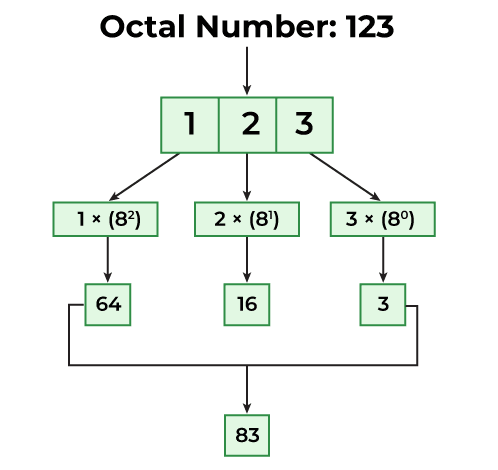
Methods to Convert Octal to Decimal
There are two main methods to convert Octal to Decimal in Java. They are:
- Using Integer.parseInt() Method
- Using a User-Defined Method
1. Using Integer.parseInt()
Java provides the Integer.parseInt(String, radix) method to convert a number represented as a string from a specified base to decimal.
public class Geeks
{
    public static void main(String args[])
    {
        // octal value
        String oct = "157";

        // octal to decimal using Integer.parseInt()
        int num = Integer.parseInt(oct, 8);

        System.out.println(
            "Decimal equivalent of Octal value of 157 is: "
            + num);
    }
}
Output
Decimal equivalent of Octal value of 157 is: 111
Explanation: The octal value "157" is stored as a string. Integer.parseInt(octal, 8) treats 8 as the radix and converts the octal number into its decimal equivalent, which is 111.
2. Using a User-Defined Method
In this approach, we extract each digit from the octal number and multiply it by the corresponding power of 8. The calculated values are added to obtain the decimal number.
class GFG {

    static int octalToDecimal(int octal) {
        int decimal = 0;
        int power = 1;

        while (octal > 0) {
            int digit = octal % 10;

            decimal += digit * power;

            power *= 8;
            octal /= 10;
        }

        return decimal;
    }

    public static void main(String[] args) {
        int octal = 167;

        int decimal = octalToDecimal(octal);

        System.out.println("Decimal equivalent: " + decimal);
    }
}
Output
Decimal equivalent: 119
Explanation: The octalToDecimal() method extracts the last digit using % 10 and multiplies it by the appropriate power of 8. The power is updated by multiplying it by 8 after each digit, while / 10 removes the processed digit. The calculated values are added to decimal to obtain the final result.
Advantages of Octal to Decimal Conversion
- Easy to understand: Each octal digit is converted using powers of 8.
- Useful in programming: Helps when working with octal values in Java and other programming languages.
- Supports number-system conversion: Builds understanding of binary, octal, decimal, and hexadecimal systems.
- Built-in support: Java provides Integer.parseInt() for simple and reliable conversion.
- Efficient: The custom conversion method processes each digit only once.
- Useful in low-level computing: Octal representation is commonly associated with permissions and bit-based data.
