

Given a decimal number, the task is to convert it into its equivalent octal representation. The decimal number system uses digits from 0 to 9 and has a base of 10, while the octal number system uses digits from 0 to 7 and has a base of 8.
- The remainders are read in reverse order.
- Integer.toOctalString() provides a simple built-in solution.
Illustration:
Input : 33
Output: 41Input : 10
Output: 12
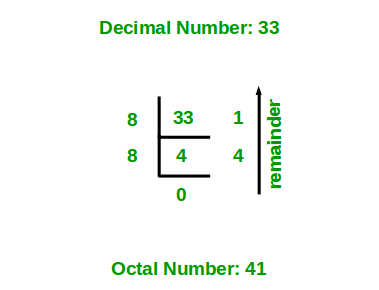
Methods to Convert Decimal to Octal
- Using repeated division by 8
- Using Integer.toOctalString()
1. Using Repeated Division by 8
Approach
- Divide the decimal number by 8.
- Store the remainder.
- Continue dividing the quotient by 8 until it becomes 0.
- The remainders obtained are read in reverse order to get the octal number.
class GFG {

    static void decimalToOctal(int n) {
        if (n == 0) {
            System.out.println(0);
            return;
        }

        int[] octal = new int[32];
        int i = 0;

        while (n > 0) {
            octal[i++] = n % 8;
            n /= 8;
        }

        // Print remainders in reverse order
        for (int j = i - 1; j >= 0; j--) {
            System.out.print(octal[j]);
        }
    }

    public static void main(String[] args) {
        int n = 33;

        decimalToOctal(n);
    }
}
Output
41
Explanation: The program repeatedly divides 33 by 8 and stores each remainder in an array. The remainders are 1 and 4. Since the remainders are generated from right to left, the array is printed in reverse order to obtain the octal value 41.
2. Using Integer.toOctalString()
Java provides the Integer.toOctalString() method to directly convert an integer into its octal representation.
Syntax:
Integer.toOctalString(int i)
class GFG {

    public static void main(String[] args) {
        int n = 33;

        String octal = Integer.toOctalString(n);

        System.out.println("Octal equivalent: " + octal);
    }
}
Output
Octal equivalent: 41
Explanation: The decimal value 33 is passed to Integer.toOctalString(), which returns its equivalent octal representation as a String. The result is 41.
