

Given a string, the task is to insert another string into it at a specified index in Java. This can be done using different approaches, such as manually traversing the string, using substring(), or using the StringBuffer.insert() method.
- It allows us to add new characters or words at a particular position in an existing string.
- Java provides multiple methods to perform string insertion depending on the requirement.
Example:
Input: originalString = "GeeksGeeks",
stringToBeInserted = "For",
index = 4Output: "GeeksForGeeks"
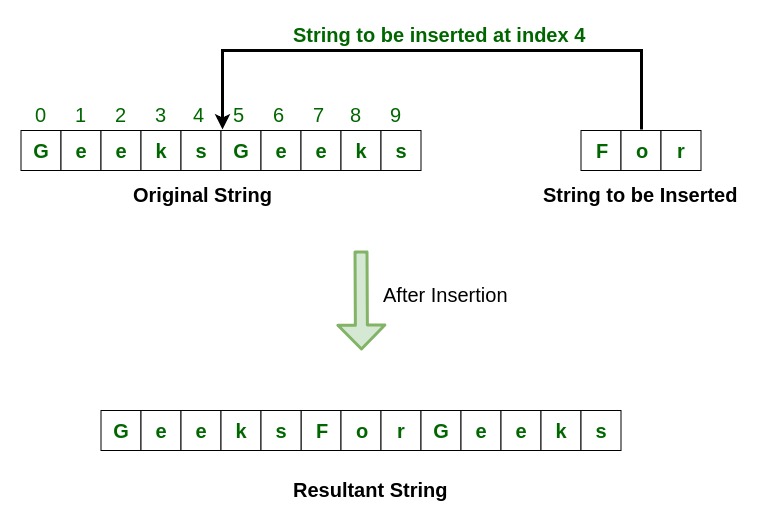
Methods To Insert a String Into Another String
1. Without Using Any Predefined Method
Approach:
- Get the original string, string to be inserted, and the index.
- Create an empty string to store the result.
- Traverse the original string character by character and add each character to the new string.
- When the specified index is reached, add the string to be inserted to the new string.
- Continue adding the remaining characters of the original string.
- Return or print the modified string.
class GFG{

    // Function to insert string
    public static String insertString(
        String originalString,
        String stringToBeInserted,
        int index){
        // Create a new string
        String newString = "";

        for (int i = 0; i < originalString.length(); i++){
            // Add the original string character
            // to the new string
            newString += originalString.charAt(i);

            if (i == index){
                // Insert the string to be inserted
                // into the new string
                newString += stringToBeInserted;
            }
        }

        // Return the modified string
        return newString;
    }

    // Driver code
    public static void main(String[] args){
        String originalString = "GeeksGeeks";
        String stringToBeInserted = "For";
        int index = 4;

        System.out.println("Original String: "+ originalString);

        System.out.println("String to be inserted: "+ stringToBeInserted);

        System.out.println("String to be inserted at index: "+ index);

        // Insert the string
        System.out.println("Modified String: "+ insertString(originalString,stringToBeInserted,index));
    }
}
Output
Original String: GeeksGeeks
String to be inserted: For
String to be inserted at index: 4
Modified String: GeeksForGeeks
Explanation: The program traverses the original string character by character. When the loop reaches the specified index, the string to be inserted is added after that character. The remaining characters are then added to form the final string.
2. Using String.substring() Method
Approach:
- Get the original string, string to be inserted, and the index.
- Divide the original string into two parts using the substring() method.
- Extract the first part using substring(0, index + 1).
- Add the string to be inserted after the first part.
- Add the remaining part using substring(index + 1).
- Return or print the modified string.
class GFG {

    // Function to insert string
    public static String
    insertString(String originalString,
                 String stringToBeInserted, int index)
    {

        // Divide the original string into two parts
        // and insert the new string between them
        String newString
            = originalString.substring(0, index + 1)
              + stringToBeInserted
              + originalString.substring(index + 1);

        return newString;
    }

    public static void main(String[] args)
    {
        String originalString = "GeeksGeeks";
        String stringToBeInserted = "For";
        int index = 4;

        System.out.println("Original String: "
                           + originalString);

        System.out.println("String to be inserted: "
                           + stringToBeInserted);

        System.out.println(
            "String to be inserted at index: " + index);

        // Insert the string
        System.out.println(
            "Modified String: "
            + insertString(originalString,
                           stringToBeInserted, index));
    }
}
Output
Original String: GeeksGeeks
String to be inserted: For
String to be inserted at index: 4
Modified String: GeeksForGeeks
Explanation: The substring() method divides the original string into two parts at the given index, and the new string is inserted between these parts. The two parts and the inserted string are concatenated to form the modified string.
3. Using StringBuffer.insert() Method
Approach:
- Get the original string, string to be inserted, and the index.
- Create a StringBuffer using the original string.
- Insert the string to be inserted using the insert() method.
- Convert the StringBuffer into a string using the toString() method.
- Return or print the modified string.
class GFG {

    // Function to insert string
    public static String
    insertString(String originalString,
                 String stringToBeInserted, int index)
    {

        StringBuffer newString
            = new StringBuffer(originalString);

        // Insert the string using insert() method
        newString.insert(index + 1, stringToBeInserted);

        return newString.toString();
    }

    public static void main(String[] args)
    {
        String originalString = "GeeksGeeks";
        String stringToBeInserted = "For";
        int index = 4;

        System.out.println("Original String: "
                           + originalString);

        System.out.println("String to be inserted: "
                           + stringToBeInserted);

        System.out.println(
            "String to be inserted at index: " + index);

        // Insert the string
        System.out.println(
            "Modified String: "
            + insertString(originalString,
                           stringToBeInserted, index));
    }
}
Output
Original String: GeeksGeeks
String to be inserted: For
String to be inserted at index: 4
Modified String: GeeksForGeeks
Explanation: The StringBuffer object is created from the original string, and its insert() method is used to insert the new string at the specified index. Finally, toString() converts the modified StringBuffer back into a String and returns the result.
Note: In above programs, index + 1 is used because the string is inserted after the character at the specified index. Java uses 0-based indexing, so the first character has index 0.
