

Arrays.sort() is a built-in method in Java used to sort arrays in ascending order. Arrays.sort() is a static method of the Arrays class .It supports arrays of primitive types and objects.
- Sorts object arrays using their natural ordering or a provided
Comparator. - It uses Dual-Pivot QuickSort for primitives and TimSort for objects (optimized for performance).
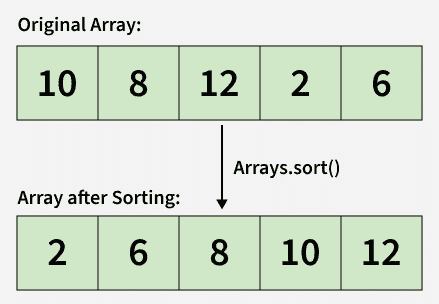
Example: Sort integer and character arrays in ascending order
import java.util.Arrays;

class Geeks{

    public static void main(String[] args) {

        // Array of primitive type
        int[] arr1 = {2, -1, 3, 4};

        // Character array
        char[] arr2 = {'b', 'a', 'c', 'b'};

        // Sorting arrays in ascending order
        Arrays.sort(arr1);
        Arrays.sort(arr2);

        // Print sorted arrays
        System.out.println(Arrays.toString(arr1));
        System.out.println(Arrays.toString(arr2));
    }
}
Output
[-1, 2, 3, 4]
[a, b, b, c]
Explanation: The Arrays.sort() method in Java is used to arrange array elements in ascending order. It works with different data types like integers, characters, strings, and more, making sorting simple and efficient.
Syntax
To sort the whole array
Arrays.sort(arr);
To sort a subarray
Arrays.sort(arr, fromIndex, toIndex);
Parameters:
- arr: The array to be sorted.
- from_Index: The index of the first element (inclusive) to be sorted.
- to_Index: The index of the last element (exclusive) to be sorted.
- Return Type: void (This method does not return anything).
Note:
- Arrays.sort() does not remove duplicates; it only reorders elements.
- Primitive types cannot use custom comparators; sorting is in natural (ascending) order.
Ways to use Arrays.sort()
1. To Sort Subarray
Example: To Sort a portion of an array by specifying start (inclusive) and end (exclusive) indices.
import java.util.Arrays;

public class Geeks{

    public static void main(String[] args){

        int[] arr = {2, -1, 4, 3};

        // Sort elements from index 1 to 3
        Arrays.sort(arr, 1, 4);

        // Print array after sorting subarray
        System.out.println(Arrays.toString(arr));
    }
}
Output
[2, -1, 3, 4]
Explanation: Only the elements at indices 1, 2, and 3 are sorted; the element at index 0 remains unchanged.
2. Descending Order Sorting
Sort an array in descending order, we can use Arrays.sort() method with Collections.reverseOrder() as a comparator.
import java.util.Arrays;
import java.util.Collections;

public class Geeks{
    public static void main(String[] args) {

        // Array of primitive type
        Integer[] arr = {2, -1, 3, 4};
        Arrays.sort(arr, Collections.reverseOrder());
        System.out.println(Arrays.toString(arr));

        // String array
        String[] str = {"Hii", "Vishnu", "chauhan"};
        Arrays.sort(str, Collections.reverseOrder());
        System.out.println(Arrays.toString(str));
    }
}
Output
[4, 3, 2, -1]
[chauhan, Vishnu, Hii]
Explanation:
- Works on object arrays only; primitive types (int) cannot use comparators.
- For Strings, sorts lexicographically from Z -> A.
3. Custom Sorting with Comparator
Sort an array of objects by defining custom sorting logic with the help of using the Comparator interface.
import java.util.*;

// Custom class
class Student{

    int roll;
    String name;
    String address;

    Student(int roll, String name, String address){

        this.roll = roll;
        this.name = name;
        this.address = address;
    }

    // Print student details
    public String toString() {
        return roll + " " + name + " " + address;
    }
}

// Comparator to sort by roll number
class SortByRoll implements Comparator<Student>{

    public int compare(Student s1, Student s2){

        return s1.roll - s2.roll;
    }
}

class Geeks {
    public static void main(String[] args){

        Student[] students = {
            new Student(1, "Ram", "MP"),
            new Student(2, "Shyam", "UP"),
            new Student(3, "Hari", "Delhi")
        };

        // Sort using custom comparator
        Arrays.sort(students, new SortByRoll());

        // Print sorted students
        for (Student s : students)
            System.out.println(s);
    }
}
Output
1 Ram MP
2 Shyam UP
3 Hari Delhi
Explanation:
- Comparator allows custom sorting logic without modifying the class.
- Here, students are sorted by roll number.
4. Natural Sorting with Comparable Interface
In the below example, we sort an array of Student objects based on their name alphabetically.
import java.util.Arrays;

class Student implements Comparable<Student>{

    int r;
    String n;
    String a;

    // Constructor
    public Student(int r, String n, String a){

        this.r = r;
        this.n = n;
        this.a = a;
    }

    // compareTo method to sort by name
    public int compareTo(Student o){

        return this.n.compareTo(o.n);
    }

    // toString() method to print Student details
    public String toString() {
        return this.r + " " + this.n + " " + this.a;
    }
}

public class Geeks{

    public static void main(String[] args){

        Student[] s = {
            new Student(1, "Ram", "UP"),
            new Student(2, "Shyam", "MP"),
            new Student(3, "Hari", "Bihar")
        };

        // Sorting students by name in alphabetical order
        Arrays.sort(s);

        for (Student student : s)
            System.out.println(student);
    }
}

Output
3 Hari Bihar
1 Ram UP
2 Shyam MP
Explanation:
- In this example, we use the Comparable interface to define a natural ordering for the Student objects.
- By implementing the method, we specify how two Student objects should be compared by enabling sorting based on the student's name.
