

HTML5 semantic elements provide meaningful tags that clearly describe their purpose, improving readability, accessibility, and SEO for both humans and browsers.
- Clearly define the role and content of elements.
- Improve code readability and structure.
- Enhance accessibility for screen readers.
- Help browsers and search engines understand page content.
- Examples include <form>, <table>, <article>, <header>, and <footer>.
Semantic Elements
Here are some of the fundamental HTML5 semantic elements that you should use to structure your web content:
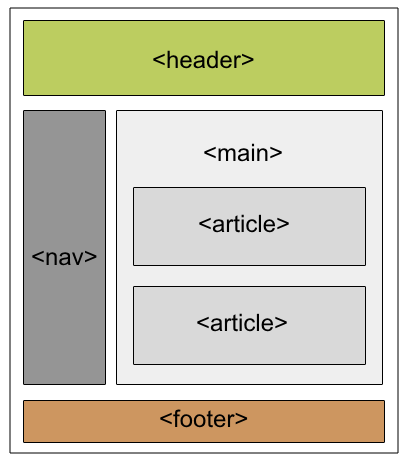
1. The <article> Tag
The <article> tag is used for content that stands alone and can be independently distributed or reused, such as a blog post or news article.
<!--Driver Code Starts-->
<!DOCTYPE html>
<html>
<head>
    <title></title>
    <style>
        h1 {
            color: #006400;
            font-size: 50px;
            text-align: left;
        }
        p {
            font-size: 25px;
            text-align: left;
            margin-top: 0;
        }
    </style>
</head>
<body>
<!--Driver Code Ends-->

    <article>
        <h1>GeeksforGeeks</h1>
        <p>A Computer Science portal for geeks. It contains well written, well thought, and well explained computer science and programming articles, quizzes, and practice/competitive programming/company interview questions.</p>
    </article>

<!--Driver Code Starts-->
</body>

</html>

<!--Driver Code Ends-->
2. The <aside> Tag
The <aside> is used to place content in a sidebar i.e. aside from the existing content. It is related to surrounding content.
<!--Driver Code Starts-->
<!DOCTYPE html>
<html>
<head>
    <title></title>
    <style>
        h4 {
        Color:#006400;
        font-size:50px;
        margin-bottom:0px;
        }
        p {
        font-size:25px;
        margin-top:0px;
        }
    </style>
</head>
<body>
    <p>GeeksforGeeks is a Computer Science Portal</p>
<!--Driver Code Ends-->

    <aside>
        <h4>GeeksForGeeks</h4>
        <p>GeeksforGeeks is a computer Science platform
            where you can learn good programming.
        </p>
    </aside>

<!--Driver Code Starts-->
</body>
</html>

<!--Driver Code Ends-->
3. The Details and Summary Tag
The "details" defines additional details that the user can hide or view. "summary" defines a visible heading for a "details" element.
<!--Driver Code Starts-->
<!DOCTYPE html>
<html>
<head>
    <title></title>
    <style>
        .GFG {
        Color:#006400;
        font-size:50px;
        margin-bottom:0px;
        }
        p {
        font-size:25px;
        margin-top:0px;
        }
    </style>
</head>
<body>
<!--Driver Code Ends-->

    <details>
        <summary class="GFG"> GeeksforGeeks </summary>
        <p>GeeksforGeeks is a Computer Science portal
            where you can learn good programming.
        </p>
    </details>

<!--Driver Code Starts-->
</body>
</html>

<!--Driver Code Ends-->
4. The Figure and Figcaption Tag
The <figure> and <figcaption> tags are used together in HTML to display an image (or illustration) with a descriptive caption.
<!--Driver Code Starts-->
<!DOCTYPE html>
<html>
<head>
    <title></title>
    <style>
        h2 {
        Color:#006400;
        font-size:50px;
        margin-bottom:0px;
        }
        p {
        font-size:25px;
        margin-top:0px;
        }
    </style>
</head>
<body>
    <h2>GeeksforGeeks</h2>
<!--Driver Code Ends-->

    <figure>
        <img src="https://media.geeksforgeeks.org/wp-content/uploads/20260720151655192447/Screenshot_2026-07-20_151541_optimized.png"
             alt="gfg"
             style="width:20%">
        <figcaption> GeeksforGeeks Logo </figcaption>
    </figure>

<!--Driver Code Starts-->
</body>
</html>

<!--Driver Code Ends-->
5. The Header Tag
As the name suggests, it is for the header of a section introductory of a page. There can be multiple headers on a page.
<!--Driver Code Starts-->
<!DOCTYPE html>
<html>
<head>
    <title></title>
    <style>
        h1, h3 {
        Color:#006400;
        Text-align:left;
        margin-bottom:0px;
        }
        p {
        font-size:25px;
        text-align:left;
        margin-top:0px;
        }
    </style>
</head>
<body>
    <article>
<!--Driver Code Ends-->

        <header>
            <h1>GeeksforGeeks</h1>
            <h3>GeeksforGeeks</h3>
            <p>A computer Science portal</p>
        </header>

<!--Driver Code Starts-->
    </article>
</body>
</html>

<!--Driver Code Ends-->
6. The Footer Tag
Footer located at the bottom of any article or document, they can contain contact details, copyright information etc. There can be multiple footers on a page.
<!--Driver Code Starts-->
<!DOCTYPE html>
<html>
<head>
    <title></title>
    <style>
        p {
        font-size:25px;
        text-align:left;
        margin-top:0px;
        }
    </style>
</head>
<body>
<!--Driver Code Ends-->

    <footer>
        <p>
            Posted by: GeeksforGeeks
        </p>
        <p>
            Contact:
            <a href=
"https://www.geeksforgeeks.org/">
                geeksforgeeks.org
            </a>.
        </p>
    </footer>

<!--Driver Code Starts-->
</body>
</html>

<!--Driver Code Ends-->
7. The Main Tag
It defines the main content of the document. The content inside the main tag should be unique.
<!--Driver Code Starts-->
<!DOCTYPE html>
<html>
<head>
    <title></title>
    <style>
        h1 {
        color:#006400;
        }
        p {
        font-size:25px;
        margin-top:0px;
        }
    </style>
</head>
<body>
<!--Driver Code Ends-->

    <main>
        <h1>Important Residences</h1>
        <p>
            A few of them are
            Rashtrapati Bhavan,
            White House etc
        </p>
        <article>
            <h1>Rashtrapati Bhavan</h1>
            <p>
                It is the home of
                the President of India.
            </p>
        </article>
        <article>
            <h1>The White House</h1>
            <p>
                It is the home of the
                President of United
                States of America.
            </p>
        </article>
    </main>

<!--Driver Code Starts-->
</body>
</html>

<!--Driver Code Ends-->
8. The Section Tag
A page can be split into sections like Introduction, Contact Information, Details, etc and each of these sections can be in a different section tag.
<!--Driver Code Starts-->
<!DOCTYPE html>
<html>
<head>
    <title></title>
    <style>
        h1 {
        color:#006400;
        }
        p {
        font-size:25px;
        margin-top:0px;
        }
    </style>
</head>
<body>
<!--Driver Code Ends-->

    <section>
        <h1>Data Structure</h1>
        <p>
            Data Structure is a data
            organization and storage
            format that enables efficient
            access and modification.
        </p>
    </section>
    <section>
        <h1>Algorithm</h1>
        <p>
            A process or set of rules to
            be followed in calculations
            or other problem-solving
            operations, especially by
            a computer.
        </p>
    </section>

<!--Driver Code Starts-->
</body>
</html>
<!--Driver Code Ends-->
9. The nav Tag
The nav tag is used to define a set of navigation links in the form of a navigation bar or nav menu.
<!--Driver Code Starts-->
<!DOCTYPE html>
<html>
<head>
    <title></title>
    <style>
        h1 {
        color:#006400;
        }
    </style>
</head>
<body>
    <h1>Navigation Bar</h1>
<!--Driver Code Ends-->

    <nav>
        <a href="/home/">
            Home
        </a> |
        <a href="/about-us/">
            About Us
        </a> |
        <a href="/data-structure/">
            Data Structure
        </a> |
        <a href="/operating-system/">
            Operating System
        </a>
    </nav>

<!--Driver Code Starts-->
</body>
</html>

<!--Driver Code Ends-->
10. The Mark Tag
Mark tag is used to highlight the text.
<!--Driver Code Starts-->
<!DOCTYPE html>
<html>
<head>
    <title></title>
    <style>
        h1 {
        color:#006400;
        }
    </style>
</head>
<body>
    <h1>mark tag</h1>
<!--Driver Code Ends-->

    <p>
        GeeksforGeeks is a
        <mark>Computer Science</mark>
        portal
    </p>

<!--Driver Code Starts-->
</body>
</html>

<!--Driver Code Ends-->
Best Practices for Using HTML5 Semantic Elements
- Do not overuse <div>: Use semantic elements where appropriate instead of non-semantic <div> elements to provide more specific information about the content.
- Structure content logically: Organize the content within semantic elements to reflect the meaning and importance of the information.
- Validate your HTML: Use tools like the W3C HTML Validator to ensure that your use of semantic elements adheres to HTML5 standards.
