

The Address Resolution Protocol (ARP) is a networking protocol used to map an IPv4 address to a MAC address within a Local Area Network (LAN). Even if a device knows the destination IP address, communication over Ethernet requires the destination MAC address. The Address Resolution Protocol (ARP) solves this problem by converting an IP address into its corresponding MAC address. Devices on a network communicate using two kinds of addresses:
- IP Address: Logical address used by applications and routing.
- MAC Address: Physical hardware address used for actual data transfer inside a local network.
- ARP allows devices to discover the hardware address of another device when only its IP address is known.
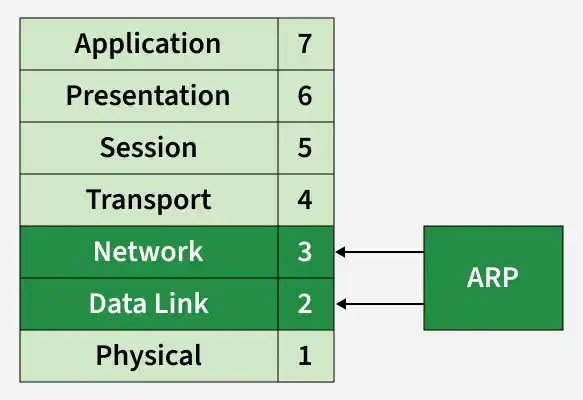
- ARP operates between: Layer 3 (Network Layer) IP addressing and Layer 2 (Data Link Layer) MAC addressing. It connects logical addressing with physical network communication.
Working
Assume PC-A wants to send data to PC-B.
- Device(PC-A): IP Address and MAC Address
- Device(PC-B): IP Address and MAC Address
Step 1: ARP Cache Lookup
When a device wants to send data, it first checks its ARP cache table to see whether the destination MAC address is already stored. PC-A first checks its ARP cache to determine whether the MAC address for 192.168.1.3 is already stored.
- If the MAC address exists, communication starts immediately.
- If not, the device sends an ARP request.
Step 2: ARP Request Broadcast
The sender broadcasts an ARP request to all devices in the network. This ensures every device on the LAN receives the request. PC-A broadcasts a request across the network asking:
- “Who owns IP address 192.168.1.100?”
- The destination MAC used in this frame is: FF:FF:FF:FF:FF:FF
Step 3: ARP Reply
The device whose IP address matches the requested IP sends an ARP reply back to the sender. PC-B recognizes its IP address and replies directly to PC-A with its MAC address.
- Example: IP Address(192.168.1.3) and MAC Address(BB-BB-BB-BB-BB-BB)
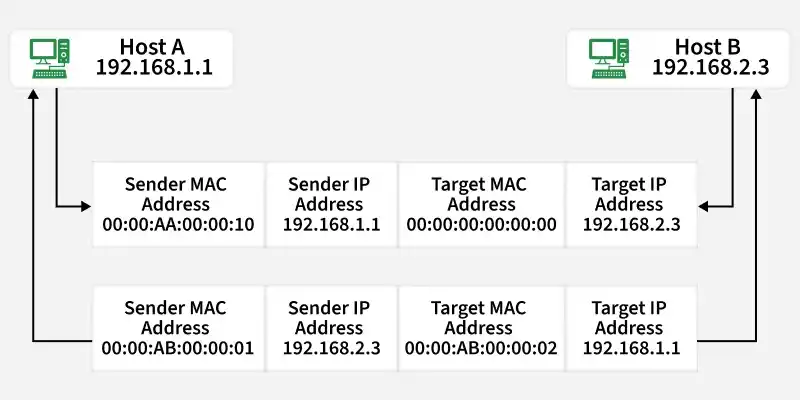
- Unlike the request, the ARP reply is sent as a unicast message.
Step 4: ARP Cache Update
PC-A stores the received MAC address temporarily in its ARP cache for future communication. This reduces repeated broadcasts and improves network efficiency.
ARP Request vs. ARP Reply
ARP Request | ARP Reply |
|---|---|
Broadcast | Unicast |
Discover MAC address | Provide MAC address |
FF:FF:FF:FF:FF:FF | Sender MAC |
Higher traffic | Minimal traffic |
Important Terms Associated with ARP
- ARP Request Broadcast.
- ARP Reply Unicast.
- ARP works only in IPv4 networks
- ARP maps IP addresses to MAC addresses
- ARP cache stores resolved addresses temporarily
Practical Example

Step 1: Check ARP Cache
- Connect two PC, say A and B with a cross cable. Now you can see the working of ARP by typing these commands:
arp -a- There will be no entry at the table because they never communicated with each other. Initially, the destination entry may not exist.
Output:

Step 2: Ping Another Device
The first communication may experience slight delay due to ARP resolution.
Command:
ping 192.168.1.2Output:

Step 3: Check ARP Cache Again
You will now see the IP-to-MAC mapping stored in the table.
Command:
arp -aOutput:

