



Apple’s official iOS App Store is well known for its strict code review of any app submitted by a developer. This mandatory policy has become one of the most important mechanisms in the iOS security ecosystem to ensure the privacy and security of iOS users. But we recently identified an app that demonstrated new ways of successfully evading Apple’s code review. This post discusses our findings and potential security risks to iOS device users.
The app we identified is named “开心日常英语 (Happy Daily English),” and it has since been removed by Apple from the App Store. This app was a complex, fully functional third party App Store client for iOS users in mainland China. We also discovered enterprise signed versions of this application elsewhere in the wild. We had not identified any malicious functionality in this app, and as such we classified it as Riskware and have named it ZergHelper.
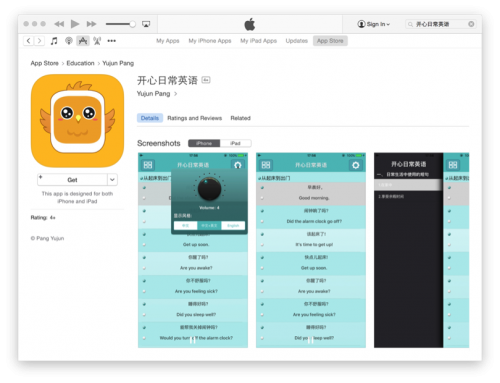
Figure 1: "Happy Daily English" available in the App Store
ZergHelper presents several security risks, include the following:
- It provides installation of modified versions of iOS apps whose security can’t be ensured..
- It abuses enterprises certificate and personal certificates to sign and distribute apps, which may include code that hasn’t been reviewed, or abuse private APIs.
- It asks user to input an Apple ID while it also shares some Apple IDs to users. It will log in to an Apple server using these IDs to perform many operations in background.
- Its author is trying to extend its capabilities via dynamic updating of its code, which could further bypass iOS security restrictions.
- It uses some novel techniques that are sensitive and risky – techniques that could be used by other malware to attack the iOS ecosystem.
ZergHelper appears to have gotten by Apple’s app review process by performing different behaviors for users from different physical locations on earth. For users outside of China, it would act as what it claimed: an English studying app. However, when accessing the app from China, its real features would appear.
The app was made available in the App Store on October 30, 2015. However, nobody appeared to have noticed ZergHelper’s hidden functionality until February 19, 2016, when a user created a post in V2EX (a Chinese developer forum) to discuss it. We shared our findings with Apple on February 19, and Apple removed the app from the App Store later that day.
ZergHelper’s main functionality appeared to be to provide another App Store that includes pirated and cracked iOS apps and games. The app was developed by a company in China that named its main product “XY Helper”. ZergHelper was the non-jailbroken and “official App Store” version of this product.
In addition to its abuse of enterprise certificates, this riskware used some new and novel approaches to install apps on non-jailbroken devices. It re-implemented a tiny version of Apple’s iTunes client for Windows to login, purchase and download apps. It also implemented some functionalities of Apple’s Xcode IDE to automatically generate free personal development certificates from Apple’s server to sign apps in the iOS devices – which means the attacker has analyzed Apple’s proprietary protocols and abused the new developer program introduced eight months ago. ZergHelper also shares some valid Apple IDs with users so that they don’t need to use their own IDs.
ZergHelper’s code is complex and it’s still unclear whether it would steal account information and send it back to server or not. The app did send some device information automatically to a server for statistic tracking. The authors appeared to be trying to use the programming language Lua to make the app more extensible. Specifically, ZergHelper’s use of the framework means its code could be remotely updated without Apple’s further review.
We also identified over 50 ZergHelper apps that are signed by enterprise certificates. These apps were spread by authors in different channels.
ZergHelper’s Spreading and Functionality
ZergHelper was designed to be installed in this way: if an iOS user accessed XY Helper’s official website from China, the top advertisement banner would prompt a page saying that you could go to App Store to install their product “XY Apple Helper” (left of Figure 2). By clicking the button, the official App Store is automatically opened and the “Happy Daily English” app’s page is shown (right of Figure 2).
The original “Happy Daily English” app is open-sourced and hosted on OSChina as a project named “HappyEnglishSentences8k”. ZergHelper authors compiled it and embedded their own risky code. There appear to have been at least three people jointly developing it using the usernames of “xi”, “zhang” and “zhangzq”. The project’s internal name was XYFactory and the app’s internal name was “AppStore_4.0.1”.
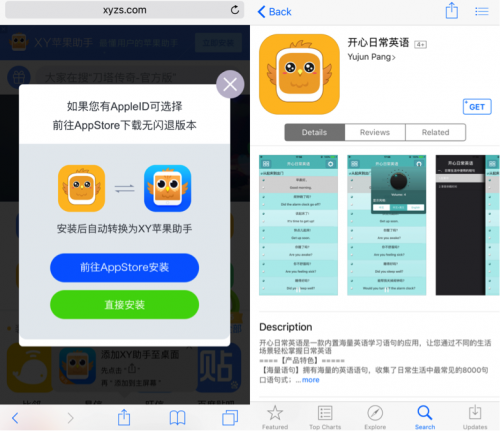
Figure 2: Official website guides user to download ZergHelper from App Store
If you were to browse the app using the desktop browser or by iTunes client on any platform, the app’s name would be shown as “开心日常英语 (Happy Daily English)”. However, once it was installed on an iPhone or iPad, the name became “XY助手 (XY Helper)” with the same logo, just like the value of CFBundleDisplayName in the app’s Info.plist file (Figure 3). Our analysis suggests the authors inputted a different name when submitting the app to Apple through web form and Apple’s review process didn’t identify that inconsistency.

Figure 3: The app's name is inconsistent with iTunes page
When the app launched, it would connect to the URL interface[.]xyzs.com immediately, and take different reactions based on result of the HTTP request (Figure 4). The webpage was configured to return a 404-not-found error if the access comes from an IP address outside of mainland China. In this situation, the app would only display an English study interface (left of Figure 5) – no other functionality was provided to users in these regions.
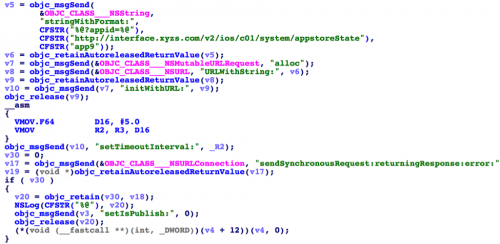
Figure 4: The app provices different functionality based on HTTP request result
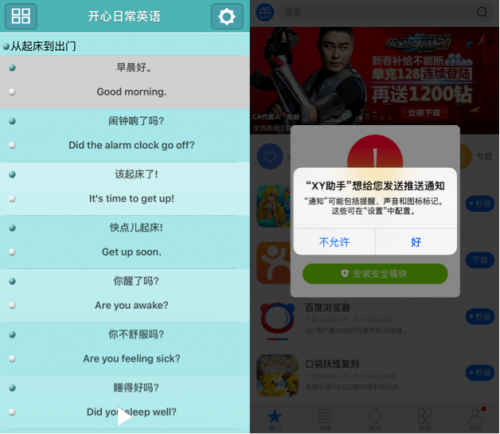
Figure 5: Different interfaces will be showed for users from different locations
We don’t know where the App Store reviewers are located. If they are not located in mainland China, this method could trick them into seeing a legitimate app. Even if they’re in China, the author could just shut down that webpage during the review period so that reviewer could not see the actual functionality through an analysis of its behavior.
For users in China, the different user interfaces would appear (right of Figure 5). Then the app will guide to install two configuration profiles that it claims are for “resolving stability issues” but will actually install a device enrollment challenge and a web clip (Figure 6). These profiles were signed with a certificate of “xyzs.com” which was issued by Go Daddy Secure Certificate Authority on December 2, 2015. Note that the device enrollment challenge is used to enroll the device to related MDM (Mobile Device Management) system.
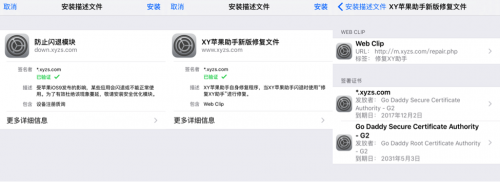
Figure 6: The app asks to install two profiles signed by certificate issued by GoDaddy
The app provided functionality of directly installing plenty of iOS apps and games to the device. It has pages for hot apps, hot games, top grossing apps, etc., just like the official App Store (Figure 7). The only difference is, all apps or games provided by ZergHelper are free, which means, they are likely pirated versions of the legitimate apps.
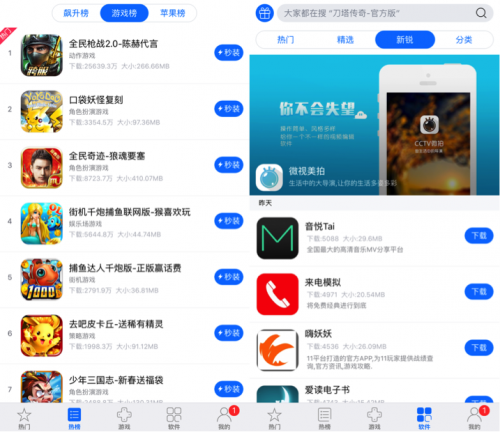
Figure 7: Main user interfaces
In the settings tab, for devices using pre-9.0 versions of iOS, a user could also input an Apple ID and password. The password would be remembered by the app. There’s another button used for “I don’t have an Apple ID. I would like to receive one for free” (Figure 8). We have not identified where these Apple IDs came from.
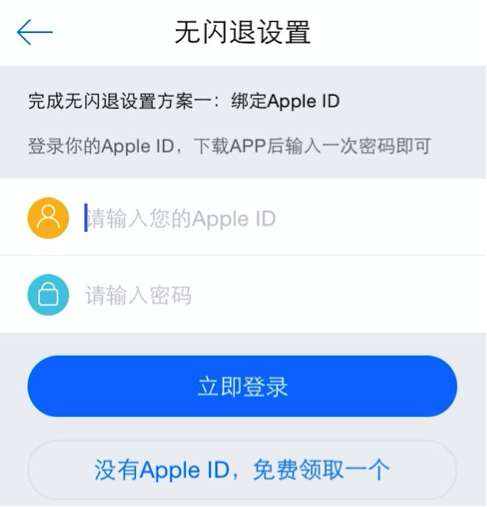
Figure 8: “I don’t have an Apple ID. I would like to receive one for free”
Novel Approach to Act as 3rd-party App Store on Non-jailbroken Devices
ZergHelper used unique ways to build a third-party App Store for non-jailbroken iOS devices. Each of them could be used to spread pirated or cracked iOS apps. Two of them are new methods of getting past App Store review that we haven’t previously observed.
Fake as Tiny iTunes Client
ZergHelper implemented the protocols between the iTunes client for PC and Apple’s App Store servers. To be more specific, these functionalities have been implemented in the app:
- Log into the App Store, cache authentication data, and log out of the account
- Click the term of service
- Get an app’s information
- Purchase an app (Figure 9)
- Download the purchased app
When communicating with Apple’s server, ZergHelper used a User Agent like this:
- iTunes/12.0.1 (Windows; Microsoft Windows 7 x64 Business Edition iTunes/12.0.1 (Windows; Microsoft Windows 7 x64 Business Edition
Hence the app is trying to act as an iTunes 12.0.1 client running on Windows 7 system.
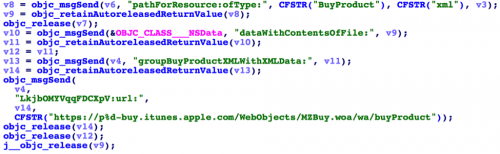
Figure 9: Code to purchase an app by simulating the iTunes protocol
We’re still not very clear in which ways ZergHelper used these functionalities. It’s possible that they were used for the Apple ID given by users, or by the “free” Apple ID provided by the app itself.
Simulate Xcode to Apply Personal Development Certificate
The most surprising approach to installing apps on non-jailbroken devices is how ZergHelper abused free personal development certificates.
Previously, Apple only offered iOS development certificates for registered developers who paid an annual fee. This kind of certificate is necessary for anyone to sign an app and then run it on a physical device. From June 2015, Apple began to provide a new program that allows anyone with an Apple ID to receive a certificate for free. The functionality is embedded into Xcode since its 7.0 version and so far Xcode is the only official way to use this feature.
However, ZergHelper could have acted as Xcode to receive a valid personal development certificate from Apple's authentication servers, too. Apple doesn’t disclose how this process works and how Xcode is implemented. Therefore, we think someone has reverse-engineered Xcode in detail to analyze this part of code so that they can implement exactly the same behaviors with Xcode – in effect, successfully cheating Apple's server.
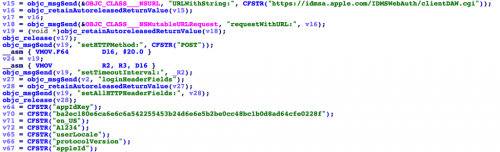
Figure 10: Login to Apple's server

Figure 11: Fetch development certificate
Using the development certificate, ZergHelper could sign other iOS apps on iOS devices and then install them. There are limits on the number of iOS devices that can be authorized to use each certificate. Previously, people worried about whether the free certificates would be abused by someone to install pirated apps, but this technique shows abuse in a wide-ranging and automated way.
In the same week that we were analyzing ZergHelper, we observed someone selling source code that:
- Automatically registers for Apple IDs by reversing protocols in phone and in PC
- Offers app DRM authentication from PC for “helper utilities”
- Automatically generates a personal development certificate by an Apple ID
The information was posted on a famous security forum in China in February 19, and was then deleted on February 20.
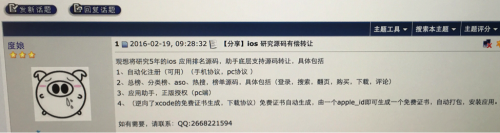
Figure 12: The deleted post of selling related source code (screenshot)
Authorize Pirated Apps from PC
For some pirated apps downloaded from ZergHelper’s server, the app asks the user to connect the iPhone or iPad to a PC for “authentication” with the help of the XY Helper’s Windows version. We have not reverse-engineered the Windows client. As far as we know, the purpose behind this is to implement the Windows client like an iTunes and to trick the iOS device into believing an iOS app has been authorized through the PC. (This attack technique has been in use with some tools for years.)
Abusing Enterprise Certificates
ZergHelper also abused enterprise certificates in a manner similar to other previously identified iOS malware, including WireLurker, YiSpecter and TinyV. In the app, these kinds of apps are tagged with “install in a second.” ZergHelper used the itms-service protocol for these apps’ installation. Compared with previous malware, the main difference in ZergHelper is that it would not only download itms-service plist file from C2 server, but it could also open a local port to install some apps onsite. This feature may have been designed for apps signed by personal certificates.
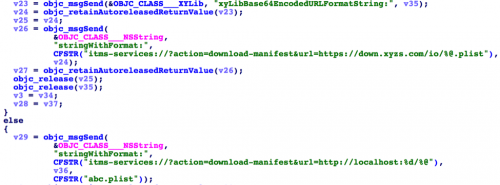
Figure 13: Enterprise signed apps's PLIST files were hosted either on remote server or the local device
More ZergHelper Samples in the Wild
Apple’s App Store was just one “channel” through which ZergHelper was distributed. The authors also developed other versions that are all signed by different enterprise certificates. These versions were distributed through different channels and could be installed to non-jailbroken devices. For example, when you access XY Helper’s website, you could choose to install it from the App Store or directly from their server.
We found over 50 ZergHelper samples signed by nine different enterprise certificates. In their “xyChannelId.plist” files, the author specified 32 different channel IDs and 33 different channel names.
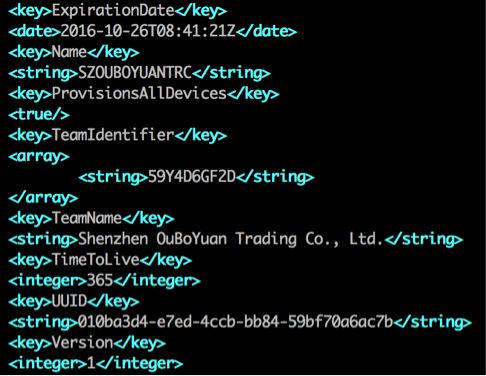
Figure 14: One of enterprise certificates being used to sign ZergHelper
Potential Security Risks
Apple’s Code Review
Previously there have been some malware (e.g., FindAndCall) or Proof-of-Concept apps (e.g., Jekyll) that successfully made it into the official App Store. The most recent cases are XcodeGhost and InstaAgent. Compared with those, ZergHelper has more user interfaces and more significantly suspicious code characteristics. Apple typically doesn’t disclose any technical details regarding how its reviewers check apps to confirm they are not malicious. But ZergHelper demonstrates new techniques that can evade Apple reviewer scrutiny.
Enterprise Certificate
Since WireLurker, there have been more malware or evasive applications installed on iOS by abusing enterprise certificate. The biggest risk around this issue is the combination of enterprise certificate and private APIs. YiSpecter and Youmi have abused private APIs to collect private information on iOS. ZergHelper took another step to automatically generate development certificates for free. This is of concern because the abuse of these certificates may be the first step toward future attacks.
Apple ID
In the underground market for iOS tools, Apple IDs have become more and more important. In recent months, we’ve seen malware designed to steal Apple IDs (e.g., KeyRaider), take money from them (e.g., AppBuyer) and share them (e.g., YiSpecter). Some attackers ransom the stolen Apple IDs or phish for them. ZergHelper’s functionality also relied on valid Apple IDs. We’re still not certain whether ZergHelper could send stolen Apple IDs back to its server or not. Note that ZergHelper would provide free Apple IDs to its users, and we do not know from where these IDs originated. Use of Apple IDs only continues to grow, especially when we consider the amount of private data stored in iCloud and on iPhones and iPads.
Code Dynamic Loading
Apple requires every single update to an app in the App Store to be reviewed again before publishing. For ZergHelper, re-review increases the possibility of exposure. The authors appear to have tried to resolve this problem by using a scripting language.
ZergHelper used an open source project called wax, “a framework that lets you write native iPhone apps in Lua.” In the app, there’s a XYLib.lua file that only contains two functions so far. This Lua plugin will be loaded and executed when the app first launches. Through the wax library, this script could invoke many methods in the Objective-C runtime.
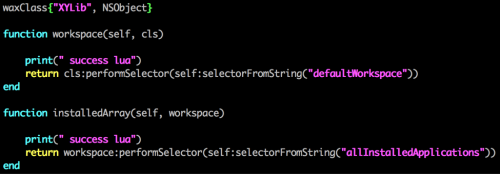 Figure 15: Lua plugin in ZergHelper
Apple disallows iOS app from dynamically loading new code or dynamically updating themselves. This is an important and useful security mechanism to mitigate the risk of some kinds of vulnerabilities and some malware. However, frameworks or SDKs like wax provide another way to bypass the restriction.
Dynamic code loading is a classic method used by malware to hide an author’s true intentions. In the last few years popular iOS SDKs that provide JavaScript, Lua or other script languages’ interface to Objective-C runtime have emerged. Considering how easy it is to write code in these languages, and how hard it is to analyze or to detect them, we think this approach may be adopted by more malware or PUAs in every popular platform (for example, the Android Trojan Xbot we recently revealed used JavaScript to implement part of its core functionality.)
Mitigation
We reported the issue to Apple on February 19 and Apple removed the app from the App Store on February 20.
For iOS users that have installed “开心日常英语” from App Store, or found “XY助手” in your devices, we suggest you uninstall it. We also suggest that users check profiles in their iOS devices (by Settings -> General -> Profiles & Device Management). If there’s any profile from “xyzs.com”, you should delete it immediately.
Acknowledgements
We greatly appreciate “i_82” for his help during the analysis. We also would like to thank the author of Surge for creating such awesome tool that greatly helped our analysis of ZergHelper. Last, we thank Ryan Olson and Chad Berndtson from Palo Alto Networks for assistance in developing this report.
IOCs
Samples of the App Store version (DRM stripped)
- e618f19d3614063e3b0fbb1c7faee259e38bde8db8972d84a3b25a771db84ef3 EnglishStudy
- b1943d0162765e22c0af9b571da2804e4f01d3a063421ee590cab862e8d712be EnglishStudy-v5.0.0.ipa
Samples of enterprise signed versions
- 03448093b24cea1402a917e18eb08cab82c30a21d981f1b516368ff20c93197c
- 1377d0c4e861e9f10010dd46806b48aef1c379f3aed28d24e839243f2f4d66da
- 145688e80784e70112a46970683cae86a8b95b78440eb6a28fc45c60dd6f6ac6
- 16b83e4babf013370005b42f5f8c12ac9551cd33d7125c33d52f67c1634d48d7
- 1d9def398ad8d16a104ced4b022a54264d8dd20e91418aa81c941caf4c58ffd0
- 1ea60e84825d4d70ac3ab9a894cb2b1c8013e18a8a29d108261fd3c0419597b7
- 24a178b69499d418ab522f5a163bd01946ee73e55ba00a94944fba84cbf26ea0
- 342520e57e77d81bfa79bafa31fc2f31bd57b1c0cd9bc6da5e4ffc148a807ee1
- 3636d8e86138bd49bc50b44cf96c172cf99991d1ab28cf4a2559e95931f4a8dc
- 3d00bd0034cb9a9c33d148c799ea9063221392f5227934dd7d700fdb55b53f4e
- 3d97417399e3df6ecfda2b1e39b199e0db7594dd7c84488435c0cac14c26ad54
- 40361936d118c7bcac7996b40055c11bd14376b6d96085aa2dd15139ab22e25b
- 4229be2075f6077c568861ebef5259212bc08eb73f8008a64e35a854c7d01509
- 48d4c62aaa60dcdda667583629e6fb8f0fcc7257a6e8b11bbb635f5bb6f21563
- 4fa19e2a1356d9789d1ea016f1ef3515f8562f28864529676114c9b12dfe409b
- 50812bb0ddb4081aa8c2e5446fad4d79f7d5ec2fc7b0ce0956d662f399df5d45
- 55d7a24ec0e5d6e860c835bc51c7e6edd69f707645144386ba425da3f444dbde
- 560dac5b05480520fd1663d5f4199de941a9831dc134c72b309893f0a350c2a7
- 57a51f660a47742b59680d78d63fdccb85cf7e5d9ed2d92b2099792fc504f69d
- 5ab7bd81ffc6841b1a2a35c5c7111bf0531f77016cbc1bf8217f173dcc56ef95
- 5de9ae15cadd45c7dda974eddf79963e373bd8a73270decdc435e972e21ee983
- 65b8a3305e9559fbcad8b9c9d66a26a32de26186b6d6a312988bfc79a1971dae
- 677841c97136338965e34fbcb1dee5ba31489956ddf9c4d882c2546e541777fd
- 69e725fb2ac26e8ab79d38713ac0ae31ac54f004679c20e4c29a91a7f9bff15e
- 729d00476a1ee18e4b007ac9371d939124b76d1b7ced8a467d870831e2d776da
- 741076d5e31fdec814994dc67e7211c707810fc298f3ab7795fed3e2ffe55ed9
- 76a01170720f433ad5e74b015be4479cadc1abcdd746465150af7a2757ac1c1c
- 7abbc150fc3c4031f1f79f4298f5c88350b73fa13c78b8ef942caf823ffe58f9
- 7bb46f38e8ee13db399501f26b91c6aa115945b47e4981aa8b9b5a0f8af128b1
- 7d789803ecc8af55793f2135462c562dddd8a7e168d175b931e0a109500ad1ce
- 8683822006535a6f485f0b19d5c1c9bdc818569cd50166cdc9ba5f412dbdf0e2
- 86dea3d6e9ec51e6df84726b9038fd2dbf0f6c9bc9d4e104f3116edc00d47358
- 886a3056f2249e84c37e6a71c5127edd08176b8816d2b3ff89841c6200ba3828
- 8a1daed530b6e922a15a03b0a0e42ff156a1dd46683de310abbdfda36a80df8d
- 8e11487b4b750bcabfa519723dc3d220307d56d419f9545d82622a96cba726f3
- 95a30c3ccfc6307dccc5525936ffa13c6ea41b7cd21fa0cf0d1017923de0e4e1
- 9c69ce5aa40eb9c079a1948ea5dcadcda959c2d255d213b93a15e833a3d044a5
- a29eb57d78cb005d33bc09cb9dca9c41fdbd18b1b4265549bb7a36a05141d71d
- a48479b5af351902e76e8c3d7daa64f8fe9c471fb4d8ca9461ef5e912aae0e94
- a625fa12829d11a280d94249cfa0ade257533b595afc0bd8a11fcb47f9aa9414
- aca2a87ee21e0330b198175ba1184a808d9e429bec9113c26b741f4a1d830c6e
- ae388c5e5082dd601bf4b971a47fa12d378d59a6fa753deba0750377c4002814
- b00d515186ee2c477e100fc3c27c3bf604e03aa907b3f159d7f76a882863c04f
- b55f265eb6cd87818715019745dc4210f4b9ed5897c9472ec9ef8305df68e09b
- bc02100ffed4fa0ed57f0ce8bd4166d3525653f4a99b517c076e3cd4ebd9e50a
- bc706f165b125d078753c8d8269894cfc6fd65fa451fa9d6187aea165f1b9ba1
- bf13170116efca42592f8b1ef979231038c2150906a70c16b376ee3958e7b309
- c6e697e73ecc381b73852881fe682664edc1e4cff8bd142323b88f99c57b86fc
- d305044bceb293fd25e40d642666ebac089e659b4550fdae7ef8536bcab876f1
- d8f82da11b7fb0ab5ca69c003d8ca626a1b3208ec2557521f6016738c13eda0c
- da7d1de9cfb294d3402325daccc35f61764fbc8f0cb3cc7403cfe31fd77f690e
- da871fcadb82bc3c4e366dd02580c7e017dc0d0a689a89cf2883c1bf02683c9d
- db2afa588b41c50e1d7fa91f2ba5fe7dd1708a7600736a11e8b5fbf2ea7d665f
- df26f3599ca2ce78de039df0b5f7c83f6c9c445fa126ac8acdfffd2e8b2c44b2
- f125bfc07becff2614fac5601f2b2efd9cdde5b37329c6fac543ac2b5686b0ab
- fee18c4c4a9f6827c084519d2f5fae11e66d9024c7711af2b0f5f66d8a98403f
Related domains
- http://interface[.]xyzs.com/
- http://tongji[.]xyzs.com/
- http://download[.]xyzs.com/
- http://api2[.]xyzs.com/
- http://software[.]xyzs.com/
- http://stat[.]das.kingnet.com
Table of Contents
Related Malware Resources

 Threat Research








 High Profile Threats

 Get updates from Unit 42
