Firefox, Mozilla’s free open-source web browser released new 159.0 version today.
The new browser release introduced several improvements to its AI subsystem, user experiences, and fixed various issues.
First, Firefox 159.0 added its Passwords tool to the left sidebar, allowing to quickly open the page to add, remove, edit, import/export your passwords.
For users with many web pages open, the Search Tabs has been updated with keyboard shortcuts support.
Simply press “Ctrl+Shift+A” (or Cmd+Shift+A) on keyboard, then typing your keyword in address bar, it will show you the results in drop-down suggestions, allowing to click to quickly navigate to the target tab.
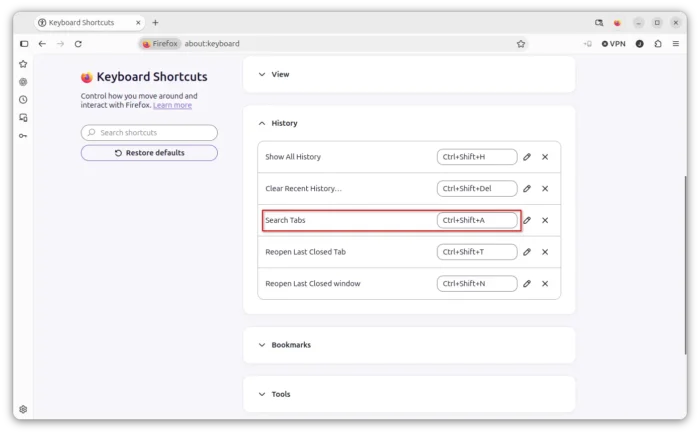
The Extensions and Themes shortcut is now Ctrl+Shift+F on Windows and Linux, and Cmd+Shift+E on macOS. And, user can go to about:keyboard keyboard to edit them.
For AI users, the “Summarize page” context menu option now sends the page’s address to the chatbot provider instead of the page’s text.
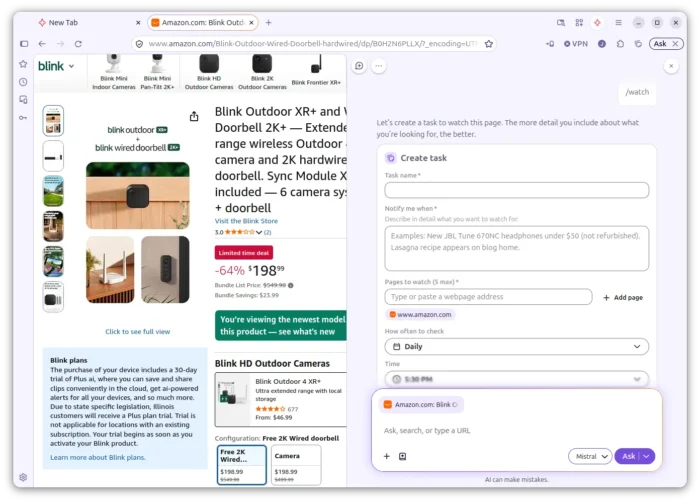
The Smart Windows can now watch changes in web pages, such as price drops or restocks. Just type /watch in chat and setup your rules.
It will send desktop notification when it finds a match. And, you can manage by either going to about:smartwindowtasks or using the Tasks button.
For macOS, it now uses the system native share picker. It shows a preview of the page and recent contacts alongside AirDrop, Messages, and other apps. And, you can select multiple tabs and share them at once.
Other changes in Firefox 159.0 include:
- Display web addresses written in the Javanese, Balinese, Canadian Aboriginal Syllabics, and N’Ko scripts in their own script.
- Support scroll-driven animations.
- Support scoped custom element registries.
- Add
EXT_clip_controlandEXT_texture_mirror_clamp_to_edgeWebGL extensions support. - Add
EXT_texture_norm16 WebGL2extension support. - Fix video display issue on Windows on Windows with NVIDIA RTX Video HDR enabled.
- Fix excessive memory usage on Linux with AMD graphics.
- Various security and other fixes.
Get Firefox 159.0
The official release note as well as the download link will be soon available in Firefox website via the link below:
For Linux Distributions with Firefox pre-installed, just wait your distribution update. Or, via this Mozilla webpage for the source and installers.