SSL FAQ
Below, we’ve compiled all the most common SSL questions in one place.
How do I know if I have a wildcard or non-wildcard SSL?
If you see *.example.com under the domain name on the Domains page in MyKinsta, this wildcard hostname. A domain without *.example.com under the domain name indicates no wildcard hostname is present and can use a non-wildcard SSL certificate.
What’s the difference between a wildcard and a non-wildcard SSL?
In the context of free SSL certificates offered by Kinsta, both are free SSL certificates from Cloudflare. Our free Cloudflare SSL certificate includes wildcard support, covering an unlimited number of subdomains for your domain.
Wildcard SSL certificates add an asterisk (*) before your domain name as a placeholder, which can be interpreted as any string of characters. The free Cloudflare certificate covers both the ‘www’ and non-’www’ variations of a domain. For example, if your primary domain is yourwebsite.com, our wildcard certificate would also work with the following domains:
- www.yourwebsite.com
- news.yourwebsite.com
- blog.yourwebsite.com
- shop.yourwebsite.com
When does my free SSL expire? How do I check?
If you’re using our free Cloudflare SSL certificate, Kinsta automatically handles the renewal process, so you don’t need to worry about the certificate expiring.
When you add and verify your domain in MyKinsta, you need to add a CNAME record for _acme-challenge. Kinsta uses this DNS entry to update the domain with the necessary tokens for each renewal. As long as the _acme-challenge CNAME record exists in your DNS, you won’t need to manually renew your SSL certificate; Kinsta manages it for you.
If you haven’t added the CNAME DNS record for _acme-challenge or have removed it, you need to re-add this CNAME record to your domain for the SSL renewal process to work. You’ll receive an email message and a notification in MyKinsta 30 days before your SSL expires to let you know your SSL certificate is expiring soon. You can also check the SSL expiration by viewing your site’s SSL certificate in your browser.
Do I have to take manual action to renew a free SSL?
No, Kinsta automatically handles the renewal process, providing the _acme-challenge CNAME record exists in your DNS.
How do I avoid having to add a DNS record?
Switch to Kinsta’s DNS for automatic wildcard renewal, switch to non-wildcard SSL when available, or use your desired third-party SSL certificate.
Why would Kinsta change the SSL verification?
This change to wildcard SSL verification is an industry-level change not decided by Kinsta. Any wildcard SSL provider now requires this or will begin requiring it soon. Here are a few references for more details:
How long does a free SSL renew for?
Cloudflare’s free SSL certificate renews for 90 days, but as long as the CNAME record is in place, we’ll add the required TXT record for you each time.
Can I renew an SSL certificate for longer than 90 days?
No, not with Cloudflare’s free SSL certificate. Some premium third-party SSL certificates may be issued for a longer period. If you want an SSL certificate that’s issued for a longer period, you can check into third-party SSL providers and find one that fits your needs.
Once you’ve purchased your SSL, you can install that in MyKinsta and manage your SSL certificate renewal with your third-party provider. When your third-party provider renews your SSL certificate, you’ll need to re-upload it in MyKinsta.
If I leave the CNAME record in place, will my free SSL automatically renew?
Yes, since we’ll take care of the TXT record for each subsequent renewal, you will not have to take any further action for renewal.
How early can I renew my free SSL?
30 days before expiration, your SSL certificate will automatically renew.
How do I know if I’m using Kinsta’s DNS?
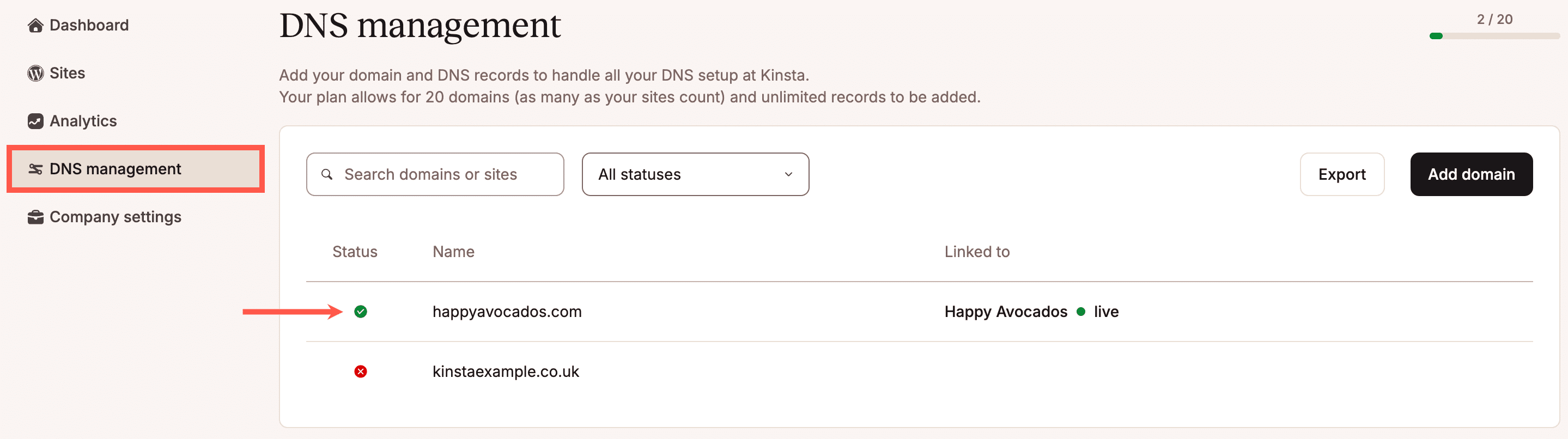
To see if you’re using Kinsta’s DNS for your domain, log in to MyKinsta and click DNS management. There you’ll see any domains you’ve added to DNS. A green circle with a white checkmark indicates the domain’s name servers have been pointed to Kinsta and the domain is using Kinsta’s DNS. A red circle with a white X indicates the domain’s name servers have not yet been pointed to Kinsta, so the domain is not using Kinsta’s DNS.
Do I need to renew the Kinsta Cloudflare SSL if I have my own Cloudflare account?
This depends on the exact setup of your own Cloudflare account:
- If your domain’s DNS records in Cloudflare have a grey cloud (proxy off), you need to renew the Kinsta Cloudflare SSL certificate.
- If your domain’s DNS records in Cloudflare have an orange cloud (proxy on) and you have either of the following, you don’t technically have to renew the Kinsta Cloudflare SSL certificate, but it is recommended (so that you have a backup certificate):
- a free Universal Cloudflare SSL certificate
- a custom SSL certificate that covers your domain/subdomains uploaded in Cloudflare
- If your domain’s DNS records in Cloudflare have an orange cloud (proxy on) but you do not have a free Universal Cloudflare SSL certificate or custom SSL in Cloudflare, then you need to renew the Kinsta Cloudflare SSL.
You can check for an SSL certificate at Cloudflare in your domain’s Edge Certificates section (SSL/TLS > Edge Certificates).
