Repository navigation
Installing PKHeX Plugins
Stable builds are recommended for the vast majority of users. They are are posted on GitHub. Please note that you must install the correct stable release of PKHeX-Plugins for each stable version of PKHeX. Mismatched plugins will not work.
To update, simply redo the installation in a new, empty folder. Move the trainers folder along with any other folders from your PKHeX installation from your old PKHeX directory and discard the rest.
These are the installation instructions for manually installing the plugins.
PKHeX-Plugins only works with the matching version of PKHeX. This is how you can check that the versions are the same.
-
Go to the PKHeX-Plugins Releases page and find the release you want to install. The red box highlights the version. Download the
PKHeX-Plugins.zipfile. Do not download the source code.

-
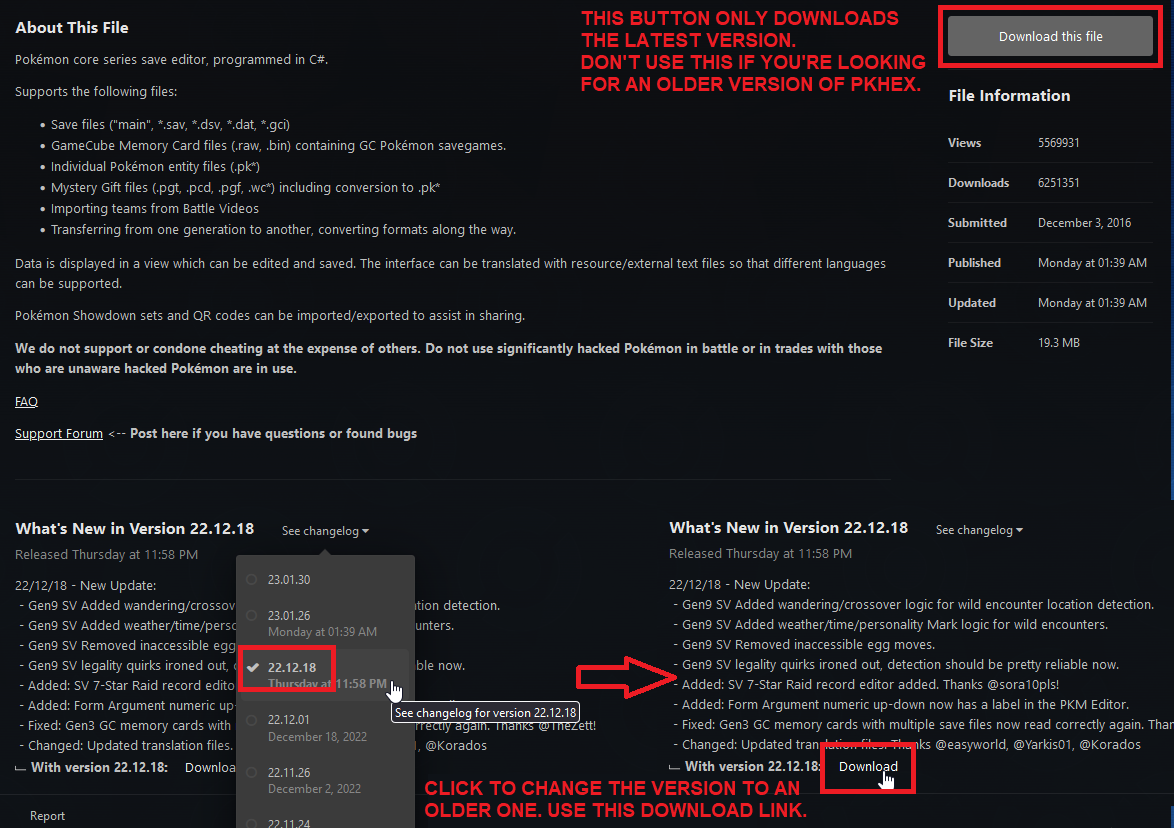
Go to the PKHeX Download page and find the matching version.
- The regular Download button on the top right will give you the latest version.
- Older versions are available from the drop-down. Click to change to the correct version and then download it.
-
Right-click and extract the PKHeX archive to a location where you have permissions. Good locations are within your Documents folder or on your Desktop. Do not place this folder in any folder named "OneDrive" or in any system location such as System32.
-
Create a new folder named
pluginsin the same directory asPKHeX.exe.

-
Extract the
dllfiles from the PKHeX-Plugins zip file and put them in thepluginsfolder. Thepdbfiles can be safely ignored. You can delete the PKHeX-Plugins zip and extracted folder afterwards.

-
Open PKHeX.exe. The program icon should be blue if you did this correctly. All mod functions and settings should be located in the
Tools > Auto-Legality Modmenu.

-
You may optionally choose to set up custom Trainer Data.
If you have followed everything on this page and still cannot get your installation to work, visit Troubleshooting for more help.
