Environment
Cascadia Code version number: 2102.25
Application (with version) used to display text: VSCode 1.54.3 and Windows Font Settings
OS platform and version: Windows 10 Pro 20H2
Screen resolution (i.e. 220dpi): 163 dpi

Any other software?
Steps to reproduce
- Install Cascadia Code
- Type == in either vscode or the windows font preview
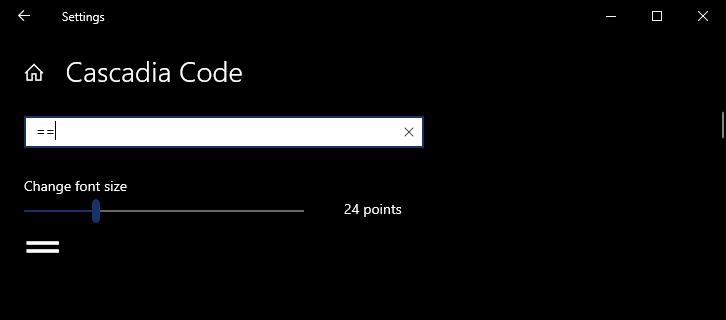
I tried this on a much older version of Cascadia code, version 1911.20 and it worked as expected. Does not work on the later versions.
Expected behavior
- Expect ligature for == to show
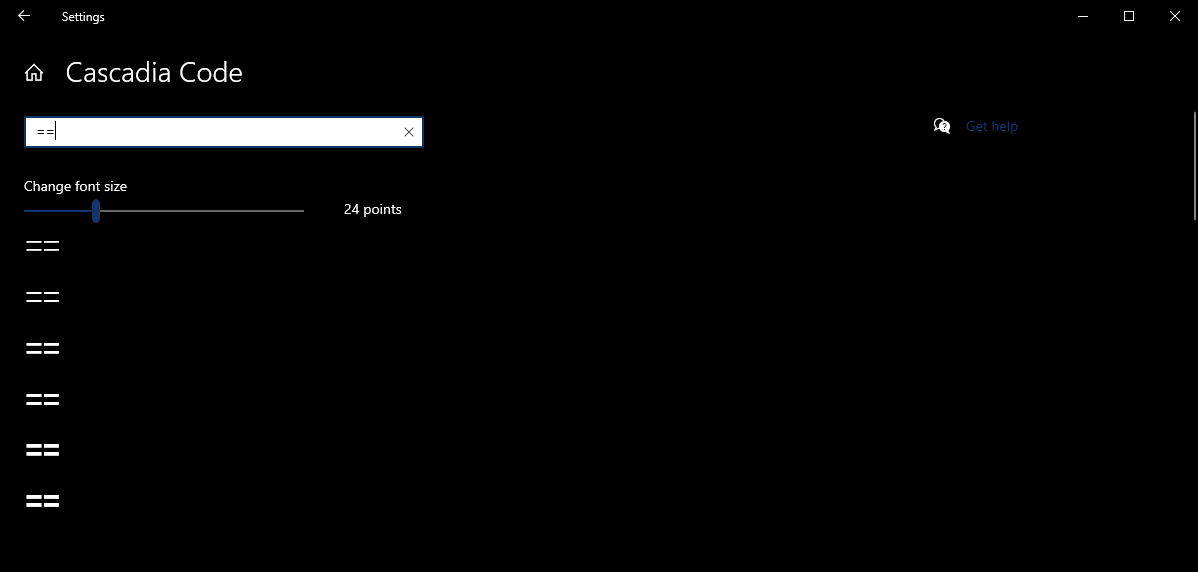
Version 2102.25
Version 1911.20
Actual behavior
- No ligature shows as seen in first image
Only happens for the == ligature as far as I know as ===, !=, etc all work fine.

Environment
Steps to reproduce
I tried this on a much older version of Cascadia code, version 1911.20 and it worked as expected. Does not work on the later versions.
Expected behavior
Version 2102.25

Version 1911.20

Actual behavior
Only happens for the == ligature as far as I know as ===, !=, etc all work fine.