You signed in with another tab or window. Reload to refresh your session.You signed out in another tab or window. Reload to refresh your session.You switched accounts on another tab or window. Reload to refresh your session.Dismiss alert
{{ message }}
This repository was archived by the owner on Jan 23, 2023. It is now read-only.
Repository navigation
This repository was archived by the owner on Jan 23, 2023. It is now read-only.
Thanks for considering this! I use Cawbird on a 2-in-1 laptop, so I often adjust apps' font sizes based on whether I'm using it in touch mode or with second monitor. If I were to adjust the native system interface font setting for GTK apps so that Cawbird's text appeared the appropriate size, it would cause my other GTK apps' fonts to be too large.
same issue when i tried corebird years ago, you can try this. change number to suit your display.
env GDK_SCALE=1.3 GDK_DPI_SCALE=1.3 CLUTTER_SCALE=1.3 cawbird
Reacted by Robert Barat, Julian Konchunas and Jakub Rączkowski
I want this feature too! Can't change system font settings in Elementary OS Juno. So adjust the default font size for Tweets' text is very much essential to me. Fonts for Indic scripts are the main problem here.
What platform are you on? And what is your default font size? It would also help if you could show what "tiny" looks like.
I still don't understand how most fonts can be fine for people in other apps but too small in Cawbird. We don't do anything special with fonts. We honour the system font size.
Which of your fonts is set to 8pt? Do you use any other GTK apps? What font size are they showing? Your case sounds like it could be KDE having bad default fonts for GTK apps, which should be configurable.
same issue when i tried corebird years ago, you can try this. change number to suit your display.
env GDK_SCALE=1.3 GDK_DPI_SCALE=1.3 CLUTTER_SCALE=1.3 cawbird
That's a nice tip! Based on this, I adjusted my Flatpak installation with the following:
In my case it's just a matter of preference. Generic interface fonts can be of "regular size", however contents from websites and such I simply like a bit larger.
Also, with the minimalistic design and focus on contents (text), it makes Cawbird look better when maximized or when using in split screen scenarios.
Can anyone provide screenshot comparisons of these "tiny" fonts, and which themes they're seeing it in, because I'm really not seeing it.
That's mindblowing. The font just seems much smaller than it really is then :D
It did a similar comparision now, and I was sure I'd prove it was smaller, but it actually wasn't. It just seems like a jedi trick of the mind. Maybe it's because of the narrow line-height? Idk.
However, when one click on a tweet, the font size in the item view is perfect and it would be great to have the option to use this size in the feed view.
I've looked at how the "Tweet Info" (single tweet) page does it and it uses a "scale" property (set at 1.5, in case people want to know). That's going to be better and easier than playing around with CSS and the many potential styling collisions that that could entail!
Okay, that new commit adds a setting for font scaling. I've only put it on tweet and DM text so far because it feels like this is "make tweets easier to read" (whether for skim reading or for certain scripts) rather than "scale for accessibility". Also, I don't think we can control tooltip scale, which further reinforces the "not directly for accessibility" approach.
I assume most people will probably just use "Large" (1.2 times larger) but included "X-Large" (1.2² = 1.44) and "XX-Large" (1.2³ = 1.728) because they were there. I couldn't see a reason to give people the option to make the text smaller!
Normal:
Large:
X-Large:
XX-Large:
Reacted by Jakub Rączkowski and chriztheanvill
Reacted by Jakub Rączkowski
Reacted by Jakub Rączkowski, Brog33 and chriztheanvill
Just a mention: I switched from the Snap build to the Flathub one, and although it is the same version (1.3.2) the default font is larger and the "like" icon is not garbled. Also doesn't seem to suffer from the handshake issue YAY!
The handshake issue is known (#9) and not us and the Snap package needs to fix it, but the change in font size is odd (although not unexpected when you sandbox an app away from too many desktop settings) and I don't know why there would be a garbled icon are odd when it's an SVG that we package.
But most of that isn't related to giving people font size scaling options.
Has this setting made its way to the release channel yet?
I pulled down the 1.3.2 DEB and I do not see any setting available for font sizes anywhere in Settings. Have scoured both the app and dconf-editor just to be sure
I had planned to release last week, but one of our translators then found several holes in the translations. Once those are fixed then there will be a new release.


Activity
IBBoard commentedon Sep 22, 2019
It's probably possible, but it's low priority for me.
Cawbird doesn't do anything special with the font size, so it should just be using your system's "interface" font size.
Is there a specific use case where using the system interface font size isn't appropriate?
volt4ire commentedon Sep 25, 2019
Thanks for considering this! I use Cawbird on a 2-in-1 laptop, so I often adjust apps' font sizes based on whether I'm using it in touch mode or with second monitor. If I were to adjust the native system interface font setting for GTK apps so that Cawbird's text appeared the appropriate size, it would cause my other GTK apps' fonts to be too large.
starvald commentedon Oct 4, 2019
same issue when i tried corebird years ago, you can try this. change number to suit your display.
env GDK_SCALE=1.3 GDK_DPI_SCALE=1.3 CLUTTER_SCALE=1.3 cawbird
volt4ire commentedon Oct 5, 2019
@starvald thanks so much that's a good solution for now!
shamim2018 commentedon Nov 27, 2019
I want this feature too! Can't change system font settings in Elementary OS Juno. So adjust the default font size for Tweets' text is very much essential to me. Fonts for Indic scripts are the main problem here.
chriztheanvill commentedon Nov 27, 2020
Please, could you make this feature. My fonts are tiny.
IBBoard commentedon Nov 27, 2020
What platform are you on? And what is your default font size? It would also help if you could show what "tiny" looks like.
I still don't understand how most fonts can be fine for people in other apps but too small in Cawbird. We don't do anything special with fonts. We honour the system font size.
chriztheanvill commentedon Nov 27, 2020
Fedora 33 kde 5.20.3
Sans Serif
General 10pt
Tiny 8pt
IBBoard commentedon Nov 27, 2020
Which of your fonts is set to 8pt? Do you use any other GTK apps? What font size are they showing? Your case sounds like it could be KDE having bad default fonts for GTK apps, which should be configurable.
chriztheanvill commentedon Nov 27, 2020
mmm, I think I do not use gtk apps. I will check the gtk default fonts.
karafior commentedon Jan 2, 2021
That's a nice tip! Based on this, I adjusted my Flatpak installation with the following:
3 remaining items
karafior commentedon Jan 10, 2021
In my case it's just a matter of preference. Generic interface fonts can be of "regular size", however contents from websites and such I simply like a bit larger.
Also, with the minimalistic design and focus on contents (text), it makes Cawbird look better when maximized or when using in split screen scenarios.
Brog33 commentedon Jan 11, 2021
That's mindblowing. The font just seems much smaller than it really is then :D
It did a similar comparision now, and I was sure I'd prove it was smaller, but it actually wasn't. It just seems like a jedi trick of the mind. Maybe it's because of the narrow line-height? Idk.
However, when one click on a tweet, the font size in the item view is perfect and it would be great to have the option to use this size in the feed view.
IBBoard commentedon Jan 11, 2021
I've looked at how the "Tweet Info" (single tweet) page does it and it uses a "scale" property (set at 1.5, in case people want to know). That's going to be better and easier than playing around with CSS and the many potential styling collisions that that could entail!
Re #33: Add Pango scaling for tweets & DMs
Re #33: Add translations for new tweet scaling UI
IBBoard commentedon Jan 16, 2021
Okay, that new commit adds a setting for font scaling. I've only put it on tweet and DM text so far because it feels like this is "make tweets easier to read" (whether for skim reading or for certain scripts) rather than "scale for accessibility". Also, I don't think we can control tooltip scale, which further reinforces the "not directly for accessibility" approach.
I assume most people will probably just use "Large" (1.2 times larger) but included "X-Large" (1.2² = 1.44) and "XX-Large" (1.2³ = 1.728) because they were there. I couldn't see a reason to give people the option to make the text smaller!
Normal:
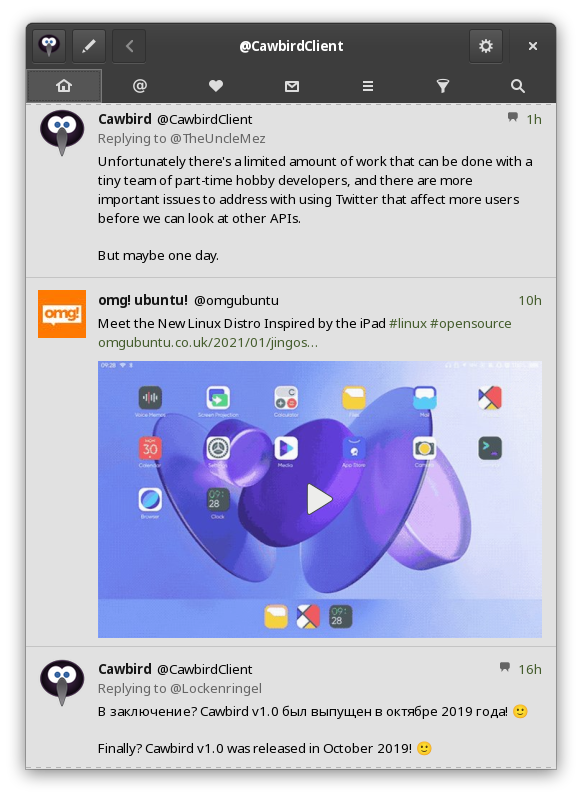
Large:
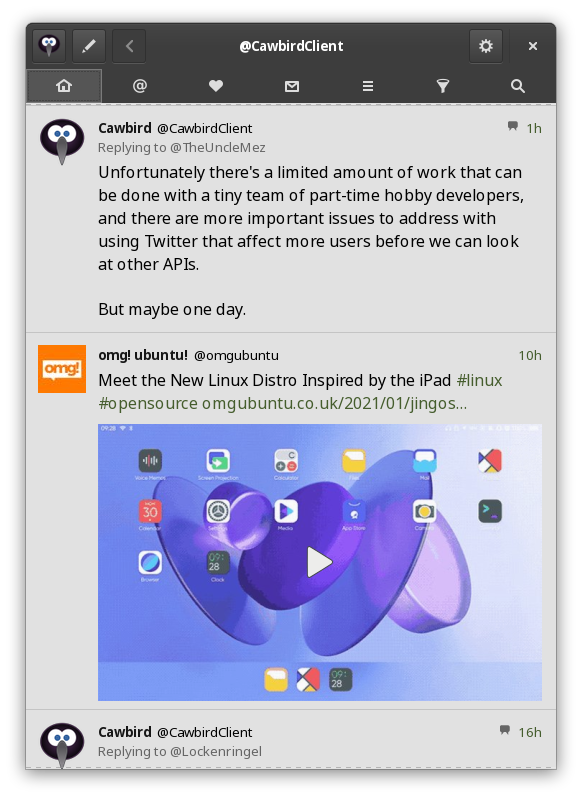
X-Large:
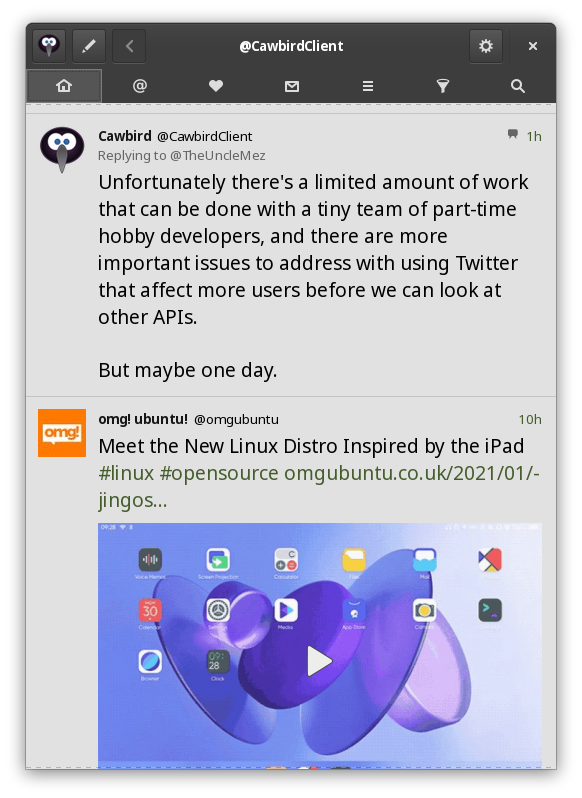
XX-Large:
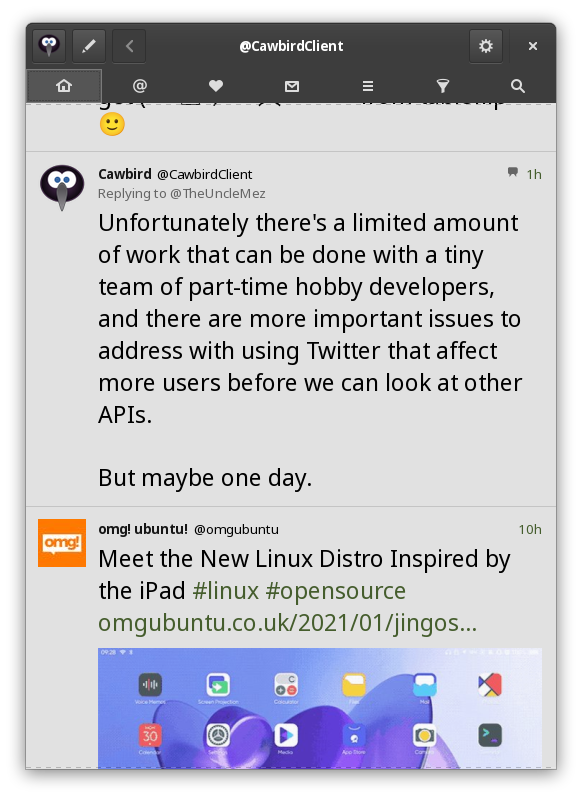
Brog33 commentedon Jan 20, 2021
Just a mention: I switched from the Snap build to the Flathub one, and although it is the same version (1.3.2) the default font is larger and the "like" icon is not garbled. Also doesn't seem to suffer from the handshake issue YAY!
IBBoard commentedon Jan 20, 2021
The handshake issue is known (#9) and not us and the Snap package needs to fix it, but the change in font size is odd (although not unexpected when you sandbox an app away from too many desktop settings) and I don't know why there would be a garbled icon are odd when it's an SVG that we package.
But most of that isn't related to giving people font size scaling options.
IBBoard commentedon Jan 20, 2021
Closing this because I think it's done and no-one has said that I missed anything after the screenshots.
mfreeman-xtivia commentedon Mar 15, 2021
Has this setting made its way to the release channel yet?
I pulled down the 1.3.2 DEB and I do not see any setting available for font sizes anywhere in Settings. Have scoured both the app and dconf-editor just to be sure
IBBoard commentedon Mar 15, 2021
1.3.2 was released on 11th January. The last commit for this was on 16th January. So no, it's not released yet 😉
mfreeman-xtivia commentedon Apr 13, 2021
Any ballpark thoughts on when 1.3.3 might be released?
IBBoard commentedon Apr 13, 2021
I had planned to release last week, but one of our translators then found several holes in the translations. Once those are fixed then there will be a new release.