This repository was archived by the owner on Jan 23, 2023. It is now read-only.
Repository navigation
This repository was archived by the owner on Jan 23, 2023. It is now read-only.
«translate content» button #161
Description

I use to follow people from different countries, so that I feel would be useful having a «translate» button near the tweet item actions.
Because of privacy concerns, automatic posting content to google translate is a «no good» feature.
So I suggest to put a button link who open the default browser at:
https://translate.google.com/?op=translate&sl=auto&tl={UI_LANG}&text={CONTENT}

Activity
IBBoard commentedon Jun 3, 2020
Interesting idea, and I agree that we don't want everything auto-posting to Google. I'm not entirely convinced we'd want to link it to Google, though. It would be nice if there was a better, FOSS-friendly solution.
For now, every tweet has a link and you can click on that to open it in a browser and then translate it there.
CodedOre commentedon Jan 2, 2021
There would be a possible OSS offline translation tool we might be able to use.
Haven't checked it in detail though.
https://github.com/argosopentech/argos-translate
IBBoard commentedon Jan 2, 2021
We don't have to do offline translation (in fact, that's probably hugely limiting, because it requires people to install translation packs locally) but that's a good starting point.
It looks like they use OpenNMT and I'm trying to work out what ArgosTranslate adds on top (other than pre-trained models).
But more importantly, they link to LibreTranslate, which appears to offer a free web service with an API that we could use. It doesn't appear to require authentication, it lists itself as "Free and open source" and I can't see any usage constraints. We're unlikely to be hitting the API that often either. But I'll poke it a bit more to see whether that's supposed to be a demo rather than an API (even though it's on a dedicated domain, which implies it's a service)
IBBoard commentedon Jan 2, 2021
So, LibreTranslate is an option but we'd need a way to fund the $100/y infrastructure costs.
Otherwise we would need to look at how Argostranslate might integrate with a Vala app and force people to download dictionaries/language models. Or we find another library/service.
tassoman commentedon Jan 3, 2021
In my opinion, founding an infrastructure sounds a little bit complicated for a not core feature.
Maybe the Libretranslate instance can be packed with the client, and instanced during main process boot, listening just on localhost.
I dunno how much it would bloat the actual cawbird client software base
CodedOre commentedon Jan 3, 2021
Then it would make more sense to just use Argostranslate. Setting up an server on your PC just for translation is overkill.
But I think it could work with Argos.
The biggest challenge would probably be packaging, as it is currently only distributed over pip, so we probably need to create a packaged version of it.
Packaging with Flatpak will most likely be the simplest implementation, as there it would just be a module.
As for the language packs, if they are under the same license, we could just distribute them with the Argos package or module.
Might be good to ask that.
I think Argos might be a good solution, but we need to take a deeper look before saying anything.
IBBoard commentedon Jan 4, 2021
If there's not a public server that we can use then we definitely need to make it 100% pluggable. As the model for each language pair is 84MB then that's going to be a huge increase over the ~500KB package (plus ~100KB of translations) that we currently ship! Given that most people won't use most language packs (if any), and 84MB is quite a lot to load on many connections then we need to make people aware of what can be done and how long it would take to add more languages.
Also, we're native-first, so even if we can make a monster-sized Flatpak build that bundles Argostranslate and all of its requirements (including PyQt, for some reason) and all of the common translation packs (with a way to add more to a Flatpak) then we still need to understand how that happens when someone installs it from the Fedora official repositories, for example.
Out of interest, I also took a look at Google's API and the pricing for that is unsurprisingly variable - https://cloud.google.com/translate/pricing - first 500K characters (so about 2000 tweets) for "free" then $20 per million characters.
CodedOre commentedon Jan 4, 2021
Well, did not looked on the size of the translations models...
Then this is probably not the most viable option.
So, it is basically back to using an online service again. My question would still be: would 2000 translated tweets be enough for any user, or would we need to pay at some point anyway? And it would still be Google then...
IBBoard commentedon Jan 12, 2021
I had an "idea" that I think is the best compromise, and I've just noticed that it falls back to @tassoman's original approach - link to a translation service. If we template it then we can let people pick other services. And because it's opening a website in the default browser then it's no different to the user opening a browser and copying and pasting the text.
I was hoping we could integrate it in-line (like Twitter web does) but it's not looking feasible or cost-effective.
philipzae commentedon Jan 14, 2021
Was just going to file a bug report on this same thing, as i couldn't read this cawbird quoted retweet. I utilize microsoft's translation in tweetdeck and google's translation on twitter.com, but also the Translator browser extension which allow you to pick which provider you'd like to use.
@tassoman's approach is the best option at the moment, as I would prefer not to go to twitter's website if i'm using cawbird and not have to go through a second step to do the translation. Which translator provider could be set in the settings dialog. I would suggest having google, microsoft, and deepl (popular with japanese twitter users).
https://www.bing.com/translator/?to={UI_LANG}&text={CONTENT}
https://www.deepl.com/translator#auto/{UI_LANG}/{CONTENT}
IBBoard commentedon Jan 14, 2021
Twitter tells us the (guessed) language for each tweet. We should probably trust that as a starting point. Bing and Google seem to use
from=…in the query string while Deepl needs the 'auto' replaced.I'm not planning to put a "translate to" option in to Cawbird. I think
$LANGshould give us the user's default language (e.g. mine isen_GB.UTF-8) and if we getCthen we should probably assume English. We will definitely need to trim everything after the dot, and we might need to trim the underscore as well.tassoman commentedon Jan 14, 2021
Hello there, thanks you for joining me in the insight. My opening comment was for a mockup like this
The link should open the browser in the chosen translation service, as you stated before It's like cut-n-pasting. If the content is coming from a public profile, there's no trouble submitting the content. (maybe you can just permit public posts translation)
I think is the thinner implementation, just a UI modificaiton and a few events.
Sorry for the ugly mockup, maybe you're better interested putting the translation link in the buttons area, just sibiling "cite", "retweet", "favorite" etc...
40 remaining items
IBBoard commentedon Jan 28, 2021
The available buttons are the standard Twitter actions. Everything that's non-standard (or dangerous) is under the menu.
But unlike Twitter, we have one menu instead of two (the meatball menu top-left and the weird "could be an upload file icon" menu beside the Reply/RT/Like buttons)
There could be enough space for them all to be displayed, but then we'll hit a point where it impacts narrow displays. And we'd have to think of a clean, simple icon for each one that clearly conveys its meaning on its own so that it doesn't look cluttered/out of place. And they'd need a colour.
tassoman commentedon Jan 28, 2021
As far I can understand, the feature can be triggered in two ways: "Translate button inside TweetInfo view" (I bet it's a brick of the timeline wall), and actions menu, right clicking the tweet. I think it can greet everyone...
In my installation, the actions menu is the only way to interact with the tweet (xubuntu xfce 20.04, cawbird 1.3.2)
I haz no burgers menu, kepapz eizer 🐈
Re #161: Add a warning for bad translation URL
IBBoard commentedon Jan 28, 2021
"Tweet Info view" is when you click/double-click (depending on settings) the tweet to view it with replies. For those tweets, it will show below the text but above the images.
Twitter is the one with with the "meatball menu". We have no foodstuffs.
philipzae commentedon Jan 28, 2021
Quote retweet is a standard twitter action now as its under the retweet icon, but not sure why you'd want to be limited to only show the default twitter actions, when it only decreases the user experience.
philipzae commentedon Jan 28, 2021
Forgot to mention that I found another place translate should be. In the text select context menu.
tassoman commentedon Jan 29, 2021
At minimum window size, I feel there's no more room for tweet action buttons. I agree translation feature isn't a core first class feature for tweet interaction.
tassoman commentedon Jan 29, 2021
I dunno if graphic library permits numbers and buttons being combined to save more space
This is an example mock-up. But I think it's off-topic.
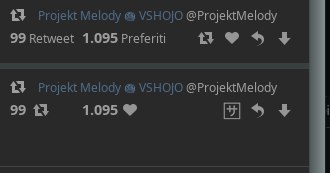
philipzae commentedon Jan 29, 2021
Guess we are misunderstanding each other, as I was speaking about the timeline, which has alot of empty space.
IBBoard commentedon Jan 29, 2021
For a given value of "standard". It's still just three buttons for the main three actions. But one now has options
Because overloading the user with too many buttons at once, especially when their icons are unclear, also decreases the user experience.
Maybe. But you're only going to be doing that from Tweet Info pages, which have a "Translate" link anyway. Or you're trying to handle the "someone used mixed text that didn't get picked up as needing translation and so I only want to translate part of it" use case, in which case a) most users would be selecting for other reasons and would see "Translate" for their own language and b) we don't have a source language so we're going to be using "auto" mode, which isn't as reliable. And c) we don't want to imply that we will let them translate to an arbitrary language (e.g. selecting native text and expecting to translate it to a foreign language).
I'm inclined to leave that as "the user can copy and paste the text, the same as they could in other apps".
We can put (almost) anything in widgets, so we probably could combine it like Twitter does. But I think that grouping the actions as they are is good.
I think we'd need a different "Translate" icon that's more obvious if we made it a button. But also fits in that space. That icon unfortunately reminds me of all the times that someone used FontAwesome but the font hadn't loaded! Also, would we show a letter in a box for Chinese/Japanese/Korean users? What about Thai and other scripts that are neither Latin nor Kanji based?
philipzae commentedon Jan 29, 2021
Not sure how more than 3 buttons is considered overloading the user and the icons are self-explanatory and if not, they have tooltips, and once a user uses them them once, they know it forever. Just to clarify, I was only mentioning this for the timeline right-click button area, which has enough space to put 10 buttons per row.
Yes the scenario of mixed text or twitter didn't detect it was a translation. This happens to me everyday on tweetdeck.
a) not sure why this is a problem, as i right-click on selected text in firefox and i see many things in the context menu that I wouldn't use.
b) auto is reliable, as I use it everyday. If the translator isn't able to detect which language is being used, then its not a good translator.
c) translating to an arbitrary language, would happen if the user chooses on the translator website.
tassoman commentedon Jan 30, 2021
I found that icon in utf8 support, provided by xfce emoji window. I also think doesnt fit perfectly. Common sense for translation/languages now is kanji+latin chars, as explained before in the thread
text selection and contextual menu, for me it's something more. My early suggestion was for an auto discovery mode, most of times it works.
i'm also fine with "translate in default user language" but I would choose for a "favorite destination language", because translating from japanese to arabic for example, can be a mess. Most of us are fine with english as common intercultural language. That's because I mentioned "auto" in first instance
For the UX/UI trouble of messing things is very hard to say without user testing. Maybe a good choice is going for iterations, changing as little as possible
IBBoard commentedon Jan 30, 2021
If you're relying on tooltips then your UX is bad. And it's not usable in all situations (e.g. touch screens)
#298 😉
We've got the core functionality now. I'll close this now and we'll see how it goes in general use.
philipzae commentedon Jan 30, 2021
You don't have to rely on it, but they are there for when there is confusion and also good for accessibility.
When you use a non-standard icon and have no tooltip, definitely it can get confusing, especially when the icon next to it can be confused for it. In my case, I speak most of my time in tweetdeck and twitter.com for work and limited time in cawbird for my personal account. 😄